ICS / SCADA Cyber security
Adithya Naresh
SAP Labs
root@kali :-# whoami
• Security Enthusiast
• Been in ICS for 2 years in my
previous employment
• Like to play around with windows
executable
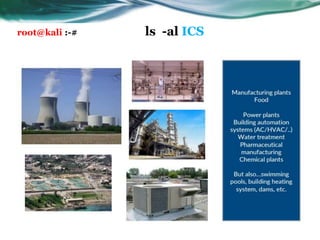
root@kali :-# ls -al ICS
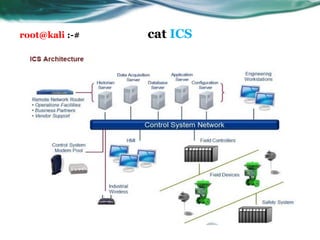
root@kali :-# cat ICS
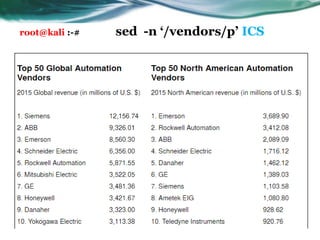
root@kali :-# sed -n ā€˜/vendors/p’ ICS
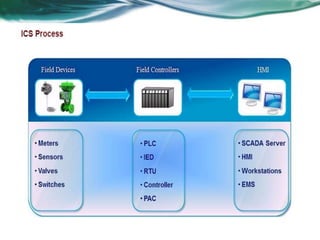
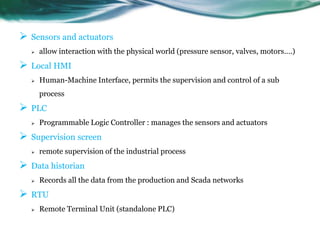
 Sensors and actuators
 allow interaction with the physical world (pressure sensor, valves, motors….)
 Local HMI
 Human-Machine Interface, permits the supervision and control of a sub
process
 PLC
 Programmable Logic Controller : manages the sensors and actuators
 Supervision screen
 remote supervision of the industrial process
 Data historian
 Records all the data from the production and Scada networks
 RTU
 Remote Terminal Unit (standalone PLC)
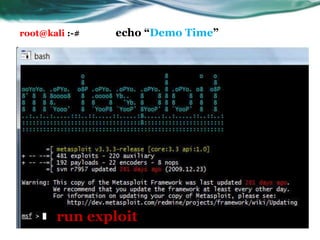
run exploit
root@kali :-# echo ā€œDemo Timeā€
root@kali :-# exit ICS
• https://ics-cert-training.inl.gov/ - ICS CERT VLP
• http://www.controlglobal.com/ - Top 50
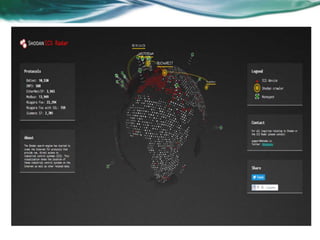
• https://ics-radar.shodan.io - Shodan
• https://www.defcon.org - Defcon

Introduction to ICS/SCADA security

  • 1.
    ICS / SCADACyber security Adithya Naresh SAP Labs
  • 2.
    root@kali :-# whoami •Security Enthusiast • Been in ICS for 2 years in my previous employment • Like to play around with windows executable
  • 3.
  • 4.
  • 5.
    root@kali :-# sed-n ā€˜/vendors/p’ ICS
  • 7.
     Sensors andactuators  allow interaction with the physical world (pressure sensor, valves, motors….)  Local HMI  Human-Machine Interface, permits the supervision and control of a sub process  PLC  Programmable Logic Controller : manages the sensors and actuators  Supervision screen  remote supervision of the industrial process  Data historian  Records all the data from the production and Scada networks  RTU  Remote Terminal Unit (standalone PLC)
  • 9.
    run exploit root@kali :-#echo ā€œDemo Timeā€
  • 10.
    root@kali :-# exitICS • https://ics-cert-training.inl.gov/ - ICS CERT VLP • http://www.controlglobal.com/ - Top 50 • https://ics-radar.shodan.io - Shodan • https://www.defcon.org - Defcon

Editor's Notes

  • #2Ā This template can be used as a starter file to give updates for project milestones. Sections Right-click on a slide to add sections. Sections can help to organize your slides or facilitate collaboration between multiple authors. Notes Use the Notes section for delivery notes or to provide additional details for the audience. View these notes in Presentation View during your presentation. Keep in mind the font size (important for accessibility, visibility, videotaping, and online production) Coordinated colors Pay particular attention to the graphs, charts, and text boxes. Consider that attendees will print in black and white or grayscale. Run a test print to make sure your colors work when printed in pure black and white and grayscale. Graphics, tables, and graphs Keep it simple: If possible, use consistent, non-distracting styles and colors. Label all graphs and tables.
  • #3Ā What is the project about? Define the goal of this project Is it similar to projects in the past or is it a new effort? Define the scope of this project Is it an independent project or is it related to other projects? * Note that this slide is not necessary for weekly status meetings
  • #4Ā * If any of these issues caused a schedule delay or need to be discussed further, include details in next slide.
  • #5Ā Duplicate this slide as necessary if there is more than one issue. This and related slides can be moved to the appendix or hidden if necessary.