Distance vector/
90 seconds update/
100 hop counts
IGRP:Interior gateway routing protocol
IGRP is the cisco proprietary protocol discovered
by the cisco to overcome the problems of the RIP.
Means the network must have all cisco routers.
It is a Distance vector protocol.
IGRP is
better then the rip because it has maximum hop
count 100 as compared to the rip so the problem
of only 15 hops is resolved.
it also use
different matrix then the rip.
i.e. Bandwidth
load
delay
reliability
MTU
IGRP uses four types of the timers to regulate its
performance.
1.Route update timer = 90 sec
2.Route invalid timer = 230 sec
3.Holddown timer = 630 sec
4.Route flush timer = 280 sec
IGRP TIMERS
IGRP TIMERS
1. Route update timer:-
it is typically 30
seconds in which a router sends a complete
copy of the routing table to all neighbors.
2. Route invalid timer:-
when there is
network failure and a router didn`t get any
update about that network for 230 seconds
the router will send update to all neighbors
about the failure of that network.
IGRP TIMERS
3.Holddown timer:-
The routing update
table received is only store/ hold till the
hold-down timer which is 630 seconds.
means there is any routing update table
received for any route and after that for 630
seconds there is no any other update
received from that side then the table will be
discard.
IGRP TIMERS
4.Route flush timer:-
it is the time 280 sec
after which a route is considered as a invalid
route and the routing information about
that route is removed from the routing table
and the information is updated to the all
neighbor routers before the local routing
table is updated.
RIP IGRP
1.Distance vector 1.Distance vector
2.Max hop count=15 2.Max hop count=100
3.Classfull +classless 3. classless
4. No Autonomous 4.use autonomous
system number
5.FLSM+VLSM 5.FLSM
6. AD=120 6.AD=100
IGRP METRIX`s
1.Bandwidth:- it is the speed of link a route with
higher bandwidth is preferred always.
2. Load:- it is the amount of traffic present in the route
(minimum load maximum output). So any route with
minimum load is always used for data sending.
3. Delay :- it is the time latency between the data is
send by the sender and received by the destination.
4. Reliability :- it can find maximum 6 routes for the
destination to deliver the data packet.
5. MTU :- Maximum Transmission Units.
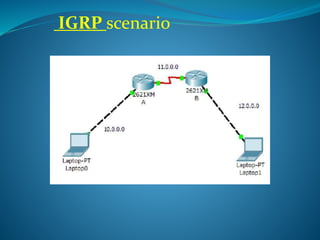
IGRP scenario
Example of configuring
igrp
Configuring the IGRP routing
To configure the IGRP routing the {ROUTER IGRP AS no.}
command is used. And we just have to mention the
directly connected networks with the router only.
Job of the IGRP is to automatically find out the all other
networks and advertise the its connecting networks to all
the connected neighbors. IGRP is classfull because the
subnet mask in all the networks is same.
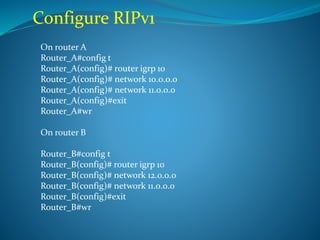
Configure RIPv1
On router A
Router_A#config t
Router_A(config)# router igrp 10
Router_A(config)# network 10.0.0.0
Router_A(config)# network 11.0.0.0
Router_A(config)#exit
Router_A#wr
On router B
Router_B#config t
Router_B(config)# router igrp 10
Router_B(config)# network 12.0.0.0
Router_B(config)# network 11.0.0.0
Router_B(config)#exit
Router_B#wr
Verify IGRP
In each routers routing table there must be a
route for the directly connected networks as well
as routes from the directly connected neighbors.
To verify
Router_A# show ip route
Router_A# show ip protocols
IGRP
OVER
Igrp

Igrp

  • 1.
    Distance vector/ 90 secondsupdate/ 100 hop counts
  • 2.
    IGRP:Interior gateway routingprotocol IGRP is the cisco proprietary protocol discovered by the cisco to overcome the problems of the RIP. Means the network must have all cisco routers. It is a Distance vector protocol. IGRP is better then the rip because it has maximum hop count 100 as compared to the rip so the problem of only 15 hops is resolved. it also use different matrix then the rip. i.e. Bandwidth load delay reliability MTU
  • 3.
    IGRP uses fourtypes of the timers to regulate its performance. 1.Route update timer = 90 sec 2.Route invalid timer = 230 sec 3.Holddown timer = 630 sec 4.Route flush timer = 280 sec IGRP TIMERS
  • 4.
    IGRP TIMERS 1. Routeupdate timer:- it is typically 30 seconds in which a router sends a complete copy of the routing table to all neighbors. 2. Route invalid timer:- when there is network failure and a router didn`t get any update about that network for 230 seconds the router will send update to all neighbors about the failure of that network.
  • 5.
    IGRP TIMERS 3.Holddown timer:- Therouting update table received is only store/ hold till the hold-down timer which is 630 seconds. means there is any routing update table received for any route and after that for 630 seconds there is no any other update received from that side then the table will be discard.
  • 6.
    IGRP TIMERS 4.Route flushtimer:- it is the time 280 sec after which a route is considered as a invalid route and the routing information about that route is removed from the routing table and the information is updated to the all neighbor routers before the local routing table is updated.
  • 7.
    RIP IGRP 1.Distance vector1.Distance vector 2.Max hop count=15 2.Max hop count=100 3.Classfull +classless 3. classless 4. No Autonomous 4.use autonomous system number 5.FLSM+VLSM 5.FLSM 6. AD=120 6.AD=100
  • 8.
    IGRP METRIX`s 1.Bandwidth:- itis the speed of link a route with higher bandwidth is preferred always. 2. Load:- it is the amount of traffic present in the route (minimum load maximum output). So any route with minimum load is always used for data sending. 3. Delay :- it is the time latency between the data is send by the sender and received by the destination. 4. Reliability :- it can find maximum 6 routes for the destination to deliver the data packet. 5. MTU :- Maximum Transmission Units.
  • 9.
  • 10.
  • 11.
    Configuring the IGRProuting To configure the IGRP routing the {ROUTER IGRP AS no.} command is used. And we just have to mention the directly connected networks with the router only. Job of the IGRP is to automatically find out the all other networks and advertise the its connecting networks to all the connected neighbors. IGRP is classfull because the subnet mask in all the networks is same.
  • 12.
    Configure RIPv1 On routerA Router_A#config t Router_A(config)# router igrp 10 Router_A(config)# network 10.0.0.0 Router_A(config)# network 11.0.0.0 Router_A(config)#exit Router_A#wr On router B Router_B#config t Router_B(config)# router igrp 10 Router_B(config)# network 12.0.0.0 Router_B(config)# network 11.0.0.0 Router_B(config)#exit Router_B#wr
  • 13.
    Verify IGRP In eachrouters routing table there must be a route for the directly connected networks as well as routes from the directly connected neighbors. To verify Router_A# show ip route Router_A# show ip protocols
  • 14.