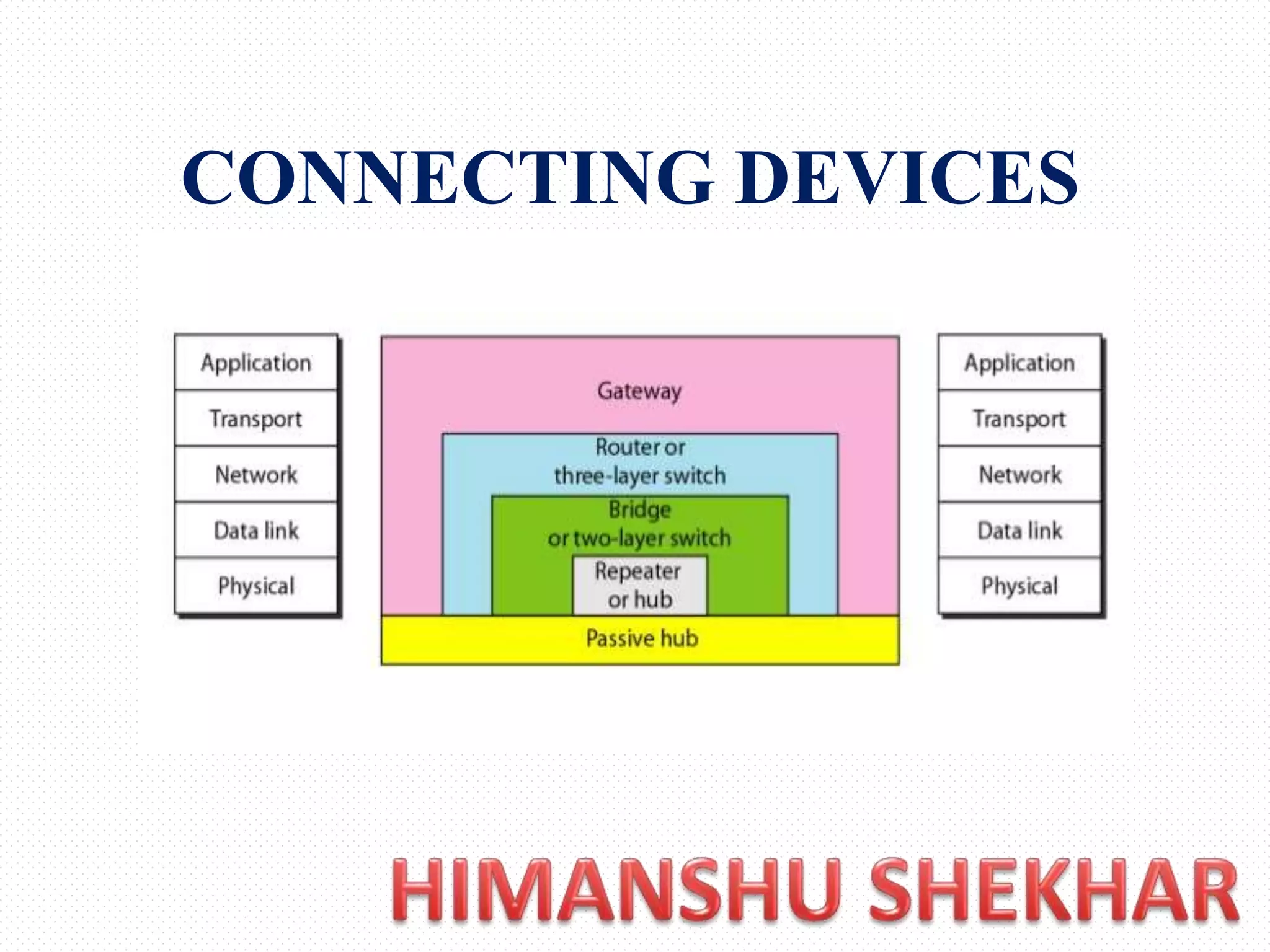
CONNECTING DEVICES
The Five Categories of Connecting
Devices Can Be Defined As
• Those which operate below the physical layer
such as a passive hub.
• Those which operate at the physical layer (a
repeater or an active hub).
• Those which operate at the physical and data link
layers (a bridge or a two-layer switch).
• Those which operate at the physical, data link,
and network layers (a router or a three-layer
switch).
• Those which can operate at all five layers (a
gateway).
Passive Hubs
• A passive hub is just a connector. It connects
the wires coming from different branches.
• In a star-topology Ethernet LAN, a passive hub
is just a point where the signals coming from
different stations collide; the hub is the
collision point. This type of a hub is part of the
media; its location in the Internet model is
below the physical layer.
Repeaters
Repeaters
• A repeater is a device that operates only in the
physical layer.
• A repeater receives a signal and, before it
becomes too weak or corrupted, regenerates the
original bit pattern. The repeater then sends the
refreshed signal.
• A repeater does not actually connect two LANs. It
connects two segments of the same LAN. The
segments connected are still part of one single
LAN.
Repeaters
Repeater
• The repeater acts as a two-port node, but operates only in
the physical layer. When it receives a frame from any of
the ports, it regenerates and forwards it to the other port.
• A repeater forwards every frame; it has no filtering
capability.
• A repeater does not amplify the signal; it regenerates the
signal. When it receives a weakened or corrupted signal,
it creates a copy, bit for bit, at the original strength.
• The location of a repeater on a link is vital. A repeater
must be placed so that a signal reaches it before any noise
changes the meaning of any of its bits.
Bridge
Bridge
• A bridge operates in both the physical and the data link
layer and connect two different LAN
• As a physical layer device, it regenerates the signal it
receives. As a data link layer device, the bridge can
check the physical (MAC) addresses (source and
destination) contained in the frame.
• A bridge has filtering capability. It can check the
destination address of a frame and decide if the frame
should be forwarded or dropped. If the frame is to be
forwarded, the decision must specify the port. A bridge
has a table that maps addresses to ports.
• Note: A bridge does not change the physical addresses
contained in the frame.
Issues to be considered while
connecting different LAN
• Frame format: Each LAN type has its own
frame format (compare an Ethernet frame with
a wireless LAN frame).
• Maximum data size: If an incoming frame's
size is too large for the destination LAN, the
data must be fragmented into several frames.
The data then need to be reassembled at the
destination.
Issues to be considered while
connecting different LAN
• Data rate: Each LAN type has its own data
rate. (Compare the 10-Mbps data rate of an
Ethernet with the I-Mbps data rate of a
wireless LAN.) The bridge must buffer the
frame to compensate for this difference.
• Bit order: Each LAN type has its own strategy
in the sending of bits. Some send the most
significant bit in a byte first; others send the
least significant bit first.
Issues to be considered while
connecting different LAN
• Security: Some LANs, such as wireless LANs,
implement security measures in the data link
layer. Other LANs, such as Ethernet, do not.
Security often involves encryption When a bridge
receives a frame from a wireless LAN, it needs to
decrypt the message before forwarding it to an
Ethernet LAN
• Multimedia support: Some LANs support
multimedia and the quality of services needed for
this type of communication; others do not
Two-Layer Switches
• A three-layer switch is used at the network layer;
it is a kind of router. The two-layer switch
performs at the physical and data link layers
• A two-layer switch is a bridge, a bridge with
many ports and a design that allows better (faster)
performance.
• A bridge with many ports may be able to allocate
a unique port to each station, with each station on
its own independent entity. This means no
competing traffic
Routers
Routers
• A router is a three-layer device that routes
packets based on their logical addresses (host-
to-host addressing).
• Router normally connects LANs and WANs in
the Internet and has a routing table that is used
for making decisions about the route.
• The routing tables are normally dynamic and
are updated using routing protocols.
Router
• Routers use headers and forwarding tables to
determine the best path for forwarding the
packets, and they use protocols such
as ICMP to communicate with each other and
configure the best route between any two hosts
• The primary function of a router is to
connect networks together and keep certain
kinds of broadcast traffic under control
Three-layer Switch
• A three-layer switch is a router, but a faster
and more sophisticated. The switching fabric
in a three-layer switch allows faster table
lookup and forwarding.
Gateway
Gateway
• A gateway is normally a computer that operates in
all five layers of the Internet or seven layers of
OSI model.
• A gateway takes an application message, reads it,
and interprets it. This means that it can be used as
a connecting device between two internetworks
that use different models. For example, a network
designed to use the OSI model can be connected
to another network using the Internet model.
Gateway
• The gateway is the computer that routes the traffic
from a workstation to the outside network that is
serving the Web pages.
• In homes, the gateway is the ISP that connects the user
to the internet.
• In enterprises, the gateway node often acts as a proxy
server and a firewall.
• The gateway is also associated with both a router,
which use headers and forwarding tables to determine
where packets are sent, and a switch, which provides
the actual path for the packet in and out of the gateway
Connecting devices

Connecting devices

  • 1.
  • 2.
    The Five Categoriesof Connecting Devices Can Be Defined As • Those which operate below the physical layer such as a passive hub. • Those which operate at the physical layer (a repeater or an active hub). • Those which operate at the physical and data link layers (a bridge or a two-layer switch). • Those which operate at the physical, data link, and network layers (a router or a three-layer switch). • Those which can operate at all five layers (a gateway).
  • 3.
    Passive Hubs • Apassive hub is just a connector. It connects the wires coming from different branches. • In a star-topology Ethernet LAN, a passive hub is just a point where the signals coming from different stations collide; the hub is the collision point. This type of a hub is part of the media; its location in the Internet model is below the physical layer.
  • 4.
  • 5.
    Repeaters • A repeateris a device that operates only in the physical layer. • A repeater receives a signal and, before it becomes too weak or corrupted, regenerates the original bit pattern. The repeater then sends the refreshed signal. • A repeater does not actually connect two LANs. It connects two segments of the same LAN. The segments connected are still part of one single LAN.
  • 6.
  • 7.
    Repeater • The repeateracts as a two-port node, but operates only in the physical layer. When it receives a frame from any of the ports, it regenerates and forwards it to the other port. • A repeater forwards every frame; it has no filtering capability. • A repeater does not amplify the signal; it regenerates the signal. When it receives a weakened or corrupted signal, it creates a copy, bit for bit, at the original strength. • The location of a repeater on a link is vital. A repeater must be placed so that a signal reaches it before any noise changes the meaning of any of its bits.
  • 8.
  • 9.
    Bridge • A bridgeoperates in both the physical and the data link layer and connect two different LAN • As a physical layer device, it regenerates the signal it receives. As a data link layer device, the bridge can check the physical (MAC) addresses (source and destination) contained in the frame. • A bridge has filtering capability. It can check the destination address of a frame and decide if the frame should be forwarded or dropped. If the frame is to be forwarded, the decision must specify the port. A bridge has a table that maps addresses to ports. • Note: A bridge does not change the physical addresses contained in the frame.
  • 10.
    Issues to beconsidered while connecting different LAN • Frame format: Each LAN type has its own frame format (compare an Ethernet frame with a wireless LAN frame). • Maximum data size: If an incoming frame's size is too large for the destination LAN, the data must be fragmented into several frames. The data then need to be reassembled at the destination.
  • 11.
    Issues to beconsidered while connecting different LAN • Data rate: Each LAN type has its own data rate. (Compare the 10-Mbps data rate of an Ethernet with the I-Mbps data rate of a wireless LAN.) The bridge must buffer the frame to compensate for this difference. • Bit order: Each LAN type has its own strategy in the sending of bits. Some send the most significant bit in a byte first; others send the least significant bit first.
  • 12.
    Issues to beconsidered while connecting different LAN • Security: Some LANs, such as wireless LANs, implement security measures in the data link layer. Other LANs, such as Ethernet, do not. Security often involves encryption When a bridge receives a frame from a wireless LAN, it needs to decrypt the message before forwarding it to an Ethernet LAN • Multimedia support: Some LANs support multimedia and the quality of services needed for this type of communication; others do not
  • 13.
    Two-Layer Switches • Athree-layer switch is used at the network layer; it is a kind of router. The two-layer switch performs at the physical and data link layers • A two-layer switch is a bridge, a bridge with many ports and a design that allows better (faster) performance. • A bridge with many ports may be able to allocate a unique port to each station, with each station on its own independent entity. This means no competing traffic
  • 14.
  • 15.
    Routers • A routeris a three-layer device that routes packets based on their logical addresses (host- to-host addressing). • Router normally connects LANs and WANs in the Internet and has a routing table that is used for making decisions about the route. • The routing tables are normally dynamic and are updated using routing protocols.
  • 16.
    Router • Routers useheaders and forwarding tables to determine the best path for forwarding the packets, and they use protocols such as ICMP to communicate with each other and configure the best route between any two hosts • The primary function of a router is to connect networks together and keep certain kinds of broadcast traffic under control
  • 17.
    Three-layer Switch • Athree-layer switch is a router, but a faster and more sophisticated. The switching fabric in a three-layer switch allows faster table lookup and forwarding.
  • 18.
  • 19.
    Gateway • A gatewayis normally a computer that operates in all five layers of the Internet or seven layers of OSI model. • A gateway takes an application message, reads it, and interprets it. This means that it can be used as a connecting device between two internetworks that use different models. For example, a network designed to use the OSI model can be connected to another network using the Internet model.
  • 20.
    Gateway • The gatewayis the computer that routes the traffic from a workstation to the outside network that is serving the Web pages. • In homes, the gateway is the ISP that connects the user to the internet. • In enterprises, the gateway node often acts as a proxy server and a firewall. • The gateway is also associated with both a router, which use headers and forwarding tables to determine where packets are sent, and a switch, which provides the actual path for the packet in and out of the gateway