Distance vector/
30 seconds update/
15 hop counts
RIP:- ROUTING INFORMATION PROTOCOL
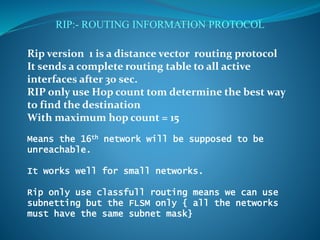
Rip version 1 is a distance vector routing protocol
It sends a complete routing table to all active
interfaces after 30 sec.
RIP only use Hop count tom determine the best way
to find the destination
With maximum hop count = 15
Means the 16th network will be supposed to be
unreachable.
It works well for small networks.
Rip only use classfull routing means we can use
subnetting but the FLSM only { all the networks
must have the same subnet mask}
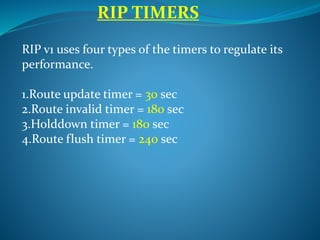
RIP v1 uses four types of the timers to regulate its
performance.
1.Route update timer = 30 sec
2.Route invalid timer = 180 sec
3.Holddown timer = 180 sec
4.Route flush timer = 240 sec
RIP TIMERS
RIP TIMERS
1. Route update timer:-
it is typically 30
seconds in which a router sends a complete
copy of the routing table to all neighbors.
2. Route invalid timer:-
when there is
network failure and a router didn`t get any
update about that network for 180 seconds
the router will send update to all neighbors
about the failure of that network.
RIP TIMERS
3.Holddown timer:-
The routing update
table received is only store/ hold till the
hold-down timer which is 180 seconds.
means there is any routing update table
received for any route and after that for 180
seconds there is no any other update
received from that side then the table will be
discard.
RIP TIMERS
4.Route flush timer:-
it is the time after
which a route is considered as a invalid route
and the routing information about that
route is removed from the routing table and
the information is updated to the all
neighbor routers before the local routing
table is updated.
RIP version 1 RIP version2
1.Distance vector 1.Distance vector
2.Max hop count=15 2.Max hop count=15
3.Classful [subnet 3. classless[subnet infor-
information is not sent mation is sent with
With route updates] the route updates]
4.broadcast based 4. multicast based[use
224.0.0.9 broadcast
address]
5.FLSM 5.VLSM
6. NO authentication 6. MD5 authentication
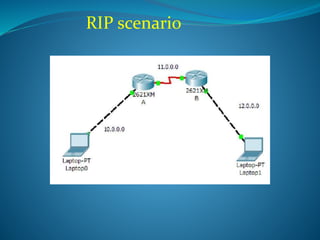
RIP scenario
Configuring the RIP routing
To configure the RIP routing the {ROUTER RIP}
command is used. And we just have to mention the
directly connected networks with the router only.
Job of the rip is to automatically find out the all other
networks and advertise the its connecting networks to all
the connected neighbors. RIP v1 is classfull because the
subnet mask in all the networks is same.
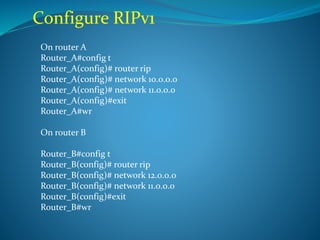
Configure RIPv1
On router A
Router_A#config t
Router_A(config)# router rip
Router_A(config)# network 10.0.0.0
Router_A(config)# network 11.0.0.0
Router_A(config)#exit
Router_A#wr
On router B
Router_B#config t
Router_B(config)# router rip
Router_B(config)# network 12.0.0.0
Router_B(config)# network 11.0.0.0
Router_B(config)#exit
Router_B#wr
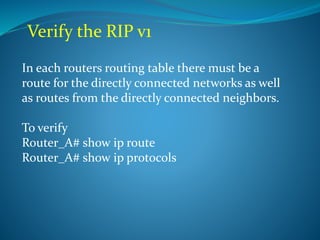
Verify the RIP v1
In each routers routing table there must be a
route for the directly connected networks as well
as routes from the directly connected neighbors.
To verify
Router_A# show ip route
Router_A# show ip protocols
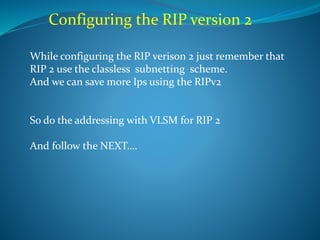
Configuring the RIP version 2
While configuring the RIP verison 2 just remember that
RIP 2 use the classless subnetting scheme.
And we can save more Ips using the RIPv2
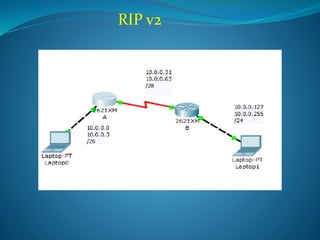
So do the addressing with VLSM for RIP 2
And follow the NEXT….
RIP v2
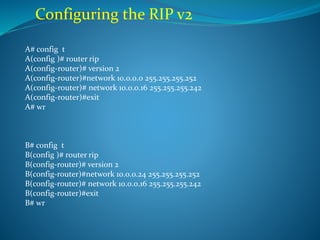
Configuring the RIP v2
A# config t
A(config )# router rip
A(config-router)# version 2
A(config-router)#network 10.0.0.0 255.255.255.252
A(config-router)# network 10.0.0.16 255.255.255.242
A(config-router)#exit
A# wr
B# config t
B(config )# router rip
B(config-router)# version 2
B(config-router)#network 10.0.0.24 255.255.255.252
B(config-router)# network 10.0.0.16 255.255.255.242
B(config-router)#exit
B# wr
RIP
OVER

Rip 1 rip 2

  • 1.
    Distance vector/ 30 secondsupdate/ 15 hop counts
  • 2.
    RIP:- ROUTING INFORMATIONPROTOCOL Rip version 1 is a distance vector routing protocol It sends a complete routing table to all active interfaces after 30 sec. RIP only use Hop count tom determine the best way to find the destination With maximum hop count = 15 Means the 16th network will be supposed to be unreachable. It works well for small networks. Rip only use classfull routing means we can use subnetting but the FLSM only { all the networks must have the same subnet mask}
  • 3.
    RIP v1 usesfour types of the timers to regulate its performance. 1.Route update timer = 30 sec 2.Route invalid timer = 180 sec 3.Holddown timer = 180 sec 4.Route flush timer = 240 sec RIP TIMERS
  • 4.
    RIP TIMERS 1. Routeupdate timer:- it is typically 30 seconds in which a router sends a complete copy of the routing table to all neighbors. 2. Route invalid timer:- when there is network failure and a router didn`t get any update about that network for 180 seconds the router will send update to all neighbors about the failure of that network.
  • 5.
    RIP TIMERS 3.Holddown timer:- Therouting update table received is only store/ hold till the hold-down timer which is 180 seconds. means there is any routing update table received for any route and after that for 180 seconds there is no any other update received from that side then the table will be discard.
  • 6.
    RIP TIMERS 4.Route flushtimer:- it is the time after which a route is considered as a invalid route and the routing information about that route is removed from the routing table and the information is updated to the all neighbor routers before the local routing table is updated.
  • 7.
    RIP version 1RIP version2 1.Distance vector 1.Distance vector 2.Max hop count=15 2.Max hop count=15 3.Classful [subnet 3. classless[subnet infor- information is not sent mation is sent with With route updates] the route updates] 4.broadcast based 4. multicast based[use 224.0.0.9 broadcast address] 5.FLSM 5.VLSM 6. NO authentication 6. MD5 authentication
  • 8.
  • 9.
    Configuring the RIProuting To configure the RIP routing the {ROUTER RIP} command is used. And we just have to mention the directly connected networks with the router only. Job of the rip is to automatically find out the all other networks and advertise the its connecting networks to all the connected neighbors. RIP v1 is classfull because the subnet mask in all the networks is same.
  • 10.
    Configure RIPv1 On routerA Router_A#config t Router_A(config)# router rip Router_A(config)# network 10.0.0.0 Router_A(config)# network 11.0.0.0 Router_A(config)#exit Router_A#wr On router B Router_B#config t Router_B(config)# router rip Router_B(config)# network 12.0.0.0 Router_B(config)# network 11.0.0.0 Router_B(config)#exit Router_B#wr
  • 11.
    Verify the RIPv1 In each routers routing table there must be a route for the directly connected networks as well as routes from the directly connected neighbors. To verify Router_A# show ip route Router_A# show ip protocols
  • 12.
    Configuring the RIPversion 2 While configuring the RIP verison 2 just remember that RIP 2 use the classless subnetting scheme. And we can save more Ips using the RIPv2 So do the addressing with VLSM for RIP 2 And follow the NEXT….
  • 13.
  • 14.
    Configuring the RIPv2 A# config t A(config )# router rip A(config-router)# version 2 A(config-router)#network 10.0.0.0 255.255.255.252 A(config-router)# network 10.0.0.16 255.255.255.242 A(config-router)#exit A# wr B# config t B(config )# router rip B(config-router)# version 2 B(config-router)#network 10.0.0.24 255.255.255.252 B(config-router)# network 10.0.0.16 255.255.255.242 B(config-router)#exit B# wr
  • 15.