Exterior Gateway Protocol The Origins of EGP Operation of EGP Shortcomings of EGP  Configuring EGP Troubleshooting EGP
The Origins of EGP This section discusses the history of the development of the Exterior Gateway Protocol.
Operation of EGP This section explores the fundamental mechanics of EGP with a focus on EGP topology issues, EGP functions, and EGP message formats.
Shortcomings of EGP This section explores some of the reasons why EGP is no longer pursued as a possible external gateway protocol solution.
Configuring EGP This section presents four separate case studies—EGP stub gateway, EGP core gateway, indirect neighbors, and default routes—to demonstrate different types of EGP configuration.
Troubleshooting EGP This section examines how to interpret an EGP neighbor table and presents a case study on the slow convergence speed of an EGP network to show why EGP is no longer a popular option.
Exterior Gateway Protocol This chapter serves as something of a history lesson.  Examining the motives for developing an external gateway protocol and the shortcomings of the original external protocol provides a prologue for the following two chapters. BGP will make more sense to you if you are familiar with the roots from which it evolved.
The Origins of EGP In the early 1980s, the routers (gateways) that made up the ARPANET (predecessor of the modern Internet) ran a distance vector routing protocol known as the  Gateway-to-Gateway Protocol  (GGP). Every gateway knew a route to every reachable network, at a distance measured in gateway hops. As the ARPANET grew, its architects predict the same problem that administrators of many growing internetworks encounter today: Their routing protocol did not scale well.
Eric Rosen, records the scalability problems: With all gateways knowing all routes, "the overhead of the routing algorithm becomes excessively large." Whenever a topology change occurs, the likelihood of which increases with the size of the internetwork, all gateways have to exchange routing information and recalculate their tables. Even when the internetwork is in a steady state, the size of the routing tables and routing updates becomes an increasing burden.
Eric Rosen, Continue.. As the number of GGP software implementations increases, and the hardware platforms on which they are implemented become more diverse, "it becomes impossible to regard the Internet as an integrated communications system." Specifically, maintenance and troubleshooting become "nearly impossible."
As the number of gateways grows, so does the number of gateway administrators. As a result, resistance to software upgrades increases: “Any proposed change must be made in too many different places by too many different people." Eric Rosen, Continue..
Each AS is connected to other autonomous systems via one or more exterior gateways. RFC 827 proposed that the exterior gateways share routing information between each other by means of a protocol known as the EGP.  Contrary to popular belief, although EGP is a distance vector protocol,  it is not a routing protocol . It has no algorithm for choosing an optimal path between networks; rather, it is a common language that exterior gateways use to exchange reachability information with other exterior gateways. That reachability information is a simple list of major network addresses (no subnets) and the gateways by which they can be reached. The Origins of EGP Continue..
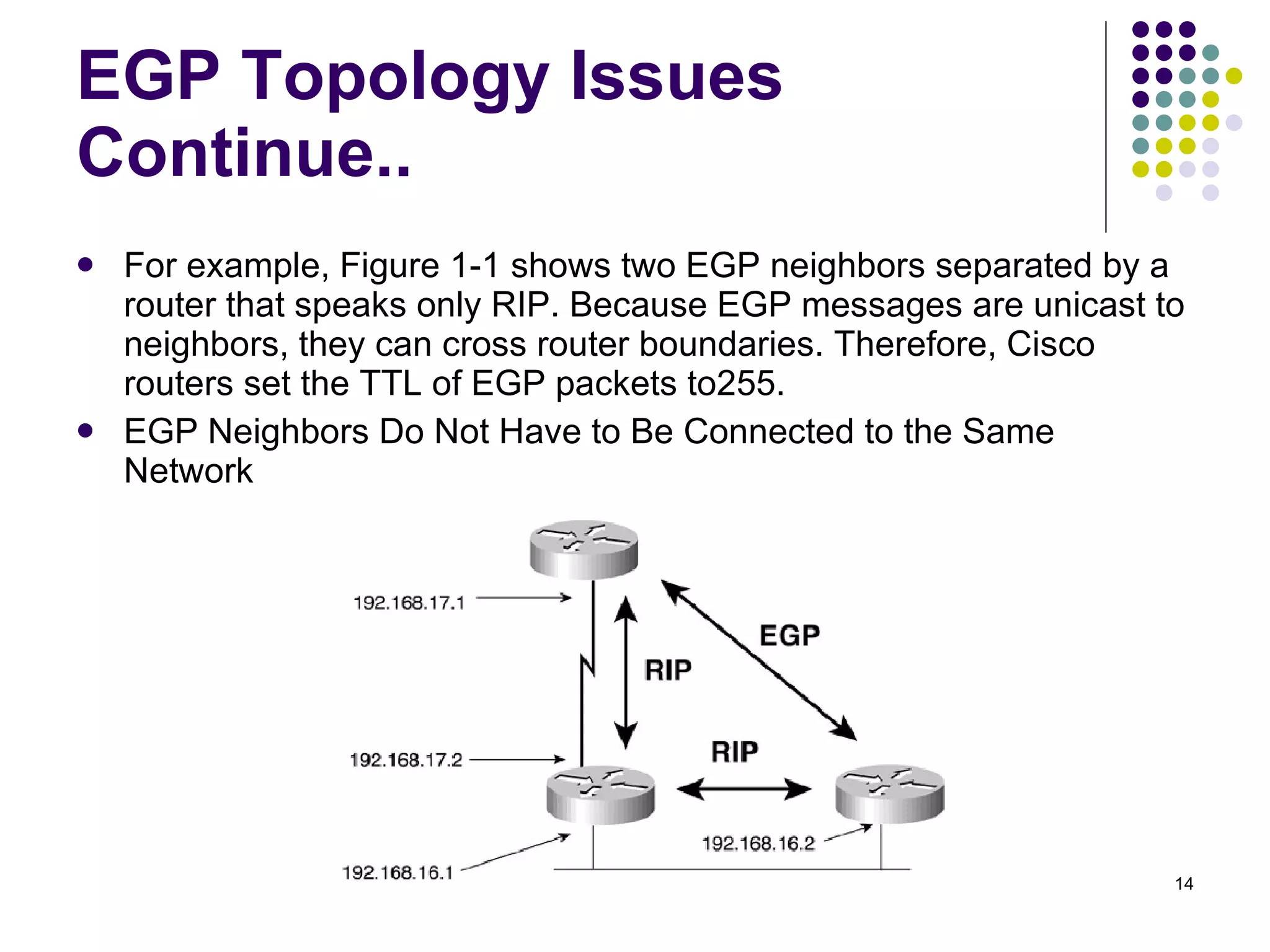
EGP Topology Issues EGP messages are exchanged between EGP neighbors, or  peers.  If the neighbors are in the same AS, they are  interior neighbors .  If they are in different autonomous systems, they are  exterior neighbors . EGP has no function that automatically discovers its neighbors; the addresses of the neighbors are manually configured, and the messages they exchange are unicast to the configured addresses.
For example, Figure 1-1 shows two EGP neighbors separated by a router that speaks only RIP. Because EGP messages are unicast to neighbors, they can cross router boundaries. Therefore, Cisco routers set the TTL of EGP packets to255. EGP Neighbors Do Not Have to Be Connected to the Same Network EGP Topology Issues Continue..
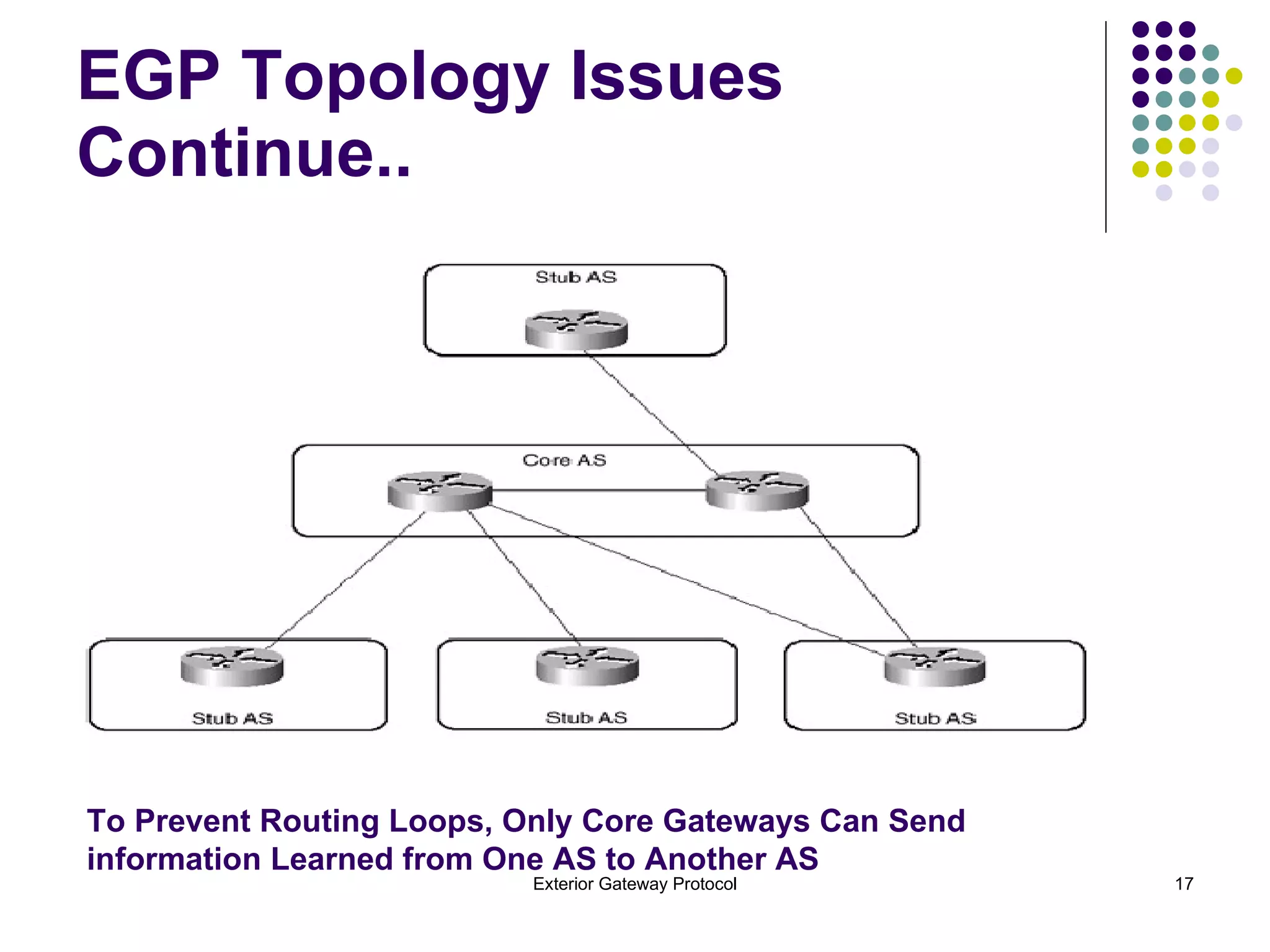
To understand why EGP defines core and stub gateways, it is necessary to understand the architectural limitations of EGP. As previously mentioned, EGP is not a routing protocol. Its updates list only reachable networks, without including enough information to determine shortest paths or to prevent routing loops. Therefore, the EGP topology must be built with no loops. EGP Topology Issues Continue..
Figure 1-2 shows an EGP topology. There is a single core AS to which all other autonomous systems (stub autonomous systems) must attach. This two-level tree topology is very similar to the two-level topology requirements of OSPF, and its purpose is the same. EGP Topology Issues Continue..
EGP Topology Issues Continue..  To Prevent Routing Loops, Only Core Gateways Can Send  information Learned from One AS to Another AS
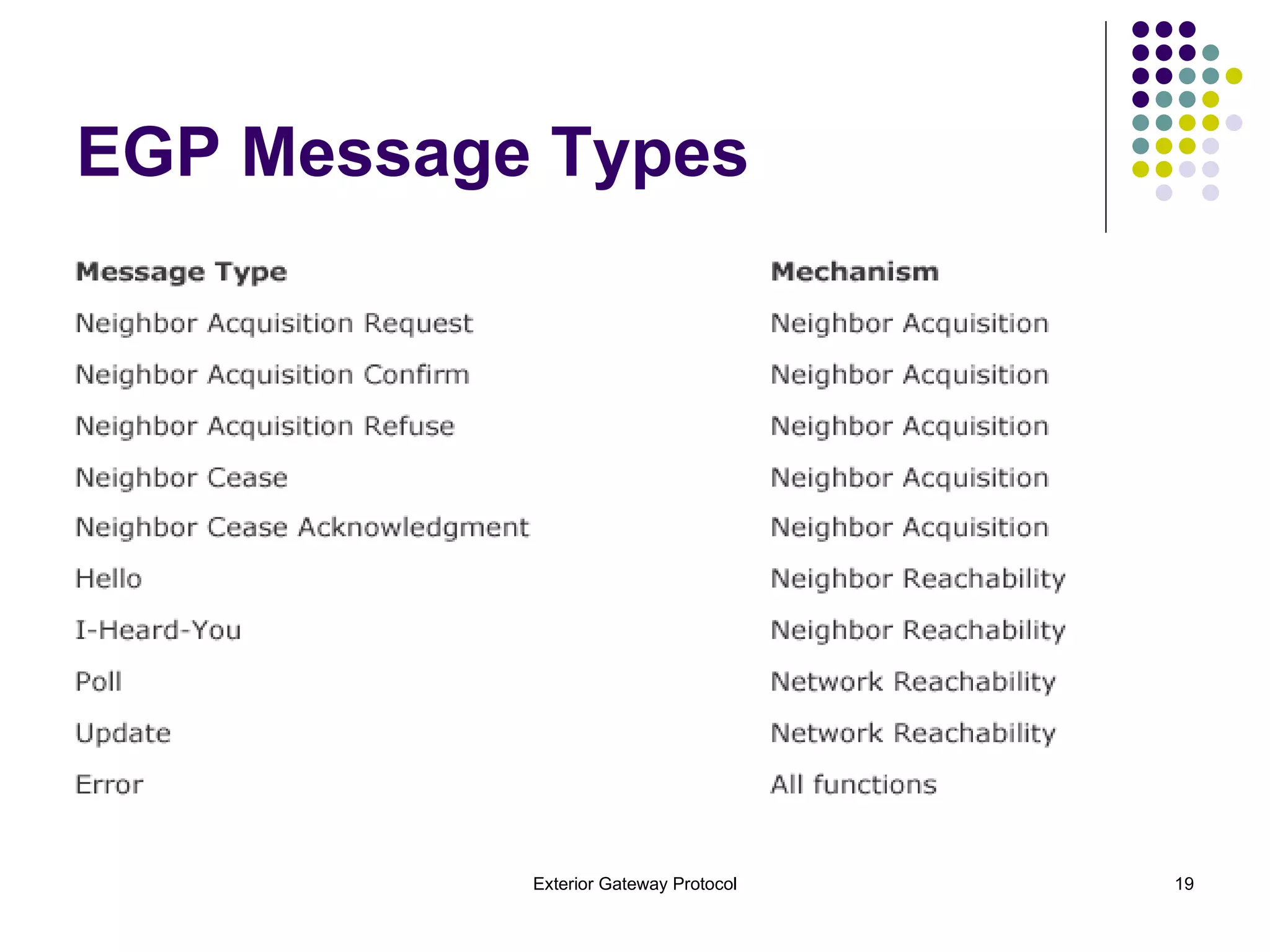
EGP Functions EGP consists of the following three mechanisms: Neighbor Acquisition Protocol Neighbor Reachability Protocol Network Reachability Protocol These three mechanisms use ten message types to establish a neighbor relationship, maintain the neighbor relationship, exchange network reachability information with the neighbor, and notify the neighbor of procedural or formatting errors.
EGP Message Types
Neighbor Acquisition Protocol Before EGP neighbors can exchange reachability information, they must establish that they are compatible. This function is performed by a simple two-way handshake in which one neighbor sends a  Neighbor Acquisition Request  message, and the other neighbor responds with a  Neighbor Acquisition Confirm message . A gateway can refuse to accept a neighbor by responding with a  Neighbor Acquisition Refuse message  rather than an  Acquisition Confirm message . The Refuse message can include a reason for the refusal, such as a lack of table space, or it can refuse for an unspecified reason. A gateway can also break an established neighbor relationship by sending a  Neighbor Cease message . As with the Refuse message, the originating gateway has the option of including a reason for the Cease or leaving the reason unspecified. A neighbor receiving a Neighbor Cease message responds with a  Neighbor Cease Acknowledgment .
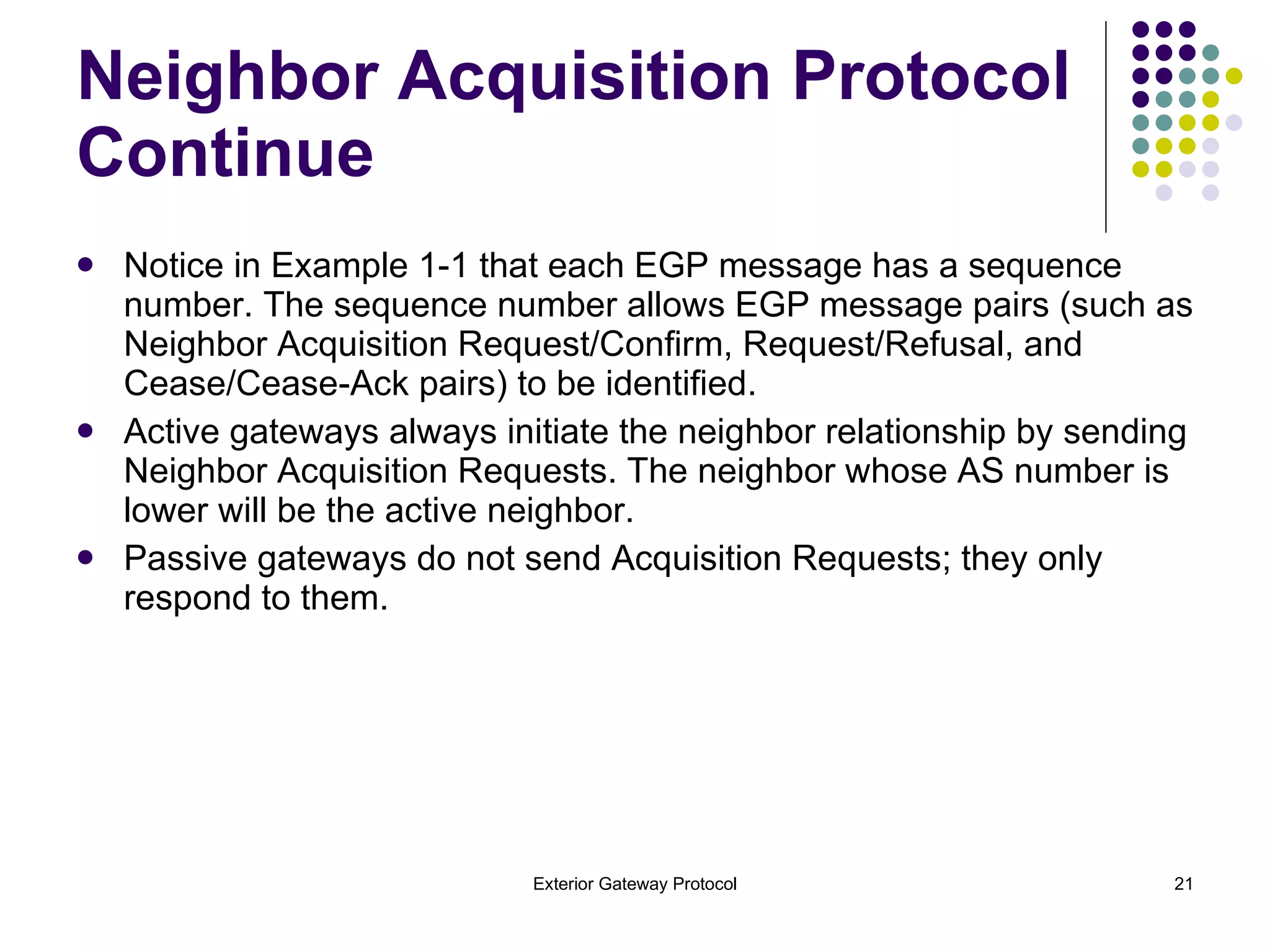
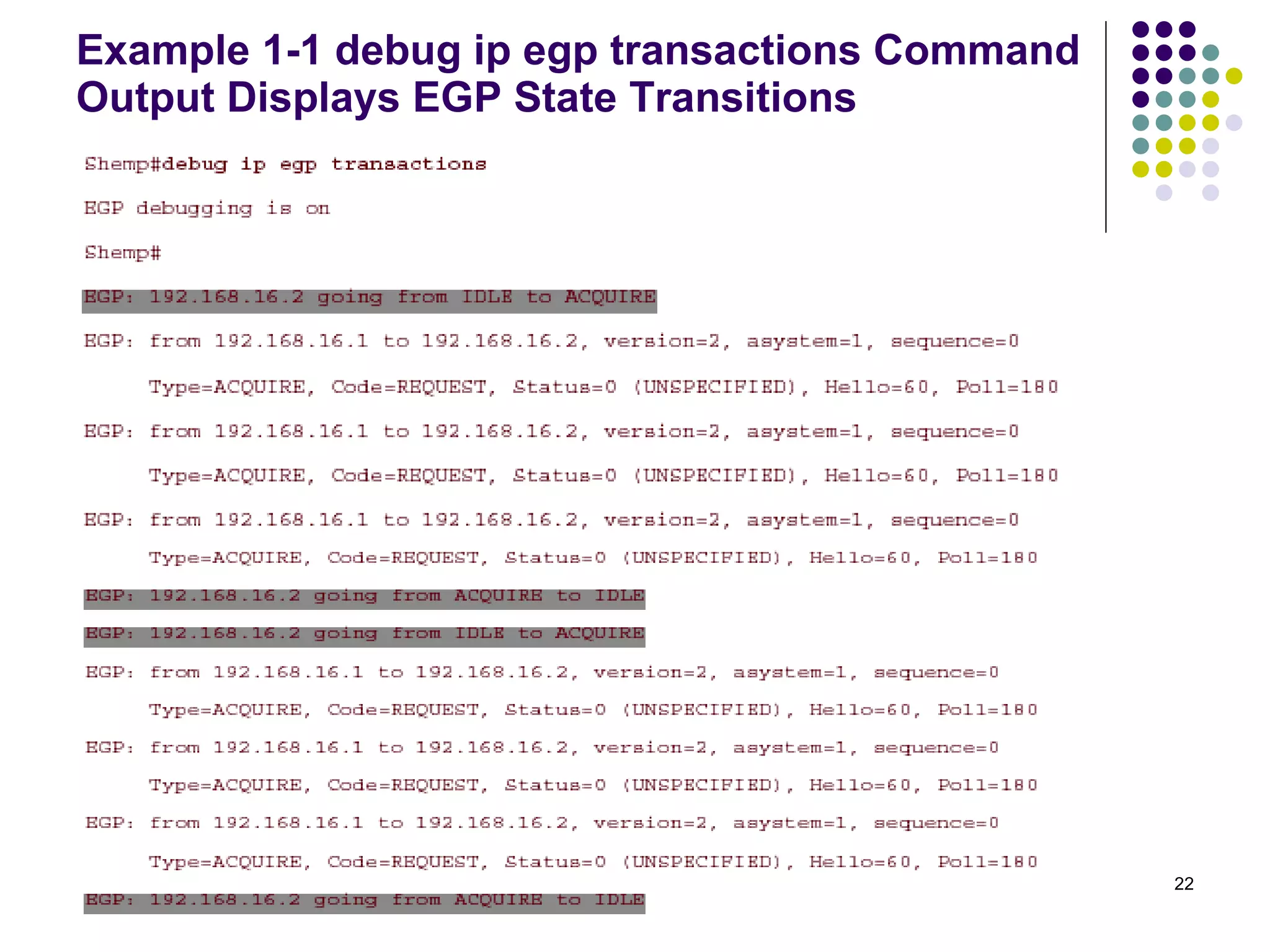
Notice in Example 1-1 that each EGP message has a sequence number. The sequence number allows EGP message pairs (such as Neighbor Acquisition Request/Confirm, Request/Refusal, and Cease/Cease-Ack pairs) to be identified. Active gateways always initiate the neighbor relationship by sending Neighbor Acquisition Requests. The neighbor whose AS number is lower will be the active neighbor. Passive gateways do not send Acquisition Requests; they only respond to them. Neighbor Acquisition Protocol Continue
Example 1-1 debug ip egp transactions Command Output Displays EGP State Transitions
Neighbor Reachability Protocol After a gateway has acquired a neighbor, it maintains the neighbor relationship by sending periodic Hello messages. The neighbor responds to each Hello with an I-H-U message. Cisco uses a default period of 60 seconds, which can be changed with the command  timers egp. When three Hello/I-H-U message pairs have been exchanged, the neighbor state changes from Down  to Up (Example 1-2) . The neighbors can then exchange network reachability information, as  described in the next section.
Example 1-2 debug ip egp transactions Command Output Displays Two-Way Handshake Success and EGP State Transitions
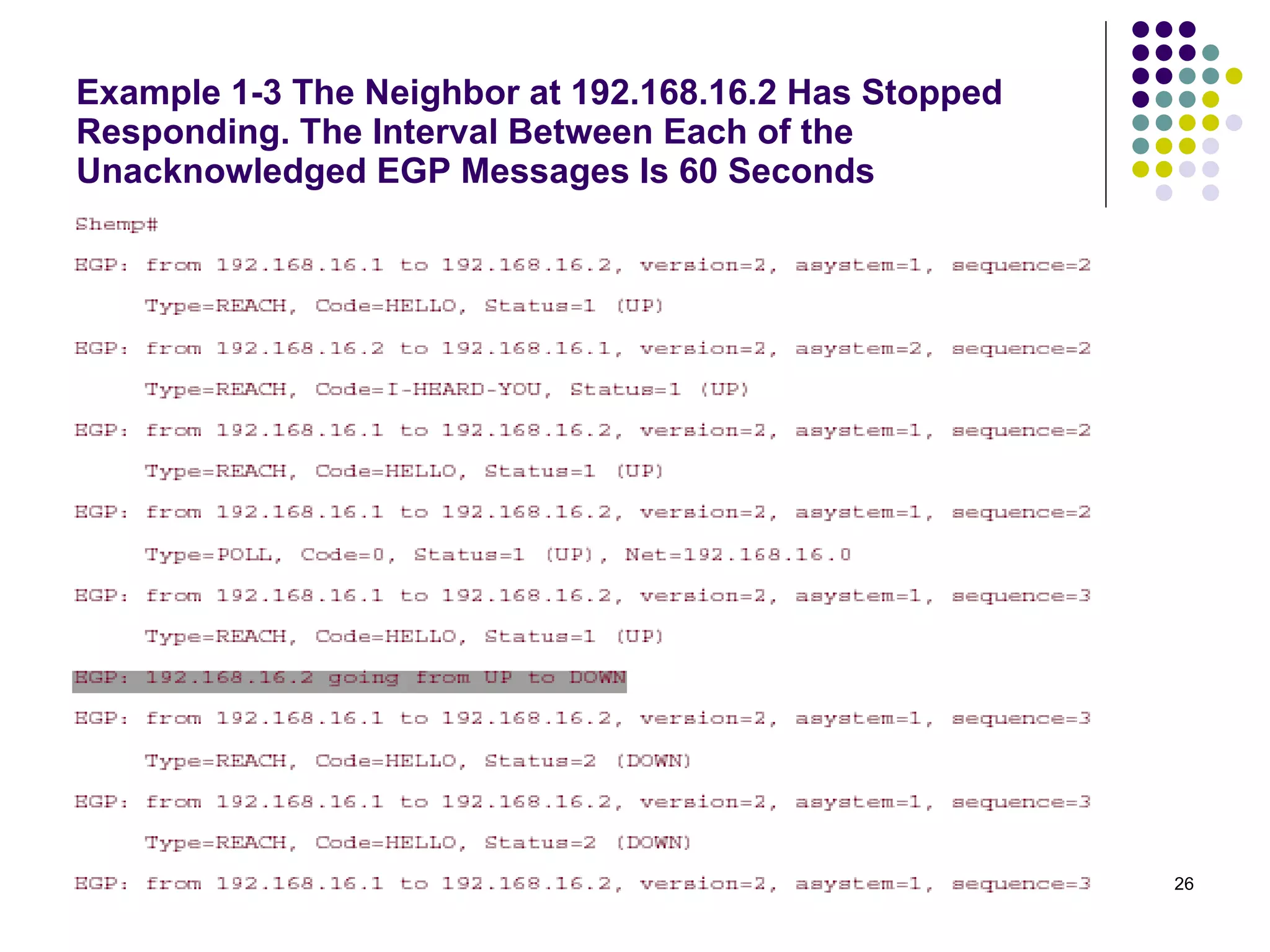
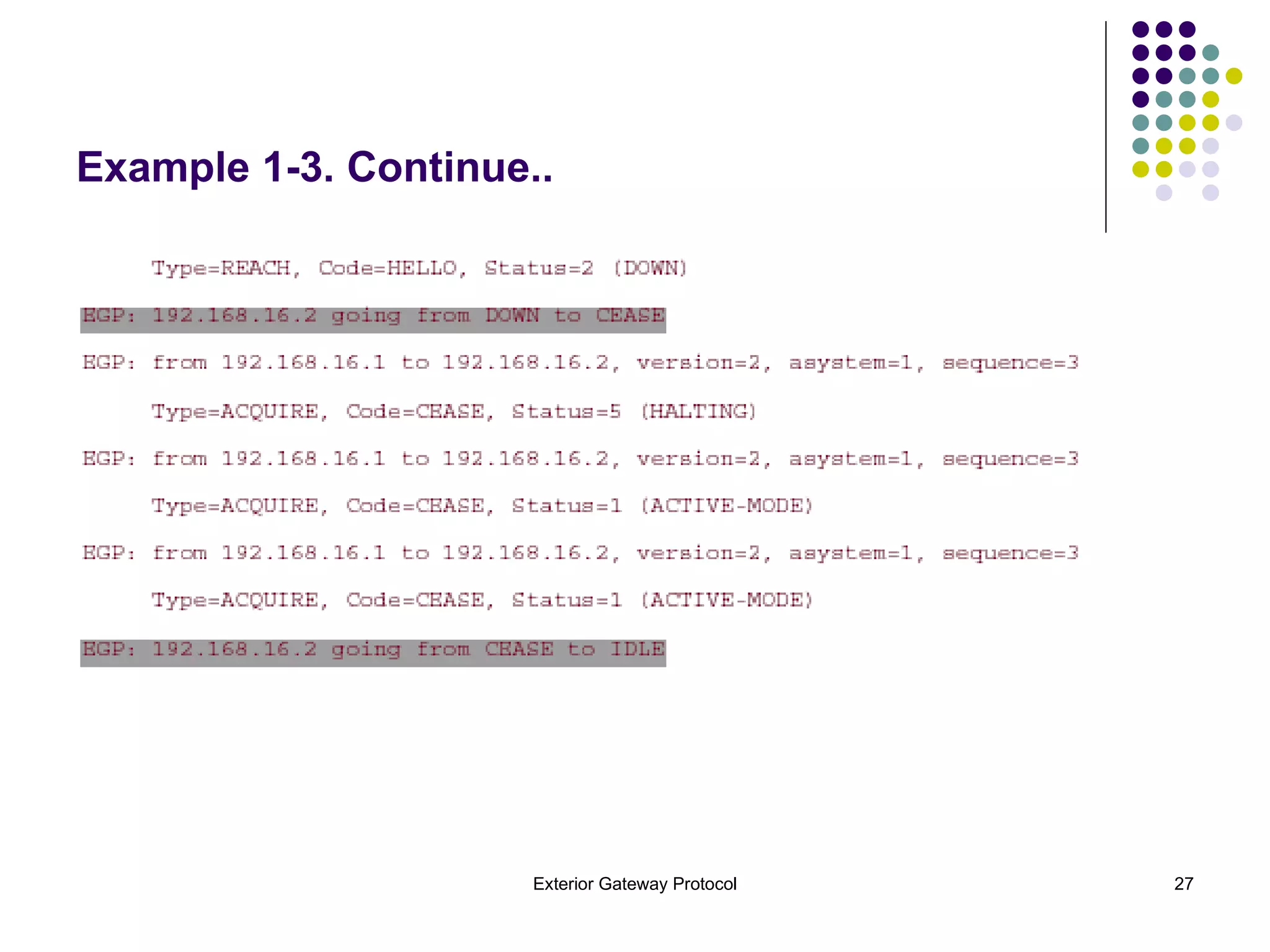
If an active neighbor sends three sequential messages without receiving a response, the neighbor state transitions to Down. The gateway sends three more Hellos at the normal Hello interval; if there is still no response, the state changes to Cease.  The gateway sends three Neighbor Cease messages at 60-second intervals. If the neighbor responds to any of the messages with a Cease Acknowledgment, or does not respond at all, the gateway transitions the neighbor state to Idle and waits 5 minutes before transitioning back to Acquire and attempting to reacquire the neighbor.  Example 1-3 shows this sequence of events. Neighbor Reachability Protocol Continue..
Example 1-3 The Neighbor at 192.168.16.2 Has Stopped Responding. The Interval Between Each of the Unacknowledged EGP Messages Is 60 Seconds
Example 1-3. Continue..
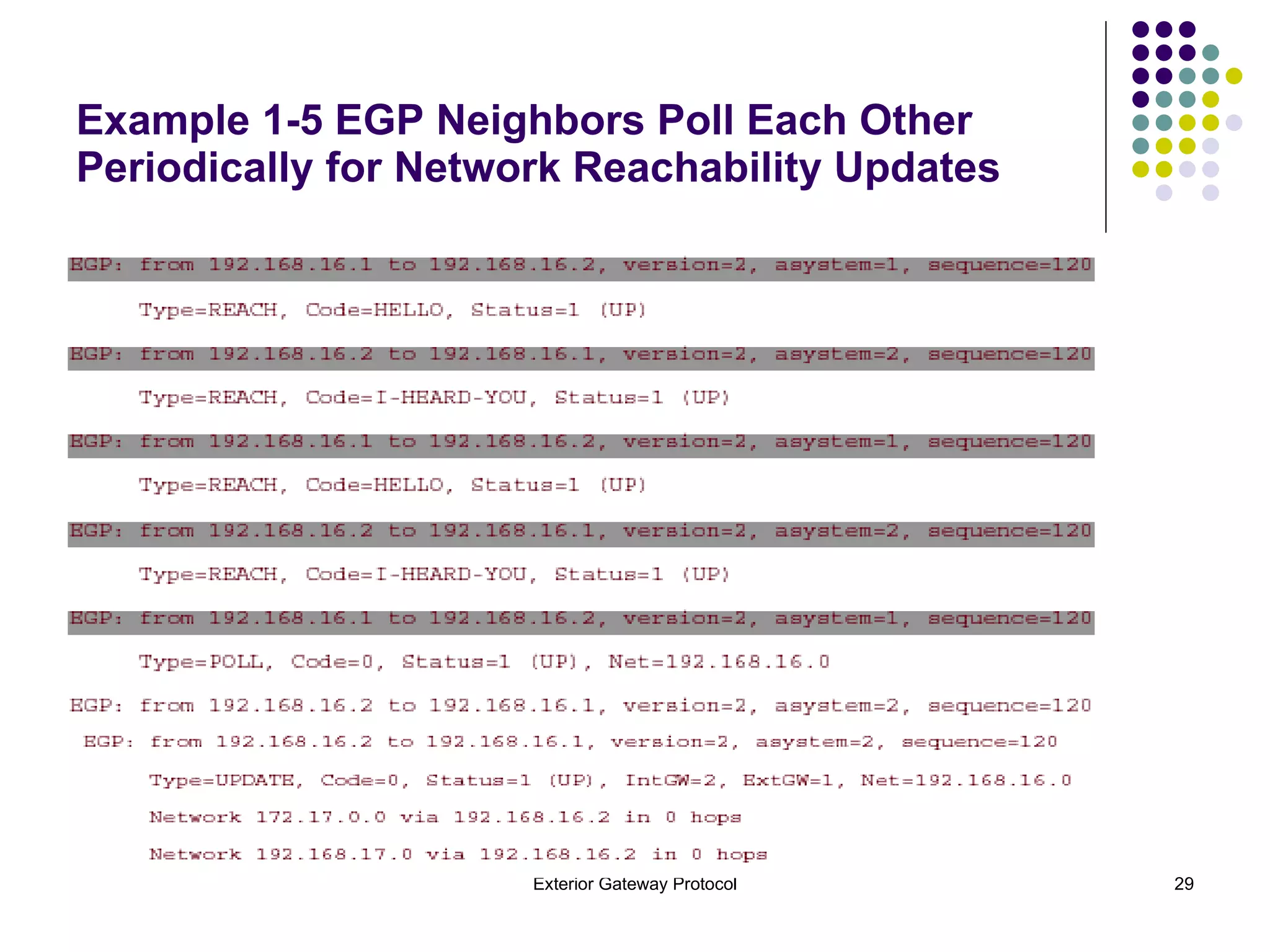
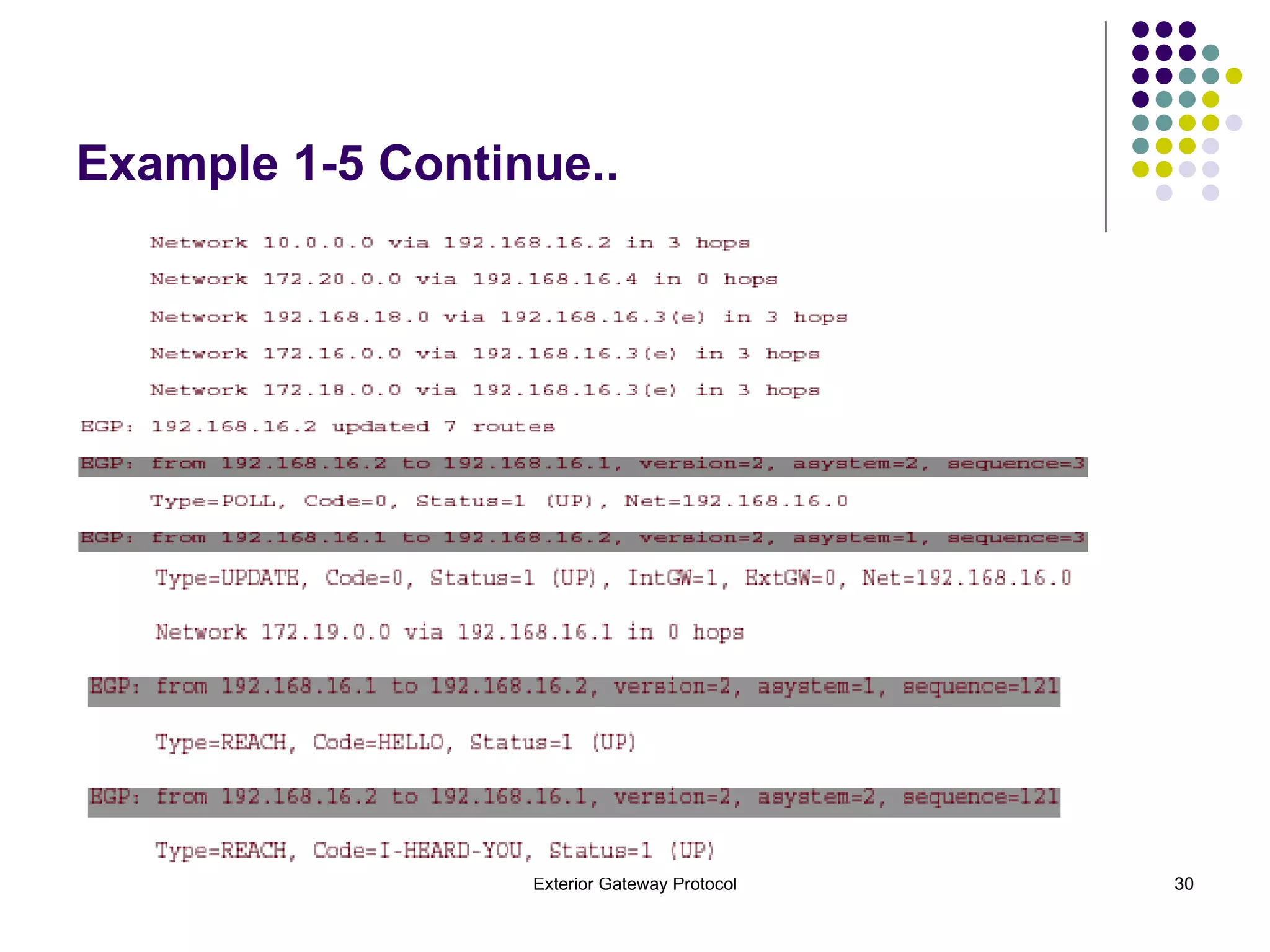
Network Reachability Protocol When the neighbor state is Up, the EGP neighbors can begin exchanging reachability information. Each gateway periodically sends a Poll message to its neighbor, containing some sequence number. The neighbor responds with an Update message that contains the same sequence number and a list of reachable networks . Example 1-5  shows how Cisco's IOS Software uses the sequence numbers.
Example 1-5 EGP Neighbors Poll Each Other Periodically for Network Reachability Updates
Example 1-5 Continue..
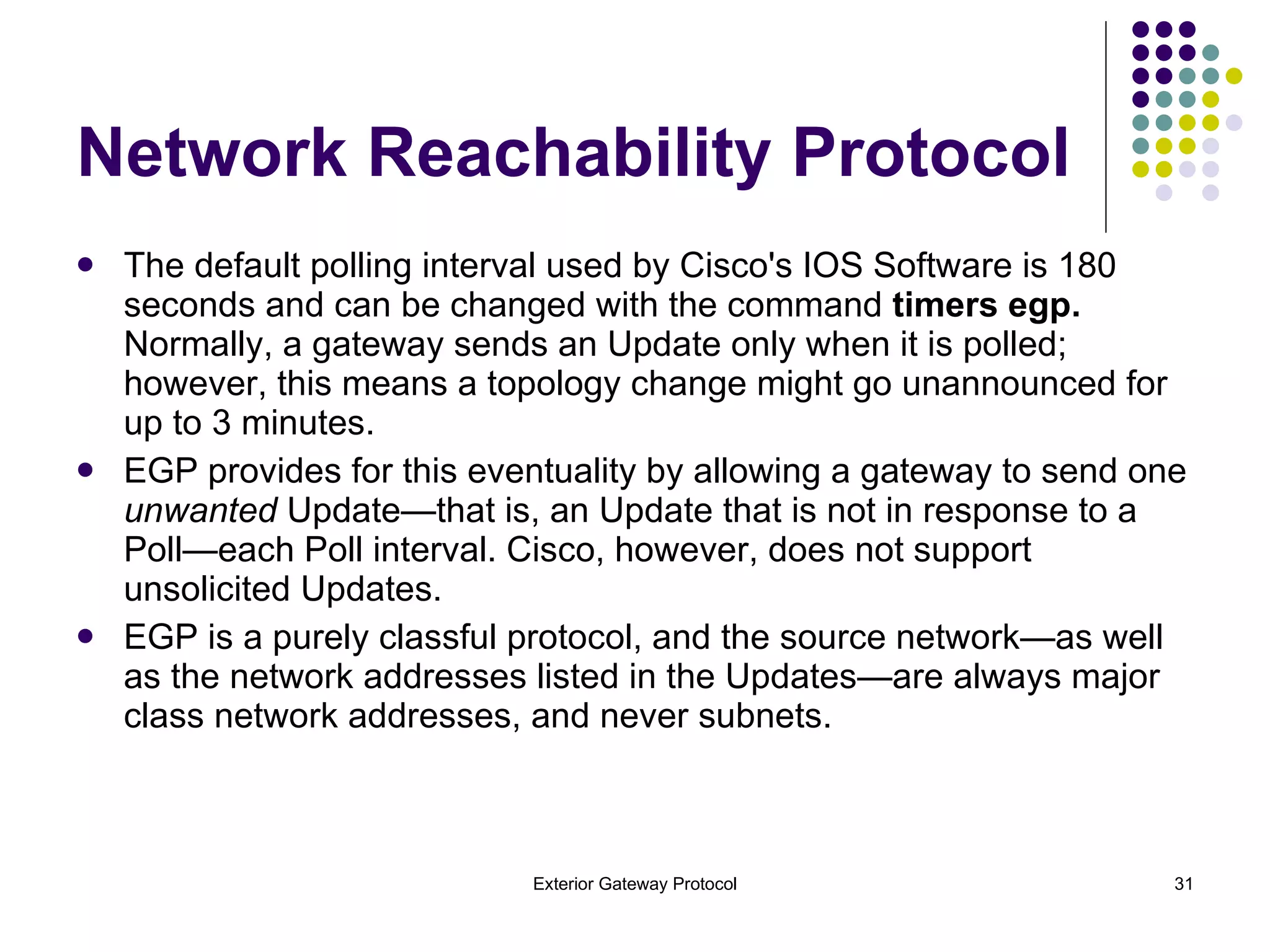
The default polling interval used by Cisco's IOS Software is 180 seconds and can be changed with the command  timers egp.  Normally, a gateway sends an Update only when it is polled; however, this means a topology change might go unannounced for up to 3 minutes.  EGP provides for this eventuality by allowing a gateway to send one  unwanted  Update—that is, an Update that is not in response to a Poll—each Poll interval. Cisco, however, does not support unsolicited Updates. EGP is a purely classful protocol, and the source network—as well as the network addresses listed in the Updates—are always major class network addresses, and never subnets. Network Reachability Protocol
Figure 1-3 illustrates the concept of indirect EGP neighbors. One router, Moe, is a core gateway and  is peered with three other gateways.
A neighbor is an  interior gateway  if it is in the same AS, and it is an  exterior gateway  if it is in a different AS.  In Figure 1-3, all the EGP gateways see all their neighbors as external gateways. If Larry were speaking EGP and peered with Moe, those two routers would see each other as interior gateways. The EGP Update message associates a distance with each network it lists. The distance field is 8 bits, so the distance can range from 0 to 255. RFC 904  does not specify how the distance is to be interpreted, however, other than that 255 is used to indicate unreachable networks.  Nor does the RFC define an algorithm for using the distance to calculate shortest inter-AS paths. Cisco chooses to interpret the distance as hops, as shown in Example 1-5. The default rules are very basic: A gateway advertises all networks within its own AS as having a distance of 0. A gateway advertises all networks within an AS other than its own as having a distance of 3. A gateway indicates that a network has become unreachable by giving it a distance of 255. Network Reachability Protocol Continue..
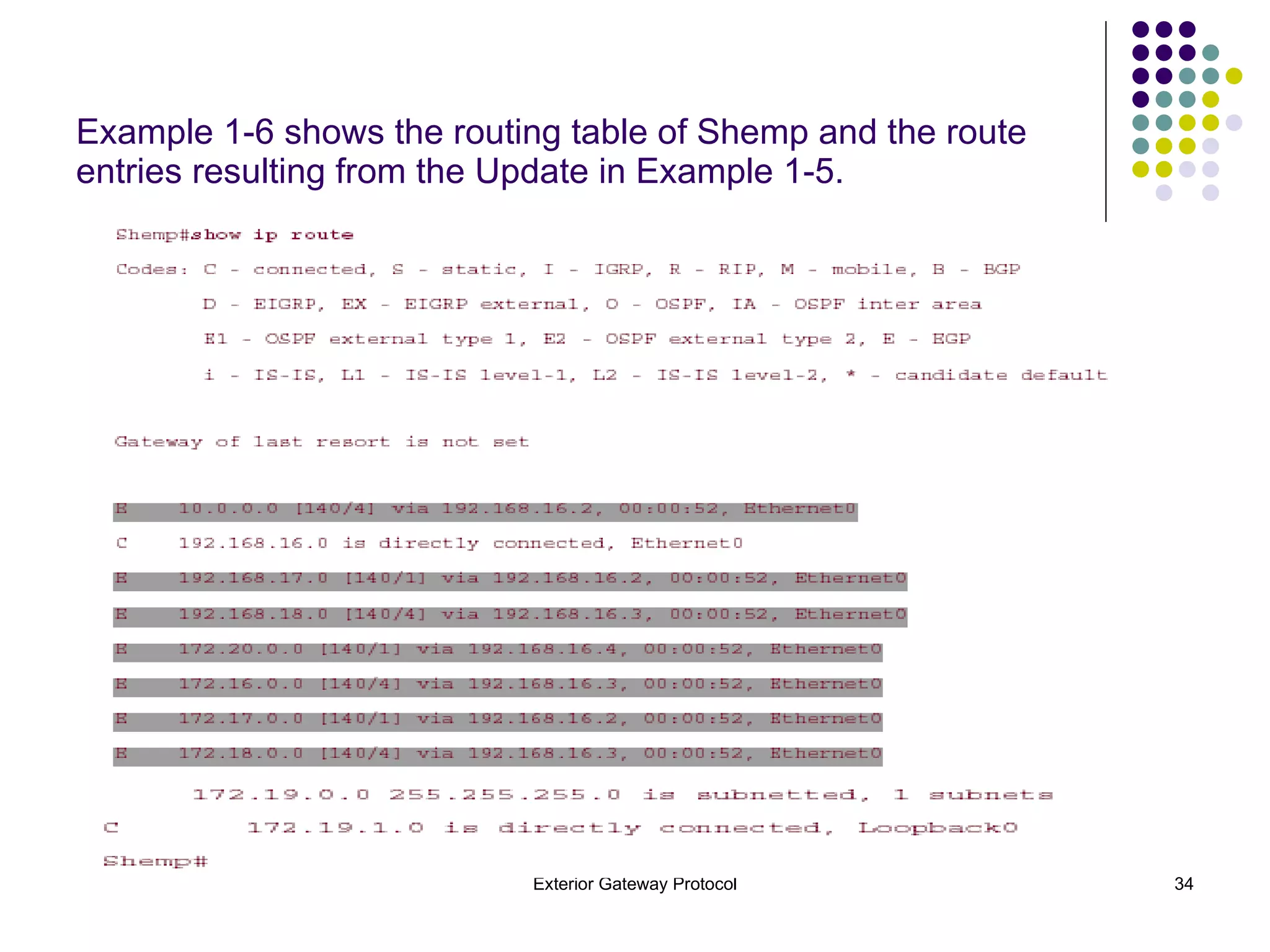
Example 1-6 shows the routing table of Shemp and the route entries resulting from the Update in Example 1-5.
There are two points of interest in the routing table.  First , notice that the EGP entries have an administrative distance of 140. This is higher than the administrative distance of any IGP (with the exception of External EIGRP), so a router will always choose an IGP route over an EGP advertisement of the same network. Second , notice that the distances to each of the EGP-advertised networks are one higher than the distances shown in the Update of Example 1-5. Cisco's EGP process increments the distance by one, just as a RIP routing algorithm does.
Shortcoming of EGP The fundamental problem with EGP is its inability to detect routing loops. Because there is an upper boundary on the distance EGP uses (255). As a result, EGP must be run on an engineered loop-free topology. The autonomous systems making up the Internet would need to evolve into a less structured mesh, in which many autonomous systems could serve as transit systems for many other autonomous systems.
Another major problem with EGP is its inability to adequately interact with IGPs to determine a shortest route to a network in another AS.  For example, EGP distances do not reliably translate into RIP hop counts. If the EGP distance causes the hop count to exceed 15, RIP declares the network unreachable.  Other shortcomings of EGP include its susceptibility to failures when attempting to convey information on a large number of networks, and its vulnerability to intentionally or unintentionally inaccurate network information. EGP can be boringly slow to advertise a network change. As the example demonstrates, almost an hour passes before a gateway four hops away determines that the network has gone down. Several attempts were made to create an EGPv3, but none were successful. In the end, EGP was abandoned in favor of an entirely new inter-AS protocol, BGP. Shortcoming of EGP
Configuring EGP You can configure EGP on a router in four basic steps: Step 1.  Specify the router's AS with the command  autonomous-system. Step 2.  Start the EGP process and specify the neighbor's AS with the command  router egp. Step 3.  Specify the EGP neighbors with the  neighbor  command. Step 4.  Specify what networks are to be advertised by EGP.
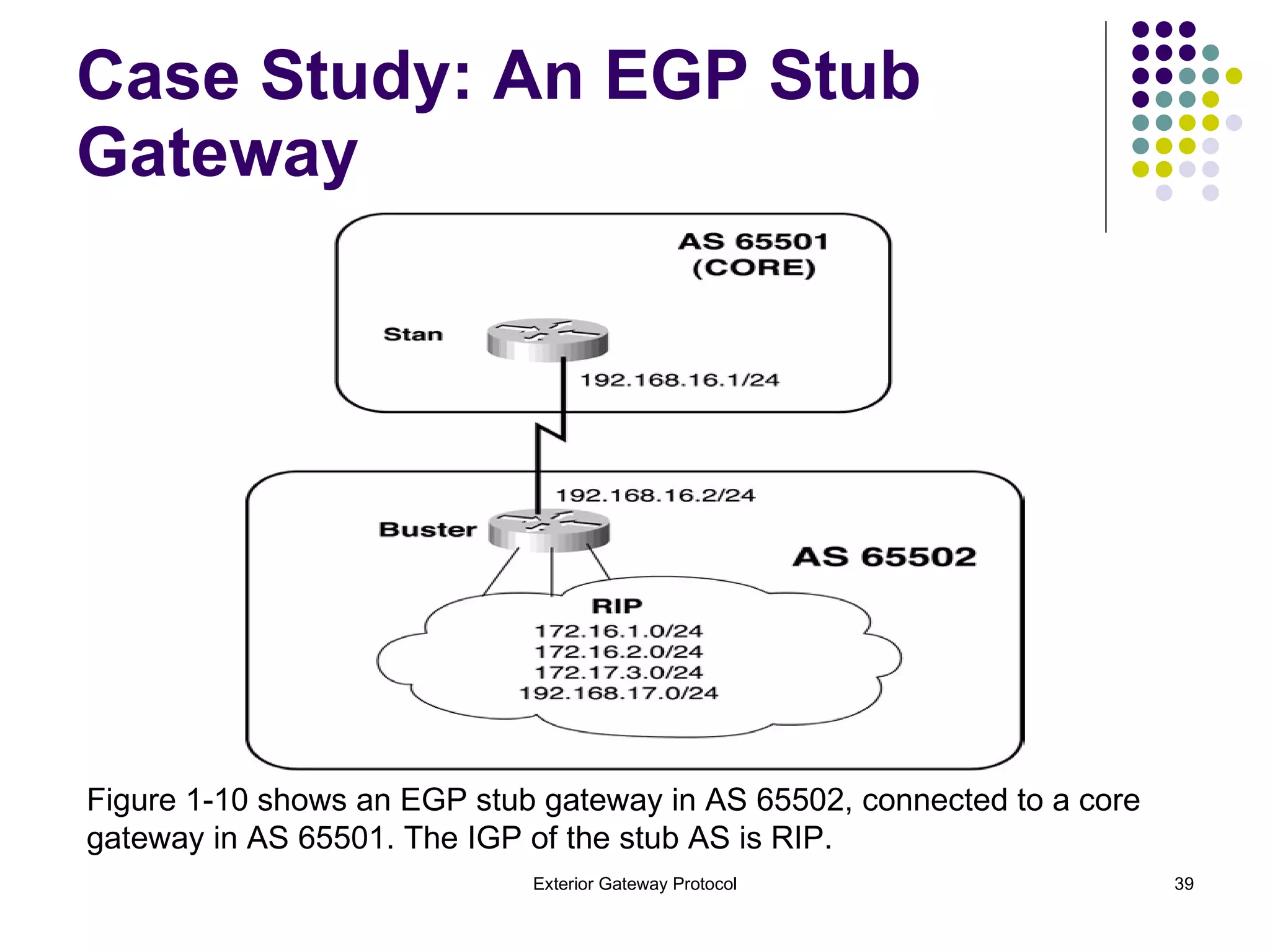
Case Study: An EGP Stub Gateway Figure 1-10 shows an EGP stub gateway in AS 65502, connected to a core gateway in AS 65501. The IGP of the stub AS is RIP.
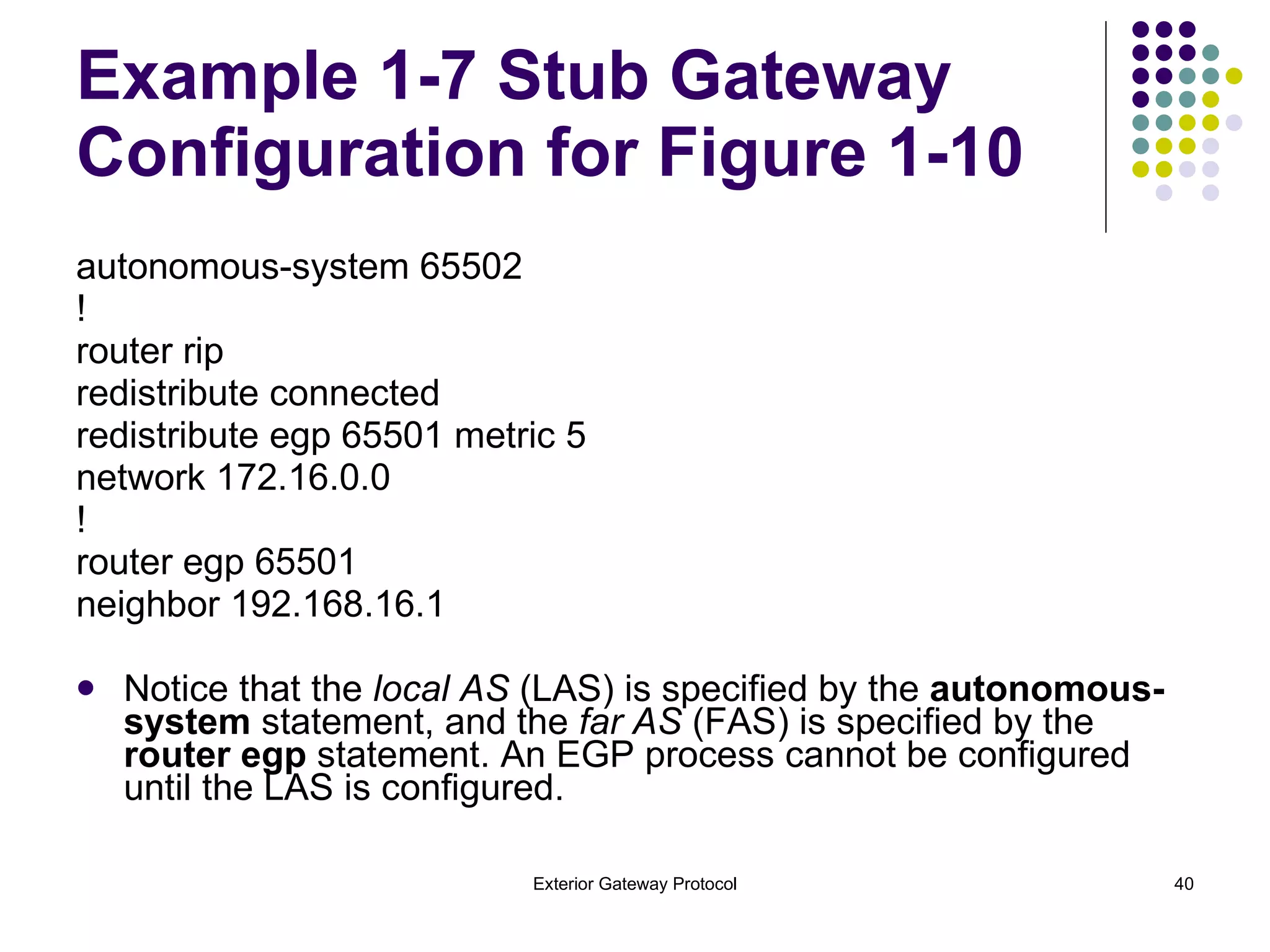
Example 1-7 Stub Gateway Configuration for Figure 1-10 autonomous-system 65502 ! router rip redistribute connected redistribute egp 65501 metric 5 network 172.16.0.0 ! router egp 65501 neighbor 192.168.16.1 Notice that the  local AS  (LAS) is specified by the  autonomous-system  statement, and the  far AS  (FAS) is specified by the  router egp  statement. An EGP process cannot be configured until the LAS is configured.
Example 1-8 Buster's Routing Table Shows Entries Learned from the EGP  Neighbor and from the Interior RIP Neighbors Buster# show ip route E 10.0.0.0 [140/4] via 192.168.16.1, 00:02:12, Serial3 C 192.168.16.0 is directly connected, Serial3 R 192.168.17.0 [120/1] via 172.16.1.2, 00:00:05, Ethernet0 E 192.168.19.0 [140/4] via 192.168.16.1, 00:02:13, Serial3 E 192.168.20.0 [140/4] via 192.168.16.1, 00:02:13, Serial3 E 192.168.21.0 [140/4] via 192.168.16.1, 00:02:13, Serial3 E 192.168.22.0 [140/4] via 192.168.16.1, 00:02:13, Serial3 172.16.0.0 255.255.255.0 is subnetted, 2 subnets C 172.16.1.0 is directly connected, Ethernet0 R 172.16.2.0 [120/1] via 172.16.1.2, 00:00:05, Ethernet0 R 172.17.0.0 [120/1] via 172.16.1.2, 00:00:05, Ethernet0 Buster# Buster's routing table contains both EGP route entries learned from the core gateway and RIP entries learned from the interior neighbors.
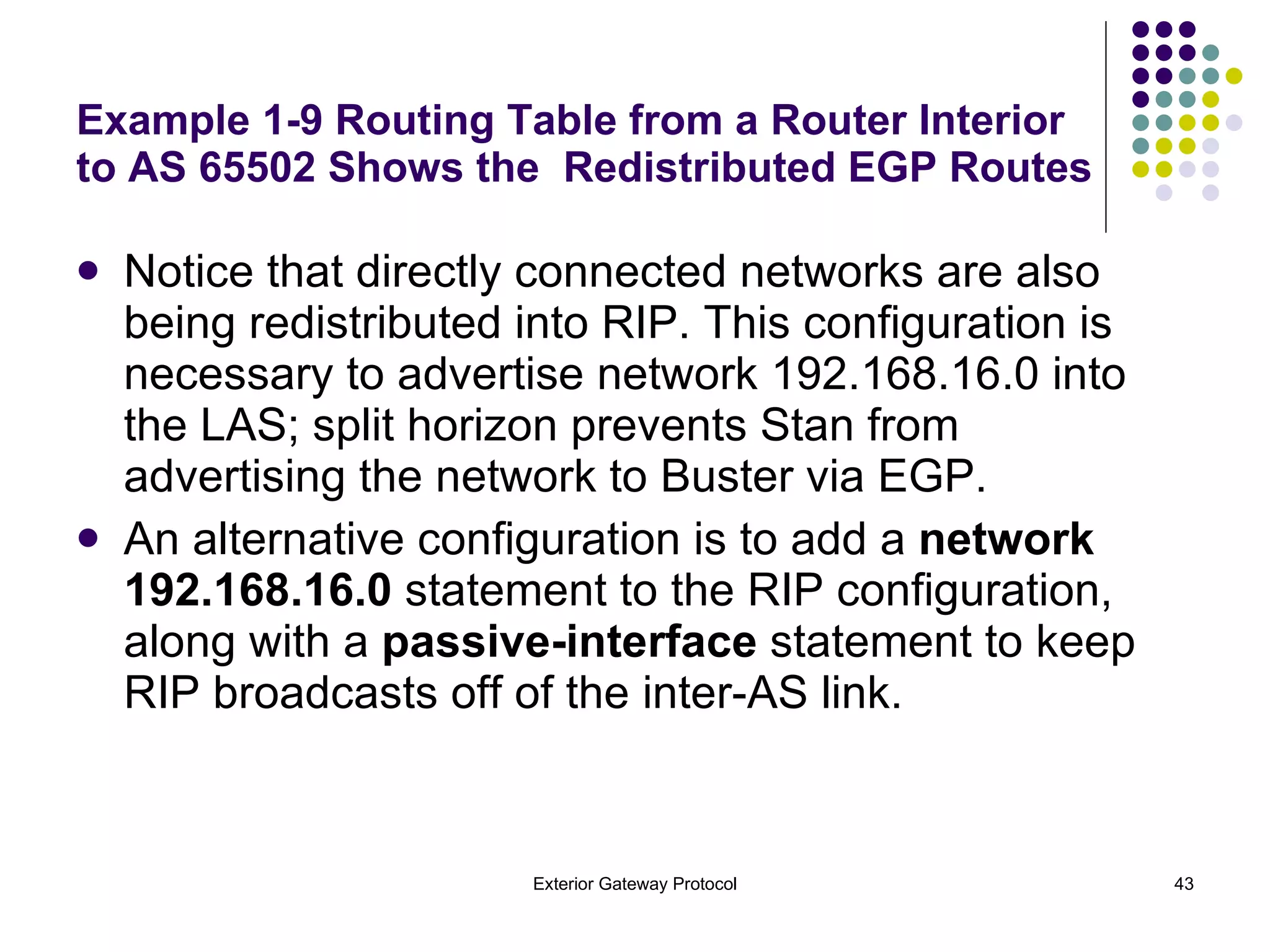
Example 1-9 Routing Table from a Router Interior to AS 65502 Shows the  Redistributed EGP Routes Charlie# show ip route R 10.0.0.0 [120/5] via 172.16.1.1, 00:00:13, Ethernet0 R 192.168.16.0 [120/1] via 172.16.1.1, 00:00:13, Ethernet0 C 192.168.17.0 is directly connected, Ethernet3 R 192.168.19.0 [120/5] via 172.16.1.1, 00:00:13, Ethernet0 R 192.168.20.0 [120/5] via 172.16.1.1, 00:00:13, Ethernet0 R 192.168.21.0 [120/5] via 172.16.1.1, 00:00:13, Ethernet0 R 192.168.22.0 [120/5] via 172.16.1.1, 00:00:13, Ethernet0 172.16.0.0 255.255.255.0 is subnetted, 2 subnets C 172.16.1.0 is directly connected, Ethernet0 C 172.16.2.0 is directly connected, Ethernet1 172.17.0.0 255.255.255.0 is subnetted, 1 subnets C 172.17.3.0 is directly connected, Ethernet2 Charlie#
Notice that directly connected networks are also being redistributed into RIP. This configuration is necessary to advertise network 192.168.16.0 into the LAS; split horizon prevents Stan from advertising the network to Buster via EGP.  An alternative configuration is to add a  network 192.168.16.0  statement to the RIP configuration, along with a  passive-interface  statement to keep RIP broadcasts off of the inter-AS link. Example 1-9 Routing Table from a Router Interior to AS 65502 Shows the  Redistributed EGP Routes
Example 1-10 Stan's Routing Table Shows That None of the Interior Networks from AS 65502 Are Being Learned from Buster Stan# show ip route E 10.0.0.0 [140/4] via 192.168.18.2, 00:01:56, Serial1 C 192.168.16.0 is directly connected, Serial0 C 192.168.18.0 is directly connected, Serial1 E 192.168.19.0 [140/1] via 192.168.18.2, 00:01:57, Serial1 E 192.168.20.0 [140/4] via 192.168.18.2, 00:01:57, Serial1 E 192.168.21.0 [140/4] via 192.168.18.2, 00:01:57, Serial1 E 192.168.22.0 [140/1] via 192.168.18.2, 00:01:57, Serial1 Stan# As Buster's EGP configuration stands so far, network information is being received from the core, but no interior networks are being advertised to the core (see Example 1-10).
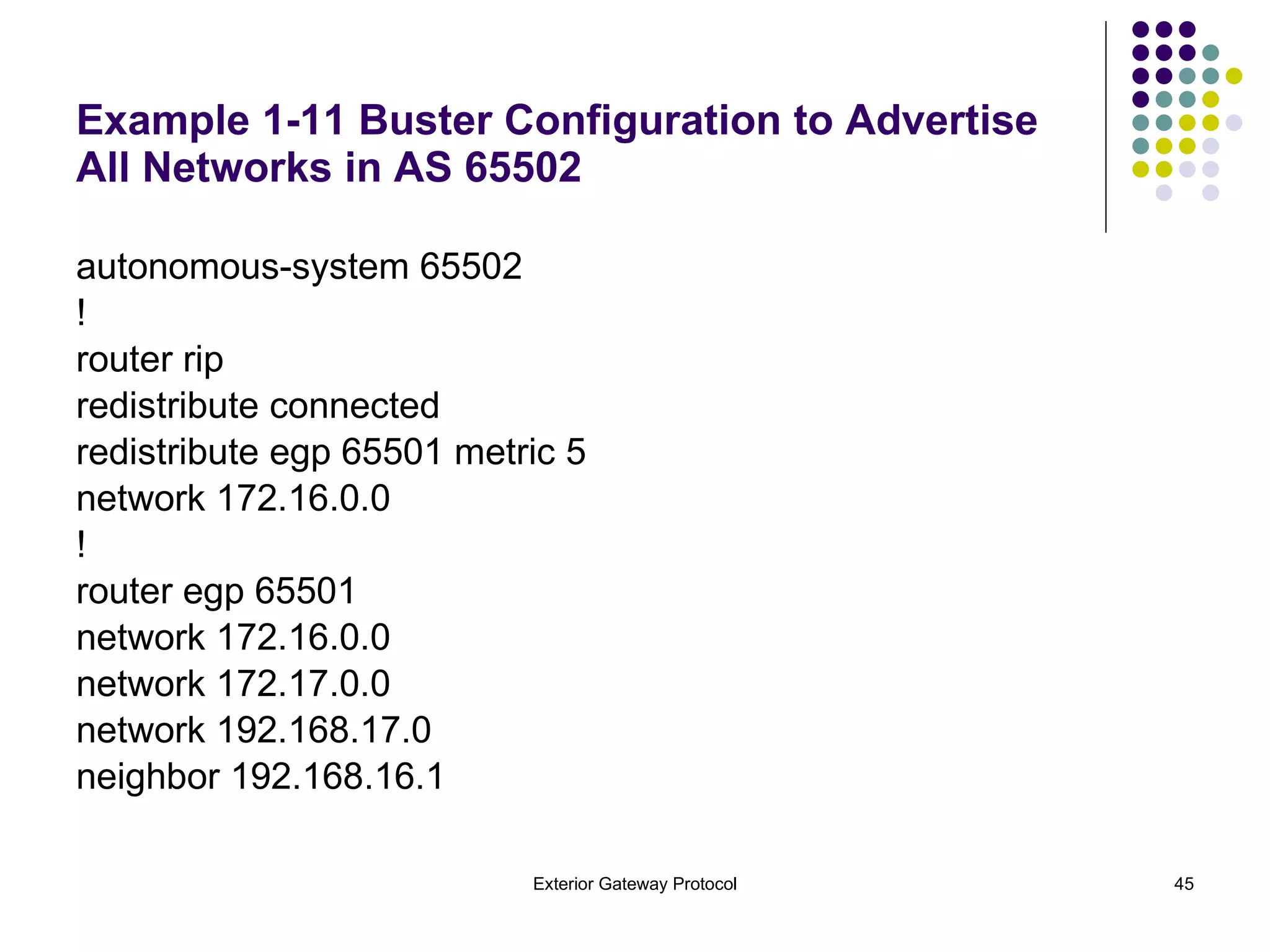
Example 1-11 Buster Configuration to Advertise All Networks in AS 65502 autonomous-system 65502 ! router rip redistribute connected redistribute egp 65501 metric 5 network 172.16.0.0 ! router egp 65501 network 172.16.0.0 network 172.17.0.0 network 192.168.17.0 neighbor 192.168.16.1
Example 1-12 Buster Is Now Advertising the Interior Networks of AS 65502 to Stan Example 1-12 shows Stan's routing table after the network statements have been added to Buster's EGP configuration. Stan# show ip route E 10.0.0.0 [140/4] via 192.168.18.2, 00:00:27, Serial1 C 192.168.16.0 is directly connected, Serial0 E 192.168.17.0 [140/1] via 192.168.16.2, 00:01:38, Serial0 C 192.168.18.0 is directly connected, Serial1 E 192.168.19.0 [140/1] via 192.168.18.2, 00:00:27, Serial1 E 192.168.20.0 [140/4] via 192.168.18.2, 00:00:27, Serial1 E 192.168.21.0 [140/4] via 192.168.18.2, 00:00:27, Serial1 E 192.168.22.0 [140/1] via 192.168.18.2, 00:00:27, Serial1 E 172.16.0.0 [140/1] via 192.168.16.2, 00:01:39, Serial0 E 172.17.0.0 [140/1] via 192.168.16.2, 00:01:39, Serial0 Stan#
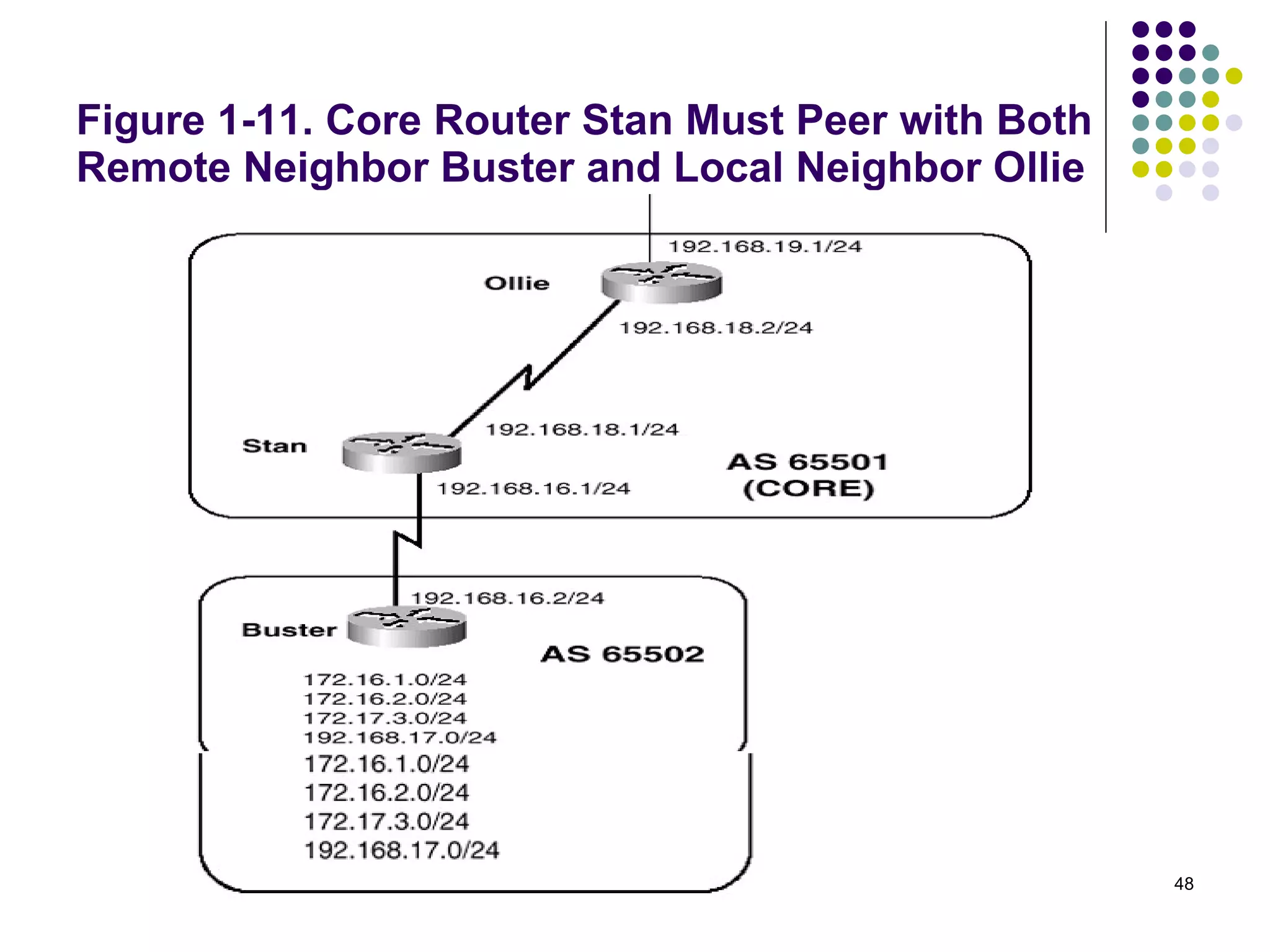
Case Study: An EGP Core Gateway By definition, an EGP core gateway can peer with multiple neighbors within multiple far autonomous systems and can pass network information from one FAS to another FAS. Because of this, the configuration of a core gateway differs slightly. Figure 1-11 shows a core router, Stan, which is peered with a router in a FAS (Buster) and a router within its LAS (Ollie).
Figure 1-11. Core Router Stan Must Peer with Both Remote Neighbor Buster and Local Neighbor Ollie
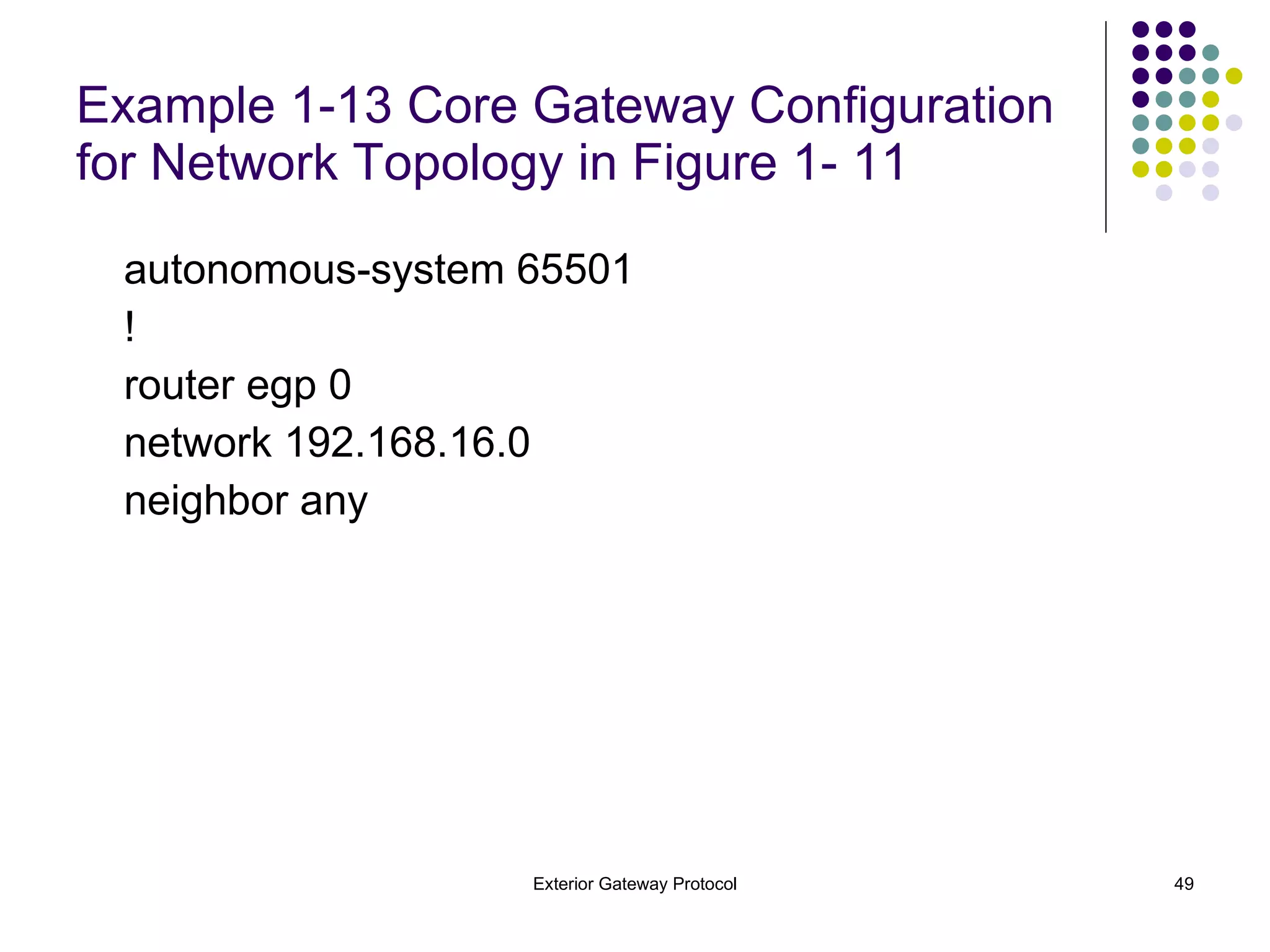
Example 1-13 Core Gateway Configuration for Network Topology in Figure 1- 11 autonomous-system 65501 ! router egp 0 network 192.168.16.0 neighbor any
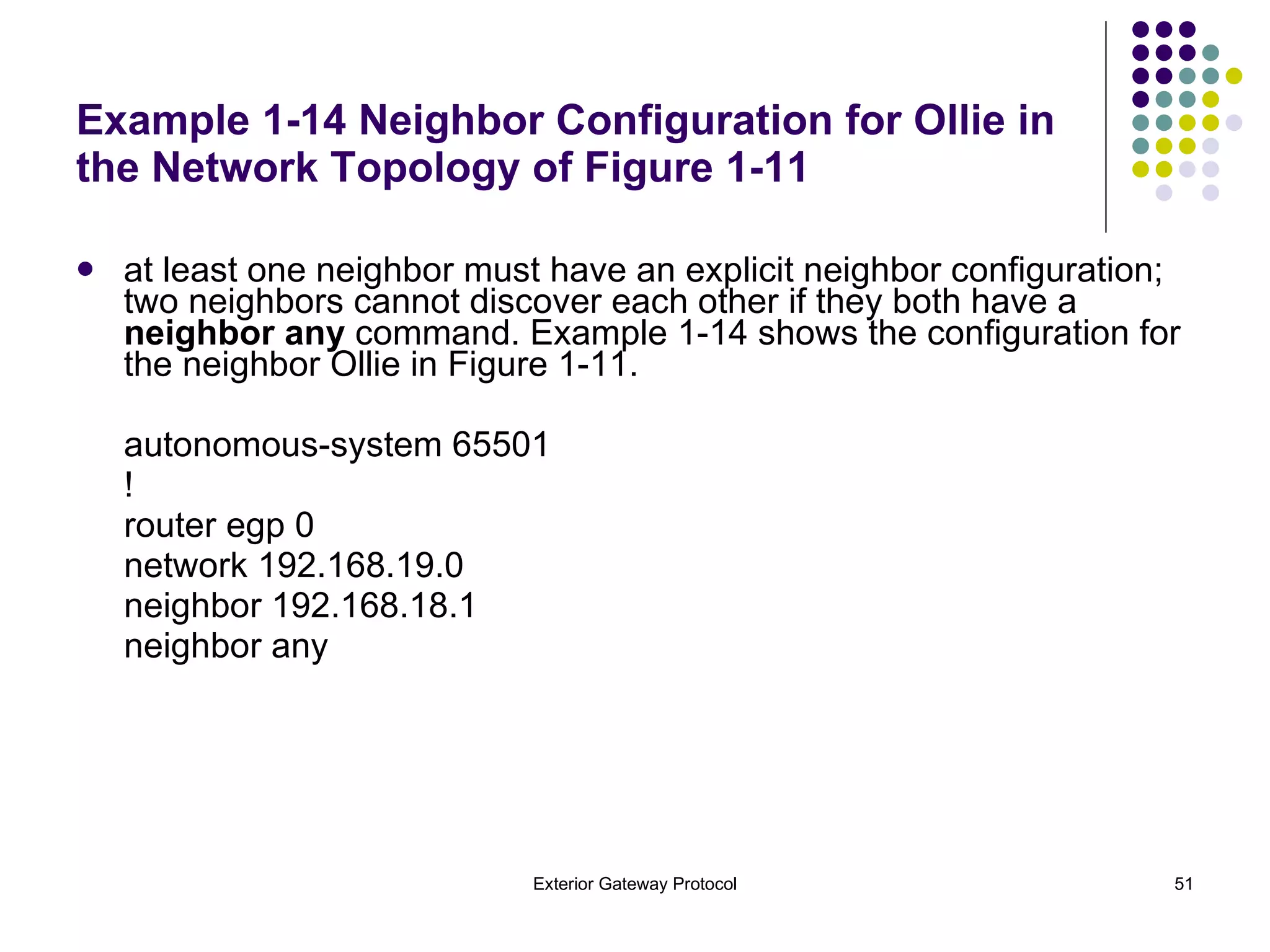
The LAS is still specified with the  autonomous-system  command, but the FAS is not specified by the  router egp  command. Instead, an AS number of 0 is used to specify any AS. Likewise, neighbors are specified with a  neighbor any  command, to respond to any neighbor that sends Acquisition messages.  The  neighbor any  command implicitly configures neighbors, whereas the  neighbor  command explicitly configures neighbors. Core gateways can have explicitly configured neighbors, but the implicit  neighbor any  makes life simpler when there are a large number of neighbors, as might be expected at a core gateway.
Example 1-14 Neighbor Configuration for Ollie in the Network Topology of Figure 1-11 at least one neighbor must have an explicit neighbor configuration; two neighbors cannot discover each other if they both have a  neighbor any  command. Example 1-14 shows the configuration for the neighbor Ollie in Figure 1-11. autonomous-system 65501 ! router egp 0 network 192.168.19.0 neighbor 192.168.18.1 neighbor any
Figure 1-12. Spanky and Buckwheat Must Peer Only with Stan, Whereas Alfalfa Must Peer Only with Ollie
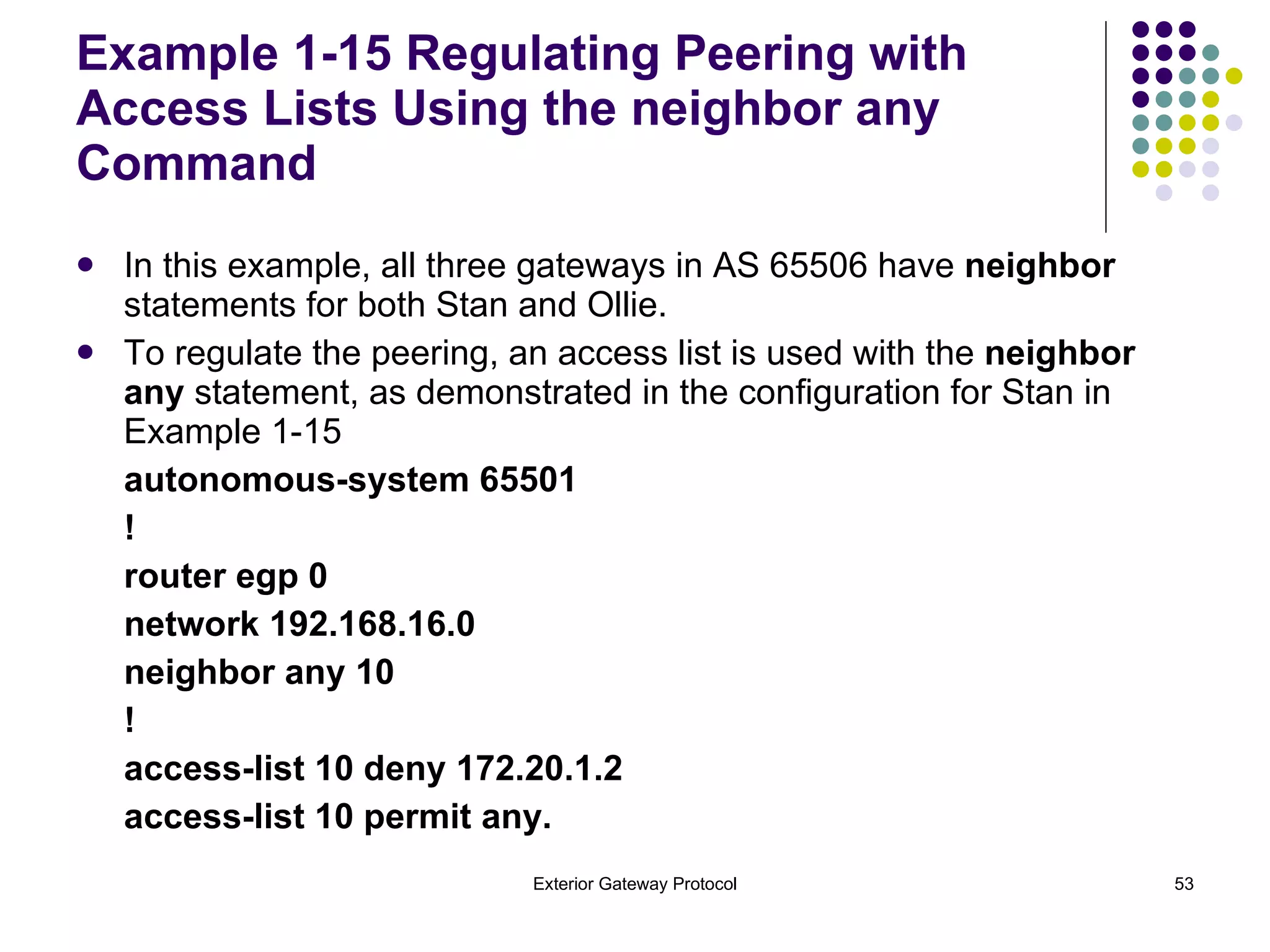
Example 1-15 Regulating Peering with Access Lists Using the neighbor any Command In this example, all three gateways in AS 65506 have  neighbor  statements for both Stan and Ollie.  To regulate the peering, an access list is used with the  neighbor any  statement, as demonstrated in the configuration for Stan in Example 1-15 autonomous-system 65501 ! router egp 0 network 192.168.16.0 neighbor any 10 ! access-list 10 deny 172.20.1.2 access-list 10 permit any.
In Example 1-15, the  neighbor any  statement contains a reference to access list 10, which denies  Alfalfa (172.20.1.2) and permits all other neighbors. A similar configuration at Ollie denies Spanky and Buckwheat and permits all other neighbors.  Example 1-15 Regulating Peering with Access Lists Using the neighbor any Command
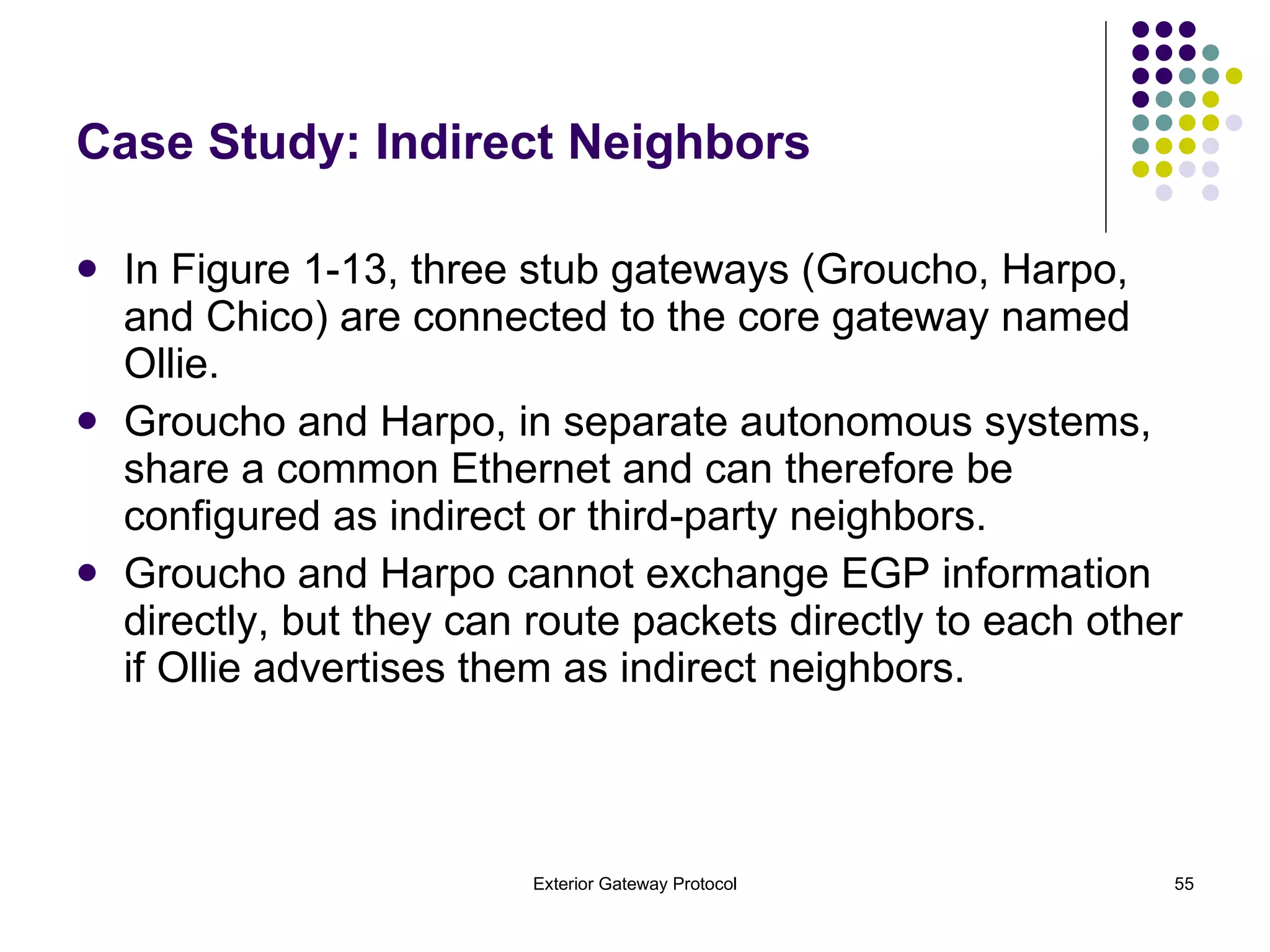
Case Study: Indirect Neighbors In Figure 1-13, three stub gateways (Groucho, Harpo, and Chico) are connected to the core gateway named Ollie. Groucho and Harpo, in separate autonomous systems, share a common Ethernet and can therefore be configured as indirect or third-party neighbors. Groucho and Harpo cannot exchange EGP information directly, but they can route packets directly to each other if Ollie advertises them as indirect neighbors.
Figure 1-13. EGP Indirect Neighbors
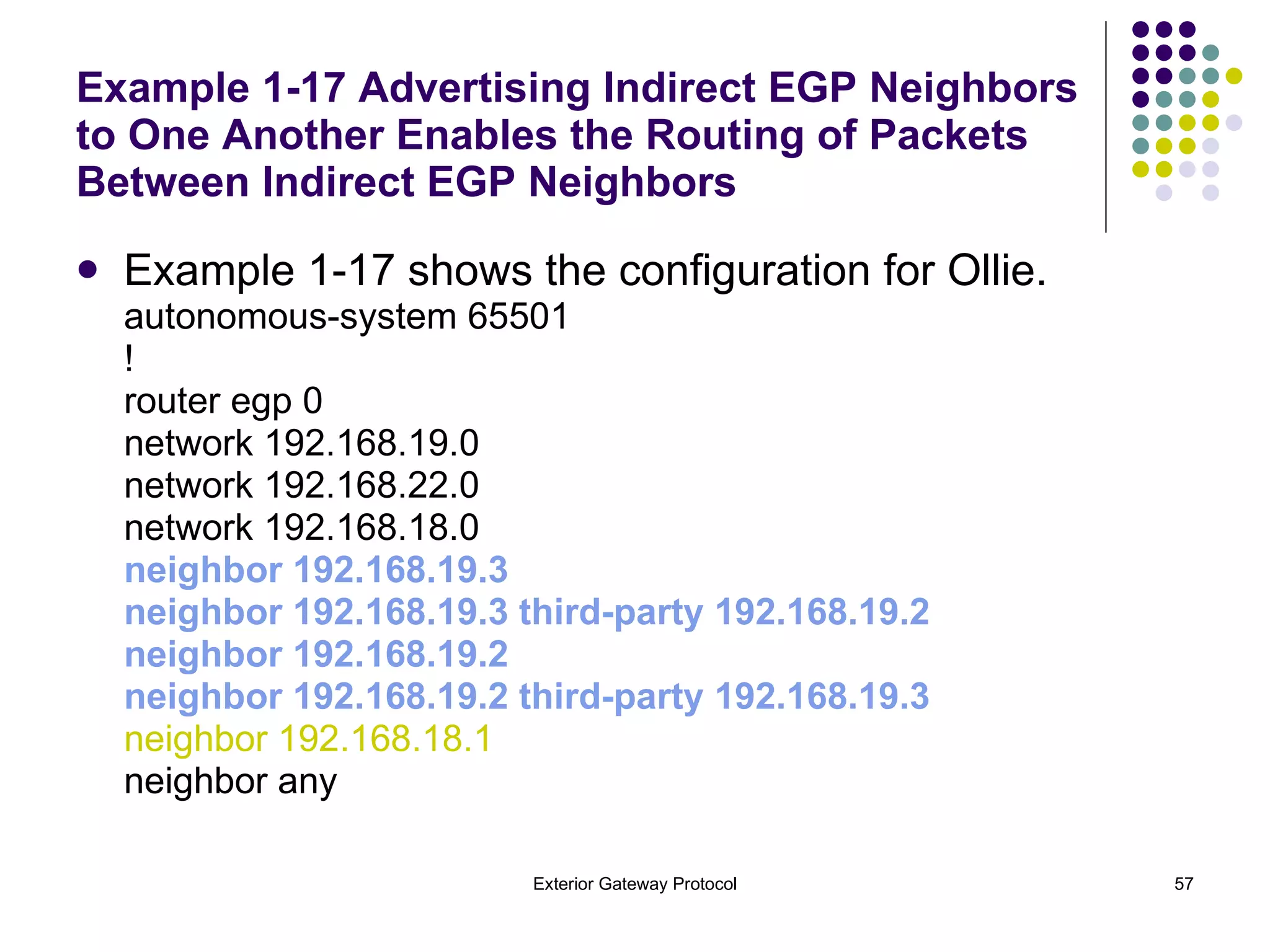
Example 1-17 Advertising Indirect EGP Neighbors to One Another Enables the Routing of Packets Between Indirect EGP Neighbors  Example 1-17 shows the configuration for Ollie. autonomous-system 65501 ! router egp 0 network 192.168.19.0 network 192.168.22.0 network 192.168.18.0 neighbor 192.168.19.3 neighbor 192.168.19.3 third-party 192.168.19.2 neighbor 192.168.19.2 neighbor 192.168.19.2 third-party 192.168.19.3 neighbor 192.168.18.1 neighbor any
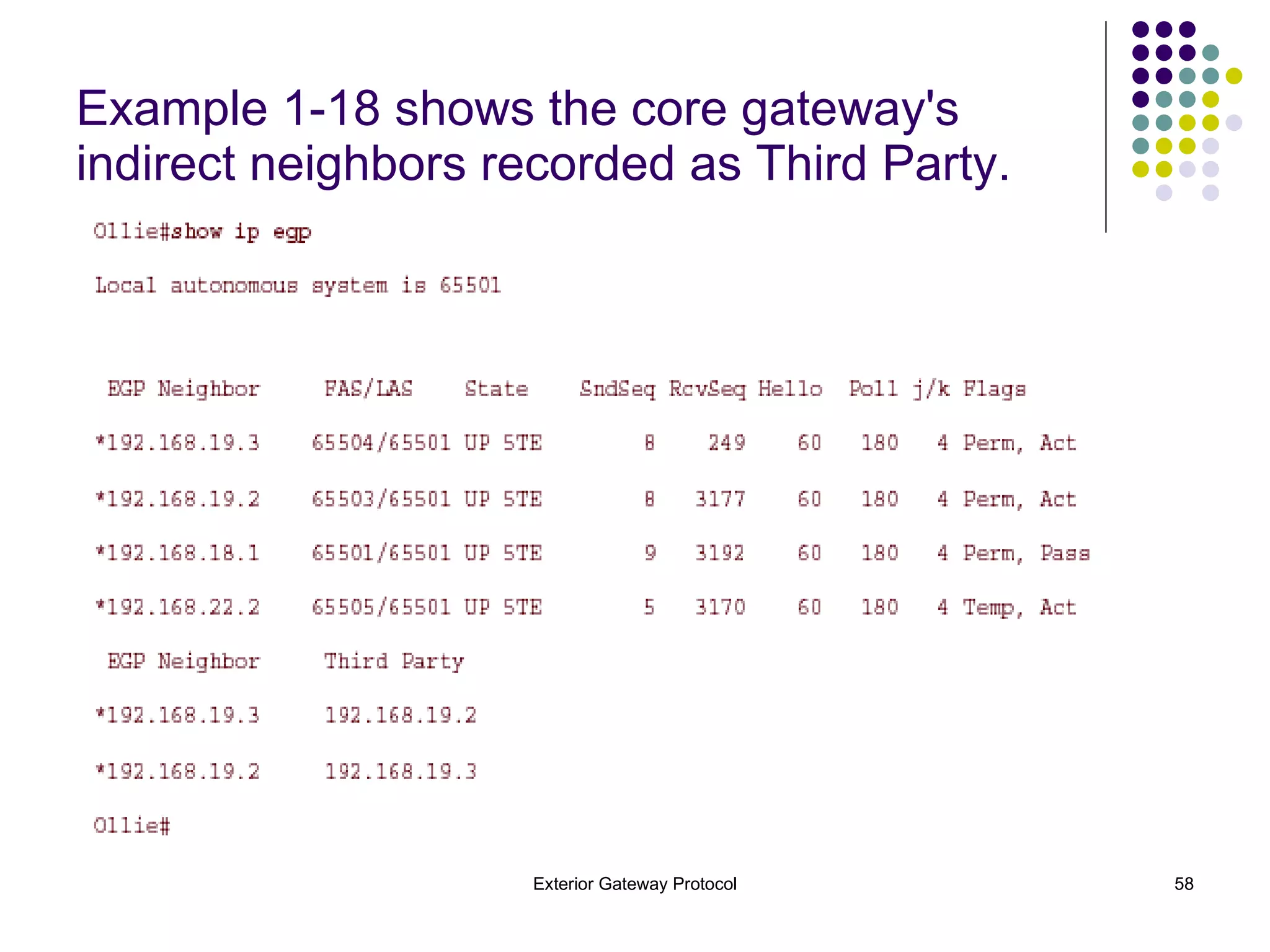
Example 1-18 shows the core gateway's indirect neighbors recorded as Third Party.
Example 1-19 Routing Table Displays Next-Hop Routes to Indirect Neighbors
Case Study: Default Routes EGP can be configured to advertise a default route in addition to more specific routes. If an AS has only a single exterior gateway, a default route is usually more efficient than a full list of exterior routes. Memory and processing cycles are conserved on the router, and bandwidth is saved on the link. To advertise a default route into AS 65502, as illustrated previously in Figure 1-13,
Example 1-20 Advertising a Default Route Stan as demonstrated in Example 1-20. router egp 0 network 192.168.16.0 neighbor any default-information originate distribute-list 20 out Serial0 ! access-list 20 permit 0.0.0.0 The  default-information originate  command is used to generate the default route.
Example 1-21 192.168.20.1 Is Reachable as a Result of the Default Route
Troubleshooting EGP As with any routing protocol, the first step in troubleshooting EGP is examining the routing tables. If a required route is missing or an unwanted route is present, the routing tables should lead you to the source of the problem. Because the EGP metrics have very little meaning, using the routing tables for troubleshooting is greatly simplified in comparison with other routing protocols. When examining EGP configurations, remember that the gateway must have some sort of  neighbor  statement—either explicit or  neighbor any —for every neighbor. Understanding the use of the  network  statement, and how it differs from the  network  statement used with IGPs, is also important. The  debug ip egp transactions  command, used several times in the "Operation of EGP" section, is a very useful troubleshooting tool. The output of this command reveals all the important information in all the EGP messages being exchanged between neighbors.
Interpreting the Neighbor Table An examination of the EGP neighbor table using  show ip egp  will tell about the state and configuration of a gateway's neighbors. Example 1-18 displayed the output of this command;  Example 1-22 shows some additional output from the  show ip egp  command that examines Stan's neighbor table.
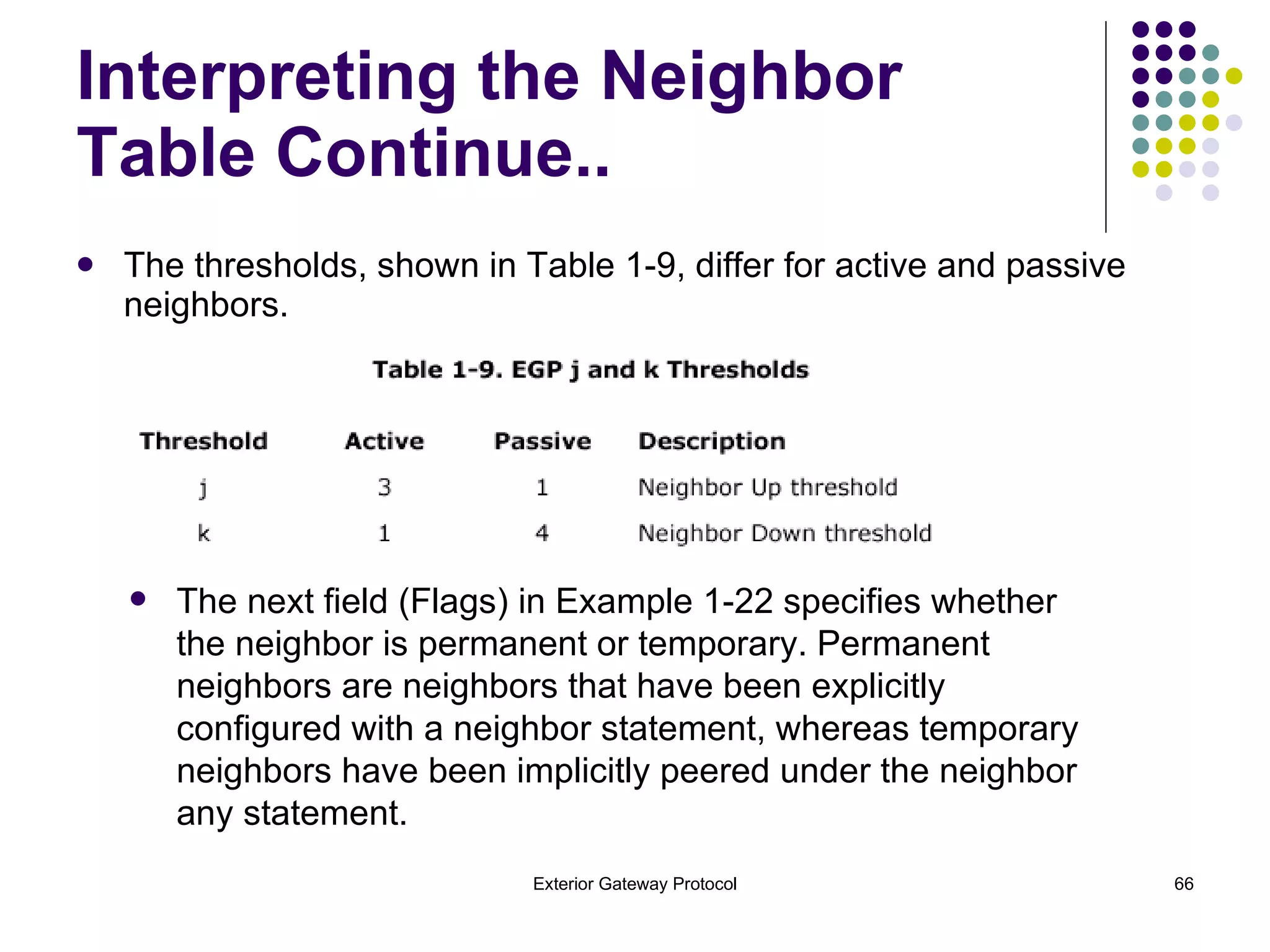
Stan's neighbor table shows that neighbor 192.168.18.2 is an interior neighbor, because the FAS and LAS are the same (65501). The state of the neighbor is shown, as is its uptime. Whereas 192.168.18.2 has been up for just over 2 hours, 192.168.16.2 has been up for 6 days and 17 hours. The present sequence number being used by the gateway for each neighbor is shown, as is the present sequence number being used by the neighbor. After the Hello and Poll intervals, the number of neighbor reachability messages that have been received in the past four Hello intervals is recorded.  This number is used to determine whether a neighbor should be declared Up or Down, based on two values known as the  j  and  k  thresholds. The  j  threshold specifies the number of neighbor reachability messages that must be received during four Hello intervals before a Down neighbor is declared Up. The  k  threshold specifies the minimum number of neighbor reachability messages that must be received within four Hello intervals to prevent an Up neighbor from being declared Down.  Interpreting the Neighbor Table Continue..
The thresholds, shown in Table 1-9, differ for active and passive neighbors. Interpreting the Neighbor Table Continue.. The next field (Flags) in Example 1-22 specifies whether the neighbor is permanent or temporary. Permanent neighbors are neighbors that have been explicitly configured with a neighbor statement, whereas temporary neighbors have been implicitly peered under the neighbor any statement.
The last field indicates whether the local router is the active or the passive neighbor. Example 1-22 shows that Stan is the active neighbor for both of its peer relationships, so you would expect Ollie to show that it is the passive neighbor. Interpreting the Neighbor Table Continue..
Case Study: Converging at the Speed of Syrup A distinct characteristic of EGP is that nothing happens quickly. The neighbor acquisition process is slow, and the advertisement of network changes is almost glacial. As a result, you might sometimes mistakenly assume that there is a problem where none exists (except for the problematic nature of EGP itself).  suppose users in AS 65503 of Figure 1-13 complain that they cannot reach network 172.17.0.0 in AS 65502. When examine Groucho's routing table, there is a route to 172.17.0.0 (see Example 1-24), but a ping to a known address on that network fails. You might be led to believe that traffic to the network is being misrouted, or  black holed.
Example 1-24 Groucho in Figure 1-13 Has a Route to 172.17.0.0, but the Network Is Unreachable Groucho# show ip route E 10.0.0.0 [140/4] via 192.168.19.1, 00:01:23, Ethernet0 E 192.168.16.0 [140/4] via 192.168.19.1, 00:01:23, Ethernet0 E 192.168.17.0 [140/4] via 192.168.19.1, 00:01:23, Ethernet0 C 192.168.19.0 is directly connected, Ethernet0 C 192.168.20.0 is directly connected, Loopback0 E 192.168.21.0 [140/4] via 192.168.19.1, 00:01:24, Ethernet0 E 192.168.22.0 [140/1] via 192.168.19.1, 00:01:24, Ethernet0 E 172.16.0.0 [140/4] via 192.168.19.1, 00:01:24, Ethernet0 E 172.17.0.0 [140/4] via 192.168.19.1, 00:01:24, Ethernet0 E 172.18.0.0 [140/4] via 192.168.19.1, 00:01:24, Ethernet0 E* 0.0.0.0 0.0.0.0 [140/4] via 192.168.19.1, 00:01:24, Ethernet0 Groucho# ping 172.17.3.1 Type escape sequence to abort. Sending 5, 100-byte ICMP Echos to 172.17.3.1, timeout is 2 seconds: ..... Success rate is 0 percent (0/5) Groucho# Case Study: Converging at the Speed of Syrup
Example 1-25 New Network Updates Are Not Being Advertised Notice that a new update for network 172.17.0.0 has not been received in more than 16 minutes, but the route entry for the network is still valid and is still being advertised to Ollie's neighbors. Ollie# show ip route E 10.0.0.0/8 [140/1] via 192.168.22.2, 00:01:20, Serial1 E 192.168.16.0/24 [140/1] via 192.168.18.1, 00:01:13, Serial0 E 192.168.17.0/24 [140/4] via 192.168.18.1, 00:16:14, Serial0 C 192.168.18.0/24 is directly connected, Serial0 C 192.168.19.0/24 is directly connected, Ethernet0 E 192.168.20.0/24 [140/1] via 192.168.19.2, 00:02:06, Ethernet0 E 192.168.21.0/24 [140/1] via 192.168.22.2, 00:01:21, Serial1 C 192.168.22.0/24 is directly connected, Serial1 E 172.16.0.0/16 [140/4] via 192.168.18.1, 00:01:13, Serial0 E 172.17.0.0/16 [140/4] via 192.168.18.1, 00:16:14, Serial0 E 172.18.0.0/16 [140/1] via 192.168.19.3, 00:01:59, Ethernet0 Ollie#
Stan has not included network 172.17.0.0 in the past five update messages to Ollie.  There is no black hole problem here; network 172.17.0.0 has just become unreachable due to a disconnected Ethernet interface on a router in AS 65502.  EGP will not declare a route down until it has failed to receive six consecutive updates for the route. Couple this with an update interval of 180 seconds, and you will see that EGP will take 18 minutes to declare a route down. Only then will it stop including the network in its own updates.  In the internetwork of  Figure 1-13,  54 minutes will pass between the time the exterior gateway of AS 65502 declares network  172.17.0.0 down and the time Groucho declares the network down! Case Study: Converging at the Speed of Syrup Continue..
 

1 egp

  • 1.
    Exterior Gateway ProtocolThe Origins of EGP Operation of EGP Shortcomings of EGP Configuring EGP Troubleshooting EGP
  • 2.
    The Origins ofEGP This section discusses the history of the development of the Exterior Gateway Protocol.
  • 3.
    Operation of EGPThis section explores the fundamental mechanics of EGP with a focus on EGP topology issues, EGP functions, and EGP message formats.
  • 4.
    Shortcomings of EGPThis section explores some of the reasons why EGP is no longer pursued as a possible external gateway protocol solution.
  • 5.
    Configuring EGP Thissection presents four separate case studies—EGP stub gateway, EGP core gateway, indirect neighbors, and default routes—to demonstrate different types of EGP configuration.
  • 6.
    Troubleshooting EGP Thissection examines how to interpret an EGP neighbor table and presents a case study on the slow convergence speed of an EGP network to show why EGP is no longer a popular option.
  • 7.
    Exterior Gateway ProtocolThis chapter serves as something of a history lesson. Examining the motives for developing an external gateway protocol and the shortcomings of the original external protocol provides a prologue for the following two chapters. BGP will make more sense to you if you are familiar with the roots from which it evolved.
  • 8.
    The Origins ofEGP In the early 1980s, the routers (gateways) that made up the ARPANET (predecessor of the modern Internet) ran a distance vector routing protocol known as the Gateway-to-Gateway Protocol (GGP). Every gateway knew a route to every reachable network, at a distance measured in gateway hops. As the ARPANET grew, its architects predict the same problem that administrators of many growing internetworks encounter today: Their routing protocol did not scale well.
  • 9.
    Eric Rosen, recordsthe scalability problems: With all gateways knowing all routes, "the overhead of the routing algorithm becomes excessively large." Whenever a topology change occurs, the likelihood of which increases with the size of the internetwork, all gateways have to exchange routing information and recalculate their tables. Even when the internetwork is in a steady state, the size of the routing tables and routing updates becomes an increasing burden.
  • 10.
    Eric Rosen, Continue..As the number of GGP software implementations increases, and the hardware platforms on which they are implemented become more diverse, "it becomes impossible to regard the Internet as an integrated communications system." Specifically, maintenance and troubleshooting become "nearly impossible."
  • 11.
    As the numberof gateways grows, so does the number of gateway administrators. As a result, resistance to software upgrades increases: “Any proposed change must be made in too many different places by too many different people." Eric Rosen, Continue..
  • 12.
    Each AS isconnected to other autonomous systems via one or more exterior gateways. RFC 827 proposed that the exterior gateways share routing information between each other by means of a protocol known as the EGP. Contrary to popular belief, although EGP is a distance vector protocol, it is not a routing protocol . It has no algorithm for choosing an optimal path between networks; rather, it is a common language that exterior gateways use to exchange reachability information with other exterior gateways. That reachability information is a simple list of major network addresses (no subnets) and the gateways by which they can be reached. The Origins of EGP Continue..
  • 13.
    EGP Topology IssuesEGP messages are exchanged between EGP neighbors, or peers. If the neighbors are in the same AS, they are interior neighbors . If they are in different autonomous systems, they are exterior neighbors . EGP has no function that automatically discovers its neighbors; the addresses of the neighbors are manually configured, and the messages they exchange are unicast to the configured addresses.
  • 14.
    For example, Figure1-1 shows two EGP neighbors separated by a router that speaks only RIP. Because EGP messages are unicast to neighbors, they can cross router boundaries. Therefore, Cisco routers set the TTL of EGP packets to255. EGP Neighbors Do Not Have to Be Connected to the Same Network EGP Topology Issues Continue..
  • 15.
    To understand whyEGP defines core and stub gateways, it is necessary to understand the architectural limitations of EGP. As previously mentioned, EGP is not a routing protocol. Its updates list only reachable networks, without including enough information to determine shortest paths or to prevent routing loops. Therefore, the EGP topology must be built with no loops. EGP Topology Issues Continue..
  • 16.
    Figure 1-2 showsan EGP topology. There is a single core AS to which all other autonomous systems (stub autonomous systems) must attach. This two-level tree topology is very similar to the two-level topology requirements of OSPF, and its purpose is the same. EGP Topology Issues Continue..
  • 17.
    EGP Topology IssuesContinue.. To Prevent Routing Loops, Only Core Gateways Can Send information Learned from One AS to Another AS
  • 18.
    EGP Functions EGPconsists of the following three mechanisms: Neighbor Acquisition Protocol Neighbor Reachability Protocol Network Reachability Protocol These three mechanisms use ten message types to establish a neighbor relationship, maintain the neighbor relationship, exchange network reachability information with the neighbor, and notify the neighbor of procedural or formatting errors.
  • 19.
  • 20.
    Neighbor Acquisition ProtocolBefore EGP neighbors can exchange reachability information, they must establish that they are compatible. This function is performed by a simple two-way handshake in which one neighbor sends a Neighbor Acquisition Request message, and the other neighbor responds with a Neighbor Acquisition Confirm message . A gateway can refuse to accept a neighbor by responding with a Neighbor Acquisition Refuse message rather than an Acquisition Confirm message . The Refuse message can include a reason for the refusal, such as a lack of table space, or it can refuse for an unspecified reason. A gateway can also break an established neighbor relationship by sending a Neighbor Cease message . As with the Refuse message, the originating gateway has the option of including a reason for the Cease or leaving the reason unspecified. A neighbor receiving a Neighbor Cease message responds with a Neighbor Cease Acknowledgment .
  • 21.
    Notice in Example1-1 that each EGP message has a sequence number. The sequence number allows EGP message pairs (such as Neighbor Acquisition Request/Confirm, Request/Refusal, and Cease/Cease-Ack pairs) to be identified. Active gateways always initiate the neighbor relationship by sending Neighbor Acquisition Requests. The neighbor whose AS number is lower will be the active neighbor. Passive gateways do not send Acquisition Requests; they only respond to them. Neighbor Acquisition Protocol Continue
  • 22.
    Example 1-1 debugip egp transactions Command Output Displays EGP State Transitions
  • 23.
    Neighbor Reachability ProtocolAfter a gateway has acquired a neighbor, it maintains the neighbor relationship by sending periodic Hello messages. The neighbor responds to each Hello with an I-H-U message. Cisco uses a default period of 60 seconds, which can be changed with the command timers egp. When three Hello/I-H-U message pairs have been exchanged, the neighbor state changes from Down to Up (Example 1-2) . The neighbors can then exchange network reachability information, as described in the next section.
  • 24.
    Example 1-2 debugip egp transactions Command Output Displays Two-Way Handshake Success and EGP State Transitions
  • 25.
    If an activeneighbor sends three sequential messages without receiving a response, the neighbor state transitions to Down. The gateway sends three more Hellos at the normal Hello interval; if there is still no response, the state changes to Cease. The gateway sends three Neighbor Cease messages at 60-second intervals. If the neighbor responds to any of the messages with a Cease Acknowledgment, or does not respond at all, the gateway transitions the neighbor state to Idle and waits 5 minutes before transitioning back to Acquire and attempting to reacquire the neighbor. Example 1-3 shows this sequence of events. Neighbor Reachability Protocol Continue..
  • 26.
    Example 1-3 TheNeighbor at 192.168.16.2 Has Stopped Responding. The Interval Between Each of the Unacknowledged EGP Messages Is 60 Seconds
  • 27.
  • 28.
    Network Reachability ProtocolWhen the neighbor state is Up, the EGP neighbors can begin exchanging reachability information. Each gateway periodically sends a Poll message to its neighbor, containing some sequence number. The neighbor responds with an Update message that contains the same sequence number and a list of reachable networks . Example 1-5 shows how Cisco's IOS Software uses the sequence numbers.
  • 29.
    Example 1-5 EGPNeighbors Poll Each Other Periodically for Network Reachability Updates
  • 30.
  • 31.
    The default pollinginterval used by Cisco's IOS Software is 180 seconds and can be changed with the command timers egp. Normally, a gateway sends an Update only when it is polled; however, this means a topology change might go unannounced for up to 3 minutes. EGP provides for this eventuality by allowing a gateway to send one unwanted Update—that is, an Update that is not in response to a Poll—each Poll interval. Cisco, however, does not support unsolicited Updates. EGP is a purely classful protocol, and the source network—as well as the network addresses listed in the Updates—are always major class network addresses, and never subnets. Network Reachability Protocol
  • 32.
    Figure 1-3 illustratesthe concept of indirect EGP neighbors. One router, Moe, is a core gateway and is peered with three other gateways.
  • 33.
    A neighbor isan interior gateway if it is in the same AS, and it is an exterior gateway if it is in a different AS. In Figure 1-3, all the EGP gateways see all their neighbors as external gateways. If Larry were speaking EGP and peered with Moe, those two routers would see each other as interior gateways. The EGP Update message associates a distance with each network it lists. The distance field is 8 bits, so the distance can range from 0 to 255. RFC 904 does not specify how the distance is to be interpreted, however, other than that 255 is used to indicate unreachable networks. Nor does the RFC define an algorithm for using the distance to calculate shortest inter-AS paths. Cisco chooses to interpret the distance as hops, as shown in Example 1-5. The default rules are very basic: A gateway advertises all networks within its own AS as having a distance of 0. A gateway advertises all networks within an AS other than its own as having a distance of 3. A gateway indicates that a network has become unreachable by giving it a distance of 255. Network Reachability Protocol Continue..
  • 34.
    Example 1-6 showsthe routing table of Shemp and the route entries resulting from the Update in Example 1-5.
  • 35.
    There are twopoints of interest in the routing table. First , notice that the EGP entries have an administrative distance of 140. This is higher than the administrative distance of any IGP (with the exception of External EIGRP), so a router will always choose an IGP route over an EGP advertisement of the same network. Second , notice that the distances to each of the EGP-advertised networks are one higher than the distances shown in the Update of Example 1-5. Cisco's EGP process increments the distance by one, just as a RIP routing algorithm does.
  • 36.
    Shortcoming of EGPThe fundamental problem with EGP is its inability to detect routing loops. Because there is an upper boundary on the distance EGP uses (255). As a result, EGP must be run on an engineered loop-free topology. The autonomous systems making up the Internet would need to evolve into a less structured mesh, in which many autonomous systems could serve as transit systems for many other autonomous systems.
  • 37.
    Another major problemwith EGP is its inability to adequately interact with IGPs to determine a shortest route to a network in another AS. For example, EGP distances do not reliably translate into RIP hop counts. If the EGP distance causes the hop count to exceed 15, RIP declares the network unreachable. Other shortcomings of EGP include its susceptibility to failures when attempting to convey information on a large number of networks, and its vulnerability to intentionally or unintentionally inaccurate network information. EGP can be boringly slow to advertise a network change. As the example demonstrates, almost an hour passes before a gateway four hops away determines that the network has gone down. Several attempts were made to create an EGPv3, but none were successful. In the end, EGP was abandoned in favor of an entirely new inter-AS protocol, BGP. Shortcoming of EGP
  • 38.
    Configuring EGP Youcan configure EGP on a router in four basic steps: Step 1. Specify the router's AS with the command autonomous-system. Step 2. Start the EGP process and specify the neighbor's AS with the command router egp. Step 3. Specify the EGP neighbors with the neighbor command. Step 4. Specify what networks are to be advertised by EGP.
  • 39.
    Case Study: AnEGP Stub Gateway Figure 1-10 shows an EGP stub gateway in AS 65502, connected to a core gateway in AS 65501. The IGP of the stub AS is RIP.
  • 40.
    Example 1-7 StubGateway Configuration for Figure 1-10 autonomous-system 65502 ! router rip redistribute connected redistribute egp 65501 metric 5 network 172.16.0.0 ! router egp 65501 neighbor 192.168.16.1 Notice that the local AS (LAS) is specified by the autonomous-system statement, and the far AS (FAS) is specified by the router egp statement. An EGP process cannot be configured until the LAS is configured.
  • 41.
    Example 1-8 Buster'sRouting Table Shows Entries Learned from the EGP Neighbor and from the Interior RIP Neighbors Buster# show ip route E 10.0.0.0 [140/4] via 192.168.16.1, 00:02:12, Serial3 C 192.168.16.0 is directly connected, Serial3 R 192.168.17.0 [120/1] via 172.16.1.2, 00:00:05, Ethernet0 E 192.168.19.0 [140/4] via 192.168.16.1, 00:02:13, Serial3 E 192.168.20.0 [140/4] via 192.168.16.1, 00:02:13, Serial3 E 192.168.21.0 [140/4] via 192.168.16.1, 00:02:13, Serial3 E 192.168.22.0 [140/4] via 192.168.16.1, 00:02:13, Serial3 172.16.0.0 255.255.255.0 is subnetted, 2 subnets C 172.16.1.0 is directly connected, Ethernet0 R 172.16.2.0 [120/1] via 172.16.1.2, 00:00:05, Ethernet0 R 172.17.0.0 [120/1] via 172.16.1.2, 00:00:05, Ethernet0 Buster# Buster's routing table contains both EGP route entries learned from the core gateway and RIP entries learned from the interior neighbors.
  • 42.
    Example 1-9 RoutingTable from a Router Interior to AS 65502 Shows the Redistributed EGP Routes Charlie# show ip route R 10.0.0.0 [120/5] via 172.16.1.1, 00:00:13, Ethernet0 R 192.168.16.0 [120/1] via 172.16.1.1, 00:00:13, Ethernet0 C 192.168.17.0 is directly connected, Ethernet3 R 192.168.19.0 [120/5] via 172.16.1.1, 00:00:13, Ethernet0 R 192.168.20.0 [120/5] via 172.16.1.1, 00:00:13, Ethernet0 R 192.168.21.0 [120/5] via 172.16.1.1, 00:00:13, Ethernet0 R 192.168.22.0 [120/5] via 172.16.1.1, 00:00:13, Ethernet0 172.16.0.0 255.255.255.0 is subnetted, 2 subnets C 172.16.1.0 is directly connected, Ethernet0 C 172.16.2.0 is directly connected, Ethernet1 172.17.0.0 255.255.255.0 is subnetted, 1 subnets C 172.17.3.0 is directly connected, Ethernet2 Charlie#
  • 43.
    Notice that directlyconnected networks are also being redistributed into RIP. This configuration is necessary to advertise network 192.168.16.0 into the LAS; split horizon prevents Stan from advertising the network to Buster via EGP. An alternative configuration is to add a network 192.168.16.0 statement to the RIP configuration, along with a passive-interface statement to keep RIP broadcasts off of the inter-AS link. Example 1-9 Routing Table from a Router Interior to AS 65502 Shows the Redistributed EGP Routes
  • 44.
    Example 1-10 Stan'sRouting Table Shows That None of the Interior Networks from AS 65502 Are Being Learned from Buster Stan# show ip route E 10.0.0.0 [140/4] via 192.168.18.2, 00:01:56, Serial1 C 192.168.16.0 is directly connected, Serial0 C 192.168.18.0 is directly connected, Serial1 E 192.168.19.0 [140/1] via 192.168.18.2, 00:01:57, Serial1 E 192.168.20.0 [140/4] via 192.168.18.2, 00:01:57, Serial1 E 192.168.21.0 [140/4] via 192.168.18.2, 00:01:57, Serial1 E 192.168.22.0 [140/1] via 192.168.18.2, 00:01:57, Serial1 Stan# As Buster's EGP configuration stands so far, network information is being received from the core, but no interior networks are being advertised to the core (see Example 1-10).
  • 45.
    Example 1-11 BusterConfiguration to Advertise All Networks in AS 65502 autonomous-system 65502 ! router rip redistribute connected redistribute egp 65501 metric 5 network 172.16.0.0 ! router egp 65501 network 172.16.0.0 network 172.17.0.0 network 192.168.17.0 neighbor 192.168.16.1
  • 46.
    Example 1-12 BusterIs Now Advertising the Interior Networks of AS 65502 to Stan Example 1-12 shows Stan's routing table after the network statements have been added to Buster's EGP configuration. Stan# show ip route E 10.0.0.0 [140/4] via 192.168.18.2, 00:00:27, Serial1 C 192.168.16.0 is directly connected, Serial0 E 192.168.17.0 [140/1] via 192.168.16.2, 00:01:38, Serial0 C 192.168.18.0 is directly connected, Serial1 E 192.168.19.0 [140/1] via 192.168.18.2, 00:00:27, Serial1 E 192.168.20.0 [140/4] via 192.168.18.2, 00:00:27, Serial1 E 192.168.21.0 [140/4] via 192.168.18.2, 00:00:27, Serial1 E 192.168.22.0 [140/1] via 192.168.18.2, 00:00:27, Serial1 E 172.16.0.0 [140/1] via 192.168.16.2, 00:01:39, Serial0 E 172.17.0.0 [140/1] via 192.168.16.2, 00:01:39, Serial0 Stan#
  • 47.
    Case Study: AnEGP Core Gateway By definition, an EGP core gateway can peer with multiple neighbors within multiple far autonomous systems and can pass network information from one FAS to another FAS. Because of this, the configuration of a core gateway differs slightly. Figure 1-11 shows a core router, Stan, which is peered with a router in a FAS (Buster) and a router within its LAS (Ollie).
  • 48.
    Figure 1-11. CoreRouter Stan Must Peer with Both Remote Neighbor Buster and Local Neighbor Ollie
  • 49.
    Example 1-13 CoreGateway Configuration for Network Topology in Figure 1- 11 autonomous-system 65501 ! router egp 0 network 192.168.16.0 neighbor any
  • 50.
    The LAS isstill specified with the autonomous-system command, but the FAS is not specified by the router egp command. Instead, an AS number of 0 is used to specify any AS. Likewise, neighbors are specified with a neighbor any command, to respond to any neighbor that sends Acquisition messages. The neighbor any command implicitly configures neighbors, whereas the neighbor command explicitly configures neighbors. Core gateways can have explicitly configured neighbors, but the implicit neighbor any makes life simpler when there are a large number of neighbors, as might be expected at a core gateway.
  • 51.
    Example 1-14 NeighborConfiguration for Ollie in the Network Topology of Figure 1-11 at least one neighbor must have an explicit neighbor configuration; two neighbors cannot discover each other if they both have a neighbor any command. Example 1-14 shows the configuration for the neighbor Ollie in Figure 1-11. autonomous-system 65501 ! router egp 0 network 192.168.19.0 neighbor 192.168.18.1 neighbor any
  • 52.
    Figure 1-12. Spankyand Buckwheat Must Peer Only with Stan, Whereas Alfalfa Must Peer Only with Ollie
  • 53.
    Example 1-15 RegulatingPeering with Access Lists Using the neighbor any Command In this example, all three gateways in AS 65506 have neighbor statements for both Stan and Ollie. To regulate the peering, an access list is used with the neighbor any statement, as demonstrated in the configuration for Stan in Example 1-15 autonomous-system 65501 ! router egp 0 network 192.168.16.0 neighbor any 10 ! access-list 10 deny 172.20.1.2 access-list 10 permit any.
  • 54.
    In Example 1-15,the neighbor any statement contains a reference to access list 10, which denies Alfalfa (172.20.1.2) and permits all other neighbors. A similar configuration at Ollie denies Spanky and Buckwheat and permits all other neighbors. Example 1-15 Regulating Peering with Access Lists Using the neighbor any Command
  • 55.
    Case Study: IndirectNeighbors In Figure 1-13, three stub gateways (Groucho, Harpo, and Chico) are connected to the core gateway named Ollie. Groucho and Harpo, in separate autonomous systems, share a common Ethernet and can therefore be configured as indirect or third-party neighbors. Groucho and Harpo cannot exchange EGP information directly, but they can route packets directly to each other if Ollie advertises them as indirect neighbors.
  • 56.
    Figure 1-13. EGPIndirect Neighbors
  • 57.
    Example 1-17 AdvertisingIndirect EGP Neighbors to One Another Enables the Routing of Packets Between Indirect EGP Neighbors Example 1-17 shows the configuration for Ollie. autonomous-system 65501 ! router egp 0 network 192.168.19.0 network 192.168.22.0 network 192.168.18.0 neighbor 192.168.19.3 neighbor 192.168.19.3 third-party 192.168.19.2 neighbor 192.168.19.2 neighbor 192.168.19.2 third-party 192.168.19.3 neighbor 192.168.18.1 neighbor any
  • 58.
    Example 1-18 showsthe core gateway's indirect neighbors recorded as Third Party.
  • 59.
    Example 1-19 RoutingTable Displays Next-Hop Routes to Indirect Neighbors
  • 60.
    Case Study: DefaultRoutes EGP can be configured to advertise a default route in addition to more specific routes. If an AS has only a single exterior gateway, a default route is usually more efficient than a full list of exterior routes. Memory and processing cycles are conserved on the router, and bandwidth is saved on the link. To advertise a default route into AS 65502, as illustrated previously in Figure 1-13,
  • 61.
    Example 1-20 Advertisinga Default Route Stan as demonstrated in Example 1-20. router egp 0 network 192.168.16.0 neighbor any default-information originate distribute-list 20 out Serial0 ! access-list 20 permit 0.0.0.0 The default-information originate command is used to generate the default route.
  • 62.
    Example 1-21 192.168.20.1Is Reachable as a Result of the Default Route
  • 63.
    Troubleshooting EGP Aswith any routing protocol, the first step in troubleshooting EGP is examining the routing tables. If a required route is missing or an unwanted route is present, the routing tables should lead you to the source of the problem. Because the EGP metrics have very little meaning, using the routing tables for troubleshooting is greatly simplified in comparison with other routing protocols. When examining EGP configurations, remember that the gateway must have some sort of neighbor statement—either explicit or neighbor any —for every neighbor. Understanding the use of the network statement, and how it differs from the network statement used with IGPs, is also important. The debug ip egp transactions command, used several times in the "Operation of EGP" section, is a very useful troubleshooting tool. The output of this command reveals all the important information in all the EGP messages being exchanged between neighbors.
  • 64.
    Interpreting the NeighborTable An examination of the EGP neighbor table using show ip egp will tell about the state and configuration of a gateway's neighbors. Example 1-18 displayed the output of this command; Example 1-22 shows some additional output from the show ip egp command that examines Stan's neighbor table.
  • 65.
    Stan's neighbor tableshows that neighbor 192.168.18.2 is an interior neighbor, because the FAS and LAS are the same (65501). The state of the neighbor is shown, as is its uptime. Whereas 192.168.18.2 has been up for just over 2 hours, 192.168.16.2 has been up for 6 days and 17 hours. The present sequence number being used by the gateway for each neighbor is shown, as is the present sequence number being used by the neighbor. After the Hello and Poll intervals, the number of neighbor reachability messages that have been received in the past four Hello intervals is recorded. This number is used to determine whether a neighbor should be declared Up or Down, based on two values known as the j and k thresholds. The j threshold specifies the number of neighbor reachability messages that must be received during four Hello intervals before a Down neighbor is declared Up. The k threshold specifies the minimum number of neighbor reachability messages that must be received within four Hello intervals to prevent an Up neighbor from being declared Down. Interpreting the Neighbor Table Continue..
  • 66.
    The thresholds, shownin Table 1-9, differ for active and passive neighbors. Interpreting the Neighbor Table Continue.. The next field (Flags) in Example 1-22 specifies whether the neighbor is permanent or temporary. Permanent neighbors are neighbors that have been explicitly configured with a neighbor statement, whereas temporary neighbors have been implicitly peered under the neighbor any statement.
  • 67.
    The last fieldindicates whether the local router is the active or the passive neighbor. Example 1-22 shows that Stan is the active neighbor for both of its peer relationships, so you would expect Ollie to show that it is the passive neighbor. Interpreting the Neighbor Table Continue..
  • 68.
    Case Study: Convergingat the Speed of Syrup A distinct characteristic of EGP is that nothing happens quickly. The neighbor acquisition process is slow, and the advertisement of network changes is almost glacial. As a result, you might sometimes mistakenly assume that there is a problem where none exists (except for the problematic nature of EGP itself). suppose users in AS 65503 of Figure 1-13 complain that they cannot reach network 172.17.0.0 in AS 65502. When examine Groucho's routing table, there is a route to 172.17.0.0 (see Example 1-24), but a ping to a known address on that network fails. You might be led to believe that traffic to the network is being misrouted, or black holed.
  • 69.
    Example 1-24 Grouchoin Figure 1-13 Has a Route to 172.17.0.0, but the Network Is Unreachable Groucho# show ip route E 10.0.0.0 [140/4] via 192.168.19.1, 00:01:23, Ethernet0 E 192.168.16.0 [140/4] via 192.168.19.1, 00:01:23, Ethernet0 E 192.168.17.0 [140/4] via 192.168.19.1, 00:01:23, Ethernet0 C 192.168.19.0 is directly connected, Ethernet0 C 192.168.20.0 is directly connected, Loopback0 E 192.168.21.0 [140/4] via 192.168.19.1, 00:01:24, Ethernet0 E 192.168.22.0 [140/1] via 192.168.19.1, 00:01:24, Ethernet0 E 172.16.0.0 [140/4] via 192.168.19.1, 00:01:24, Ethernet0 E 172.17.0.0 [140/4] via 192.168.19.1, 00:01:24, Ethernet0 E 172.18.0.0 [140/4] via 192.168.19.1, 00:01:24, Ethernet0 E* 0.0.0.0 0.0.0.0 [140/4] via 192.168.19.1, 00:01:24, Ethernet0 Groucho# ping 172.17.3.1 Type escape sequence to abort. Sending 5, 100-byte ICMP Echos to 172.17.3.1, timeout is 2 seconds: ..... Success rate is 0 percent (0/5) Groucho# Case Study: Converging at the Speed of Syrup
  • 70.
    Example 1-25 NewNetwork Updates Are Not Being Advertised Notice that a new update for network 172.17.0.0 has not been received in more than 16 minutes, but the route entry for the network is still valid and is still being advertised to Ollie's neighbors. Ollie# show ip route E 10.0.0.0/8 [140/1] via 192.168.22.2, 00:01:20, Serial1 E 192.168.16.0/24 [140/1] via 192.168.18.1, 00:01:13, Serial0 E 192.168.17.0/24 [140/4] via 192.168.18.1, 00:16:14, Serial0 C 192.168.18.0/24 is directly connected, Serial0 C 192.168.19.0/24 is directly connected, Ethernet0 E 192.168.20.0/24 [140/1] via 192.168.19.2, 00:02:06, Ethernet0 E 192.168.21.0/24 [140/1] via 192.168.22.2, 00:01:21, Serial1 C 192.168.22.0/24 is directly connected, Serial1 E 172.16.0.0/16 [140/4] via 192.168.18.1, 00:01:13, Serial0 E 172.17.0.0/16 [140/4] via 192.168.18.1, 00:16:14, Serial0 E 172.18.0.0/16 [140/1] via 192.168.19.3, 00:01:59, Ethernet0 Ollie#
  • 71.
    Stan has notincluded network 172.17.0.0 in the past five update messages to Ollie. There is no black hole problem here; network 172.17.0.0 has just become unreachable due to a disconnected Ethernet interface on a router in AS 65502. EGP will not declare a route down until it has failed to receive six consecutive updates for the route. Couple this with an update interval of 180 seconds, and you will see that EGP will take 18 minutes to declare a route down. Only then will it stop including the network in its own updates. In the internetwork of Figure 1-13, 54 minutes will pass between the time the exterior gateway of AS 65502 declares network 172.17.0.0 down and the time Groucho declares the network down! Case Study: Converging at the Speed of Syrup Continue..
  • 72.