© 2006 Cisco Systems, Inc. All rights reserved. Cisco Public 1
www.professordkinney.com
CCNP ROUTE
08/02/13
Instructional Design-Computer Networking -
Bridges Educational Group
IGRP (Interior Gateway Routing Protocol)
IGRP is a Cisco-proprietary Distance-Vector protocol, designed to be
more
scalable than RIP, its standardized counterpart.
IGRP adheres to the following Distance-Vector characteristics:
• IGRP sends out periodic routing updates (every 90 seconds).
• IGRP sends out the full routing table every periodic update.
• IGRP uses a form of distance as its metric (in this case, a composite of
bandwidth and delay).
• IGRP uses the Bellman-Ford Distance Vector algorithm to determine
the best “path” to a particular destination.
IGRP uses Bandwidth and Delay of the Line, by default, to
calculate its
distance metric. Reliability, Load, and MTU are optional
attributes that can
be used to calculate the distance metric.
08/02/13
Instructional Design-Computer Networking -
Bridges Educational Group
CCNP ROUTE
Configuring IGRP
08/02/13
Instructional Design-Computer Networking -
Bridges Educational Group
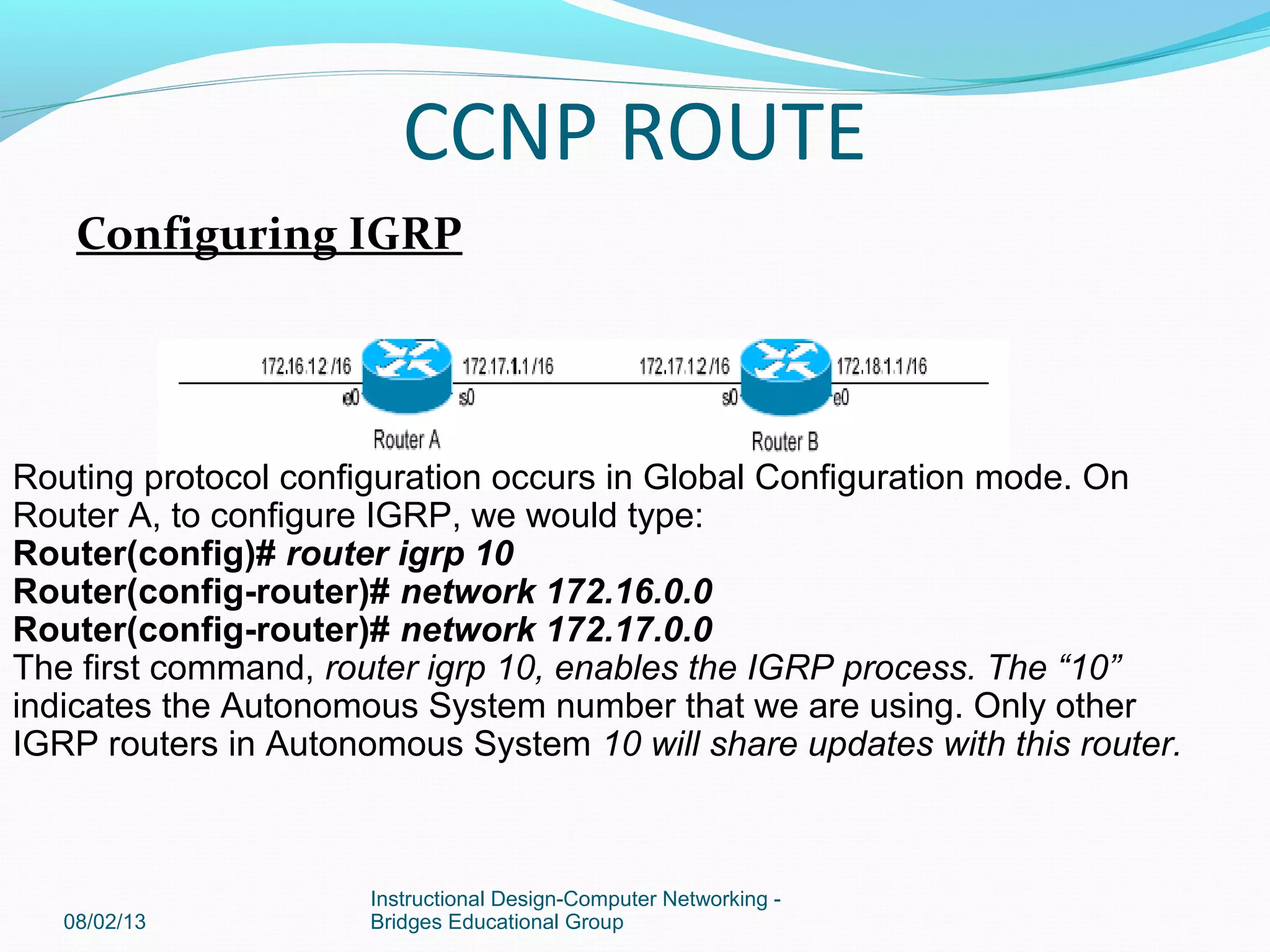
Routing protocol configuration occurs in Global Configuration mode. On
Router A, to configure IGRP, we would type:
Router(config)# router igrp 10
Router(config-router)# network 172.16.0.0
Router(config-router)# network 172.17.0.0
The first command, router igrp 10, enables the IGRP process. The “10”
indicates the Autonomous System number that we are using. Only other
IGRP routers in Autonomous System 10 will share updates with this router.
CCNP ROUTE
The network statements tell IGRP which networks you wish to advertise
to other RIP routers. We simply list the networks that are directly
connected to our router. Notice that we specify the networks at their
classful boundaries,and we do not specify a subnet mask.
To configure Router B:
Router(config)# router igrp 10
Router(config-router)# network 172.17.0.0
Router(config-router)# network 172.18.0.0
The routing table on Router A will look like:
RouterA# show ip route
Gateway of last resort is not set
C 172.16.0.0 is directly connected, Ethernet0
C 172.17.0.0 is directly connected, Serial0
I 172.18.0.0 [120/1] via 172.17.1.2, 00:00:00, Serial0
08/02/13
Instructional Design-Computer Networking -
Bridges Educational Group
The routing table on Router B will look like:
RouterB# show ip route
Gateway of last resort is not set
C 172.17.0.0 is directly connected, Serial0
C 172.18.0.0 is directly connected, Ethernet0
I 172.16.0.0 [120/1] via 172.17.1.1, 00:00:00, Serial0
Limitations of IGRP
The example on the previous page works fine with IGRP, because the
networks are contiguous and the subnet masks are consistent.
Consider the
following example:
08/02/13
Instructional Design-Computer Networking -
Bridges Educational Group
CCNP ROUTE
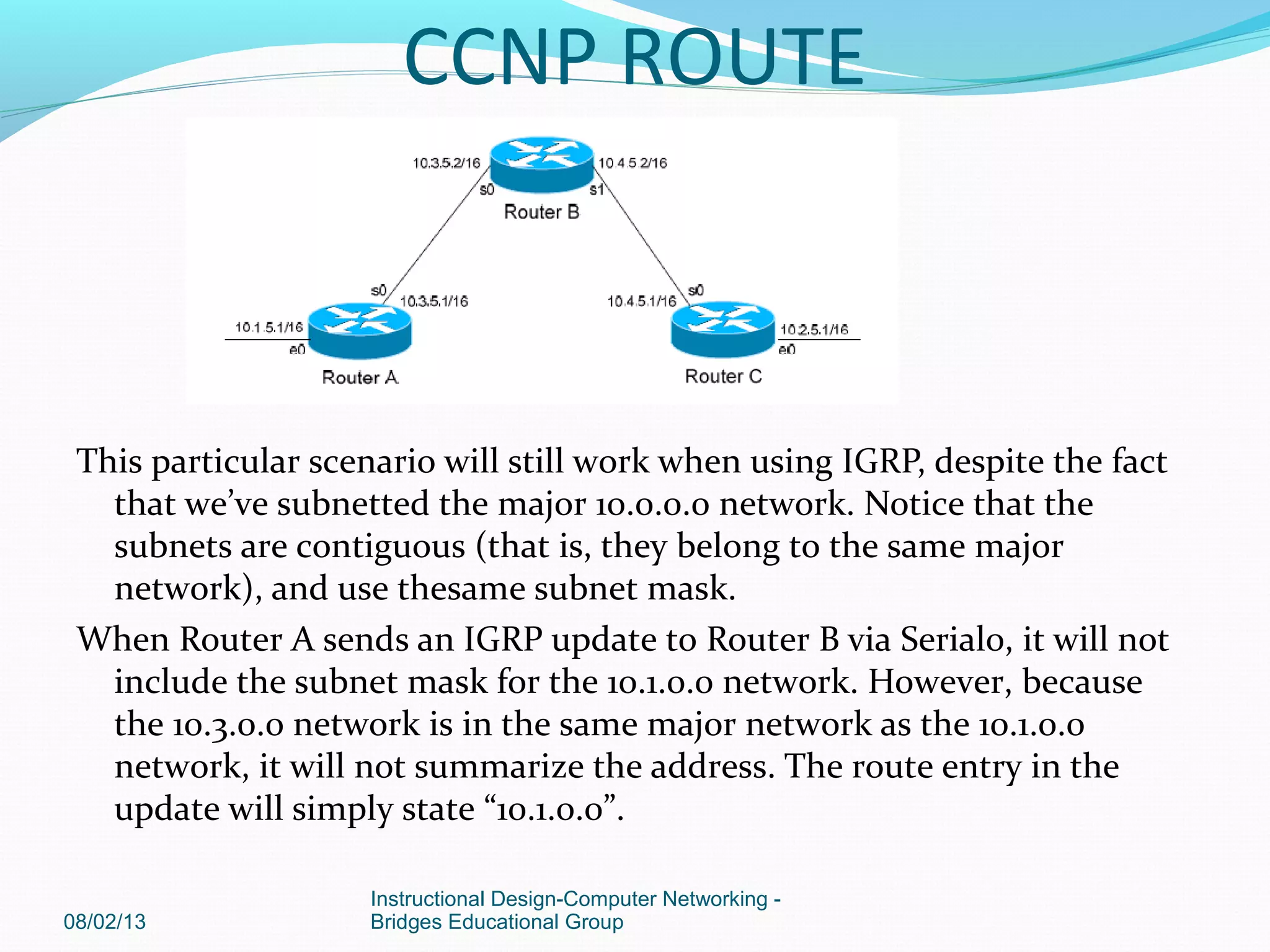
This particular scenario will still work when using IGRP, despite the fact
that we’ve subnetted the major 10.0.0.0 network. Notice that the
subnets are contiguous (that is, they belong to the same major
network), and use thesame subnet mask.
When Router A sends an IGRP update to Router B via Serial0, it will not
include the subnet mask for the 10.1.0.0 network. However, because
the 10.3.0.0 network is in the same major network as the 10.1.0.0
network, it will not summarize the address. The route entry in the
update will simply state “10.1.0.0”.
08/02/13
Instructional Design-Computer Networking -
Bridges Educational Group
CCNP ROUTE
Router B will accept this routing update, and realize that the interface
receiving the update (Serial0) belongs to the same major network as
the route entry of 10.1.0.0. It will then apply the subnet mask of its
Serial0 interface to this route entry.
Router C will similarly send an entry for the 10.2.0.0 network to Router B.
Router B’s routing table will thus look like:
RouterB# show ip route
Gateway of last resort is not set
10.0.0.0/16 is subnetted, 4 subnets
C 10.3.0.0 is directly connected, Serial0
C 10.4.0.0 is directly connected, Serial1
I 10.1.0.0 [120/1] via 10.3.5.1, 00:00:00, Serial0
I 10.2.0.0 [120/1] via 10.4.5.1, 00:00:00, Serial1
08/02/13
Instructional Design-Computer Networking -
Bridges Educational Group
CCNP ROUTE
Limitations of IGRP (continued)
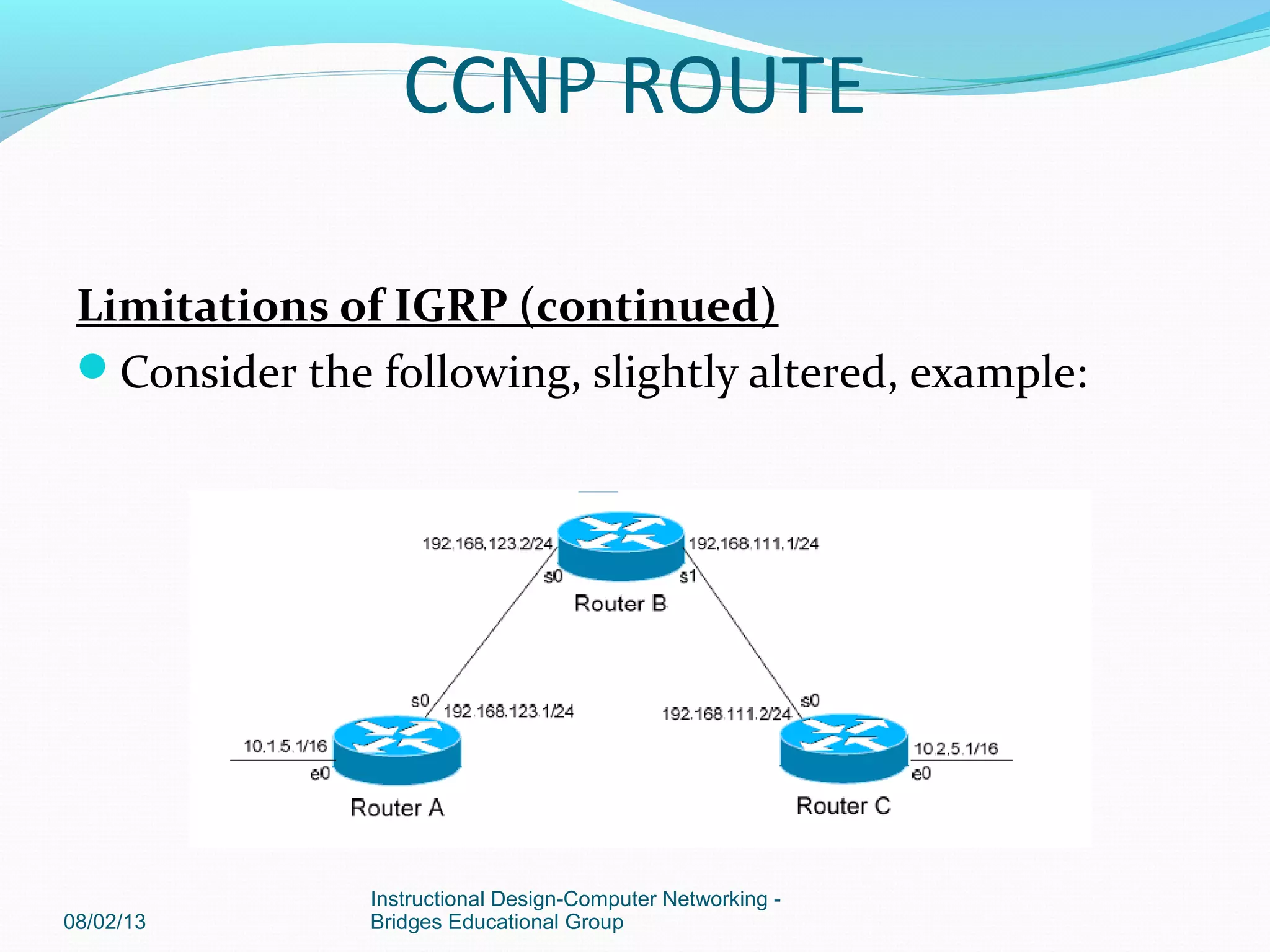
Consider the following, slightly altered, example:
08/02/13
Instructional Design-Computer Networking -
Bridges Educational Group
CCNP ROUTE
We’ll assume that IGRP is configured correctly on all routers. Notice that
our networks are no longer contiguous. Both Router A and Router C
contain subnets of the 10.0.0.0 major network (10.1.0.0 and 10.2.0.0
respectively).
Separating these networks now are two Class C subnets (192.168.123.0
and 192.168.111.0).
Why is this a problem? Again, when Router A sends an IGRP update to
Router B via Serial, it will not include the subnet mask for the 10.1.0.0
network. Instead, Router A will consider itself a border router, as the
10.1.0.0 and 192.168.123.0 networks do not belong to the same major
network. Router A will summarize the 10.1.0.0/16 network to its classful
boundary of 10.0.0.0/8.
Router B will accept this routing update, and realize that it does not
have a directly connected interface in the 10.x.x.x scheme. Thus, it has
no subnet mask to apply to this route. Because of this, RouterRouter
B will install the summarized 10.0.0.0 route into its routing table.
08/02/13
Instructional Design-Computer Networking -
Bridges Educational Group
CCNP ROUTE
Router C, similarly, will consider itself a border router between networks
10.2.0.0 and 192.168.111.0. Thus, Router C will also send a summarized
10.0.0.0 route to Router B.
Router B’s routing table will then look like:
RouterB# show ip route
Gateway of last resort is not set
C 192.168.123.0 is directly connected, Serial0
C 192.168.111.0 is directly connected, Serial1
I 10.0.0.0 [120/1] via 192.168.123.1, 00:00:00, Serial0
[120/1] via 192.168.111.2, 00:00:00, Serial1
That’s right, Router B now has two equal metric routes to get to the
summarized 10.0.0.0 network, one through Router A and the other
through Router C. Router B will now load balance all traffic to any
10.x.x.x network between routers A and C. Suffice to say, this is not a
good thing.
08/02/13
Instructional Design-Computer Networking -
Bridges Educational Group
CCNP ROUTE
It gets better. Router B then tries to send routing updates to Router A
and Router C, including the summary route of 10.0.0.0/8. Router A’s
routing table looks like:
RouterA# show ip route
Gateway of last resort is not set
C 192.168.123.0 is directly connected, Serial0
10.0.0.0/16 is subnetted, 1 subnet
C 10.1.0.0 is directly connected, Ethernet0
Router A will receive the summarized 10.0.0.0/8 route from Router B,
and
will reject it. This is because it already has the summary network of
10.0.0.0 in its routing table, and it’s directly connected. Router C will
respond exactly the same, and the 10.1.0.0/16 and 10.2.0.0/16 networks
will never be able to communicate.
08/02/13
Instructional Design-Computer Networking -
Bridges Educational Group
CCNP ROUTE

Ccnp route

  • 1.
    © 2006 CiscoSystems, Inc. All rights reserved. Cisco Public 1 www.professordkinney.com
  • 2.
    CCNP ROUTE 08/02/13 Instructional Design-ComputerNetworking - Bridges Educational Group
  • 3.
    IGRP (Interior GatewayRouting Protocol) IGRP is a Cisco-proprietary Distance-Vector protocol, designed to be more scalable than RIP, its standardized counterpart. IGRP adheres to the following Distance-Vector characteristics: • IGRP sends out periodic routing updates (every 90 seconds). • IGRP sends out the full routing table every periodic update. • IGRP uses a form of distance as its metric (in this case, a composite of bandwidth and delay). • IGRP uses the Bellman-Ford Distance Vector algorithm to determine the best “path” to a particular destination. IGRP uses Bandwidth and Delay of the Line, by default, to calculate its distance metric. Reliability, Load, and MTU are optional attributes that can be used to calculate the distance metric. 08/02/13 Instructional Design-Computer Networking - Bridges Educational Group CCNP ROUTE
  • 4.
    Configuring IGRP 08/02/13 Instructional Design-ComputerNetworking - Bridges Educational Group Routing protocol configuration occurs in Global Configuration mode. On Router A, to configure IGRP, we would type: Router(config)# router igrp 10 Router(config-router)# network 172.16.0.0 Router(config-router)# network 172.17.0.0 The first command, router igrp 10, enables the IGRP process. The “10” indicates the Autonomous System number that we are using. Only other IGRP routers in Autonomous System 10 will share updates with this router. CCNP ROUTE
  • 5.
    The network statementstell IGRP which networks you wish to advertise to other RIP routers. We simply list the networks that are directly connected to our router. Notice that we specify the networks at their classful boundaries,and we do not specify a subnet mask. To configure Router B: Router(config)# router igrp 10 Router(config-router)# network 172.17.0.0 Router(config-router)# network 172.18.0.0 The routing table on Router A will look like: RouterA# show ip route Gateway of last resort is not set C 172.16.0.0 is directly connected, Ethernet0 C 172.17.0.0 is directly connected, Serial0 I 172.18.0.0 [120/1] via 172.17.1.2, 00:00:00, Serial0 08/02/13 Instructional Design-Computer Networking - Bridges Educational Group
  • 6.
    The routing tableon Router B will look like: RouterB# show ip route Gateway of last resort is not set C 172.17.0.0 is directly connected, Serial0 C 172.18.0.0 is directly connected, Ethernet0 I 172.16.0.0 [120/1] via 172.17.1.1, 00:00:00, Serial0 Limitations of IGRP The example on the previous page works fine with IGRP, because the networks are contiguous and the subnet masks are consistent. Consider the following example: 08/02/13 Instructional Design-Computer Networking - Bridges Educational Group CCNP ROUTE
  • 7.
    This particular scenariowill still work when using IGRP, despite the fact that we’ve subnetted the major 10.0.0.0 network. Notice that the subnets are contiguous (that is, they belong to the same major network), and use thesame subnet mask. When Router A sends an IGRP update to Router B via Serial0, it will not include the subnet mask for the 10.1.0.0 network. However, because the 10.3.0.0 network is in the same major network as the 10.1.0.0 network, it will not summarize the address. The route entry in the update will simply state “10.1.0.0”. 08/02/13 Instructional Design-Computer Networking - Bridges Educational Group CCNP ROUTE
  • 8.
    Router B willaccept this routing update, and realize that the interface receiving the update (Serial0) belongs to the same major network as the route entry of 10.1.0.0. It will then apply the subnet mask of its Serial0 interface to this route entry. Router C will similarly send an entry for the 10.2.0.0 network to Router B. Router B’s routing table will thus look like: RouterB# show ip route Gateway of last resort is not set 10.0.0.0/16 is subnetted, 4 subnets C 10.3.0.0 is directly connected, Serial0 C 10.4.0.0 is directly connected, Serial1 I 10.1.0.0 [120/1] via 10.3.5.1, 00:00:00, Serial0 I 10.2.0.0 [120/1] via 10.4.5.1, 00:00:00, Serial1 08/02/13 Instructional Design-Computer Networking - Bridges Educational Group CCNP ROUTE
  • 9.
    Limitations of IGRP(continued) Consider the following, slightly altered, example: 08/02/13 Instructional Design-Computer Networking - Bridges Educational Group CCNP ROUTE
  • 10.
    We’ll assume thatIGRP is configured correctly on all routers. Notice that our networks are no longer contiguous. Both Router A and Router C contain subnets of the 10.0.0.0 major network (10.1.0.0 and 10.2.0.0 respectively). Separating these networks now are two Class C subnets (192.168.123.0 and 192.168.111.0). Why is this a problem? Again, when Router A sends an IGRP update to Router B via Serial, it will not include the subnet mask for the 10.1.0.0 network. Instead, Router A will consider itself a border router, as the 10.1.0.0 and 192.168.123.0 networks do not belong to the same major network. Router A will summarize the 10.1.0.0/16 network to its classful boundary of 10.0.0.0/8. Router B will accept this routing update, and realize that it does not have a directly connected interface in the 10.x.x.x scheme. Thus, it has no subnet mask to apply to this route. Because of this, RouterRouter B will install the summarized 10.0.0.0 route into its routing table. 08/02/13 Instructional Design-Computer Networking - Bridges Educational Group CCNP ROUTE
  • 11.
    Router C, similarly,will consider itself a border router between networks 10.2.0.0 and 192.168.111.0. Thus, Router C will also send a summarized 10.0.0.0 route to Router B. Router B’s routing table will then look like: RouterB# show ip route Gateway of last resort is not set C 192.168.123.0 is directly connected, Serial0 C 192.168.111.0 is directly connected, Serial1 I 10.0.0.0 [120/1] via 192.168.123.1, 00:00:00, Serial0 [120/1] via 192.168.111.2, 00:00:00, Serial1 That’s right, Router B now has two equal metric routes to get to the summarized 10.0.0.0 network, one through Router A and the other through Router C. Router B will now load balance all traffic to any 10.x.x.x network between routers A and C. Suffice to say, this is not a good thing. 08/02/13 Instructional Design-Computer Networking - Bridges Educational Group CCNP ROUTE
  • 12.
    It gets better.Router B then tries to send routing updates to Router A and Router C, including the summary route of 10.0.0.0/8. Router A’s routing table looks like: RouterA# show ip route Gateway of last resort is not set C 192.168.123.0 is directly connected, Serial0 10.0.0.0/16 is subnetted, 1 subnet C 10.1.0.0 is directly connected, Ethernet0 Router A will receive the summarized 10.0.0.0/8 route from Router B, and will reject it. This is because it already has the summary network of 10.0.0.0 in its routing table, and it’s directly connected. Router C will respond exactly the same, and the 10.1.0.0/16 and 10.2.0.0/16 networks will never be able to communicate. 08/02/13 Instructional Design-Computer Networking - Bridges Educational Group CCNP ROUTE