

Chapter – 4
ROUTER FUNDAMENTALS
BY :- Gurwinder Singh
Introduction
 A Router is a network device that allows you to direct data
traffic to an appropriate destination . Router maintain routing
tables that contain IP addresses of computers over the
network. A router has different components that enable its
proper functioning. The Internetwork Operating System (IOS)
acts as an operating system for the network devices. The IOS
has many features that allow the user to interact with the
devices.
 ROUTER COMPONENTS
• A Cisco router does not contain disk storage mechanisms such
as hard disks. Therefore , the router requires certain hardware
and firmware components for proper functioning. These
components allow the router to enter the boot up process , load to
operating system and configuration files. A router has six different
components.
1. Processor :-
Cisco router has a processor (CPU) that executes
the IOS commands using the router components.
Cisco routers use two types of processors such as
Motorola 68030 and Orion/R4600. The Cisco IOS
Software makes routing decisions and maintains
Routing tables using the processor.
2. ROM :-
The Read Only Memory (ROM) is a non-volatile
memory storage device. ROM does not lose its
contents when the power supply is turned off.
The ROM consists of the following components :-
POST
Bootstrap Program
Mini-IOS
ROM monitor
 Bootstrap Program
A bootstrap program is a ROM monitor component that
allows you to initialize the processor hardware when the
router boots. This component boots the operating system
software after initializing the processor hardware.
 POST
The Power-ON-Self-Test (POST) component provides a series
of diagnostic tests for the router. These tests start when the
router is switched on. The Post is a series of 14 tests that run in
the reverse numerical order
 Mini-IOS
The Mini-IOS is not present in every router. It provides a
minimized version of the IOS image file consisting of the IP
code.
 ROM Monitor
ROM monitor is a program stored in the ROM which
is used to debug user programs. The ROM monitor
also allows manufacturing , testing and
troubleshooting of ROM.
3. RAM :-
The function of Random Access Memory in the
router is similar to that of the memory in a
computer. The RAM is volatile storage medium
that loses data when the device is switched off.
The RAM temporarily stores the active
configuration files , routing tables and information
in the input and output buffers of the router
interface .
4. Flash :-
The flash memory in a router is a non volatile storage
medium . It is basically EEPROM . The Flash memory
may contain IOS image that is loaded when the router
boots.
5. NVRAM :-
Non-Volatile RAM (NVRAM) is a type of random
access memory that stores configuration files for the
router . The startup file and configuration register for
the router are present in the NVRAM.
6. Configuration Register :-
Configuration Register is used to hold the
configuration of the router or configuration files of a
router. The type value of configuration register is
hexadecimal 0x2102. Using this value , router loads
Internetwork Operating System (IOS) from the flash
memory and configuration from the NVRAM.
 ROUTER BOOT SEQUENCE
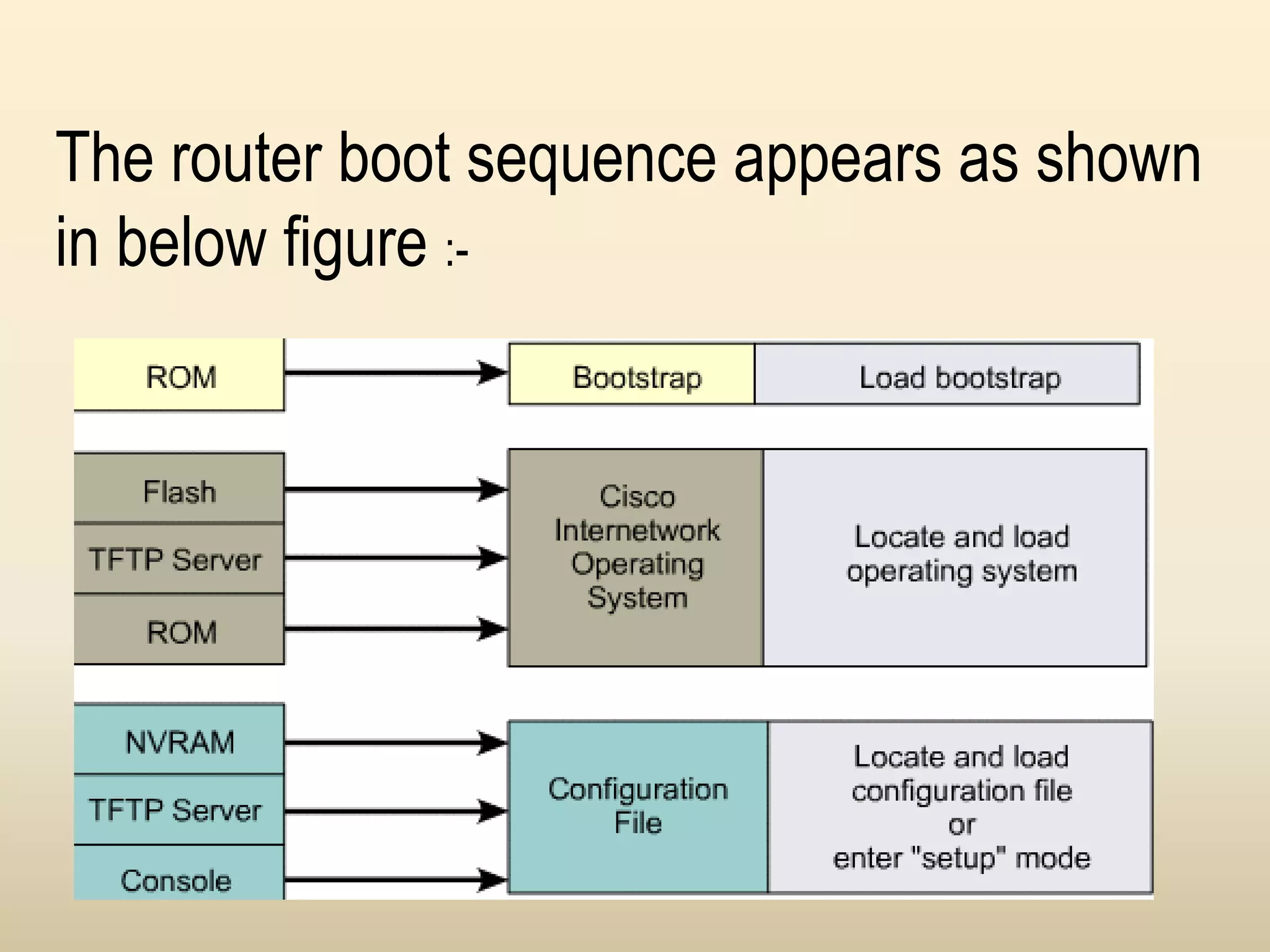
The router boot sequence consists of the following steps :-
 Router performs the POST check for testing the hardware components
and memory.
 Bootstrap program is loaded from the ROM and executed.
 Bootstrap program starts loading the IOS image from the location
specified by the boot field of the configuration register.
 The Cisco IOS then locates the hardware and software components of
the router and displays list of components on the console.
 IOS loads a configuration file present in the NVRAM into the main
memory. The configuration commands execute one after the other.
 If the valid configuration file is not present in NVRAM , the router displays
the setup dialog box .
The router boot sequence appears as shown
in below figure :-
 IOS
The operating system provides an interface between the user
And the hardware . Similarly , IOS acts as an interface
between the network devices and the user . It stored in the
flash memory of the router . The Cisco IOS software running
on the router requires the processor of the system for
configuring and maintaining the network devices.
The different features of the IOS are follow :-
 Support for different technologies
Scalability
Security
 CONNECTING TO A CISCO ROUTER
The Cisco router runs Internetwork Operating
System (IOS) that manages hardware interface and
security of the router . You can configure the router
, verify its configuration and access Cisco IOS
through the router ports and Telnet.
Cisco router have two main ports –
Console port
Auxiliary port
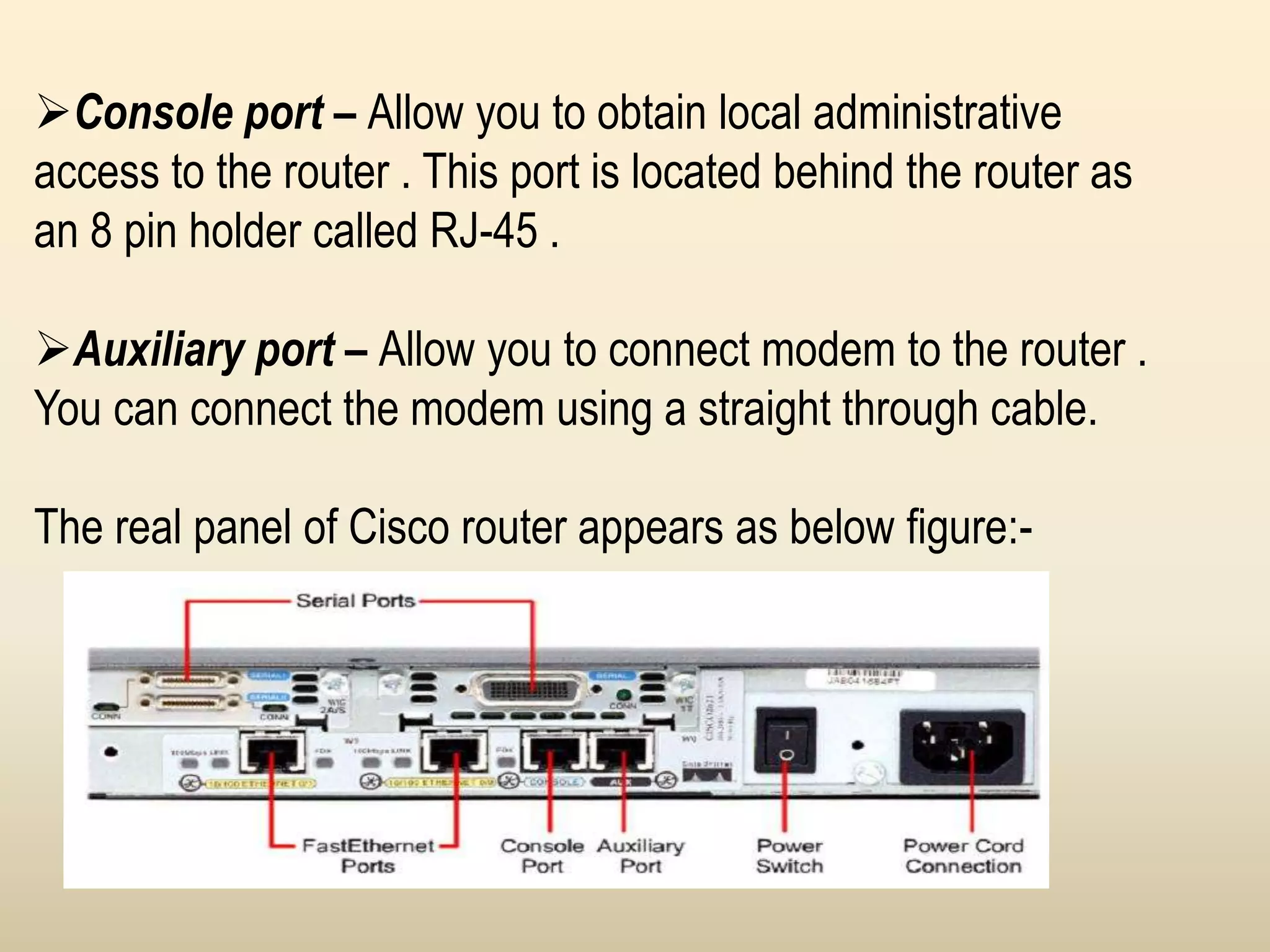
Console port – Allow you to obtain local administrative
access to the router . This port is located behind the router as
an 8 pin holder called RJ-45 .
Auxiliary port – Allow you to connect modem to the router .
You can connect the modem using a straight through cable.
The real panel of Cisco router appears as below figure:-
 COMMAND LINE INTERFACE
Cisco router provides a command line interface
(CLI) that allows manual configuration of the
router .you can access router CLI using three
following modes:-
User exec mode
Privileged exec mode
Global configuration mode
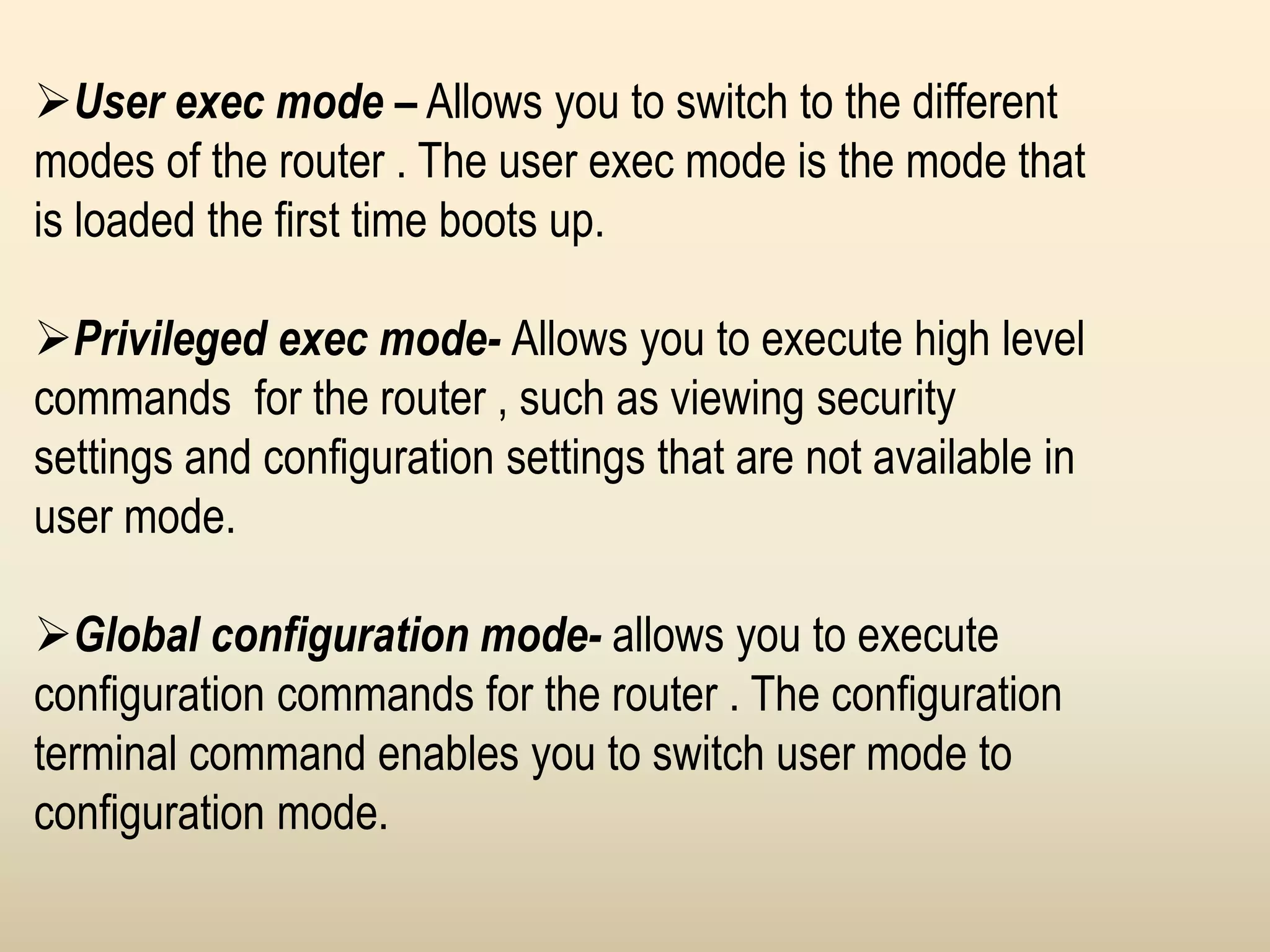
User exec mode – Allows you to switch to the different
modes of the router . The user exec mode is the mode that
is loaded the first time boots up.
Privileged exec mode- Allows you to execute high level
commands for the router , such as viewing security
settings and configuration settings that are not available in
user mode.
Global configuration mode- allows you to execute
configuration commands for the router . The configuration
terminal command enables you to switch user mode to
configuration mode.
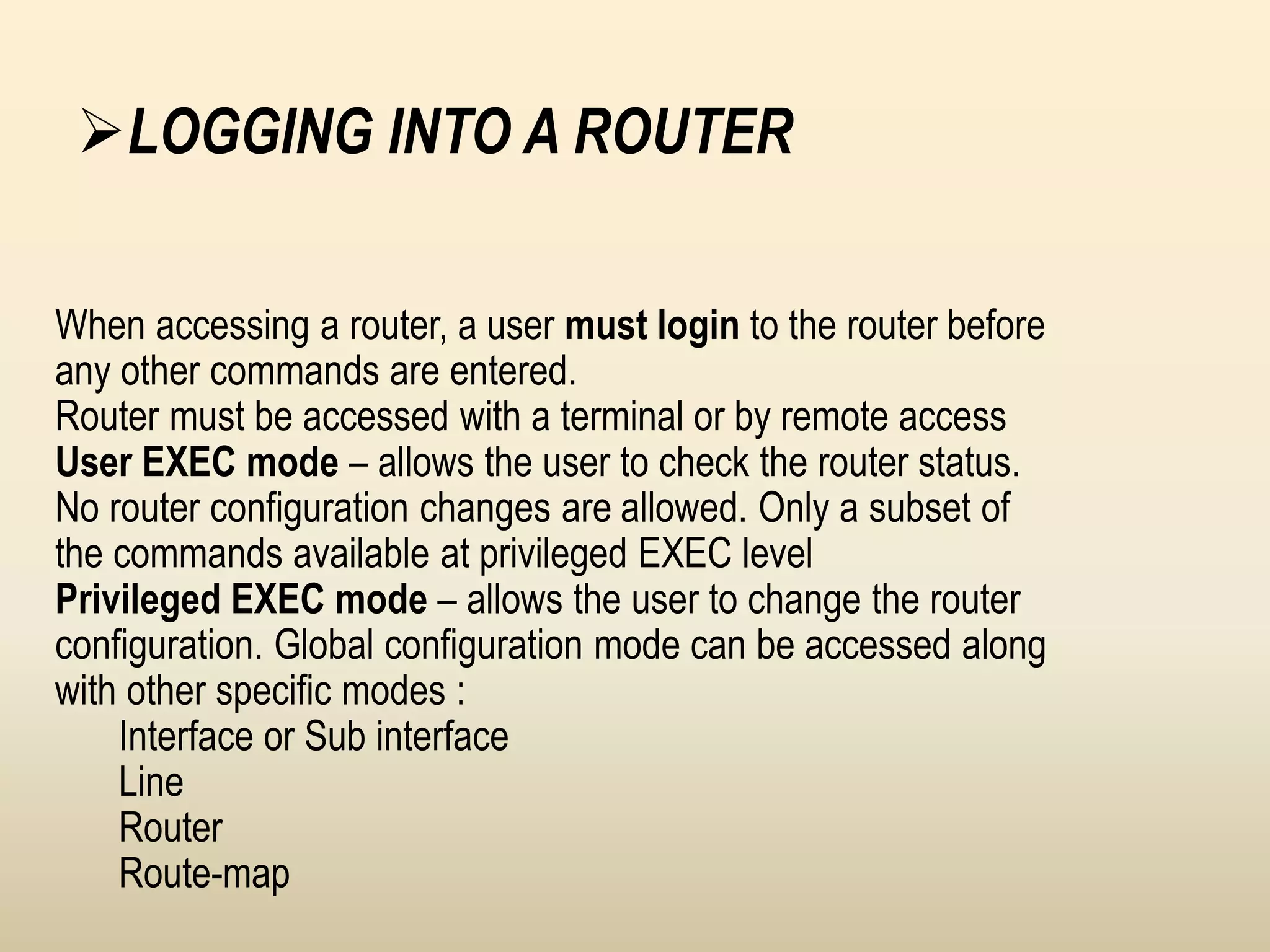
When accessing a router, a user must login to the router before
any other commands are entered.
Router must be accessed with a terminal or by remote access
User EXEC mode – allows the user to check the router status.
No router configuration changes are allowed. Only a subset of
the commands available at privileged EXEC level
Privileged EXEC mode – allows the user to change the router
configuration. Global configuration mode can be accessed along
with other specific modes :
Interface or Sub interface
Line
Router
Route-map
LOGGING INTO A ROUTER
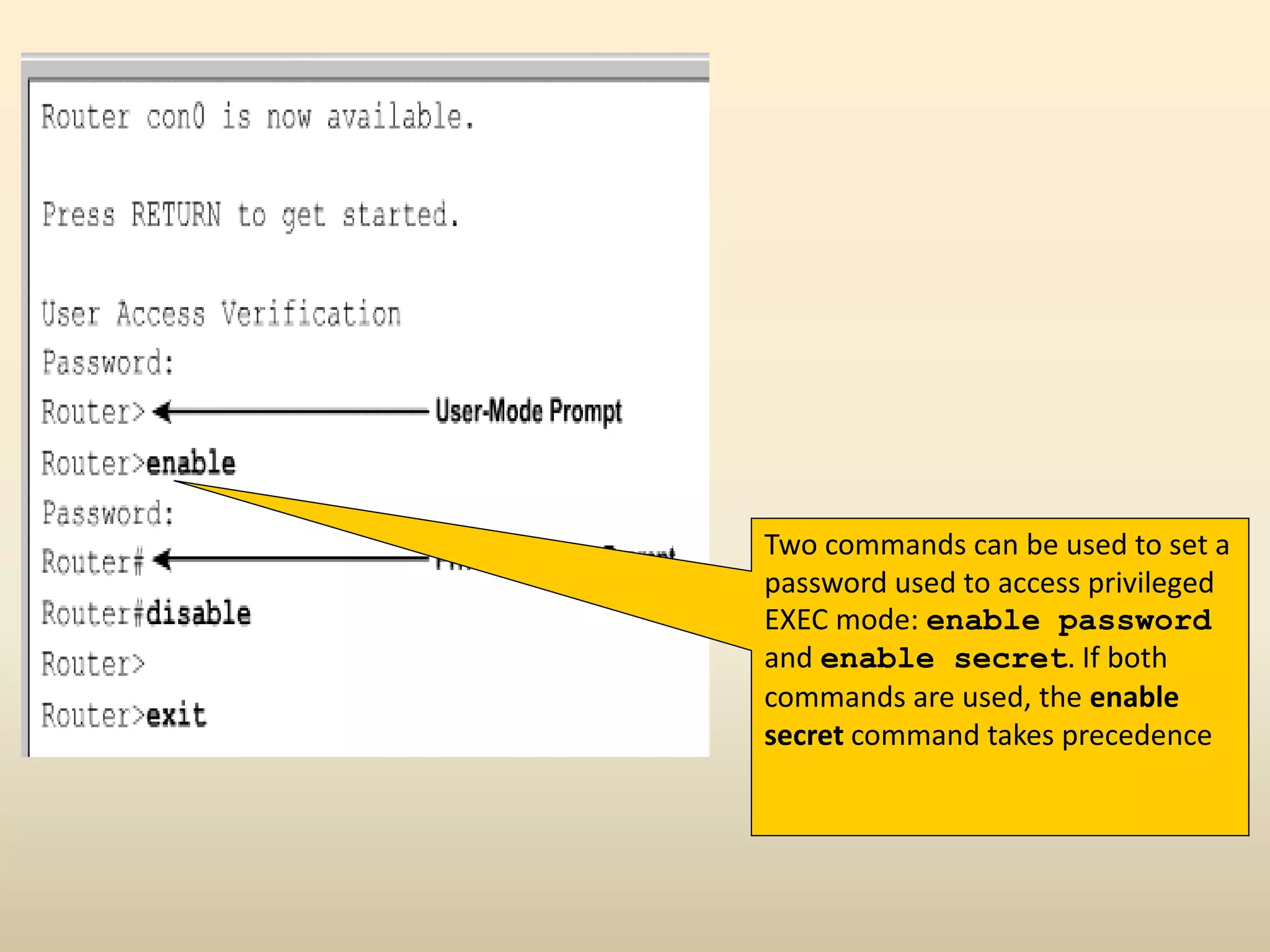
Two commands can be used to set a
password used to access privileged
EXEC mode: enable password
and enable secret. If both
commands are used, the enable
secret command takes precedence
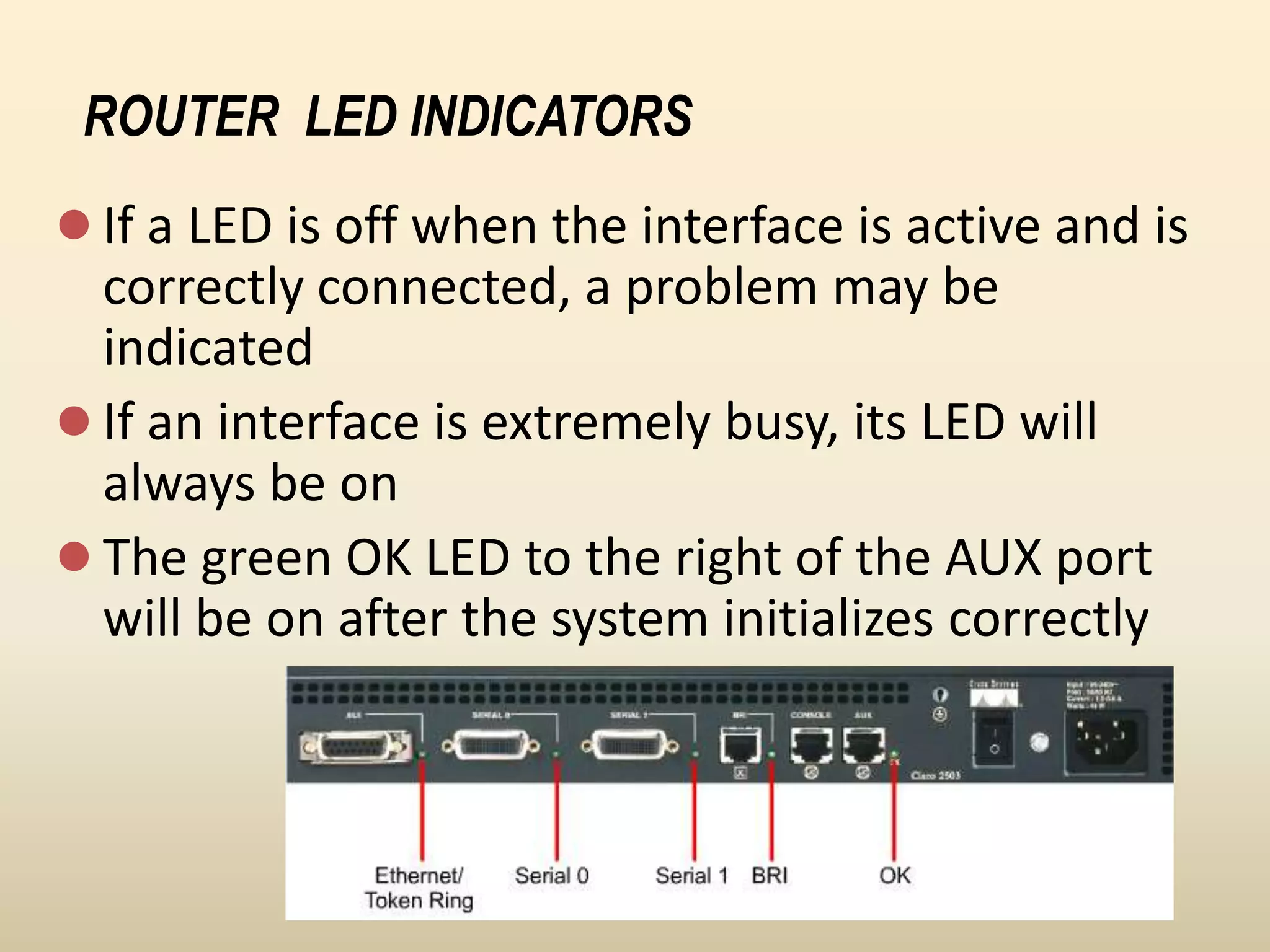
 If a LED is off when the interface is active and is
correctly connected, a problem may be
indicated
 If an interface is extremely busy, its LED will
always be on
 The green OK LED to the right of the AUX port
will be on after the system initializes correctly
ROUTER LED INDICATORS
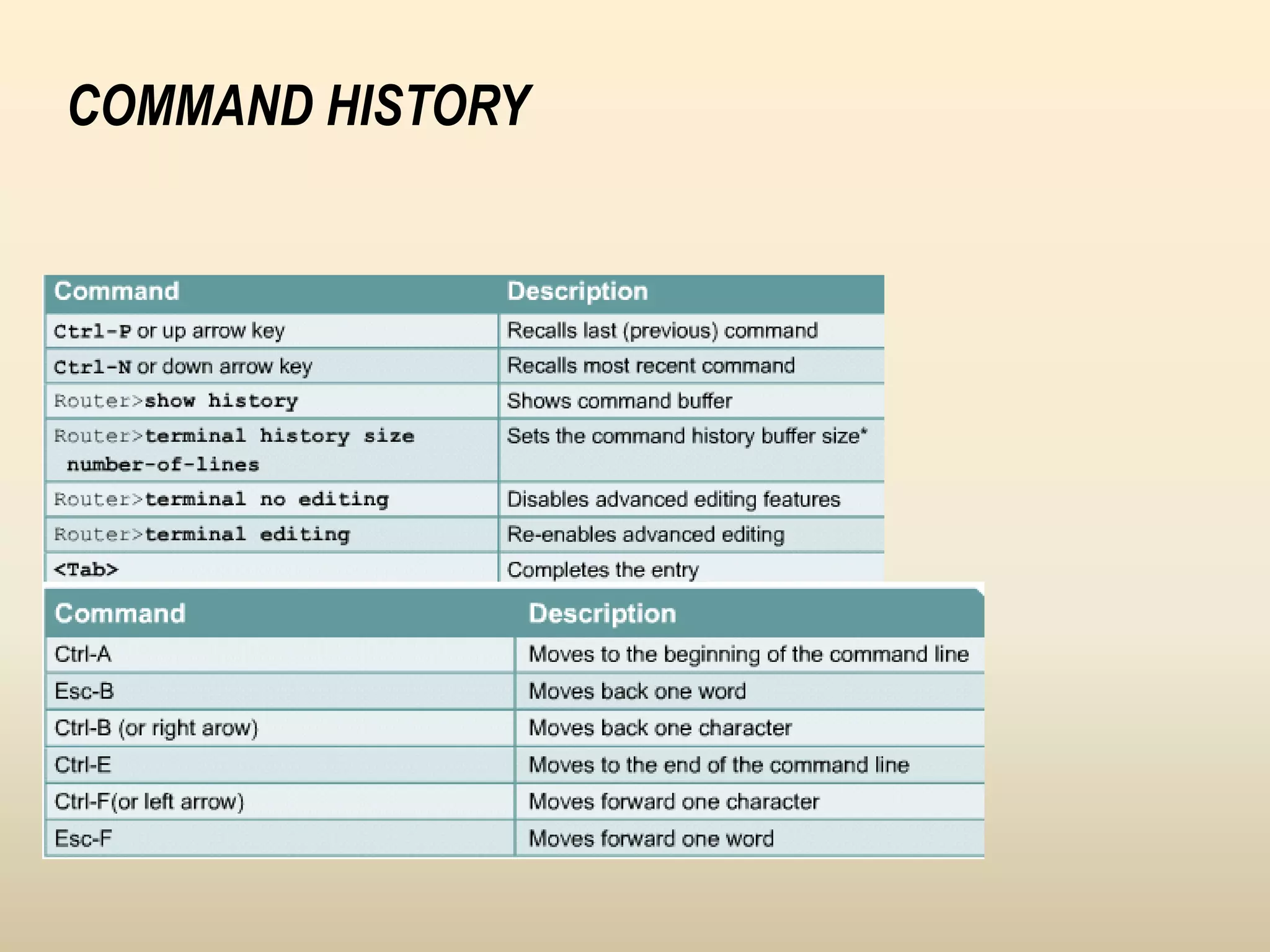
COMMAND HISTORY
THE END

Routerfundaments gurwinder

  • 1.
    Chapter – 4 ROUTERFUNDAMENTALS BY :- Gurwinder Singh
  • 2.
    Introduction  A Routeris a network device that allows you to direct data traffic to an appropriate destination . Router maintain routing tables that contain IP addresses of computers over the network. A router has different components that enable its proper functioning. The Internetwork Operating System (IOS) acts as an operating system for the network devices. The IOS has many features that allow the user to interact with the devices.
  • 3.
     ROUTER COMPONENTS •A Cisco router does not contain disk storage mechanisms such as hard disks. Therefore , the router requires certain hardware and firmware components for proper functioning. These components allow the router to enter the boot up process , load to operating system and configuration files. A router has six different components.
  • 4.
    1. Processor :- Ciscorouter has a processor (CPU) that executes the IOS commands using the router components. Cisco routers use two types of processors such as Motorola 68030 and Orion/R4600. The Cisco IOS Software makes routing decisions and maintains Routing tables using the processor.
  • 5.
    2. ROM :- TheRead Only Memory (ROM) is a non-volatile memory storage device. ROM does not lose its contents when the power supply is turned off. The ROM consists of the following components :- POST Bootstrap Program Mini-IOS ROM monitor
  • 6.
     Bootstrap Program Abootstrap program is a ROM monitor component that allows you to initialize the processor hardware when the router boots. This component boots the operating system software after initializing the processor hardware.  POST The Power-ON-Self-Test (POST) component provides a series of diagnostic tests for the router. These tests start when the router is switched on. The Post is a series of 14 tests that run in the reverse numerical order
  • 7.
     Mini-IOS The Mini-IOSis not present in every router. It provides a minimized version of the IOS image file consisting of the IP code.  ROM Monitor ROM monitor is a program stored in the ROM which is used to debug user programs. The ROM monitor also allows manufacturing , testing and troubleshooting of ROM.
  • 8.
    3. RAM :- Thefunction of Random Access Memory in the router is similar to that of the memory in a computer. The RAM is volatile storage medium that loses data when the device is switched off. The RAM temporarily stores the active configuration files , routing tables and information in the input and output buffers of the router interface .
  • 9.
    4. Flash :- Theflash memory in a router is a non volatile storage medium . It is basically EEPROM . The Flash memory may contain IOS image that is loaded when the router boots. 5. NVRAM :- Non-Volatile RAM (NVRAM) is a type of random access memory that stores configuration files for the router . The startup file and configuration register for the router are present in the NVRAM.
  • 10.
    6. Configuration Register:- Configuration Register is used to hold the configuration of the router or configuration files of a router. The type value of configuration register is hexadecimal 0x2102. Using this value , router loads Internetwork Operating System (IOS) from the flash memory and configuration from the NVRAM.
  • 11.
     ROUTER BOOTSEQUENCE The router boot sequence consists of the following steps :-  Router performs the POST check for testing the hardware components and memory.  Bootstrap program is loaded from the ROM and executed.  Bootstrap program starts loading the IOS image from the location specified by the boot field of the configuration register.  The Cisco IOS then locates the hardware and software components of the router and displays list of components on the console.  IOS loads a configuration file present in the NVRAM into the main memory. The configuration commands execute one after the other.  If the valid configuration file is not present in NVRAM , the router displays the setup dialog box .
  • 12.
    The router bootsequence appears as shown in below figure :-
  • 13.
     IOS The operatingsystem provides an interface between the user And the hardware . Similarly , IOS acts as an interface between the network devices and the user . It stored in the flash memory of the router . The Cisco IOS software running on the router requires the processor of the system for configuring and maintaining the network devices.
  • 14.
    The different featuresof the IOS are follow :-  Support for different technologies Scalability Security
  • 15.
     CONNECTING TOA CISCO ROUTER The Cisco router runs Internetwork Operating System (IOS) that manages hardware interface and security of the router . You can configure the router , verify its configuration and access Cisco IOS through the router ports and Telnet. Cisco router have two main ports – Console port Auxiliary port
  • 16.
    Console port –Allow you to obtain local administrative access to the router . This port is located behind the router as an 8 pin holder called RJ-45 . Auxiliary port – Allow you to connect modem to the router . You can connect the modem using a straight through cable. The real panel of Cisco router appears as below figure:-
  • 17.
     COMMAND LINEINTERFACE Cisco router provides a command line interface (CLI) that allows manual configuration of the router .you can access router CLI using three following modes:- User exec mode Privileged exec mode Global configuration mode
  • 18.
    User exec mode– Allows you to switch to the different modes of the router . The user exec mode is the mode that is loaded the first time boots up. Privileged exec mode- Allows you to execute high level commands for the router , such as viewing security settings and configuration settings that are not available in user mode. Global configuration mode- allows you to execute configuration commands for the router . The configuration terminal command enables you to switch user mode to configuration mode.
  • 19.
    When accessing arouter, a user must login to the router before any other commands are entered. Router must be accessed with a terminal or by remote access User EXEC mode – allows the user to check the router status. No router configuration changes are allowed. Only a subset of the commands available at privileged EXEC level Privileged EXEC mode – allows the user to change the router configuration. Global configuration mode can be accessed along with other specific modes : Interface or Sub interface Line Router Route-map LOGGING INTO A ROUTER
  • 20.
    Two commands canbe used to set a password used to access privileged EXEC mode: enable password and enable secret. If both commands are used, the enable secret command takes precedence
  • 21.
     If aLED is off when the interface is active and is correctly connected, a problem may be indicated  If an interface is extremely busy, its LED will always be on  The green OK LED to the right of the AUX port will be on after the system initializes correctly ROUTER LED INDICATORS
  • 22.
  • 23.