Subject :- computer presentation
Class :- B.sc 6TH sem
HTML is a markup language for describing web documents.
HTML stand for HYPER TEXT MARKUP LANGUAGE
A markup language is a set of markup tags
HTML documents are described by HTML tags
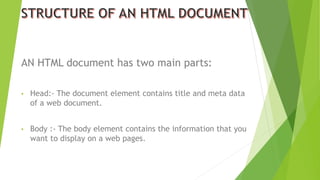
AN HTML document has two main parts:
• Head:- The document element contains title and meta data
of a web document.
• Body :- The body element contains the information that you
want to display on a web pages.
 HTML is a document layout and hyperlink specification language i.e. this
language is used to design a layout of a document and specify the
hyperlink.
 HTML actually tells the browser how to display the content of a hypertext
document including text , image and other support media . The language
also tells how to make a document interactive through special hyperlinks.
 HTML is a language which support multimedia and new pages layout
feature yet it has its limitation.
 HTML is a not a word processing tool , it is not desktop publishing solution
or even a programming language. It is just a page layout and hyperlink
specification language.
HTML is a very useful used for us but all languages has limitation . HTML
also has be some limitation .HTML is simply a “markup” language.
 The HTML pages are the document that can be read by the server and
are not the best fit to be read by humans.
 HTML forms have the dependency on scripting language and it results in
complex document creation that consume more time.
 HTML doesn’t make it initialize the form data properly and doesn’t
make it easier for the users to enter the information once.
Following are the basic limitation of HTML
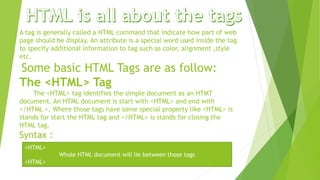
A tag is generally called a HTML command that indicate how part of web
page should be display. An attribute is a special word used inside the tag
to specify additional information to tag such as color, alignment ,style
etc.
Some basic HTML Tags are as follow:
The <HTML> Tag
The <HTML> tag identifies the simple document as an HTMT
document. An HTML document is start with <HTML> and end with
</HTML >. Where those tags have some special property like <HTML> is
stands for start the HTML tag and </HTML> is stands for closing the
HTML tag.
Syntax :
<HTML>
Whole HTML document will lie between those tags
<HTML>
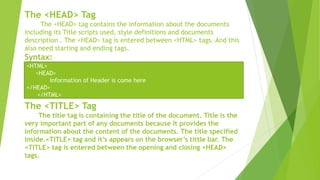
The <HEAD> Tag
The <HEAD> tag contains the information about the documents
including its Title scripts used, style definitions and documents
description . The <HEAD> tag is entered between <HTML> tags. And this
also need starting and ending tags.
Syntax:
The <TITLE> Tag
The title tag is containing the title of the document. Title is the
very important part of any documents because it provides the
information about the content of the documents. The title specified
inside.<TITLE> tag and it’s appears on the browser’s tittle bar. The
<TITLE> tag is entered between the opening and closing <HEAD>
tags.
<HTML>
<HEAD>
Information of Header is come here
</HEAD>
</HTML>
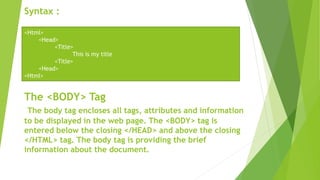
Syntax :
The <BODY> Tag
The body tag encloses all tags, attributes and information
to be displayed in the web page. The <BODY> tag is
entered below the closing </HEAD> and above the closing
</HTML> tag. The body tag is providing the brief
information about the document.
<Html>
<Head>
<Title>
This is my title
<Title>
<Head>
<Html>
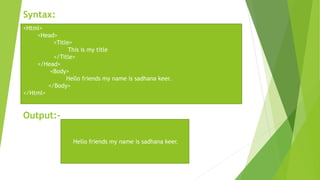
Syntax:
Output:-
<Html>
<Head>
<Title>
This is my title
</Title>
</Head>
<Body>
Hello friends my name is sadhana keer.
</Body>
</Html>
Hello friends my name is sadhana keer.
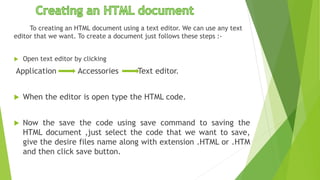
To creating an HTML document using a text editor. We can use any text
editor that we want. To create a document just follows these steps :-
 Open text editor by clicking
Application Accessories Text editor.
 When the editor is open type the HTML code.
 Now the save the code using save command to saving the
HTML document ,just select the code that we want to save,
give the desire files name along with extension .HTML or .HTM
and then click save button.
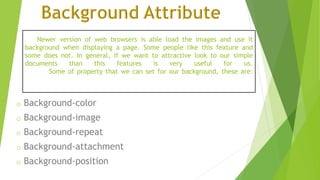
Newer version of web browsers is able load the images and use it
background when displaying a page. Some people like this feature and
some does not. In general, if we want to attractive look to our simple
documents than this features is very useful for us.
Some of property that we can set for our background, these are:
o Background-color
o Background-image
o Background-repeat
o Background-attachment
o Background-position
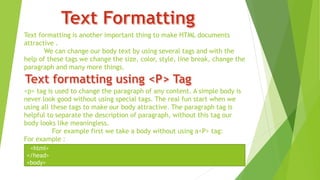
Text formatting is another important thing to make HTML documents
attractive .
We can change our body text by using several tags and with the
help of these tags we change the size, color, style, line break, change the
paragraph and many more things.
<p> tag is used to change the paragraph of any content. A simple body is
never look good without using special tags. The real fun start when we
using all these tags to make our body attractive. The paragraph tag is
helpful to separate the description of paragraph, without this tag our
body looks like meaningless.
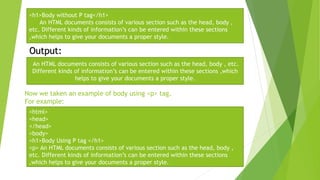
For example first we take a body without using a<P> tag:
For example :
<html>
</head>
<body>
Now we taken an example of body using <p> tag.
For example:
<h1>Body without P tag</h1>
An HTML documents consists of various section such as the head, body ,
etc. Different kinds of information’s can be entered within these sections
,which helps to give your documents a proper style.
Output:
An HTML documents consists of various section such as the head, body , etc.
Different kinds of information’s can be entered within these sections ,which
helps to give your documents a proper style.
<html>
<head>
</head>
<body>
<h1>Body Using P tag </h1>
<p> An HTML documents consists of various section such as the head, body ,
etc. Different kinds of information’s can be entered within these sections
,which helps to give your documents a proper style.
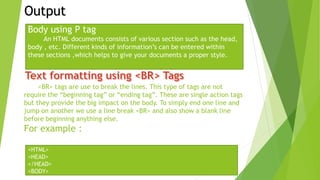
<BR> tags are use to break the lines. This type of tags are not
require the “beginning tag” or “ending tag”. These are single action tags
but they provide the big impact on the body. To simply end one line and
jump on another we use a line break <BR> and also show a blank line
before beginning anything else.
For example :
Output
Body using P tag
An HTML documents consists of various section such as the head,
body , etc. Different kinds of information’s can be entered within
these sections ,which helps to give your documents a proper style.
<HTML>
<HEAD>
</HEAD>
<BODY>
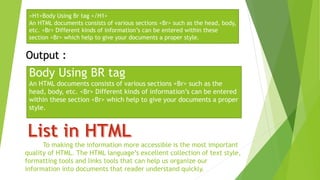
To making the information more accessible is the most important
quality of HTML. The HTML language’s excellent collection of text style,
formatting tools and links tools that can help us organize our
information into documents that reader understand quickly.
<H1>Body Using Br tag </H1>
An HTML documents consists of various sections <Br> such as the head, body,
etc. <Br> Different kinds of information’s can be entered within these
section <Br> which help to give your documents a proper style.
Output :
Body Using BR tag
An HTML documents consists of various sections <Br> such as the
head, body, etc. <Br> Different kinds of information’s can be entered
within these section <Br> which help to give your documents a proper
style.
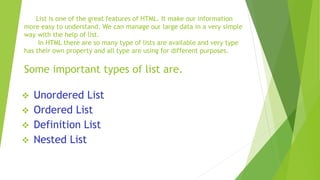
List is one of the great features of HTML. It make our information
more easy to understand. We can manage our large data in a very simple
way with the help of list.
In HTML there are so many type of lists are available and very type
has their own property and all type are using for different purposes.
Some important types of list are.
 Unordered List
 Ordered List
 Definition List
 Nested List
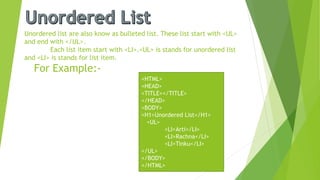
Unordered list are also know as bulleted list. These list start with <UL>
and end with </UL>.
Each list item start with <LI>.<UL> is stands for unordered list
and <LI> is stands for list item.
For Example:-
<HTML>
<HEAD>
<TITLE></TITLE>
</HEAD>
<BODY>
<H1>Unordered List</H1>
<UL>
<LI>Arti</LI>
<LI>Rachna</LI>
<LI>Tinku</LI>
</UL>
</BODY>
</HTML>
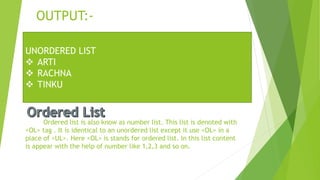
OUTPUT:-
Ordered list is also know as number list. This list is denoted with
<OL> tag . It is identical to an unordered list except it use <OL> in a
place of <UL>. Here <OL> is stands for ordered list. In this list content
is appear with the help of number like 1,2,3 and so on.
UNORDERED LIST
 ARTI
 RACHNA
 TINKU
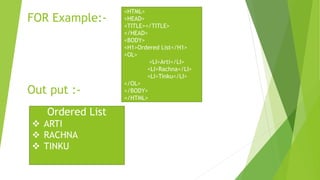
FOR Example:-
Out put :-
<HTML>
<HEAD>
<TITLE></TITLE>
</HEAD>
<BODY>
<H1>Ordered List</H1>
<OL>
<LI>Arti</LI>
<LI>Rachna</LI>
<LI>Tinku</LI>
</OL>
</BODY>
</HTML>
Ordered List
 ARTI
 RACHNA
 TINKU
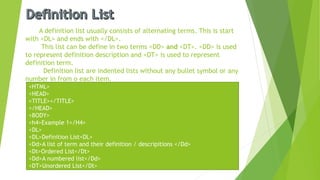
A definition list usually consists of alternating terms. This is start
with <DL> and ends with </DL>.
This list can be define in two terms <DD> and <DT>. <DD> is used
to represent definition description and <DT> is used to represent
definition term.
Definition list are indented lists without any bullet symbol or any
number in from o each item.
<HTML>
<HEAD>
<TITLE></TITLE>
</HEAD>
<BODY>
<h4>Example 1</H4>
<DL>
<DL>Definition List<DL>
<Dd>A list of term and their definition / descripitions </Dd>
<Dt>Ordered List</Dt>
<Dd>A numbered list</Dd>
<DT>Unordered List</Dt>
<Dd>An unnumbered list.</Dd>
</Dl>
<H4>Example 2</H4>
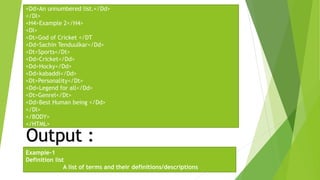
<Dl>
<Dt>God of Cricket </DT
<Dd>Sachin Tenduulkar</Dd>
<Dt>Sports</Dt>
<Dd>Cricket</Dd>
<Dd>Hocky</Dd>
<Dd>kabaddi</Dd>
<Dt>Personality</Dt>
<Dd>Legend for all</Dd>
<Dt>Genrel</Dt>
<Dd>Best Human being </Dd>
</Dl>
</BODY>
</HTML>
Output :
Example-1
Definition list
A list of terms and their definitions/descriptions
Ordered List
A number list.
Unordered list.
An unnumbered list.
Example:-2
God of Cricket
Sachin Tendulkar
Sports
Cricket
Hockey
Kabbadi
Personality
Legend for all
General
Best Human being
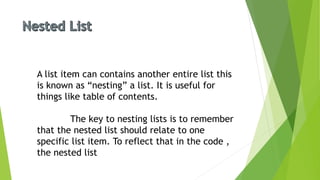
A list item can contains another entire list this
is known as “nesting” a list. It is useful for
things like table of contents.
The key to nesting lists is to remember
that the nested list should relate to one
specific list item. To reflect that in the code ,
the nested list
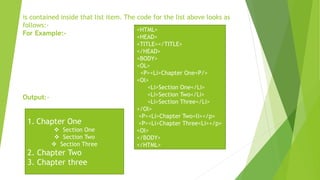
is contained inside that list item. The code for the list above looks as
follows:-
For Example:-
Output:-
<HTML>
<HEAD>
<TITLE></TITLE>
</HEAD>
<BODY>
<OL>
<P><Li>Chapter One<P/>
<Ol>
<Li>Section One</Li>
<Li>Section Two</Li>
<Li>Section Three</Li>
</Ol>
<P><Li>Chapter Two<li></p>
<P><Li>Chapter Three<Li></p>
<Ol>
</BODY>
</HTML>
1. Chapter One
 Section One
 Section Two
 Section Three
2. Chapter Two
3. Chapter three
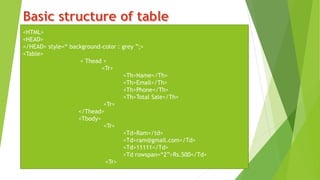
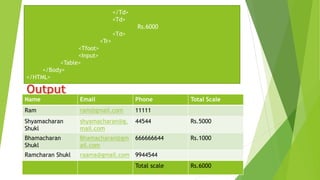
<HTML>
<HEAD>
</HEAD> style=“ background-color : grey ”;>
<Table>
< Thead >
<Tr>
<Th>Name</Th>
<Th>Email</Th>
<Th>Phone</Th>
<Th>Total Sale</Th>
<Tr>
</Thead>
<Tbody>
<Tr>
<Td>Ram</td>
<Td>ram@gmail.com</Td>
<Td>11111</Td>
<Td rowspan=“2”>Rs.500</Td>
<Tr>
</Td>
<Td>
Rs.6000
<Td>
<Tr>
<Tfoot>
<Input>
<Table>
</Body>
</HTML>
Name Email Phone Total Scale
Ram ram@gmail.com 11111
Shyamacharan
Shukl
shyamacharan@g.
mail.com
44544 Rs.5000
Bhamacharan
Shukl
Bhamacharan@gm
ail.com
666666644 Rs.1000
Ramcharan Shukl raama@gmail.com 9944544
Total scale Rs.6000
HTML
HTML

HTML

  • 2.
    Subject :- computerpresentation Class :- B.sc 6TH sem
  • 6.
    HTML is amarkup language for describing web documents. HTML stand for HYPER TEXT MARKUP LANGUAGE A markup language is a set of markup tags HTML documents are described by HTML tags
  • 7.
    AN HTML documenthas two main parts: • Head:- The document element contains title and meta data of a web document. • Body :- The body element contains the information that you want to display on a web pages.
  • 8.
     HTML isa document layout and hyperlink specification language i.e. this language is used to design a layout of a document and specify the hyperlink.  HTML actually tells the browser how to display the content of a hypertext document including text , image and other support media . The language also tells how to make a document interactive through special hyperlinks.  HTML is a language which support multimedia and new pages layout feature yet it has its limitation.  HTML is a not a word processing tool , it is not desktop publishing solution or even a programming language. It is just a page layout and hyperlink specification language.
  • 9.
    HTML is avery useful used for us but all languages has limitation . HTML also has be some limitation .HTML is simply a “markup” language.  The HTML pages are the document that can be read by the server and are not the best fit to be read by humans.  HTML forms have the dependency on scripting language and it results in complex document creation that consume more time.  HTML doesn’t make it initialize the form data properly and doesn’t make it easier for the users to enter the information once. Following are the basic limitation of HTML
  • 10.
    A tag isgenerally called a HTML command that indicate how part of web page should be display. An attribute is a special word used inside the tag to specify additional information to tag such as color, alignment ,style etc. Some basic HTML Tags are as follow: The <HTML> Tag The <HTML> tag identifies the simple document as an HTMT document. An HTML document is start with <HTML> and end with </HTML >. Where those tags have some special property like <HTML> is stands for start the HTML tag and </HTML> is stands for closing the HTML tag. Syntax : <HTML> Whole HTML document will lie between those tags <HTML>
  • 11.
    The <HEAD> Tag The<HEAD> tag contains the information about the documents including its Title scripts used, style definitions and documents description . The <HEAD> tag is entered between <HTML> tags. And this also need starting and ending tags. Syntax: The <TITLE> Tag The title tag is containing the title of the document. Title is the very important part of any documents because it provides the information about the content of the documents. The title specified inside.<TITLE> tag and it’s appears on the browser’s tittle bar. The <TITLE> tag is entered between the opening and closing <HEAD> tags. <HTML> <HEAD> Information of Header is come here </HEAD> </HTML>
  • 12.
    Syntax : The <BODY>Tag The body tag encloses all tags, attributes and information to be displayed in the web page. The <BODY> tag is entered below the closing </HEAD> and above the closing </HTML> tag. The body tag is providing the brief information about the document. <Html> <Head> <Title> This is my title <Title> <Head> <Html>
  • 13.
    Syntax: Output:- <Html> <Head> <Title> This is mytitle </Title> </Head> <Body> Hello friends my name is sadhana keer. </Body> </Html> Hello friends my name is sadhana keer.
  • 14.
    To creating anHTML document using a text editor. We can use any text editor that we want. To create a document just follows these steps :-  Open text editor by clicking Application Accessories Text editor.  When the editor is open type the HTML code.  Now the save the code using save command to saving the HTML document ,just select the code that we want to save, give the desire files name along with extension .HTML or .HTM and then click save button.
  • 15.
    Newer version ofweb browsers is able load the images and use it background when displaying a page. Some people like this feature and some does not. In general, if we want to attractive look to our simple documents than this features is very useful for us. Some of property that we can set for our background, these are: o Background-color o Background-image o Background-repeat o Background-attachment o Background-position
  • 16.
    Text formatting isanother important thing to make HTML documents attractive . We can change our body text by using several tags and with the help of these tags we change the size, color, style, line break, change the paragraph and many more things. <p> tag is used to change the paragraph of any content. A simple body is never look good without using special tags. The real fun start when we using all these tags to make our body attractive. The paragraph tag is helpful to separate the description of paragraph, without this tag our body looks like meaningless. For example first we take a body without using a<P> tag: For example : <html> </head> <body>
  • 17.
    Now we takenan example of body using <p> tag. For example: <h1>Body without P tag</h1> An HTML documents consists of various section such as the head, body , etc. Different kinds of information’s can be entered within these sections ,which helps to give your documents a proper style. Output: An HTML documents consists of various section such as the head, body , etc. Different kinds of information’s can be entered within these sections ,which helps to give your documents a proper style. <html> <head> </head> <body> <h1>Body Using P tag </h1> <p> An HTML documents consists of various section such as the head, body , etc. Different kinds of information’s can be entered within these sections ,which helps to give your documents a proper style.
  • 18.
    <BR> tags areuse to break the lines. This type of tags are not require the “beginning tag” or “ending tag”. These are single action tags but they provide the big impact on the body. To simply end one line and jump on another we use a line break <BR> and also show a blank line before beginning anything else. For example : Output Body using P tag An HTML documents consists of various section such as the head, body , etc. Different kinds of information’s can be entered within these sections ,which helps to give your documents a proper style. <HTML> <HEAD> </HEAD> <BODY>
  • 19.
    To making theinformation more accessible is the most important quality of HTML. The HTML language’s excellent collection of text style, formatting tools and links tools that can help us organize our information into documents that reader understand quickly. <H1>Body Using Br tag </H1> An HTML documents consists of various sections <Br> such as the head, body, etc. <Br> Different kinds of information’s can be entered within these section <Br> which help to give your documents a proper style. Output : Body Using BR tag An HTML documents consists of various sections <Br> such as the head, body, etc. <Br> Different kinds of information’s can be entered within these section <Br> which help to give your documents a proper style.
  • 20.
    List is oneof the great features of HTML. It make our information more easy to understand. We can manage our large data in a very simple way with the help of list. In HTML there are so many type of lists are available and very type has their own property and all type are using for different purposes. Some important types of list are.  Unordered List  Ordered List  Definition List  Nested List
  • 21.
    Unordered list arealso know as bulleted list. These list start with <UL> and end with </UL>. Each list item start with <LI>.<UL> is stands for unordered list and <LI> is stands for list item. For Example:- <HTML> <HEAD> <TITLE></TITLE> </HEAD> <BODY> <H1>Unordered List</H1> <UL> <LI>Arti</LI> <LI>Rachna</LI> <LI>Tinku</LI> </UL> </BODY> </HTML>
  • 22.
    OUTPUT:- Ordered list isalso know as number list. This list is denoted with <OL> tag . It is identical to an unordered list except it use <OL> in a place of <UL>. Here <OL> is stands for ordered list. In this list content is appear with the help of number like 1,2,3 and so on. UNORDERED LIST  ARTI  RACHNA  TINKU
  • 23.
    FOR Example:- Out put:- <HTML> <HEAD> <TITLE></TITLE> </HEAD> <BODY> <H1>Ordered List</H1> <OL> <LI>Arti</LI> <LI>Rachna</LI> <LI>Tinku</LI> </OL> </BODY> </HTML> Ordered List  ARTI  RACHNA  TINKU
  • 24.
    A definition listusually consists of alternating terms. This is start with <DL> and ends with </DL>. This list can be define in two terms <DD> and <DT>. <DD> is used to represent definition description and <DT> is used to represent definition term. Definition list are indented lists without any bullet symbol or any number in from o each item. <HTML> <HEAD> <TITLE></TITLE> </HEAD> <BODY> <h4>Example 1</H4> <DL> <DL>Definition List<DL> <Dd>A list of term and their definition / descripitions </Dd> <Dt>Ordered List</Dt> <Dd>A numbered list</Dd> <DT>Unordered List</Dt>
  • 25.
    <Dd>An unnumbered list.</Dd> </Dl> <H4>Example2</H4> <Dl> <Dt>God of Cricket </DT <Dd>Sachin Tenduulkar</Dd> <Dt>Sports</Dt> <Dd>Cricket</Dd> <Dd>Hocky</Dd> <Dd>kabaddi</Dd> <Dt>Personality</Dt> <Dd>Legend for all</Dd> <Dt>Genrel</Dt> <Dd>Best Human being </Dd> </Dl> </BODY> </HTML> Output : Example-1 Definition list A list of terms and their definitions/descriptions
  • 26.
    Ordered List A numberlist. Unordered list. An unnumbered list. Example:-2 God of Cricket Sachin Tendulkar Sports Cricket Hockey Kabbadi Personality Legend for all General Best Human being
  • 27.
    A list itemcan contains another entire list this is known as “nesting” a list. It is useful for things like table of contents. The key to nesting lists is to remember that the nested list should relate to one specific list item. To reflect that in the code , the nested list
  • 28.
    is contained insidethat list item. The code for the list above looks as follows:- For Example:- Output:- <HTML> <HEAD> <TITLE></TITLE> </HEAD> <BODY> <OL> <P><Li>Chapter One<P/> <Ol> <Li>Section One</Li> <Li>Section Two</Li> <Li>Section Three</Li> </Ol> <P><Li>Chapter Two<li></p> <P><Li>Chapter Three<Li></p> <Ol> </BODY> </HTML> 1. Chapter One  Section One  Section Two  Section Three 2. Chapter Two 3. Chapter three
  • 29.
    <HTML> <HEAD> </HEAD> style=“ background-color: grey ”;> <Table> < Thead > <Tr> <Th>Name</Th> <Th>Email</Th> <Th>Phone</Th> <Th>Total Sale</Th> <Tr> </Thead> <Tbody> <Tr> <Td>Ram</td> <Td>ram@gmail.com</Td> <Td>11111</Td> <Td rowspan=“2”>Rs.500</Td> <Tr>
  • 30.
    </Td> <Td> Rs.6000 <Td> <Tr> <Tfoot> <Input> <Table> </Body> </HTML> Name Email PhoneTotal Scale Ram ram@gmail.com 11111 Shyamacharan Shukl shyamacharan@g. mail.com 44544 Rs.5000 Bhamacharan Shukl Bhamacharan@gm ail.com 666666644 Rs.1000 Ramcharan Shukl raama@gmail.com 9944544 Total scale Rs.6000