Prepared By: Er. Nawaraj
Bhandari
DESIGNING AND DEVELOPING A
WEBSITE
Topic 2:
Introduction to (X)HTML
HTML
• Hyper Text Markup language.
• Markup refers to the sequence of characters that
describes the document’s structure and how the
file should look when it is printed or displayed.
• HTML does not define what a page looks like!
For that we have CSS.
• Extension is html or htm.
• Write code in any text editor (e.g. Notepad,
Notepad++, Dream weaver, etc) and save as
filename.html/htm
• Initially, html deals with only text but now
multimedia too.
• Html is not a case sensitive.
HTML Tags
• The markup indicators are often called "tags."
• Beings with an open angle bracket (<) and ends
with close angle bracket (>).
• e.g. <html>, <head>, <br/>, <table>, etc.
• Two types: -
1. Singular Tag or Empty Elements
• Tag that comes alone, no closing tag.
• It doesn’t contain any content.
• e.g <br />, <hr />, <img />, etc.
HTML Tags
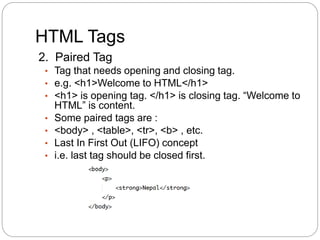
2. Paired Tag
• Tag that needs opening and closing tag.
• e.g. <h1>Welcome to HTML</h1>
• <h1> is opening tag. </h1> is closing tag. “Welcome to
HTML” is content.
• Some paired tags are :
• <body> , <table>, <tr>, <b> , etc.
• Last In First Out (LIFO) concept
• i.e. last tag should be closed first.
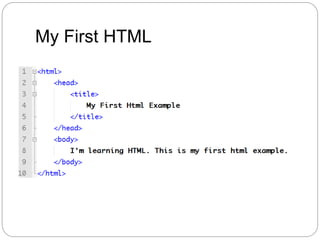
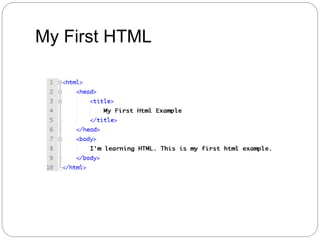
My First HTML
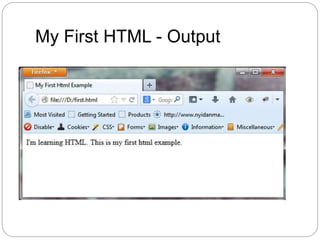
My First HTML - Output
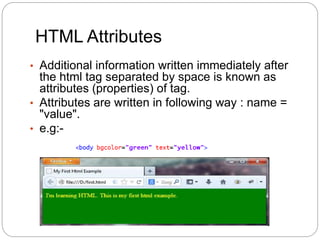
HTML Attributes
• Additional information written immediately after
the html tag separated by space is known as
attributes (properties) of tag.
• Attributes are written in following way : name =
"value".
• e.g:-
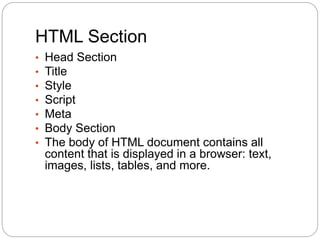
HTML Section
• Head Section
• Title
• Style
• Script
• Meta
• Body Section
• The body of HTML document contains all
content that is displayed in a browser: text,
images, lists, tables, and more.
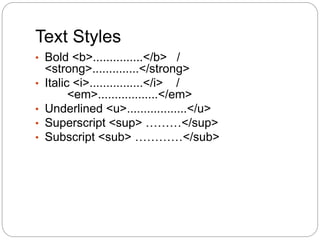
Text Styles
• Bold <b>...............</b> /
<strong>..............</strong>
• Italic <i>................</i> /
<em>..................</em>
• Underlined <u>..................</u>
• Superscript <sup> ………</sup>
• Subscript <sub> …………</sub>
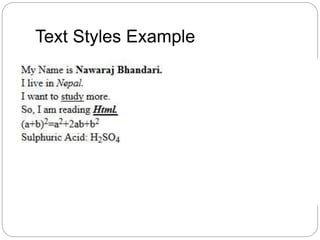
Text Styles Example
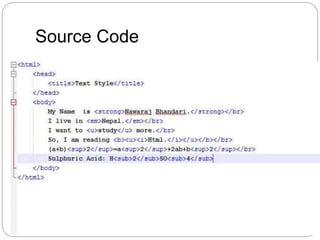
Source Code
My First HTML
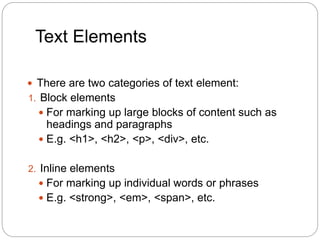
Text Elements
 There are two categories of text element:
1. Block elements
 For marking up large blocks of content such as
headings and paragraphs
 E.g. <h1>, <h2>, <p>, <div>, etc.
2. Inline elements
 For marking up individual words or phrases
 E.g. <strong>, <em>, <span>, etc.
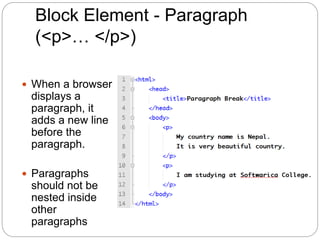
Block Element - Paragraph
(<p>… </p>)
 When a browser
displays a
paragraph, it
adds a new line
before the
paragraph.
 Paragraphs
should not be
nested inside
other
paragraphs
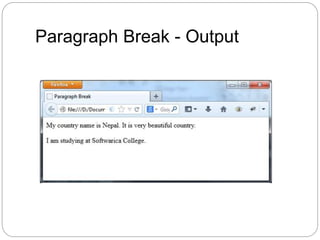
Paragraph Break - Output
Block Elements - Heading
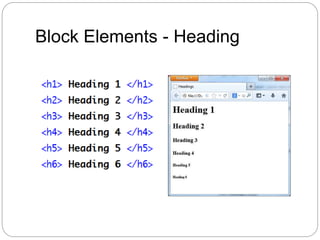
 There are 6 different levels of headings. <h1> to
<h6>.
 The highest level header format is <h1> and the
lowest is <h6> i.e:- font size decreases.
 All the styles appeared in bold face.
 Headings shouldn’t be nested inside other
headings.
Block Elements - Heading
Inline Elements
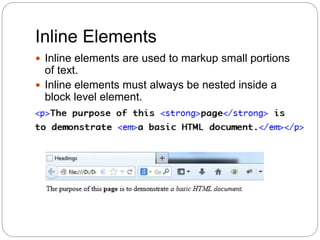
 Inline elements are used to markup small portions
of text.
 Inline elements must always be nested inside a
block level element.
‘Physical Style’ tags
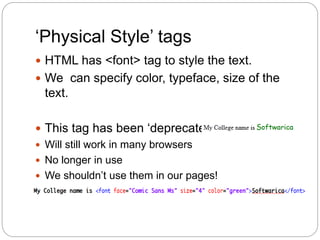
 HTML has <font> tag to style the text.
 We can specify color, typeface, size of the
text.
 This tag has been ‘deprecated’:
 Will still work in many browsers
 No longer in use
 We shouldn’t use them in our pages!
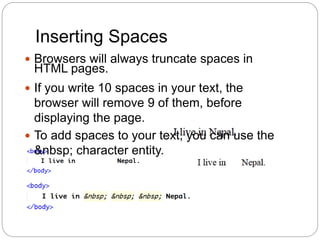
Inserting Spaces
 Browsers will always truncate spaces in
HTML pages.
 If you write 10 spaces in your text, the
browser will remove 9 of them, before
displaying the page.
 To add spaces to your text, you can use the
&nbsp; character entity.
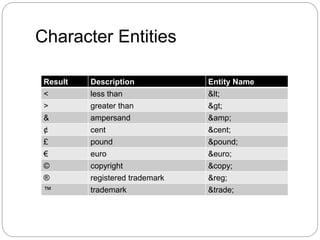
Character Entities
Result Description Entity Name
< less than &lt;
> greater than &gt;
& ampersand &amp;
¢ cent &cent;
£ pound &pound;
€ euro &euro;
© copyright &copy;
® registered trademark &reg;
™ trademark &trade;
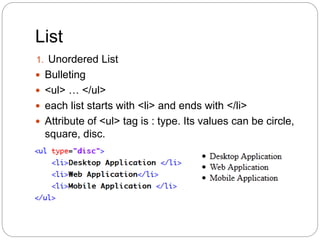
List
1. Unordered List
 Bulleting
 <ul> … </ul>
 each list starts with <li> and ends with </li>
 Attribute of <ul> tag is : type. Its values can be circle,
square, disc.
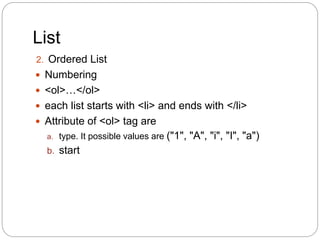
List
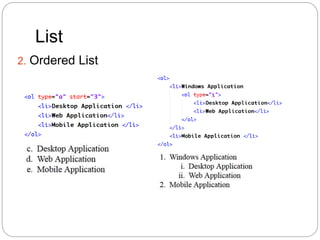
2. Ordered List
 Numbering
 <ol>…</ol>
 each list starts with <li> and ends with </li>
 Attribute of <ol> tag are
a. type. It possible values are ("1", "A", "i", "I", "a")
b. start
List
2. Ordered List
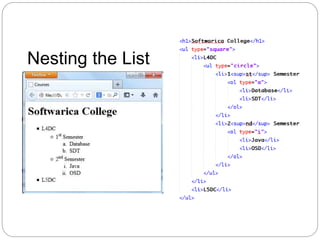
Nesting the List
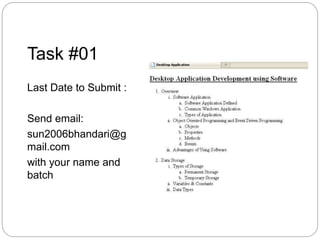
Task #01
Last Date to Submit :
Send email:
sun2006bhandari@g
mail.com
with your name and
batch
List
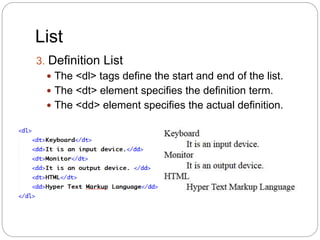
3. Definition List
 The <dl> tags define the start and end of the list.
 The <dt> element specifies the definition term.
 The <dd> element specifies the actual definition.
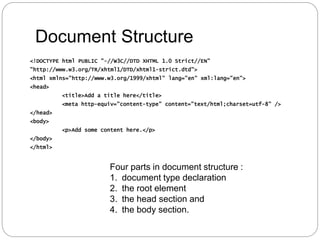
Document Structure
<!DOCTYPE html PUBLIC "-//W3C//DTD XHTML 1.0 Strict//EN"
"http://www.w3.org/TR/xhtml1/DTD/xhtml1-strict.dtd">
<html xmlns="http://www.w3.org/1999/xhtml" lang="en" xml:lang="en">
<head>
<title>Add a title here</title>
<meta http-equiv="content-type" content="text/html;charset=utf-8" />
</head>
<body>
<p>Add some content here.</p>
</body>
</html>
Four parts in document structure :
1. document type declaration
2. the root element
3. the head section and
4. the body section.
Document Type Declaration
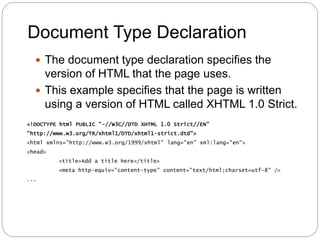
 The document type declaration specifies the
version of HTML that the page uses.
 This example specifies that the page is written
using a version of HTML called XHTML 1.0 Strict.
<!DOCTYPE html PUBLIC "-//W3C//DTD XHTML 1.0 Strict//EN"
"http://www.w3.org/TR/xhtml1/DTD/xhtml1-strict.dtd">
<html xmlns="http://www.w3.org/1999/xhtml" lang="en" xml:lang="en">
<head>
<title>Add a title here</title>
<meta http-equiv="content-type" content="text/html;charset=utf-8" />
...
Document Type Declaration
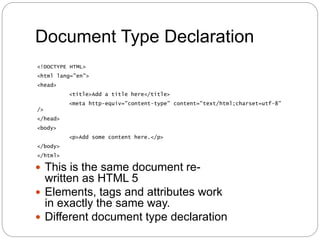
 This is the same document re-
written as HTML 5
 Elements, tags and attributes work
in exactly the same way.
 Different document type declaration
<!DOCTYPE HTML>
<html lang="en">
<head>
<title>Add a title here</title>
<meta http-equiv="content-type" content="text/html;charset=utf-8"
/>
</head>
<body>
<p>Add some content here.</p>
</body>
</html>
Document Type Declaration
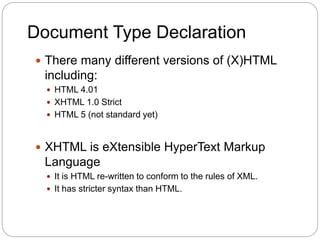
 There many different versions of (X)HTML
including:
 HTML 4.01
 XHTML 1.0 Strict
 HTML 5 (not standard yet)
 XHTML is eXtensible HyperText Markup
Language
 It is HTML re-written to conform to the rules of XML.
 It has stricter syntax than HTML.
Which Version of (X)HTML to
Use?
 This module is based around using XHTML
1.0 Strict.
 We will also explore features of the new
HTML5 specification
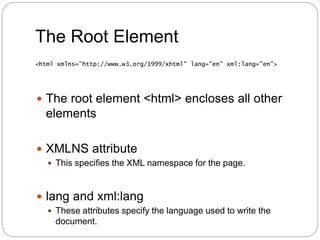
The Root Element
 The root element <html> encloses all other
elements
 XMLNS attribute
 This specifies the XML namespace for the page.
 lang and xml:lang
 These attributes specify the language used to write the
document.
<html xmlns="http://www.w3.org/1999/xhtml" lang="en" xml:lang="en">
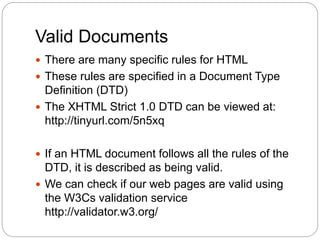
Valid Documents
 There are many specific rules for HTML
 These rules are specified in a Document Type
Definition (DTD)
 The XHTML Strict 1.0 DTD can be viewed at:
http://tinyurl.com/5n5xq
 If an HTML document follows all the rules of the
DTD, it is described as being valid.
 We can check if our web pages are valid using
the W3Cs validation service
http://validator.w3.org/
Why Validate?
 Validating web pages checks we are
using web standards.
 Accessibility
 Support standards compliant browsers
 Support a range of devices
Any Questions???
Topic 2 : Introduction to (X)HTML
References
 XHTML 1.0 Strict Cheat Sheet
 Available at: http://www.w3.org/2010/04/xhtml10-
strict.html
 http://www.w3schools.com/html/html_entities.
asp

Introduction to (x)html

  • 1.
    Prepared By: Er.Nawaraj Bhandari DESIGNING AND DEVELOPING A WEBSITE Topic 2: Introduction to (X)HTML
  • 2.
    HTML • Hyper TextMarkup language. • Markup refers to the sequence of characters that describes the document’s structure and how the file should look when it is printed or displayed. • HTML does not define what a page looks like! For that we have CSS. • Extension is html or htm. • Write code in any text editor (e.g. Notepad, Notepad++, Dream weaver, etc) and save as filename.html/htm • Initially, html deals with only text but now multimedia too. • Html is not a case sensitive.
  • 3.
    HTML Tags • Themarkup indicators are often called "tags." • Beings with an open angle bracket (<) and ends with close angle bracket (>). • e.g. <html>, <head>, <br/>, <table>, etc. • Two types: - 1. Singular Tag or Empty Elements • Tag that comes alone, no closing tag. • It doesn’t contain any content. • e.g <br />, <hr />, <img />, etc.
  • 4.
    HTML Tags 2. PairedTag • Tag that needs opening and closing tag. • e.g. <h1>Welcome to HTML</h1> • <h1> is opening tag. </h1> is closing tag. “Welcome to HTML” is content. • Some paired tags are : • <body> , <table>, <tr>, <b> , etc. • Last In First Out (LIFO) concept • i.e. last tag should be closed first.
  • 5.
  • 6.
    My First HTML- Output
  • 7.
    HTML Attributes • Additionalinformation written immediately after the html tag separated by space is known as attributes (properties) of tag. • Attributes are written in following way : name = "value". • e.g:-
  • 8.
    HTML Section • HeadSection • Title • Style • Script • Meta • Body Section • The body of HTML document contains all content that is displayed in a browser: text, images, lists, tables, and more.
  • 9.
    Text Styles • Bold<b>...............</b> / <strong>..............</strong> • Italic <i>................</i> / <em>..................</em> • Underlined <u>..................</u> • Superscript <sup> ………</sup> • Subscript <sub> …………</sub>
  • 10.
  • 11.
  • 12.
  • 13.
    Text Elements  Thereare two categories of text element: 1. Block elements  For marking up large blocks of content such as headings and paragraphs  E.g. <h1>, <h2>, <p>, <div>, etc. 2. Inline elements  For marking up individual words or phrases  E.g. <strong>, <em>, <span>, etc.
  • 14.
    Block Element -Paragraph (<p>… </p>)  When a browser displays a paragraph, it adds a new line before the paragraph.  Paragraphs should not be nested inside other paragraphs
  • 15.
  • 16.
    Block Elements -Heading  There are 6 different levels of headings. <h1> to <h6>.  The highest level header format is <h1> and the lowest is <h6> i.e:- font size decreases.  All the styles appeared in bold face.  Headings shouldn’t be nested inside other headings.
  • 17.
  • 18.
    Inline Elements  Inlineelements are used to markup small portions of text.  Inline elements must always be nested inside a block level element.
  • 19.
    ‘Physical Style’ tags HTML has <font> tag to style the text.  We can specify color, typeface, size of the text.  This tag has been ‘deprecated’:  Will still work in many browsers  No longer in use  We shouldn’t use them in our pages!
  • 20.
    Inserting Spaces  Browserswill always truncate spaces in HTML pages.  If you write 10 spaces in your text, the browser will remove 9 of them, before displaying the page.  To add spaces to your text, you can use the &nbsp; character entity.
  • 21.
    Character Entities Result DescriptionEntity Name < less than &lt; > greater than &gt; & ampersand &amp; ¢ cent &cent; £ pound &pound; € euro &euro; © copyright &copy; ® registered trademark &reg; ™ trademark &trade;
  • 22.
    List 1. Unordered List Bulleting  <ul> … </ul>  each list starts with <li> and ends with </li>  Attribute of <ul> tag is : type. Its values can be circle, square, disc.
  • 23.
    List 2. Ordered List Numbering  <ol>…</ol>  each list starts with <li> and ends with </li>  Attribute of <ol> tag are a. type. It possible values are ("1", "A", "i", "I", "a") b. start
  • 24.
  • 25.
  • 26.
    Task #01 Last Dateto Submit : Send email: sun2006bhandari@g mail.com with your name and batch
  • 27.
    List 3. Definition List The <dl> tags define the start and end of the list.  The <dt> element specifies the definition term.  The <dd> element specifies the actual definition.
  • 28.
    Document Structure <!DOCTYPE htmlPUBLIC "-//W3C//DTD XHTML 1.0 Strict//EN" "http://www.w3.org/TR/xhtml1/DTD/xhtml1-strict.dtd"> <html xmlns="http://www.w3.org/1999/xhtml" lang="en" xml:lang="en"> <head> <title>Add a title here</title> <meta http-equiv="content-type" content="text/html;charset=utf-8" /> </head> <body> <p>Add some content here.</p> </body> </html> Four parts in document structure : 1. document type declaration 2. the root element 3. the head section and 4. the body section.
  • 29.
    Document Type Declaration The document type declaration specifies the version of HTML that the page uses.  This example specifies that the page is written using a version of HTML called XHTML 1.0 Strict. <!DOCTYPE html PUBLIC "-//W3C//DTD XHTML 1.0 Strict//EN" "http://www.w3.org/TR/xhtml1/DTD/xhtml1-strict.dtd"> <html xmlns="http://www.w3.org/1999/xhtml" lang="en" xml:lang="en"> <head> <title>Add a title here</title> <meta http-equiv="content-type" content="text/html;charset=utf-8" /> ...
  • 30.
    Document Type Declaration This is the same document re- written as HTML 5  Elements, tags and attributes work in exactly the same way.  Different document type declaration <!DOCTYPE HTML> <html lang="en"> <head> <title>Add a title here</title> <meta http-equiv="content-type" content="text/html;charset=utf-8" /> </head> <body> <p>Add some content here.</p> </body> </html>
  • 31.
    Document Type Declaration There many different versions of (X)HTML including:  HTML 4.01  XHTML 1.0 Strict  HTML 5 (not standard yet)  XHTML is eXtensible HyperText Markup Language  It is HTML re-written to conform to the rules of XML.  It has stricter syntax than HTML.
  • 32.
    Which Version of(X)HTML to Use?  This module is based around using XHTML 1.0 Strict.  We will also explore features of the new HTML5 specification
  • 33.
    The Root Element The root element <html> encloses all other elements  XMLNS attribute  This specifies the XML namespace for the page.  lang and xml:lang  These attributes specify the language used to write the document. <html xmlns="http://www.w3.org/1999/xhtml" lang="en" xml:lang="en">
  • 34.
    Valid Documents  Thereare many specific rules for HTML  These rules are specified in a Document Type Definition (DTD)  The XHTML Strict 1.0 DTD can be viewed at: http://tinyurl.com/5n5xq  If an HTML document follows all the rules of the DTD, it is described as being valid.  We can check if our web pages are valid using the W3Cs validation service http://validator.w3.org/
  • 35.
    Why Validate?  Validatingweb pages checks we are using web standards.  Accessibility  Support standards compliant browsers  Support a range of devices
  • 36.
    Any Questions??? Topic 2: Introduction to (X)HTML
  • 37.
    References  XHTML 1.0Strict Cheat Sheet  Available at: http://www.w3.org/2010/04/xhtml10- strict.html  http://www.w3schools.com/html/html_entities. asp