Hyper Text Markup Language
1
2
3
4
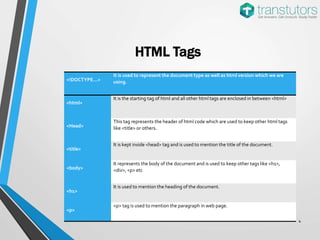
HTML Tags
<!DOCTYPE…>
It is used to represent the document type as well as html version which we are
using.
<html>
It is the starting tag of html and all other html tags are enclosed in between <html>
<Head>
This tag represents the header of html code which are used to keep other html tags
like <title> or others.
<title>
It is kept inside <head> tag and is used to mention the title of the document.
<body>
It represents the body of the document and is used to keep other tags like <h1>,
<div>, <p> etc
<h1>
It is used to mention the heading of the document.
<p>
<p> tag is used to mention the paragraph in web page.
5
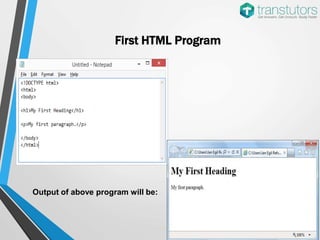
First HTML Program
Output of above program will be:
6
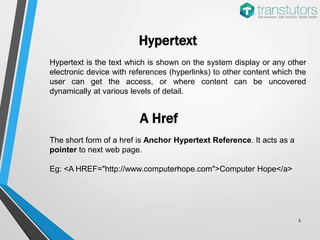
Hypertext
Hypertext is the text which is shown on the system display or any other
electronic device with references (hyperlinks) to other content which the
user can get the access, or where content can be uncovered
dynamically at various levels of detail.
The short form of a href is Anchor Hypertext Reference. It acts as a
pointer to next web page.
Eg: <A HREF="http://www.computerhope.com">Computer Hope</a>
A Href
7
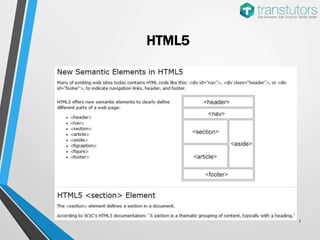
HTML5
8
9
10
Hey Friend,
This was just a summary on HTML. For more detailed
information on this topic, please type the link given
below or copy it from the description of this PPT and
open it in a new browser window.
www.transtutors.com/homework-help/computer-science/html.aspx

HTML | Computer Science

  • 1.
  • 2.
  • 3.
  • 4.
    4 HTML Tags <!DOCTYPE…> It isused to represent the document type as well as html version which we are using. <html> It is the starting tag of html and all other html tags are enclosed in between <html> <Head> This tag represents the header of html code which are used to keep other html tags like <title> or others. <title> It is kept inside <head> tag and is used to mention the title of the document. <body> It represents the body of the document and is used to keep other tags like <h1>, <div>, <p> etc <h1> It is used to mention the heading of the document. <p> <p> tag is used to mention the paragraph in web page.
  • 5.
    5 First HTML Program Outputof above program will be:
  • 6.
    6 Hypertext Hypertext is thetext which is shown on the system display or any other electronic device with references (hyperlinks) to other content which the user can get the access, or where content can be uncovered dynamically at various levels of detail. The short form of a href is Anchor Hypertext Reference. It acts as a pointer to next web page. Eg: <A HREF="http://www.computerhope.com">Computer Hope</a> A Href
  • 7.
  • 8.
  • 9.
  • 10.
    10 Hey Friend, This wasjust a summary on HTML. For more detailed information on this topic, please type the link given below or copy it from the description of this PPT and open it in a new browser window. www.transtutors.com/homework-help/computer-science/html.aspx