Visuals Catches the attention of readers In many cases, visuals make it easy to illustrate product benefit in a single glance. Helps decrease, if not do away, with body copy in certain cases.
Determining the Chief Focus for Visuals Package containing the product Product alone Product in use How to use the product Product features
Determining the Chief Focus for Visuals… Cont’d Comparison of products User benefit Humor Testimonial Negative appeal-What happens if you don’t use the product?
Package containing the product
Product Alone
Product in Use
How to Use the Product
Product Features
Comparison of Products
User Benefit
Humor
Testimonial
Negative Appeal
Composing Great Pictures Visualize a concept for your picture.  What do you want it to say? Choose a subject matter. Decide on a center of interest Pick the picture orientation Establish the distance and point of view Plan for action
Composing Great Pictures… Cont’d Working with the background Arranging all visual elements within the frame
Decide on a  Center of Interest Most prominent object in the picture Either the brightest object in the photo or at least not overpowered by a brighter object Only one center of interest should be in the composition Avoid putting the center of interest in the exact center of the photo.
Pick the Picture Orientation When using pictures for a slide show, use horizontally composed images If subject has dominant horizontal lines, use horizontally composed image.  Vertically composed if vertical. Use square composition if vertical and horizontal objects in your picture are equally important.
Some orientation examples
Arranging your subjects Choosing the subject distance To convey a feeling of space and depth, move back a bit or use wide-angle lens. Make sure your subjects don’t appear too small when you’re moving back.  They should still be large enough to be interesting. For photos that emphasize a person or a group of people, move in as close as you can. Move so you fill in the frame completely with interesting things.
Optimizing Backgrounds Check your background to make sure it is not gaudy, brightly colored, or busy. For portraits, a plain background, such as a seamless backdrop can be effective. Outdoors, trees, grass, cloud-studded skies, plain walls, and other textured surfaces can make good backgrounds. Watch for strong lines or shapes in the background that don’t lead the eye to your subject. Consider using depth of field (the amount of the image that’s in sharp focus) to make your background blurry.
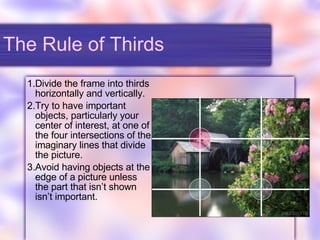
The Rule of Thirds Divide the frame into thirds horizontally and vertically. Try to have important objects, particularly your center of interest, at one of the four intersections of the imaginary lines that divide the picture. Avoid having objects at the edge of a picture unless the part that isn’t shown isn’t important.
When to break The Rule When your main subject is too large to fit comfortably at one of the imaginary intersection points. If centering the image would help illustrate the concept. When you want to show symmetry.
Rule-breaking example
Some Corollaries If your subjects are people, animals, statues or anything that you think of as having a front end and back end, make sure they are either facing the camera or facing into the frame, rather than out of it. If objects in the frame are moving or pointed in a particular direction, make sure they are heading into the frame, rather than out of it.
Some Corollaries… Cont’d Add extra space in front of any fast-moving object (such as a race car) so the object will have somewhere to go, while remaining in the frame. 
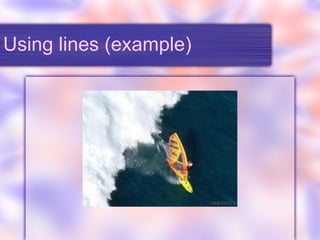
Using Straight Lines and Curves Composing with lines Look for straight lines in your image and try to use them to lead the eye to the main subject area. Find diagonal lines to direct the attention to the center of interest. Use repetitive lines to create an interesting pattern. Curved lines are more graceful than straight lines, and can lead the viewer gently from one portion of the composition to another. Look for shapes within your composition to add interest.
Using lines (example)
Balancing an Image Create a symmetrical balance by having the objects on either side of the frame to be roughly of similar size or weight. Create a nonsymmetrical balance, have the objects on opposing sides to have different size or weight.
Framing an Image In the foreground, look for obvious framing shapes in which you can place your composition. Make your own frames by changing position until foreground objects create a border around your image. Place your frame in the foreground. Use a frame to create a feeling of depth.
Avoiding Mergers Mergers are the unintentional combining of portions of an image. Follow these steps to avoid mergers: When composing an image, look behind the subject at the objects in the background. Then, examine the borders of the image to look for things “attached” to the edges. If an unwanted merger seems likely, move the subject to either side, or change your position slightly to eliminate the juxtaposition.
Photographing People Capture satisfying portraits Make it possible for your subject to look their best. Get to know your subject’s personality. Provide comfortable surroundings to help people stay relaxed.
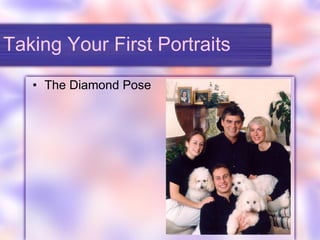
Taking Your First Portraits The Diamond Pose

Guide to print ad visuals

  • 1.
    Visuals Catches theattention of readers In many cases, visuals make it easy to illustrate product benefit in a single glance. Helps decrease, if not do away, with body copy in certain cases.
  • 2.
    Determining the ChiefFocus for Visuals Package containing the product Product alone Product in use How to use the product Product features
  • 3.
    Determining the ChiefFocus for Visuals… Cont’d Comparison of products User benefit Humor Testimonial Negative appeal-What happens if you don’t use the product?
  • 4.
  • 5.
  • 6.
  • 7.
    How to Usethe Product
  • 8.
  • 9.
  • 10.
  • 11.
  • 12.
  • 13.
  • 14.
    Composing Great PicturesVisualize a concept for your picture. What do you want it to say? Choose a subject matter. Decide on a center of interest Pick the picture orientation Establish the distance and point of view Plan for action
  • 15.
    Composing Great Pictures…Cont’d Working with the background Arranging all visual elements within the frame
  • 16.
    Decide on a Center of Interest Most prominent object in the picture Either the brightest object in the photo or at least not overpowered by a brighter object Only one center of interest should be in the composition Avoid putting the center of interest in the exact center of the photo.
  • 17.
    Pick the PictureOrientation When using pictures for a slide show, use horizontally composed images If subject has dominant horizontal lines, use horizontally composed image. Vertically composed if vertical. Use square composition if vertical and horizontal objects in your picture are equally important.
  • 18.
  • 19.
    Arranging your subjectsChoosing the subject distance To convey a feeling of space and depth, move back a bit or use wide-angle lens. Make sure your subjects don’t appear too small when you’re moving back. They should still be large enough to be interesting. For photos that emphasize a person or a group of people, move in as close as you can. Move so you fill in the frame completely with interesting things.
  • 20.
    Optimizing Backgrounds Checkyour background to make sure it is not gaudy, brightly colored, or busy. For portraits, a plain background, such as a seamless backdrop can be effective. Outdoors, trees, grass, cloud-studded skies, plain walls, and other textured surfaces can make good backgrounds. Watch for strong lines or shapes in the background that don’t lead the eye to your subject. Consider using depth of field (the amount of the image that’s in sharp focus) to make your background blurry.
  • 21.
    The Rule ofThirds Divide the frame into thirds horizontally and vertically. Try to have important objects, particularly your center of interest, at one of the four intersections of the imaginary lines that divide the picture. Avoid having objects at the edge of a picture unless the part that isn’t shown isn’t important.
  • 22.
    When to breakThe Rule When your main subject is too large to fit comfortably at one of the imaginary intersection points. If centering the image would help illustrate the concept. When you want to show symmetry.
  • 23.
  • 24.
    Some Corollaries Ifyour subjects are people, animals, statues or anything that you think of as having a front end and back end, make sure they are either facing the camera or facing into the frame, rather than out of it. If objects in the frame are moving or pointed in a particular direction, make sure they are heading into the frame, rather than out of it.
  • 25.
    Some Corollaries… Cont’dAdd extra space in front of any fast-moving object (such as a race car) so the object will have somewhere to go, while remaining in the frame. 
  • 26.
    Using Straight Linesand Curves Composing with lines Look for straight lines in your image and try to use them to lead the eye to the main subject area. Find diagonal lines to direct the attention to the center of interest. Use repetitive lines to create an interesting pattern. Curved lines are more graceful than straight lines, and can lead the viewer gently from one portion of the composition to another. Look for shapes within your composition to add interest.
  • 27.
  • 28.
    Balancing an ImageCreate a symmetrical balance by having the objects on either side of the frame to be roughly of similar size or weight. Create a nonsymmetrical balance, have the objects on opposing sides to have different size or weight.
  • 29.
    Framing an ImageIn the foreground, look for obvious framing shapes in which you can place your composition. Make your own frames by changing position until foreground objects create a border around your image. Place your frame in the foreground. Use a frame to create a feeling of depth.
  • 30.
    Avoiding Mergers Mergersare the unintentional combining of portions of an image. Follow these steps to avoid mergers: When composing an image, look behind the subject at the objects in the background. Then, examine the borders of the image to look for things “attached” to the edges. If an unwanted merger seems likely, move the subject to either side, or change your position slightly to eliminate the juxtaposition.
  • 31.
    Photographing People Capturesatisfying portraits Make it possible for your subject to look their best. Get to know your subject’s personality. Provide comfortable surroundings to help people stay relaxed.
  • 32.
    Taking Your FirstPortraits The Diamond Pose