Four Principles of
 Graphic Design
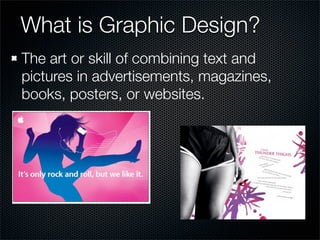
What is Graphic Design?
The art or skill of combining text and
pictures in advertisements, magazines,
books, posters, or websites.
This lesson will explore the
four main principles of Design:

  1. Proximity
  2. Alignment
  3. Repetition
  4. Contrast
Principles of Design
  These FOUR basic principles of design appear in
  every well-designed piece of work. Although we will
  discuss each individually, they are all connected.
  Rarely will you apply only one principle to your
  design.
	1.	 Contrast
 	 .	 Repetition
 2
	3.	 Alignment
	4.	 Proximity
Proximity/Closeness:
   Organizing your ideas

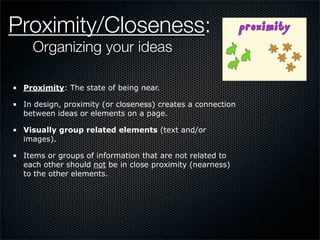
 Proximity: The state of being near.

 In design, proximity (or closeness) creates a connection
 between ideas or elements on a page.

 Visually group related elements (text and/or
 images).

 Items or groups of information that are not related to
 each other should not be in close proximity (nearness)
 to the other elements.
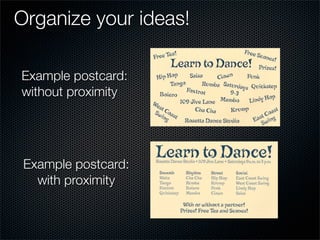
Organize your ideas!

Example postcard:
without proximity


 Example postcard:
   with proximity
So far we have covered:

  ✓ Proximity
    Alignment
    Repetition
    Contrast
Alignment

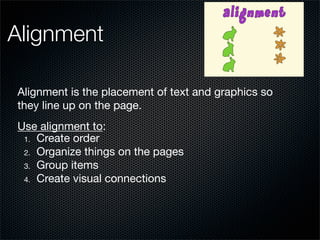
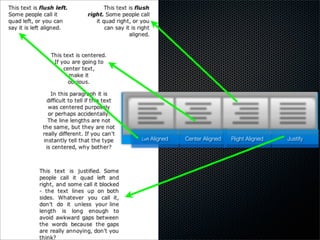
Alignment is the placement of text and graphics so
they line up on the page.
Use alignment to:
 1. Create order
 2. Organize things on the pages
 3. Group items
 4. Create visual connections
Left Aligned   Center Aligned   Right Aligned   Justify
So far we have covered:

  ✓ Proximity
  ✓ Alignment
    Repetition
    Contrast
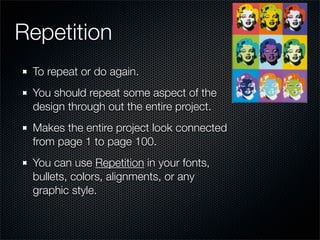
Repetition
 To repeat or do again.
 You should repeat some aspect of the
 design through out the entire project.
 Makes the entire project look connected
 from page 1 to page 100.
 You can use Repetition in your fonts,
 bullets, colors, alignments, or any
 graphic style.
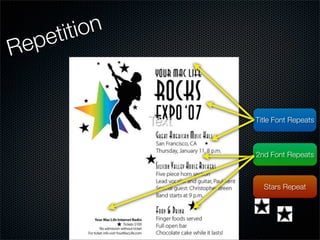
etition
R ep


              Text   Title Font Repeats


                     2nd Font Repeats


                       Stars Repeat
So far we have covered:

  ✓ Proximity
  ✓ Alignment
  ✓ Repetition
    Contrast
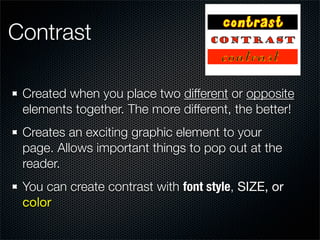
Contrast

 Created when you place two different or opposite
 elements together. The more different, the better!
 Creates an exciting graphic element to your
 page. Allows important things to pop out at the
 reader.
 You can create contrast with font style, SIZE, or
 color
So far we have covered:

  ✓ Proximity
  ✓ Alignment
  ✓ Repetition
  ✓ Contrast
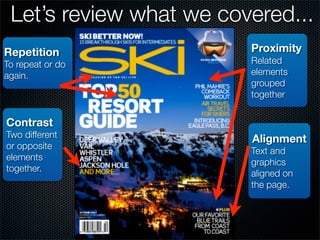
Let’s review what we covered...
Repetition               Proximity
To repeat or do          Related
again.                   elements
                         grouped
                         together


Contrast
Two different            Alignment
or opposite
                         Text and
elements
                         graphics
together.
                         aligned on
                         the page.
Images
Cover Picture:
http://eeryelegance.blogspot.com/2011/04/graphic-design-special.html


iPod Ad:
http://news.cnet.com/i/bto/20090831/apple.JPG

Nike Ad
http://3.bp.blogspot.com/_MIBYQhdxSug/S1acqqBgj8I/AAAAAAAAAAk/IczISi8DkTA/s400/Nike_thighs_ad.jpg


Proximity Poster
http://www.nhsdesigns.com/images/principles/proximity_poster_example.gif

Learn to Dance Postcard
http://msfrankel.com/old_site/images/p23a.gif

Repetition Poster
http://www.nhsdesigns.com/images/principles/repetition_poster_example2.gif

Alignment poster
http://www.nhsdesigns.com/images/principles/alignment_poster_example.gif

Alignment Image
http://www.plu.edu/~haasehj/repetition.html
Images Continued...
Marilyn Monroe Collage
http://www.graphicshunt.com/images/marilyn_monroe_collage-6741.htm

Contrast poster
http://www.nhsdesigns.com/images/principles/contrast_poster_example.gif

Ski Magazine
http://news.auroraphotos.com/wp-content/uploads/2007/09/kirkwoodcover.jpg
Facts:
Design Principles- adapted from The Non-Designer's Design and Type
Books by Robin Williams and NHS Design Dept. http://www.nhsdesigns.com/.
THE END

Graphic design slideshow

  • 1.
    Four Principles of Graphic Design
  • 2.
    What is GraphicDesign? The art or skill of combining text and pictures in advertisements, magazines, books, posters, or websites.
  • 3.
    This lesson willexplore the four main principles of Design: 1. Proximity 2. Alignment 3. Repetition 4. Contrast
  • 4.
    Principles of Design These FOUR basic principles of design appear in every well-designed piece of work. Although we will discuss each individually, they are all connected. Rarely will you apply only one principle to your design. 1. Contrast . Repetition 2 3. Alignment 4. Proximity
  • 5.
    Proximity/Closeness: Organizing your ideas Proximity: The state of being near. In design, proximity (or closeness) creates a connection between ideas or elements on a page. Visually group related elements (text and/or images). Items or groups of information that are not related to each other should not be in close proximity (nearness) to the other elements.
  • 6.
    Organize your ideas! Examplepostcard: without proximity Example postcard: with proximity
  • 7.
    So far wehave covered: ✓ Proximity Alignment Repetition Contrast
  • 8.
    Alignment Alignment is theplacement of text and graphics so they line up on the page. Use alignment to: 1. Create order 2. Organize things on the pages 3. Group items 4. Create visual connections
  • 9.
    Left Aligned Center Aligned Right Aligned Justify
  • 10.
    So far wehave covered: ✓ Proximity ✓ Alignment Repetition Contrast
  • 11.
    Repetition To repeator do again. You should repeat some aspect of the design through out the entire project. Makes the entire project look connected from page 1 to page 100. You can use Repetition in your fonts, bullets, colors, alignments, or any graphic style.
  • 12.
    etition R ep Text Title Font Repeats 2nd Font Repeats Stars Repeat
  • 13.
    So far wehave covered: ✓ Proximity ✓ Alignment ✓ Repetition Contrast
  • 14.
    Contrast Created whenyou place two different or opposite elements together. The more different, the better! Creates an exciting graphic element to your page. Allows important things to pop out at the reader. You can create contrast with font style, SIZE, or color
  • 15.
    So far wehave covered: ✓ Proximity ✓ Alignment ✓ Repetition ✓ Contrast
  • 16.
    Let’s review whatwe covered... Repetition Proximity To repeat or do Related again. elements grouped together Contrast Two different Alignment or opposite Text and elements graphics together. aligned on the page.
  • 17.
    Images Cover Picture: http://eeryelegance.blogspot.com/2011/04/graphic-design-special.html iPod Ad: http://news.cnet.com/i/bto/20090831/apple.JPG NikeAd http://3.bp.blogspot.com/_MIBYQhdxSug/S1acqqBgj8I/AAAAAAAAAAk/IczISi8DkTA/s400/Nike_thighs_ad.jpg Proximity Poster http://www.nhsdesigns.com/images/principles/proximity_poster_example.gif Learn to Dance Postcard http://msfrankel.com/old_site/images/p23a.gif Repetition Poster http://www.nhsdesigns.com/images/principles/repetition_poster_example2.gif Alignment poster http://www.nhsdesigns.com/images/principles/alignment_poster_example.gif Alignment Image http://www.plu.edu/~haasehj/repetition.html
  • 18.
    Images Continued... Marilyn MonroeCollage http://www.graphicshunt.com/images/marilyn_monroe_collage-6741.htm Contrast poster http://www.nhsdesigns.com/images/principles/contrast_poster_example.gif Ski Magazine http://news.auroraphotos.com/wp-content/uploads/2007/09/kirkwoodcover.jpg
  • 19.
    Facts: Design Principles- adaptedfrom The Non-Designer's Design and Type Books by Robin Williams and NHS Design Dept. http://www.nhsdesigns.com/.
  • 20.