

A flowchart is a graphic or pictorial representation of
the steps necessary to solve problem, complete a
process, accomplish a task or illustrate the
components of a system.
What is a Flowchart?
 A program flowchart represents the information
processing steps to be performed within a computer
system.
 The basic types of flowcharts are system flowcharts and
program flowcharts
 A system flowchart is representation of the components
and flows in a system.
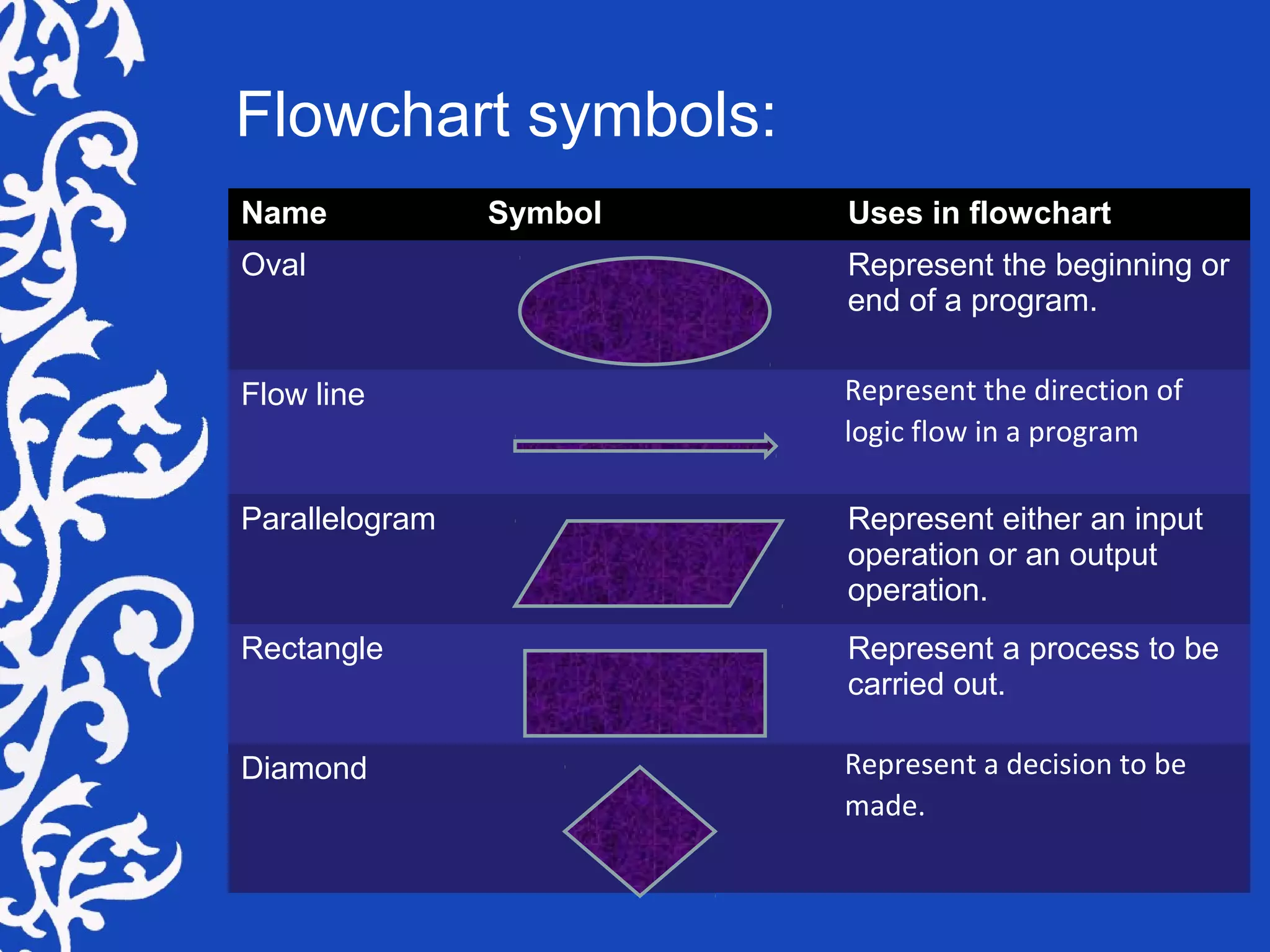
Name Symbol Uses in flowchart
Oval Represent the beginning or
end of a program.
Flow line Represent the direction of
logic flow in a program
Parallelogram Represent either an input
operation or an output
operation.
Rectangle Represent a process to be
carried out.
Diamond Represent a decision to be
made.
Flowchart symbols:
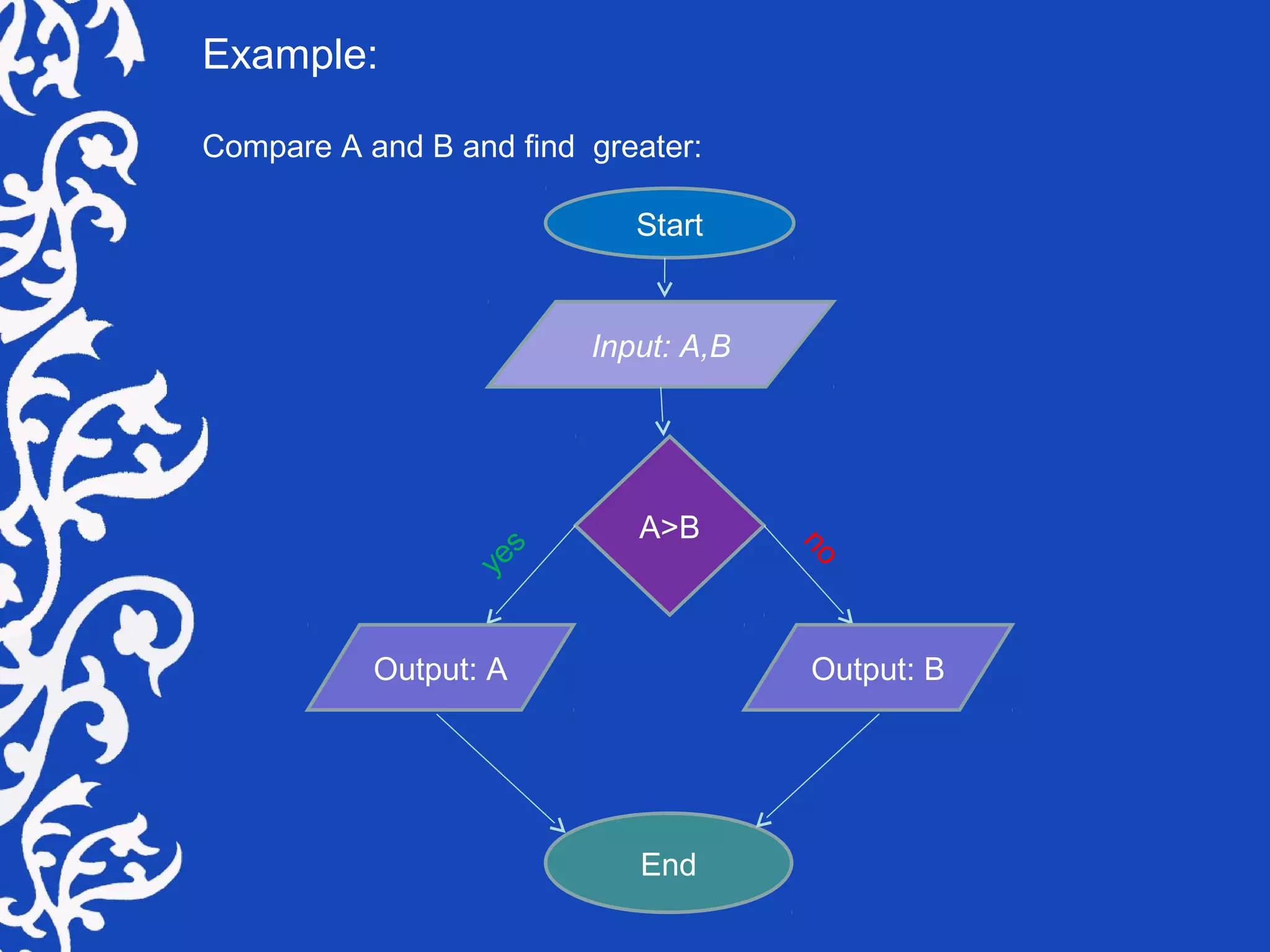
Example:
Compare A and B and find greater:
Start
Input: A,B
A>B
Output: A Output: B
End
yes
no
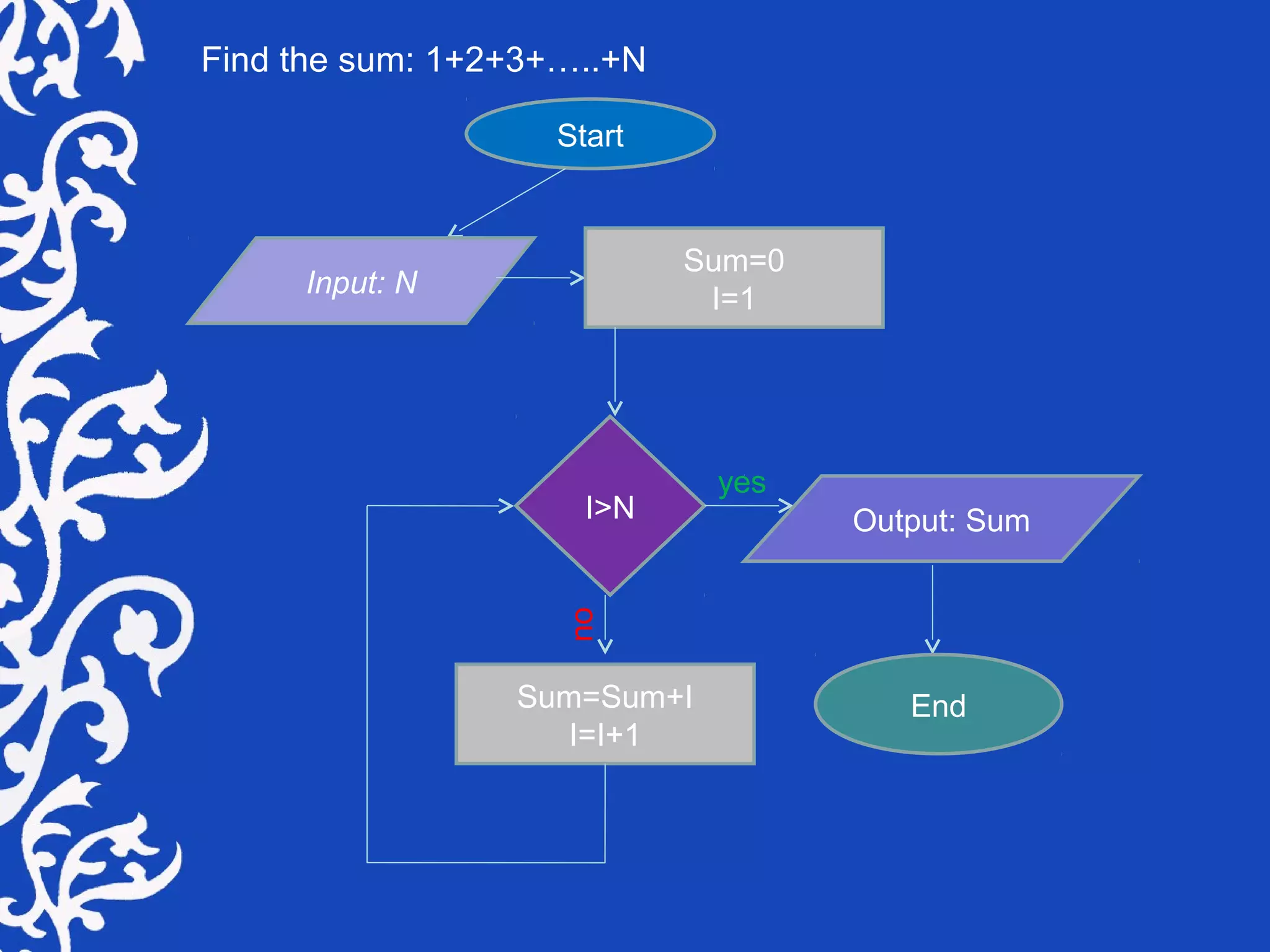
Find the sum: 1+2+3+…..+N
Start
Input: N
Sum=0
I=1
I>N Output: Sum
Sum=Sum+I
I=I+1
End
yes
no
Use of flowchart
Sometimes it's more effective to visualize something graphically
that it is to describe it with words. That is the essence of what
flowcharts do for us. Flowcharts explain a process clearly through
symbols and text. Moreover, flowcharts give you the gist of the
process flow in a single glance. The following are some of the
more salient reasons to use flowcharts.
Programming:
Information technology played a big influence on the use and
spread of flowcharts in the 20th century. While Dr. W. Edwards
Deming was advocating their use in quality management,
professionals in the data processing world were using them to
flesh out their programming logic. Flowcharts were a mainstay of
procedural programming, however, and with the advent of object
oriented programming and various modeling tools, the use of
flowcharts for programming is no longer as commonplace as it
once was.
That said, even within the scope of object oriented programming,
complex program logic can be modeled effectively using a flowchart.
Moreover, diagramming the user's experience as they navigate through
a program is a valuable prerequisite prior to designing the user
interface. So flowcharts still have their place in the world of
programming.
Process Documentation / Training Materials:
Another common use for flowcharts is to create process
documentation. Although this reason overlaps with regulatory
and quality management requirements (below), many non-
regulated businesses use flowcharts for their documentation as
well. These can range in form from high-level procedures to
low-level, detailed work instructions.
Advantages of flowchart:
It provides a clear overview of the entire program and problem and
Solution.
It checks the accuracy in logic flow.
It provides an easy way of communication because any other
person besides the programmer can understand the way they are
represented.
It represents the data flow.
It documents the steps followed in an algorithm.
It provides the facility for coding.
It provides the way of modification of running program.
They shows all major elements and their relationship.
Flow chart
Flow chart

Flow chart

  • 2.
    A flowchart isa graphic or pictorial representation of the steps necessary to solve problem, complete a process, accomplish a task or illustrate the components of a system. What is a Flowchart?  A program flowchart represents the information processing steps to be performed within a computer system.  The basic types of flowcharts are system flowcharts and program flowcharts  A system flowchart is representation of the components and flows in a system.
  • 3.
    Name Symbol Usesin flowchart Oval Represent the beginning or end of a program. Flow line Represent the direction of logic flow in a program Parallelogram Represent either an input operation or an output operation. Rectangle Represent a process to be carried out. Diamond Represent a decision to be made. Flowchart symbols:
  • 4.
    Example: Compare A andB and find greater: Start Input: A,B A>B Output: A Output: B End yes no
  • 5.
    Find the sum:1+2+3+…..+N Start Input: N Sum=0 I=1 I>N Output: Sum Sum=Sum+I I=I+1 End yes no
  • 6.
    Use of flowchart Sometimesit's more effective to visualize something graphically that it is to describe it with words. That is the essence of what flowcharts do for us. Flowcharts explain a process clearly through symbols and text. Moreover, flowcharts give you the gist of the process flow in a single glance. The following are some of the more salient reasons to use flowcharts. Programming: Information technology played a big influence on the use and spread of flowcharts in the 20th century. While Dr. W. Edwards Deming was advocating their use in quality management, professionals in the data processing world were using them to flesh out their programming logic. Flowcharts were a mainstay of procedural programming, however, and with the advent of object oriented programming and various modeling tools, the use of flowcharts for programming is no longer as commonplace as it once was.
  • 7.
    That said, evenwithin the scope of object oriented programming, complex program logic can be modeled effectively using a flowchart. Moreover, diagramming the user's experience as they navigate through a program is a valuable prerequisite prior to designing the user interface. So flowcharts still have their place in the world of programming. Process Documentation / Training Materials: Another common use for flowcharts is to create process documentation. Although this reason overlaps with regulatory and quality management requirements (below), many non- regulated businesses use flowcharts for their documentation as well. These can range in form from high-level procedures to low-level, detailed work instructions.
  • 8.
    Advantages of flowchart: Itprovides a clear overview of the entire program and problem and Solution. It checks the accuracy in logic flow. It provides an easy way of communication because any other person besides the programmer can understand the way they are represented. It represents the data flow. It documents the steps followed in an algorithm. It provides the facility for coding. It provides the way of modification of running program. They shows all major elements and their relationship.