
UNIT 2
Algorithm and Flowcharts
8/2/20171 Ms SURBHI SAROHA(Asst.Professor)
Algorithm
 Algorithm is a step-by-step procedure, which defines a set of instructions to be
executed in a certain order to get the desired output. Algorithms are generally
created independent of underlying languages, i.e. an algorithm can be
implemented in more than one programming language.
 From the data structure point of view, following are some important categories
of algorithms −
 Search − Algorithm to search an item in a data structure.
 Sort − Algorithm to sort items in a certain order.
 Insert − Algorithm to insert item in a data structure.
 Update − Algorithm to update an existing item in a data structure.
 Delete − Algorithm to delete an existing item from a data structure.
8/2/20172 Ms SURBHI SAROHA(Asst.Professor)
Advantages of Algorithm
8/2/2017Ms SURBHI SAROHA(Asst.Professor)3
 It is a step-by-step repetition of a solution to a
given problem which is very easy to understand.
 Its easy to first develop an algorithm, then convert
it into a flowchart &then into a computer program.
 Its is easy to debug as every step is got its own
logical sequence.
Disadvantages of algorithm.
8/2/2017Ms SURBHI SAROHA(Asst.Professor)4
 Writing algorithm takes a long time.
 An Algorithm is not a computer program, it is
rather a concept of how a program should be.
Characteristics of an Algorithm
8/2/2017Ms SURBHI SAROHA(Asst.Professor)5
 An algorithm should have the following characteristics −
 Unambiguous − Algorithm should be clear and
unambiguous. Each of its steps(or phases), and their
inputs/outputs should be clear and must lead to only one
meaning.
 Input − An algorithm should have 0 or more well-
defined inputs.
 Output − An algorithm should have 1 or more well-
defined outputs, and should match the desired output.
 Finiteness − Algorithms must terminate after a finite
number of steps.
 Feasibility − Should be feasible with the available
resources.
 Independent − An algorithm should have step-by-step
directions, which should be independent of any
programming code.
Example of Algorithm
8/2/2017Ms SURBHI SAROHA(Asst.Professor)6
 Let's try to learn algorithm-writing by using an
example.
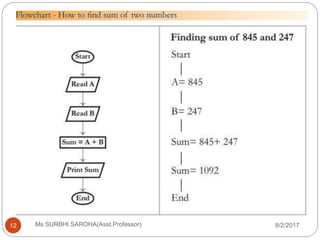
 Problem− Design an algorithm to add two
numbers
 Step 1 − START
 Step 2 − declare three integers a, b & c
 Step 3 − define values of a & b
 Step 4 − add values of a & b
 Step 5 − store output of step 4 to c
 Step 6 − print c
 Step 7 − STOP
Cont….
8/2/2017Ms SURBHI SAROHA(Asst.Professor)7
 Algorithms tell the programmers how to code the
program. Alternatively, the algorithm can be
written as −
 Step 1 − START ADD
 Step 2 − get values of a & b
 Step 3 − c ← a + b
 Step 4 − display c
 Step 5 − STOP
Flowchart
8/2/2017Ms SURBHI SAROHA(Asst.Professor)8
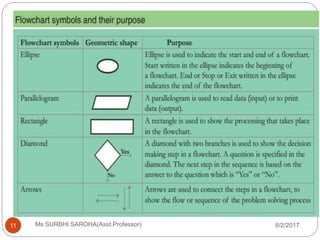
 A flowchart is a picture (graphical representation) of
the problem solving process.
 A flowchart gives a step-by-step procedure for
solution of a problem.
 Elements of a flowchart:
 Various geometrical shaped boxes represent the
steps of the solution.
 The boxes are connected by directional arrows to
show the flow of the solution.
 Uses of a flowchart:
 To specify the method of solving a problem.
 To plan the sequence of a computer program.
 Communicate ideas, solutions.
Advantages Of Using
FLOWCHARTS
8/2/2017Ms SURBHI SAROHA(Asst.Professor)9
1.Communication: Flowcharts are better way of
communicating the logic of a system to all concerned
or involved.
2.Effective analysis: With the help of flowchart,
problem can be analyzed in more effective way
therefore reducing cost and wastage of time.
3.Proper documentation: Program flowcharts serve
as a good program documentation, which is needed
for various purposes, making things more efficient.
4.Efficient Coding: The flowcharts act as a guide or
blueprint during the systems analysis and program
development phase.
5.Proper Debugging: The flowchart helps in
debugging process.
6.Efficient Program Maintenance: The maintenance
of operating program becomes easy with the help of
flowchart. It helps the programmer to put efforts more
efficiently on that part
Disadvantages Of Using
FLOWCHARTS:
8/2/2017Ms SURBHI SAROHA(Asst.Professor)10
1. Complex logic: Sometimes, the program logic
is quite complicated. In that case, flowchart
becomes complex and clumsy. This will become a
pain for the user, resulting in a waste of time and
money trying to correct the problem.
2. Alterations and Modifications: If alterations
are required the flowchart may require re-drawing
completely. This will usually waste valuable time.
3.Reproduction: As the flowchart symbols
cannot be typed, reproduction of flowchart
becomes a problem.
8/2/2017Ms SURBHI SAROHA(Asst.Professor)11
8/2/2017Ms SURBHI SAROHA(Asst.Professor)12
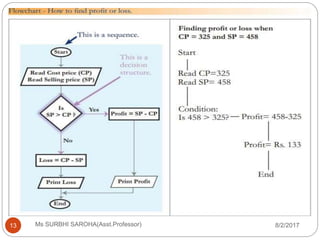
8/2/2017Ms SURBHI SAROHA(Asst.Professor)13
Thank you
8/2/2017Ms SURBHI SAROHA(Asst.Professor)14

Algorithm and Flowcharts

  • 1.
    UNIT 2 Algorithm andFlowcharts 8/2/20171 Ms SURBHI SAROHA(Asst.Professor)
  • 2.
    Algorithm  Algorithm isa step-by-step procedure, which defines a set of instructions to be executed in a certain order to get the desired output. Algorithms are generally created independent of underlying languages, i.e. an algorithm can be implemented in more than one programming language.  From the data structure point of view, following are some important categories of algorithms −  Search − Algorithm to search an item in a data structure.  Sort − Algorithm to sort items in a certain order.  Insert − Algorithm to insert item in a data structure.  Update − Algorithm to update an existing item in a data structure.  Delete − Algorithm to delete an existing item from a data structure. 8/2/20172 Ms SURBHI SAROHA(Asst.Professor)
  • 3.
    Advantages of Algorithm 8/2/2017MsSURBHI SAROHA(Asst.Professor)3  It is a step-by-step repetition of a solution to a given problem which is very easy to understand.  Its easy to first develop an algorithm, then convert it into a flowchart &then into a computer program.  Its is easy to debug as every step is got its own logical sequence.
  • 4.
    Disadvantages of algorithm. 8/2/2017MsSURBHI SAROHA(Asst.Professor)4  Writing algorithm takes a long time.  An Algorithm is not a computer program, it is rather a concept of how a program should be.
  • 5.
    Characteristics of anAlgorithm 8/2/2017Ms SURBHI SAROHA(Asst.Professor)5  An algorithm should have the following characteristics −  Unambiguous − Algorithm should be clear and unambiguous. Each of its steps(or phases), and their inputs/outputs should be clear and must lead to only one meaning.  Input − An algorithm should have 0 or more well- defined inputs.  Output − An algorithm should have 1 or more well- defined outputs, and should match the desired output.  Finiteness − Algorithms must terminate after a finite number of steps.  Feasibility − Should be feasible with the available resources.  Independent − An algorithm should have step-by-step directions, which should be independent of any programming code.
  • 6.
    Example of Algorithm 8/2/2017MsSURBHI SAROHA(Asst.Professor)6  Let's try to learn algorithm-writing by using an example.  Problem− Design an algorithm to add two numbers  Step 1 − START  Step 2 − declare three integers a, b & c  Step 3 − define values of a & b  Step 4 − add values of a & b  Step 5 − store output of step 4 to c  Step 6 − print c  Step 7 − STOP
  • 7.
    Cont…. 8/2/2017Ms SURBHI SAROHA(Asst.Professor)7 Algorithms tell the programmers how to code the program. Alternatively, the algorithm can be written as −  Step 1 − START ADD  Step 2 − get values of a & b  Step 3 − c ← a + b  Step 4 − display c  Step 5 − STOP
  • 8.
    Flowchart 8/2/2017Ms SURBHI SAROHA(Asst.Professor)8 A flowchart is a picture (graphical representation) of the problem solving process.  A flowchart gives a step-by-step procedure for solution of a problem.  Elements of a flowchart:  Various geometrical shaped boxes represent the steps of the solution.  The boxes are connected by directional arrows to show the flow of the solution.  Uses of a flowchart:  To specify the method of solving a problem.  To plan the sequence of a computer program.  Communicate ideas, solutions.
  • 9.
    Advantages Of Using FLOWCHARTS 8/2/2017MsSURBHI SAROHA(Asst.Professor)9 1.Communication: Flowcharts are better way of communicating the logic of a system to all concerned or involved. 2.Effective analysis: With the help of flowchart, problem can be analyzed in more effective way therefore reducing cost and wastage of time. 3.Proper documentation: Program flowcharts serve as a good program documentation, which is needed for various purposes, making things more efficient. 4.Efficient Coding: The flowcharts act as a guide or blueprint during the systems analysis and program development phase. 5.Proper Debugging: The flowchart helps in debugging process. 6.Efficient Program Maintenance: The maintenance of operating program becomes easy with the help of flowchart. It helps the programmer to put efforts more efficiently on that part
  • 10.
    Disadvantages Of Using FLOWCHARTS: 8/2/2017MsSURBHI SAROHA(Asst.Professor)10 1. Complex logic: Sometimes, the program logic is quite complicated. In that case, flowchart becomes complex and clumsy. This will become a pain for the user, resulting in a waste of time and money trying to correct the problem. 2. Alterations and Modifications: If alterations are required the flowchart may require re-drawing completely. This will usually waste valuable time. 3.Reproduction: As the flowchart symbols cannot be typed, reproduction of flowchart becomes a problem.
  • 11.
  • 12.
  • 13.
  • 14.
    Thank you 8/2/2017Ms SURBHISAROHA(Asst.Professor)14