SANKET SENAPATI
FIREWALL
What is a firewall?
A firewall is a device (or software feature) designed to
control the flow of traffic into and out-of a network.
In general, firewalls are installed to prevent attacks.
2
What is an attack?
Attack covers many things:
1. Someone probing a network for computers.
2. Someone attempting to crash services on a computer.
3. Someone attempting to crash a computer
(Win nuke:Remote DoS).
4. Someone attempting to gain access to a computer to use
resources or information.
3
Edge Firewall
4
An edge firewall is usually software running on a server
or workstation. An edge firewall protects a single
computer from attacks directed against it.
Examples of these firewalls are:
ZoneAlarm
BlackIce
IPFW on OSX
Firewall Appliance
5
An appliance firewall is a device whose sole function is
to act as a firewall. Examples of these firewalls are:
Cisco PIX.
Netscreen series.
Network Firewall
6
 Router/Bridge based Firewall
 A firewall running on a bridge or a router protects from a group of
devices to an entire network. Cisco has firewall feature sets in their
IOS operating system.
 Computer-based Network Firewall
 A network firewall runs on a computer (such as a PC or Unix
computer). These firewalls are some of the most flexible. Many free
products are available including IPFilter (the first package we tried),
PF (the current package we are using found on OpenBSD 3.0 and
later) and IPTables (found on Linux). Commercial products include:
Checkpoint Firewall-1. Apple OSX includes IPFW (included in an
operating system you gotta purchase).
Why use a firewall?
7
 Protect a wide range of machines from general probes
and many attacks.
 Provides some protection for machines lacking in
security.
What is VPN?
Virtual Private Network is a type of private
network that uses public telecommunication,
such as the Internet, instead of leased lines to
communicate.
Became popular as more employees worked
in remote locations.
Private Networks
vs.
Virtual Private Networks
Employees can access the network (Intranet) from
remote locations
Secured networks.
The Internet is used as the backbone for VPNs
Saves cost tremendously from reduction of
equipment and maintenance costs.
Scalability
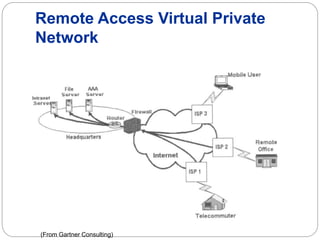
Remote Access Virtual Private
Network
(From Gartner Consulting)
Brief Overview of How it Works
 Two connections – one is made to the Internet
and the second is made to the VPN.
 Datagrams – contains data, destination and
source information.
 Firewalls – VPNs allow authorized users to pass
through the firewalls.
 Protocols – protocols create the VPN tunnels.
Types of Implementations
What does “implementation” mean in VPNs?
3 types
Intranet – Within an organization
Extranet – Outside an organization
Remote Access – Employee to Business
Advantages: Cost Savings
 Eliminating the need for expensive long-
distance leased lines
 Reducing the long-distance telephone
charges for remote access.
 Transferring the support burden to the service
providers
 Operational costs
Advantages: Scalability
 Flexibility of growth
 Efficiency with broadband technology
Disadvantages
VPNs require an in-depth understanding of
public network security issues and proper
deployment of precautions
Availability and performance depends on factors
largely outside of their control
Immature standards
VPNs need to accommodate protocols other
than IP and existing internal network technology
Industries That May Use a VPN
 Healthcare: enables the transferring of confidential patient
information within the medical facilities & health care provider
 Manufacturing: allow suppliers to view inventory & allow clients to
purchase online safely
 Retail: able to securely transfer sales data or customer info between
stores & the headquarters
 Banking/Financial: enables account information to be transferred
safely within departments & branches
 General Business: communication between remote employees can
be securely exchanged
Proxy servers
 A proxy server is a machine which acts as an
intermediary between the computers of a local
area network (sometimes using protocols other
than TCP/IP) and the Internet
Proxy servers
 Most of the time the proxy server is used for the
web, and when it is, it's an HTTP proxy. However,
there can be proxy servers for every application
protocol (FTP, etc.).
Proxy servers
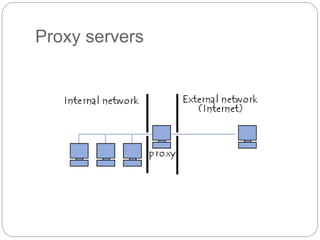
The operating principle of a proxy server
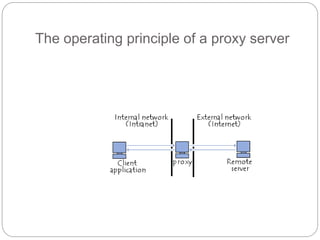
The basic operating principle of a proxy server is
quite simple: It is server which acts as a "proxy" for an
application by making a request on the Internet in its
stead. This way, whenever a user connects to the
Internet using a client application configured to use a
proxy server, the application will first connect to the
proxy server and give it its request. The proxy server
then connects to the server which the client
application wants to connect to and sends that server
the request. Next, the server gives its reply to the
proxy, which then finally sends it to the application
client
The operating principle of a proxy server
Features of a proxy server
 Nowadays, by using TCP/IP within local area
networks, the relaying role that the proxy server
plays is handled directly by gateways and routers.
However, proxy servers are still being used, as
they have some other features.
 Cashing
 Filtering
 Authentication
Caching
 Most proxies have a cache, the ability to keep pages commonly
visited by users in memory (or "in cache"), so they can provide
them as quickly as possible. Indeed, the term "cache" is used
often in computer science to refer to a temporary data storage
space (also sometimes called a "buffer.")
 A proxy server with the ability to cache information is generally
called a "proxy-cache server".
 The feature, implemented on some proxy servers, is used both
to reduce Internet bandwidth use and to reduce document
loading time for users.
 Nevertheless, to achieve this, the proxy must compare the data it
stores in cached memory with the remote data on a regular
basis, in order to ensure that the cached data is still valid.
Filtering
 What's more, by using a proxy server, connections
can be tracked by creating logs for systematically
recording user queries when they request
connections to the Internet
 Because of this, Internet connections can be filtered,
by analysing both client requests and server replies.
When filtering is done by comparing a client's request
to a list of authorised requests, this is called
whitelisting, and when it's done with a list of forbidden
sites, it's called blacklisting. Finally, analysing server
replies that comply with a list of criteria (such as
keywords) is called content filtering.
Authentication
 As a proxy is an indispensable intermediary tool for
internal network users who want to access external
resources, it can sometimes be used to authenticate
users, meaning to ask them to identify themselves,
such as with a username and password. It is also
easy to grant access to external resources only to
individuals authorized to do so, and to record each
use of external resources in log files.
 This type of mechanism, when implemented,
obviously raises many issues related to individual
liberties and personal rights.
Reverse-proxy servers
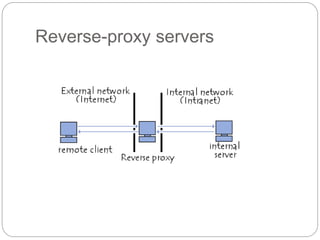
 A reverse-proxy is a "backwards" proxy-cache
server; it's a proxy server that, rather than
allowing internal users to access the Internet, lets
Internet users indirectly access certain internal
servers.
Reverse-proxy servers
 The reverse-proxy server is used as an intermediary by Internet
users who want to access an internal website, by sending it
requests indirectly. With a reverse-proxy, the web server is
protected from direct outside attacks, which increases the
internal network's strength. What's more, a reverse-proxy's
cache function can lower the workload if the server it is assigned
to, and for this reason is sometimes called a server accelerator.
 Finally, with perfected algorithms, the reverse-proxy can
distribute the workload by redirecting requests to other, similar
servers; this process is called load balancing.
Setting up a proxy server
 The most widely used proxy, without a doubt, is
Squid, a free software program available for several
platforms, including Windows and Linux.
 In Windows, there are several programs for setting up
a local area network proxy server at a low cost:
 Wingate is the most common solution (but isn't free of
charge)
 Configuring a proxy with Jana server is becoming
more and more common
 Windows 2000 includes Microsoft Proxy Server
(MSP), which works with Microsoft Proxy Client

Firewall vpn proxy

  • 1.
  • 2.
    What is afirewall? A firewall is a device (or software feature) designed to control the flow of traffic into and out-of a network. In general, firewalls are installed to prevent attacks. 2
  • 3.
    What is anattack? Attack covers many things: 1. Someone probing a network for computers. 2. Someone attempting to crash services on a computer. 3. Someone attempting to crash a computer (Win nuke:Remote DoS). 4. Someone attempting to gain access to a computer to use resources or information. 3
  • 4.
    Edge Firewall 4 An edgefirewall is usually software running on a server or workstation. An edge firewall protects a single computer from attacks directed against it. Examples of these firewalls are: ZoneAlarm BlackIce IPFW on OSX
  • 5.
    Firewall Appliance 5 An appliancefirewall is a device whose sole function is to act as a firewall. Examples of these firewalls are: Cisco PIX. Netscreen series.
  • 6.
    Network Firewall 6  Router/Bridgebased Firewall  A firewall running on a bridge or a router protects from a group of devices to an entire network. Cisco has firewall feature sets in their IOS operating system.  Computer-based Network Firewall  A network firewall runs on a computer (such as a PC or Unix computer). These firewalls are some of the most flexible. Many free products are available including IPFilter (the first package we tried), PF (the current package we are using found on OpenBSD 3.0 and later) and IPTables (found on Linux). Commercial products include: Checkpoint Firewall-1. Apple OSX includes IPFW (included in an operating system you gotta purchase).
  • 7.
    Why use afirewall? 7  Protect a wide range of machines from general probes and many attacks.  Provides some protection for machines lacking in security.
  • 8.
    What is VPN? VirtualPrivate Network is a type of private network that uses public telecommunication, such as the Internet, instead of leased lines to communicate. Became popular as more employees worked in remote locations.
  • 9.
    Private Networks vs. Virtual PrivateNetworks Employees can access the network (Intranet) from remote locations Secured networks. The Internet is used as the backbone for VPNs Saves cost tremendously from reduction of equipment and maintenance costs. Scalability
  • 10.
    Remote Access VirtualPrivate Network (From Gartner Consulting)
  • 11.
    Brief Overview ofHow it Works  Two connections – one is made to the Internet and the second is made to the VPN.  Datagrams – contains data, destination and source information.  Firewalls – VPNs allow authorized users to pass through the firewalls.  Protocols – protocols create the VPN tunnels.
  • 12.
    Types of Implementations Whatdoes “implementation” mean in VPNs? 3 types Intranet – Within an organization Extranet – Outside an organization Remote Access – Employee to Business
  • 13.
    Advantages: Cost Savings Eliminating the need for expensive long- distance leased lines  Reducing the long-distance telephone charges for remote access.  Transferring the support burden to the service providers  Operational costs
  • 14.
    Advantages: Scalability  Flexibilityof growth  Efficiency with broadband technology
  • 15.
    Disadvantages VPNs require anin-depth understanding of public network security issues and proper deployment of precautions Availability and performance depends on factors largely outside of their control Immature standards VPNs need to accommodate protocols other than IP and existing internal network technology
  • 16.
    Industries That MayUse a VPN  Healthcare: enables the transferring of confidential patient information within the medical facilities & health care provider  Manufacturing: allow suppliers to view inventory & allow clients to purchase online safely  Retail: able to securely transfer sales data or customer info between stores & the headquarters  Banking/Financial: enables account information to be transferred safely within departments & branches  General Business: communication between remote employees can be securely exchanged
  • 17.
    Proxy servers  Aproxy server is a machine which acts as an intermediary between the computers of a local area network (sometimes using protocols other than TCP/IP) and the Internet
  • 18.
    Proxy servers  Mostof the time the proxy server is used for the web, and when it is, it's an HTTP proxy. However, there can be proxy servers for every application protocol (FTP, etc.).
  • 19.
  • 20.
    The operating principleof a proxy server The basic operating principle of a proxy server is quite simple: It is server which acts as a "proxy" for an application by making a request on the Internet in its stead. This way, whenever a user connects to the Internet using a client application configured to use a proxy server, the application will first connect to the proxy server and give it its request. The proxy server then connects to the server which the client application wants to connect to and sends that server the request. Next, the server gives its reply to the proxy, which then finally sends it to the application client
  • 21.
    The operating principleof a proxy server
  • 22.
    Features of aproxy server  Nowadays, by using TCP/IP within local area networks, the relaying role that the proxy server plays is handled directly by gateways and routers. However, proxy servers are still being used, as they have some other features.  Cashing  Filtering  Authentication
  • 23.
    Caching  Most proxieshave a cache, the ability to keep pages commonly visited by users in memory (or "in cache"), so they can provide them as quickly as possible. Indeed, the term "cache" is used often in computer science to refer to a temporary data storage space (also sometimes called a "buffer.")  A proxy server with the ability to cache information is generally called a "proxy-cache server".  The feature, implemented on some proxy servers, is used both to reduce Internet bandwidth use and to reduce document loading time for users.  Nevertheless, to achieve this, the proxy must compare the data it stores in cached memory with the remote data on a regular basis, in order to ensure that the cached data is still valid.
  • 24.
    Filtering  What's more,by using a proxy server, connections can be tracked by creating logs for systematically recording user queries when they request connections to the Internet  Because of this, Internet connections can be filtered, by analysing both client requests and server replies. When filtering is done by comparing a client's request to a list of authorised requests, this is called whitelisting, and when it's done with a list of forbidden sites, it's called blacklisting. Finally, analysing server replies that comply with a list of criteria (such as keywords) is called content filtering.
  • 25.
    Authentication  As aproxy is an indispensable intermediary tool for internal network users who want to access external resources, it can sometimes be used to authenticate users, meaning to ask them to identify themselves, such as with a username and password. It is also easy to grant access to external resources only to individuals authorized to do so, and to record each use of external resources in log files.  This type of mechanism, when implemented, obviously raises many issues related to individual liberties and personal rights.
  • 26.
    Reverse-proxy servers  Areverse-proxy is a "backwards" proxy-cache server; it's a proxy server that, rather than allowing internal users to access the Internet, lets Internet users indirectly access certain internal servers.
  • 27.
  • 28.
    Reverse-proxy servers  Thereverse-proxy server is used as an intermediary by Internet users who want to access an internal website, by sending it requests indirectly. With a reverse-proxy, the web server is protected from direct outside attacks, which increases the internal network's strength. What's more, a reverse-proxy's cache function can lower the workload if the server it is assigned to, and for this reason is sometimes called a server accelerator.  Finally, with perfected algorithms, the reverse-proxy can distribute the workload by redirecting requests to other, similar servers; this process is called load balancing.
  • 29.
    Setting up aproxy server  The most widely used proxy, without a doubt, is Squid, a free software program available for several platforms, including Windows and Linux.  In Windows, there are several programs for setting up a local area network proxy server at a low cost:  Wingate is the most common solution (but isn't free of charge)  Configuring a proxy with Jana server is becoming more and more common  Windows 2000 includes Microsoft Proxy Server (MSP), which works with Microsoft Proxy Client