Information Security
Your responsibilities as a
Government of Canada employee
AT THE END OF THIS MODULE YOU WILL:
• Be aware of your responsibilities with respect to
information security.
• Be able to decide what protection or classification is
appropriate for your information.
• Understand how to mark sensitive documents.
• Be able to make appropriate choices for the storage of
sensitive materials.
• Know the appropriate methods of communication and
destruction of sensitive materials.
• Understand the importance of removing or changing
the level of protection or classification of information.
GENERAL RESPONSIBILITIES
• You must apply diligence and due care during
the:
– Creation or collection of sensitive
information;
– Use, distribution, storage and retention of
sensitive information;
– Declassification/change in classification or
protection of sensitive information;
– Disposal or destruction of sensitive
information.
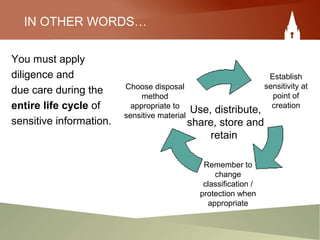
IN OTHER WORDS…
You must apply
diligence and
due care during the
entire life cycle of
sensitive information.
ChooseChooseChoose Use, distribute,
share, store and
retain
Choose
Choose disposal
method
appropriate to
sensitive material
Establish
sensitivity at
point of
creation
Remember to
change
classification /
protection when
appropriate
SPECIFIC RESPONSIBILITIES
As the originator, or recipient, of sensitive documents you must:
1. Decide what level of protection or classification is
appropriate;
2. Mark the document(s) from draft to completion;
3. Ensure documents are processed and stored according to
the level of protection or classification assigned;
4. Distribute the information to others who are appropriately
screened and on a need to know, need to access basis;
5. Remove or change the level of protection/classification of
information when required;
6. Ensure the appropriate destruction of sensitive documents.
Responsibility #1
Deciding what level of protection or
classification is appropriate
SECURITY CATEGORIES
There are two main security categories that you
would apply, based on a document’s content:
Protected
• Protected C
• Protected B
• Protected A
Classified
• Top Secret
• Secret
• Confidential
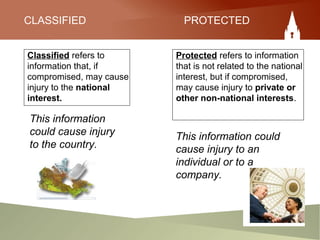
CLASSIFIED PROTECTED
Classified refers to
information that, if
compromised, may cause
injury to the national
interest.
Protected refers to information
that is not related to the national
interest, but if compromised,
may cause injury to private or
other non-national interests.
This information
could cause injury
to the country.
This information could
cause injury to an
individual or to a
company.
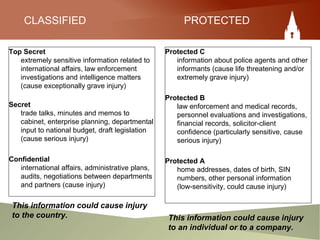
CLASSIFIED PROTECTED
Top Secret
extremely sensitive information related to
international affairs, law enforcement
investigations and intelligence matters
(cause exceptionally grave injury)
Secret
trade talks, minutes and memos to
cabinet, enterprise planning, departmental
input to national budget, draft legislation
(cause serious injury)
Confidential
international affairs, administrative plans,
audits, negotiations between departments
and partners (cause injury)
Protected C
information about police agents and other
informants (cause life threatening and/or
extremely grave injury)
Protected B
law enforcement and medical records,
personnel evaluations and investigations,
financial records, solicitor-client
confidence (particularly sensitive, cause
serious injury)
Protected A
home addresses, dates of birth, SIN
numbers, other personal information
(low-sensitivity, could cause injury)
This information could cause injury
to the country. This information could cause injury
to an individual or to a company.
Responsibility #2
Marking your sensitive documents
from draft to completion.
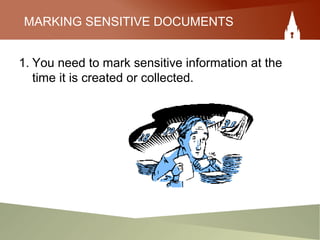
MARKING SENSITIVE DOCUMENTS
1. You need to mark sensitive information at the
time it is created or collected.
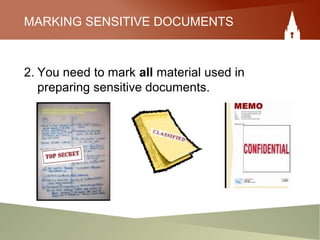
MARKING SENSITIVE DOCUMENTS
2. You need to mark all material used in
preparing sensitive documents.
MARKING SENSITIVE DOCUMENTS
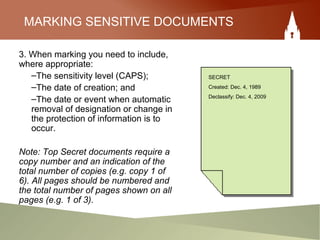
3. When marking you need to include,
where appropriate:
–The sensitivity level (CAPS);
–The date of creation; and
–The date or event when automatic
removal of designation or change in
the protection of information is to
occur.
Note: Top Secret documents require a
copy number and an indication of the
total number of copies (e.g. copy 1 of
6). All pages should be numbered and
the total number of pages shown on all
pages (e.g. 1 of 3).
SECRET
Created: Dec. 4, 1989
Declassify: Dec. 4, 2009
MARKING SENSITIVE DOCUMENTS
4. Indicate who may, or may not, have access to
the document. Access should be on a need to
know basis.
5. When you create cover letters or transmittal
forms you must indicate the highest level of
sensitivity of all of the attachments.
At the OIC, use annex B of the IM
Manual: Managing Sensitive
Records.
REVIEW: MARKING SENSITIVE DOCUMENTS
1. Mark sensitive information at the time it is created or
collected.
2. Mark all material used in preparing sensitive documents.
– Markings are to include, where appropriate:
– The sensitivity level;
– The date of creation;
3. The date or event when automatic removal of designation
or change in the protection of information is to occur.
4. Indicate who may, or may not, have access to the
document.
5. Cover letters or transmittal forms must indicate the highest
level of sensitivity of the attachments.
Don’t forget to
mark electronic media!
MARKING ELECTRONIC MEDIA
You should clearly record on the surface of electronic
media, the following information:
– Name of the organization
– Highest level of designation or protection
– Subject of the documents
– Team the documents belong to
– Custodian’s name.
Responsibility #3
Ensuring that documents are processed
and stored according to the level of
classification or protection assigned
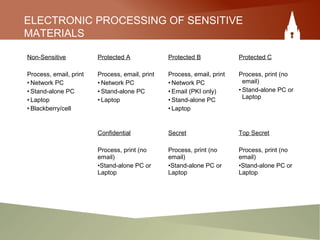
ELECTRONIC PROCESSING OF SENSITIVE
MATERIALS
Non-Sensitive
Process, email, print
• Network PC
• Stand-alone PC
• Laptop
• Blackberry/cell
Protected A
Process, email, print
• Network PC
• Stand-alone PC
• Laptop
Protected B
Process, email, print
• Network PC
• Email (PKI only)
• Stand-alone PC
• Laptop
Protected C
Process, print (no
email)
• Stand-alone PC or
Laptop
Confidential
Process, print (no
email)
•Stand-alone PC or
Laptop
Secret
Process, print (no
email)
•Stand-alone PC or
Laptop
Top Secret
Process, print (no
email)
•Stand-alone PC or
Laptop
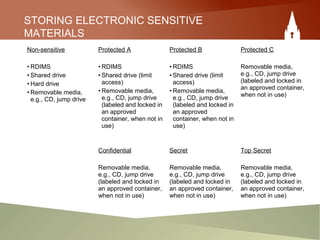
STORING ELECTRONIC SENSITIVE
MATERIALS
Non-sensitive
• RDIMS
• Shared drive
• Hard drive
• Removable media,
e.g., CD, jump drive
Protected A
• RDIMS
• Shared drive (limit
access)
• Removable media,
e.g., CD, jump drive
(labeled and locked in
an approved
container, when not in
use)
Protected B
• RDIMS
• Shared drive (limit
access)
• Removable media,
e.g., CD, jump drive
(labeled and locked in
an approved
container, when not in
use)
Protected C
Removable media,
e.g., CD, jump drive
(labeled and locked in
an approved container,
when not in use)
Confidential
Removable media,
e.g., CD, jump drive
(labeled and locked in
an approved container,
when not in use)
Secret
Removable media,
e.g., CD, jump drive
(labeled and locked in
an approved container,
when not in use)
Top Secret
Removable media,
e.g., CD, jump drive
(labeled and locked in
an approved container,
when not in use)
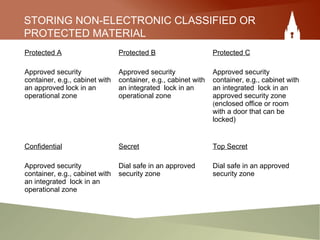
STORING NON-ELECTRONIC CLASSIFIED OR
PROTECTED MATERIAL
Protected A
Approved security
container, e.g., cabinet with
an approved lock in an
operational zone
Protected B
Approved security
container, e.g., cabinet with
an integrated lock in an
operational zone
Protected C
Approved security
container, e.g., cabinet with
an integrated lock in an
approved security zone
(enclosed office or room
with a door that can be
locked)
Confidential
Approved security
container, e.g., cabinet with
an integrated lock in an
operational zone
Secret
Dial safe in an approved
security zone
Top Secret
Dial safe in an approved
security zone
Responsibility #4
Distribute sensitive information to others
on a need to know, need to access basis
DISTRIBUTION OF SENSITIVE
DOCUMENTS
Access Criteria:
– Recipients have a requirement to know;
– Recipients hold an appropriate security
clearance.
It is your responsibility to verify that the
recipient of your sensitive document meets
access criteria.
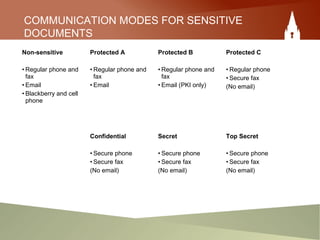
COMMUNICATION MODES FOR SENSITIVE
DOCUMENTS
Non-sensitive
• Regular phone and
fax
• Email
• Blackberry and cell
phone
Protected A
• Regular phone and
fax
• Email
Protected B
• Regular phone and
fax
• Email (PKI only)
Protected C
• Regular phone
• Secure fax
(No email)
Confidential
• Secure phone
• Secure fax
(No email)
Secret
• Secure phone
• Secure fax
(No email)
Top Secret
• Secure phone
• Secure fax
(No email)
TRANSMITTAL OF SENSITIVE DOCUMENTS
Paper documents that are sensitive should be handled with
discretion and common sense applying such principles as:
– Markings and caveats should be used to caution others
about the sensitivity of the material;
– Mail should be addressed “to be opened only by…”;
– Double envelope with security markings on inner
envelope only – for Secret, Top Secret and Protected C;
– Phone ahead when sending sensitive faxes.
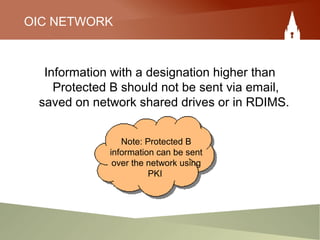
OIC NETWORK
Information with a designation higher than
Protected B should not be sent via email,
saved on network shared drives or in RDIMS.
Note: Protected B
information can be sent
over the network using
PKI
Responsibility #5
Removing or changing the level
of protection or classification of
information when required
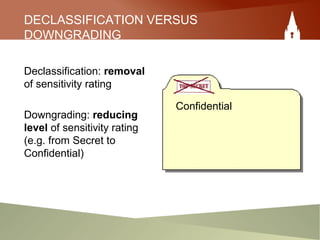
DECLASSIFICATION VERSUS
DOWNGRADING
Declassification: removal
of sensitivity rating
Downgrading: reducing
level of sensitivity rating
(e.g. from Secret to
Confidential)
Confidential
DECLASSIFICATION AND DOWNGRADING
• Protected information will lose its sensitivity:
– over time; or
– with the occurrence of specific events (e.g. scientific data
when published loses its protected status).
• Declassification or downgrading can be effected through:
– date or special event triggers;
– an automatic expiry date; (Note: automatic expiry does not
apply to Top Secret or Protected C)
– originating authors;
– managers (in originating office).
• You should systematically review your sensitive materials with the
intent of declassifying or downgrading them as appropriate.
Responsibility #6
Ensure the appropriate destruction
of sensitive documents
DESTRUCTION OF SENSITIVE
DOCUMENTS
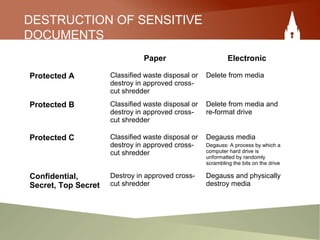
Paper Electronic
Protected A Classified waste disposal or
destroy in approved cross-
cut shredder
Delete from media
Protected B Classified waste disposal or
destroy in approved cross-
cut shredder
Delete from media and
re-format drive
Protected C Classified waste disposal or
destroy in approved cross-
cut shredder
Degauss media
Degauss: A process by which a
computer hard drive is
unformatted by randomly
scrambling the bits on the drive
Confidential,
Secret, Top Secret
Destroy in approved cross-
cut shredder
Degauss and physically
destroy media
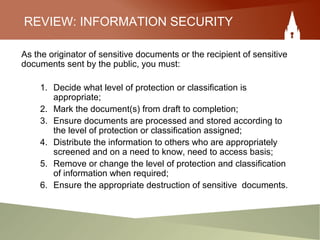
REVIEW: INFORMATION SECURITY
As the originator of sensitive documents or the recipient of sensitive
documents sent by the public, you must:
1. Decide what level of protection or classification is
appropriate;
2. Mark the document(s) from draft to completion;
3. Ensure documents are processed and stored according to
the level of protection or classification assigned;
4. Distribute the information to others who are appropriately
screened and on a need to know, need to access basis;
5. Remove or change the level of protection and classification
of information when required;
6. Ensure the appropriate destruction of sensitive documents.
In closing…
Some guiding principles
of information security
GUIDING PRINCIPLES OF INFORMATION
SECURITY:
• Security classification flows with the information:
– Originator decides on level of security;
– Receiver must accept the assigned classification.
– Note: Information received from the public must
be assessed and assigned either a protected or
classified level where appropriate.
• When incorporating information into existing
classified/protected documents or other media –
ensure that the new document is also classified at
the level of the highest document in the file or
storage device.
GUIDING PRINCIPLES OF INFORMATION
SECURITY:
• A package of information is “marked” based on
the document with the highest classification.
• Sensitive information should be reviewed
periodically with the intent of “declassifying” or
“downgrading” when appropriate.
• Over-classification must be avoided – it is costly
and it minimizes the potential uses of the
information.
CONGRATULATIONS!
• You have just completed Information Security – an IM self-study
module.
– You may now:
– Test your knowledge with the following quiz.
• Review other IM self-study modules in this series:
• Information Management 101
• Managing Email Effectively
• Records Management and You!
• IM and the Departing Employee
• Privacy and Personal Information – What Canadians
Expect
• Understanding IM Within the Federal Government

Information Security

  • 1.
  • 2.
    Your responsibilities asa Government of Canada employee
  • 3.
    AT THE ENDOF THIS MODULE YOU WILL: • Be aware of your responsibilities with respect to information security. • Be able to decide what protection or classification is appropriate for your information. • Understand how to mark sensitive documents. • Be able to make appropriate choices for the storage of sensitive materials. • Know the appropriate methods of communication and destruction of sensitive materials. • Understand the importance of removing or changing the level of protection or classification of information.
  • 4.
    GENERAL RESPONSIBILITIES • Youmust apply diligence and due care during the: – Creation or collection of sensitive information; – Use, distribution, storage and retention of sensitive information; – Declassification/change in classification or protection of sensitive information; – Disposal or destruction of sensitive information.
  • 5.
    IN OTHER WORDS… Youmust apply diligence and due care during the entire life cycle of sensitive information. ChooseChooseChoose Use, distribute, share, store and retain Choose Choose disposal method appropriate to sensitive material Establish sensitivity at point of creation Remember to change classification / protection when appropriate
  • 6.
    SPECIFIC RESPONSIBILITIES As theoriginator, or recipient, of sensitive documents you must: 1. Decide what level of protection or classification is appropriate; 2. Mark the document(s) from draft to completion; 3. Ensure documents are processed and stored according to the level of protection or classification assigned; 4. Distribute the information to others who are appropriately screened and on a need to know, need to access basis; 5. Remove or change the level of protection/classification of information when required; 6. Ensure the appropriate destruction of sensitive documents.
  • 7.
    Responsibility #1 Deciding whatlevel of protection or classification is appropriate
  • 8.
    SECURITY CATEGORIES There aretwo main security categories that you would apply, based on a document’s content: Protected • Protected C • Protected B • Protected A Classified • Top Secret • Secret • Confidential
  • 9.
    CLASSIFIED PROTECTED Classified refersto information that, if compromised, may cause injury to the national interest. Protected refers to information that is not related to the national interest, but if compromised, may cause injury to private or other non-national interests. This information could cause injury to the country. This information could cause injury to an individual or to a company.
  • 10.
    CLASSIFIED PROTECTED Top Secret extremelysensitive information related to international affairs, law enforcement investigations and intelligence matters (cause exceptionally grave injury) Secret trade talks, minutes and memos to cabinet, enterprise planning, departmental input to national budget, draft legislation (cause serious injury) Confidential international affairs, administrative plans, audits, negotiations between departments and partners (cause injury) Protected C information about police agents and other informants (cause life threatening and/or extremely grave injury) Protected B law enforcement and medical records, personnel evaluations and investigations, financial records, solicitor-client confidence (particularly sensitive, cause serious injury) Protected A home addresses, dates of birth, SIN numbers, other personal information (low-sensitivity, could cause injury) This information could cause injury to the country. This information could cause injury to an individual or to a company.
  • 11.
    Responsibility #2 Marking yoursensitive documents from draft to completion.
  • 12.
    MARKING SENSITIVE DOCUMENTS 1.You need to mark sensitive information at the time it is created or collected.
  • 13.
    MARKING SENSITIVE DOCUMENTS 2.You need to mark all material used in preparing sensitive documents.
  • 14.
    MARKING SENSITIVE DOCUMENTS 3.When marking you need to include, where appropriate: –The sensitivity level (CAPS); –The date of creation; and –The date or event when automatic removal of designation or change in the protection of information is to occur. Note: Top Secret documents require a copy number and an indication of the total number of copies (e.g. copy 1 of 6). All pages should be numbered and the total number of pages shown on all pages (e.g. 1 of 3). SECRET Created: Dec. 4, 1989 Declassify: Dec. 4, 2009
  • 15.
    MARKING SENSITIVE DOCUMENTS 4.Indicate who may, or may not, have access to the document. Access should be on a need to know basis. 5. When you create cover letters or transmittal forms you must indicate the highest level of sensitivity of all of the attachments.
  • 16.
    At the OIC,use annex B of the IM Manual: Managing Sensitive Records.
  • 17.
    REVIEW: MARKING SENSITIVEDOCUMENTS 1. Mark sensitive information at the time it is created or collected. 2. Mark all material used in preparing sensitive documents. – Markings are to include, where appropriate: – The sensitivity level; – The date of creation; 3. The date or event when automatic removal of designation or change in the protection of information is to occur. 4. Indicate who may, or may not, have access to the document. 5. Cover letters or transmittal forms must indicate the highest level of sensitivity of the attachments.
  • 18.
    Don’t forget to markelectronic media!
  • 19.
    MARKING ELECTRONIC MEDIA Youshould clearly record on the surface of electronic media, the following information: – Name of the organization – Highest level of designation or protection – Subject of the documents – Team the documents belong to – Custodian’s name.
  • 20.
    Responsibility #3 Ensuring thatdocuments are processed and stored according to the level of classification or protection assigned
  • 21.
    ELECTRONIC PROCESSING OFSENSITIVE MATERIALS Non-Sensitive Process, email, print • Network PC • Stand-alone PC • Laptop • Blackberry/cell Protected A Process, email, print • Network PC • Stand-alone PC • Laptop Protected B Process, email, print • Network PC • Email (PKI only) • Stand-alone PC • Laptop Protected C Process, print (no email) • Stand-alone PC or Laptop Confidential Process, print (no email) •Stand-alone PC or Laptop Secret Process, print (no email) •Stand-alone PC or Laptop Top Secret Process, print (no email) •Stand-alone PC or Laptop
  • 22.
    STORING ELECTRONIC SENSITIVE MATERIALS Non-sensitive •RDIMS • Shared drive • Hard drive • Removable media, e.g., CD, jump drive Protected A • RDIMS • Shared drive (limit access) • Removable media, e.g., CD, jump drive (labeled and locked in an approved container, when not in use) Protected B • RDIMS • Shared drive (limit access) • Removable media, e.g., CD, jump drive (labeled and locked in an approved container, when not in use) Protected C Removable media, e.g., CD, jump drive (labeled and locked in an approved container, when not in use) Confidential Removable media, e.g., CD, jump drive (labeled and locked in an approved container, when not in use) Secret Removable media, e.g., CD, jump drive (labeled and locked in an approved container, when not in use) Top Secret Removable media, e.g., CD, jump drive (labeled and locked in an approved container, when not in use)
  • 23.
    STORING NON-ELECTRONIC CLASSIFIEDOR PROTECTED MATERIAL Protected A Approved security container, e.g., cabinet with an approved lock in an operational zone Protected B Approved security container, e.g., cabinet with an integrated lock in an operational zone Protected C Approved security container, e.g., cabinet with an integrated lock in an approved security zone (enclosed office or room with a door that can be locked) Confidential Approved security container, e.g., cabinet with an integrated lock in an operational zone Secret Dial safe in an approved security zone Top Secret Dial safe in an approved security zone
  • 24.
    Responsibility #4 Distribute sensitiveinformation to others on a need to know, need to access basis
  • 25.
    DISTRIBUTION OF SENSITIVE DOCUMENTS AccessCriteria: – Recipients have a requirement to know; – Recipients hold an appropriate security clearance. It is your responsibility to verify that the recipient of your sensitive document meets access criteria.
  • 26.
    COMMUNICATION MODES FORSENSITIVE DOCUMENTS Non-sensitive • Regular phone and fax • Email • Blackberry and cell phone Protected A • Regular phone and fax • Email Protected B • Regular phone and fax • Email (PKI only) Protected C • Regular phone • Secure fax (No email) Confidential • Secure phone • Secure fax (No email) Secret • Secure phone • Secure fax (No email) Top Secret • Secure phone • Secure fax (No email)
  • 27.
    TRANSMITTAL OF SENSITIVEDOCUMENTS Paper documents that are sensitive should be handled with discretion and common sense applying such principles as: – Markings and caveats should be used to caution others about the sensitivity of the material; – Mail should be addressed “to be opened only by…”; – Double envelope with security markings on inner envelope only – for Secret, Top Secret and Protected C; – Phone ahead when sending sensitive faxes.
  • 28.
    OIC NETWORK Information witha designation higher than Protected B should not be sent via email, saved on network shared drives or in RDIMS. Note: Protected B information can be sent over the network using PKI
  • 29.
    Responsibility #5 Removing orchanging the level of protection or classification of information when required
  • 30.
    DECLASSIFICATION VERSUS DOWNGRADING Declassification: removal ofsensitivity rating Downgrading: reducing level of sensitivity rating (e.g. from Secret to Confidential) Confidential
  • 31.
    DECLASSIFICATION AND DOWNGRADING •Protected information will lose its sensitivity: – over time; or – with the occurrence of specific events (e.g. scientific data when published loses its protected status). • Declassification or downgrading can be effected through: – date or special event triggers; – an automatic expiry date; (Note: automatic expiry does not apply to Top Secret or Protected C) – originating authors; – managers (in originating office). • You should systematically review your sensitive materials with the intent of declassifying or downgrading them as appropriate.
  • 32.
    Responsibility #6 Ensure theappropriate destruction of sensitive documents
  • 33.
    DESTRUCTION OF SENSITIVE DOCUMENTS PaperElectronic Protected A Classified waste disposal or destroy in approved cross- cut shredder Delete from media Protected B Classified waste disposal or destroy in approved cross- cut shredder Delete from media and re-format drive Protected C Classified waste disposal or destroy in approved cross- cut shredder Degauss media Degauss: A process by which a computer hard drive is unformatted by randomly scrambling the bits on the drive Confidential, Secret, Top Secret Destroy in approved cross- cut shredder Degauss and physically destroy media
  • 34.
    REVIEW: INFORMATION SECURITY Asthe originator of sensitive documents or the recipient of sensitive documents sent by the public, you must: 1. Decide what level of protection or classification is appropriate; 2. Mark the document(s) from draft to completion; 3. Ensure documents are processed and stored according to the level of protection or classification assigned; 4. Distribute the information to others who are appropriately screened and on a need to know, need to access basis; 5. Remove or change the level of protection and classification of information when required; 6. Ensure the appropriate destruction of sensitive documents.
  • 35.
    In closing… Some guidingprinciples of information security
  • 36.
    GUIDING PRINCIPLES OFINFORMATION SECURITY: • Security classification flows with the information: – Originator decides on level of security; – Receiver must accept the assigned classification. – Note: Information received from the public must be assessed and assigned either a protected or classified level where appropriate. • When incorporating information into existing classified/protected documents or other media – ensure that the new document is also classified at the level of the highest document in the file or storage device.
  • 37.
    GUIDING PRINCIPLES OFINFORMATION SECURITY: • A package of information is “marked” based on the document with the highest classification. • Sensitive information should be reviewed periodically with the intent of “declassifying” or “downgrading” when appropriate. • Over-classification must be avoided – it is costly and it minimizes the potential uses of the information.
  • 38.
    CONGRATULATIONS! • You havejust completed Information Security – an IM self-study module. – You may now: – Test your knowledge with the following quiz. • Review other IM self-study modules in this series: • Information Management 101 • Managing Email Effectively • Records Management and You! • IM and the Departing Employee • Privacy and Personal Information – What Canadians Expect • Understanding IM Within the Federal Government