Presented By:
Gayatri Karmwani
Kanika Gupta
(MCA III Group 1)
Virtual Private
Network
 Introduction
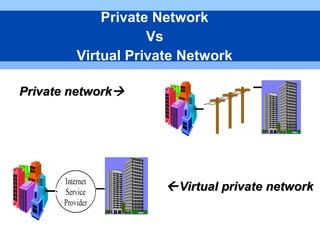
 Private network Vs
VPN
 Need for developing
VPN
 Tunnelling
 Example of VPN
 Types of VPN
 VPN protocols
VPN Components
VPN Security
Advantages
Disadvantages
Future of VPN
Conclusion
References
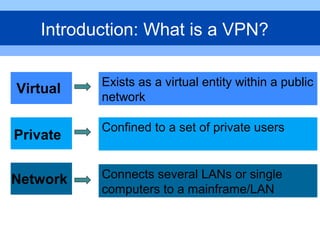
Introduction: What is a VPN?
Virtual
Private
Network
Exists as a virtual entity within a public
network
Confined to a set of private users
Connects several LANs or single
computers to a mainframe/LAN
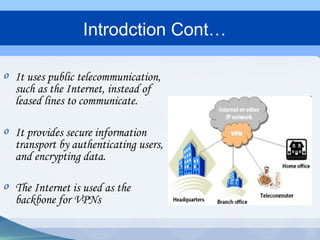
o It uses public telecommunication,
such as the Internet, instead of
leased lines to communicate.
o It provides secure information
transport by authenticating users,
and encrypting data.
o The Internet is used as the
backbone for VPNs
Introdction Cont…
Private networkPrivate network
Virtual private networkVirtual private network
Private Network
Vs
Virtual Private Network
 Share applications and data between offices
 Remote workers access office systems
 Reduce leased line costs
 Improve communication links with
suppliers and customers
 Maximize productivity from workers outside
the office
 Ensure that you are secure from outside
threats
Need For Developing VPN
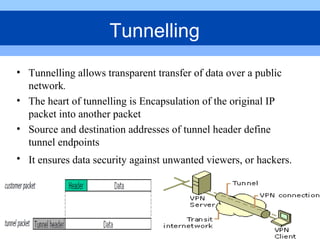
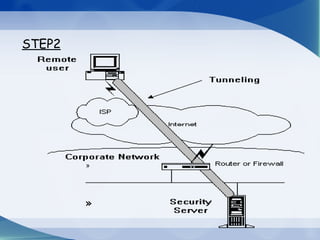
• Tunnelling allows transparent transfer of data over a public
network.
• The heart of tunnelling is Encapsulation of the original IP
packet into another packet
• Source and destination addresses of tunnel header define
tunnel endpoints
• It ensures data security against unwanted viewers, or hackers.
Tunnelling
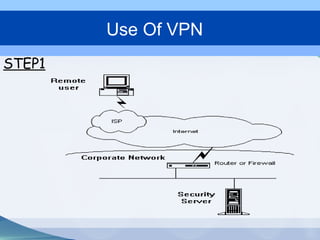
STEP1
Use Of VPN
»
»
STEP2
STEP3
STEP4
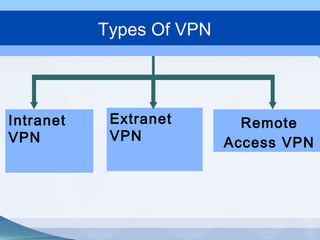
Types Of VPN
Intranet
VPN
Extranet
VPN
Remote
Access VPN
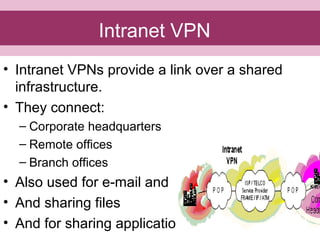
• Intranet VPNs provide a link over a shared
infrastructure.
• They connect:
– Corporate headquarters
– Remote offices
– Branch offices
• Also used for e-mail and
• And sharing files
• And for sharing applications
Intranet VPN
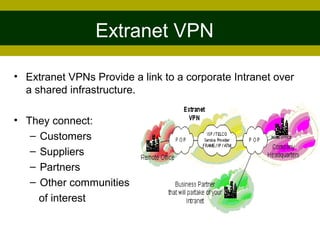
• Extranet VPNs Provide a link to a corporate Intranet over
a shared infrastructure.
• They connect:
– Customers
– Suppliers
– Partners
– Other communities
of interest
Extranet VPN
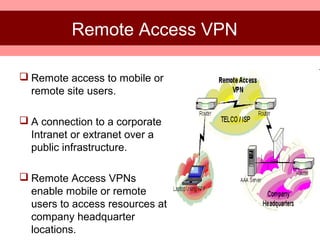
 Remote access to mobile or
remote site users.
 A connection to a corporate
Intranet or extranet over a
public infrastructure.
 Remote Access VPNs
enable mobile or remote
users to access resources at
company headquarter
locations.
Remote Access VPN
PPTP (Point-to-Point tunneling protocol)
IPSec (IP Security)
L2TP (Layer 2 Transmission Protocol)
VPN Protocols
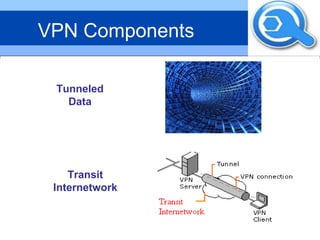
VPN Components
TunnelVPN
Client
VPN
Server
Tunnel
VPN
Connection
Tunneled
Data
Transit
Internetwork
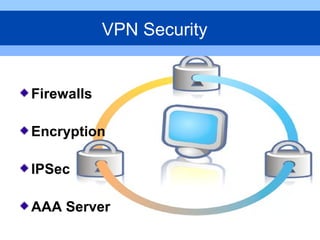
Firewalls
Encryption
IPSec
AAA Server
VPN Security
 It provides a strong barrier between your private network
and the Internet.
 A firewall prevents data from leaving and entering an
enterprise by unauthorized users.
 You can set firewalls to restrict the number of open
ports, what type of packets are passed through and
which protocols are allowed through.
Firewalls
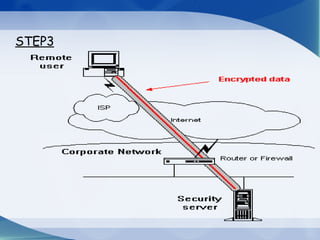
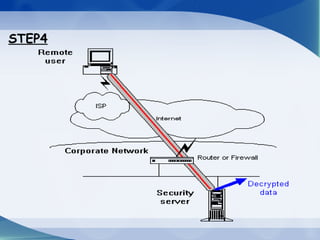
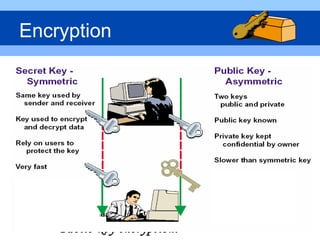
• Encryption is enabled to protect data from being read by
anyone except who you intend to receive and view it.
• An encryption device encrypts data before placing it on a
network
• A decryption device decrypts the data before passing it to an
application
• Encrypted data is called ciphered data
• Data that is not encrypted is called plain text or clear
text
It belongs in one of two categories:-
•symmetric-key encryption
•Public-key encryption.
Encryption
It provides better encryption algorithms and more
comprehensive authentication.
IPSec has two encryption modes: tunnel and transport.
IPSec can encrypt data between various devices, such as:
 Router to router
 Firewall to router
 PC to router
 PC to server
IPSec
 Used for more secure access in a remote-access VPN
environment.
 AAA checks the following:
 Who you are (authentication)
 What you are allowed to do (authorization)
 What you actually do (accounting)
AAA Servers
(Authentication, Authorization and Accounting)
• Dedicated Line Costs
– Dedicated T1 Line:
• $3,600 monthly hire fee
• $30 per 10km of T1 line per month
– Total Costs per Office
• Office 1 – Office 2
– 3,600 + 30 x 40 = $4,800
• Office 2 – Office 3
– 3,600 + 30 x 30 = $4,500
– Total Cost = $9,300
Case Study
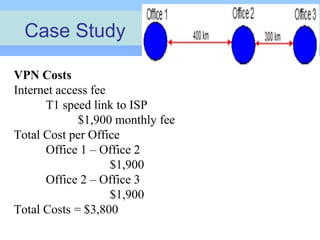
VPN Costs
Internet access fee
T1 speed link to ISP
$1,900 monthly fee
Total Cost per Office
Office 1 – Office 2
$1,900
Office 2 – Office 3
$1,900
Total Costs = $3,800
Cost saving
Scalability
Mobility
Security
global networking
effective bandwidth use.
Advantages
Understanding of security issues.
Immature standards.
Reliability and performance VPN is not
under an organization's direct control.
Disadvantages
• A virtual private network (VPN) uses the
open, distributed infrastructure of the
Internet to transmit data between corporate
sites.
• Virtual private network offers cheap way to
build WAN .
• The standardisation of VPN technology will
lead to its wide spread use among network
users.
Conclusion
• http://en.wikipedia.org/wiki/Virtual_private_network
• http://www.buildinglinuxvpns.net/chapter2.pdf
• http://technet.microsoft.com/en-
us/library/cc786563(WS.10).aspx
• http://technet.microsoft.com/en-us/library
/bb742566.aspx
References
Virtual Private Network main

Virtual Private Network main

  • 1.
    Presented By: Gayatri Karmwani KanikaGupta (MCA III Group 1) Virtual Private Network
  • 2.
     Introduction  Privatenetwork Vs VPN  Need for developing VPN  Tunnelling  Example of VPN  Types of VPN  VPN protocols VPN Components VPN Security Advantages Disadvantages Future of VPN Conclusion References
  • 3.
    Introduction: What isa VPN? Virtual Private Network Exists as a virtual entity within a public network Confined to a set of private users Connects several LANs or single computers to a mainframe/LAN
  • 4.
    o It usespublic telecommunication, such as the Internet, instead of leased lines to communicate. o It provides secure information transport by authenticating users, and encrypting data. o The Internet is used as the backbone for VPNs Introdction Cont…
  • 5.
    Private networkPrivate network Virtualprivate networkVirtual private network Private Network Vs Virtual Private Network
  • 6.
     Share applicationsand data between offices  Remote workers access office systems  Reduce leased line costs  Improve communication links with suppliers and customers  Maximize productivity from workers outside the office  Ensure that you are secure from outside threats Need For Developing VPN
  • 7.
    • Tunnelling allowstransparent transfer of data over a public network. • The heart of tunnelling is Encapsulation of the original IP packet into another packet • Source and destination addresses of tunnel header define tunnel endpoints • It ensures data security against unwanted viewers, or hackers. Tunnelling
  • 8.
  • 9.
  • 10.
  • 11.
  • 12.
  • 13.
    • Intranet VPNsprovide a link over a shared infrastructure. • They connect: – Corporate headquarters – Remote offices – Branch offices • Also used for e-mail and • And sharing files • And for sharing applications Intranet VPN
  • 14.
    • Extranet VPNsProvide a link to a corporate Intranet over a shared infrastructure. • They connect: – Customers – Suppliers – Partners – Other communities of interest Extranet VPN
  • 15.
     Remote accessto mobile or remote site users.  A connection to a corporate Intranet or extranet over a public infrastructure.  Remote Access VPNs enable mobile or remote users to access resources at company headquarter locations. Remote Access VPN
  • 16.
    PPTP (Point-to-Point tunnelingprotocol) IPSec (IP Security) L2TP (Layer 2 Transmission Protocol) VPN Protocols
  • 17.
  • 18.
  • 19.
     It providesa strong barrier between your private network and the Internet.  A firewall prevents data from leaving and entering an enterprise by unauthorized users.  You can set firewalls to restrict the number of open ports, what type of packets are passed through and which protocols are allowed through. Firewalls
  • 20.
    • Encryption isenabled to protect data from being read by anyone except who you intend to receive and view it. • An encryption device encrypts data before placing it on a network • A decryption device decrypts the data before passing it to an application • Encrypted data is called ciphered data • Data that is not encrypted is called plain text or clear text It belongs in one of two categories:- •symmetric-key encryption •Public-key encryption. Encryption
  • 21.
    It provides betterencryption algorithms and more comprehensive authentication. IPSec has two encryption modes: tunnel and transport. IPSec can encrypt data between various devices, such as:  Router to router  Firewall to router  PC to router  PC to server IPSec
  • 22.
     Used formore secure access in a remote-access VPN environment.  AAA checks the following:  Who you are (authentication)  What you are allowed to do (authorization)  What you actually do (accounting) AAA Servers (Authentication, Authorization and Accounting)
  • 23.
    • Dedicated LineCosts – Dedicated T1 Line: • $3,600 monthly hire fee • $30 per 10km of T1 line per month – Total Costs per Office • Office 1 – Office 2 – 3,600 + 30 x 40 = $4,800 • Office 2 – Office 3 – 3,600 + 30 x 30 = $4,500 – Total Cost = $9,300 Case Study VPN Costs Internet access fee T1 speed link to ISP $1,900 monthly fee Total Cost per Office Office 1 – Office 2 $1,900 Office 2 – Office 3 $1,900 Total Costs = $3,800
  • 24.
  • 25.
    Understanding of securityissues. Immature standards. Reliability and performance VPN is not under an organization's direct control. Disadvantages
  • 26.
    • A virtualprivate network (VPN) uses the open, distributed infrastructure of the Internet to transmit data between corporate sites. • Virtual private network offers cheap way to build WAN . • The standardisation of VPN technology will lead to its wide spread use among network users. Conclusion
  • 27.
    • http://en.wikipedia.org/wiki/Virtual_private_network • http://www.buildinglinuxvpns.net/chapter2.pdf •http://technet.microsoft.com/en- us/library/cc786563(WS.10).aspx • http://technet.microsoft.com/en-us/library /bb742566.aspx References