COMPUTER AND NETWORK SECURITY THREATS
by kuda & kudzie
Bindura University of Science Education
NETWORK SECURITY
 Network security" refers to any activity designed to protect
the usability and integrity of your network and data. It
includes both hardware and software technologies.
 Effective network security manages access to the network.
 It targets a variety of threats and stops them from entering or
spreading on your network.
Fundamentals of security services
1) Confidentiality
2) Integrity
3) Availability
confidentiality
 The function of confidentiality is to protect precious business
data from unauthorized persons.
 Confidentiality part of network security makes sure that the
data is available only to the intended and authorized
 Confidentiality is keeping information secret or private.
 Confidentiality might be important for military, business or
personal reasons.
integrity
 This goal means maintaining and assuring the accuracy and
consistency of data.
 The function of integrity is to make sure that the data is
reliable and is not changed by unauthorized persons.
 Integrity means that there is an external consistency in the
system - everything is as it is expected to be.
 Data integrity means that the data stored on a computer is
the same as the source documents.
Availability
 The function of availability in Network Security is to make sure
that the data, network resources/services are continuously
available to the legitimate users, whenever they require it.
e.g. network bandwidth
 Denial of service attacks are a common form of attack.
vulnerability
 A vulnerability in an information system is a weakness
that an attacker might leverage to gain unauthorized
access to the system or its data.
 It allow an attacker to compromise the integrity,
availability, or confidentiality of that product
THREATS
 A threat, refers to anything that has the potential to cause
serious harm to a computer system.
 It is an event that can take advantage of vulnerability and
cause a negative impact on the network.
 Potential threats to the network need to be identified, and
the related vulnerabilities need to be addressed to minimize
the risk of the threat.
 There are many threats to a computer system, including
human-initiated and computer-initiated ones.
 We can view any threat as being one of four kinds such as
interception, interruption, modification, and fabrication
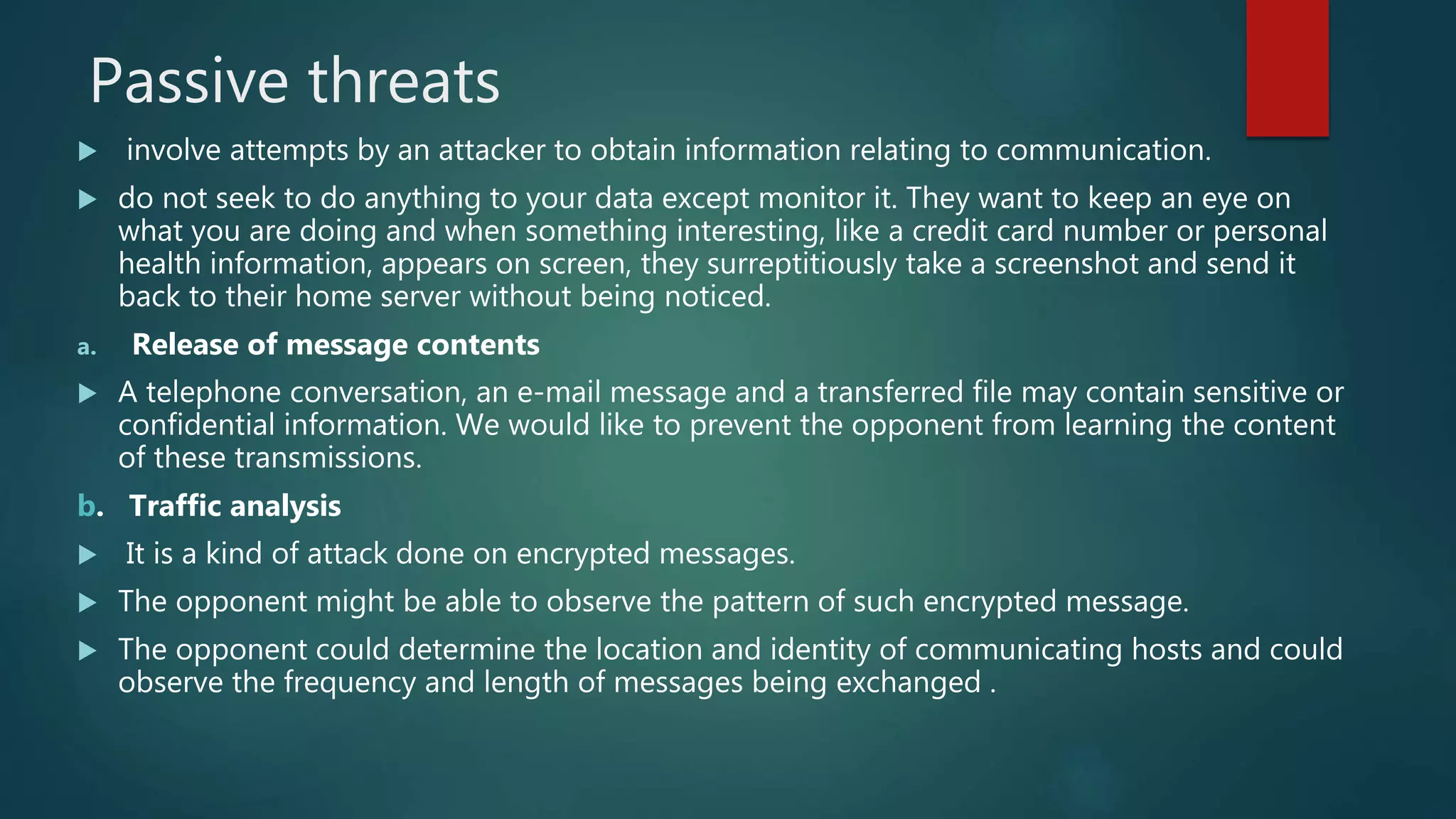
Network security threats fall into two categories:
Passive threats
 involve attempts by an attacker to obtain information relating to communication.
 do not seek to do anything to your data except monitor it. They want to keep an eye on
what you are doing and when something interesting, like a credit card number or personal
health information, appears on screen, they surreptitiously take a screenshot and send it
back to their home server without being noticed.
a. Release of message contents
 A telephone conversation, an e-mail message and a transferred file may contain sensitive or
confidential information. We would like to prevent the opponent from learning the content
of these transmissions.
b. Traffic analysis
 It is a kind of attack done on encrypted messages.
 The opponent might be able to observe the pattern of such encrypted message.
 The opponent could determine the location and identity of communicating hosts and could
observe the frequency and length of messages being exchanged .
active threats
 involve some modification of the data stream or the creation of a false stream.
 active threat is one that actively seeks to damage or destroy your information
(a) Masquerade
 A masquerade attack is an attack that uses a fake identity, such as
a network identity, to gain unauthorized access to personal computer
information through legitimate access identification.
(b) Replay
 is a form of network attack in which a valid data transmission is maliciously or
fraudulently repeated or delayed.
 It involves the passive capture of a data unit and its subsequent retransmission
to produce an unauthorized effect.
(c) Modification of message
 It means that some position of a message is altered, or that messages are
delayed or rendered, to produce an unauthorized effect.
(d) Denial of service (DOS)
 A denial of service attack takes place when the availability to a resource is
intentionally blocked or degraded by an attacker.
 In this way the normal use or management of communication facilities is
inhibited.
 This attack may have a specific target. For e.g. an entity may suppress all
messages directed to a particular destination.
 Another form of service denial is the disruption of an entire network, either by
disabling the network or by overloading it with messages so as to degrade
performance.
THREATS
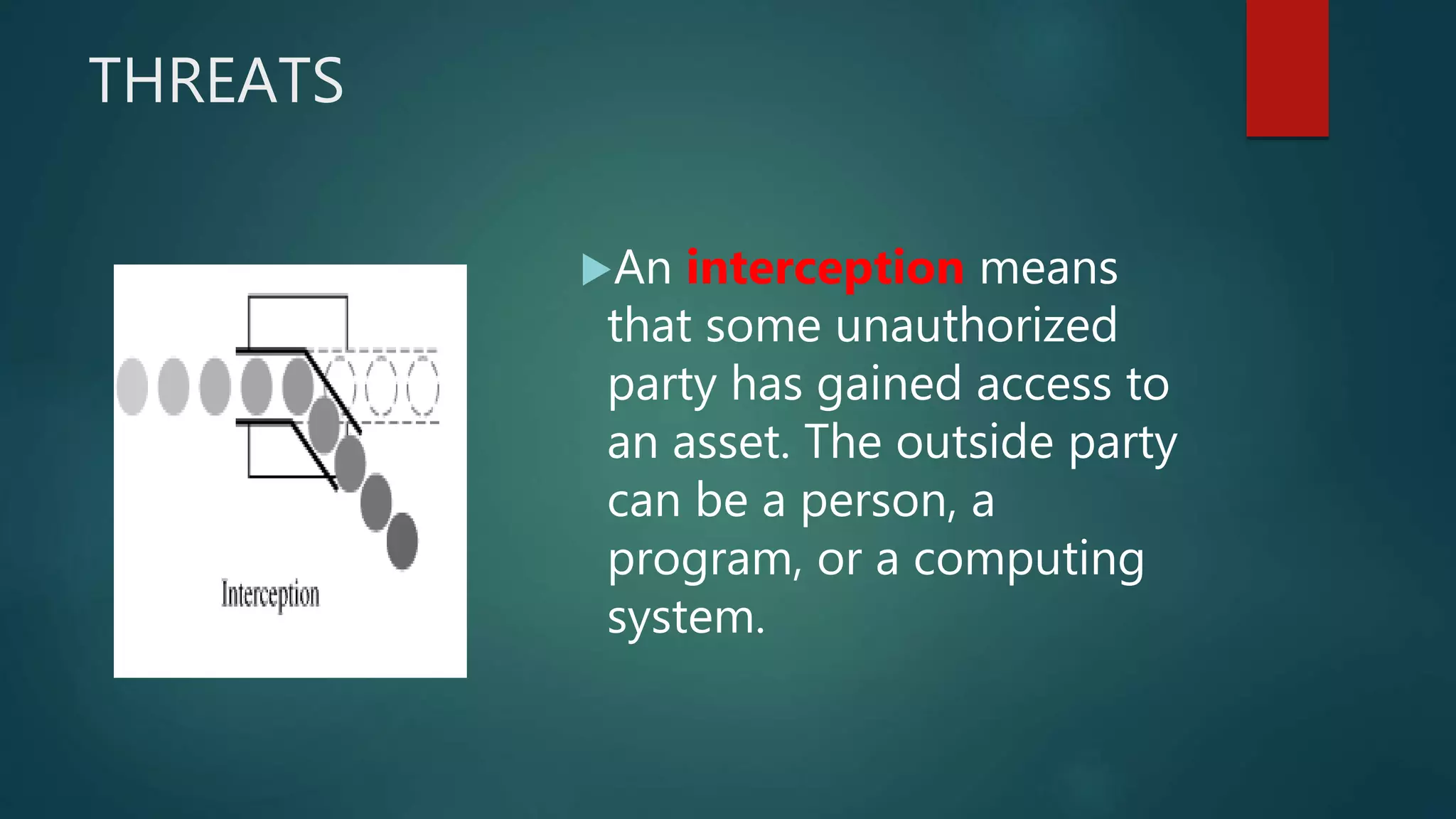
An interception means
that some unauthorized
party has gained access to
an asset. The outside party
can be a person, a
program, or a computing
system.
THREATS
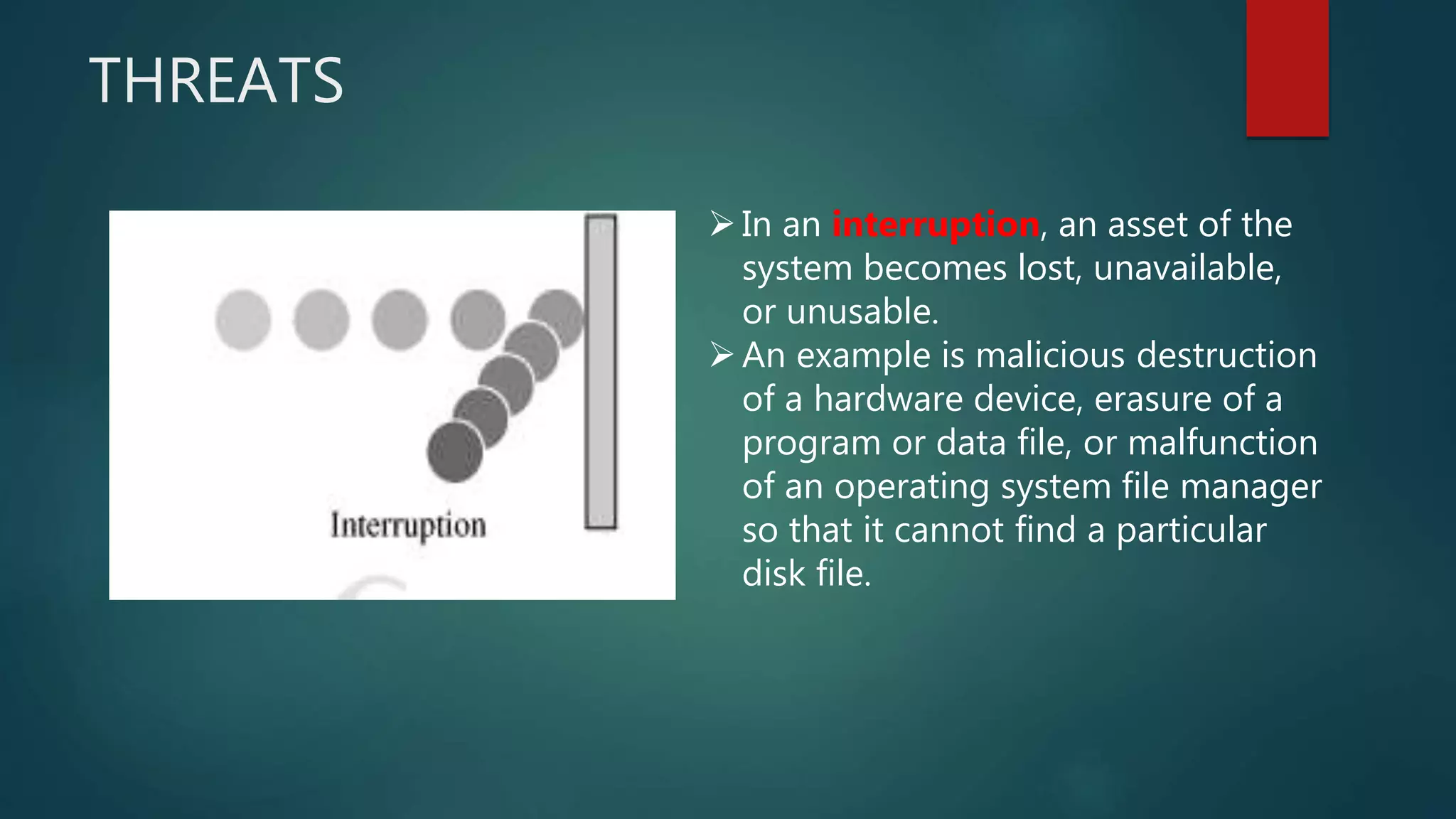
In an interruption, an asset of the
system becomes lost, unavailable,
or unusable.
An example is malicious destruction
of a hardware device, erasure of a
program or data file, or malfunction
of an operating system file manager
so that it cannot find a particular
disk file.
Threats
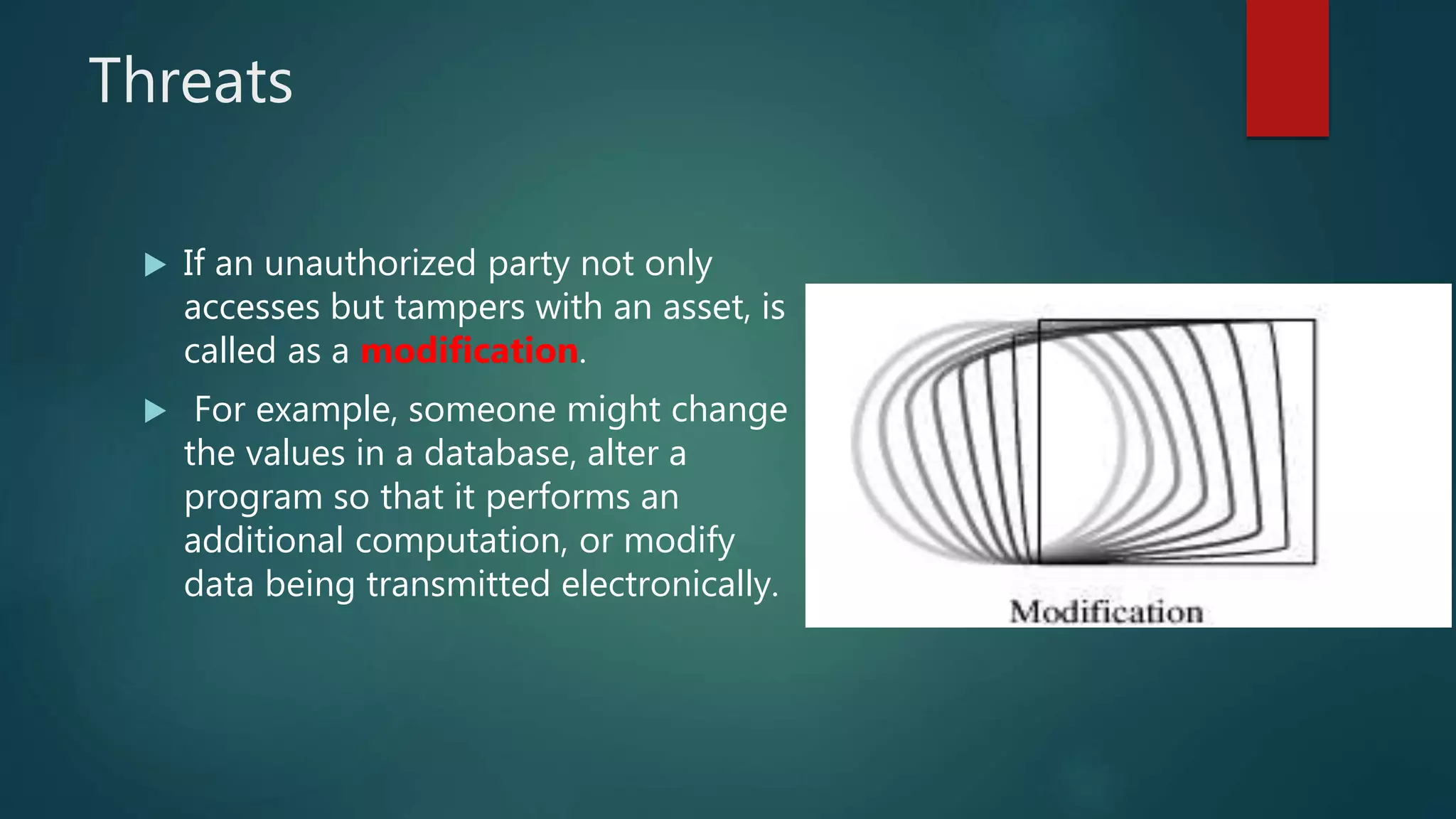
 If an unauthorized party not only
accesses but tampers with an asset, is
called as a modification.
 For example, someone might change
the values in a database, alter a
program so that it performs an
additional computation, or modify
data being transmitted electronically.
THREATS
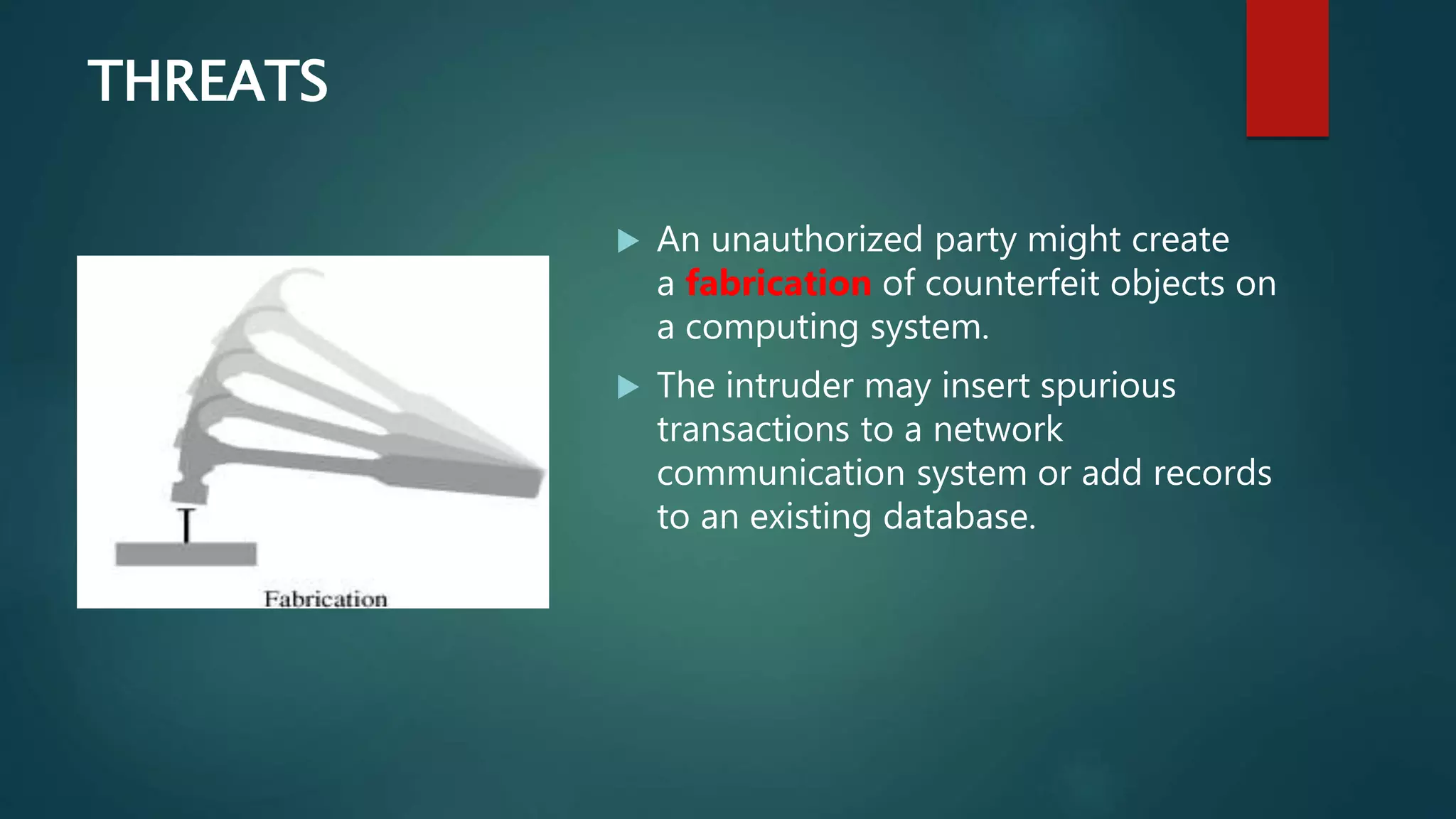
 An unauthorized party might create
a fabrication of counterfeit objects on
a computing system.
 The intruder may insert spurious
transactions to a network
communication system or add records
to an existing database.
ATTACKS
an attack is any attempt to destroy, expose,
alter, disable, steal or gain unauthorized access
to or make unauthorized use of an asset.
ATTACKS
•Unfortunately, we have seen this type of
attack frequently, as denial-of-service
attacks flood servers with more messages
than they can handle.
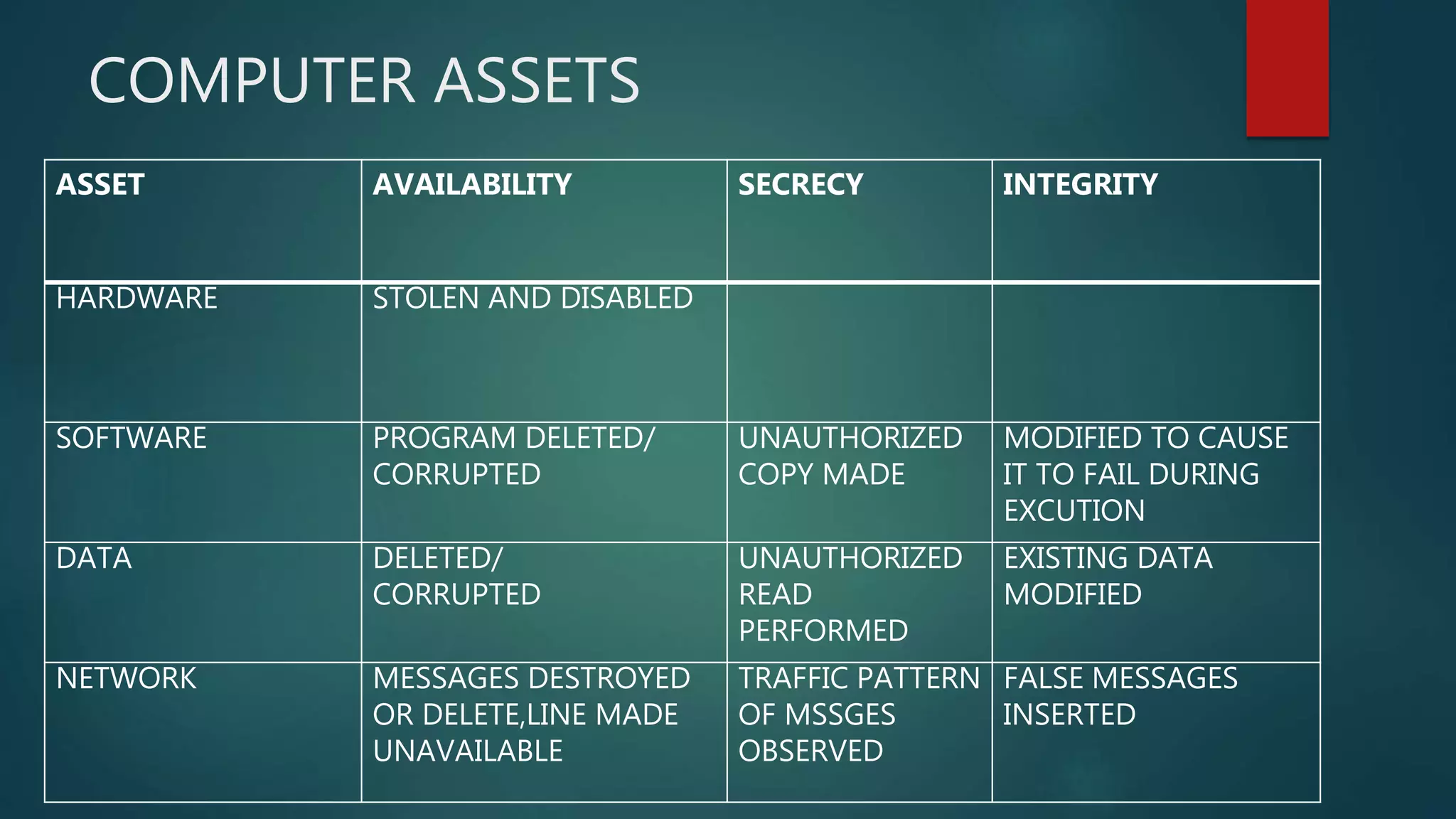
COMPUTER ASSETS
ASSET AVAILABILITY SECRECY INTEGRITY
HARDWARE STOLEN AND DISABLED
SOFTWARE PROGRAM DELETED/
CORRUPTED
UNAUTHORIZED
COPY MADE
MODIFIED TO CAUSE
IT TO FAIL DURING
EXCUTION
DATA DELETED/
CORRUPTED
UNAUTHORIZED
READ
PERFORMED
EXISTING DATA
MODIFIED
NETWORK MESSAGES DESTROYED
OR DELETE,LINE MADE
UNAVAILABLE
TRAFFIC PATTERN
OF MSSGES
OBSERVED
FALSE MESSAGES
INSERTED
INTRUDERS
 A computer intruder is something that invades your computer
without permission.
 In other cases, you may think you are giving permission for one
thing such as accepting a game download, but are actually
opening your computer to attack.
EXAMPLES
Adware- advertising-supported software that is automatically loaded
when a web page is viewed.
Hijacking - refers to when spyware or a virus is hidden in a
software program that normally does something else.
Malicious software overview
 Malicious software (malware) is any software that gives partial
to full control of your computer to do whatever the malware
creator wants. Malware can be a virus, worm, Trojan, adware,
spyware, root kit, etc.
 it is any program or file that is harmful to a computer user.
These malicious programs can perform a variety of functions,
including stealing, encrypting or deleting sensitive data,
altering or hijacking core computing functions and monitoring
users' computer activity without their permission.
 Most malware requires the user to initiate it's operation.
VIRUSES
 A computer virus is a type of malware that propagates by
inserting a copy of itself into and becoming part of another
program. It spreads from one computer to another, leaving
infections as it travels.
 Almost all viruses are attached to an executable file, which
means the virus may exist on a system but will not be active or
able to spread until a user runs or opens the malicious host
file or program.
 Viruses spread when the software or document they are
attached to is transferred from one computer to another using
the network, a disk, file sharing, or infected e-mail
attachments.
WORMS
 Computer worms are similar to viruses in that they replicate
functional copies of themselves and can cause the same type of
damage.
 n contrast to viruses, which require the spreading of an infected host
file, worms are standalone software and do not require a host
program or human help to propagate.
 To spread, worms either exploit a vulnerability on the target system
or use some kind of social engineering to trick users into executing
them.
 A worm enters a computer through a vulnerability in the system and
takes advantage of file-transport or information-transport features
on the system, allowing it to travel unaided.
BOTS
 Bot" is derived from the word "robot" and is an automated
process that interacts with other network services.
 Bots often automate tasks and provide information or services
that would otherwise be conducted by a human being.
 A typical use of bots is to gather information (such as web
crawlers), or interact automatically with instant messaging (IM),
Internet Relay Chat (IRC), or other web interfaces.
 They may also be used to interact dynamically with websites.
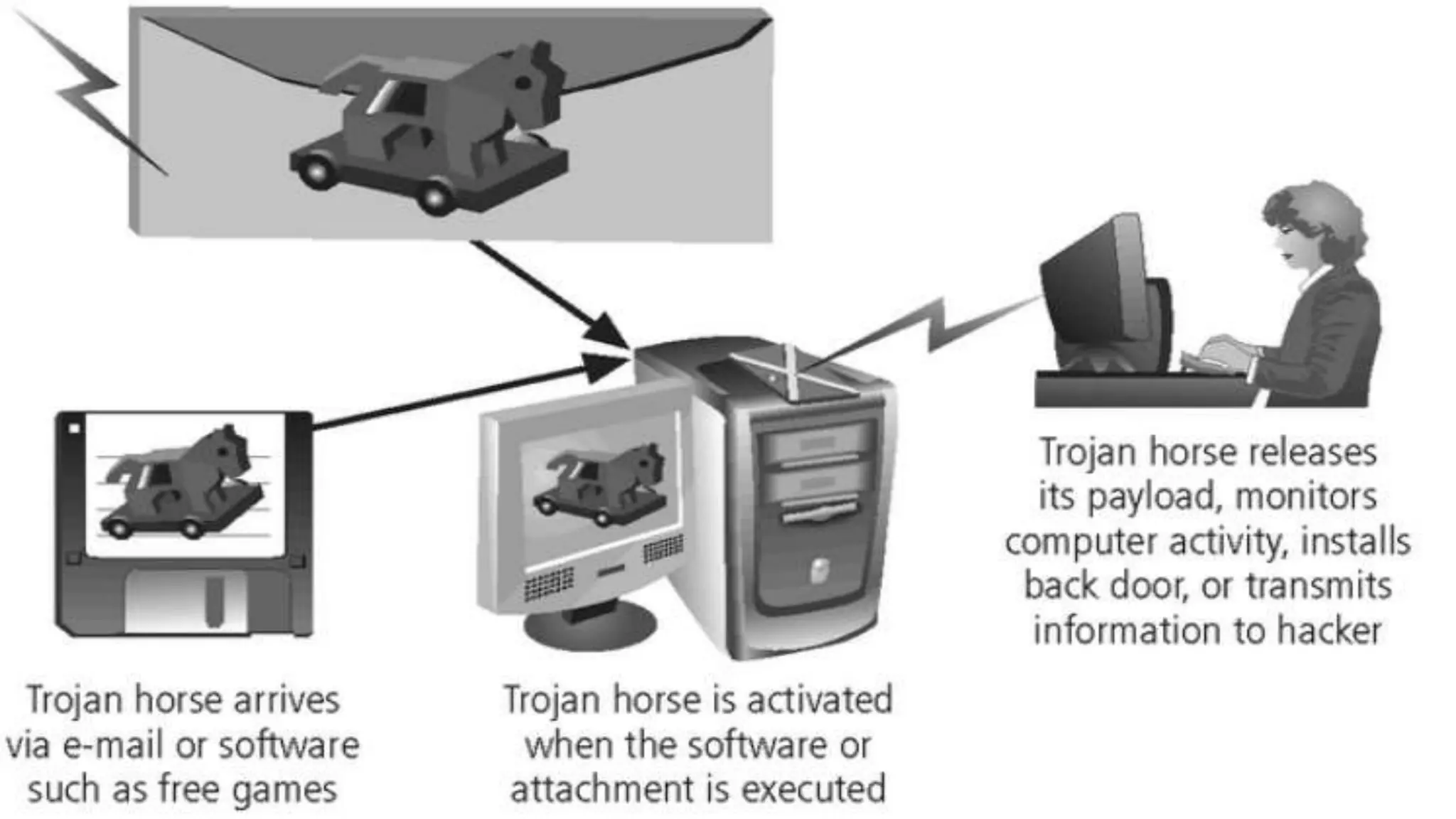
Trojan horse
 A Trojan Horse is a malicious program that is designed to appear as a
legitimate program; once activated following installation, Trojans can execute
their malicious functions
 Users are typically tricked into loading and executing it on their systems. After
it is activated, it can achieve any number of attacks on the host, from irritating
the user (popping up windows or changing desktops) to damaging the host
(deleting files, stealing data, or activating and spreading other malware, such
as viruses).
 Trojans are also known to create back doors to give malicious users access to
the system.
 Unlike viruses and worms, Trojans do not reproduce by infecting other files nor
do they self-replicate. Trojans must spread through user interaction such as
opening an e-mail attachment or downloading and running a file from the
Internet.
spyware
 It is a type of malware that is installed on a computer without the knowledge of the
owner in order to collect the owner’s private information.
 It is often hidden from the user in order to gather information about internet
interaction, keystrokes (also known as key logging), passwords, and other valuable
data.
 they can also negatively affect a computer’s performance by installing additional
software, redirecting web browser searches, changing computer settings, reducing
connection speeds, changing the homepage or even completely disrupting network
connection ability.
 Typically, spyware is installed when a user installs a piece of free software that they
actually wanted. When the desired software is installed, the spyware will piggyback
on the installation and start collecting data from the user’s activities.
 The user can also be tricked into installing the spyware through a Trojan horse as
well as it pretending to be a free piece of security software

Network security presentation

  • 1.
    COMPUTER AND NETWORKSECURITY THREATS by kuda & kudzie Bindura University of Science Education
  • 2.
    NETWORK SECURITY  Networksecurity" refers to any activity designed to protect the usability and integrity of your network and data. It includes both hardware and software technologies.  Effective network security manages access to the network.  It targets a variety of threats and stops them from entering or spreading on your network.
  • 3.
    Fundamentals of securityservices 1) Confidentiality 2) Integrity 3) Availability
  • 4.
    confidentiality  The functionof confidentiality is to protect precious business data from unauthorized persons.  Confidentiality part of network security makes sure that the data is available only to the intended and authorized  Confidentiality is keeping information secret or private.  Confidentiality might be important for military, business or personal reasons.
  • 5.
    integrity  This goalmeans maintaining and assuring the accuracy and consistency of data.  The function of integrity is to make sure that the data is reliable and is not changed by unauthorized persons.  Integrity means that there is an external consistency in the system - everything is as it is expected to be.  Data integrity means that the data stored on a computer is the same as the source documents.
  • 6.
    Availability  The functionof availability in Network Security is to make sure that the data, network resources/services are continuously available to the legitimate users, whenever they require it. e.g. network bandwidth  Denial of service attacks are a common form of attack.
  • 7.
    vulnerability  A vulnerabilityin an information system is a weakness that an attacker might leverage to gain unauthorized access to the system or its data.  It allow an attacker to compromise the integrity, availability, or confidentiality of that product
  • 8.
    THREATS  A threat,refers to anything that has the potential to cause serious harm to a computer system.  It is an event that can take advantage of vulnerability and cause a negative impact on the network.  Potential threats to the network need to be identified, and the related vulnerabilities need to be addressed to minimize the risk of the threat.  There are many threats to a computer system, including human-initiated and computer-initiated ones.  We can view any threat as being one of four kinds such as interception, interruption, modification, and fabrication
  • 9.
    Network security threatsfall into two categories:
  • 10.
    Passive threats  involveattempts by an attacker to obtain information relating to communication.  do not seek to do anything to your data except monitor it. They want to keep an eye on what you are doing and when something interesting, like a credit card number or personal health information, appears on screen, they surreptitiously take a screenshot and send it back to their home server without being noticed. a. Release of message contents  A telephone conversation, an e-mail message and a transferred file may contain sensitive or confidential information. We would like to prevent the opponent from learning the content of these transmissions. b. Traffic analysis  It is a kind of attack done on encrypted messages.  The opponent might be able to observe the pattern of such encrypted message.  The opponent could determine the location and identity of communicating hosts and could observe the frequency and length of messages being exchanged .
  • 11.
    active threats  involvesome modification of the data stream or the creation of a false stream.  active threat is one that actively seeks to damage or destroy your information (a) Masquerade  A masquerade attack is an attack that uses a fake identity, such as a network identity, to gain unauthorized access to personal computer information through legitimate access identification. (b) Replay  is a form of network attack in which a valid data transmission is maliciously or fraudulently repeated or delayed.  It involves the passive capture of a data unit and its subsequent retransmission to produce an unauthorized effect.
  • 12.
    (c) Modification ofmessage  It means that some position of a message is altered, or that messages are delayed or rendered, to produce an unauthorized effect. (d) Denial of service (DOS)  A denial of service attack takes place when the availability to a resource is intentionally blocked or degraded by an attacker.  In this way the normal use or management of communication facilities is inhibited.  This attack may have a specific target. For e.g. an entity may suppress all messages directed to a particular destination.  Another form of service denial is the disruption of an entire network, either by disabling the network or by overloading it with messages so as to degrade performance.
  • 13.
    THREATS An interception means thatsome unauthorized party has gained access to an asset. The outside party can be a person, a program, or a computing system.
  • 14.
    THREATS In an interruption,an asset of the system becomes lost, unavailable, or unusable. An example is malicious destruction of a hardware device, erasure of a program or data file, or malfunction of an operating system file manager so that it cannot find a particular disk file.
  • 15.
    Threats  If anunauthorized party not only accesses but tampers with an asset, is called as a modification.  For example, someone might change the values in a database, alter a program so that it performs an additional computation, or modify data being transmitted electronically.
  • 16.
    THREATS  An unauthorizedparty might create a fabrication of counterfeit objects on a computing system.  The intruder may insert spurious transactions to a network communication system or add records to an existing database.
  • 17.
    ATTACKS an attack isany attempt to destroy, expose, alter, disable, steal or gain unauthorized access to or make unauthorized use of an asset.
  • 18.
    ATTACKS •Unfortunately, we haveseen this type of attack frequently, as denial-of-service attacks flood servers with more messages than they can handle.
  • 19.
    COMPUTER ASSETS ASSET AVAILABILITYSECRECY INTEGRITY HARDWARE STOLEN AND DISABLED SOFTWARE PROGRAM DELETED/ CORRUPTED UNAUTHORIZED COPY MADE MODIFIED TO CAUSE IT TO FAIL DURING EXCUTION DATA DELETED/ CORRUPTED UNAUTHORIZED READ PERFORMED EXISTING DATA MODIFIED NETWORK MESSAGES DESTROYED OR DELETE,LINE MADE UNAVAILABLE TRAFFIC PATTERN OF MSSGES OBSERVED FALSE MESSAGES INSERTED
  • 20.
    INTRUDERS  A computerintruder is something that invades your computer without permission.  In other cases, you may think you are giving permission for one thing such as accepting a game download, but are actually opening your computer to attack. EXAMPLES Adware- advertising-supported software that is automatically loaded when a web page is viewed. Hijacking - refers to when spyware or a virus is hidden in a software program that normally does something else.
  • 21.
    Malicious software overview Malicious software (malware) is any software that gives partial to full control of your computer to do whatever the malware creator wants. Malware can be a virus, worm, Trojan, adware, spyware, root kit, etc.  it is any program or file that is harmful to a computer user. These malicious programs can perform a variety of functions, including stealing, encrypting or deleting sensitive data, altering or hijacking core computing functions and monitoring users' computer activity without their permission.  Most malware requires the user to initiate it's operation.
  • 22.
    VIRUSES  A computervirus is a type of malware that propagates by inserting a copy of itself into and becoming part of another program. It spreads from one computer to another, leaving infections as it travels.  Almost all viruses are attached to an executable file, which means the virus may exist on a system but will not be active or able to spread until a user runs or opens the malicious host file or program.  Viruses spread when the software or document they are attached to is transferred from one computer to another using the network, a disk, file sharing, or infected e-mail attachments.
  • 23.
    WORMS  Computer wormsare similar to viruses in that they replicate functional copies of themselves and can cause the same type of damage.  n contrast to viruses, which require the spreading of an infected host file, worms are standalone software and do not require a host program or human help to propagate.  To spread, worms either exploit a vulnerability on the target system or use some kind of social engineering to trick users into executing them.  A worm enters a computer through a vulnerability in the system and takes advantage of file-transport or information-transport features on the system, allowing it to travel unaided.
  • 24.
    BOTS  Bot" isderived from the word "robot" and is an automated process that interacts with other network services.  Bots often automate tasks and provide information or services that would otherwise be conducted by a human being.  A typical use of bots is to gather information (such as web crawlers), or interact automatically with instant messaging (IM), Internet Relay Chat (IRC), or other web interfaces.  They may also be used to interact dynamically with websites.
  • 25.
    Trojan horse  ATrojan Horse is a malicious program that is designed to appear as a legitimate program; once activated following installation, Trojans can execute their malicious functions  Users are typically tricked into loading and executing it on their systems. After it is activated, it can achieve any number of attacks on the host, from irritating the user (popping up windows or changing desktops) to damaging the host (deleting files, stealing data, or activating and spreading other malware, such as viruses).  Trojans are also known to create back doors to give malicious users access to the system.  Unlike viruses and worms, Trojans do not reproduce by infecting other files nor do they self-replicate. Trojans must spread through user interaction such as opening an e-mail attachment or downloading and running a file from the Internet.
  • 27.
    spyware  It isa type of malware that is installed on a computer without the knowledge of the owner in order to collect the owner’s private information.  It is often hidden from the user in order to gather information about internet interaction, keystrokes (also known as key logging), passwords, and other valuable data.  they can also negatively affect a computer’s performance by installing additional software, redirecting web browser searches, changing computer settings, reducing connection speeds, changing the homepage or even completely disrupting network connection ability.  Typically, spyware is installed when a user installs a piece of free software that they actually wanted. When the desired software is installed, the spyware will piggyback on the installation and start collecting data from the user’s activities.  The user can also be tricked into installing the spyware through a Trojan horse as well as it pretending to be a free piece of security software