FIREWALL AND ITS
CONFIGURATION
Presented By:
Muhammad Baqar Kazmi 16094119-055
FIREWALL
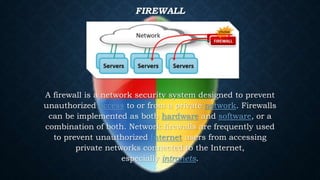
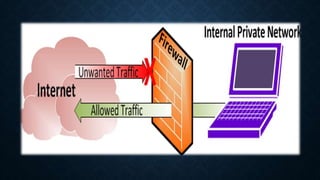
A firewall is a network security system designed to prevent
unauthorized access to or from a private network. Firewalls
can be implemented as both hardware and software, or a
combination of both. Network firewalls are frequently used
to prevent unauthorized Internet users from accessing
private networks connected to the Internet,
especially intranets.
FIREWALL FILTERING
TECHNIQUES
Firewall Filtering Techniques
• Packet Filter: Looks at each packet entering or leaving the
network and accepts or rejects it based on user-defined rules.
Packet filtering is fairly effective and transparent to users,
but it is difficult to configure. In addition, it is susceptible
to IP spoofing.
• Application Gateway: Applies security mechanisms to
specific applications, such as FTP and Telnet servers. This is
very effective, but can impose a performance degradation.
Firewall Filtering Techniques
• Circuit-level Gateway: Applies security mechanisms when
a TCP or UDP connection is established. Once the connection has
been made, packets can flow between the hosts without further
checking.
• Proxy Server: Intercepts all messages entering and leaving the
network. The proxy server effectively hides the true network
addresses.
Serves as a relay between two networks, breaking the connection bet
ween the two.
In practice, many firewalls use two or more of these techniques in
concert. A firewall is considered a first line of defense in protecting
private information. For greater security, data can be encrypted
Characteristics of the firewall
protection
Characteristics of the firewall protection
Different protection levels based on the location of the computer
When your PC connects to a network, the firewall applies a security
level in accordance with the type of network. If you want to change
the security level assigned initially, you can do this at any time
through the firewall settings.
Protection of wireless networks (Wi-Fi)
This blocks intrusion attempts launched through wireless networks
(Wi-Fi). When an intruder attempts to access, a pop-up warning is
displayed that allows you to immediately block the attack.
Different protection levels based on the location of the
computer
When your PC connects to a network, the firewall applies a security
level in accordance with the type of network. If you want to change
the security level assigned initially, you can do this at any time
through the firewall settings.
Protection of wireless networks (Wi-Fi)
This blocks intrusion attempts launched through wireless networks
(Wi-Fi). When an intruder attempts to access, a pop-up warning is
displayed that allows you to immediately block the attack.
Access to the network and the Internet
It specifies which programs installed on your computer can
access the network or the Internet.
Protection against intruders
It prevents hacker attacks that try to access your computer to
carry out certain actions.
Blocks
The firewall can block the access of the programs that you
specify should not be able to access the local network or the
Internet. It also blocks access from other computers that try to
connect to programs installed on your computer.
Definition of rules
This defines rules that you can use to specify which connections
you want to allow and the ports and zones through which the
connection can be established.
Firewall Configuration
While configuring the firewall protection,you should keep in mind that your
changes can affect the functioning of some shared network programs and
resources.
How to enable or disable the firewall protection
Configuring the firewall security level
How to configure permissions for programs that try to connect to the
Internet
How to modify the Internet connection permissions of the programs
installed
Configure connection rules for installed programs
How to allow or prevent connections with other computers across Wi-Fi
networks

Firewall and its configuration

  • 1.
    FIREWALL AND ITS CONFIGURATION PresentedBy: Muhammad Baqar Kazmi 16094119-055
  • 2.
    FIREWALL A firewall isa network security system designed to prevent unauthorized access to or from a private network. Firewalls can be implemented as both hardware and software, or a combination of both. Network firewalls are frequently used to prevent unauthorized Internet users from accessing private networks connected to the Internet, especially intranets.
  • 4.
  • 5.
    Firewall Filtering Techniques •Packet Filter: Looks at each packet entering or leaving the network and accepts or rejects it based on user-defined rules. Packet filtering is fairly effective and transparent to users, but it is difficult to configure. In addition, it is susceptible to IP spoofing. • Application Gateway: Applies security mechanisms to specific applications, such as FTP and Telnet servers. This is very effective, but can impose a performance degradation.
  • 6.
    Firewall Filtering Techniques •Circuit-level Gateway: Applies security mechanisms when a TCP or UDP connection is established. Once the connection has been made, packets can flow between the hosts without further checking. • Proxy Server: Intercepts all messages entering and leaving the network. The proxy server effectively hides the true network addresses. Serves as a relay between two networks, breaking the connection bet ween the two. In practice, many firewalls use two or more of these techniques in concert. A firewall is considered a first line of defense in protecting private information. For greater security, data can be encrypted
  • 7.
    Characteristics of thefirewall protection
  • 8.
    Characteristics of thefirewall protection Different protection levels based on the location of the computer When your PC connects to a network, the firewall applies a security level in accordance with the type of network. If you want to change the security level assigned initially, you can do this at any time through the firewall settings. Protection of wireless networks (Wi-Fi) This blocks intrusion attempts launched through wireless networks (Wi-Fi). When an intruder attempts to access, a pop-up warning is displayed that allows you to immediately block the attack.
  • 9.
    Different protection levelsbased on the location of the computer When your PC connects to a network, the firewall applies a security level in accordance with the type of network. If you want to change the security level assigned initially, you can do this at any time through the firewall settings. Protection of wireless networks (Wi-Fi) This blocks intrusion attempts launched through wireless networks (Wi-Fi). When an intruder attempts to access, a pop-up warning is displayed that allows you to immediately block the attack.
  • 10.
    Access to thenetwork and the Internet It specifies which programs installed on your computer can access the network or the Internet. Protection against intruders It prevents hacker attacks that try to access your computer to carry out certain actions.
  • 11.
    Blocks The firewall canblock the access of the programs that you specify should not be able to access the local network or the Internet. It also blocks access from other computers that try to connect to programs installed on your computer. Definition of rules This defines rules that you can use to specify which connections you want to allow and the ports and zones through which the connection can be established.
  • 12.
  • 13.
    While configuring thefirewall protection,you should keep in mind that your changes can affect the functioning of some shared network programs and resources. How to enable or disable the firewall protection Configuring the firewall security level How to configure permissions for programs that try to connect to the Internet How to modify the Internet connection permissions of the programs installed Configure connection rules for installed programs How to allow or prevent connections with other computers across Wi-Fi networks