
EduTools 2.0
EduTools 2.0
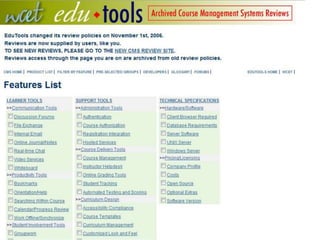
EduTools 1.0
• Ground-breaking comparison tool
• Used for RFP generation
• Provider content vetted by WCET
• Resource-intensive to maintain
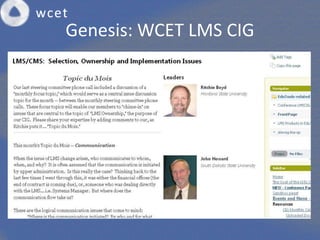
Genesis: WCET LMS CIG
Revision Drivers
• Ubiquitous
• Converging feature sets
• Handle administrivia
• Student expectations
• Focus on learning not learner management
• Constant change
Driving Questions
• Semi-permeable borders
– Content
– Non-students
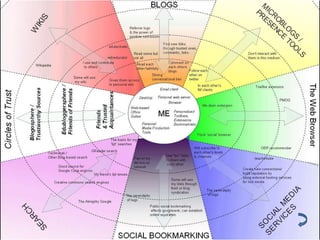
• Personal learning environments
– Content
– Non-students
• Small pieces, loosely joined
EduTools Survey
1. Portal
2. Communication
3. Tests
4. Grades
5. Reports
6. Interoperability
7. Accessibility
8. Community
9. Administration
10.Technical
11.Price
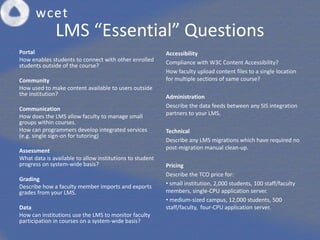
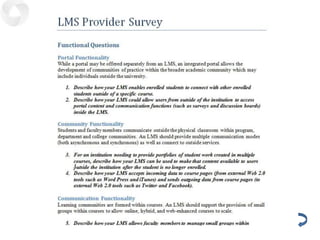
LMS “Essential” Questions
Portal
How enables students to connect with other enrolled
students outside of the course?
Community
How used to make content available to users outside
the institution?
Communication
How does the LMS allow faculty to manage small
groups within courses.
How can programmers develop integrated services
(e.g. single sign-on for tutoring)
Assessment
What data is available to allow institutions to student
progress on system-wide basis?
Grading
Describe how a faculty member imports and exports
grades from your LMS.
Data
How can institutions use the LMS to monitor faculty
participation in courses on a system-wide basis?
Accessibility
Compliance with W3C Content Accessibility?
How faculty upload content files to a single location
for multiple sections of same course?
Administration
Describe the data feeds between any SIS integration
partners to your LMS.
Technical
Describe any LMS migrations which have required no
post-migration manual clean-up.
Pricing
Describe the TCO price for:
• small institution, 2,000 students, 100 staff/faculty
members, single-CPU application server.
• medium-sized campus, 12,000 students, 500
staff/faculty, four-CPU application server.
EduTools Data
• LMS Filters
– Type
• Proprietary vs. Open Source
– Location
• Local vs. Hosted
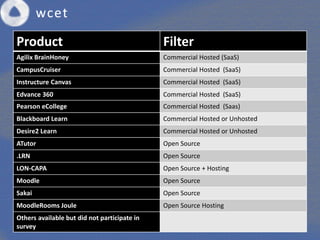
LMS Respondents
Product Filter
Agilix BrainHoney Commercial Hosted (SaaS)
CampusCruiser Commercial Hosted (SaaS)
Instructure Canvas Commercial Hosted (SaaS)
Edvance 360 Commercial Hosted (SaaS)
Pearson eCollege Commercial Hosted (Saas)
Blackboard Learn Commercial Hosted or Unhosted
Desire2 Learn Commercial Hosted or Unhosted
ATutor Open Source
.LRN Open Source
LON-CAPA Open Source + Hosting
Moodle Open Source
Sakai Open Source
MoodleRooms Joule Open Source Hosting
Others available but did not participate in
survey
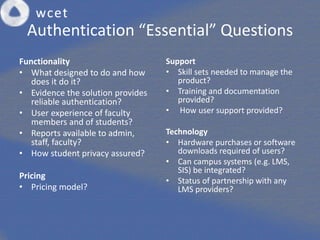
Authentication “Essential” Questions
Functionality
• What designed to do and how
does it do it?
• Evidence the solution provides
reliable authentication?
• User experience of faculty
members and of students?
• Reports available to admin,
staff, faculty?
• How student privacy assured?
Pricing
• Pricing model?
Support
• Skill sets needed to manage the
product?
• Training and documentation
provided?
• How user support provided?
Technology
• Hardware purchases or software
downloads required of users?
• Can campus systems (e.g. LMS,
SIS) be integrated?
• Status of partnership with any
LMS providers?
EduTools Data
• Authentication Filter: Technology
– Biometric
– Challenge-Response
– Monitoring
Authentication Respondents
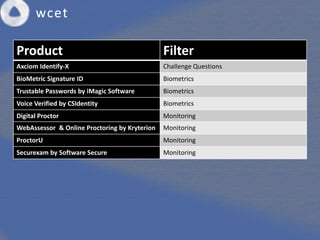
Product Filter
Axciom Identify-X Challenge Questions
BioMetric Signature ID Biometrics
Trustable Passwords by iMagic Software Biometrics
Voice Verified by CSIdentity Biometrics
Digital Proctor Monitoring
WebAssessor & Online Proctoring by Kryterion Monitoring
ProctorU Monitoring
Securexam by Software Secure Monitoring
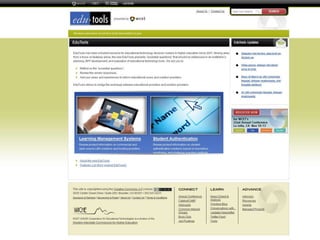
EduTools Mockup
Direction
• Annual updates
• Additional resources
• Vendor input
• Community involvement
– Vetting
– Sharing
Future
Ed U Tools
2.0
coming soon
End
RFP
PLE
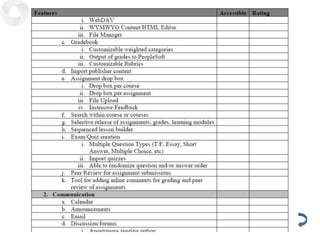
Survey Questions
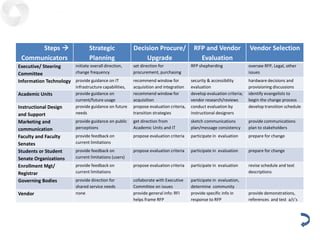
Communications
Steps 
Communicators
Strategic
Planning
Decision Procure/
Upgrade
RFP and Vendor
Evaluation
Vendor Selection
Executive/ Steering
Committee
initiate overall direction,
change frequency
set direction for
procurement, purchasing
RFP shepherding oversee RFP, Legal, other
issues
Information Technology provide guidance on IT
infrastructure capabilities,
recommend window for
acquisition and integration
security & accessibility
evaluation
hardware decisions and
provisioning discussions
Academic Units provide guidance on
current/future usage
recommend window for
acquisition
develop evaluation criteria;
vendor research/reviews
identify evangelists to
begin the change process
Instructional Design
and Support
provide guidance on future
needs
propose evaluation criteria,
transition strategies
conduct evaluation by
instructional designers
develop transition schedule
Marketing and
communication
provide guidance on public
perceptions
get direction from
Academic Units and IT
sketch communications
plan/message consistency
provide communications
plan to stakeholders
Faculty and Faculty
Senates
provide feedback on
current limitations
propose evaluation criteria participate in evaluation prepare for change
Students or Student
Senate Organizations
provide feedback on
current limitations (users)
propose evaluation criteria participate in evaluation prepare for change
Enrollment Mgt/
Registrar
provide feedback on
current limitations
propose evaluation criteria participate in evaluation revise schedule and text
descriptions
Governing Bodies provide direction for
shared service needs
collaborate with Executive
Committee on issues
participate in evaluation,
determine community
Vendor none provide general info: RFI
helps frame RFP
provide specific info in
response to RFP
provide demonstrations,
references and test a/c’s

2010 Edu tools

  • 1.
  • 2.
    EduTools 1.0 • Ground-breakingcomparison tool • Used for RFP generation • Provider content vetted by WCET • Resource-intensive to maintain
  • 3.
  • 4.
    Revision Drivers • Ubiquitous •Converging feature sets • Handle administrivia • Student expectations • Focus on learning not learner management • Constant change
  • 5.
    Driving Questions • Semi-permeableborders – Content – Non-students • Personal learning environments – Content – Non-students • Small pieces, loosely joined
  • 6.
    EduTools Survey 1. Portal 2.Communication 3. Tests 4. Grades 5. Reports 6. Interoperability 7. Accessibility 8. Community 9. Administration 10.Technical 11.Price
  • 7.
    LMS “Essential” Questions Portal Howenables students to connect with other enrolled students outside of the course? Community How used to make content available to users outside the institution? Communication How does the LMS allow faculty to manage small groups within courses. How can programmers develop integrated services (e.g. single sign-on for tutoring) Assessment What data is available to allow institutions to student progress on system-wide basis? Grading Describe how a faculty member imports and exports grades from your LMS. Data How can institutions use the LMS to monitor faculty participation in courses on a system-wide basis? Accessibility Compliance with W3C Content Accessibility? How faculty upload content files to a single location for multiple sections of same course? Administration Describe the data feeds between any SIS integration partners to your LMS. Technical Describe any LMS migrations which have required no post-migration manual clean-up. Pricing Describe the TCO price for: • small institution, 2,000 students, 100 staff/faculty members, single-CPU application server. • medium-sized campus, 12,000 students, 500 staff/faculty, four-CPU application server.
  • 8.
    EduTools Data • LMSFilters – Type • Proprietary vs. Open Source – Location • Local vs. Hosted
  • 9.
    LMS Respondents Product Filter AgilixBrainHoney Commercial Hosted (SaaS) CampusCruiser Commercial Hosted (SaaS) Instructure Canvas Commercial Hosted (SaaS) Edvance 360 Commercial Hosted (SaaS) Pearson eCollege Commercial Hosted (Saas) Blackboard Learn Commercial Hosted or Unhosted Desire2 Learn Commercial Hosted or Unhosted ATutor Open Source .LRN Open Source LON-CAPA Open Source + Hosting Moodle Open Source Sakai Open Source MoodleRooms Joule Open Source Hosting Others available but did not participate in survey
  • 10.
    Authentication “Essential” Questions Functionality •What designed to do and how does it do it? • Evidence the solution provides reliable authentication? • User experience of faculty members and of students? • Reports available to admin, staff, faculty? • How student privacy assured? Pricing • Pricing model? Support • Skill sets needed to manage the product? • Training and documentation provided? • How user support provided? Technology • Hardware purchases or software downloads required of users? • Can campus systems (e.g. LMS, SIS) be integrated? • Status of partnership with any LMS providers?
  • 11.
    EduTools Data • AuthenticationFilter: Technology – Biometric – Challenge-Response – Monitoring
  • 12.
    Authentication Respondents Product Filter AxciomIdentify-X Challenge Questions BioMetric Signature ID Biometrics Trustable Passwords by iMagic Software Biometrics Voice Verified by CSIdentity Biometrics Digital Proctor Monitoring WebAssessor & Online Proctoring by Kryterion Monitoring ProctorU Monitoring Securexam by Software Secure Monitoring
  • 13.
  • 14.
    Direction • Annual updates •Additional resources • Vendor input • Community involvement – Vetting – Sharing
  • 15.
  • 16.
  • 17.
  • 18.
  • 19.
  • 20.
    Communications Steps  Communicators Strategic Planning Decision Procure/ Upgrade RFPand Vendor Evaluation Vendor Selection Executive/ Steering Committee initiate overall direction, change frequency set direction for procurement, purchasing RFP shepherding oversee RFP, Legal, other issues Information Technology provide guidance on IT infrastructure capabilities, recommend window for acquisition and integration security & accessibility evaluation hardware decisions and provisioning discussions Academic Units provide guidance on current/future usage recommend window for acquisition develop evaluation criteria; vendor research/reviews identify evangelists to begin the change process Instructional Design and Support provide guidance on future needs propose evaluation criteria, transition strategies conduct evaluation by instructional designers develop transition schedule Marketing and communication provide guidance on public perceptions get direction from Academic Units and IT sketch communications plan/message consistency provide communications plan to stakeholders Faculty and Faculty Senates provide feedback on current limitations propose evaluation criteria participate in evaluation prepare for change Students or Student Senate Organizations provide feedback on current limitations (users) propose evaluation criteria participate in evaluation prepare for change Enrollment Mgt/ Registrar provide feedback on current limitations propose evaluation criteria participate in evaluation revise schedule and text descriptions Governing Bodies provide direction for shared service needs collaborate with Executive Committee on issues participate in evaluation, determine community Vendor none provide general info: RFI helps frame RFP provide specific info in response to RFP provide demonstrations, references and test a/c’s

Editor's Notes

  • #19 From Scott Leslie’s blog