LMS TRANSITIONS
LESSONS FROM A CULTURALLY INCLUSIVE AND TRANSPARENT
CHANGE EFFORT
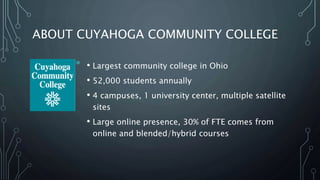
ABOUT CUYAHOGA COMMUNITY COLLEGE
• Largest community college in Ohio
• 52,000 students annually
• 4 campuses, 1 university center, multiple satellite
sites
• Large online presence, 30% of FTE comes from
online and blended/hybrid courses
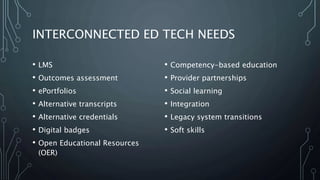
INTERCONNECTED ED TECH NEEDS
• LMS
• Outcomes assessment
• ePortfolios
• Alternative transcripts
• Alternative credentials
• Digital badges
• Open Educational Resources
(OER)
• Competency-based education
• Provider partnerships
• Social learning
• Integration
• Legacy system transitions
• Soft skills
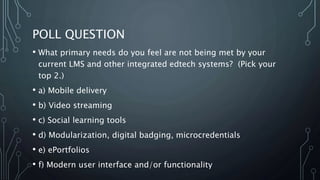
POLL QUESTION
• What primary needs do you feel are not being met by your
current LMS and other integrated edtech systems? (Pick your
top 2.)
• a) Mobile delivery
• b) Video streaming
• c) Social learning tools
• d) Modularization, digital badging, microcredentials
• e) ePortfolios
• f) Modern user interface and/or functionality
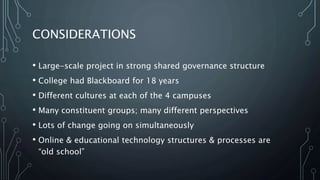
CONSIDERATIONS
• Large-scale project in strong shared governance structure
• College had Blackboard for 18 years
• Different cultures at each of the 4 campuses
• Many constituent groups; many different perspectives
• Lots of change going on simultaneously
• Online & educational technology structures & processes are
“old school”
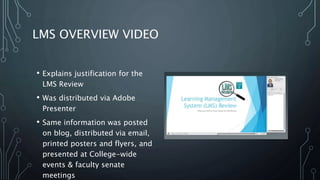
LMS OVERVIEW VIDEO
• Explains justification for the
LMS Review
• Was distributed via Adobe
Presenter
• Same information was posted
on blog, distributed via email,
printed posters and flyers, and
presented at College-wide
events & faculty senate
meetings
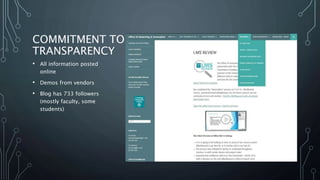
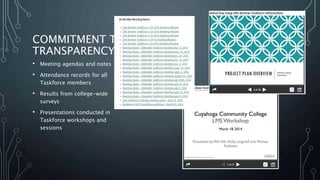
COMMITMENT TO
TRANSPARENCY
• All information posted
online
• Demos from vendors
• Blog has 733 followers
(mostly faculty, some
students)
COMMITMENT TO
TRANSPARENCY
• Meeting agendas and notes
• Attendance records for all
Taskforce members
• Results from college-wide
surveys
• Presentations conducted in
Taskforce workshops and
sessions
THE TASKFORCE
• Short-term group
• 10 full-time faculty (all campuses); 1 adjunct; several staff were
also adjunct instructors
• Staff and administration from eLearning and Innovation, IT,
procurement, legal, accessibility services, Centers for Learning
Excellence, student affairs, students
• Formalized the expectations for what Taskforce membership
entailed
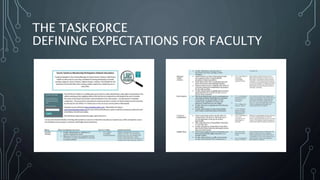
THE TASKFORCE
DEFINING EXPECTATIONS FOR FACULTY
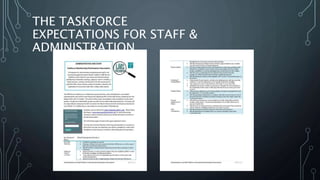
THE TASKFORCE
EXPECTATIONS FOR STAFF &
ADMINISTRATION
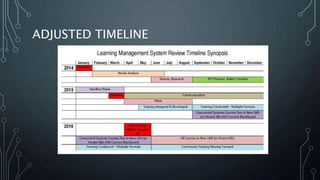
ADJUSTED TIMELINE
COMMUNICATION
SHARED OWNERSHIP OF THE MESSAGE
POLL QUESTION
What primary methods do you use to communicate within your
college? (Pick top 2.)
A. Email
B. Portal and/or Intranet
C. Newsletters (physical or virtual)
D.Paper (flyers, posters, etc.)
E. Video updates
F. Faculty meetings and/or presentations
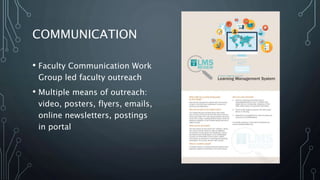
COMMUNICATION
• Faculty Communication Work
Group led faculty outreach
• Multiple means of outreach:
video, posters, flyers, emails,
online newsletters, postings
in portal
COMMUNICATION
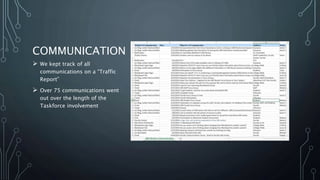
 We kept track of all
communications on a “Traffic
Report”
 Over 75 communications went
out over the length of the
Taskforce involvement
SURVEYS, FOCUS GROUPS & INTERVIEWS OH
MY!
GETTING FEEDBACK IS JUST LIKE VOTING: DO IT EARLY AND OFTEN
SURVEYS & FOCUS GROUPS
• College-wide
• Separate surveys for faculty, staff and administration, and
students
• Focus groups for each of those populations at each of the
campuses
• Interviews with key stakeholders
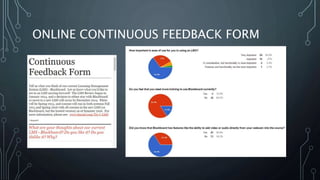
ONLINE CONTINUOUS FEEDBACK FORM
TOOLS
NEEDS ANALYSIS, RUBRIC, AND SCORECARD PROCESS
TOOLS USED IN THE DECISION MAKING
PROCESS
1. Needs Analysis
2. Rubric
3. Scorecard
4. Consensus Tool
POLL QUESTION
What tools do you use when making committee or Taskforce
decisions? (Pick top 2.)
A. None – general discussion
B. Formal voting
C. Codified analysis tool (i.e. rubrics, surveys, etc.)
D.Consensus tool
E. Other specific internal process
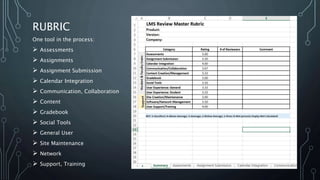
RUBRIC
One tool in the process:
 Assessments
 Assignments
 Assignment Submission
 Calendar Integration
 Communication, Collaboration
 Content
 Gradebook
 Social Tools
 General User
 Site Maintenance
 Network
 Support, Training
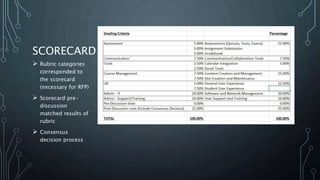
SCORECARD
 Rubric categories
corresponded to
the scorecard
(necessary for RFP)
 Scorecard pre-
discussion
matched results of
rubric
 Consensus
decision process
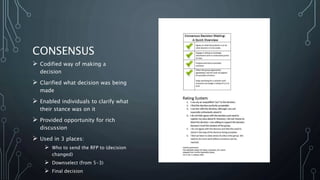
CONSENSUS
 Codified way of making a
decision
 Clarified what decision was being
made
 Enabled individuals to clarify what
their stance was on it
 Provided opportunity for rich
discussion
 Used in 3 places:
 Who to send the RFP to (decision
changed)
 Downselect (from 5-3)
 Final decision
TASKFORCE OPERATIONS
SHORT DEADLINES, SHARED OWNERSHIP, AND CELEBRATION OF WINS
SPRINTS
• Short-term 2 week assignments
• Intense work over a short period of time
• Work Group leads determined what needed to be
done, assigned tasks
• Report outs every 2 weeks
• Adjusted as we went
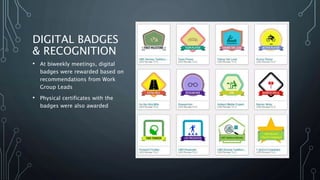
DIGITAL BADGES
& RECOGNITION
• At biweekly meetings, digital
badges were rewarded based on
recommendations from Work
Group Leads
• Physical certificates with the
badges were also awarded
PUTTING A BOW ON IT
HIGHLIGHTING THE WORK OF THE TASKFORCE
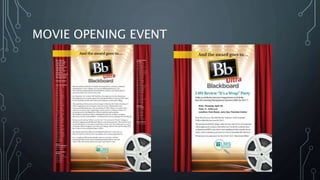
MOVIE OPENING EVENT
COLLEGE-WIDE ANNOUNCEMENTS
LMS Review Overview
Video
LINGERING CONCERNS
• Self-hosted
• SaaS versus on-site
• To Ultra or Not to Ultra, that is the question

LMS Transitions

  • 1.
    LMS TRANSITIONS LESSONS FROMA CULTURALLY INCLUSIVE AND TRANSPARENT CHANGE EFFORT
  • 2.
    ABOUT CUYAHOGA COMMUNITYCOLLEGE • Largest community college in Ohio • 52,000 students annually • 4 campuses, 1 university center, multiple satellite sites • Large online presence, 30% of FTE comes from online and blended/hybrid courses
  • 3.
    INTERCONNECTED ED TECHNEEDS • LMS • Outcomes assessment • ePortfolios • Alternative transcripts • Alternative credentials • Digital badges • Open Educational Resources (OER) • Competency-based education • Provider partnerships • Social learning • Integration • Legacy system transitions • Soft skills
  • 4.
    POLL QUESTION • Whatprimary needs do you feel are not being met by your current LMS and other integrated edtech systems? (Pick your top 2.) • a) Mobile delivery • b) Video streaming • c) Social learning tools • d) Modularization, digital badging, microcredentials • e) ePortfolios • f) Modern user interface and/or functionality
  • 5.
    CONSIDERATIONS • Large-scale projectin strong shared governance structure • College had Blackboard for 18 years • Different cultures at each of the 4 campuses • Many constituent groups; many different perspectives • Lots of change going on simultaneously • Online & educational technology structures & processes are “old school”
  • 6.
    LMS OVERVIEW VIDEO •Explains justification for the LMS Review • Was distributed via Adobe Presenter • Same information was posted on blog, distributed via email, printed posters and flyers, and presented at College-wide events & faculty senate meetings
  • 7.
    COMMITMENT TO TRANSPARENCY • Allinformation posted online • Demos from vendors • Blog has 733 followers (mostly faculty, some students)
  • 8.
    COMMITMENT TO TRANSPARENCY • Meetingagendas and notes • Attendance records for all Taskforce members • Results from college-wide surveys • Presentations conducted in Taskforce workshops and sessions
  • 9.
    THE TASKFORCE • Short-termgroup • 10 full-time faculty (all campuses); 1 adjunct; several staff were also adjunct instructors • Staff and administration from eLearning and Innovation, IT, procurement, legal, accessibility services, Centers for Learning Excellence, student affairs, students • Formalized the expectations for what Taskforce membership entailed
  • 10.
  • 11.
    THE TASKFORCE EXPECTATIONS FORSTAFF & ADMINISTRATION
  • 12.
  • 13.
  • 14.
    POLL QUESTION What primarymethods do you use to communicate within your college? (Pick top 2.) A. Email B. Portal and/or Intranet C. Newsletters (physical or virtual) D.Paper (flyers, posters, etc.) E. Video updates F. Faculty meetings and/or presentations
  • 15.
    COMMUNICATION • Faculty CommunicationWork Group led faculty outreach • Multiple means of outreach: video, posters, flyers, emails, online newsletters, postings in portal
  • 16.
    COMMUNICATION  We kepttrack of all communications on a “Traffic Report”  Over 75 communications went out over the length of the Taskforce involvement
  • 17.
    SURVEYS, FOCUS GROUPS& INTERVIEWS OH MY! GETTING FEEDBACK IS JUST LIKE VOTING: DO IT EARLY AND OFTEN
  • 18.
    SURVEYS & FOCUSGROUPS • College-wide • Separate surveys for faculty, staff and administration, and students • Focus groups for each of those populations at each of the campuses • Interviews with key stakeholders
  • 19.
  • 20.
    TOOLS NEEDS ANALYSIS, RUBRIC,AND SCORECARD PROCESS
  • 21.
    TOOLS USED INTHE DECISION MAKING PROCESS 1. Needs Analysis 2. Rubric 3. Scorecard 4. Consensus Tool
  • 22.
    POLL QUESTION What toolsdo you use when making committee or Taskforce decisions? (Pick top 2.) A. None – general discussion B. Formal voting C. Codified analysis tool (i.e. rubrics, surveys, etc.) D.Consensus tool E. Other specific internal process
  • 23.
    RUBRIC One tool inthe process:  Assessments  Assignments  Assignment Submission  Calendar Integration  Communication, Collaboration  Content  Gradebook  Social Tools  General User  Site Maintenance  Network  Support, Training
  • 24.
    SCORECARD  Rubric categories correspondedto the scorecard (necessary for RFP)  Scorecard pre- discussion matched results of rubric  Consensus decision process
  • 25.
    CONSENSUS  Codified wayof making a decision  Clarified what decision was being made  Enabled individuals to clarify what their stance was on it  Provided opportunity for rich discussion  Used in 3 places:  Who to send the RFP to (decision changed)  Downselect (from 5-3)  Final decision
  • 26.
    TASKFORCE OPERATIONS SHORT DEADLINES,SHARED OWNERSHIP, AND CELEBRATION OF WINS
  • 27.
    SPRINTS • Short-term 2week assignments • Intense work over a short period of time • Work Group leads determined what needed to be done, assigned tasks • Report outs every 2 weeks • Adjusted as we went
  • 28.
    DIGITAL BADGES & RECOGNITION •At biweekly meetings, digital badges were rewarded based on recommendations from Work Group Leads • Physical certificates with the badges were also awarded
  • 29.
    PUTTING A BOWON IT HIGHLIGHTING THE WORK OF THE TASKFORCE
  • 30.
  • 31.
  • 32.
    LINGERING CONCERNS • Self-hosted •SaaS versus on-site • To Ultra or Not to Ultra, that is the question

Editor's Notes

  • #2 Session Description: Working effectively on a change initiative in a strong shared governance environment requires successful collaboration with faculty leaders. This presentation will focus on the process of an LMS Review that was conducted at Cuyahoga Community College, with a College-wide Taskforce of full-time and adjunct faculty, administrative leadership and representatives from all stakeholder groups. The project management style of distributed ownership and short-term sprints led to genuine buy-in from all parties, with a successful conclusion. The LMS Review was purposefully transparent, with all components posted publicly on a blog including meeting minutes, needs analysis, evaluation of systems, and the internal education process for the group regarding LMS trends. The project incorporated educational opportunities and incentives internally, with the use of digital badging and recognition of exemplary work throughout the process.
  • #4 Many different needs within the college Wanted to avoid duplications of systems if possible Wanted to think ahead for “room to grow,” even within the confines of an LMS Review
  • #6 Reflecting on this change process, there were some major elements to it, what we’ll be discussing today Context – providing overview Commitment to transparency The Taskforce – who was involved, what the expectations were Timelines – and flexibility of timelines Communication streams Opportunities for input Tools Taskforce Operations – how we ran the project with Sprints, digital badges, etc. “Put a Bow On It” – pomp and circumstance – ending the project Lingering concerns
  • #15 In terms of “getting the word out”
  • #20 Feedback form was there throughout Most faculty did not use it (40) It was available for input and it was another avenue where faculty and staff could participate