The LSE Training Portal: a
really simple solution?
Jane Secker, Jeni Brown & Chris Fryer
London School of Economics and Political Science
17th
March 2008
LILAC 2008, Liverpool John Moores University
Overview and summary
 Overview of training portal project
 Use of RSS technology to enhance access
to training information for staff and
students at LSE
 Development of a portal or ‘one-stop shop’
 Development of a re-usable RSS feed for
inclusion in the institutional portal and the VLE
 Consider information literacy implications
of RSS technology
Training Portal project goals
 To improve access to training information
for staff and students by providing a single
information point.
 To improve communication and cooperation
between training providers throughout the
university.
 To improve the visibility of training events
and to foster the development of LSE as a
learning community.
 To establish an easy to use and flexible
system which could be re-used throughout
the university’s existing systems.
 To explore the use of RSS technology as a
means of providing timely and relevant
information to users.
Project partners
Project initiation and background
 Awareness of problem – but no
obvious solution
 Endnote training caused confusion
 Potential overlap in course content
between IT training and CLT
 New members of staff – new skills
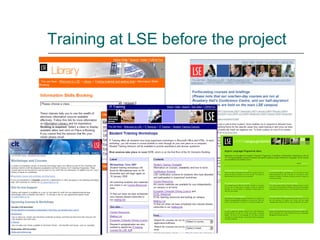
Training at LSE before the project
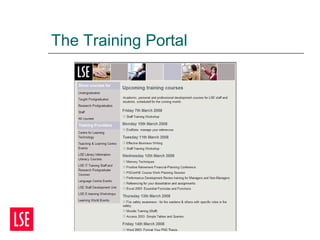
The Training Portal
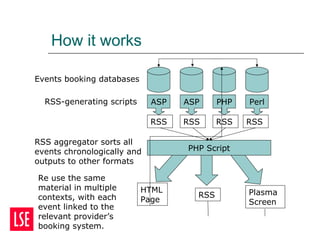
How it works
PerlPHPASPASP
Events booking databases
RSS-generating scripts
RSS aggregator sorts all
events chronologically and
outputs to other formats
PHP Script
HTML
Page
RSS Plasma
Screen
Re use the same
material in multiple
contexts, with each
event linked to the
relevant provider’s
booking system.
RSSRSSRSSRSS
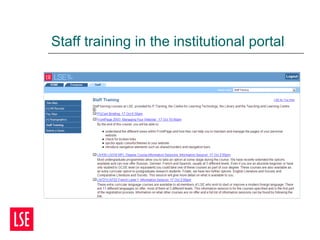
Staff training in the institutional portal
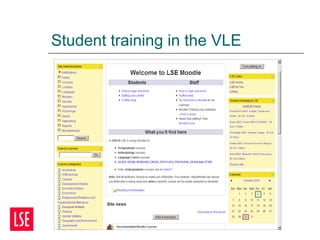
Student training in the VLE
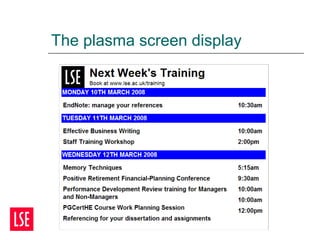
The plasma screen display
Project launch and follow up
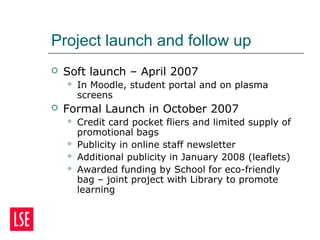
 Soft launch – April 2007
 In Moodle, student portal and on plasma
screens
 Formal Launch in October 2007
 Credit card pocket fliers and limited supply of
promotional bags
 Publicity in online staff newsletter
 Additional publicity in January 2008 (leaflets)
 Awarded funding by School for eco-friendly
bag – joint project with Library to promote
learning
Evaluation and feedback
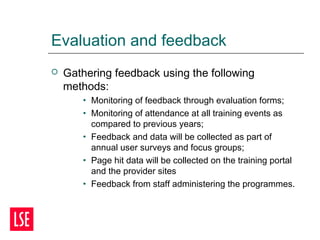
 Gathering feedback using the following
methods:
• Monitoring of feedback through evaluation forms;
• Monitoring of attendance at all training events as
compared to previous years;
• Feedback and data will be collected as part of
annual user surveys and focus groups;
• Page hit data will be collected on the training portal
and the provider sites
• Feedback from staff administering the programmes.
Impact to date
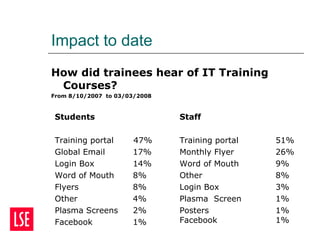
How did trainees hear of IT Training
Courses?
From 8/10/2007 to 03/03/2008
Students
Training portal 47%
Global Email 17%
Login Box 14%
Word of Mouth 8%
Flyers 8%
Other 4%
Plasma Screens 2%
Facebook 1%
Staff
Training portal 51%
Monthly Flyer 26%
Word of Mouth 9%
Other 8%
Login Box 3%
Plasma Screen 1%
Posters 1%
Facebook 1%
Key successes
 Project was a finalist for the Institute of IT
Training ‘Internal Project of the Year’ Award
 Feedback suggests it has raised profile of
training
 We think this system is unique in HE
 Demonstrates the importance of collaboration
and cooperation between training providers
 Delivered with a minimal investment of resources
 Requires no additional user training
 Highly flexible: use in VLE, portal, plasma screens
 Innovative and highly practical use of Web 2.0
technology
Information literacy implications
 Portal makes things easier for students
and makes training more visible
 True value of the portal relies on
understanding how to use RSS as a
personal information management tool
 Now run a class for staff and researchers
on Keeping up to Date – using Google
Reader – extend to students?
 Most attendees see the benefit but are
unfamiliar with using RSS in this way
The future
 Aim to get all training providers on board
 Evaluation
 measuring the impact on attendance at classes
across the School
 measuring impact on awareness of training
 Assumes that non-attendance is due to poor
visibility which may not be the case
 Training providers are continuing to meet with
other ideas in the pipeline such as:
 A single booking system?
 More coordinated approach to training – JISC i-skills
framework?
 E-portfolios for training records
Thanks for listening
Any questions?
References
Secker, Jane and Fryer Christopher. Information Literacy and
RSS feeds at LSE in Godwin, P. and Parker, J. (eds) (2008)
Information Literacy meets Library 2.0. London: Facet. ISBN
978-1-85604-637-4
Training Portal documentation available at:
http://training.lse.ac.uk/docs
Contact details
Jeni Brown j.l.brown@lse.ac.uk
Jane Secker j.secker@lse.ac.uk
Chris Fryer c.j.fryer@lse.ac.uk (Technical queries)

The LSE Training Portal: a really simple solution? Secker

  • 1.
    The LSE TrainingPortal: a really simple solution? Jane Secker, Jeni Brown & Chris Fryer London School of Economics and Political Science 17th March 2008 LILAC 2008, Liverpool John Moores University
  • 2.
    Overview and summary Overview of training portal project  Use of RSS technology to enhance access to training information for staff and students at LSE  Development of a portal or ‘one-stop shop’  Development of a re-usable RSS feed for inclusion in the institutional portal and the VLE  Consider information literacy implications of RSS technology
  • 3.
    Training Portal projectgoals  To improve access to training information for staff and students by providing a single information point.  To improve communication and cooperation between training providers throughout the university.  To improve the visibility of training events and to foster the development of LSE as a learning community.  To establish an easy to use and flexible system which could be re-used throughout the university’s existing systems.  To explore the use of RSS technology as a means of providing timely and relevant information to users.
  • 4.
  • 5.
    Project initiation andbackground  Awareness of problem – but no obvious solution  Endnote training caused confusion  Potential overlap in course content between IT training and CLT  New members of staff – new skills
  • 6.
    Training at LSEbefore the project
  • 7.
  • 8.
    How it works PerlPHPASPASP Eventsbooking databases RSS-generating scripts RSS aggregator sorts all events chronologically and outputs to other formats PHP Script HTML Page RSS Plasma Screen Re use the same material in multiple contexts, with each event linked to the relevant provider’s booking system. RSSRSSRSSRSS
  • 9.
    Staff training inthe institutional portal
  • 10.
  • 11.
  • 12.
    Project launch andfollow up  Soft launch – April 2007  In Moodle, student portal and on plasma screens  Formal Launch in October 2007  Credit card pocket fliers and limited supply of promotional bags  Publicity in online staff newsletter  Additional publicity in January 2008 (leaflets)  Awarded funding by School for eco-friendly bag – joint project with Library to promote learning
  • 13.
    Evaluation and feedback Gathering feedback using the following methods: • Monitoring of feedback through evaluation forms; • Monitoring of attendance at all training events as compared to previous years; • Feedback and data will be collected as part of annual user surveys and focus groups; • Page hit data will be collected on the training portal and the provider sites • Feedback from staff administering the programmes.
  • 14.
    Impact to date Howdid trainees hear of IT Training Courses? From 8/10/2007 to 03/03/2008 Students Training portal 47% Global Email 17% Login Box 14% Word of Mouth 8% Flyers 8% Other 4% Plasma Screens 2% Facebook 1% Staff Training portal 51% Monthly Flyer 26% Word of Mouth 9% Other 8% Login Box 3% Plasma Screen 1% Posters 1% Facebook 1%
  • 15.
    Key successes  Projectwas a finalist for the Institute of IT Training ‘Internal Project of the Year’ Award  Feedback suggests it has raised profile of training  We think this system is unique in HE  Demonstrates the importance of collaboration and cooperation between training providers  Delivered with a minimal investment of resources  Requires no additional user training  Highly flexible: use in VLE, portal, plasma screens  Innovative and highly practical use of Web 2.0 technology
  • 16.
    Information literacy implications Portal makes things easier for students and makes training more visible  True value of the portal relies on understanding how to use RSS as a personal information management tool  Now run a class for staff and researchers on Keeping up to Date – using Google Reader – extend to students?  Most attendees see the benefit but are unfamiliar with using RSS in this way
  • 17.
    The future  Aimto get all training providers on board  Evaluation  measuring the impact on attendance at classes across the School  measuring impact on awareness of training  Assumes that non-attendance is due to poor visibility which may not be the case  Training providers are continuing to meet with other ideas in the pipeline such as:  A single booking system?  More coordinated approach to training – JISC i-skills framework?  E-portfolios for training records
  • 18.
    Thanks for listening Anyquestions? References Secker, Jane and Fryer Christopher. Information Literacy and RSS feeds at LSE in Godwin, P. and Parker, J. (eds) (2008) Information Literacy meets Library 2.0. London: Facet. ISBN 978-1-85604-637-4 Training Portal documentation available at: http://training.lse.ac.uk/docs Contact details Jeni Brown j.l.brown@lse.ac.uk Jane Secker j.secker@lse.ac.uk Chris Fryer c.j.fryer@lse.ac.uk (Technical queries)

Editor's Notes

  • #2 Jeni and Jane
  • #4 Jane
  • #5 Jane – goes with Project Initiation Started with IT Training, Library and CLT/TLC. Later involved SDU and Language Centre after approaching all training providers on campus for inclusion in project prior to launch
  • #6 Jane
  • #7 Jane – goes with Overview of Problem
  • #8 Jeni
  • #9 Jeni How we solved the problem: Users needed to be able to easily access details of upcoming training courses and view this information in a way that made sense to them. Providers needed to be able to generate this information without any added burden of manually updating a central resource, or altering the way in which they scheduled and booked courses. Every day, an automated program is run that generates an RSS feed for each training provider by querying their course database. Another program collects all these RSS feeds and aggregates the information for display on a single page. The inclusion of scheduling information allows this page to display the sessions in chronological order, and the audience metadata allows users to filter the list for courses tailored to their requirements. Now, users do not need to know in advance who is offering a particular course, since each item on the page contains a link to the department’s booking system. In addition, the aggregating program generates new RSS feeds for specific audiences. The student feed can then be displayed in the university’s institutional Virtual Learning Environment, Moodle, which is equipped to handle RSS. The institutional portal, meanwhile, a user’s status – e.g. staff or student – and provides information and tasks appropriate to that role, including our training feeds
  • #10 Jeni
  • #11 Jeni Also mention that an Information Systems course has added the feed into it’s Moodle course for PhD students so feeds for specific audiences can be used in different ways.
  • #12 Jeni
  • #13 Jeni
  • #14 Jeni
  • #15 Jeni
  • #16 Jane for example the JISC have funded a project to provide a schema for a programme of courses from different providers (http://www.elframework.org/projects/xcri).