Disk Forensics
Chiawei Wang
2015.10.28
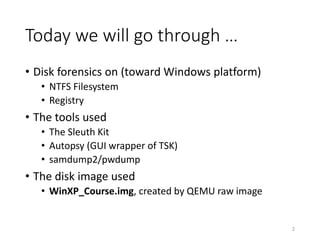
Today we will go through …
• Disk forensics on (toward Windows platform)
• NTFS Filesystem
• Registry
• The tools used
• The Sleuth Kit
• Autopsy (GUI wrapper of TSK)
• samdump2/pwdump
• The disk image used
• WinXP_Course.img, created by QEMU raw image
2
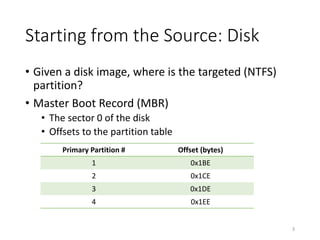
Starting from the Source: Disk
• Given a disk image, where is the targeted (NTFS)
partition?
• Master Boot Record (MBR)
• The sector 0 of the disk
• Offsets to the partition table
3
Primary Partition # Offset (bytes)
1 0x1BE
2 0x1CE
3 0x1DE
4 0x1EE
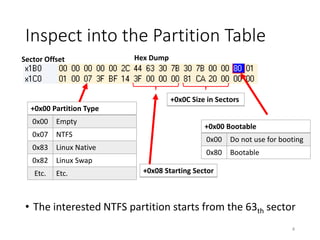
• The interested NTFS partition starts from the 63th sector
Inspect into the Partition Table
4
+0x00 Bootable
0x00 Do not use for booting
0x80 Bootable
+0x00 Partition Type
0x00 Empty
0x07 NTFS
0x83 Linux Native
0x82 Linux Swap
Etc. Etc. +0x08 Starting Sector
Sector Offset Hex Dump
+0x0C Size in Sectors
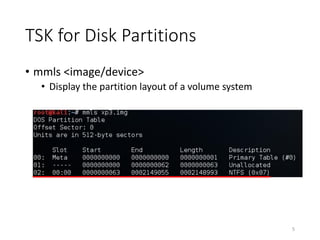
TSK for Disk Partitions
• mmls <image/device>
• Display the partition layout of a volume system
5
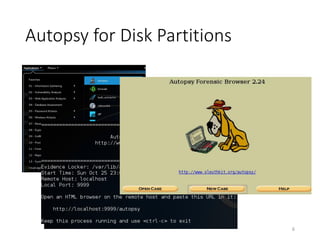
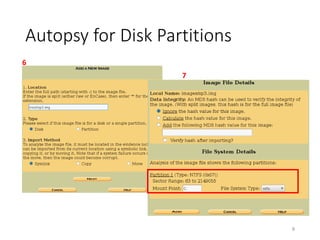
Autopsy for Disk Partitions
6
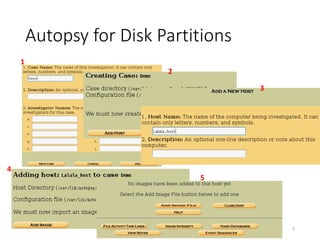
Autopsy for Disk Partitions
7
1
2
3
4
5
Autopsy for Disk Partitions
8
6
7
Few Tips Before Digging into NTFS
• The basic unit used by NTFS is called Cluster
• The key item for the NTFS forensics is called MFT,
Master File Table
9
NTFS Boot Sector @ 63th Sector
10
+0x03OEMID=“NTFS”
+0x54BootstrapCode[426]
+0x0BBytesperSec
+0x0CSecperCluster
NTFS Boot Sector @ 63th Sector
11
+0x03OEMID=“NTFS”
+0x54BootstrapCode[426]
+0x0BBytesperSec
+0x0CSecperCluster
+0x30ClusterNo.ofMFT
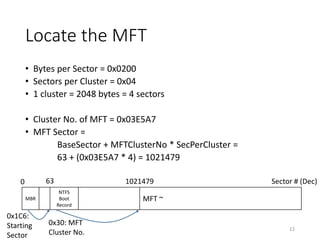
Locate the MFT
• Bytes per Sector = 0x0200
• Sectors per Cluster = 0x04
• 1 cluster = 2048 bytes = 4 sectors
• Cluster No. of MFT = 0x03E5A7
• MFT Sector =
BaseSector + MFTClusterNo * SecPerCluster =
63 + (0x03E5A7 * 4) = 1021479
12
MBR
NTFS
Boot
Record
MFT ~
Sector # (Dec)0 63 1021479
0x1C6:
Starting
Sector
0x30: MFT
Cluster No.
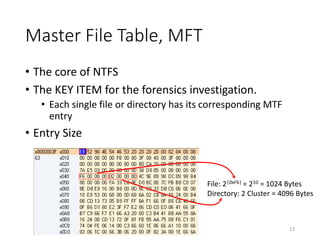
Master File Table, MFT
• The core of NTFS
• The KEY ITEM for the forensics investigation.
• Each single file or directory has its corresponding MTF
entry
• Entry Size
13
File: 2|0xF6| = 210 = 1024 Bytes
Directory: 2 Cluster = 4096 Bytes
MFT Entry
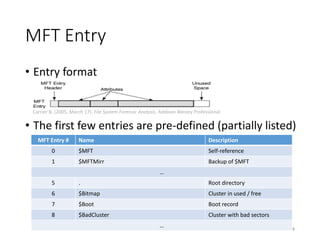
• Entry format
• The first few entries are pre-defined (partially listed)
14
Carrier B. (2005, March 17). File System Forensic Analysis. Addison Wesley Professional
MFT Entry # Name Description
0 $MFT Self-reference
1 $MFTMirr Backup of $MFT
…
5 . Root directory
6 $Bitmap Cluster in used / free
7 $Boot Boot record
8 $BadCluster Cluster with bad sectors
…
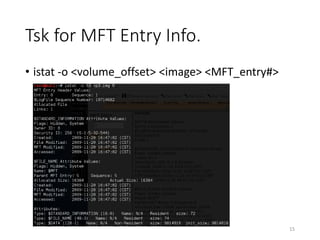
Tsk for MFT Entry Info.
• istat -o <volume_offset> <image> <MFT_entry#>
15
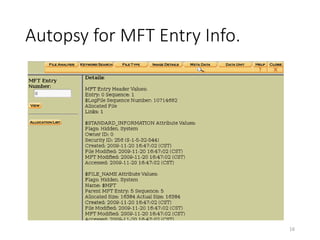
Autopsy for MFT Entry Info.
16
Attribute of MFT Entry
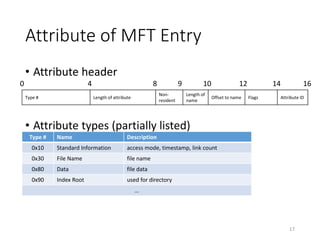
• Attribute header
• Attribute types (partially listed)
17
Type # Name Description
0x10 Standard Information access mode, timestamp, link count
0x30 File Name file name
0x80 Data file data
0x90 Index Root used for directory
…
Type # Length of attribute
Non-
resident
Length of
name
Offset to name Flags Attribute ID
0 4 8 9 10 12 14 16
File Name Attribute
• A MFT entry may have two File Name attribute
• Long name & Short name
• e.g. Program Files & PROGRA~1
18
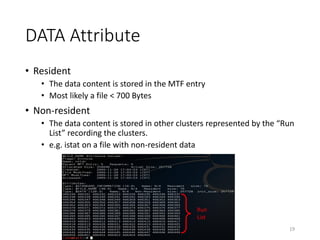
DATA Attribute
• Resident
• The data content is stored in the MTF entry
• Most likely a file < 700 Bytes
• Non-resident
• The data content is stored in other clusters represented by the “Run
List” recording the clusters.
• e.g. istat on a file with non-resident data
19
Run
List
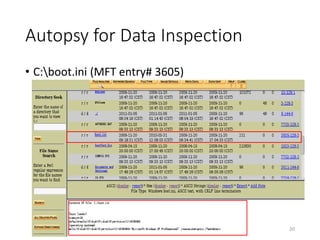
Autopsy for Data Inspection
20
• C:boot.ini (MFT entry# 3605)
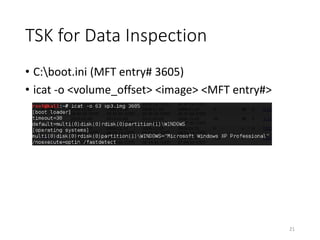
TSK for Data Inspection
• C:boot.ini (MFT entry# 3605)
• icat -o <volume_offset> <image> <MFT entry#>
21
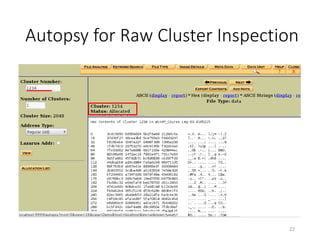
Autopsy for Raw Cluster Inspection
22
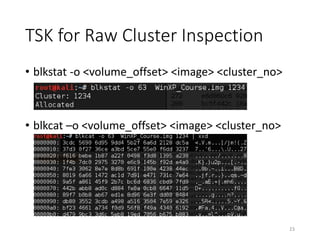
TSK for Raw Cluster Inspection
• blkstat -o <volume_offset> <image> <cluster_no>
• blkcat –o <volume_offset> <image> <cluster_no>
23
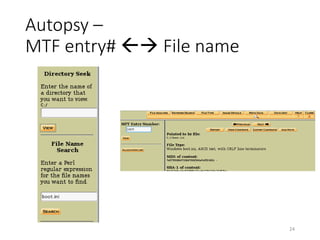
Autopsy –
MTF entry#  File name
24
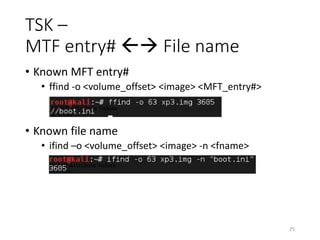
TSK –
MTF entry#  File name
• Known MFT entry#
• ffind -o <volume_offset> <image> <MFT_entry#>
• Known file name
• ifind –o <volume_offset> <image> -n <fname>
25
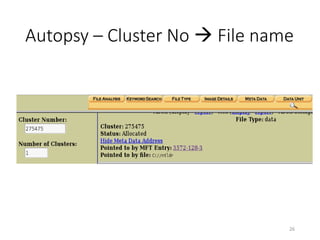
Autopsy – Cluster No  File name
26
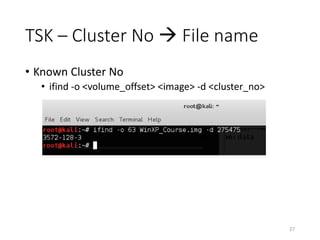
TSK – Cluster No  File name
• Known Cluster No
• ifind -o <volume_offset> <image> -d <cluster_no>
27
Why Not Just Autopsy ?
• Knowing the underlying commands gives the
flexibility to customize your forensics process.
28
Practice – Which file is broken ?
• Oh my gosh, the 408,052 sector of seems like broken. I
wanna figure out which file got shot. Submit your key in
BAMBOOFOX{FULL_PATH_FILE_NAME}
• Hint:
Remove drive letter and replace “” with “/”
e.g. C:aaabbbccc.txt  /aaa/bbb/ccc.txt
29
Now the basic is introduced
• Time to consider some forensics scenario
• Alternate Data Stream
• Deleted File Recovery
• Timestamp Forge
• Advanced
• $BadClus Forge
• Slack
30
Alternate Data Stream
• ADS allow more than one data stream to be
associated with a filename.
• Alternate streams are not listed in Windows
Explorer, and the size is not included in the
associated file's size.
31
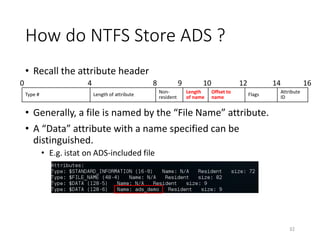
How do NTFS Store ADS ?
• Recall the attribute header
• Generally, a file is named by the “File Name” attribute.
• A “Data” attribute with a name specified can be
distinguished.
• E.g. istat on ADS-included file
32
Type # Length of attribute
Non-
resident
Length
of name
Offset to
name
Flags
Attribute
ID
0 4 8 9 10 12 14 16
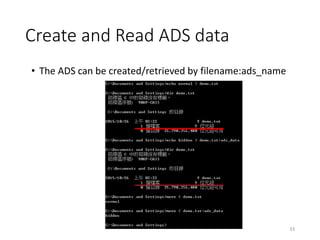
Create and Read ADS data
33
• The ADS can be created/retrieved by filename:ads_name
Practice – Find ADS
• Read the ADS data as the key to submit in
BAMBOOFOX{ADS_DATA}
34
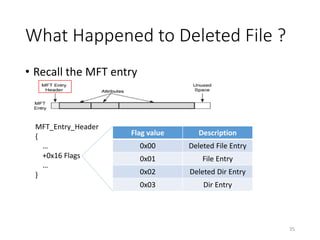
What Happened to Deleted File ?
• Recall the MFT entry
35
MFT_Entry_Header
{
…
+0x16 Flags
…
}
Flag value Description
0x00 Deleted File Entry
0x01 File Entry
0x02 Deleted Dir Entry
0x03 Dir Entry
Hope of Deleted File
• The content is not erased but simply tag the MFT
entry unallocated.
• NTFS reuse free MFT entry# backward.
• A file with the shorter lifetime are harder to be
recovered.
36
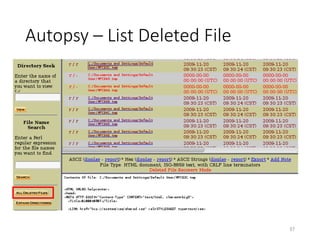
Autopsy – List Deleted File
37
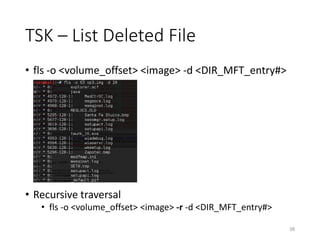
TSK – List Deleted File
• fls -o <volume_offset> <image> -d <DIR_MFT_entry#>
• Recursive traversal
• fls -o <volume_offset> <image> -r -d <DIR_MFT_entry#>
38
Practice – Recover Deleted Data
• Find the key
39
Timestamp Forge
• Suppose that a malware infects a system and drops
some files pretending to be the system built-in one
• A naïve approach is to check the timestamp of files in
system directory.
• BUT! NTFS has some glitches.
• When a file is cut-and-paste to replace another file,
the timestamp of the replaced one is inherited.
40
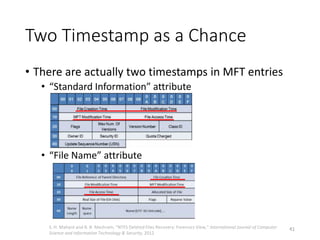
Two Timestamp as a Chance
• There are actually two timestamps in MFT entries
• “Standard Information” attribute
• “File Name” attribute
41S. H. Mahant and B. B. Meshram, “NTFS Deleted Files Recovery: Forensics View,” International Journal of Computer
Science and Information Technology & Security, 2012
The Commonly Seen is Not True
• Windows Explorer and most disk viewer tools show
the timestamp in “Standard Information”.
• Now you have something more powerful. Look
inside the attributes of MFT entries.
42
Practice – Find the disguised file
• Help!! I got hacked on 27 Oct. 2015 at 03:04 PM
• TA made a typo...囧rz
• Please fix the prefix word BAMOOFOX to BAMBOOFOX when you find the key
• Hint:
• VMWare is handy
43
Advanced Disk Forensics Task
• $BadClus Forge
• Modify the $BadClus metafile to mark certain clusters as
broken to hide the secret data.
• Slack
• The remnant space after the cluster allocation is used to
hide the secret data.
44
Registry
• The Windows Registry is a hierarchical database
that stores low-level settings for the Microsoft
Windows operating system and for applications
that opt to use the Registry. The kernel, device
drivers, services, Security Accounts Manager (SAM),
and user interface can all use the Registry.
https://en.wikipedia.org/wiki/Windows_Registry
45
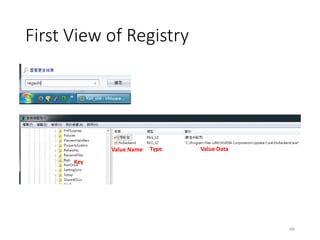
First View of Registry
46
Key
Value Name Type Value Data
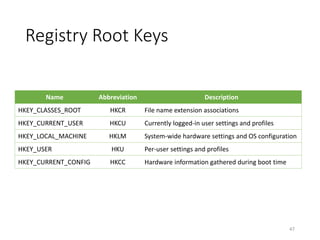
Registry Root Keys
Name Abbreviation Description
HKEY_CLASSES_ROOT HKCR File name extension associations
HKEY_CURRENT_USER HKCU Currently logged-in user settings and profiles
HKEY_LOCAL_MACHINE HKLM System-wide hardware settings and OS configuration
HKEY_USER HKU Per-user settings and profiles
HKEY_CURRENT_CONFIG HKCC Hardware information gathered during boot time
47
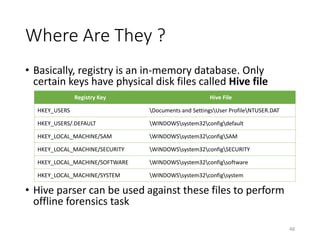
Where Are They ?
• Basically, registry is an in-memory database. Only
certain keys have physical disk files called Hive file
• Hive parser can be used against these files to perform
offline forensics task
48
Registry Key Hive File
HKEY_USERS Documents and SettingsUser ProfileNTUSER.DAT
HKEY_USERS/.DEFAULT WINDOWSsystem32configdefault
HKEY_LOCAL_MACHINE/SAM WINDOWSsystem32configSAM
HKEY_LOCAL_MACHINE/SECURITY WINDOWSsystem32configSECURITY
HKEY_LOCAL_MACHINE/SOFTWARE WINDOWSsystem32configsoftware
HKEY_LOCAL_MACHINE/SYSTEM WINDOWSsystem32configsystem
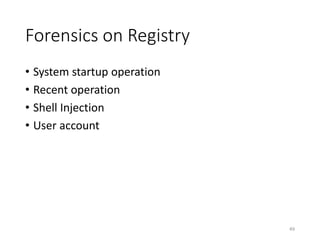
Forensics on Registry
• System startup operation
• Recent operation
• Shell Injection
• User account
49
System Startup Operation
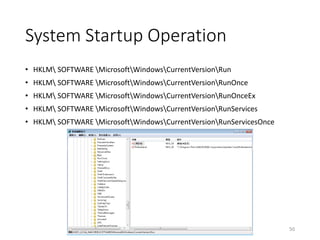
• HKLM SOFTWARE MicrosoftWindowsCurrentVersionRun
• HKLM SOFTWARE MicrosoftWindowsCurrentVersionRunOnce
• HKLM SOFTWARE MicrosoftWindowsCurrentVersionRunOnceEx
• HKLM SOFTWARE MicrosoftWindowsCurrentVersionRunServices
• HKLM SOFTWARE MicrosoftWindowsCurrentVersionRunServicesOnce
50
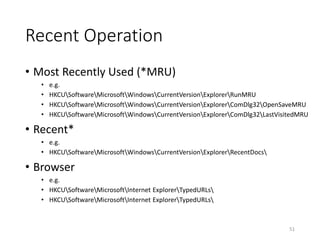
Recent Operation
• Most Recently Used (*MRU)
• e.g.
• HKCUSoftwareMicrosoftWindowsCurrentVersionExplorerRunMRU
• HKCUSoftwareMicrosoftWindowsCurrentVersionExplorerComDlg32OpenSaveMRU
• HKCUSoftwareMicrosoftWindowsCurrentVersionExplorerComDlg32LastVisitedMRU
• Recent*
• e.g.
• HKCUSoftwareMicrosoftWindowsCurrentVersionExplorerRecentDocs
• Browser
• e.g.
• HKCUSoftwareMicrosoftInternet ExplorerTypedURLs
51
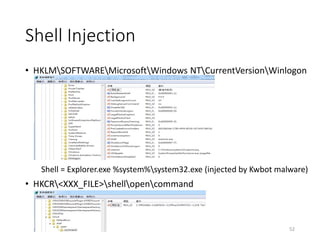
Shell Injection
• HKLMSOFTWAREMicrosoftWindows NTCurrentVersionWinlogon
Shell = Explorer.exe %system%system32.exe (injected by Kwbot malware)
• HKCR<XXX_FILE>shellopencommand
52
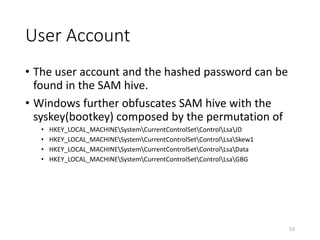
User Account
• The user account and the hashed password can be
found in the SAM hive.
• Windows further obfuscates SAM hive with the
syskey(bootkey) composed by the permutation of
• HKEY_LOCAL_MACHINESystemCurrentControlSetControlLsaJD
• HKEY_LOCAL_MACHINESystemCurrentControlSetControlLsaSkew1
• HKEY_LOCAL_MACHINESystemCurrentControlSetControlLsaData
• HKEY_LOCAL_MACHINESystemCurrentControlSetControlLsaGBG
53
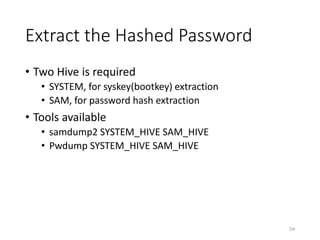
Extract the Hashed Password
• Two Hive is required
• SYSTEM, for syskey(bootkey) extraction
• SAM, for password hash extraction
• Tools available
• samdump2 SYSTEM_HIVE SAM_HIVE
• Pwdump SYSTEM_HIVE SAM_HIVE
54
Practice – Reveal admin password
• Get the admin’s password as the key to submit in
BAMBOOFOX{ADMIN_PASSWD}
55

Disk forensics

  • 1.
  • 2.
    Today we willgo through … • Disk forensics on (toward Windows platform) • NTFS Filesystem • Registry • The tools used • The Sleuth Kit • Autopsy (GUI wrapper of TSK) • samdump2/pwdump • The disk image used • WinXP_Course.img, created by QEMU raw image 2
  • 3.
    Starting from theSource: Disk • Given a disk image, where is the targeted (NTFS) partition? • Master Boot Record (MBR) • The sector 0 of the disk • Offsets to the partition table 3 Primary Partition # Offset (bytes) 1 0x1BE 2 0x1CE 3 0x1DE 4 0x1EE
  • 4.
    • The interestedNTFS partition starts from the 63th sector Inspect into the Partition Table 4 +0x00 Bootable 0x00 Do not use for booting 0x80 Bootable +0x00 Partition Type 0x00 Empty 0x07 NTFS 0x83 Linux Native 0x82 Linux Swap Etc. Etc. +0x08 Starting Sector Sector Offset Hex Dump +0x0C Size in Sectors
  • 5.
    TSK for DiskPartitions • mmls <image/device> • Display the partition layout of a volume system 5
  • 6.
    Autopsy for DiskPartitions 6
  • 7.
    Autopsy for DiskPartitions 7 1 2 3 4 5
  • 8.
    Autopsy for DiskPartitions 8 6 7
  • 9.
    Few Tips BeforeDigging into NTFS • The basic unit used by NTFS is called Cluster • The key item for the NTFS forensics is called MFT, Master File Table 9
  • 10.
    NTFS Boot Sector@ 63th Sector 10 +0x03OEMID=“NTFS” +0x54BootstrapCode[426] +0x0BBytesperSec +0x0CSecperCluster
  • 11.
    NTFS Boot Sector@ 63th Sector 11 +0x03OEMID=“NTFS” +0x54BootstrapCode[426] +0x0BBytesperSec +0x0CSecperCluster +0x30ClusterNo.ofMFT
  • 12.
    Locate the MFT •Bytes per Sector = 0x0200 • Sectors per Cluster = 0x04 • 1 cluster = 2048 bytes = 4 sectors • Cluster No. of MFT = 0x03E5A7 • MFT Sector = BaseSector + MFTClusterNo * SecPerCluster = 63 + (0x03E5A7 * 4) = 1021479 12 MBR NTFS Boot Record MFT ~ Sector # (Dec)0 63 1021479 0x1C6: Starting Sector 0x30: MFT Cluster No.
  • 13.
    Master File Table,MFT • The core of NTFS • The KEY ITEM for the forensics investigation. • Each single file or directory has its corresponding MTF entry • Entry Size 13 File: 2|0xF6| = 210 = 1024 Bytes Directory: 2 Cluster = 4096 Bytes
  • 14.
    MFT Entry • Entryformat • The first few entries are pre-defined (partially listed) 14 Carrier B. (2005, March 17). File System Forensic Analysis. Addison Wesley Professional MFT Entry # Name Description 0 $MFT Self-reference 1 $MFTMirr Backup of $MFT … 5 . Root directory 6 $Bitmap Cluster in used / free 7 $Boot Boot record 8 $BadCluster Cluster with bad sectors …
  • 15.
    Tsk for MFTEntry Info. • istat -o <volume_offset> <image> <MFT_entry#> 15
  • 16.
    Autopsy for MFTEntry Info. 16
  • 17.
    Attribute of MFTEntry • Attribute header • Attribute types (partially listed) 17 Type # Name Description 0x10 Standard Information access mode, timestamp, link count 0x30 File Name file name 0x80 Data file data 0x90 Index Root used for directory … Type # Length of attribute Non- resident Length of name Offset to name Flags Attribute ID 0 4 8 9 10 12 14 16
  • 18.
    File Name Attribute •A MFT entry may have two File Name attribute • Long name & Short name • e.g. Program Files & PROGRA~1 18
  • 19.
    DATA Attribute • Resident •The data content is stored in the MTF entry • Most likely a file < 700 Bytes • Non-resident • The data content is stored in other clusters represented by the “Run List” recording the clusters. • e.g. istat on a file with non-resident data 19 Run List
  • 20.
    Autopsy for DataInspection 20 • C:boot.ini (MFT entry# 3605)
  • 21.
    TSK for DataInspection • C:boot.ini (MFT entry# 3605) • icat -o <volume_offset> <image> <MFT entry#> 21
  • 22.
    Autopsy for RawCluster Inspection 22
  • 23.
    TSK for RawCluster Inspection • blkstat -o <volume_offset> <image> <cluster_no> • blkcat –o <volume_offset> <image> <cluster_no> 23
  • 24.
    Autopsy – MTF entry# File name 24
  • 25.
    TSK – MTF entry# File name • Known MFT entry# • ffind -o <volume_offset> <image> <MFT_entry#> • Known file name • ifind –o <volume_offset> <image> -n <fname> 25
  • 26.
    Autopsy – ClusterNo  File name 26
  • 27.
    TSK – ClusterNo  File name • Known Cluster No • ifind -o <volume_offset> <image> -d <cluster_no> 27
  • 28.
    Why Not JustAutopsy ? • Knowing the underlying commands gives the flexibility to customize your forensics process. 28
  • 29.
    Practice – Whichfile is broken ? • Oh my gosh, the 408,052 sector of seems like broken. I wanna figure out which file got shot. Submit your key in BAMBOOFOX{FULL_PATH_FILE_NAME} • Hint: Remove drive letter and replace “” with “/” e.g. C:aaabbbccc.txt  /aaa/bbb/ccc.txt 29
  • 30.
    Now the basicis introduced • Time to consider some forensics scenario • Alternate Data Stream • Deleted File Recovery • Timestamp Forge • Advanced • $BadClus Forge • Slack 30
  • 31.
    Alternate Data Stream •ADS allow more than one data stream to be associated with a filename. • Alternate streams are not listed in Windows Explorer, and the size is not included in the associated file's size. 31
  • 32.
    How do NTFSStore ADS ? • Recall the attribute header • Generally, a file is named by the “File Name” attribute. • A “Data” attribute with a name specified can be distinguished. • E.g. istat on ADS-included file 32 Type # Length of attribute Non- resident Length of name Offset to name Flags Attribute ID 0 4 8 9 10 12 14 16
  • 33.
    Create and ReadADS data 33 • The ADS can be created/retrieved by filename:ads_name
  • 34.
    Practice – FindADS • Read the ADS data as the key to submit in BAMBOOFOX{ADS_DATA} 34
  • 35.
    What Happened toDeleted File ? • Recall the MFT entry 35 MFT_Entry_Header { … +0x16 Flags … } Flag value Description 0x00 Deleted File Entry 0x01 File Entry 0x02 Deleted Dir Entry 0x03 Dir Entry
  • 36.
    Hope of DeletedFile • The content is not erased but simply tag the MFT entry unallocated. • NTFS reuse free MFT entry# backward. • A file with the shorter lifetime are harder to be recovered. 36
  • 37.
    Autopsy – ListDeleted File 37
  • 38.
    TSK – ListDeleted File • fls -o <volume_offset> <image> -d <DIR_MFT_entry#> • Recursive traversal • fls -o <volume_offset> <image> -r -d <DIR_MFT_entry#> 38
  • 39.
    Practice – RecoverDeleted Data • Find the key 39
  • 40.
    Timestamp Forge • Supposethat a malware infects a system and drops some files pretending to be the system built-in one • A naïve approach is to check the timestamp of files in system directory. • BUT! NTFS has some glitches. • When a file is cut-and-paste to replace another file, the timestamp of the replaced one is inherited. 40
  • 41.
    Two Timestamp asa Chance • There are actually two timestamps in MFT entries • “Standard Information” attribute • “File Name” attribute 41S. H. Mahant and B. B. Meshram, “NTFS Deleted Files Recovery: Forensics View,” International Journal of Computer Science and Information Technology & Security, 2012
  • 42.
    The Commonly Seenis Not True • Windows Explorer and most disk viewer tools show the timestamp in “Standard Information”. • Now you have something more powerful. Look inside the attributes of MFT entries. 42
  • 43.
    Practice – Findthe disguised file • Help!! I got hacked on 27 Oct. 2015 at 03:04 PM • TA made a typo...囧rz • Please fix the prefix word BAMOOFOX to BAMBOOFOX when you find the key • Hint: • VMWare is handy 43
  • 44.
    Advanced Disk ForensicsTask • $BadClus Forge • Modify the $BadClus metafile to mark certain clusters as broken to hide the secret data. • Slack • The remnant space after the cluster allocation is used to hide the secret data. 44
  • 45.
    Registry • The WindowsRegistry is a hierarchical database that stores low-level settings for the Microsoft Windows operating system and for applications that opt to use the Registry. The kernel, device drivers, services, Security Accounts Manager (SAM), and user interface can all use the Registry. https://en.wikipedia.org/wiki/Windows_Registry 45
  • 46.
    First View ofRegistry 46 Key Value Name Type Value Data
  • 47.
    Registry Root Keys NameAbbreviation Description HKEY_CLASSES_ROOT HKCR File name extension associations HKEY_CURRENT_USER HKCU Currently logged-in user settings and profiles HKEY_LOCAL_MACHINE HKLM System-wide hardware settings and OS configuration HKEY_USER HKU Per-user settings and profiles HKEY_CURRENT_CONFIG HKCC Hardware information gathered during boot time 47
  • 48.
    Where Are They? • Basically, registry is an in-memory database. Only certain keys have physical disk files called Hive file • Hive parser can be used against these files to perform offline forensics task 48 Registry Key Hive File HKEY_USERS Documents and SettingsUser ProfileNTUSER.DAT HKEY_USERS/.DEFAULT WINDOWSsystem32configdefault HKEY_LOCAL_MACHINE/SAM WINDOWSsystem32configSAM HKEY_LOCAL_MACHINE/SECURITY WINDOWSsystem32configSECURITY HKEY_LOCAL_MACHINE/SOFTWARE WINDOWSsystem32configsoftware HKEY_LOCAL_MACHINE/SYSTEM WINDOWSsystem32configsystem
  • 49.
    Forensics on Registry •System startup operation • Recent operation • Shell Injection • User account 49
  • 50.
    System Startup Operation •HKLM SOFTWARE MicrosoftWindowsCurrentVersionRun • HKLM SOFTWARE MicrosoftWindowsCurrentVersionRunOnce • HKLM SOFTWARE MicrosoftWindowsCurrentVersionRunOnceEx • HKLM SOFTWARE MicrosoftWindowsCurrentVersionRunServices • HKLM SOFTWARE MicrosoftWindowsCurrentVersionRunServicesOnce 50
  • 51.
    Recent Operation • MostRecently Used (*MRU) • e.g. • HKCUSoftwareMicrosoftWindowsCurrentVersionExplorerRunMRU • HKCUSoftwareMicrosoftWindowsCurrentVersionExplorerComDlg32OpenSaveMRU • HKCUSoftwareMicrosoftWindowsCurrentVersionExplorerComDlg32LastVisitedMRU • Recent* • e.g. • HKCUSoftwareMicrosoftWindowsCurrentVersionExplorerRecentDocs • Browser • e.g. • HKCUSoftwareMicrosoftInternet ExplorerTypedURLs • HKCUSoftwareMicrosoftInternet ExplorerTypedURLs 51
  • 52.
    Shell Injection • HKLMSOFTWAREMicrosoftWindowsNTCurrentVersionWinlogon Shell = Explorer.exe %system%system32.exe (injected by Kwbot malware) • HKCR<XXX_FILE>shellopencommand 52
  • 53.
    User Account • Theuser account and the hashed password can be found in the SAM hive. • Windows further obfuscates SAM hive with the syskey(bootkey) composed by the permutation of • HKEY_LOCAL_MACHINESystemCurrentControlSetControlLsaJD • HKEY_LOCAL_MACHINESystemCurrentControlSetControlLsaSkew1 • HKEY_LOCAL_MACHINESystemCurrentControlSetControlLsaData • HKEY_LOCAL_MACHINESystemCurrentControlSetControlLsaGBG 53
  • 54.
    Extract the HashedPassword • Two Hive is required • SYSTEM, for syskey(bootkey) extraction • SAM, for password hash extraction • Tools available • samdump2 SYSTEM_HIVE SAM_HIVE • Pwdump SYSTEM_HIVE SAM_HIVE 54
  • 55.
    Practice – Revealadmin password • Get the admin’s password as the key to submit in BAMBOOFOX{ADMIN_PASSWD} 55