By: Gaurav Ragtah and Nell Lapres


                                    1
 Goal: to locate and extract evidence from
  computers and digital storage media in criminal
  cases.
 Interest has grown recently.
 Widely accepted as reliable in US and European
  courts.
 Lots of information on NTFS computers can be used
  as evidence.


                                                      2
   Volatile data stored in RAM
   Non-volatile data stored on hard disk.
   Don’t want to lose date and time information
    when starting the computer.
   Boot to a forensic CD.


                                                   3
   Standard file system of Windows NT
   Preferred over FAT for Microsoft’s Windows Operating
    systems
     Microsoft currently provides a tool to convert FAT file
        systems to NTFS
   Improvements
       Improved support for metadata
       Use of advanced data structures to improve performance
       Reliability
       File system journaling
       Disk space utilization
       Multiple data streams
                                                                 4
NTFS Log
  Uses NTFS log to record metadata changes to the
   volume
  Help in maintaining consistency in case of system
   crash
  Rollback of uncommitted changes
  A recoverable file system.
Update Sequence Number Journal
  A system management feature that records changes
   to all files, streams and directories on the volume.
  Made available so that applications can track changes
   to the volume

                                                           5
   Contains information about settings for
    hardware and software.
   Changes in control panel or to installed
    software is seen in registry entries.


                                               6
   NTFS supports multiple data streams
   Data could be hidden in the ADS
   Hidden partitions by altering the partition
    table.
   Can be found in end-of-file slack space


                                                  7
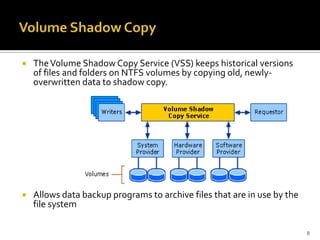
   The Volume Shadow Copy Service (VSS) keeps historical versions
    of files and folders on NTFS volumes by copying old, newly-
    overwritten data to shadow copy.


   Allows data backup programs to archive files that are in use by the
    file system

                                                                          8
   All file data stored as metadata in the Master
    File Table.
   Continuously changed as files and folders are
    modified.
   First 16 records in MFT are for NTFS
    metadata files.
   An MFT record has a size limit of 1 KB.


                                                     9
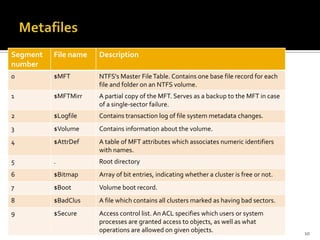
Segment   File name   Description
number
0         $MFT        NTFS's Master File Table. Contains one base file record for each
                      file and folder on an NTFS volume.
1         $MFTMirr    A partial copy of the MFT. Serves as a backup to the MFT in case
                      of a single-sector failure.
2         $Logfile    Contains transaction log of file system metadata changes.
3         $Volume     Contains information about the volume.
4         $AttrDef    A table of MFT attributes which associates numeric identifiers
                      with names.
5         .           Root directory
6         $Bitmap     Array of bit entries, indicating whether a cluster is free or not.
7         $Boot       Volume boot record.
8         $BadClus    A file which contains all clusters marked as having bad sectors.
9         $Secure     Access control list. An ACL specifies which users or system
                      processes are granted access to objects, as well as what
                      operations are allowed on given objects.                             10
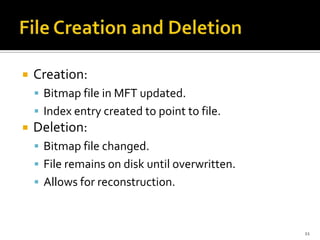
   Creation:
     Bitmap file in MFT updated.
     Index entry created to point to file.
   Deletion:
     Bitmap file changed.
     File remains on disk until overwritten.
     Allows for reconstruction.


                                                11
   $BadClus can be used to store hidden data.
   User writes information into good section of
    bad cluster.
   User marks good cluster as bad.


                                                   12
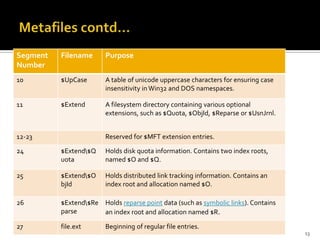
Segment   Filename      Purpose
Number
10        $UpCase       A table of unicode uppercase characters for ensuring case
                        insensitivity in Win32 and DOS namespaces.

11        $Extend       A filesystem directory containing various optional
                        extensions, such as $Quota, $ObjId, $Reparse or $UsnJrnl.


12-23                   Reserved for $MFT extension entries.

24        $Extend$Q    Holds disk quota information. Contains two index roots,
          uota          named $O and $Q.

25        $Extend$O    Holds distributed link tracking information. Contains an
          bjId          index root and allocation named $O.

26        $Extend$Re Holds reparse point data (such as symbolic links). Contains
          parse       an index root and allocation named $R.

27        file.ext      Beginning of regular file entries.
                                                                                    13
   Could be used maliciously
     Steal information
     Spy


                                14
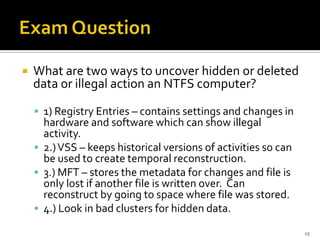
   What are two ways to uncover hidden or deleted
    data or illegal action an NTFS computer?

     1) Registry Entries – contains settings and changes in
      hardware and software which can show illegal
      activity.
     2.) VSS – keeps historical versions of activities so can
      be used to create temporal reconstruction.
     3.) MFT – stores the metadata for changes and file is
      only lost if another file is written over. Can
      reconstruct by going to space where file was stored.
     4.) Look in bad clusters for hidden data.

                                                                 15

Ntfs and computer forensics

  • 1.
    By: Gaurav Ragtahand Nell Lapres 1
  • 2.
     Goal: tolocate and extract evidence from computers and digital storage media in criminal cases.  Interest has grown recently.  Widely accepted as reliable in US and European courts.  Lots of information on NTFS computers can be used as evidence. 2
  • 3.
    Volatile data stored in RAM  Non-volatile data stored on hard disk.  Don’t want to lose date and time information when starting the computer.  Boot to a forensic CD. 3
  • 4.
    Standard file system of Windows NT  Preferred over FAT for Microsoft’s Windows Operating systems  Microsoft currently provides a tool to convert FAT file systems to NTFS  Improvements  Improved support for metadata  Use of advanced data structures to improve performance  Reliability  File system journaling  Disk space utilization  Multiple data streams 4
  • 5.
    NTFS Log Uses NTFS log to record metadata changes to the volume  Help in maintaining consistency in case of system crash  Rollback of uncommitted changes  A recoverable file system. Update Sequence Number Journal  A system management feature that records changes to all files, streams and directories on the volume.  Made available so that applications can track changes to the volume 5
  • 6.
    Contains information about settings for hardware and software.  Changes in control panel or to installed software is seen in registry entries. 6
  • 7.
    NTFS supports multiple data streams  Data could be hidden in the ADS  Hidden partitions by altering the partition table.  Can be found in end-of-file slack space 7
  • 8.
    The Volume Shadow Copy Service (VSS) keeps historical versions of files and folders on NTFS volumes by copying old, newly- overwritten data to shadow copy.  Allows data backup programs to archive files that are in use by the file system 8
  • 9.
    All file data stored as metadata in the Master File Table.  Continuously changed as files and folders are modified.  First 16 records in MFT are for NTFS metadata files.  An MFT record has a size limit of 1 KB. 9
  • 10.
    Segment File name Description number 0 $MFT NTFS's Master File Table. Contains one base file record for each file and folder on an NTFS volume. 1 $MFTMirr A partial copy of the MFT. Serves as a backup to the MFT in case of a single-sector failure. 2 $Logfile Contains transaction log of file system metadata changes. 3 $Volume Contains information about the volume. 4 $AttrDef A table of MFT attributes which associates numeric identifiers with names. 5 . Root directory 6 $Bitmap Array of bit entries, indicating whether a cluster is free or not. 7 $Boot Volume boot record. 8 $BadClus A file which contains all clusters marked as having bad sectors. 9 $Secure Access control list. An ACL specifies which users or system processes are granted access to objects, as well as what operations are allowed on given objects. 10
  • 11.
    Creation:  Bitmap file in MFT updated.  Index entry created to point to file.  Deletion:  Bitmap file changed.  File remains on disk until overwritten.  Allows for reconstruction. 11
  • 12.
    $BadClus can be used to store hidden data.  User writes information into good section of bad cluster.  User marks good cluster as bad. 12
  • 13.
    Segment Filename Purpose Number 10 $UpCase A table of unicode uppercase characters for ensuring case insensitivity in Win32 and DOS namespaces. 11 $Extend A filesystem directory containing various optional extensions, such as $Quota, $ObjId, $Reparse or $UsnJrnl. 12-23 Reserved for $MFT extension entries. 24 $Extend$Q Holds disk quota information. Contains two index roots, uota named $O and $Q. 25 $Extend$O Holds distributed link tracking information. Contains an bjId index root and allocation named $O. 26 $Extend$Re Holds reparse point data (such as symbolic links). Contains parse an index root and allocation named $R. 27 file.ext Beginning of regular file entries. 13
  • 14.
    Could be used maliciously  Steal information  Spy 14
  • 15.
    What are two ways to uncover hidden or deleted data or illegal action an NTFS computer?  1) Registry Entries – contains settings and changes in hardware and software which can show illegal activity.  2.) VSS – keeps historical versions of activities so can be used to create temporal reconstruction.  3.) MFT – stores the metadata for changes and file is only lost if another file is written over. Can reconstruct by going to space where file was stored.  4.) Look in bad clusters for hidden data. 15

Editor's Notes

  • #4 http://books.google.com/books?hl=en&lr=&id=xoZn5tJJ4gkC&oi=fnd&pg=PR3&dq=computer+forensics&ots=LCvAeaoKim&sig=WNaEwufz7KS7fUjnubWSytXrpjs#v=onepage&q=CD&f=false