Computer Forensics
NTFS File System
MBR and GPT Disks
 MBR disks for 32b 86x-compatibles
 GPT disks for 64b Itanium processors
 Start with a MBR in order to maintain
compatibility
 MBR has a single partition with a partition
table entry of 0xEE
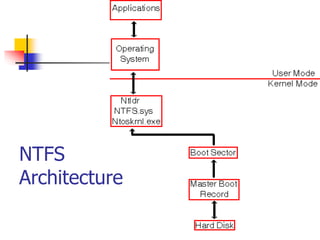
NTFS
Architecture
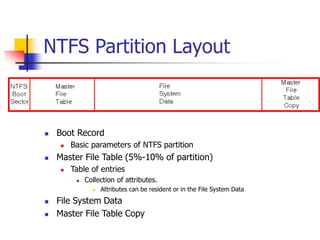
NTFS Partition Layout
 Boot Record
 Basic parameters of NTFS partition
 Master File Table (5%-10% of partition)
 Table of entries
 Collection of attributes.
 Attributes can be resident or in the File System Data
 File System Data
 Master File Table Copy
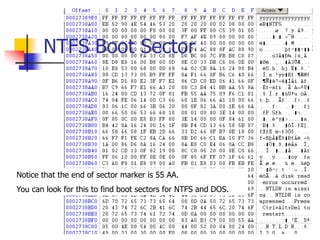
NTFS Boot Sector
Notice that the end of sector marker is 55 AA.
You can look for this to find boot sectors for NTFS and DOS.
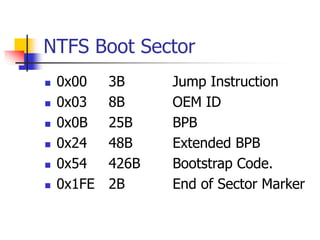
NTFS Boot Sector
 0x00 3B Jump Instruction
 0x03 8B OEM ID
 0x0B 25B BPB
 0x24 48B Extended BPB
 0x54 426B Bootstrap Code.
 0x1FE 2B End of Sector Marker
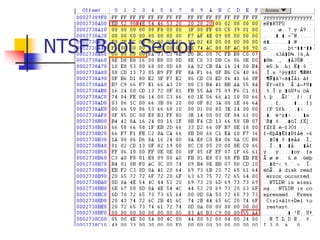
NTSF Boot Sector
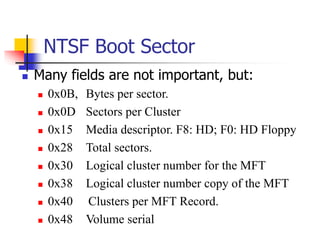
NTSF Boot Sector
 Many fields are not important, but:
 0x0B, Bytes per sector.
 0x0D Sectors per Cluster
 0x15 Media descriptor. F8: HD; F0: HD Floppy
 0x28 Total sectors.
 0x30 Logical cluster number for the MFT
 0x38 Logical cluster number copy of the MFT
 0x40 Clusters per MFT Record.
 0x48 Volume serial
NTFS Boot Sector
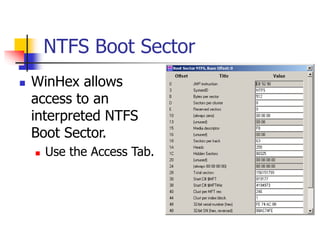
 WinHex allows
access to an
interpreted NTFS
Boot Sector.
 Use the Access Tab.
NTFS BPB
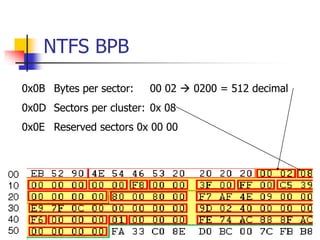
0x0B Bytes per sector: 00 02  0200 = 512 decimal
0x0D Sectors per cluster: 0x 08
0x0E Reserved sectors 0x 00 00
NTFS BPB
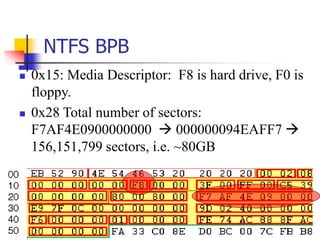
 0x15: Media Descriptor: F8 is hard drive, F0 is
floppy.
 0x28 Total number of sectors:
F7AF4E0900000000  000000094EAFF7 
156,151,799 sectors, i.e. ~80GB
NTFS BPB
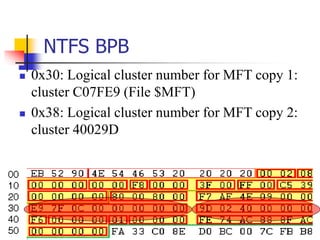
 0x30: Logical cluster number for MFT copy 1:
cluster C07FE9 (File $MFT)
 0x38: Logical cluster number for MFT copy 2:
cluster 40029D
NTFS BPB
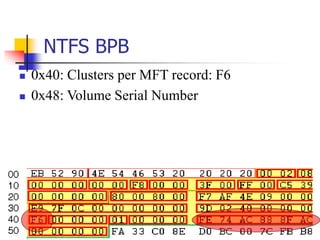
 0x40: Clusters per MFT record: F6
 0x48: Volume Serial Number
NTFS Master File Table
 First four entries are replicated, so that
MFT can be repaired
 First 16 records are reserved for
metadata files, their name begins with a
dollar sign ($)
NTFS Master File Table
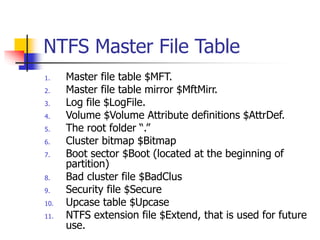
1. Master file table $MFT.
2. Master file table mirror $MftMirr.
3. Log file $LogFile.
4. Volume $Volume Attribute definitions $AttrDef.
5. The root folder “.”
6. Cluster bitmap $Bitmap
7. Boot sector $Boot (located at the beginning of
partition)
8. Bad cluster file $BadClus
9. Security file $Secure
10. Upcase table $Upcase
11. NTFS extension file $Extend, that is used for future
use.
NTFS Master File Table
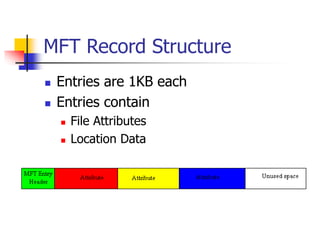
MFT Record Structure
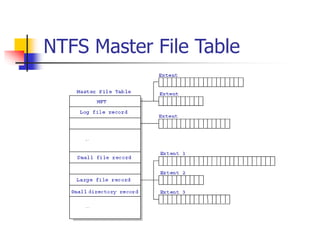
 Entries are 1KB each
 Entries contain
 File Attributes
 Location Data
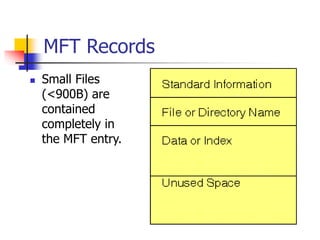
MFT Records
 Small Files
(<900B) are
contained
completely in
the MFT entry.
MFT Records
 Folders contain index data.
 Small folders reside within the MFT
record
 Larger folders have an index structure
to other data blocks. They use a B-tree
structure.
MFT Record
 Each MFT record is addressed by a 48 bit
MFT entry value.
 First entry has address 0.
 Each MFT entry has a 16 bit sequence
number that is incremented when the entry is
allocated.
 MFT entry value and sequence number
combined yield 64b file reference address.
MFT Record
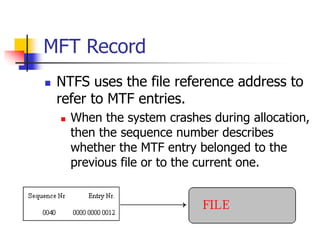
 NTFS uses the file reference address to
refer to MTF entries.
 When the system crashes during allocation,
then the sequence number describes
whether the MTF entry belonged to the
previous file or to the current one.
MFT Record
 MFT entry attributes are loosely
defined.
 Each attribute is preceded by the
attribute header.
 The attribute header identifies
 Type of attribute.
 Size.
 Name.
MFT Record Structure
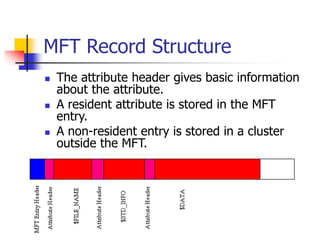
 The attribute header gives basic information
about the attribute.
 A resident attribute is stored in the MFT
entry.
 A non-resident entry is stored in a cluster
outside the MFT.
MFT Record Structure
 Resident attributes are stored in MFT record.
 Non-resident attributes are stored in cluster
runs.
 Cluster run consists of consecutive clusters and
are identified by starting cluster and run length.
 NTFS distinguishes between Virtual Cluster
Numbers and Logical Cluster Numbers.
 LCN * (#sectors in cluster) = sector number
 LCN 0 is first cluster in the volume (boot sector).
 VCN 0 refers to the first cluster in a cluster run.
MFT Record Structure
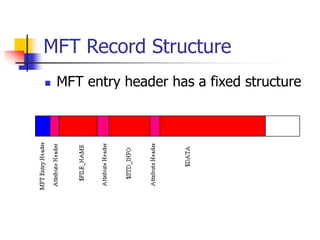
 MFT entry header has a fixed structure
MFT Record Structure
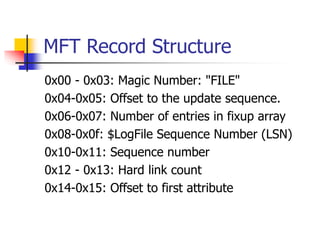
0x00 - 0x03: Magic Number: "FILE"
0x04-0x05: Offset to the update sequence.
0x06-0x07: Number of entries in fixup array
0x08-0x0f: $LogFile Sequence Number (LSN)
0x10-0x11: Sequence number
0x12 - 0x13: Hard link count
0x14-0x15: Offset to first attribute
MFT Record Structure
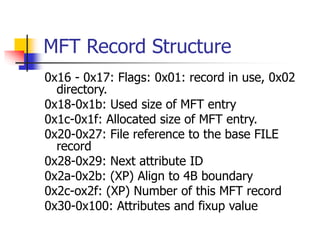
0x16 - 0x17: Flags: 0x01: record in use, 0x02
directory.
0x18-0x1b: Used size of MFT entry
0x1c-0x1f: Allocated size of MFT entry.
0x20-0x27: File reference to the base FILE
record
0x28-0x29: Next attribute ID
0x2a-0x2b: (XP) Align to 4B boundary
0x2c-ox2f: (XP) Number of this MFT record
0x30-0x100: Attributes and fixup value
MFT Record Structure
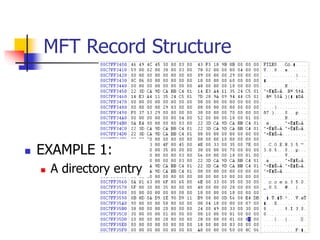
 EXAMPLE 1:
 A directory entry
MFT Record
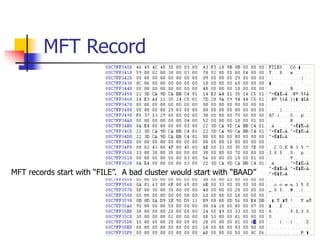
MFT records start with “FILE”. A bad cluster would start with “BAAD”
MFT Record
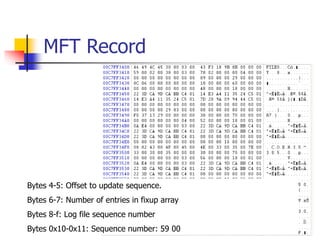
Bytes 4-5: Offset to update sequence.
Bytes 6-7: Number of entries in fixup array
Bytes 8-f: Log file sequence number
Bytes 0x10-0x11: Sequence number: 59 00
MFT Record
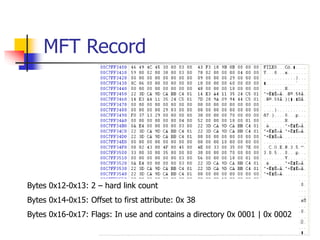
Bytes 0x12-0x13: 2 – hard link count
Bytes 0x14-0x15: Offset to first attribute: 0x 38
Bytes 0x16-0x17: Flags: In use and contains a directory 0x 0001 | 0x 0002
MFT Record
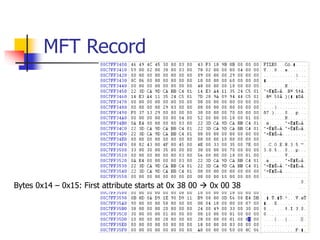
Bytes 0x14 – 0x15: First attribute starts at 0x 38 00  0x 00 38
MFT List of possible attributes
 Defined in $AttrDef entry of MFT, but default is:
 0x10 STANDARD_INFORMATION
 0x20$ATTRIBUTE_LIST
 0x30$FILE_NAME0
 X40 (NT) $VOLUME_VERSION (2K) $OBJECT_ID
 0x50 $SECURITY_DESCRIPTOR
 0x60$VOLUME_NAME
 0x70 $VOLUME_INFORMATION
 0x80$DATA
 0x90$INDEX_ROOT
 0xA0$INDEX_ALLOCATION
 0xB0$BITMAP
 0xC0 (NT) $SYMBOLIC_LINK, (2K) $REPARSE_POINT
 0xD0$EA_INFORMATION
 0xE0$EA0xF0NT$PROPERTY_SET
 0x100 (2K) $LOGGED_UTILITY_STREAM
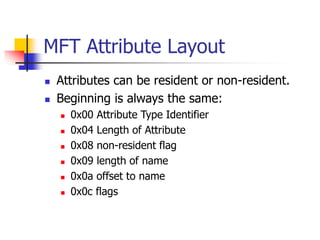
MFT Attribute Layout
 Attributes can be resident or non-resident.
 Beginning is always the same:
 0x00 Attribute Type Identifier
 0x04 Length of Attribute
 0x08 non-resident flag
 0x09 length of name
 0x0a offset to name
 0x0c flags
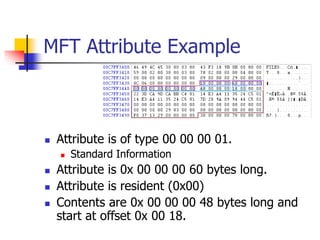
MFT Attribute Example
 Attribute is of type 00 00 00 01.
 Standard Information
 Attribute is 0x 00 00 00 60 bytes long.
 Attribute is resident (0x00)
 Contents are 0x 00 00 00 48 bytes long and
start at offset 0x 00 18.
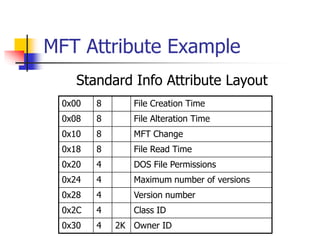
MFT Attribute Example
0x00 8 File Creation Time
0x08 8 File Alteration Time
0x10 8 MFT Change
0x18 8 File Read Time
0x20 4 DOS File Permissions
0x24 4 Maximum number of versions
0x28 4 Version number
0x2C 4 Class ID
0x30 4 2K Owner ID
Standard Info Attribute Layout
MFT Attribute Example
 This allows us to extract the file access
times just as for DOS.
 Time values are in 100 nanoseconds
since January 1, 1601 UTC.
MFT Attribute Example
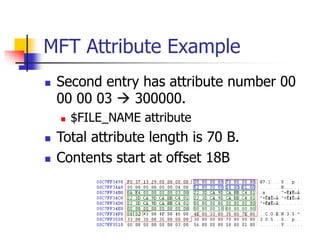
 Second entry has attribute number 00
00 00 03  300000.
 $FILE_NAME attribute
 Total attribute length is 70 B.
 Contents start at offset 18B
MFT Attribute Example
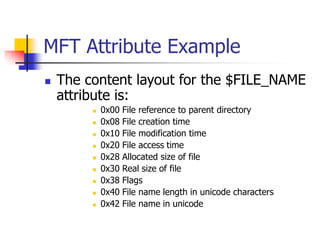
 The content layout for the $FILE_NAME
attribute is:
 0x00 File reference to parent directory
 0x08 File creation time
 0x10 File modification time
 0x20 File access time
 0x28 Allocated size of file
 0x30 Real size of file
 0x38 Flags
 0x40 File name length in unicode characters
 0x42 File name in unicode
MFT Attribute Example
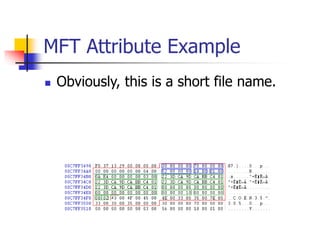
 Obviously, this is a short file name.
MFT Attribute Example
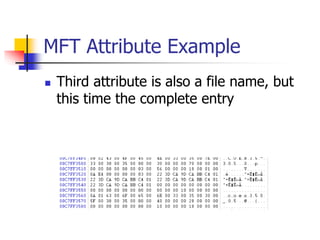
 Third attribute is also a file name, but
this time the complete entry
NTFS Versions
 File system improves.
 Disk Layout changes.

NTFSFS.ppt

  • 1.
  • 2.
    MBR and GPTDisks  MBR disks for 32b 86x-compatibles  GPT disks for 64b Itanium processors  Start with a MBR in order to maintain compatibility  MBR has a single partition with a partition table entry of 0xEE
  • 3.
  • 4.
    NTFS Partition Layout Boot Record  Basic parameters of NTFS partition  Master File Table (5%-10% of partition)  Table of entries  Collection of attributes.  Attributes can be resident or in the File System Data  File System Data  Master File Table Copy
  • 5.
    NTFS Boot Sector Noticethat the end of sector marker is 55 AA. You can look for this to find boot sectors for NTFS and DOS.
  • 6.
    NTFS Boot Sector 0x00 3B Jump Instruction  0x03 8B OEM ID  0x0B 25B BPB  0x24 48B Extended BPB  0x54 426B Bootstrap Code.  0x1FE 2B End of Sector Marker
  • 7.
  • 8.
    NTSF Boot Sector Many fields are not important, but:  0x0B, Bytes per sector.  0x0D Sectors per Cluster  0x15 Media descriptor. F8: HD; F0: HD Floppy  0x28 Total sectors.  0x30 Logical cluster number for the MFT  0x38 Logical cluster number copy of the MFT  0x40 Clusters per MFT Record.  0x48 Volume serial
  • 9.
    NTFS Boot Sector WinHex allows access to an interpreted NTFS Boot Sector.  Use the Access Tab.
  • 10.
    NTFS BPB 0x0B Bytesper sector: 00 02  0200 = 512 decimal 0x0D Sectors per cluster: 0x 08 0x0E Reserved sectors 0x 00 00
  • 11.
    NTFS BPB  0x15:Media Descriptor: F8 is hard drive, F0 is floppy.  0x28 Total number of sectors: F7AF4E0900000000  000000094EAFF7  156,151,799 sectors, i.e. ~80GB
  • 12.
    NTFS BPB  0x30:Logical cluster number for MFT copy 1: cluster C07FE9 (File $MFT)  0x38: Logical cluster number for MFT copy 2: cluster 40029D
  • 13.
    NTFS BPB  0x40:Clusters per MFT record: F6  0x48: Volume Serial Number
  • 14.
    NTFS Master FileTable  First four entries are replicated, so that MFT can be repaired  First 16 records are reserved for metadata files, their name begins with a dollar sign ($)
  • 15.
    NTFS Master FileTable 1. Master file table $MFT. 2. Master file table mirror $MftMirr. 3. Log file $LogFile. 4. Volume $Volume Attribute definitions $AttrDef. 5. The root folder “.” 6. Cluster bitmap $Bitmap 7. Boot sector $Boot (located at the beginning of partition) 8. Bad cluster file $BadClus 9. Security file $Secure 10. Upcase table $Upcase 11. NTFS extension file $Extend, that is used for future use.
  • 16.
  • 17.
    MFT Record Structure Entries are 1KB each  Entries contain  File Attributes  Location Data
  • 18.
    MFT Records  SmallFiles (<900B) are contained completely in the MFT entry.
  • 19.
    MFT Records  Folderscontain index data.  Small folders reside within the MFT record  Larger folders have an index structure to other data blocks. They use a B-tree structure.
  • 20.
    MFT Record  EachMFT record is addressed by a 48 bit MFT entry value.  First entry has address 0.  Each MFT entry has a 16 bit sequence number that is incremented when the entry is allocated.  MFT entry value and sequence number combined yield 64b file reference address.
  • 21.
    MFT Record  NTFSuses the file reference address to refer to MTF entries.  When the system crashes during allocation, then the sequence number describes whether the MTF entry belonged to the previous file or to the current one.
  • 22.
    MFT Record  MFTentry attributes are loosely defined.  Each attribute is preceded by the attribute header.  The attribute header identifies  Type of attribute.  Size.  Name.
  • 23.
    MFT Record Structure The attribute header gives basic information about the attribute.  A resident attribute is stored in the MFT entry.  A non-resident entry is stored in a cluster outside the MFT.
  • 24.
    MFT Record Structure Resident attributes are stored in MFT record.  Non-resident attributes are stored in cluster runs.  Cluster run consists of consecutive clusters and are identified by starting cluster and run length.  NTFS distinguishes between Virtual Cluster Numbers and Logical Cluster Numbers.  LCN * (#sectors in cluster) = sector number  LCN 0 is first cluster in the volume (boot sector).  VCN 0 refers to the first cluster in a cluster run.
  • 25.
    MFT Record Structure MFT entry header has a fixed structure
  • 26.
    MFT Record Structure 0x00- 0x03: Magic Number: "FILE" 0x04-0x05: Offset to the update sequence. 0x06-0x07: Number of entries in fixup array 0x08-0x0f: $LogFile Sequence Number (LSN) 0x10-0x11: Sequence number 0x12 - 0x13: Hard link count 0x14-0x15: Offset to first attribute
  • 27.
    MFT Record Structure 0x16- 0x17: Flags: 0x01: record in use, 0x02 directory. 0x18-0x1b: Used size of MFT entry 0x1c-0x1f: Allocated size of MFT entry. 0x20-0x27: File reference to the base FILE record 0x28-0x29: Next attribute ID 0x2a-0x2b: (XP) Align to 4B boundary 0x2c-ox2f: (XP) Number of this MFT record 0x30-0x100: Attributes and fixup value
  • 28.
    MFT Record Structure EXAMPLE 1:  A directory entry
  • 29.
    MFT Record MFT recordsstart with “FILE”. A bad cluster would start with “BAAD”
  • 30.
    MFT Record Bytes 4-5:Offset to update sequence. Bytes 6-7: Number of entries in fixup array Bytes 8-f: Log file sequence number Bytes 0x10-0x11: Sequence number: 59 00
  • 31.
    MFT Record Bytes 0x12-0x13:2 – hard link count Bytes 0x14-0x15: Offset to first attribute: 0x 38 Bytes 0x16-0x17: Flags: In use and contains a directory 0x 0001 | 0x 0002
  • 32.
    MFT Record Bytes 0x14– 0x15: First attribute starts at 0x 38 00  0x 00 38
  • 33.
    MFT List ofpossible attributes  Defined in $AttrDef entry of MFT, but default is:  0x10 STANDARD_INFORMATION  0x20$ATTRIBUTE_LIST  0x30$FILE_NAME0  X40 (NT) $VOLUME_VERSION (2K) $OBJECT_ID  0x50 $SECURITY_DESCRIPTOR  0x60$VOLUME_NAME  0x70 $VOLUME_INFORMATION  0x80$DATA  0x90$INDEX_ROOT  0xA0$INDEX_ALLOCATION  0xB0$BITMAP  0xC0 (NT) $SYMBOLIC_LINK, (2K) $REPARSE_POINT  0xD0$EA_INFORMATION  0xE0$EA0xF0NT$PROPERTY_SET  0x100 (2K) $LOGGED_UTILITY_STREAM
  • 34.
    MFT Attribute Layout Attributes can be resident or non-resident.  Beginning is always the same:  0x00 Attribute Type Identifier  0x04 Length of Attribute  0x08 non-resident flag  0x09 length of name  0x0a offset to name  0x0c flags
  • 35.
    MFT Attribute Example Attribute is of type 00 00 00 01.  Standard Information  Attribute is 0x 00 00 00 60 bytes long.  Attribute is resident (0x00)  Contents are 0x 00 00 00 48 bytes long and start at offset 0x 00 18.
  • 36.
    MFT Attribute Example 0x008 File Creation Time 0x08 8 File Alteration Time 0x10 8 MFT Change 0x18 8 File Read Time 0x20 4 DOS File Permissions 0x24 4 Maximum number of versions 0x28 4 Version number 0x2C 4 Class ID 0x30 4 2K Owner ID Standard Info Attribute Layout
  • 37.
    MFT Attribute Example This allows us to extract the file access times just as for DOS.  Time values are in 100 nanoseconds since January 1, 1601 UTC.
  • 38.
    MFT Attribute Example Second entry has attribute number 00 00 00 03  300000.  $FILE_NAME attribute  Total attribute length is 70 B.  Contents start at offset 18B
  • 39.
    MFT Attribute Example The content layout for the $FILE_NAME attribute is:  0x00 File reference to parent directory  0x08 File creation time  0x10 File modification time  0x20 File access time  0x28 Allocated size of file  0x30 Real size of file  0x38 Flags  0x40 File name length in unicode characters  0x42 File name in unicode
  • 40.
    MFT Attribute Example Obviously, this is a short file name.
  • 41.
    MFT Attribute Example Third attribute is also a file name, but this time the complete entry
  • 42.
    NTFS Versions  Filesystem improves.  Disk Layout changes.