The document discusses NTFS forensics. It begins with introducing the speaker and their background in information security and computer forensics. It then provides an overview of NTFS, including that it is the default file system for Windows NT-based operating systems and some of its key features. The document discusses some of the internals of NTFS like the master file table ($MFT), timestamps, alternate data streams, extended attributes, and the $UsnJrnl journal file that can contain forensic artifacts. It notes how understanding these NTFS artifacts can aid in file recovery, finding hidden data, and malware analysis.
Speaker’s profile
MALLA REDDYDONAPATI
Security Enthusiast, Consultant & Forensicator
Chapter Moderator – null Mumbai
https://null.co.in/
M.Sc Information Security & Computer Forensics (University
of East London )
dmred1
3.
Agenda
• Introduction
• NTFSinternals
• Alternate Data streams
• Extended Attributes
• Malware artifacts in UsnJrnl
• Demo
4.
NTFS – NewTechnology File System
• Introduced in 1993 for Win NT
3.1
• Default file system for NT based
OS (Win NT, 2K, 2K3, XP, …)
• Feature list includes journaling,
encryption, compression,
sparse file support, disk quotas,
reparse points.
5.
Why NTFS forensics?
• To understand its format and inner-working
• To device effective file recovery strategies for deleted /
lost data
• To find forensically useful artifacts like Existence of
hidden timestamps, Logs and Deleted / Leftover
Metadata
• Leverage NTFS artifacts in memory for efficient malware
analysis
6.
NTFS Basics
• Everythingis a file, even
the core file system
internals
• The internal files are
always hidden from user
view
Hidden files and folders in NTFS
7.
Hidden Internal Files
FilenameDescription
$MFT Master File Table
$MFTMirr Backup of first 4 records of MFT
$LogFile Transaction log file
$Volume Volume related information, usually empty
$AttrDef $AttrDef Table listing MFT attribute names and numbers
. Root folder on NTFS
$Bitmap Map showing which clusters on volume are in use
$Boot Boot code used during bootstrap
$BadClus Map of bad clusters
$Secure Security descriptors and ACLs are listed here
$Upcase Keeps all lowercase to uppercase character mappings
$Extend Optional extensions listed here (This is a folder)
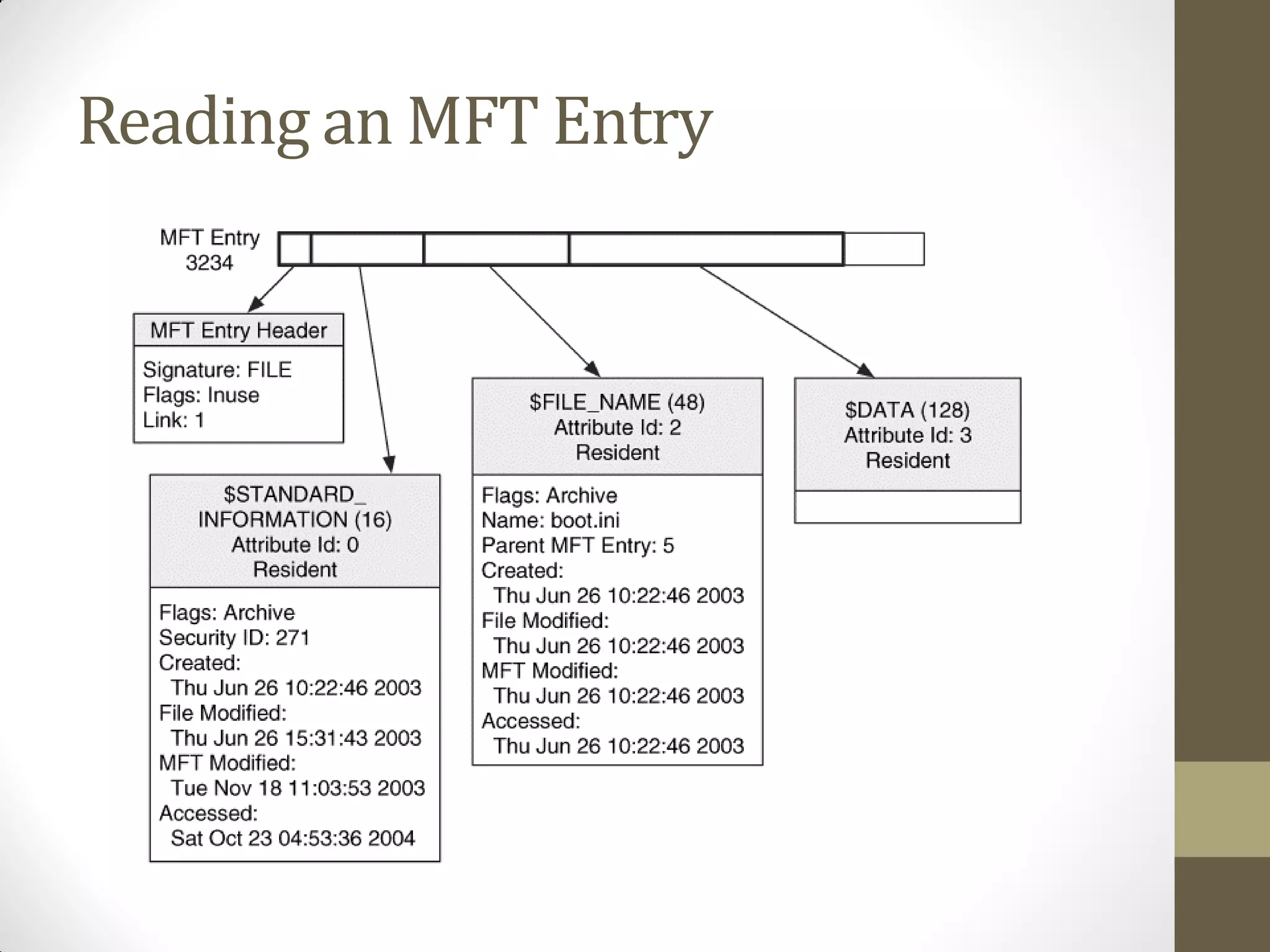
Master File Table- $MFT
• Consists of 1024 byte records
• Has an entry for every file and folder including itself
• Records can be identified by header “FILE”
• A record consists of header and attributes
• All metadata is stored in attributes
• Common attributes:
• $STANDARD_INFORAMTION
• $FILE_NAME
• $DATA
Timestamps on NTFS
•64 bit Timestamp
• Number of 100
Nanosecond intervals since
1st January 1601
• 1 second = 0x989
• 4 Timestamps
• Created
• Modified
• Accessed
• MFT Entry Modified - ?
• caution:
• The NTFS file system delays
updates to the last access
time for a file by up to 1 hour
after the last access. (Source:
msdn.microsoft.com )
13.
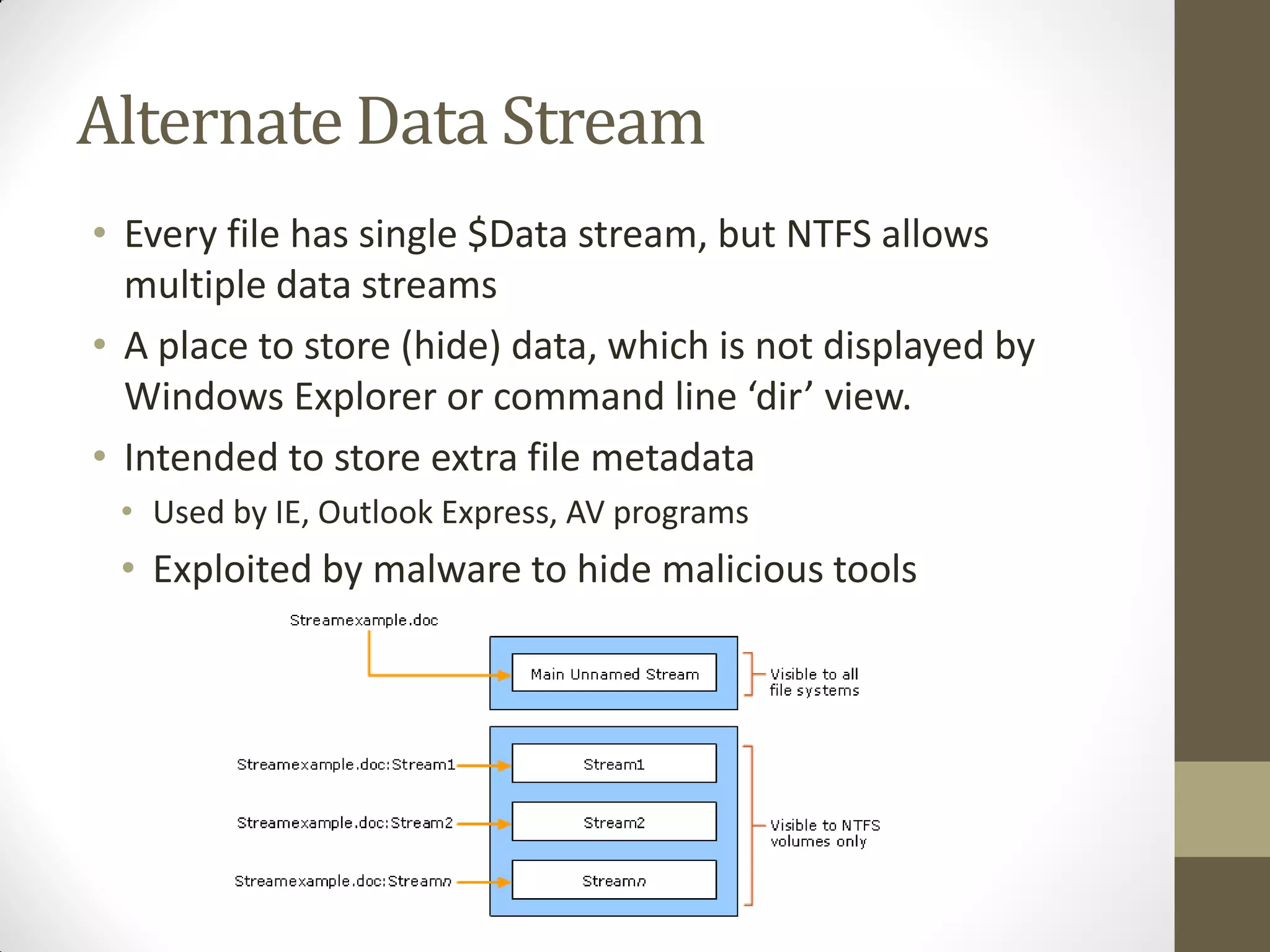
Alternate Data Stream
•Every file has single $Data stream, but NTFS allows
multiple data streams
• A place to store (hide) data, which is not displayed by
Windows Explorer or command line ‘dir’ view.
• Intended to store extra file metadata
• Used by IE, Outlook Express, AV programs
• Exploited by malware to hide malicious tools
14.
Extended Attributes
• ExtendedAttributes are a feature of NTFS similar in nature to
Alternate Data Streams where extra information about the file
can be stored on the file system
• EA
• EA_INFORMATION
• ZeroAccess rootkit uses this feature to hide a whole PE file as
well as shellcode in services.exe that loads the PE file
15.
$UsnJrnl
• Is achange journal file
• Records when changes were made to the files and directories
• Located at $Extend$UsnJrnl and the actual entries are
located at $UsnJrnl:$J alterante data stream
• Information contained in each entry :
• Time of change
• Reason for change
• File/Directory’s name
• File/Directory MFT record number
• File record number of the file’s parent directory
• Security ID
• Update Sequence Number of the record
• Information about the source of change










![[OWASP-TR Mobil Güvenlik Çalıştayı 2015] Yalçın Çakmak - Social Media Apps Fo...](https://cdn.slidesharecdn.com/ss_thumbnails/yalcincakmak-socialmediaappsforensics-151109073248-lva1-app6891-thumbnail.jpg?width=640&height=640&fit=bounds)


