OS EvidentiaryArtefacts
Version 1.0
Brent Muir – 2014
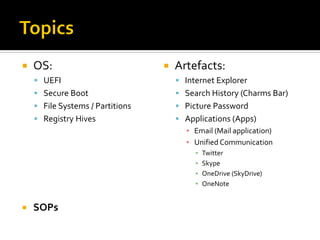
 OS:
 UEFI
 Secure Boot
 File Systems / Partitions
 Registry Hives
 SOPs
 Artefacts:
 Internet Explorer
 Search History (Charms Bar)
 Picture Password
 Applications (Apps)
▪ Email (Mail application)
▪ Unified Communication
▪ Twitter
▪ Skype
▪ OneDrive (SkyDrive)
▪ OneNote
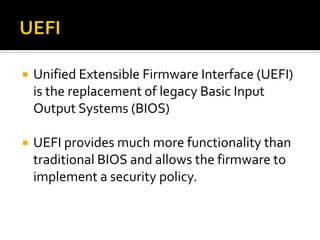
 Unified Extensible Firmware Interface (UEFI)
is the replacement of legacy Basic Input
Output Systems (BIOS)
 UEFI provides much more functionality than
traditional BIOS and allows the firmware to
implement a security policy.
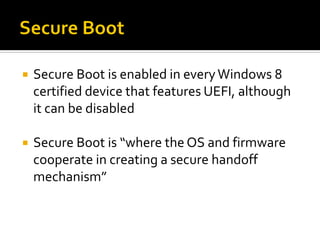
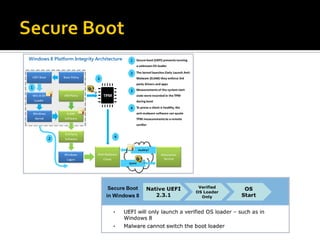
 Secure Boot is enabled in everyWindows 8
certified device that features UEFI, although
it can be disabled
 Secure Boot is “where the OS and firmware
cooperate in creating a secure handoff
mechanism”
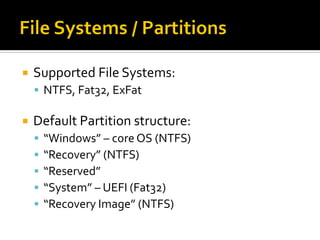
 Supported File Systems:
 NTFS, Fat32, ExFat
 Default Partition structure:
 “Windows” – core OS (NTFS)
 “Recovery” (NTFS)
 “Reserved”
 “System” – UEFI (Fat32)
 “Recovery Image” (NTFS)
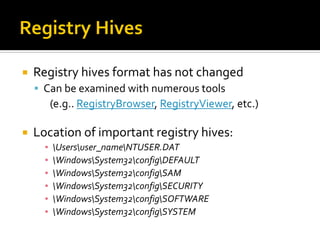
 Registry hives format has not changed
 Can be examined with numerous tools
(e.g.. RegistryBrowser, RegistryViewer, etc.)
 Location of important registry hives:
▪ Usersuser_nameNTUSER.DAT
▪ WindowsSystem32configDEFAULT
▪ WindowsSystem32configSAM
▪ WindowsSystem32configSECURITY
▪ WindowsSystem32configSOFTWARE
▪ WindowsSystem32configSYSTEM
 No longer stored in Index.DAT files
 IE history records stored in the following file:
 Usersuser_nameAppDataLocalMicrosoftWindo
wsWebCacheWebCacheV01.dat
▪ This is actually an .EDB file
▪ Can be interpreted by EseDbViewer or ESEDatabaseView
▪ Might be a “dirty” dismount, need to use esentutl.exe
 Internet Cache stored in this directory:
 Usersuser_nameAppDataLocalMicrosoftWindo
wsINetCache
 Internet Cookies stored in this directory:
 Usersuser_nameAppDataLocalMicrosoftWindo
wsINetCookies
 Windows 8 introduced a unified search platform
that encompasses local files & websites
 InWindows 8 stored in NTUSER.DAT registry:
 SOFTWAREMicrosoftWindowsCurrentVersionExplor
erSearchHistory
 InWindows 8.1 stored as .LNK files in:
 Usersuser_nameAppDataLocalMicrosoftWindows
ConnectedSearchHistory
 “Picture Password” is an alternate login method
where gestures on top of a picture are used as a
password
 This registry key details the path to the location
of the “Picture Password” file:
 HKEY_LOCAL_MACHINESoftwareMicrosoftWindowsCurrentV
ersionAuthenticationLogonUIPicturePassworduser_GUID
 Path of locally stored Picture Password file:
 C:ProgramDataMicrosoftWindowsSystemDatauser_GUIDRea
dOnlyPicturePasswordbackground.png
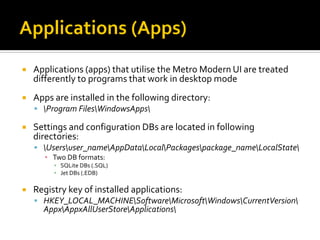
 Applications (apps) that utilise the Metro Modern UI are treated
differently to programs that work in desktop mode
 Apps are installed in the following directory:
 Program FilesWindowsApps
 Settings and configuration DBs are located in following
directories:
 Usersuser_nameAppDataLocalPackagespackage_nameLocalState
▪ Two DB formats:
▪ SQLite DBs (.SQL)
▪ Jet DBs (.EDB)
 Registry key of installed applications:
 HKEY_LOCAL_MACHINESoftwareMicrosoftWindowsCurrentVersion
AppxAppxAllUserStoreApplications
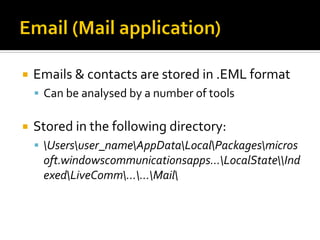
 Emails & contacts are stored in .EML format
 Can be analysed by a number of tools
 Stored in the following directory:
 Usersuser_nameAppDataLocalPackagesmicros
oft.windowscommunicationsapps...LocalStateInd
exedLiveComm......Mail
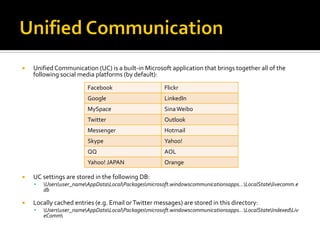
 Unified Communication (UC) is a built-in Microsoft application that brings together all of the
following social media platforms (by default):
 UC settings are stored in the following DB:
 Usersuser_nameAppDataLocalPackagesmicrosoft.windowscommunicationsapps…LocalStatelivecomm.e
db
 Locally cached entries (e.g. Email orTwitter messages) are stored in this directory:
 Usersuser_nameAppDataLocalPackagesmicrosoft.windowscommunicationsapps…LocalStateIndexedLiv
eComm
Facebook Flickr
Google LinkedIn
MySpace SinaWeibo
Twitter Outlook
Messenger Hotmail
Skype Yahoo!
QQ AOL
Yahoo! JAPAN Orange
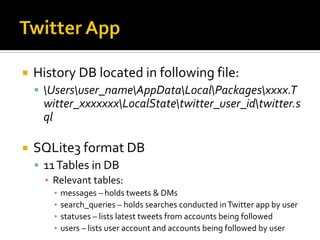
 History DB located in following file:
 Usersuser_nameAppDataLocalPackagesxxxx.T
witter_xxxxxxxLocalStatetwitter_user_idtwitter.s
ql
 SQLite3 format DB
 11Tables in DB
▪ Relevant tables:
▪ messages – holds tweets & DMs
▪ search_queries – holds searches conducted inTwitter app by user
▪ statuses – lists latest tweets from accounts being followed
▪ users – lists user account and accounts being followed by user
 Settings located in file:
 Usersuser_nameAppDataLocalPackagesxxxxx.
Twitter_xxxxSettingssettings.dat
▪ Includes user name (@xxxxx)
▪ Details on profile picture URL
▪ Twitter ID number
 Skype user name located in file
 UsersesfAppDataLocalPackagesmicrosoft.windowscommunic
ationsapps_xxxxxLocalStateIndexedLiveCommxxxxxxxPeopl
eMexxxxxxx.appcontent-ms
 Relevant DB files located in directory:
 Usersuser_nameAppDataLocalPackagesMicrosoft.SkypeApp
_xxxxLocalStatelive#3xxxxxxx
▪ eas.db
▪ Contains user details in “properties” table
▪ qik_main.db
▪ Contains Skype username in “settings” table
▪ Contains recent messages in “conversations” table
▪ main.db
▪ Contains chats, calls, contacts
 Be aware that if you search for a user via the app, the results will show under
“contacts” even if not “added”
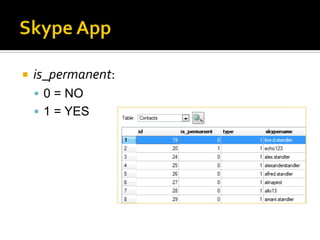
 is_permanent:
 0 = NO
 1 = YES
 Built-in by default, API allows all programs to
save files in OneDrive
 List of Synced items located in file:
 Usersuser_nameAppDataLocalMicrosoftWindo
wsSkyDrivesettingsxxxxxxxx.dat
 Locally cached items are stored in directory:
 Usersuser_nameOneDrive
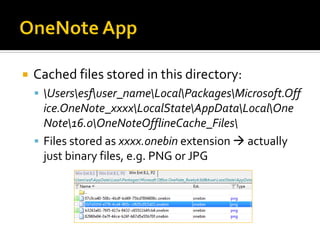
 Cached files stored in this directory:
 Usersesfuser_nameLocalPackagesMicrosoft.Off
ice.OneNote_xxxxLocalStateAppDataLocalOne
Note16.0OneNoteOfflineCache_Files
 Files stored as xxxx.onebin extension  actually
just binary files, e.g. PNG or JPG
 Assuming no encryption located and due to
prevalence of ESE JetBlue DBs, not
recommended to pull power  clean
shutdown instead (otherwise dirty DBs)
 Recommend grabbing RAM first if running
machine encountered
 WinPMEM1.5
 DumpIt
 FTK Imager
Windows 8.x Forensics 1.0

Windows 8.x Forensics 1.0

  • 1.
  • 2.
     OS:  UEFI Secure Boot  File Systems / Partitions  Registry Hives  SOPs  Artefacts:  Internet Explorer  Search History (Charms Bar)  Picture Password  Applications (Apps) ▪ Email (Mail application) ▪ Unified Communication ▪ Twitter ▪ Skype ▪ OneDrive (SkyDrive) ▪ OneNote
  • 3.
     Unified ExtensibleFirmware Interface (UEFI) is the replacement of legacy Basic Input Output Systems (BIOS)  UEFI provides much more functionality than traditional BIOS and allows the firmware to implement a security policy.
  • 4.
     Secure Bootis enabled in everyWindows 8 certified device that features UEFI, although it can be disabled  Secure Boot is “where the OS and firmware cooperate in creating a secure handoff mechanism”
  • 6.
     Supported FileSystems:  NTFS, Fat32, ExFat  Default Partition structure:  “Windows” – core OS (NTFS)  “Recovery” (NTFS)  “Reserved”  “System” – UEFI (Fat32)  “Recovery Image” (NTFS)
  • 7.
     Registry hivesformat has not changed  Can be examined with numerous tools (e.g.. RegistryBrowser, RegistryViewer, etc.)  Location of important registry hives: ▪ Usersuser_nameNTUSER.DAT ▪ WindowsSystem32configDEFAULT ▪ WindowsSystem32configSAM ▪ WindowsSystem32configSECURITY ▪ WindowsSystem32configSOFTWARE ▪ WindowsSystem32configSYSTEM
  • 8.
     No longerstored in Index.DAT files  IE history records stored in the following file:  Usersuser_nameAppDataLocalMicrosoftWindo wsWebCacheWebCacheV01.dat ▪ This is actually an .EDB file ▪ Can be interpreted by EseDbViewer or ESEDatabaseView ▪ Might be a “dirty” dismount, need to use esentutl.exe
  • 9.
     Internet Cachestored in this directory:  Usersuser_nameAppDataLocalMicrosoftWindo wsINetCache  Internet Cookies stored in this directory:  Usersuser_nameAppDataLocalMicrosoftWindo wsINetCookies
  • 10.
     Windows 8introduced a unified search platform that encompasses local files & websites  InWindows 8 stored in NTUSER.DAT registry:  SOFTWAREMicrosoftWindowsCurrentVersionExplor erSearchHistory  InWindows 8.1 stored as .LNK files in:  Usersuser_nameAppDataLocalMicrosoftWindows ConnectedSearchHistory
  • 11.
     “Picture Password”is an alternate login method where gestures on top of a picture are used as a password  This registry key details the path to the location of the “Picture Password” file:  HKEY_LOCAL_MACHINESoftwareMicrosoftWindowsCurrentV ersionAuthenticationLogonUIPicturePassworduser_GUID  Path of locally stored Picture Password file:  C:ProgramDataMicrosoftWindowsSystemDatauser_GUIDRea dOnlyPicturePasswordbackground.png
  • 12.
     Applications (apps)that utilise the Metro Modern UI are treated differently to programs that work in desktop mode  Apps are installed in the following directory:  Program FilesWindowsApps  Settings and configuration DBs are located in following directories:  Usersuser_nameAppDataLocalPackagespackage_nameLocalState ▪ Two DB formats: ▪ SQLite DBs (.SQL) ▪ Jet DBs (.EDB)  Registry key of installed applications:  HKEY_LOCAL_MACHINESoftwareMicrosoftWindowsCurrentVersion AppxAppxAllUserStoreApplications
  • 13.
     Emails &contacts are stored in .EML format  Can be analysed by a number of tools  Stored in the following directory:  Usersuser_nameAppDataLocalPackagesmicros oft.windowscommunicationsapps...LocalStateInd exedLiveComm......Mail
  • 14.
     Unified Communication(UC) is a built-in Microsoft application that brings together all of the following social media platforms (by default):  UC settings are stored in the following DB:  Usersuser_nameAppDataLocalPackagesmicrosoft.windowscommunicationsapps…LocalStatelivecomm.e db  Locally cached entries (e.g. Email orTwitter messages) are stored in this directory:  Usersuser_nameAppDataLocalPackagesmicrosoft.windowscommunicationsapps…LocalStateIndexedLiv eComm Facebook Flickr Google LinkedIn MySpace SinaWeibo Twitter Outlook Messenger Hotmail Skype Yahoo! QQ AOL Yahoo! JAPAN Orange
  • 15.
     History DBlocated in following file:  Usersuser_nameAppDataLocalPackagesxxxx.T witter_xxxxxxxLocalStatetwitter_user_idtwitter.s ql  SQLite3 format DB  11Tables in DB ▪ Relevant tables: ▪ messages – holds tweets & DMs ▪ search_queries – holds searches conducted inTwitter app by user ▪ statuses – lists latest tweets from accounts being followed ▪ users – lists user account and accounts being followed by user
  • 16.
     Settings locatedin file:  Usersuser_nameAppDataLocalPackagesxxxxx. Twitter_xxxxSettingssettings.dat ▪ Includes user name (@xxxxx) ▪ Details on profile picture URL ▪ Twitter ID number
  • 17.
     Skype username located in file  UsersesfAppDataLocalPackagesmicrosoft.windowscommunic ationsapps_xxxxxLocalStateIndexedLiveCommxxxxxxxPeopl eMexxxxxxx.appcontent-ms  Relevant DB files located in directory:  Usersuser_nameAppDataLocalPackagesMicrosoft.SkypeApp _xxxxLocalStatelive#3xxxxxxx ▪ eas.db ▪ Contains user details in “properties” table ▪ qik_main.db ▪ Contains Skype username in “settings” table ▪ Contains recent messages in “conversations” table ▪ main.db ▪ Contains chats, calls, contacts  Be aware that if you search for a user via the app, the results will show under “contacts” even if not “added”
  • 18.
     is_permanent:  0= NO  1 = YES
  • 19.
     Built-in bydefault, API allows all programs to save files in OneDrive  List of Synced items located in file:  Usersuser_nameAppDataLocalMicrosoftWindo wsSkyDrivesettingsxxxxxxxx.dat  Locally cached items are stored in directory:  Usersuser_nameOneDrive
  • 20.
     Cached filesstored in this directory:  Usersesfuser_nameLocalPackagesMicrosoft.Off ice.OneNote_xxxxLocalStateAppDataLocalOne Note16.0OneNoteOfflineCache_Files  Files stored as xxxx.onebin extension  actually just binary files, e.g. PNG or JPG
  • 21.
     Assuming noencryption located and due to prevalence of ESE JetBlue DBs, not recommended to pull power  clean shutdown instead (otherwise dirty DBs)  Recommend grabbing RAM first if running machine encountered  WinPMEM1.5  DumpIt  FTK Imager