
PDA FORENSICS
PRESENTED BY:
MEGHANA J
01FM15ECS020
M.TECH 3RD SEM
UNDER GUIDANCE OF:
Dr. SANCHIKA GUPTA
Agenda
1) Introduction
2) Components of PDA
3) Operating Systems
4) PDAs Generic States
5) Steps in forensic investigation of PDA
6) Forensic Considerations
7) Security Issues
8) PDA Forensic Tools
9) Tool- Device Seizure
10) References
INTRODUCTION
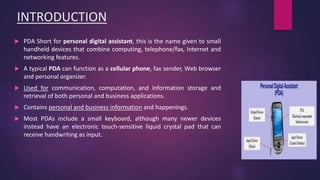
 PDA Short for personal digital assistant, this is the name given to small
handheld devices that combine computing, telephone/fax, Internet and
networking features.
 A typical PDA can function as a cellular phone, fax sender, Web browser
and personal organizer.
 Used for communication, computation, and information storage and
retrieval of both personal and business applications.
 Contains personal and business information and happenings.
 Most PDAs include a small keyboard, although many newer devices
instead have an electronic touch-sensitive liquid crystal pad that can
receive handwriting as input.
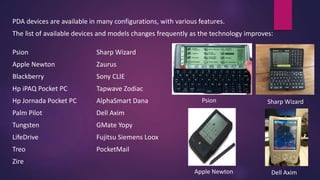
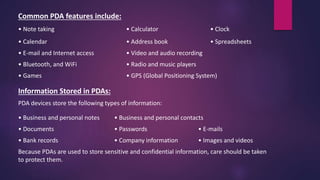
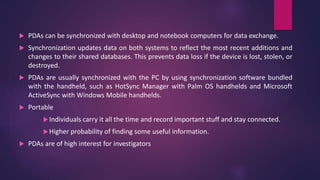
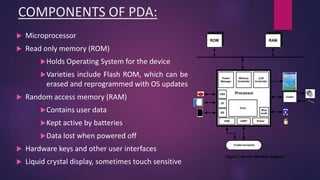
PDA devices are available in many configurations, with various features.
The list of available devices and models changes frequently as the technology improves:
Psion Sharp Wizard
Apple Newton Zaurus
Blackberry Sony CLIE
Hp iPAQ Pocket PC Tapwave Zodiac
Hp Jornada Pocket PC AlphaSmart Dana
Palm Pilot Dell Axim
Tungsten GMate Yopy
LifeDrive Fujitsu Siemens Loox
Treo PocketMail
Zire
Psion Sharp Wizard
Apple Newton Dell Axim
Common PDA features include:
• Note taking • Calculator • Clock
• Calendar • Address book • Spreadsheets
• E-mail and Internet access • Video and audio recording
• Bluetooth, and WiFi • Radio and music players
• Games • GPS (Global Positioning System)
Information Stored in PDAs:
PDA devices store the following types of information:
• Business and personal notes • Business and personal contacts
• Documents • Passwords • E-mails
• Bank records • Company information • Images and videos
Because PDAs are used to store sensitive and confidential information, care should be taken
to protect them.
 PDAs can be synchronized with desktop and notebook computers for data exchange.
 Synchronization updates data on both systems to reflect the most recent additions and
changes to their shared databases. This prevents data loss if the device is lost, stolen, or
destroyed.
 PDAs are usually synchronized with the PC by using synchronization software bundled
with the handheld, such as HotSync Manager with Palm OS handhelds and Microsoft
ActiveSync with Windows Mobile handhelds.
 Portable
Individuals carry it all the time and record important stuff and stay connected.
Higher probability of finding some useful information.
 PDAs are of high interest for investigators
COMPONENTS OF PDA:
 Microprocessor
 Read only memory (ROM)
Holds Operating System for the device
Varieties include Flash ROM, which can be
erased and reprogrammed with OS updates
 Random access memory (RAM)
Contains user data
Kept active by batteries
Data lost when powered off
 Hardware keys and other user interfaces
 Liquid crystal display, sometimes touch sensitive
 Additionally
WiFi, Bluetooth
Card Slots
SD/ MMD slot, Compact Flash(CF) slot etc
Expansions Slots
Battery
Removable, rechargeable batteries
OPERATING SYSTEMS
 PALM OS: Palm OS is a compact operating system developed and licensed by
PalmSource, Inc.
• It is designed to be easy to use and similar compared with desktop operating
system such as MS Windows.
 Windows Mobile 5.0: Windows Mobile 5.0 marks the convergence of the phone
Edition and Professional Edition operating systems into one system that contains
both phone and PDA capabilities. Windows Mobile 5.0 is compatible with
Microsoft's Smartphone operating system and is capable of running Smartphone
applications.
 Blackberry: RIM develops its own software for its devices, using C++ and Java
technology.
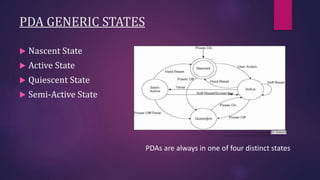
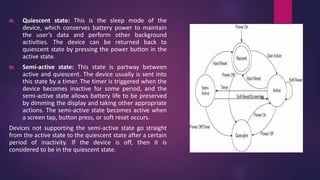
PDA GENERIC STATES
 Nascent State
 Active State
 Quiescent State
 Semi-Active State
PDAs are always in one of four distinct states
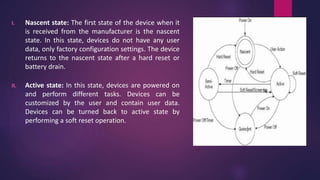
I. Nascent state: The first state of the device when it
is received from the manufacturer is the nascent
state. In this state, devices do not have any user
data, only factory configuration settings. The device
returns to the nascent state after a hard reset or
battery drain.
II. Active state: In this state, devices are powered on
and perform different tasks. Devices can be
customized by the user and contain user data.
Devices can be turned back to active state by
performing a soft reset operation.
III. Quiescent state: This is the sleep mode of the
device, which conserves battery power to maintain
the user’s data and perform other background
activities. The device can be returned back to
quiescent state by pressing the power button in the
active state.
IV. Semi-active state: This state is partway between
active and quiescent. The device usually is sent into
this state by a timer. The timer is triggered when the
device becomes inactive for some period, and the
semi-active state allows battery life to be preserved
by dimming the display and taking other appropriate
actions. The semi-active state becomes active when
a screen tap, button press, or soft reset occurs.
Devices not supporting the semi-active state go straight
from the active state to the quiescent state after a certain
period of inactivity. If the device is off, then it is
considered to be in the quiescent state.
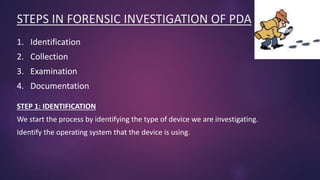
STEPS IN FORENSIC INVESTIGATION OF PDA
1. Identification
2. Collection
3. Examination
4. Documentation
STEP 1: IDENTIFICATION
We start the process by identifying the type of device we are investigating.
Identify the operating system that the device is using.
STEP 2: COLLECTION
 There are a multitude of these types of devices like: SD, micro-drives and universal
serial bus (USB) tokens.
 Information collected can be both volatile and dynamic information; We give the
volatile information priority while we collect evidence.
 Reason: Anything that is classified as volatile information will not survive if the
machine is powered off or reset.
 Once the information has been captured it is imperative that the PDA be placed
into an evidence bag, and maintained at stable power support throughout.
 After acquiring the evidence you must create an exact image to preserve the crime
scene.
 Once we have acquired the image it is time for us to examine the evidence.
STEP 3: EXAMINATION
• In the examination step of PDA forensics, we first need to understand the potential
sources of the evidence. Source can be another device and any other peripherals
devices, that the device being examined has come into contact with.
• Peripheral devices
May contain more useful information than the actual device
• Attachments/ Accessories, hardware or software and their manuals
• In addition to these sources you should also investigate any device that has
synchronized with the PDA you are examining.
STEP 4: Documentation
• As with any component in the forensic process, it is critical that we maintain our
documentation and "chain of custody."
• As we collect our information and potential evidence, we need to record all visible data.
• Our records must document the case number, and the date and time it was collected.
• Additionally, the entire investigation area needs to be photographed. This includes any
devices that can be connected to the PDA, or currently are connected to the PDA.
• Another part of the documentation process is to generate a report that consists of the
detailed information that describes the entire forensic process that you are performing.
• Within this report you need to annotate the state and status of the device in question
during your collection process.
• The final step of the collection process consists of accumulating of all the information and
storing it in a secure and safe location.
FORENSIC CONSIDERATIONS
 What to Report
o Make, Model, Colour, Condition, Serial Number
o IMEI number, SIM card number (if applicable)
o Hardware/software used
o Data recovered
 Where to look for data
o Depends on PDA model, Identify characteristics first
o Calendar
o Internet cache, settings
o Text, Audio, Video
o Messages sent/received
o Call logs, Phone-book
FORENSIC CONSIDERATIONS CONTD..
 Left ON or OFF??
o Depends on the case at hand and the device
o If left ON
o Isolate the device from network
o Battery will drain more quickly if the device
searches for network.
o If turned OFF
o PDA may be password protected
o May lose some useful information in the
Dynamic RAM
 Look around..
o Take charger and data cable (if applicable)
o Look for manuals, PDA documentations
PDA SECURITY ISSUES
• Password theft • Wireless vulnerabilities • Device theft
The major security issue with the PDA is the theft of the device itself.
The best precaution to overcome this threat is by securing the data on the device in
standalone mode (a mode in which the device is not connected to a wireless service
provider).
Wireless vulnerabilities: PDAs that use wireless services or wireless ports are also
vulnerable to wireless attacks. The best solution to protect PDAs from wireless attacks is
to install a VPN client on the PDA and encrypt the connection.
Password theft: It can be reduced by using a lengthy secure password containing
alphanumeric characters and symbols in order to make it more difficult to crack.
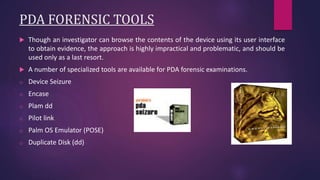
PDA FORENSIC TOOLS
 Though an investigator can browse the contents of the device using its user interface
to obtain evidence, the approach is highly impractical and problematic, and should be
used only as a last resort.
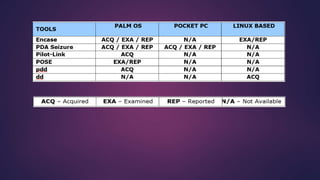
 A number of specialized tools are available for PDA forensic examinations.
o Device Seizure
o Encase
o Plam dd
o Pilot link
o Palm OS Emulator (POSE)
o Duplicate Disk (dd)
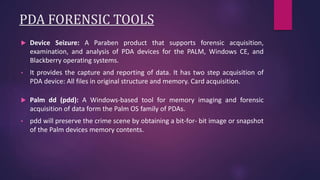
PDA FORENSIC TOOLS
 Device Seizure: A Paraben product that supports forensic acquisition,
examination, and analysis of PDA devices for the PALM, Windows CE, and
Blackberry operating systems.
• It provides the capture and reporting of data. It has two step acquisition of
PDA device: All files in original structure and memory. Card acquisition.
 Palm dd (pdd): A Windows-based tool for memory imaging and forensic
acquisition of data form the Palm OS family of PDAs.
• pdd will preserve the crime scene by obtaining a bit-for- bit image or snapshot
of the Palm devices memory contents.
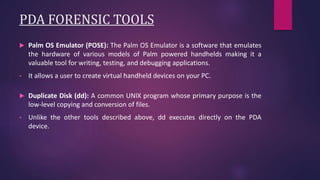
PDA FORENSIC TOOLS
 Palm OS Emulator (POSE): The Palm OS Emulator is a software that emulates
the hardware of various models of Palm powered handhelds making it a
valuable tool for writing, testing, and debugging applications.
• It allows a user to create virtual handheld devices on your PC.
 Duplicate Disk (dd): A common UNIX program whose primary purpose is the
low-level copying and conversion of files.
• Unlike the other tools described above, dd executes directly on the PDA
device.
DEVICE SEIZURE
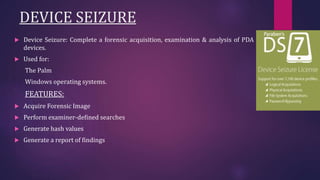
 Device Seizure: Complete a forensic acquisition, examination & analysis of PDA
devices.
 Used for:
The Palm
Windows operating systems.
FEATURES:
 Acquire Forensic Image
 Perform examiner-defined searches
 Generate hash values
 Generate a report of findings
Depending on the Device and the Model, Device Seizure™ can access the
following data:
Phonebook (from the phone’s memory and the SIM card)
Call History including Received, Dialed and Missed Calls
Datebook, Scheduler, and Calendar
Current Text Messages Deleted Text Messages
To-Do Lists Pictures and Videos
Quick-notes RAM/ROM
PDA Databases E-mail
Deleted Data
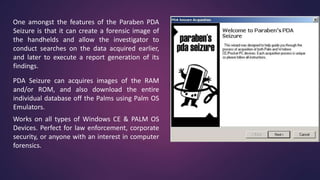
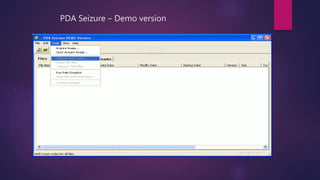
One amongst the features of the Paraben PDA
Seizure is that it can create a forensic image of
the handhelds and allow the investigator to
conduct searches on the data acquired earlier,
and later to execute a report generation of its
findings.
PDA Seizure can acquires images of the RAM
and/or ROM, and also download the entire
individual database off the Palms using Palm OS
Emulators.
Works on all types of Windows CE & PALM OS
Devices. Perfect for law enforcement, corporate
security, or anyone with an interest in computer
forensics.
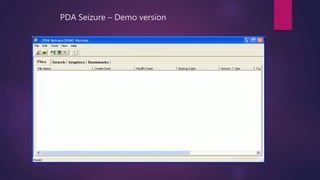
PDA Seizure – Demo version
REFERENCE
1. Sansurooah, Krishnun. "An overview and examination of digital PDA
devices under forensics toolkits."
2. Jansen, Wayne, and Rick Ayers. "An overview and analysis of PDA forensic
tools." National Institute of Standards and Technology(NIST).
3. Jansen, Wayne, and Rick Ayers. "Guidelines on PDA forensics." National
Institute of Standards and Technology(NIST), Special Publication 800.
pda forensics

pda forensics

  • 1.
    PDA FORENSICS PRESENTED BY: MEGHANAJ 01FM15ECS020 M.TECH 3RD SEM UNDER GUIDANCE OF: Dr. SANCHIKA GUPTA
  • 2.
    Agenda 1) Introduction 2) Componentsof PDA 3) Operating Systems 4) PDAs Generic States 5) Steps in forensic investigation of PDA 6) Forensic Considerations 7) Security Issues 8) PDA Forensic Tools 9) Tool- Device Seizure 10) References
  • 3.
    INTRODUCTION  PDA Shortfor personal digital assistant, this is the name given to small handheld devices that combine computing, telephone/fax, Internet and networking features.  A typical PDA can function as a cellular phone, fax sender, Web browser and personal organizer.  Used for communication, computation, and information storage and retrieval of both personal and business applications.  Contains personal and business information and happenings.  Most PDAs include a small keyboard, although many newer devices instead have an electronic touch-sensitive liquid crystal pad that can receive handwriting as input.
  • 4.
    PDA devices areavailable in many configurations, with various features. The list of available devices and models changes frequently as the technology improves: Psion Sharp Wizard Apple Newton Zaurus Blackberry Sony CLIE Hp iPAQ Pocket PC Tapwave Zodiac Hp Jornada Pocket PC AlphaSmart Dana Palm Pilot Dell Axim Tungsten GMate Yopy LifeDrive Fujitsu Siemens Loox Treo PocketMail Zire Psion Sharp Wizard Apple Newton Dell Axim
  • 5.
    Common PDA featuresinclude: • Note taking • Calculator • Clock • Calendar • Address book • Spreadsheets • E-mail and Internet access • Video and audio recording • Bluetooth, and WiFi • Radio and music players • Games • GPS (Global Positioning System) Information Stored in PDAs: PDA devices store the following types of information: • Business and personal notes • Business and personal contacts • Documents • Passwords • E-mails • Bank records • Company information • Images and videos Because PDAs are used to store sensitive and confidential information, care should be taken to protect them.
  • 6.
     PDAs canbe synchronized with desktop and notebook computers for data exchange.  Synchronization updates data on both systems to reflect the most recent additions and changes to their shared databases. This prevents data loss if the device is lost, stolen, or destroyed.  PDAs are usually synchronized with the PC by using synchronization software bundled with the handheld, such as HotSync Manager with Palm OS handhelds and Microsoft ActiveSync with Windows Mobile handhelds.  Portable Individuals carry it all the time and record important stuff and stay connected. Higher probability of finding some useful information.  PDAs are of high interest for investigators
  • 7.
    COMPONENTS OF PDA: Microprocessor  Read only memory (ROM) Holds Operating System for the device Varieties include Flash ROM, which can be erased and reprogrammed with OS updates  Random access memory (RAM) Contains user data Kept active by batteries Data lost when powered off  Hardware keys and other user interfaces  Liquid crystal display, sometimes touch sensitive
  • 8.
     Additionally WiFi, Bluetooth CardSlots SD/ MMD slot, Compact Flash(CF) slot etc Expansions Slots Battery Removable, rechargeable batteries
  • 9.
    OPERATING SYSTEMS  PALMOS: Palm OS is a compact operating system developed and licensed by PalmSource, Inc. • It is designed to be easy to use and similar compared with desktop operating system such as MS Windows.  Windows Mobile 5.0: Windows Mobile 5.0 marks the convergence of the phone Edition and Professional Edition operating systems into one system that contains both phone and PDA capabilities. Windows Mobile 5.0 is compatible with Microsoft's Smartphone operating system and is capable of running Smartphone applications.  Blackberry: RIM develops its own software for its devices, using C++ and Java technology.
  • 10.
    PDA GENERIC STATES Nascent State  Active State  Quiescent State  Semi-Active State PDAs are always in one of four distinct states
  • 11.
    I. Nascent state:The first state of the device when it is received from the manufacturer is the nascent state. In this state, devices do not have any user data, only factory configuration settings. The device returns to the nascent state after a hard reset or battery drain. II. Active state: In this state, devices are powered on and perform different tasks. Devices can be customized by the user and contain user data. Devices can be turned back to active state by performing a soft reset operation.
  • 12.
    III. Quiescent state:This is the sleep mode of the device, which conserves battery power to maintain the user’s data and perform other background activities. The device can be returned back to quiescent state by pressing the power button in the active state. IV. Semi-active state: This state is partway between active and quiescent. The device usually is sent into this state by a timer. The timer is triggered when the device becomes inactive for some period, and the semi-active state allows battery life to be preserved by dimming the display and taking other appropriate actions. The semi-active state becomes active when a screen tap, button press, or soft reset occurs. Devices not supporting the semi-active state go straight from the active state to the quiescent state after a certain period of inactivity. If the device is off, then it is considered to be in the quiescent state.
  • 13.
    STEPS IN FORENSICINVESTIGATION OF PDA 1. Identification 2. Collection 3. Examination 4. Documentation STEP 1: IDENTIFICATION We start the process by identifying the type of device we are investigating. Identify the operating system that the device is using.
  • 14.
    STEP 2: COLLECTION There are a multitude of these types of devices like: SD, micro-drives and universal serial bus (USB) tokens.  Information collected can be both volatile and dynamic information; We give the volatile information priority while we collect evidence.  Reason: Anything that is classified as volatile information will not survive if the machine is powered off or reset.  Once the information has been captured it is imperative that the PDA be placed into an evidence bag, and maintained at stable power support throughout.  After acquiring the evidence you must create an exact image to preserve the crime scene.  Once we have acquired the image it is time for us to examine the evidence.
  • 15.
    STEP 3: EXAMINATION •In the examination step of PDA forensics, we first need to understand the potential sources of the evidence. Source can be another device and any other peripherals devices, that the device being examined has come into contact with. • Peripheral devices May contain more useful information than the actual device • Attachments/ Accessories, hardware or software and their manuals • In addition to these sources you should also investigate any device that has synchronized with the PDA you are examining.
  • 16.
    STEP 4: Documentation •As with any component in the forensic process, it is critical that we maintain our documentation and "chain of custody." • As we collect our information and potential evidence, we need to record all visible data. • Our records must document the case number, and the date and time it was collected. • Additionally, the entire investigation area needs to be photographed. This includes any devices that can be connected to the PDA, or currently are connected to the PDA. • Another part of the documentation process is to generate a report that consists of the detailed information that describes the entire forensic process that you are performing. • Within this report you need to annotate the state and status of the device in question during your collection process. • The final step of the collection process consists of accumulating of all the information and storing it in a secure and safe location.
  • 17.
    FORENSIC CONSIDERATIONS  Whatto Report o Make, Model, Colour, Condition, Serial Number o IMEI number, SIM card number (if applicable) o Hardware/software used o Data recovered  Where to look for data o Depends on PDA model, Identify characteristics first o Calendar o Internet cache, settings o Text, Audio, Video o Messages sent/received o Call logs, Phone-book
  • 18.
    FORENSIC CONSIDERATIONS CONTD.. Left ON or OFF?? o Depends on the case at hand and the device o If left ON o Isolate the device from network o Battery will drain more quickly if the device searches for network. o If turned OFF o PDA may be password protected o May lose some useful information in the Dynamic RAM  Look around.. o Take charger and data cable (if applicable) o Look for manuals, PDA documentations
  • 19.
    PDA SECURITY ISSUES •Password theft • Wireless vulnerabilities • Device theft The major security issue with the PDA is the theft of the device itself. The best precaution to overcome this threat is by securing the data on the device in standalone mode (a mode in which the device is not connected to a wireless service provider). Wireless vulnerabilities: PDAs that use wireless services or wireless ports are also vulnerable to wireless attacks. The best solution to protect PDAs from wireless attacks is to install a VPN client on the PDA and encrypt the connection. Password theft: It can be reduced by using a lengthy secure password containing alphanumeric characters and symbols in order to make it more difficult to crack.
  • 20.
    PDA FORENSIC TOOLS Though an investigator can browse the contents of the device using its user interface to obtain evidence, the approach is highly impractical and problematic, and should be used only as a last resort.  A number of specialized tools are available for PDA forensic examinations. o Device Seizure o Encase o Plam dd o Pilot link o Palm OS Emulator (POSE) o Duplicate Disk (dd)
  • 21.
    PDA FORENSIC TOOLS Device Seizure: A Paraben product that supports forensic acquisition, examination, and analysis of PDA devices for the PALM, Windows CE, and Blackberry operating systems. • It provides the capture and reporting of data. It has two step acquisition of PDA device: All files in original structure and memory. Card acquisition.  Palm dd (pdd): A Windows-based tool for memory imaging and forensic acquisition of data form the Palm OS family of PDAs. • pdd will preserve the crime scene by obtaining a bit-for- bit image or snapshot of the Palm devices memory contents.
  • 22.
    PDA FORENSIC TOOLS Palm OS Emulator (POSE): The Palm OS Emulator is a software that emulates the hardware of various models of Palm powered handhelds making it a valuable tool for writing, testing, and debugging applications. • It allows a user to create virtual handheld devices on your PC.  Duplicate Disk (dd): A common UNIX program whose primary purpose is the low-level copying and conversion of files. • Unlike the other tools described above, dd executes directly on the PDA device.
  • 24.
    DEVICE SEIZURE  DeviceSeizure: Complete a forensic acquisition, examination & analysis of PDA devices.  Used for: The Palm Windows operating systems. FEATURES:  Acquire Forensic Image  Perform examiner-defined searches  Generate hash values  Generate a report of findings
  • 25.
    Depending on theDevice and the Model, Device Seizure™ can access the following data: Phonebook (from the phone’s memory and the SIM card) Call History including Received, Dialed and Missed Calls Datebook, Scheduler, and Calendar Current Text Messages Deleted Text Messages To-Do Lists Pictures and Videos Quick-notes RAM/ROM PDA Databases E-mail Deleted Data
  • 26.
    One amongst thefeatures of the Paraben PDA Seizure is that it can create a forensic image of the handhelds and allow the investigator to conduct searches on the data acquired earlier, and later to execute a report generation of its findings. PDA Seizure can acquires images of the RAM and/or ROM, and also download the entire individual database off the Palms using Palm OS Emulators. Works on all types of Windows CE & PALM OS Devices. Perfect for law enforcement, corporate security, or anyone with an interest in computer forensics.
  • 27.
    PDA Seizure –Demo version
  • 28.
    PDA Seizure –Demo version
  • 29.
    REFERENCE 1. Sansurooah, Krishnun."An overview and examination of digital PDA devices under forensics toolkits." 2. Jansen, Wayne, and Rick Ayers. "An overview and analysis of PDA forensic tools." National Institute of Standards and Technology(NIST). 3. Jansen, Wayne, and Rick Ayers. "Guidelines on PDA forensics." National Institute of Standards and Technology(NIST), Special Publication 800.