
Windows Forensic
MD Saquib Nasir Khan
(JONK)
DEA- Data64
www.malc0de.org
CONTENTS
• Recycle Bin Forensics
• Analyzing Prefetch File
• Analyzing Hiberfil.sys File
• Analyzing Paging File
• Analyzing thumbs.db file
• Registry Analysis
www.malc0de.org
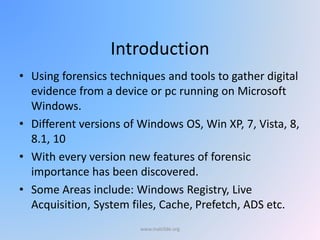
Introduction
• Using forensics techniques and tools to gather digital
evidence from a device or pc running on Microsoft
Windows.
• Different versions of Windows OS, Win XP, 7, Vista, 8,
8.1, 10
• With every version new features of forensic
importance has been discovered.
• Some Areas include: Windows Registry, Live
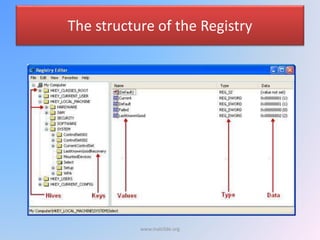
Acquisition, System files, Cache, Prefetch, ADS etc.
www.malc0de.org
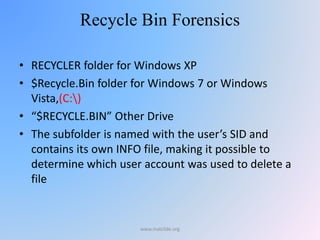
Recycle Bin Forensics
• RECYCLER folder for Windows XP
• $Recycle.Bin folder for Windows 7 or Windows
Vista,(C:)
• “$RECYCLE.BIN” Other Drive
• The subfolder is named with the user’s SID and
contains its own INFO file, making it possible to
determine which user account was used to delete a
file
www.malc0de.org
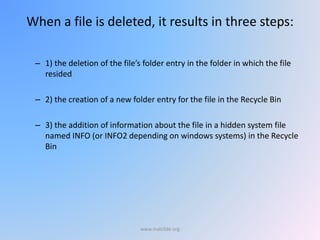
When a file is deleted, it results in three steps:
– 1) the deletion of the file’s folder entry in the folder in which the file
resided
– 2) the creation of a new folder entry for the file in the Recycle Bin
– 3) the addition of information about the file in a hidden system file
named INFO (or INFO2 depending on windows systems) in the Recycle
Bin
www.malc0de.org
Every file sent to the recycle bin is renamed in the following
format
D[ orginal drive letter of file][index no][original extension]
E.g. hw1.txt residing in C:My Documents was sent to empty
recycle bin
» Its new name is DC0.txt
www.malc0de.org
SID
• According to the Microsoft Developer Network (2009), the
SID is an alpha-numeric string that is used by Windows to
uniquely identify an object - like a user or a group
• “S” means the string is a Security Identifie
• “1” refers to the Revision Level. (This value has always
been 1)
• “5” is the identifier for the Authority Level or
“IdentifierAuthority”
• “500” at the end of the string, is the Domain or Local
Computer Identifier
• The “500” at the end is known as the Relative ID, and in
this case, “500” means the user is a system administrator
www.malc0de.org
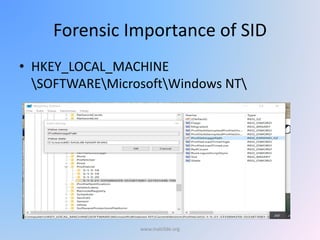
Forensic Importance of SID
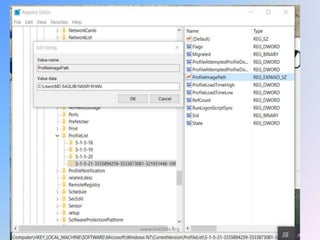
• HKEY_LOCAL_MACHINE
SOFTWAREMicrosoftWindows NT
www.malc0de.org
SID
• If there are three users and four drives,
• there will be four folders named $Recycle.Bin
(one on each drive)
• And within each of these $Recycle.Bin folders
will be three sub-folders with names that
correspond to the SID of each of the three
users
www.malc0de.org
METADATA ANALYSIS
• Inside recycle bin folder there are two sub
folder
– DC1.txt and INFO2
– DC1.txt contain the original file
– Info2 Contain Metadata
– There is only one INFO2 file for each user‟s
Recycle Bin, where all of the metadata for all of
the files/folders that are found in that Recycle Bin
is stored.
www.malc0de.org
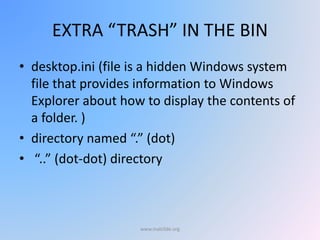
EXTRA “TRASH” IN THE BIN
• desktop.ini (file is a hidden Windows system
file that provides information to Windows
Explorer about how to display the contents of
a folder. )
• directory named “.” (dot)
• “..” (dot-dot) directory
www.malc0de.org
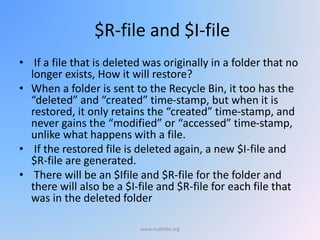
$R-file and $I-file
• If a file that is deleted was originally in a folder that no
longer exists, How it will restore?
• When a folder is sent to the Recycle Bin, it too has the
“deleted” and “created” time-stamp, but when it is
restored, it only retains the “created” time-stamp, and
never gains the “modified” or “accessed” time-stamp,
unlike what happens with a file.
• If the restored file is deleted again, a new $I-file and
$R-file are generated.
• There will be an $Ifile and $R-file for the folder and
there will also be a $I-file and $R-file for each file that
was in the deleted folder
www.malc0de.org
SHADOW COPIES
• Volume Shadow Copy Service
www.malc0de.org
PREFETCH FILES
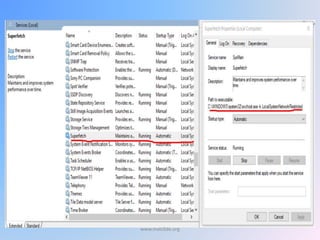
SuperFetch
• The Prefetching process tries to speed the
boot process and application startup
• The Prefetching process monitors the first 10
seconds of application startup
www.malc0de.org
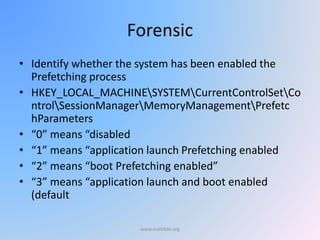
Forensic
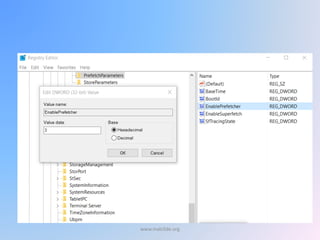
• Identify whether the system has been enabled the
Prefetching process
• HKEY_LOCAL_MACHINESYSTEMCurrentControlSetCo
ntrolSessionManagerMemoryManagementPrefetc
hParameters
• “0” means “disabled
• “1” means “application launch Prefetching enabled
• “2” means “boot Prefetching enabled”
• “3” means “application launch and boot enabled
(default
www.malc0de.org
www.malc0de.org
www.malc0de.org
Hibernate is a feature of many computer operating systems where the
contents of RAM are written to non-volatile storage such as a hard disk,
as a file or on a separate partition, before powering off the computer.
The computer uses the Hiberfil.sys file to store a copy of the system
memory on the hard disk when the hybrid sleep setting is turned on.
The Hiberfil.sys hidden system file is located in the root folder of the drive
where the operating system is installed and Windows Kernel Power
Manager reserves this file when you install Microsoft Windows.
The size of this file is approximately equal to the amount of random
access memory (RAM) that is installed on the computer.
ANALYZING HIBERFIL.SYS FILES
www.malc0de.org
A page file is a hidden file or files on the hard disk that the operating system uses
to hold parts of programs and data files that do not fit in memory.
Virtual memory comprises the paging file and physical memory or random access
memory (RAM).
Windows moves data from the paging file to memory as needed, and it moves
data from memory to the paging file to make room for new data.
By default, Windows stores the paging file on the boot partition (the partition that
contains the operating system and its support files). The default paging file size is
equal to 1.5 times the total RAM.
ANALYZING PAGING FILES
www.malc0de.org
The computer can be configured to clear the paging file at shutdown.
For this the data value of the ClearPageFileAtShutdown value in the
following registry key must be set to a value of 1:
HKEY_LOCAL_MACHINESYSTEMCurrentControlSetControlSession
ManagerMemory Management
ANALYZING PAGING FILES
www.malc0de.org
Thumbs.db is a hidden file used by Windows to store thumbnail
images of the files in a folder.
It is then used to display thumbnails when a folder is in Thumbnails
view.
Deleting images from a folder does not remove the thumbnail from
the thumbs.db database cache.
This makes the thumbs.db file useful from a forensic point of view.
FTex is useful utility for thumbs.db analysis.
ANALYZING THUMBS.DB FILES
www.malc0de.org
Registry Hive
• The five most hierarchal folders are called hives and begin with .HKEY (an
abbreviation for Handle to a Key).
• Although five hives can be seen, only two of these are actually real,
HKEY_USERS (HKU) and HKEY_LOCAL_MACHINE (HKLM).
• The other three are shortcuts or aliases to branches within one of the two
hives.
www.malc0de.org
REGISTRY ANALYSIS
www.malc0de.org
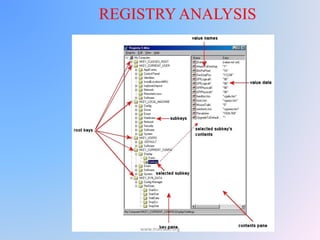
The structure of the Registry
www.malc0de.org
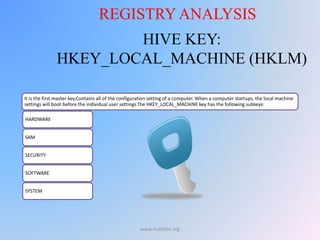
HIVE KEY:
HKEY_LOCAL_MACHINE (HKLM)
It is the first master key.Contains all of the configuration setting of a computer. When a computer startups, the local machine
settings will boot before the individual user settings.The HKEY_LOCAL_MACHINE key has the following subkeys:
HARDWARE
SAM
SECURITY
SOFTWARE
SYSTEM
REGISTRY ANALYSIS
www.malc0de.org
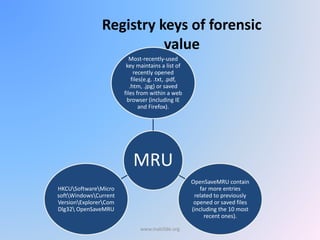
Registry keys of forensic
value
MRU
Most-recently-used
key maintains a list of
recently opened
files(e.g. .txt, .pdf,
.htm, .jpg) or saved
files from within a web
browser (including IE
and Firefox).
OpenSaveMRU contain
far more entries
related to previously
opened or saved files
(including the 10 most
recent ones).
HKCUSoftwareMicro
softWindowsCurrent
VersionExplorerCom
Dlg32 OpenSaveMRU
www.malc0de.org
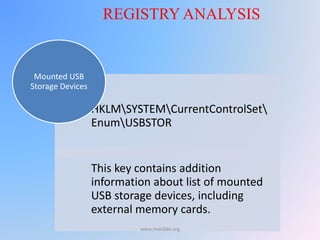
HKLMSYSTEMCurrentControlSet
EnumUSBSTOR
This key contains addition
information about list of mounted
USB storage devices, including
external memory cards.
Mounted USB
Storage Devices
REGISTRY ANALYSIS
www.malc0de.org
Device ID
• The device ID for a specific device identified.
• It should be noted that not all USB thumb
drives will have a serial number.
www.malc0de.org
REGISTRY ANALYSIS
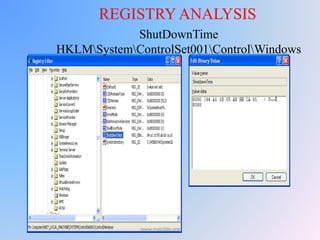
ShutDownTime
HKLMSystemControlSet001ControlWindows
www.malc0de.org
Autostart locations
• Used by a great many pieces of malware to
remain persistent on the victim system.
• Example:
HKEY_CURRENT_USERSoftwareMicros-
oftWindowsCurrentVersionRun
www.malc0de.org
Wireless SSIDs
• SSIDs (service set identifiers)
• This shows you which wireless networks
you’ve connected to, and if you travel and
make use of the ubiquitous wireless hotspots,
you’ll see quite a few entries there.
www.malc0de.org
Registry: A Wealth of Information
Information that can be recovered include:
– System Configuration
– Devices on the System
– User Names
– Personal Settings and Browser Preferences
– Web Browsing Activity
– Files Opened
– Programs Executed
– Passwords
www.malc0de.org
www.malc0de.org
Registry Organization
• Root Keys
– HKEY_CLASSES_ROOT (HKCR)
• Contains information in order that the correct program opens when executing a file with
Windows Explorer.
– HKEY_CURRENT_USER (HKCU)
• Contains the profile (settings, etc) about the user that is logged in.
– HKEY_LOCAL_MACHINE (HKLM)
• Contains system-wide hardware settings and configuration information.
– HKEY_USERS (HKU)
• Contains the root of all user profiles that exist on the system.
– HKEY_CURRENT_CONFIG (HKCC)
• Contains information about the hardware profile used by the computer during start up.
• Sub Keys – These are essentially sub directories that exist under the Root
Keys.
www.malc0de.org

Windows forensic

  • 1.
    Windows Forensic MD SaquibNasir Khan (JONK) DEA- Data64 www.malc0de.org
  • 2.
    CONTENTS • Recycle BinForensics • Analyzing Prefetch File • Analyzing Hiberfil.sys File • Analyzing Paging File • Analyzing thumbs.db file • Registry Analysis www.malc0de.org
  • 3.
    Introduction • Using forensicstechniques and tools to gather digital evidence from a device or pc running on Microsoft Windows. • Different versions of Windows OS, Win XP, 7, Vista, 8, 8.1, 10 • With every version new features of forensic importance has been discovered. • Some Areas include: Windows Registry, Live Acquisition, System files, Cache, Prefetch, ADS etc. www.malc0de.org
  • 4.
    Recycle Bin Forensics •RECYCLER folder for Windows XP • $Recycle.Bin folder for Windows 7 or Windows Vista,(C:) • “$RECYCLE.BIN” Other Drive • The subfolder is named with the user’s SID and contains its own INFO file, making it possible to determine which user account was used to delete a file www.malc0de.org
  • 5.
    When a fileis deleted, it results in three steps: – 1) the deletion of the file’s folder entry in the folder in which the file resided – 2) the creation of a new folder entry for the file in the Recycle Bin – 3) the addition of information about the file in a hidden system file named INFO (or INFO2 depending on windows systems) in the Recycle Bin www.malc0de.org
  • 6.
    Every file sentto the recycle bin is renamed in the following format D[ orginal drive letter of file][index no][original extension] E.g. hw1.txt residing in C:My Documents was sent to empty recycle bin » Its new name is DC0.txt www.malc0de.org
  • 7.
    SID • According tothe Microsoft Developer Network (2009), the SID is an alpha-numeric string that is used by Windows to uniquely identify an object - like a user or a group • “S” means the string is a Security Identifie • “1” refers to the Revision Level. (This value has always been 1) • “5” is the identifier for the Authority Level or “IdentifierAuthority” • “500” at the end of the string, is the Domain or Local Computer Identifier • The “500” at the end is known as the Relative ID, and in this case, “500” means the user is a system administrator www.malc0de.org
  • 8.
    Forensic Importance ofSID • HKEY_LOCAL_MACHINE SOFTWAREMicrosoftWindows NT www.malc0de.org
  • 9.
    SID • If thereare three users and four drives, • there will be four folders named $Recycle.Bin (one on each drive) • And within each of these $Recycle.Bin folders will be three sub-folders with names that correspond to the SID of each of the three users www.malc0de.org
  • 10.
    METADATA ANALYSIS • Insiderecycle bin folder there are two sub folder – DC1.txt and INFO2 – DC1.txt contain the original file – Info2 Contain Metadata – There is only one INFO2 file for each user‟s Recycle Bin, where all of the metadata for all of the files/folders that are found in that Recycle Bin is stored. www.malc0de.org
  • 11.
    EXTRA “TRASH” INTHE BIN • desktop.ini (file is a hidden Windows system file that provides information to Windows Explorer about how to display the contents of a folder. ) • directory named “.” (dot) • “..” (dot-dot) directory www.malc0de.org
  • 12.
    $R-file and $I-file •If a file that is deleted was originally in a folder that no longer exists, How it will restore? • When a folder is sent to the Recycle Bin, it too has the “deleted” and “created” time-stamp, but when it is restored, it only retains the “created” time-stamp, and never gains the “modified” or “accessed” time-stamp, unlike what happens with a file. • If the restored file is deleted again, a new $I-file and $R-file are generated. • There will be an $Ifile and $R-file for the folder and there will also be a $I-file and $R-file for each file that was in the deleted folder www.malc0de.org
  • 13.
    SHADOW COPIES • VolumeShadow Copy Service www.malc0de.org
  • 14.
    PREFETCH FILES SuperFetch • ThePrefetching process tries to speed the boot process and application startup • The Prefetching process monitors the first 10 seconds of application startup www.malc0de.org
  • 15.
    Forensic • Identify whetherthe system has been enabled the Prefetching process • HKEY_LOCAL_MACHINESYSTEMCurrentControlSetCo ntrolSessionManagerMemoryManagementPrefetc hParameters • “0” means “disabled • “1” means “application launch Prefetching enabled • “2” means “boot Prefetching enabled” • “3” means “application launch and boot enabled (default www.malc0de.org
  • 16.
  • 17.
  • 18.
    Hibernate is afeature of many computer operating systems where the contents of RAM are written to non-volatile storage such as a hard disk, as a file or on a separate partition, before powering off the computer. The computer uses the Hiberfil.sys file to store a copy of the system memory on the hard disk when the hybrid sleep setting is turned on. The Hiberfil.sys hidden system file is located in the root folder of the drive where the operating system is installed and Windows Kernel Power Manager reserves this file when you install Microsoft Windows. The size of this file is approximately equal to the amount of random access memory (RAM) that is installed on the computer. ANALYZING HIBERFIL.SYS FILES www.malc0de.org
  • 19.
    A page fileis a hidden file or files on the hard disk that the operating system uses to hold parts of programs and data files that do not fit in memory. Virtual memory comprises the paging file and physical memory or random access memory (RAM). Windows moves data from the paging file to memory as needed, and it moves data from memory to the paging file to make room for new data. By default, Windows stores the paging file on the boot partition (the partition that contains the operating system and its support files). The default paging file size is equal to 1.5 times the total RAM. ANALYZING PAGING FILES www.malc0de.org
  • 20.
    The computer canbe configured to clear the paging file at shutdown. For this the data value of the ClearPageFileAtShutdown value in the following registry key must be set to a value of 1: HKEY_LOCAL_MACHINESYSTEMCurrentControlSetControlSession ManagerMemory Management ANALYZING PAGING FILES www.malc0de.org
  • 21.
    Thumbs.db is ahidden file used by Windows to store thumbnail images of the files in a folder. It is then used to display thumbnails when a folder is in Thumbnails view. Deleting images from a folder does not remove the thumbnail from the thumbs.db database cache. This makes the thumbs.db file useful from a forensic point of view. FTex is useful utility for thumbs.db analysis. ANALYZING THUMBS.DB FILES www.malc0de.org
  • 22.
    Registry Hive • Thefive most hierarchal folders are called hives and begin with .HKEY (an abbreviation for Handle to a Key). • Although five hives can be seen, only two of these are actually real, HKEY_USERS (HKU) and HKEY_LOCAL_MACHINE (HKLM). • The other three are shortcuts or aliases to branches within one of the two hives. www.malc0de.org
  • 23.
  • 24.
    The structure ofthe Registry www.malc0de.org
  • 25.
    HIVE KEY: HKEY_LOCAL_MACHINE (HKLM) Itis the first master key.Contains all of the configuration setting of a computer. When a computer startups, the local machine settings will boot before the individual user settings.The HKEY_LOCAL_MACHINE key has the following subkeys: HARDWARE SAM SECURITY SOFTWARE SYSTEM REGISTRY ANALYSIS www.malc0de.org
  • 26.
    Registry keys offorensic value MRU Most-recently-used key maintains a list of recently opened files(e.g. .txt, .pdf, .htm, .jpg) or saved files from within a web browser (including IE and Firefox). OpenSaveMRU contain far more entries related to previously opened or saved files (including the 10 most recent ones). HKCUSoftwareMicro softWindowsCurrent VersionExplorerCom Dlg32 OpenSaveMRU www.malc0de.org
  • 27.
    HKLMSYSTEMCurrentControlSet EnumUSBSTOR This key containsaddition information about list of mounted USB storage devices, including external memory cards. Mounted USB Storage Devices REGISTRY ANALYSIS www.malc0de.org
  • 28.
    Device ID • Thedevice ID for a specific device identified. • It should be noted that not all USB thumb drives will have a serial number. www.malc0de.org
  • 29.
  • 30.
    Autostart locations • Usedby a great many pieces of malware to remain persistent on the victim system. • Example: HKEY_CURRENT_USERSoftwareMicros- oftWindowsCurrentVersionRun www.malc0de.org
  • 31.
    Wireless SSIDs • SSIDs(service set identifiers) • This shows you which wireless networks you’ve connected to, and if you travel and make use of the ubiquitous wireless hotspots, you’ll see quite a few entries there. www.malc0de.org
  • 32.
    Registry: A Wealthof Information Information that can be recovered include: – System Configuration – Devices on the System – User Names – Personal Settings and Browser Preferences – Web Browsing Activity – Files Opened – Programs Executed – Passwords www.malc0de.org
  • 33.
  • 34.
    Registry Organization • RootKeys – HKEY_CLASSES_ROOT (HKCR) • Contains information in order that the correct program opens when executing a file with Windows Explorer. – HKEY_CURRENT_USER (HKCU) • Contains the profile (settings, etc) about the user that is logged in. – HKEY_LOCAL_MACHINE (HKLM) • Contains system-wide hardware settings and configuration information. – HKEY_USERS (HKU) • Contains the root of all user profiles that exist on the system. – HKEY_CURRENT_CONFIG (HKCC) • Contains information about the hardware profile used by the computer during start up. • Sub Keys – These are essentially sub directories that exist under the Root Keys. www.malc0de.org