Hardware and SoftwareHardware and Software
ComponentsComponents
Question:Question:
 What is the difference between hardwareWhat is the difference between hardware
and software?and software?
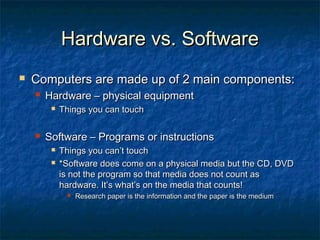
Hardware vs. SoftwareHardware vs. Software
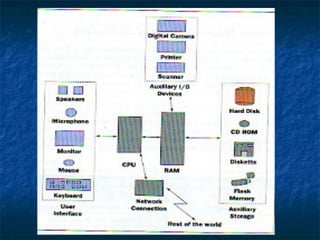
 Computers are made up of 2 main components:Computers are made up of 2 main components:
 Hardware – physical equipmentHardware – physical equipment
 Things you can touchThings you can touch
 Software – Programs or instructionsSoftware – Programs or instructions
 Things you can’t touchThings you can’t touch
 *Software does come on a physical media but the CD, DVD*Software does come on a physical media but the CD, DVD
is not the program so that media does not count asis not the program so that media does not count as
hardware. It’s what’s on the media that counts!hardware. It’s what’s on the media that counts!
 Research paper is the information and the paper is the mediumResearch paper is the information and the paper is the medium
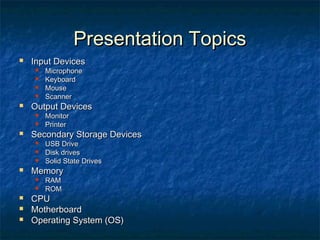
Presentation TopicsPresentation Topics
 Input DevicesInput Devices
 MicrophoneMicrophone
 KeyboardKeyboard
 MouseMouse
 ScannerScanner
 Output DevicesOutput Devices
 MonitorMonitor
 PrinterPrinter
 Secondary Storage DevicesSecondary Storage Devices
 USB DriveUSB Drive
 Disk drivesDisk drives
 Solid State DrivesSolid State Drives
 MemoryMemory
 RAMRAM
 ROMROM
 CPUCPU
 MotherboardMotherboard
 Operating System (OS)Operating System (OS)
SoftwareSoftware
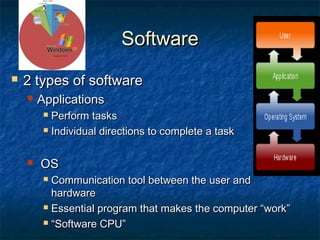
 2 types of software2 types of software
 ApplicationsApplications
 Perform tasksPerform tasks
 Individual directions to complete a taskIndividual directions to complete a task
 OSOS
 Communication tool between the user andCommunication tool between the user and
hardwarehardware
 Essential program that makes the computer “work”Essential program that makes the computer “work”
 ““Software CPU”Software CPU”
SoftwareSoftware
 2 types of software2 types of software
 ApplicationsApplications
 Perform tasksPerform tasks
 Individual directions to complete a taskIndividual directions to complete a task
 OSOS
 Communication tool between the user andCommunication tool between the user and
hardwarehardware
 Essential program that makes the computer “work”Essential program that makes the computer “work”
 ““Software CPU”Software CPU”

Hardware vs. Software Presentations

  • 1.
    Hardware and SoftwareHardwareand Software ComponentsComponents
  • 2.
    Question:Question:  What isthe difference between hardwareWhat is the difference between hardware and software?and software?
  • 3.
    Hardware vs. SoftwareHardwarevs. Software  Computers are made up of 2 main components:Computers are made up of 2 main components:  Hardware – physical equipmentHardware – physical equipment  Things you can touchThings you can touch  Software – Programs or instructionsSoftware – Programs or instructions  Things you can’t touchThings you can’t touch  *Software does come on a physical media but the CD, DVD*Software does come on a physical media but the CD, DVD is not the program so that media does not count asis not the program so that media does not count as hardware. It’s what’s on the media that counts!hardware. It’s what’s on the media that counts!  Research paper is the information and the paper is the mediumResearch paper is the information and the paper is the medium
  • 4.
    Presentation TopicsPresentation Topics Input DevicesInput Devices  MicrophoneMicrophone  KeyboardKeyboard  MouseMouse  ScannerScanner  Output DevicesOutput Devices  MonitorMonitor  PrinterPrinter  Secondary Storage DevicesSecondary Storage Devices  USB DriveUSB Drive  Disk drivesDisk drives  Solid State DrivesSolid State Drives  MemoryMemory  RAMRAM  ROMROM  CPUCPU  MotherboardMotherboard  Operating System (OS)Operating System (OS)
  • 6.
    SoftwareSoftware  2 typesof software2 types of software  ApplicationsApplications  Perform tasksPerform tasks  Individual directions to complete a taskIndividual directions to complete a task  OSOS  Communication tool between the user andCommunication tool between the user and hardwarehardware  Essential program that makes the computer “work”Essential program that makes the computer “work”  ““Software CPU”Software CPU”
  • 7.
    SoftwareSoftware  2 typesof software2 types of software  ApplicationsApplications  Perform tasksPerform tasks  Individual directions to complete a taskIndividual directions to complete a task  OSOS  Communication tool between the user andCommunication tool between the user and hardwarehardware  Essential program that makes the computer “work”Essential program that makes the computer “work”  ““Software CPU”Software CPU”