Processing Crime and
Incident Scenes
2
Identifying Digital Evidence
• Digital evidence
• Can be any information stored or transmitted in digital form
• U.S. courts accept digital evidence as physical evidence
• Digital data is treated as a tangible object
• Groups such as the ScientificWorking Group on Digital Evidence (SWGDE) set
standards for recovering, preserving, and examining digital evidence
• General tasks investigators perform when working with digital evidence:
• Identify digital information or artifacts that can be used as evidence
• Collect, preserve, and document evidence
• Analyze, identify, and organize evidence
• Rebuild evidence or repeat a situation to verify that the results can be reproduced reliably
• Collecting digital devices and processing a criminal or incident scene must be done
systematically
3
Understanding Rules of Evidence
• Consistent practices help verify your work and enhance your
credibility
• Comply with your state’s rules of evidence or with
the Federal Rules of Evidence
• Keep current on the latest rulings and directives on
collecting, processing, storing, and admitting
digital evidence
• Collecting evidence according to the proper steps of evidence control
helps ensure that the computer evidence is authentic
• One test to prove that computer-stored records are authentic is to
demonstrate that a specific person created the records
• The author of a MicrosoftWord document can be identified by using file
metadata
4
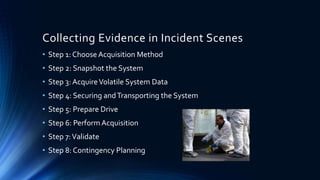
Collecting Evidence in Incident Scenes
• Step 1: Choose Acquisition Method
• Step 2: Snapshot the System
• Step 3: AcquireVolatile System Data
• Step 4: Securing andTransporting the System
• Step 5: Prepare Drive
• Step 6: PerformAcquisition
• Step 7:Validate
• Step 8: Contingency Planning
Collecting Evidence in Private-Sector
Incident Scenes
• A special category of private-sector businesses includes ISPs and other
communication companies
• ISPs can investigate computer abuse committed by their employees, but not
by customers
• Except for activities that are deemed to create an emergency situation
• Investigating and controlling computer incident scenes in the corporate
environment
• Much easier than in the criminal environment
• Incident scene is often a workplace
• Typically, businesses have inventory databases of computer hardware and
software
• Help identify the computer forensics tools needed to analyze a policy violation
• And the best way to conduct the analysis
• Corporate policy statement about misuse of digital assets
• Allows corporate investigators to conduct covert surveillance with little or no cause
• And access company systems without a warrant
• Companies should display a warning banner and publish a policy
• Stating that they reserve the right to inspect computing assets at will
• Corporate investigators should know under what circumstances they can
examine an employee’s computer
• Every organization must have a well-defined process describing when an investigation
can be initiated
• If a corporate investigator finds that an employee is committing or has
committed a crime
• Employer can file a criminal complaint with the police
• Employers are usually interested in enforcing company policy
• Not seeking out and prosecuting employees
• Corporate investigators are, therefore, primarily concerned with protecting
company assets
• If you discover evidence of a crime during a company policy investigation
• Determine whether the incident meets the elements of criminal law
• Inform management of the incident
• Stop your investigation to make sure you don’t violate Fourth Amendment restrictions
on obtaining evidence
• Work with the corporate attorney on how to respond to a police request for more
information
5
6
Processing Law Enforcement Crime Scenes
• You must be familiar with criminal rules of search and seizure
• You should also understand how a search warrant works and what to do when you
process one
• Law enforcement officer may search for and seize criminal evidence only with
probable cause
• Refers to the standard specifying whether a police officer has the right to make an arrest,
conduct a personal or property search, or obtain a warrant for arrest
• With probable cause, a police officer can obtain a search warrant from a judge
• That authorizes a search and seizure of specific evidence related to the criminal complaint
• The Fourth Amendment states that only warrants “particularly describing the place
to be searched, and the persons or things to be seized” can be issued
7
Identifying the Type of OS or Digital Device
• For law enforcement
• This step might be difficult because the crime scene isn’t controlled
• If you can identify the OS or device
• Estimate the size of the drive on the suspect’s computer
• And how many devices to process at the scene
• Determine which OSs and hardware are involved
8
Determining WhetherYou Can Seize
Computers and Digital Devices
• The type of case and location of the evidence
• Determine whether you can remove digital evidence
• Law enforcement investigators need a warrant to remove computers from a crime
scene
• And transport them to a lab
• If removing the computers will irreparably harm a business
• The computers should not be taken offsite
• Additional complications:
• Files stored offsite that are accessed remotely
• Availability of cloud storage, which can’t be located physically
• Stored on drives where data from many other subscribers might be stored
• If you aren’t allowed to take the computers to your lab
• Determine the resources you need to acquire digital evidence and which tools can speed data
acquisition
9
Getting a Detailed Description of the
Location
• Get as much information as you can about the location of a digital
crime
• Identify potential hazards
• Interact with your HAZMAT (hazardous materials) team
• HAZMAT guidelines
• Put the target drive in a special HAZMAT bag
• HAZMAT technician can decontaminate the bag
• Check for high temperatures
10
Using Additional Technical Expertise
• Determine whether you need specialized help to process the incident
or crime scene
• You may need to look for specialists in:
• OSs
• RAID servers
• Databases
• Finding the right person can be a challenge
• Educate specialists in investigative techniques
• Prevent evidence damage
11
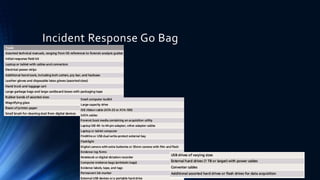
Incident Response Go Bag
12
Securing a Computer Incident or Crime
Scene
• Goals
• Preserve the evidence
• Keep information confidential
• Define a secure perimeter
• Use yellow barrier tape
• Legal authority for a corporate incident includes trespassing violations
• For a crime scene, it includes obstructing justice or failing to comply with a police officer
• Professional curiosity can destroy evidence
• Involves police officers and other professionals who aren’t part of the crime scene processing
team
• Automated Fingerprint Identification System (AFIS)
• A computerized system for identifying fingerprints that’s connected to a central database
• Used to identify criminal suspects and review thousands of fingerprint samples at high speed
• Police can take elimination prints of everyone who had access to the crime scene
13
Seizing Digital Evidence at the Scene
• Law enforcement can seize evidence
• With a proper warrant
• Corporate investigators might have the authority only to
make an image of the suspect’s drive
• When seizing digital evidence in criminal investigations
• Follow U.S. DoJ standards for seizing digital data
• Civil investigations follow same rules
• Require less documentation though
• Consult with your attorney for extra guidelines
14
Preparing to Acquire Digital Evidence
• The evidence you acquire at the scene depends on the nature of the case
• And the alleged crime or violation
• Do you need to take the entire computer and all peripherals and media in the
immediate area?
• How are you going to protect the computer and media while transporting them to
your lab?
• Is the computer powered on when you arrive?
• Is the suspect you’re investigating in the immediate area of the computer?
• Is it possible the suspect damaged or destroyed the computer, peripherals, or media?
• Will you have to separate the suspect from the computer?
Processing an Incident or Crime Scene
• Guidelines
• Keep a journal to document your activities
• Secure the scene
• Be professional and courteous with onlookers
• Remove people who are not part of the investigation
• Take video and still recordings of the area around the
computer
• Pay attention to details
• Sketch the incident or crime scene
• Check state of computers as soon as possible
• Don’t cut electrical power to a running system unless it’s
an older Windows 9x or MS-DOS system
• Save data from current applications as safely as possible
• Record all active windows or shell sessions
• Make notes of everything you do when copying data
from a live suspect computer
• Close applications and shut down the computer
• Bag and tag the evidence, following these steps:
• Assign one person to collect and log all evidence
• Tag all evidence you collect with the current date and
time, serial numbers or unique features, make and model,
and the name of the person who collected it
• Maintain two separate logs of collected evidence
• Maintain constant control of the collected evidence and
the crime or incident scene
• Look for information related to the investigation
• Passwords, passphrases, PINs, bank accounts
• Collect documentation and media related to the
investigation
• Hardware, software, backup media, documentation,
manuals
15
16
Documenting Evidence in the Lab
• Record your activities and findings as you work
• Maintain a journal to record the steps you take as you process evidence
• Your goal is to be able to reproduce the same results
• When you or another investigator repeat the steps you took to collect
evidence
• A journal serves as a reference that documents the methods
you used to process digital evidence
17
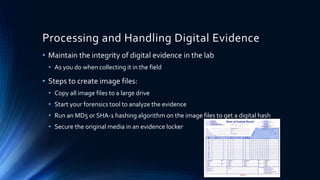
Processing and Handling Digital Evidence
• Maintain the integrity of digital evidence in the lab
• As you do when collecting it in the field
• Steps to create image files:
• Copy all image files to a large drive
• Start your forensics tool to analyze the evidence
• Run an MD5 or SHA-1 hashing algorithm on the image files to get a digital hash
• Secure the original media in an evidence locker
18
Evidence Retention and Media Storage
Needs
• To help maintain the chain of custody for digital evidence
• Restrict access to lab and evidence storage area
• Lab should have a sign-in roster for all visitors
• Maintain logs for a period based on legal requirements
• You might need to retain evidence indefinitely
• Check with your local prosecuting attorney’s office or state laws to make sure
you’re in compliance
19
Creating a Case
• General tasks you perform in any computer forensics case:
• Identify the case requirements
• Plan your investigation
• Conduct the investigation
• Data Acquisition
• Complete the case report
• Critique the case
Sample Cases
• Civil Cases
• Most cases in the corporate environment
are considered low-level investigations
• Or noncriminal cases
• Common activities and practices
• Recover specific evidence
• Suspect’sOutlook e-mail folder (PST file)
• Covert surveillance
• Its use must be well defined in the company policy
• Risk of civil or criminal liability
• Sniffing tools for data transmissions
• Criminal Cases
• Computer crimes examples
• Fraud
• Check fraud
• Homicides
• Need a warrant to start seizing evidence
• Limit searching area
20
Summary
• Digital evidence is anything stored or transmitted
on electronic or optical media
• In the private sector, incident scene is often in a
contained and controlled area
• Companies should publish the right to inspect
computer assets policy
• Private and public sectors follow same computing
investigation rules
• Criminal cases
• Require warrants
• Protect your safety and health as well as the
integrity of the evidence
• Follow guidelines when processing an incident or
crime scene
• Security perimeter
• Video recording
• As you collect digital evidence, guard against
physically destroying or contaminating it
• Forensic hash values verify that data or storage
media have not been altered
• To analyze computer forensics data, learn to use
more than one vendor tool
• You must handle all evidence the same way every
time you handle it
• After you determine that an incident scene has
digital evidence, identify the digital information or
artifacts that can be used as evidence21

Processing Crimes and Incident Scenes

  • 1.
  • 2.
    2 Identifying Digital Evidence •Digital evidence • Can be any information stored or transmitted in digital form • U.S. courts accept digital evidence as physical evidence • Digital data is treated as a tangible object • Groups such as the ScientificWorking Group on Digital Evidence (SWGDE) set standards for recovering, preserving, and examining digital evidence • General tasks investigators perform when working with digital evidence: • Identify digital information or artifacts that can be used as evidence • Collect, preserve, and document evidence • Analyze, identify, and organize evidence • Rebuild evidence or repeat a situation to verify that the results can be reproduced reliably • Collecting digital devices and processing a criminal or incident scene must be done systematically
  • 3.
    3 Understanding Rules ofEvidence • Consistent practices help verify your work and enhance your credibility • Comply with your state’s rules of evidence or with the Federal Rules of Evidence • Keep current on the latest rulings and directives on collecting, processing, storing, and admitting digital evidence • Collecting evidence according to the proper steps of evidence control helps ensure that the computer evidence is authentic • One test to prove that computer-stored records are authentic is to demonstrate that a specific person created the records • The author of a MicrosoftWord document can be identified by using file metadata
  • 4.
    4 Collecting Evidence inIncident Scenes • Step 1: Choose Acquisition Method • Step 2: Snapshot the System • Step 3: AcquireVolatile System Data • Step 4: Securing andTransporting the System • Step 5: Prepare Drive • Step 6: PerformAcquisition • Step 7:Validate • Step 8: Contingency Planning
  • 5.
    Collecting Evidence inPrivate-Sector Incident Scenes • A special category of private-sector businesses includes ISPs and other communication companies • ISPs can investigate computer abuse committed by their employees, but not by customers • Except for activities that are deemed to create an emergency situation • Investigating and controlling computer incident scenes in the corporate environment • Much easier than in the criminal environment • Incident scene is often a workplace • Typically, businesses have inventory databases of computer hardware and software • Help identify the computer forensics tools needed to analyze a policy violation • And the best way to conduct the analysis • Corporate policy statement about misuse of digital assets • Allows corporate investigators to conduct covert surveillance with little or no cause • And access company systems without a warrant • Companies should display a warning banner and publish a policy • Stating that they reserve the right to inspect computing assets at will • Corporate investigators should know under what circumstances they can examine an employee’s computer • Every organization must have a well-defined process describing when an investigation can be initiated • If a corporate investigator finds that an employee is committing or has committed a crime • Employer can file a criminal complaint with the police • Employers are usually interested in enforcing company policy • Not seeking out and prosecuting employees • Corporate investigators are, therefore, primarily concerned with protecting company assets • If you discover evidence of a crime during a company policy investigation • Determine whether the incident meets the elements of criminal law • Inform management of the incident • Stop your investigation to make sure you don’t violate Fourth Amendment restrictions on obtaining evidence • Work with the corporate attorney on how to respond to a police request for more information 5
  • 6.
    6 Processing Law EnforcementCrime Scenes • You must be familiar with criminal rules of search and seizure • You should also understand how a search warrant works and what to do when you process one • Law enforcement officer may search for and seize criminal evidence only with probable cause • Refers to the standard specifying whether a police officer has the right to make an arrest, conduct a personal or property search, or obtain a warrant for arrest • With probable cause, a police officer can obtain a search warrant from a judge • That authorizes a search and seizure of specific evidence related to the criminal complaint • The Fourth Amendment states that only warrants “particularly describing the place to be searched, and the persons or things to be seized” can be issued
  • 7.
    7 Identifying the Typeof OS or Digital Device • For law enforcement • This step might be difficult because the crime scene isn’t controlled • If you can identify the OS or device • Estimate the size of the drive on the suspect’s computer • And how many devices to process at the scene • Determine which OSs and hardware are involved
  • 8.
    8 Determining WhetherYou CanSeize Computers and Digital Devices • The type of case and location of the evidence • Determine whether you can remove digital evidence • Law enforcement investigators need a warrant to remove computers from a crime scene • And transport them to a lab • If removing the computers will irreparably harm a business • The computers should not be taken offsite • Additional complications: • Files stored offsite that are accessed remotely • Availability of cloud storage, which can’t be located physically • Stored on drives where data from many other subscribers might be stored • If you aren’t allowed to take the computers to your lab • Determine the resources you need to acquire digital evidence and which tools can speed data acquisition
  • 9.
    9 Getting a DetailedDescription of the Location • Get as much information as you can about the location of a digital crime • Identify potential hazards • Interact with your HAZMAT (hazardous materials) team • HAZMAT guidelines • Put the target drive in a special HAZMAT bag • HAZMAT technician can decontaminate the bag • Check for high temperatures
  • 10.
    10 Using Additional TechnicalExpertise • Determine whether you need specialized help to process the incident or crime scene • You may need to look for specialists in: • OSs • RAID servers • Databases • Finding the right person can be a challenge • Educate specialists in investigative techniques • Prevent evidence damage
  • 11.
  • 12.
    12 Securing a ComputerIncident or Crime Scene • Goals • Preserve the evidence • Keep information confidential • Define a secure perimeter • Use yellow barrier tape • Legal authority for a corporate incident includes trespassing violations • For a crime scene, it includes obstructing justice or failing to comply with a police officer • Professional curiosity can destroy evidence • Involves police officers and other professionals who aren’t part of the crime scene processing team • Automated Fingerprint Identification System (AFIS) • A computerized system for identifying fingerprints that’s connected to a central database • Used to identify criminal suspects and review thousands of fingerprint samples at high speed • Police can take elimination prints of everyone who had access to the crime scene
  • 13.
    13 Seizing Digital Evidenceat the Scene • Law enforcement can seize evidence • With a proper warrant • Corporate investigators might have the authority only to make an image of the suspect’s drive • When seizing digital evidence in criminal investigations • Follow U.S. DoJ standards for seizing digital data • Civil investigations follow same rules • Require less documentation though • Consult with your attorney for extra guidelines
  • 14.
    14 Preparing to AcquireDigital Evidence • The evidence you acquire at the scene depends on the nature of the case • And the alleged crime or violation • Do you need to take the entire computer and all peripherals and media in the immediate area? • How are you going to protect the computer and media while transporting them to your lab? • Is the computer powered on when you arrive? • Is the suspect you’re investigating in the immediate area of the computer? • Is it possible the suspect damaged or destroyed the computer, peripherals, or media? • Will you have to separate the suspect from the computer?
  • 15.
    Processing an Incidentor Crime Scene • Guidelines • Keep a journal to document your activities • Secure the scene • Be professional and courteous with onlookers • Remove people who are not part of the investigation • Take video and still recordings of the area around the computer • Pay attention to details • Sketch the incident or crime scene • Check state of computers as soon as possible • Don’t cut electrical power to a running system unless it’s an older Windows 9x or MS-DOS system • Save data from current applications as safely as possible • Record all active windows or shell sessions • Make notes of everything you do when copying data from a live suspect computer • Close applications and shut down the computer • Bag and tag the evidence, following these steps: • Assign one person to collect and log all evidence • Tag all evidence you collect with the current date and time, serial numbers or unique features, make and model, and the name of the person who collected it • Maintain two separate logs of collected evidence • Maintain constant control of the collected evidence and the crime or incident scene • Look for information related to the investigation • Passwords, passphrases, PINs, bank accounts • Collect documentation and media related to the investigation • Hardware, software, backup media, documentation, manuals 15
  • 16.
    16 Documenting Evidence inthe Lab • Record your activities and findings as you work • Maintain a journal to record the steps you take as you process evidence • Your goal is to be able to reproduce the same results • When you or another investigator repeat the steps you took to collect evidence • A journal serves as a reference that documents the methods you used to process digital evidence
  • 17.
    17 Processing and HandlingDigital Evidence • Maintain the integrity of digital evidence in the lab • As you do when collecting it in the field • Steps to create image files: • Copy all image files to a large drive • Start your forensics tool to analyze the evidence • Run an MD5 or SHA-1 hashing algorithm on the image files to get a digital hash • Secure the original media in an evidence locker
  • 18.
    18 Evidence Retention andMedia Storage Needs • To help maintain the chain of custody for digital evidence • Restrict access to lab and evidence storage area • Lab should have a sign-in roster for all visitors • Maintain logs for a period based on legal requirements • You might need to retain evidence indefinitely • Check with your local prosecuting attorney’s office or state laws to make sure you’re in compliance
  • 19.
    19 Creating a Case •General tasks you perform in any computer forensics case: • Identify the case requirements • Plan your investigation • Conduct the investigation • Data Acquisition • Complete the case report • Critique the case
  • 20.
    Sample Cases • CivilCases • Most cases in the corporate environment are considered low-level investigations • Or noncriminal cases • Common activities and practices • Recover specific evidence • Suspect’sOutlook e-mail folder (PST file) • Covert surveillance • Its use must be well defined in the company policy • Risk of civil or criminal liability • Sniffing tools for data transmissions • Criminal Cases • Computer crimes examples • Fraud • Check fraud • Homicides • Need a warrant to start seizing evidence • Limit searching area 20
  • 21.
    Summary • Digital evidenceis anything stored or transmitted on electronic or optical media • In the private sector, incident scene is often in a contained and controlled area • Companies should publish the right to inspect computer assets policy • Private and public sectors follow same computing investigation rules • Criminal cases • Require warrants • Protect your safety and health as well as the integrity of the evidence • Follow guidelines when processing an incident or crime scene • Security perimeter • Video recording • As you collect digital evidence, guard against physically destroying or contaminating it • Forensic hash values verify that data or storage media have not been altered • To analyze computer forensics data, learn to use more than one vendor tool • You must handle all evidence the same way every time you handle it • After you determine that an incident scene has digital evidence, identify the digital information or artifacts that can be used as evidence21

Editor's Notes

  • #3 Identifying Digital Evidence Digital evidence Can be any information stored or transmitted in digital form U.S. courts accept digital evidence as physical evidence Digital data is treated as a tangible object Groups such as the Scientific Working Group on Digital Evidence (SWGDE) set standards for recovering, preserving, and examining digital evidence
  • #4 Evidence admitted in a criminal case can be used in a civil suit, and vice versa Digital evidence is unlike other physical evidence because it can be changed more easily The only way to detect these changes is to compare the original data with a duplicate Most federal courts have interpreted computer records as hearsay evidence Hearsay is secondhand or indirect evidence Computer and digitally stored records must be shown to be authentic and trustworthy To be admitted into evidence Computer-generated records are considered authentic if the program that created the output is functioning correctly Usually considered an exception to hearsay rule As long as bit-stream copies of data are created and maintained properly The copies can be admitted in court, although they aren’t considered best evidence Example of not being able to use original evidence Investigations involving network servers Removing a server from the network to acquire evidence data could cause harm to a business or its owner, who might be an innocent bystander to a crime or civil wrong USE THESE AS QUESTION POINTS FOR DISCUSSION Follow the steps starting on page 141 of the text to see how to identify file metadata timestomp as well to verify integrity of metadata
  • #5 Before initiating the search: Review facts, plans, and objectives with the investigation team you have assembled Goal of scene processing To collect and secure digital evidence Digital evidence is volatile Develop skills to assess facts quickly Slow response can cause digital evidence to be lost
  • #6 Collecting Evidence in Private-Sector Incident Scenes A special category of private-sector businesses includes ISPs and other communication companies ISPs can investigate computer abuse committed by their employees, but not by customers Except for activities that are deemed to create an emergency situation Investigating and controlling computer incident scenes in the corporate environment Much easier than in the criminal environment Incident scene is often a workplace Al lot of time its outside agencies hired as third parties to investigate and respond
  • #7 Processing Law Enforcement Crime Scenes You must be familiar with criminal rules of search and seizure You should also understand how a search warrant works and what to do when you process one Law enforcement officer may search for and seize criminal evidence only with probable cause Refers to the standard specifying whether a police officer has the right to make an arrest, conduct a personal or property search, or obtain a warrant for arrest
  • #8 Identifying the Type of OS or Digital Device For law enforcement This step might be difficult because the crime scene isn’t controlled If you can identify the OS or device Estimate the size of the drive on the suspect’s computer And how many devices to process at the scene Determine which OSs and hardware are involved
  • #9 Determining Whether You Can Seize Computers and Digital Devices The type of case and location of the evidence Determine whether you can remove digital evidence Law enforcement investigators need a warrant to remove computers from a crime scene And transport them to a lab If removing the computers will irreparably harm a business The computers should not be taken offsite
  • #10 Getting a Detailed Description of the Location Get as much information as you can about the location of a digital crime Identify potential hazards Interact with your HAZMAT (hazardous materials) team HAZMAT guidelines Put the target drive in a special HAZMAT bag HAZMAT technician can decontaminate the bag Check for high temperatures
  • #11 Using Additional Technical Expertise Determine whether you need specialized help to process the incident or crime scene You may need to look for specialists in: OSs RAID servers Databases Finding the right person can be a challenge Educate specialists in investigative techniques Prevent evidence damage
  • #12 Determining the Tools You Need Table 4-1 Tools in an initial-response field kit
  • #13 Securing a Computer Incident or Crime Scene Goals Preserve the evidence Keep information confidential Define a secure perimeter Use yellow barrier tape Legal authority for a corporate incident includes trespassing violations For a crime scene, it includes obstructing justice or failing to comply with a police officer
  • #14 Seizing Digital Evidence at the Scene Law enforcement can seize evidence With a proper warrant Corporate investigators might have the authority only to make an image of the suspect’s drive When seizing digital evidence in criminal investigations Follow U.S. DoJ standards for seizing digital data Civil investigations follow same rules Require less documentation though Consult with your attorney for extra guidelines
  • #15 Preparing to Acquire Digital Evidence The evidence you acquire at the scene depends on the nature of the case And the alleged crime or violation Ask your supervisor or senior forensics examiner in your organization the following questions: Do you need to take the entire computer and all peripherals and media in the immediate area? How are you going to protect the computer and media while transporting them to your lab? Is the computer powered on when you arrive?
  • #16 CASE!!!!!! Sparse acquisition Technique for extracting evidence from large systems Extracts only data related to evidence for your case from allocated files And minimizes how much data you need to analyze Drawback of this technique It doesn’t recover data in free or slack space – FIND THE BEAVER
  • #17 Documenting Evidence in the Lab Record your activities and findings as you work Maintain a journal to record the steps you take as you process evidence Your goal is to be able to reproduce the same results When you or another investigator repeat the steps you took to collect evidence A journal serves as a reference that documents the methods you used to process digital evidence
  • #18 Storing Digital Evidence The media you use to store digital evidence usually depends on how long you need to keep it CDs, DVDs, DVD-Rs, DVD+Rs, or DVD-RWs The ideal media Capacity: up to 17 GB Lifespan: 2 to 5 years Magnetic tapes - 4-mm DAT Capacity: 40 to 72 GB Lifespan: 30 years Costs: drive: $400 to $800; tape: $40 Know your media for storage and conenctions, auto mount and write vs manual, etc
  • #19 Evidence Retention and Media Storage Needs To help maintain the chain of custody for digital evidence Restrict access to lab and evidence storage area Lab should have a sign-in roster for all visitors Maintain logs for a period based on legal requirements You might need to retain evidence indefinitely Check with your local prosecuting attorney’s office or state laws to make sure you’re in compliance
  • #20 Reviewing a Case General tasks you perform in any computer forensics case: Identify the case requirements Plan your investigation Conduct the investigation Complete the case report Critique the case
  • #21 Sample Civil Investigation Most cases in the corporate environment are considered low-level investigations Or noncriminal cases Common activities and practices Recover specific evidence Suspect’s Outlook e-mail folder (PST file) Covert surveillance Its use must be well defined in the company policy Risk of civil or criminal liability Sniffing tools for data transmissions
  • #22 Summary Digital evidence is anything stored or transmitted on electronic or optical media In the private sector, incident scene is often in a contained and controlled area Companies should publish the right to inspect computer assets policy Private and public sectors follow same computing investigation rules Criminal cases Require warrants