Chapter 12 - Graphical User Interface Concepts: Part 1 Outline 12.1  Introduction 12.2  Windows Forms 12.3  Event-Handling Model 12.3.1  Basic Event Handling 12.4  Control Properties and Layout 12.5  Label s,  TextBox es and  Button s 12.6  GroupBox es and  Panel s 12.7  CheckBox es and  RadioButton s 12.8  PictureBox es 12.9  Mouse Event Handling 12.10  Keyboard Event Handling
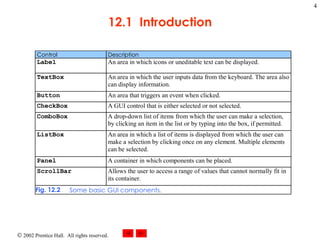
12.1 Introduction Graphical user interface Allow interaction with program visually Give program distinct look and feel Built from window gadgets  Is an object, accessed via keyboard or mouse
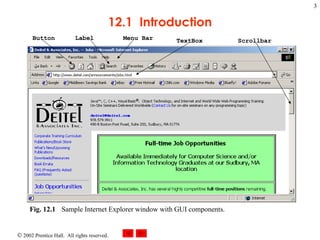
12.1  Introduction Fig. 12.1 Sample Internet Explorer window with GUI components.  Button Label Menu Bar TextBox Scrollbar
12.1  Introduction
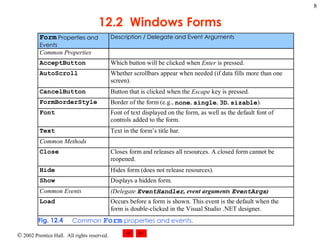
12.2 Windows Forms WinForms Create GUIs for programs Element on the desktop Represented by: Dialog Window MDI window
12.2 Windows Forms Component Class that implements IComponent interface Lacks visual parts Control Component with graphical part Such as button or label Are visible Event Generated by movement from mouse or keyboard Event handlers performs action Specifics written by programmer
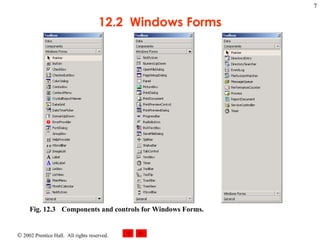
12.2  Windows Forms Fig. 12.3 Components and controls for Windows Forms.
12.2  Windows Forms
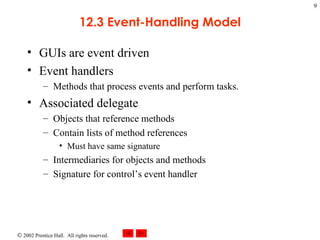
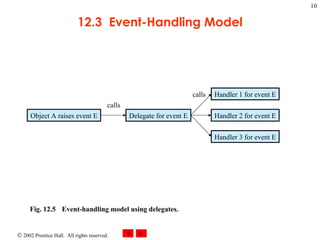
12.3 Event-Handling Model GUIs are event driven Event handlers  Methods that process events and perform tasks. Associated delegate Objects that reference methods Contain lists of method references Must have same signature Intermediaries for objects and methods Signature for control’s event handler
12.3  Event-Handling Model Fig. 12.5 Event-handling model using delegates.   Object A raises event E Delegate for event E Handler 1 for event E Handler 3 for event E Handler 2 for event E calls calls
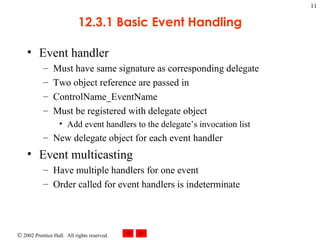
12.3.1 Basic Event Handling Event handler Must have same signature as corresponding delegate Two object reference are passed in ControlName_EventName Must be registered with delegate object Add event handlers to the delegate’s invocation list New delegate object for each event handler Event multicasting Have multiple handlers for one event Order called for event handlers is indeterminate
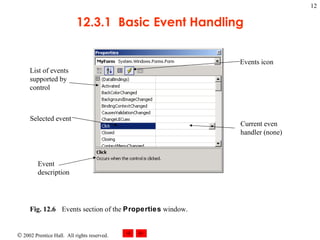
12.3.1  Basic Event Handling Fig. 12.6 Events section of the  Properties  window.   Current even handler (none) Selected event Event description List of events supported by control Events icon
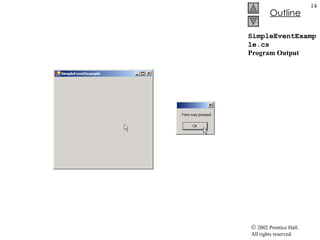
SimpleEventExample.cs 1  // Fig. 12.7: SimpleEventExample.cs 2  // Using Visual Studio .NET to create event handlers. 3  4  using  System; 5  using  System.Drawing; 6  using  System.Collections; 7  using  System.ComponentModel; 8  using  System.Windows.Forms; 9  using  System.Data; 10  11  // program that shows a simple event handler 12  public   class  MyForm : System.Windows.Forms.Form 13  { 14  private  System.ComponentModel.Container components =  null ; 15  16  // Visual Studio .NET generated code 17  18  [STAThread] 19  static   void  Main()  20  { 21  Application.Run(  new  MyForm() ); 22  } 23  24  // Visual Studio .NET creates an empty handler,  25  // we write definition: show message box when form clicked 26  private   void  MyForm_Click(  object  sender, System.EventArgs e ) 27  { 28  MessageBox.Show( "Form was pressed" ); 29  } 30  31  }  // end class MyForm Create an event handler Signature of the event handler Reference to the object that raised the event ( sender ) Reference to an event arguments object ( e ) Class  EventArgs  is base class for objects with event information
SimpleEventExample.cs Program Output
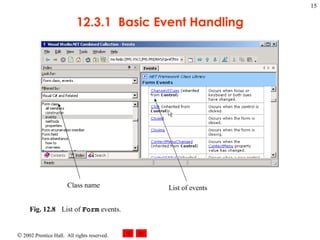
12.3.1  Basic Event Handling Fig. 12.8 List of  Form  events.  Class name List of events
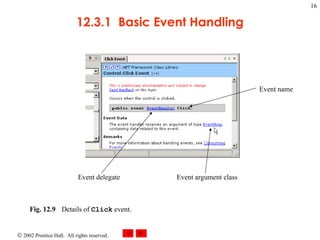
12.3.1  Basic Event Handling Fig. 12.9 Details of  Click  event.   Event delegate Event argument class Event name
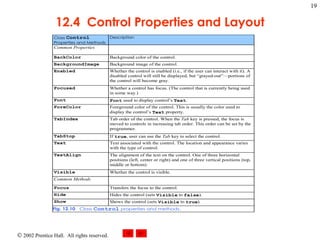
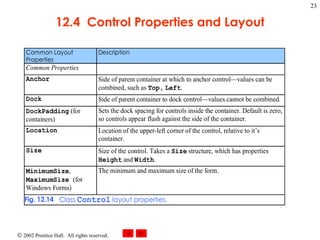
12.4 Control Properties and Layout Common properties Derive from class Control Text property Specifies the text that appears on a control Focus method Transfers the focus to a control Becomes active control TabIndex property Order in which controls are given focus Automatically set by Visual Studio .NET Enable property Indicate a control’s accessibility
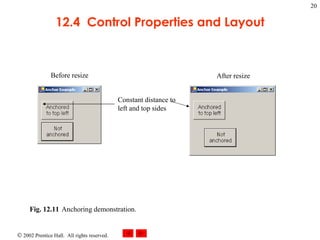
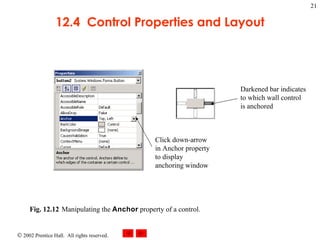
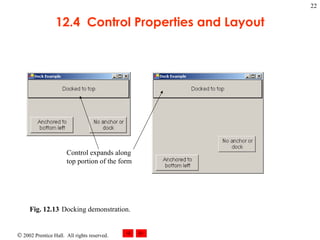
12.4 Control Properties and Layout Visibility control Hide control from user Or use method Hide Anchor property Anchoring control to specific location Constant distance from specified location Unanchored control moves relative to the position Docking allows control to spread itself along and entire side Both options refer to the parent container Size structure Allow for specifying size range MinimumSize and MaximumSize property
12.4  Control Properties and Layout
12.4  Control Properties and Layout Fig. 12.11 Anchoring demonstration.  Constant distance to left and top sides Before resize After resize
12.4  Control Properties and Layout Fig. 12.12 Manipulating the  Anchor  property of a control.   Darkened bar indicates to which wall control is anchored Click down-arrow in Anchor property to display anchoring window
12.4  Control Properties and Layout Fig. 12.13 Docking demonstration.   Control expands along top portion of the form
12.4  Control Properties and Layout
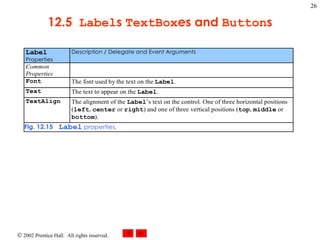
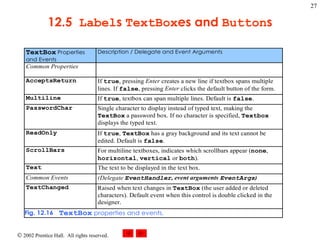
12.5 Labels, TextBoxes and Buttons Labels Provide text instruction Read only text Defined with class Label1 Derived from class Control Textbox Class TextBox Area for text input Password textbox
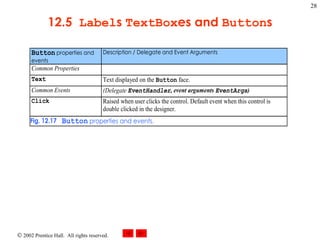
12.5 Labels, TextBoxes and Buttons Button Control to trigger a specific action Checkboxes or radio buttons Derived from ButtonBase
12.5  Label s  TextBox es and  Button s
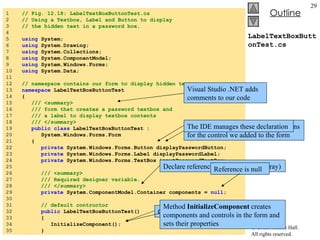
LabelTextBoxButtonTest.cs 1  // Fig. 12.18: LabelTextBoxButtonTest.cs 2  // Using a Textbox, Label and Button to display 3  // the hidden text in a password box. 4  5  using  System; 6  using  System.Drawing; 7  using  System.Collections; 8  using  System.ComponentModel; 9  using  System.Windows.Forms; 10  using  System.Data; 11  12  // namespace contains our form to display hidden text 13  namespace  LabelTextBoxButtonTest 14  { 15  /// <summary> 16  /// form that creates a password textbox and 17  /// a label to display textbox contents 18  /// </summary> 19  public   class  LabelTextBoxButtonTest :  20  System.Windows.Forms.Form 21  { 22  private  System.Windows.Forms.Button displayPasswordButton; 23  private  System.Windows.Forms.Label displayPasswordLabel; 24  private  System.Windows.Forms.TextBox inputPasswordTextBox; 25  26  /// <summary> 27  /// Required designer variable. 28  /// </summary> 29  private  System.ComponentModel.Container components =  null ; 30  31  // default contructor 32  public  LabelTextBoxButtonTest() 33  { 34  InitializeComponent(); 35  } Visual Studio .NET adds comments to our code  Visual Studio .NET inserts declarations for the control we added to the form  The IDE manages these declaration Declare reference  components  (an array) Reference is null Constructor for the form is created for us Method  InitializeComponent  creates components and controls in the form and sets their properties
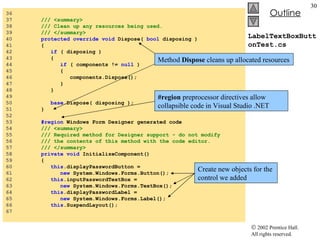
LabelTextBoxButtonTest.cs 36  37  /// <summary> 38  /// Clean up any resources being used. 39  /// </summary> 40  protected   override   void  Dispose(  bool  disposing ) 41  { 42  if  ( disposing ) 43  { 44  if  ( components !=  null  )  45  { 46  components.Dispose(); 47  } 48  } 49  50  base .Dispose( disposing ); 51  } 52  53  #region  Windows Form Designer generated code 54  /// <summary> 55  /// Required method for Designer support - do not modify 56  /// the contents of this method with the code editor. 57  /// </summary> 58  private   void  InitializeComponent() 59  { 60  this .displayPasswordButton =  61  new  System.Windows.Forms.Button(); 62  this .inputPasswordTextBox =  63  new  System.Windows.Forms.TextBox(); 64  this .displayPasswordLabel =  65  new  System.Windows.Forms.Label(); 66  this .SuspendLayout(); 67  Method  Dispose  cleans up allocated resources #region  preprocessor directives allow collapsible code in Visual Studio .NET Create new objects for the control we added
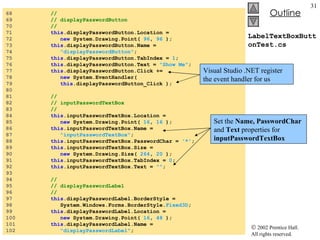
LabelTextBoxButtonTest.cs 68  //  69  // displayPasswordButton 70  //  71  this .displayPasswordButton.Location =  72  new  System.Drawing.Point(  96 ,  96  ); 73  this .displayPasswordButton.Name =  74  &quot;displayPasswordButton&quot; ; 75  this .displayPasswordButton.TabIndex =  1 ; 76  this .displayPasswordButton.Text =  &quot;Show Me&quot; ; 77  this .displayPasswordButton.Click +=  78  new  System.EventHandler(  79  this .displayPasswordButton_Click ); 80  81  //  82  // inputPasswordTextBox 83  //  84  this .inputPasswordTextBox.Location =  85  new  System.Drawing.Point(  16 ,  16  ); 86  this .inputPasswordTextBox.Name =  87  &quot;inputPasswordTextBox&quot; ; 88  this .inputPasswordTextBox.PasswordChar =  '*' ; 89  this .inputPasswordTextBox.Size =  90  new  System.Drawing.Size(  264 ,  20  ); 91  this .inputPasswordTextBox.TabIndex =  0 ; 92  this .inputPasswordTextBox.Text =  &quot;&quot; ; 93  94  //  95  // displayPasswordLabel 96  //  97  this .displayPasswordLabel.BorderStyle =  98  System.Windows.Forms.BorderStyle. Fixed3D ; 99  this .displayPasswordLabel.Location =  100  new  System.Drawing.Point(  16 ,  48  ); 101  this .displayPasswordLabel.Name =  102  &quot;displayPasswordLabel&quot; ; Set the  Name, PasswordChar  and  Text  properties for  inputPasswordTextBox Visual Studio .NET register the event handler for us
LabelTextBoxButtonTest.cs 103  this .displayPasswordLabel.Size =  104  new  System.Drawing.Size(  264 ,  23  ); 105  this .displayPasswordLabel.TabIndex =  2 ; 106  107  //  108  // LabelTextBoxButtonTest 109  //  110  this .AutoScaleBaseSize =  111  new  System.Drawing.Size(  5 ,  13  ); 112  this .ClientSize =  113  new  System.Drawing.Size(  292 ,  133  ); 114  this .Controls.AddRange( 115  new  System.Windows.Forms.Control[] { 116  this .displayPasswordLabel, 117  this .inputPasswordTextBox, 118  this .displayPasswordButton}); 119  this .Name =  &quot;LabelTextBoxButtonTest&quot; ; 120  this .Text =  &quot;LabelTextBoxButtonTest&quot; ; 121  this .ResumeLayout(  false  ); 122  123  }  // end method InitializeComponent 124  125  // end collapsible region started on line 53 126  #endregion 127  128  /// <summary> 129  /// The main entry point for the application. 130  /// </summary> 131  [STAThread] 132  static   void  Main()  133  { 134  Application.Run(  new  LabelTextBoxButtonTest() ); 135  } 136  #endregion  signal the end of the collapsible region
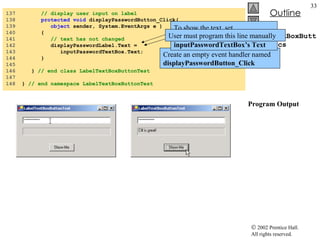
LabelTextBoxButtonTest.cs Program Output 137  // display user input on label 138  protected   void  displayPasswordButton_Click(  139  object  sender, System.EventArgs e ) 140  { 141  // text has not changed 142  displayPasswordLabel.Text =  143  inputPasswordTextBox.Text; 144  } 145  146  }  // end class LabelTextBoxButtonTest 147  148  }  // end namespace LabelTextBoxButtonTest Create an empty event handler named  displayPasswordButton_Click To show the text, set  displayPasswordLabel’s   Text  to  inputPasswordTextBox’s Text User must program this line manually
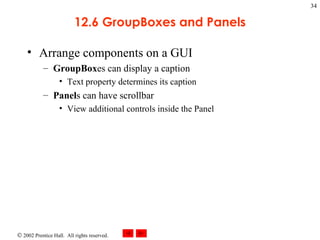
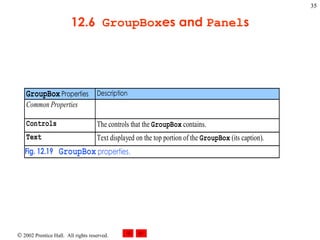
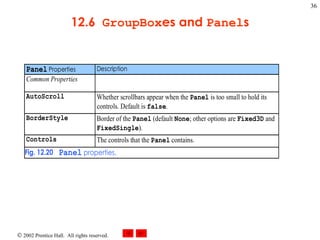
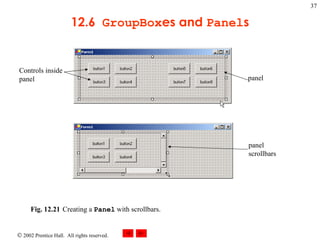
12.6 GroupBoxes and Panels Arrange components on a GUI GroupBox es can display a caption Text property determines its caption Panel s can have scrollbar View additional controls inside the Panel
12.6  GroupBox es and  Panel s
12.6  GroupBox es and  Panel s Fig. 12.21 Creating a  Panel  with scrollbars.  Controls inside panel panel panel scrollbars
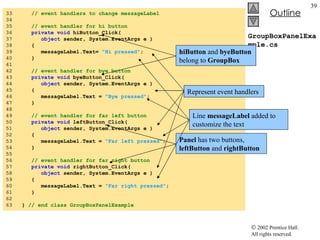
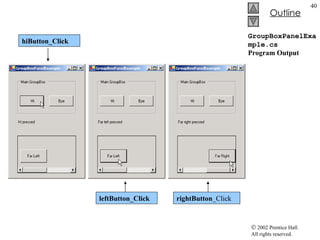
GroupBoxPanelExample.cs 1  // Fig. 12.22: GroupBoxPanelExample.cs  2  // Using GroupBoxes and Panels to hold buttons. 3  4  using  System; 5  using  System.Drawing; 6  using  System.Collections; 7  using  System.ComponentModel; 8  using  System.Windows.Forms; 9  using  System.Data; 10  11  /// form to display a groupbox versus a panel 12  public   class  GroupBoxPanelExample : System.Windows.Forms.Form 13  { 14  private  System.Windows.Forms.Button hiButton; 15  private  System.Windows.Forms.Button byeButton; 16  private  System.Windows.Forms.Button leftButton; 17  private  System.Windows.Forms.Button rightButton; 18  19  private  System.Windows.Forms.GroupBox mainGroupBox; 20  private  System.Windows.Forms.Label messageLabel; 21  private  System.Windows.Forms.Panel mainPanel; 22  23  private  System.ComponentModel.Container components =  null ; 24  25  // Visual Studio .NET-generated Dispose method 26  27  [STAThread] 28  static   void  Main()  29  { 30  Application.Run(  new  GroupBoxPanelExample() ); 31  } 32  messageLabel  is initially blank GroupBox  (name  mainGroupBox ) Panel (name mainPanel) Control  AutoScroll  property set to  TRUE
GroupBoxPanelExample.cs 33  // event handlers to change messageLabel 34  35  // event handler for hi button 36  private   void  hiButton_Click(  37  object  sender, System.EventArgs e ) 38  { 39  messageLabel.Text=  &quot;Hi pressed&quot; ; 40  } 41  42  // event handler for bye button 43  private   void  byeButton_Click(  44  object  sender, System.EventArgs e ) 45  { 46  messageLabel.Text =  &quot;Bye pressed&quot; ; 47  } 48  49  // event handler for far left button 50  private   void  leftButton_Click(  51  object  sender, System.EventArgs e ) 52  { 53  messageLabel.Text =  &quot;Far left pressed&quot; ; 54  } 55  56  // event handler for far right button 57  private   void  rightButton_Click(  58  object  sender, System.EventArgs e ) 59  { 60  messageLabel.Text =  &quot;Far right pressed&quot; ; 61  } 62  63  }  // end class GroupBoxPanelExample Represent event handlers hiButton  and  byeButton  belong to  GroupBox Panel  has two buttons,  leftButton  and  rightButton Line  messageLabel  added to customize the text
GroupBoxPanelExample.cs Program Output hiButton_Click leftButton_Click  rightButton _Click
12.7 Checkboxes and RadioButtons State buttons On/off or true/false state Derived from class ButtonBase CheckBox No restriction on usage RadioButton Grouped together  Only one can be true Mutually exclusive options
12.7  CheckBox es and  RadioButton s
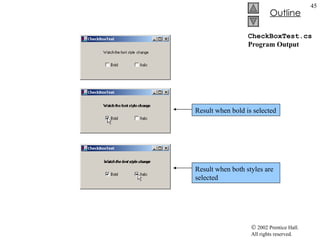
CheckBoxTest.cs 1  // Fig. 12.24: CheckBoxTest.cs 2  // Using CheckBoxes to toggle italic and bold styles. 3  4  using  System; 5  using  System.Drawing; 6  using  System.Collections; 7  using  System.ComponentModel; 8  using  System.Windows.Forms; 9  using  System.Data; 10  11  /// form contains checkboxes to allow 12  /// the user to modify sample text 13  public   class  CheckBoxTest : System.Windows.Forms.Form 14  { 15  private  System.Windows.Forms.CheckBox boldCheckBox; 16  private  System.Windows.Forms.CheckBox italicCheckBox; 17  18  private  System.Windows.Forms.Label outputLabel; 19  20  private  System.ComponentModel.Container components =  null ; 21  22  // Visual Studio .NET-generated Dispose method 23  24  /// The main entry point for the application. 25  [STAThread] 26  static   void  Main()  27  { 28  Application.Run(  new  CheckBoxTest() ); 29  } 30  When program start, both  Checkbox  is unchecked Text  property set to  Bold Text  property set to  Italic The  Label   OutputLabel  is labeled  Watch the font style change
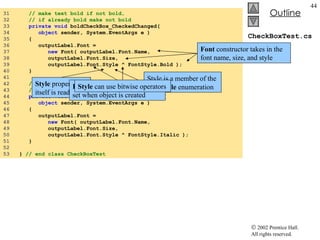
CheckBoxTest.cs 31  // make text bold if not bold,  32  // if already bold make not bold 33  private   void  boldCheckBox_CheckedChanged(  34  object  sender, System.EventArgs e ) 35  { 36  outputLabel.Font =  37  new  Font( outputLabel.Font.Name, 38  outputLabel.Font.Size, 39  outputLabel.Font.Style ^ FontStyle.Bold ); 40  } 41  42  // make text italic if not italic,  43  // if already italic make not italic 44  private   void  italicCheckBox_CheckedChanged(  45  object  sender, System.EventArgs e ) 46  { 47  outputLabel.Font =  48  new  Font( outputLabel.Font.Name, 49  outputLabel.Font.Size, 50  outputLabel.Font.Style ^ FontStyle.Italic ); 51  } 52  53  }  // end class CheckBoxTest Font  constructor takes in the font name, size, and style Style is a member of the  FontStyle  enumeration Style  property itself is read-only Font  object’s  Style  property is set when object is created Style  can use bitwise operators
CheckBoxTest.cs Program Output Result when bold is selected Result when both styles are selected
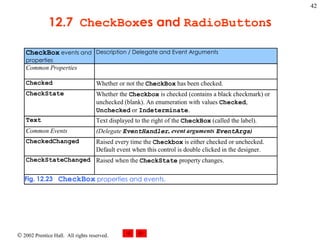
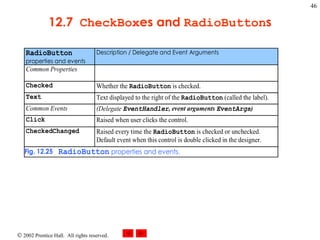
12.7  CheckBox es and  RadioButton s
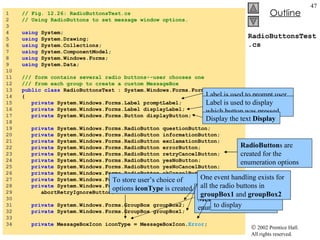
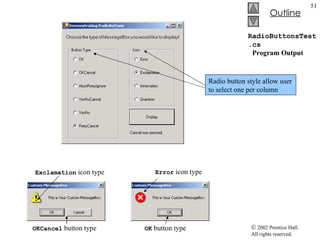
RadioButtonsTest.cs 1  // Fig. 12.26: RadioButtonsTest.cs 2  // Using RadioButtons to set message window options. 3  4  using  System; 5  using  System.Drawing; 6  using  System.Collections; 7  using  System.ComponentModel; 8  using  System.Windows.Forms; 9  using  System.Data; 10  11  /// form contains several radio buttons--user chooses one 12  /// from each group to create a custom MessageBox 13  public   class  RadioButtonsTest : System.Windows.Forms.Form 14  { 15  private  System.Windows.Forms.Label promptLabel; 16  private  System.Windows.Forms.Label displayLabel; 17  private  System.Windows.Forms.Button displayButton; 18  19  private  System.Windows.Forms.RadioButton questionButton; 20  private  System.Windows.Forms.RadioButton informationButton; 21  private  System.Windows.Forms.RadioButton exclamationButton; 22  private  System.Windows.Forms.RadioButton errorButton; 23  private  System.Windows.Forms.RadioButton retryCancelButton; 24  private  System.Windows.Forms.RadioButton yesNoButton; 25  private  System.Windows.Forms.RadioButton yesNoCancelButton; 26  private  System.Windows.Forms.RadioButton okCancelButton; 27  private  System.Windows.Forms.RadioButton okButton; 28  private  System.Windows.Forms.RadioButton 29  abortRetryIgnoreButton; 30  31  private  System.Windows.Forms.GroupBox groupBox2; 32  private  System.Windows.Forms.GroupBox groupBox1; 33  34  private  MessageBoxIcon iconType = MessageBoxIcon. Error ; To store user’s choice of options  iconType  is created. Object  iconType  is a  MessageBoxIcon  enumeration The enumeration name indicate which button to display Label is used to prompt user Label is used to display which button was pressed Display the text  Display RadioButton s are created for the enumeration options One event handling exists for all the radio buttons in  groupBox1  and  groupBox2
RadioButtonsTest.cs 35  private  MessageBoxButtons buttonType =  36  MessageBoxButtons. OK ; 37  38  /// The main entry point for the application. 39  [STAThread] 40  static   void  Main()  41  { 42  Application.Run(  new  RadioButtonsTest() ); 43  } 44  45  // change button based on option chosen by sender 46  private   void  buttonType_CheckedChanged( 47  object  sender, System.EventArgs e ) 48  { 49  if  ( sender == okButton )  // display OK button 50  buttonType = MessageBoxButtons. OK ; 51  52  // display OK and Cancel buttons 53  else   if  ( sender == okCancelButton ) 54  buttonType = MessageBoxButtons. OKCancel ; 55  56  // display Abort, Retry and Ignore buttons 57  else   if  ( sender == abortRetryIgnoreButton ) 58  buttonType = MessageBoxButtons. AbortRetryIgnore ; 59  60  // display Yes, No and Cancel buttons 61  else   if  ( sender == yesNoCancelButton ) 62  buttonType = MessageBoxButtons. YesNoCancel ; 63  64  // display Yes and No buttons 65  else   if  ( sender == yesNoButton ) 66  buttonType = MessageBoxButtons. YesNo ; 67  68  // only one option left--display  69  // Retry and Cancel buttons To store user’s choice of options  buttonType  is created Object  buttonType  is a  MessageBoxButtom  enumeration The enumeration name indicate which button to display Each radio button generates a  CheckedChanged  when clicked Handlers compare the  sender  object with every radio button to determine which button was selected
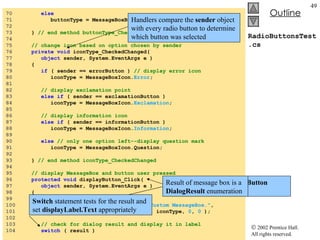
RadioButtonsTest.cs 70  else 71  buttonType = MessageBoxButtons. RetryCancel ; 72  73  }  // end method buttonType_CheckedChanged 74  75  // change icon based on option chosen by sender 76  private   void  iconType_CheckedChanged( 77  object  sender, System.EventArgs e ) 78  { 79  if  ( sender == errorButton )  // display error icon 80  iconType = MessageBoxIcon. Error ; 81  82  // display exclamation point 83  else   if  ( sender == exclamationButton ) 84  iconType = MessageBoxIcon. Exclamation ; 85  86  // display information icon 87  else   if  ( sender == informationButton )  88  iconType = MessageBoxIcon. Information ; 89  90  else   // only one option left--display question mark 91  iconType = MessageBoxIcon.Question; 92  93  }  // end method iconType_CheckedChanged 94  95  // display MessageBox and button user pressed 96  protected   void  displayButton_Click(  97  object  sender, System.EventArgs e ) 98  { 99  DialogResult result =  100  MessageBox.Show(  &quot;This is Your Custom MessageBox.&quot; ,  101  &quot;Custom MessageBox&quot; , buttonType, iconType,  0 ,  0  ); 102  103  // check for dialog result and display it in label 104  switch  ( result ) Handlers compare the  sender  object with every radio button to determine which button was selected Click  handler for  displayButton  creates a  MessageBox Result of message box is a  DialogResult  enumeration Switch  statement tests for the result and set  displayLabel.Text  appropriately
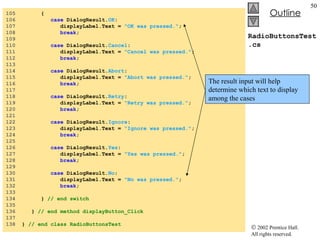
RadioButtonsTest.cs 105  { 106  case  DialogResult. OK :  107  displayLabel.Text =  &quot;OK was pressed.&quot; ;  108  break ; 109  110  case  DialogResult. Cancel :  111  displayLabel.Text =  &quot;Cancel was pressed.&quot; ;  112  break ; 113  114  case  DialogResult. Abort :  115  displayLabel.Text =  &quot;Abort was pressed.&quot; ;  116  break ; 117  118  case  DialogResult. Retry :  119  displayLabel.Text =  &quot;Retry was pressed.&quot; ;  120  break ; 121  122  case  DialogResult. Ignore :  123  displayLabel.Text =  &quot;Ignore was pressed.&quot; ;  124  break ; 125  126  case  DialogResult. Yes :  127  displayLabel.Text =  &quot;Yes was pressed.&quot; ;  128  break ; 129  130  case  DialogResult. No :  131  displayLabel.Text =  &quot;No was pressed.&quot; ;  132  break ; 133  134  }  // end switch 135  136  }  // end method displayButton_Click 137  138  }  // end class RadioButtonsTest The result input will help determine which text to display among the cases
RadioButtonsTest.cs   Program Output Exclamation  icon type Error  icon type OKCancel  button type OK  button type Radio button style allow user to select one per column
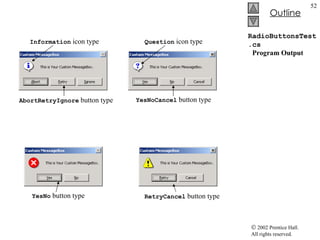
RadioButtonsTest.cs   Program Output AbortRetryIgnore  button type RetryCancel  button type Information  icon type Question  icon type YesNoCancel  button type YesNo  button type
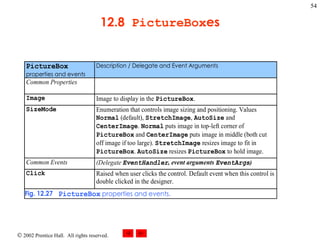
12.8 PictureBoxes Class PictureBox Displays an image Image set by object of class Image. The Image property sets the Image object to use SizeMode property sets how the image is displayed
12.8  PictureBox es
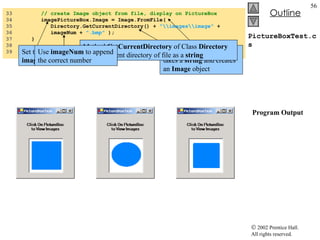
PictureBoxTest.cs 1  // Fig. 12.28: PictureBoxTest.cs 2  // Using a PictureBox to display images. 3  4  using  System; 5  using  System.Drawing; 6  using  System.Collections; 7  using  System.ComponentModel; 8  using  System.Windows.Forms; 9  using  System.Data; 10  using  System.IO; 11  12  /// form to display different images when clicked 13  public   class  PictureBoxTest : System.Windows.Forms.Form 14  { 15  private  System.Windows.Forms.PictureBox imagePictureBox; 16  private  System.Windows.Forms.Label promptLabel; 17  18  private   int  imageNum =  -1 ; 19  20  /// The main entry point for the application. 21  [STAThread] 22  static   void  Main()  23  { 24  Application.Run(  new  PictureBoxTest() ); 25  } 26  27  // change image whenever PictureBox clicked 28  private   void  imagePictureBox_Click(  29  object  sender, System.EventArgs e ) 30  { 31  imageNum = ( imageNum +  1  ) %  3 ;  // imageNum from 0 to 2 32  PictureBox imagePicture  use to display  one of three bitmap images Includes instructions  Click On Picture Box to View Images To respond to the  Click  event Store the image we want to display Modulus calculation insures that number is between 0 and 2
PictureBoxTest.cs   Program Output 33  // create Image object from file, display on PictureBox 34  imagePictureBox.Image = Image.FromFile(  35  Directory.GetCurrentDirectory() +  &quot;\\images\\image&quot;  +  36  imageNum +  &quot;.bmp&quot;  ); 37  } 38  39  }  // end class PictureBoxTest Set the  Image  property of  imagePictureBox  to an Image Method  FromFile  which takes a  string  and creates an  Image  object Method  GetCurrentDirectory  of Class  Directory  returns current directory of file as a  string Use  imageNum  to append the correct number
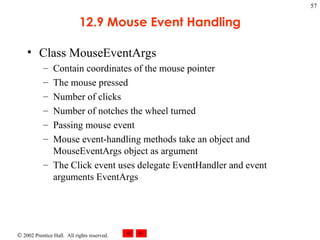
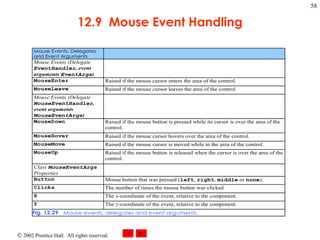
12.9 Mouse Event Handling Class MouseEventArgs Contain coordinates of the mouse pointer The mouse pressed Number of clicks Number of notches the wheel turned Passing mouse event Mouse event-handling methods take an object and MouseEventArgs object as argument The Click event uses delegate EventHandler and event arguments EventArgs
12.9  Mouse Event Handling
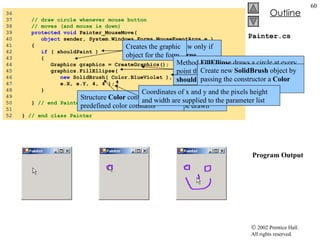
Painter.cs 1  // Fig 12.30: Painter.cs 2  // Using the mouse to draw on a form. 3  4  using  System; 5  using  System.Drawing; 6  using  System.Collections; 7  using  System.ComponentModel; 8  using  System.Windows.Forms; 9  using  System.Data; 10  11  /// creates a form as a drawing surface 12  public   class  Painter : System.Windows.Forms.Form 13  { 14  bool  shouldPaint =  false ;  // whether to paint 15  16  /// The main entry point for the application. 17  [STAThread] 18  static   void  Main()  19  { 20  Application.Run(  new  Painter() ); 21  } 22  23  // should paint after mouse button has been pressed 24  private   void  Painter_MouseDown(  25  object  sender, System.Windows.Forms.MouseEventArgs e ) 26  { 27  shouldPaint =  true ; 28  } 29  30  // stop painting when mouse button released 31  private   void  Painter_MouseUp(  32  object  sender, System.Windows.Forms.MouseEventArgs e ) 33  { 34  shouldPaint =  false ; 35  } Creates variable  shouldPaint  to determine whether to draw on the form The event handler for event  MouseDown shouldPaint  is set to true when this event occurs Mouse cursor will draw The event handler of event  MouseUp shouldPaint set to false, mouse cursor will not draw
Painter.cs   Program Output 36  37  // draw circle whenever mouse button  38  // moves (and mouse is down) 39  protected   void  Painter_MouseMove(  40  object  sender, System.Windows.Forms.MouseEventArgs e ) 41  { 42  if  ( shouldPaint ) 43  { 44  Graphics graphics = CreateGraphics(); 45  graphics.FillEllipse(  46  new  SolidBrush( Color.BlueViolet ),  47  e.X, e.Y, 4, 4 ); 48  } 49  50  }  // end Painter_MouseMove 51  52  }  // end class Painter Program will draw only if  shouldPaint  is  true Creates the graphic object for the form Provides method for drawing various shapes Method  FillEllipse  draws a circle at every point the mouse cursor moves over and  shouldPaint  is  true SolidBrush  object determines the color of the shape drawn Create new  SolidBrush  object by passing the constructor a  Color  value  Structure  Color  contain numerous predefined color constants Coordinates of x and y and the pixels height and width are supplied to the parameter list
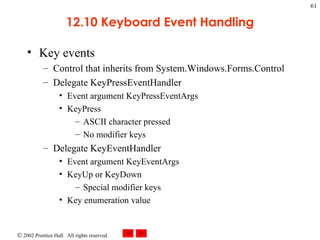
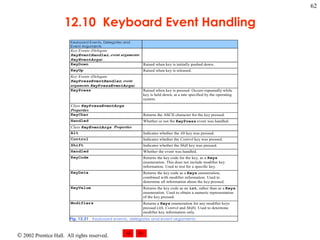
12.10 Keyboard Event Handling Key events Control that inherits from System.Windows.Forms.Control Delegate KeyPressEventHandler Event argument KeyPressEventArgs KeyPress ASCII character pressed No modifier keys Delegate KeyEventHandler Event argument KeyEventArgs KeyUp or KeyDown Special modifier keys Key enumeration value
12.10  Keyboard Event Handling
KeyDemo.cs 1  // Fig. 12.32: KeyDemo.cs 2  // Displaying information about the key the user pressed. 3  4  using  System; 5  using  System.Drawing; 6  using  System.Collections; 7  using  System.ComponentModel; 8  using  System.Windows.Forms; 9  using  System.Data; 10  11  // form to display key press  12  // information--contains two labels 13  public   class  KeyDemo : System.Windows.Forms.Form 14  { 15  private  System.Windows.Forms.Label charLabel; 16  private  System.Windows.Forms.Label keyInfoLabel; 17  18  private  System.ComponentModel.Container components =  null ; 19  20  /// The main entry point for the application. 21  [STAThread] 22  static   void  Main()  23  { 24  Application.Run(  new  KeyDemo() ); 25  } 26  27  // display the character pressed using key char 28  protected   void  KeyDemo_KeyPress(  29  object  sender, System.Windows.Forms.KeyPressEventArgs e ) 30  {  31  charLabel.Text =  &quot;Key pressed: &quot;  + e.KeyChar; 32  } 33  Forms contain two  Label s Label for key pressed Label for modifier information Initially empty KeyPress  event handler Accesses the  KeyChar  property of the  KeyPressEventArgs object Key pressed as a  char Display the key pressed If key pressed is not ASCII,  charLabel  remains empty
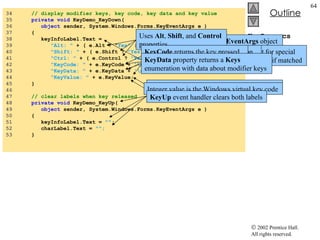
KeyDemo.cs 34  // display modifier keys, key code, key data and key value 35  private   void  KeyDemo_KeyDown(  36  object  sender, System.Windows.Forms.KeyEventArgs e ) 37  { 38  keyInfoLabel.Text =  39  &quot;Alt: &quot;  + ( e.Alt ? &quot; Yes&quot;  :  &quot;No&quot; ) +  '\n'  + 40  &quot;Shift: &quot;  + ( e.Shift ?  &quot;Yes&quot;  :  &quot;No&quot;  ) +  '\n'  + 41  &quot;Ctrl: &quot;  + ( e.Control ?  &quot;Yes&quot;  :  &quot;No&quot;  ) +  '\n'  +  42  &quot;KeyCode: &quot;  + e.KeyCode +  '\n'  + 43  &quot;KeyData: &quot;  + e.KeyData +  '\n'  + 44  &quot;KeyValue: &quot;  + e.KeyValue; 45  } 46  47  // clear labels when key released 48  private   void  KeyDemo_KeyUp(  49  object  sender, System.Windows.Forms.KeyEventArgs e ) 50  { 51  keyInfoLabel.Text =  &quot;&quot; ; 52  charLabel.Text =  &quot;&quot;; 53  } KeyEventArgs  object This block test for special keys, return  bool  if matched Uses  Alt ,  Shift , and  Control  properties Displays the  KeyCode ,  KeyData , and  KeyValue  properties KeyCode  returns a  Keys  enumeration converted into a  string  using  ToString KeyCode  returns the key pressed without modifier keys information KeyData  property returns a  Keys  enumeration with data about modifier keys KeyValue  returns the key code as an integer Integer value is the Windows virtual key code KeyUp  event handler clears both labels
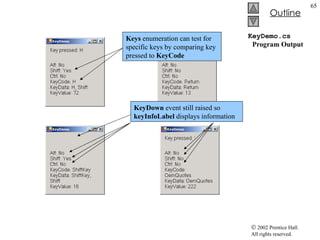
KeyDemo.cs   Program Output KeyPress  event was not engaged KeyDown  event still raised so  keyInfoLabel  displays information Keys  enumeration can test for specific keys by comparing key pressed to  KeyCode

Csphtp1 12

  • 1.
    Chapter 12 -Graphical User Interface Concepts: Part 1 Outline 12.1 Introduction 12.2 Windows Forms 12.3 Event-Handling Model 12.3.1 Basic Event Handling 12.4 Control Properties and Layout 12.5 Label s, TextBox es and Button s 12.6 GroupBox es and Panel s 12.7 CheckBox es and RadioButton s 12.8 PictureBox es 12.9 Mouse Event Handling 12.10 Keyboard Event Handling
  • 2.
    12.1 Introduction Graphicaluser interface Allow interaction with program visually Give program distinct look and feel Built from window gadgets Is an object, accessed via keyboard or mouse
  • 3.
    12.1 IntroductionFig. 12.1 Sample Internet Explorer window with GUI components. Button Label Menu Bar TextBox Scrollbar
  • 4.
  • 5.
    12.2 Windows FormsWinForms Create GUIs for programs Element on the desktop Represented by: Dialog Window MDI window
  • 6.
    12.2 Windows FormsComponent Class that implements IComponent interface Lacks visual parts Control Component with graphical part Such as button or label Are visible Event Generated by movement from mouse or keyboard Event handlers performs action Specifics written by programmer
  • 7.
    12.2 WindowsForms Fig. 12.3 Components and controls for Windows Forms.
  • 8.
  • 9.
    12.3 Event-Handling ModelGUIs are event driven Event handlers Methods that process events and perform tasks. Associated delegate Objects that reference methods Contain lists of method references Must have same signature Intermediaries for objects and methods Signature for control’s event handler
  • 10.
    12.3 Event-HandlingModel Fig. 12.5 Event-handling model using delegates. Object A raises event E Delegate for event E Handler 1 for event E Handler 3 for event E Handler 2 for event E calls calls
  • 11.
    12.3.1 Basic EventHandling Event handler Must have same signature as corresponding delegate Two object reference are passed in ControlName_EventName Must be registered with delegate object Add event handlers to the delegate’s invocation list New delegate object for each event handler Event multicasting Have multiple handlers for one event Order called for event handlers is indeterminate
  • 12.
    12.3.1 BasicEvent Handling Fig. 12.6 Events section of the Properties window. Current even handler (none) Selected event Event description List of events supported by control Events icon
  • 13.
    SimpleEventExample.cs 1 // Fig. 12.7: SimpleEventExample.cs 2 // Using Visual Studio .NET to create event handlers. 3 4 using System; 5 using System.Drawing; 6 using System.Collections; 7 using System.ComponentModel; 8 using System.Windows.Forms; 9 using System.Data; 10 11 // program that shows a simple event handler 12 public class MyForm : System.Windows.Forms.Form 13 { 14 private System.ComponentModel.Container components = null ; 15 16 // Visual Studio .NET generated code 17 18 [STAThread] 19 static void Main() 20 { 21 Application.Run( new MyForm() ); 22 } 23 24 // Visual Studio .NET creates an empty handler, 25 // we write definition: show message box when form clicked 26 private void MyForm_Click( object sender, System.EventArgs e ) 27 { 28 MessageBox.Show( &quot;Form was pressed&quot; ); 29 } 30 31 } // end class MyForm Create an event handler Signature of the event handler Reference to the object that raised the event ( sender ) Reference to an event arguments object ( e ) Class EventArgs is base class for objects with event information
  • 14.
  • 15.
    12.3.1 BasicEvent Handling Fig. 12.8 List of Form events. Class name List of events
  • 16.
    12.3.1 BasicEvent Handling Fig. 12.9 Details of Click event. Event delegate Event argument class Event name
  • 17.
    12.4 Control Propertiesand Layout Common properties Derive from class Control Text property Specifies the text that appears on a control Focus method Transfers the focus to a control Becomes active control TabIndex property Order in which controls are given focus Automatically set by Visual Studio .NET Enable property Indicate a control’s accessibility
  • 18.
    12.4 Control Propertiesand Layout Visibility control Hide control from user Or use method Hide Anchor property Anchoring control to specific location Constant distance from specified location Unanchored control moves relative to the position Docking allows control to spread itself along and entire side Both options refer to the parent container Size structure Allow for specifying size range MinimumSize and MaximumSize property
  • 19.
    12.4 ControlProperties and Layout
  • 20.
    12.4 ControlProperties and Layout Fig. 12.11 Anchoring demonstration. Constant distance to left and top sides Before resize After resize
  • 21.
    12.4 ControlProperties and Layout Fig. 12.12 Manipulating the Anchor property of a control. Darkened bar indicates to which wall control is anchored Click down-arrow in Anchor property to display anchoring window
  • 22.
    12.4 ControlProperties and Layout Fig. 12.13 Docking demonstration. Control expands along top portion of the form
  • 23.
    12.4 ControlProperties and Layout
  • 24.
    12.5 Labels, TextBoxesand Buttons Labels Provide text instruction Read only text Defined with class Label1 Derived from class Control Textbox Class TextBox Area for text input Password textbox
  • 25.
    12.5 Labels, TextBoxesand Buttons Button Control to trigger a specific action Checkboxes or radio buttons Derived from ButtonBase
  • 26.
    12.5 Labels TextBox es and Button s
  • 27.
    12.5 Labels TextBox es and Button s
  • 28.
    12.5 Labels TextBox es and Button s
  • 29.
    LabelTextBoxButtonTest.cs 1 // Fig. 12.18: LabelTextBoxButtonTest.cs 2 // Using a Textbox, Label and Button to display 3 // the hidden text in a password box. 4 5 using System; 6 using System.Drawing; 7 using System.Collections; 8 using System.ComponentModel; 9 using System.Windows.Forms; 10 using System.Data; 11 12 // namespace contains our form to display hidden text 13 namespace LabelTextBoxButtonTest 14 { 15 /// <summary> 16 /// form that creates a password textbox and 17 /// a label to display textbox contents 18 /// </summary> 19 public class LabelTextBoxButtonTest : 20 System.Windows.Forms.Form 21 { 22 private System.Windows.Forms.Button displayPasswordButton; 23 private System.Windows.Forms.Label displayPasswordLabel; 24 private System.Windows.Forms.TextBox inputPasswordTextBox; 25 26 /// <summary> 27 /// Required designer variable. 28 /// </summary> 29 private System.ComponentModel.Container components = null ; 30 31 // default contructor 32 public LabelTextBoxButtonTest() 33 { 34 InitializeComponent(); 35 } Visual Studio .NET adds comments to our code Visual Studio .NET inserts declarations for the control we added to the form The IDE manages these declaration Declare reference components (an array) Reference is null Constructor for the form is created for us Method InitializeComponent creates components and controls in the form and sets their properties
  • 30.
    LabelTextBoxButtonTest.cs 36 37 /// <summary> 38 /// Clean up any resources being used. 39 /// </summary> 40 protected override void Dispose( bool disposing ) 41 { 42 if ( disposing ) 43 { 44 if ( components != null ) 45 { 46 components.Dispose(); 47 } 48 } 49 50 base .Dispose( disposing ); 51 } 52 53 #region Windows Form Designer generated code 54 /// <summary> 55 /// Required method for Designer support - do not modify 56 /// the contents of this method with the code editor. 57 /// </summary> 58 private void InitializeComponent() 59 { 60 this .displayPasswordButton = 61 new System.Windows.Forms.Button(); 62 this .inputPasswordTextBox = 63 new System.Windows.Forms.TextBox(); 64 this .displayPasswordLabel = 65 new System.Windows.Forms.Label(); 66 this .SuspendLayout(); 67 Method Dispose cleans up allocated resources #region preprocessor directives allow collapsible code in Visual Studio .NET Create new objects for the control we added
  • 31.
    LabelTextBoxButtonTest.cs 68 // 69 // displayPasswordButton 70 // 71 this .displayPasswordButton.Location = 72 new System.Drawing.Point( 96 , 96 ); 73 this .displayPasswordButton.Name = 74 &quot;displayPasswordButton&quot; ; 75 this .displayPasswordButton.TabIndex = 1 ; 76 this .displayPasswordButton.Text = &quot;Show Me&quot; ; 77 this .displayPasswordButton.Click += 78 new System.EventHandler( 79 this .displayPasswordButton_Click ); 80 81 // 82 // inputPasswordTextBox 83 // 84 this .inputPasswordTextBox.Location = 85 new System.Drawing.Point( 16 , 16 ); 86 this .inputPasswordTextBox.Name = 87 &quot;inputPasswordTextBox&quot; ; 88 this .inputPasswordTextBox.PasswordChar = '*' ; 89 this .inputPasswordTextBox.Size = 90 new System.Drawing.Size( 264 , 20 ); 91 this .inputPasswordTextBox.TabIndex = 0 ; 92 this .inputPasswordTextBox.Text = &quot;&quot; ; 93 94 // 95 // displayPasswordLabel 96 // 97 this .displayPasswordLabel.BorderStyle = 98 System.Windows.Forms.BorderStyle. Fixed3D ; 99 this .displayPasswordLabel.Location = 100 new System.Drawing.Point( 16 , 48 ); 101 this .displayPasswordLabel.Name = 102 &quot;displayPasswordLabel&quot; ; Set the Name, PasswordChar and Text properties for inputPasswordTextBox Visual Studio .NET register the event handler for us
  • 32.
    LabelTextBoxButtonTest.cs 103 this .displayPasswordLabel.Size = 104 new System.Drawing.Size( 264 , 23 ); 105 this .displayPasswordLabel.TabIndex = 2 ; 106 107 // 108 // LabelTextBoxButtonTest 109 // 110 this .AutoScaleBaseSize = 111 new System.Drawing.Size( 5 , 13 ); 112 this .ClientSize = 113 new System.Drawing.Size( 292 , 133 ); 114 this .Controls.AddRange( 115 new System.Windows.Forms.Control[] { 116 this .displayPasswordLabel, 117 this .inputPasswordTextBox, 118 this .displayPasswordButton}); 119 this .Name = &quot;LabelTextBoxButtonTest&quot; ; 120 this .Text = &quot;LabelTextBoxButtonTest&quot; ; 121 this .ResumeLayout( false ); 122 123 } // end method InitializeComponent 124 125 // end collapsible region started on line 53 126 #endregion 127 128 /// <summary> 129 /// The main entry point for the application. 130 /// </summary> 131 [STAThread] 132 static void Main() 133 { 134 Application.Run( new LabelTextBoxButtonTest() ); 135 } 136 #endregion signal the end of the collapsible region
  • 33.
    LabelTextBoxButtonTest.cs Program Output137 // display user input on label 138 protected void displayPasswordButton_Click( 139 object sender, System.EventArgs e ) 140 { 141 // text has not changed 142 displayPasswordLabel.Text = 143 inputPasswordTextBox.Text; 144 } 145 146 } // end class LabelTextBoxButtonTest 147 148 } // end namespace LabelTextBoxButtonTest Create an empty event handler named displayPasswordButton_Click To show the text, set displayPasswordLabel’s Text to inputPasswordTextBox’s Text User must program this line manually
  • 34.
    12.6 GroupBoxes andPanels Arrange components on a GUI GroupBox es can display a caption Text property determines its caption Panel s can have scrollbar View additional controls inside the Panel
  • 35.
    12.6 GroupBoxes and Panel s
  • 36.
    12.6 GroupBoxes and Panel s
  • 37.
    12.6 GroupBoxes and Panel s Fig. 12.21 Creating a Panel with scrollbars. Controls inside panel panel panel scrollbars
  • 38.
    GroupBoxPanelExample.cs 1 // Fig. 12.22: GroupBoxPanelExample.cs 2 // Using GroupBoxes and Panels to hold buttons. 3 4 using System; 5 using System.Drawing; 6 using System.Collections; 7 using System.ComponentModel; 8 using System.Windows.Forms; 9 using System.Data; 10 11 /// form to display a groupbox versus a panel 12 public class GroupBoxPanelExample : System.Windows.Forms.Form 13 { 14 private System.Windows.Forms.Button hiButton; 15 private System.Windows.Forms.Button byeButton; 16 private System.Windows.Forms.Button leftButton; 17 private System.Windows.Forms.Button rightButton; 18 19 private System.Windows.Forms.GroupBox mainGroupBox; 20 private System.Windows.Forms.Label messageLabel; 21 private System.Windows.Forms.Panel mainPanel; 22 23 private System.ComponentModel.Container components = null ; 24 25 // Visual Studio .NET-generated Dispose method 26 27 [STAThread] 28 static void Main() 29 { 30 Application.Run( new GroupBoxPanelExample() ); 31 } 32 messageLabel is initially blank GroupBox (name mainGroupBox ) Panel (name mainPanel) Control AutoScroll property set to TRUE
  • 39.
    GroupBoxPanelExample.cs 33 // event handlers to change messageLabel 34 35 // event handler for hi button 36 private void hiButton_Click( 37 object sender, System.EventArgs e ) 38 { 39 messageLabel.Text= &quot;Hi pressed&quot; ; 40 } 41 42 // event handler for bye button 43 private void byeButton_Click( 44 object sender, System.EventArgs e ) 45 { 46 messageLabel.Text = &quot;Bye pressed&quot; ; 47 } 48 49 // event handler for far left button 50 private void leftButton_Click( 51 object sender, System.EventArgs e ) 52 { 53 messageLabel.Text = &quot;Far left pressed&quot; ; 54 } 55 56 // event handler for far right button 57 private void rightButton_Click( 58 object sender, System.EventArgs e ) 59 { 60 messageLabel.Text = &quot;Far right pressed&quot; ; 61 } 62 63 } // end class GroupBoxPanelExample Represent event handlers hiButton and byeButton belong to GroupBox Panel has two buttons, leftButton and rightButton Line messageLabel added to customize the text
  • 40.
    GroupBoxPanelExample.cs Program OutputhiButton_Click leftButton_Click rightButton _Click
  • 41.
    12.7 Checkboxes andRadioButtons State buttons On/off or true/false state Derived from class ButtonBase CheckBox No restriction on usage RadioButton Grouped together Only one can be true Mutually exclusive options
  • 42.
    12.7 CheckBoxes and RadioButton s
  • 43.
    CheckBoxTest.cs 1 // Fig. 12.24: CheckBoxTest.cs 2 // Using CheckBoxes to toggle italic and bold styles. 3 4 using System; 5 using System.Drawing; 6 using System.Collections; 7 using System.ComponentModel; 8 using System.Windows.Forms; 9 using System.Data; 10 11 /// form contains checkboxes to allow 12 /// the user to modify sample text 13 public class CheckBoxTest : System.Windows.Forms.Form 14 { 15 private System.Windows.Forms.CheckBox boldCheckBox; 16 private System.Windows.Forms.CheckBox italicCheckBox; 17 18 private System.Windows.Forms.Label outputLabel; 19 20 private System.ComponentModel.Container components = null ; 21 22 // Visual Studio .NET-generated Dispose method 23 24 /// The main entry point for the application. 25 [STAThread] 26 static void Main() 27 { 28 Application.Run( new CheckBoxTest() ); 29 } 30 When program start, both Checkbox is unchecked Text property set to Bold Text property set to Italic The Label OutputLabel is labeled Watch the font style change
  • 44.
    CheckBoxTest.cs 31 // make text bold if not bold, 32 // if already bold make not bold 33 private void boldCheckBox_CheckedChanged( 34 object sender, System.EventArgs e ) 35 { 36 outputLabel.Font = 37 new Font( outputLabel.Font.Name, 38 outputLabel.Font.Size, 39 outputLabel.Font.Style ^ FontStyle.Bold ); 40 } 41 42 // make text italic if not italic, 43 // if already italic make not italic 44 private void italicCheckBox_CheckedChanged( 45 object sender, System.EventArgs e ) 46 { 47 outputLabel.Font = 48 new Font( outputLabel.Font.Name, 49 outputLabel.Font.Size, 50 outputLabel.Font.Style ^ FontStyle.Italic ); 51 } 52 53 } // end class CheckBoxTest Font constructor takes in the font name, size, and style Style is a member of the FontStyle enumeration Style property itself is read-only Font object’s Style property is set when object is created Style can use bitwise operators
  • 45.
    CheckBoxTest.cs Program OutputResult when bold is selected Result when both styles are selected
  • 46.
    12.7 CheckBoxes and RadioButton s
  • 47.
    RadioButtonsTest.cs 1 // Fig. 12.26: RadioButtonsTest.cs 2 // Using RadioButtons to set message window options. 3 4 using System; 5 using System.Drawing; 6 using System.Collections; 7 using System.ComponentModel; 8 using System.Windows.Forms; 9 using System.Data; 10 11 /// form contains several radio buttons--user chooses one 12 /// from each group to create a custom MessageBox 13 public class RadioButtonsTest : System.Windows.Forms.Form 14 { 15 private System.Windows.Forms.Label promptLabel; 16 private System.Windows.Forms.Label displayLabel; 17 private System.Windows.Forms.Button displayButton; 18 19 private System.Windows.Forms.RadioButton questionButton; 20 private System.Windows.Forms.RadioButton informationButton; 21 private System.Windows.Forms.RadioButton exclamationButton; 22 private System.Windows.Forms.RadioButton errorButton; 23 private System.Windows.Forms.RadioButton retryCancelButton; 24 private System.Windows.Forms.RadioButton yesNoButton; 25 private System.Windows.Forms.RadioButton yesNoCancelButton; 26 private System.Windows.Forms.RadioButton okCancelButton; 27 private System.Windows.Forms.RadioButton okButton; 28 private System.Windows.Forms.RadioButton 29 abortRetryIgnoreButton; 30 31 private System.Windows.Forms.GroupBox groupBox2; 32 private System.Windows.Forms.GroupBox groupBox1; 33 34 private MessageBoxIcon iconType = MessageBoxIcon. Error ; To store user’s choice of options iconType is created. Object iconType is a MessageBoxIcon enumeration The enumeration name indicate which button to display Label is used to prompt user Label is used to display which button was pressed Display the text Display RadioButton s are created for the enumeration options One event handling exists for all the radio buttons in groupBox1 and groupBox2
  • 48.
    RadioButtonsTest.cs 35 private MessageBoxButtons buttonType = 36 MessageBoxButtons. OK ; 37 38 /// The main entry point for the application. 39 [STAThread] 40 static void Main() 41 { 42 Application.Run( new RadioButtonsTest() ); 43 } 44 45 // change button based on option chosen by sender 46 private void buttonType_CheckedChanged( 47 object sender, System.EventArgs e ) 48 { 49 if ( sender == okButton ) // display OK button 50 buttonType = MessageBoxButtons. OK ; 51 52 // display OK and Cancel buttons 53 else if ( sender == okCancelButton ) 54 buttonType = MessageBoxButtons. OKCancel ; 55 56 // display Abort, Retry and Ignore buttons 57 else if ( sender == abortRetryIgnoreButton ) 58 buttonType = MessageBoxButtons. AbortRetryIgnore ; 59 60 // display Yes, No and Cancel buttons 61 else if ( sender == yesNoCancelButton ) 62 buttonType = MessageBoxButtons. YesNoCancel ; 63 64 // display Yes and No buttons 65 else if ( sender == yesNoButton ) 66 buttonType = MessageBoxButtons. YesNo ; 67 68 // only one option left--display 69 // Retry and Cancel buttons To store user’s choice of options buttonType is created Object buttonType is a MessageBoxButtom enumeration The enumeration name indicate which button to display Each radio button generates a CheckedChanged when clicked Handlers compare the sender object with every radio button to determine which button was selected
  • 49.
    RadioButtonsTest.cs 70 else 71 buttonType = MessageBoxButtons. RetryCancel ; 72 73 } // end method buttonType_CheckedChanged 74 75 // change icon based on option chosen by sender 76 private void iconType_CheckedChanged( 77 object sender, System.EventArgs e ) 78 { 79 if ( sender == errorButton ) // display error icon 80 iconType = MessageBoxIcon. Error ; 81 82 // display exclamation point 83 else if ( sender == exclamationButton ) 84 iconType = MessageBoxIcon. Exclamation ; 85 86 // display information icon 87 else if ( sender == informationButton ) 88 iconType = MessageBoxIcon. Information ; 89 90 else // only one option left--display question mark 91 iconType = MessageBoxIcon.Question; 92 93 } // end method iconType_CheckedChanged 94 95 // display MessageBox and button user pressed 96 protected void displayButton_Click( 97 object sender, System.EventArgs e ) 98 { 99 DialogResult result = 100 MessageBox.Show( &quot;This is Your Custom MessageBox.&quot; , 101 &quot;Custom MessageBox&quot; , buttonType, iconType, 0 , 0 ); 102 103 // check for dialog result and display it in label 104 switch ( result ) Handlers compare the sender object with every radio button to determine which button was selected Click handler for displayButton creates a MessageBox Result of message box is a DialogResult enumeration Switch statement tests for the result and set displayLabel.Text appropriately
  • 50.
    RadioButtonsTest.cs 105 { 106 case DialogResult. OK : 107 displayLabel.Text = &quot;OK was pressed.&quot; ; 108 break ; 109 110 case DialogResult. Cancel : 111 displayLabel.Text = &quot;Cancel was pressed.&quot; ; 112 break ; 113 114 case DialogResult. Abort : 115 displayLabel.Text = &quot;Abort was pressed.&quot; ; 116 break ; 117 118 case DialogResult. Retry : 119 displayLabel.Text = &quot;Retry was pressed.&quot; ; 120 break ; 121 122 case DialogResult. Ignore : 123 displayLabel.Text = &quot;Ignore was pressed.&quot; ; 124 break ; 125 126 case DialogResult. Yes : 127 displayLabel.Text = &quot;Yes was pressed.&quot; ; 128 break ; 129 130 case DialogResult. No : 131 displayLabel.Text = &quot;No was pressed.&quot; ; 132 break ; 133 134 } // end switch 135 136 } // end method displayButton_Click 137 138 } // end class RadioButtonsTest The result input will help determine which text to display among the cases
  • 51.
    RadioButtonsTest.cs Program Output Exclamation icon type Error icon type OKCancel button type OK button type Radio button style allow user to select one per column
  • 52.
    RadioButtonsTest.cs Program Output AbortRetryIgnore button type RetryCancel button type Information icon type Question icon type YesNoCancel button type YesNo button type
  • 53.
    12.8 PictureBoxes ClassPictureBox Displays an image Image set by object of class Image. The Image property sets the Image object to use SizeMode property sets how the image is displayed
  • 54.
  • 55.
    PictureBoxTest.cs 1 // Fig. 12.28: PictureBoxTest.cs 2 // Using a PictureBox to display images. 3 4 using System; 5 using System.Drawing; 6 using System.Collections; 7 using System.ComponentModel; 8 using System.Windows.Forms; 9 using System.Data; 10 using System.IO; 11 12 /// form to display different images when clicked 13 public class PictureBoxTest : System.Windows.Forms.Form 14 { 15 private System.Windows.Forms.PictureBox imagePictureBox; 16 private System.Windows.Forms.Label promptLabel; 17 18 private int imageNum = -1 ; 19 20 /// The main entry point for the application. 21 [STAThread] 22 static void Main() 23 { 24 Application.Run( new PictureBoxTest() ); 25 } 26 27 // change image whenever PictureBox clicked 28 private void imagePictureBox_Click( 29 object sender, System.EventArgs e ) 30 { 31 imageNum = ( imageNum + 1 ) % 3 ; // imageNum from 0 to 2 32 PictureBox imagePicture use to display one of three bitmap images Includes instructions Click On Picture Box to View Images To respond to the Click event Store the image we want to display Modulus calculation insures that number is between 0 and 2
  • 56.
    PictureBoxTest.cs Program Output 33 // create Image object from file, display on PictureBox 34 imagePictureBox.Image = Image.FromFile( 35 Directory.GetCurrentDirectory() + &quot;\\images\\image&quot; + 36 imageNum + &quot;.bmp&quot; ); 37 } 38 39 } // end class PictureBoxTest Set the Image property of imagePictureBox to an Image Method FromFile which takes a string and creates an Image object Method GetCurrentDirectory of Class Directory returns current directory of file as a string Use imageNum to append the correct number
  • 57.
    12.9 Mouse EventHandling Class MouseEventArgs Contain coordinates of the mouse pointer The mouse pressed Number of clicks Number of notches the wheel turned Passing mouse event Mouse event-handling methods take an object and MouseEventArgs object as argument The Click event uses delegate EventHandler and event arguments EventArgs
  • 58.
    12.9 MouseEvent Handling
  • 59.
    Painter.cs 1 // Fig 12.30: Painter.cs 2 // Using the mouse to draw on a form. 3 4 using System; 5 using System.Drawing; 6 using System.Collections; 7 using System.ComponentModel; 8 using System.Windows.Forms; 9 using System.Data; 10 11 /// creates a form as a drawing surface 12 public class Painter : System.Windows.Forms.Form 13 { 14 bool shouldPaint = false ; // whether to paint 15 16 /// The main entry point for the application. 17 [STAThread] 18 static void Main() 19 { 20 Application.Run( new Painter() ); 21 } 22 23 // should paint after mouse button has been pressed 24 private void Painter_MouseDown( 25 object sender, System.Windows.Forms.MouseEventArgs e ) 26 { 27 shouldPaint = true ; 28 } 29 30 // stop painting when mouse button released 31 private void Painter_MouseUp( 32 object sender, System.Windows.Forms.MouseEventArgs e ) 33 { 34 shouldPaint = false ; 35 } Creates variable shouldPaint to determine whether to draw on the form The event handler for event MouseDown shouldPaint is set to true when this event occurs Mouse cursor will draw The event handler of event MouseUp shouldPaint set to false, mouse cursor will not draw
  • 60.
    Painter.cs Program Output 36 37 // draw circle whenever mouse button 38 // moves (and mouse is down) 39 protected void Painter_MouseMove( 40 object sender, System.Windows.Forms.MouseEventArgs e ) 41 { 42 if ( shouldPaint ) 43 { 44 Graphics graphics = CreateGraphics(); 45 graphics.FillEllipse( 46 new SolidBrush( Color.BlueViolet ), 47 e.X, e.Y, 4, 4 ); 48 } 49 50 } // end Painter_MouseMove 51 52 } // end class Painter Program will draw only if shouldPaint is true Creates the graphic object for the form Provides method for drawing various shapes Method FillEllipse draws a circle at every point the mouse cursor moves over and shouldPaint is true SolidBrush object determines the color of the shape drawn Create new SolidBrush object by passing the constructor a Color value Structure Color contain numerous predefined color constants Coordinates of x and y and the pixels height and width are supplied to the parameter list
  • 61.
    12.10 Keyboard EventHandling Key events Control that inherits from System.Windows.Forms.Control Delegate KeyPressEventHandler Event argument KeyPressEventArgs KeyPress ASCII character pressed No modifier keys Delegate KeyEventHandler Event argument KeyEventArgs KeyUp or KeyDown Special modifier keys Key enumeration value
  • 62.
    12.10 KeyboardEvent Handling
  • 63.
    KeyDemo.cs 1 // Fig. 12.32: KeyDemo.cs 2 // Displaying information about the key the user pressed. 3 4 using System; 5 using System.Drawing; 6 using System.Collections; 7 using System.ComponentModel; 8 using System.Windows.Forms; 9 using System.Data; 10 11 // form to display key press 12 // information--contains two labels 13 public class KeyDemo : System.Windows.Forms.Form 14 { 15 private System.Windows.Forms.Label charLabel; 16 private System.Windows.Forms.Label keyInfoLabel; 17 18 private System.ComponentModel.Container components = null ; 19 20 /// The main entry point for the application. 21 [STAThread] 22 static void Main() 23 { 24 Application.Run( new KeyDemo() ); 25 } 26 27 // display the character pressed using key char 28 protected void KeyDemo_KeyPress( 29 object sender, System.Windows.Forms.KeyPressEventArgs e ) 30 { 31 charLabel.Text = &quot;Key pressed: &quot; + e.KeyChar; 32 } 33 Forms contain two Label s Label for key pressed Label for modifier information Initially empty KeyPress event handler Accesses the KeyChar property of the KeyPressEventArgs object Key pressed as a char Display the key pressed If key pressed is not ASCII, charLabel remains empty
  • 64.
    KeyDemo.cs 34 // display modifier keys, key code, key data and key value 35 private void KeyDemo_KeyDown( 36 object sender, System.Windows.Forms.KeyEventArgs e ) 37 { 38 keyInfoLabel.Text = 39 &quot;Alt: &quot; + ( e.Alt ? &quot; Yes&quot; : &quot;No&quot; ) + '\n' + 40 &quot;Shift: &quot; + ( e.Shift ? &quot;Yes&quot; : &quot;No&quot; ) + '\n' + 41 &quot;Ctrl: &quot; + ( e.Control ? &quot;Yes&quot; : &quot;No&quot; ) + '\n' + 42 &quot;KeyCode: &quot; + e.KeyCode + '\n' + 43 &quot;KeyData: &quot; + e.KeyData + '\n' + 44 &quot;KeyValue: &quot; + e.KeyValue; 45 } 46 47 // clear labels when key released 48 private void KeyDemo_KeyUp( 49 object sender, System.Windows.Forms.KeyEventArgs e ) 50 { 51 keyInfoLabel.Text = &quot;&quot; ; 52 charLabel.Text = &quot;&quot;; 53 } KeyEventArgs object This block test for special keys, return bool if matched Uses Alt , Shift , and Control properties Displays the KeyCode , KeyData , and KeyValue properties KeyCode returns a Keys enumeration converted into a string using ToString KeyCode returns the key pressed without modifier keys information KeyData property returns a Keys enumeration with data about modifier keys KeyValue returns the key code as an integer Integer value is the Windows virtual key code KeyUp event handler clears both labels
  • 65.
    KeyDemo.cs Program Output KeyPress event was not engaged KeyDown event still raised so keyInfoLabel displays information Keys enumeration can test for specific keys by comparing key pressed to KeyCode