CIS 115 Lecture 3
 Forms
 Form properties
 Controls
 Control properties
 Event Driven Programming
 Form Events
 Control Events
 Event Handlers
 VB Example Program
 A form is a container for controls
 A form is used to design a GUI-based window
in a Windows application
 A form displays information and receives
input from the user.
 Always orient a form at a task as defined by
the user
 Text – defines the text to display in the caption bar
 StartPosition – determines position of form when it
first appears (eg. CenterScreen)
 Size.Width, Size.Height – the 2D area occupied by
the form, in units of pixels
 Location.X, Location.Y – the relative position of the
form on the screen
 Visible – can be seen by the user
 Enabled – the user can interact with the form
 FormBorderStyle – determines the appearance and
behavior of the borders of the form
 Sizable: (Default) Has min, max, and close buttons; can be
resized by dragging edges
 Fixed3D: Has a 3D look; min, max, and close buttons;
cannot be resized
 FixedSingle: Has single line border; min, max, and close
buttons; cannot be resized
 AcceptButton - designates which button on the
form is activated by the Enter Key
 Cancel Button - designates which button on the
form is activated by the ESC Key
 Visual objects that are placed on a form to enable
customized activities
 Familiar Visual Basic controls:
 Label - displays text the user cannot change
 TextBox - allows the user to enter text
 Button – performs an action when clicked
 RadioButton - A round button that is selected or deselected with a mouse
 CheckBox – A box that is checked or unchecked with a mouse click
 Form - A window that contains these controls
 Built-in controls defined in Windows Form class library,
and are defined
 with ToolBox and Form Designer
 or strictly with code
 Text edit (TextBox—txt___)
 Text display (Label—default name or lbl___)
 Selection from a list (ListBox—lst___, ComboBox—cbo___,
ListView, TreeView, NumericUpDown…)
 Graphic display (PictureBox—pic___)
 Graphic storage (ImageList)
 Value setting (CheckBox—chk___, CheckListBox, RadioButton,…)
 Date setting (DateTimePicker, MonthCalendar)
 Dialog boxes (OpenFileDialog, PrintDialog…)
 Menu controls (MainMenu, …)
 Commands (Button—btn___, LinkLabel…)
 Grouping other controls (GroupBox, TabControl, Panel)
 Common properties shared by many controls
 Name, Text
 Size.Height & Width, Location.X &Y, Dock
 BackColor: Sets the background (fill) color
 ForeColor: Sets the foreground (text) color
 CanFocus, ContainsFocus, Focused
 Visible & Enabled determine availability to user
 Font properties affect text display in the control
▪ Font, size, bold, etc.
 Tab Index & Tab Stop
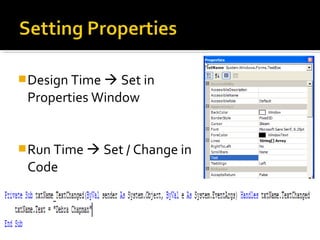
Design Time  Set in
Properties Window
Run Time  Set / Change in
Code
Slide 2- 10
 Specify the control name (btnExit)
 Then a dot
 Then the PropertyName (Visible)
 controlName.propertyName
 btnExit.Visible
▪ refers to the Visible property of the btnExit control
▪ The visible property values may only be true or false
Item to receive the value (Left Side)
Assignment Indicator =
Value to be assigned(Right Side)
 VariableName = Value
 NumberVariable = 5
 ControlName.PropertyName = Setting
 btnExit.Visible = False
▪ Assigns the value False to the Visible property of the btnExit control
▪ Causes the text of the btnExit control to become hidden to the user
 txtFirstName.text = “Paul”
 txtLastName.text = “Overstreet”
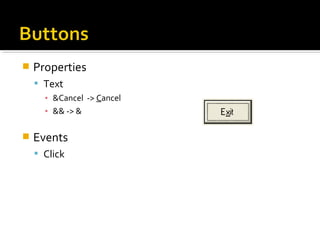
 Properties
 Text
▪ &Cancel -> Cancel
▪ && -> &
 Events
 Click
 Use labels and link labels for text
display
 Text property (no more Caption) defines
text to display
 User cannot change a label
 LinkLabel enables hyperlinks
 Links.Add inserts a hyperlink into text
 Must write event-handler to invoke
browser
 See example
 Text box allows user to
enter or edit data
 Properties
 MaxLength, MultiLine
 AcceptsTab
 AcceptsReturn
 WordWrap
 ScrollBars
 Events
 TextChanged
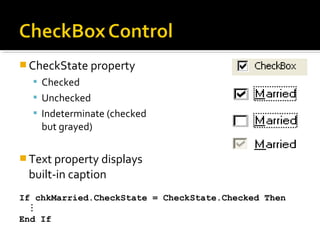
 CheckState property
 Checked
 Unchecked
 Indeterminate (checked
but grayed)
 Text property displays
built-in caption
If chkMarried.CheckState = CheckState.Checked Then

End If
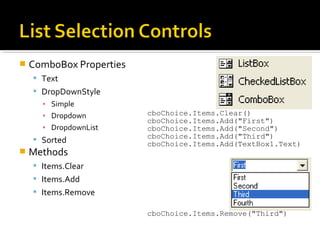
 ComboBox Properties
 Text
 DropDownStyle
▪ Simple
▪ Dropdown
▪ DropdownList
 Sorted
 Methods
 Items.Clear
 Items.Add
 Items.Remove
cboChoice.Items.Clear()
cboChoice.Items.Add("First")
cboChoice.Items.Add("Second")
cboChoice.Items.Add("Third")
cboChoice.Items.Add(TextBox1.Text)
cboChoice.Items.Remove("Third")
 Executes code after a
specified interval
 Timer Event
 Unique event that executes
after the interval specified in
the interval property expires
 Interval Property
 0 - 65,535 milliseconds
▪ 0 - means disabled
▪ 60,000 milliseconds is one
minute
 Enabled property must also
be true for timer to work.
 Timer control is never visible
at run time
 Stored in Component Tray at
design time
 Applications recognize and respond to events by
executing code known as event procedures
 Event: An action that is recognized by an object.
 User Actions
▪ Mouse Click
▪ Entering Text
▪ Pressing a Key
 Program Calculations
 Triggered by the system
▪ Timer
 Event Handler: Code that is written by the
programmer to respond to an event
 Executes only when particular event occurs
Common Form Events
 Form1_Load() - Occurs before a form is displayed
for the first time.
 Form1_Activated() - Occurs when form becomes
the active window - through code or by user
 Form1_Deactivate() - Occurs when the form loses
focus and is not the active form
 Form1_Closing() - Occurs when the form closes,
either through an event or the windows close
button being clicked
 Many controls share a Common set of events
to which they can react
 Click, DoubleClick
 MouseMove, MouseDown, MouseUp,
MouseWheel, MouseHover, MouseLeave
 KeyPress, KeyDown, KeyUp
 Resize
 DragDrop
 GotFocus
 LostFocus
 Focus is when an object becomes the “Active
Control”
 Focus Event Sequence:
 Enter
 GotFocus
 Leave
 Validating
 Validated
 LostFocus
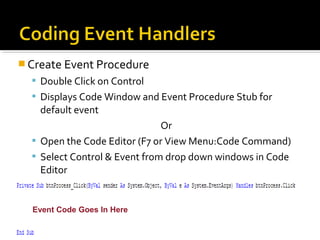
 Create Event Procedure
 Double Click on Control
 Displays Code Window and Event Procedure Stub for
default event
Or
 Open the Code Editor (F7 or View Menu:Code Command)
 Select Control & Event from drop down windows in Code
Editor
Event Code Goes In Here
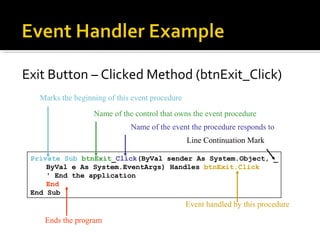
Exit Button – Clicked Method (btnExit_Click)
Private Sub btnExit_Click(ByVal sender As System.Object, _
ByVal e As System.EventArgs) Handles btnExit.Click
' End the application
End
End Sub
Line Continuation Mark
Name of the event the procedure responds to
Name of the control that owns the event procedure
Marks the beginning of this event procedure
Ends the program
Event handled by this procedure
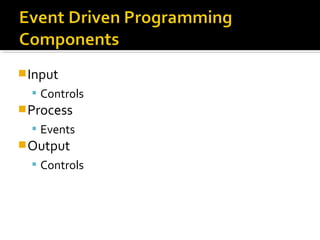
Input
 Controls
Process
 Events
Output
 Controls
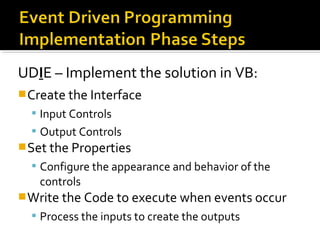
UDIE – Implement the solution in VB:
Create the Interface
 Input Controls
 Output Controls
Set the Properties
 Configure the appearance and behavior of the
controls
Write the Code to execute when events occur
 Process the inputs to create the outputs
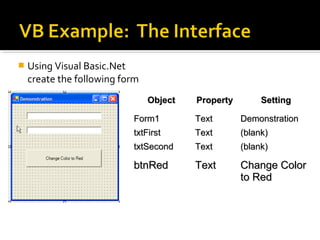
 Using Visual Basic.Net
create the following form
ObjectObject PropertyProperty SettingSetting
Form1Form1 TextText DemonstrationDemonstration
txtFirsttxtFirst TextText (blank)(blank)
txtSecondtxtSecond TextText (blank)(blank)
btnRedbtnRed TextText Change ColorChange Color
to Redto Red
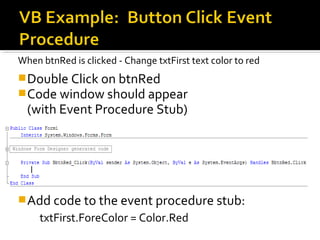
When btnRed is clicked - Change txtFirst text color to red
Double Click on btnRed
Code window should appear
(with Event Procedure Stub)
Add code to the event procedure stub:
txtFirst.ForeColor = Color.Red
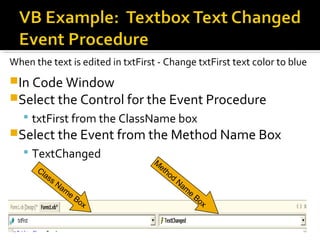
When the text is edited in txtFirst - Change txtFirst text color to blue
In Code Window
Select the Control for the Event Procedure
 txtFirst from the ClassName box
Select the Event from the Method Name Box
 TextChanged
Class Nam
e
Box
M
ethod
Nam
e
Box
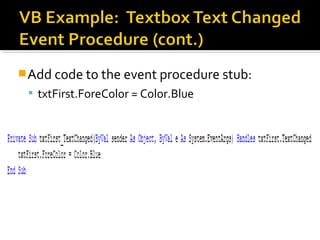
Add code to the event procedure stub:
 txtFirst.ForeColor = Color.Blue
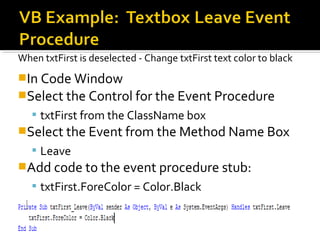
When txtFirst is deselected - Change txtFirst text color to black
In Code Window
Select the Control for the Event Procedure
 txtFirst from the ClassName box
Select the Event from the Method Name Box
 Leave
Add code to the event procedure stub:
 txtFirst.ForeColor = Color.Black
Click F5 or the Run Button
Type “Hello” into the 1st textbox
 What Happens
Click on the 2nd
Textbox
 What happened in txtFirst and Why
Click on the Button
 What happened in txtFirst
Type “Friends” into the 1st
textbox
Stop Program by clicking Red X in corner
Add a Button to your Form
 Name: btnExit
 Text Property: &Quit
Add a Button Click Event for this Button
 Code: END
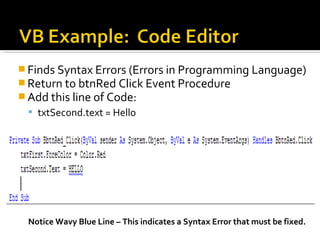
 Finds Syntax Errors (Errors in Programming Language)
 Return to btnRed Click Event Procedure
 Add this line of Code:
 txtSecond.text = Hello
Notice Wavy Blue Line – This indicates a Syntax Error that must be fixed.
Test All Events
Click Quit Button
 Homework 1
 Visual Basic Controls and Properties
 See handout for details and due date
 Questions?

4.7.14&17.7.14&23.6.15&10.9.15

  • 1.
  • 2.
     Forms  Formproperties  Controls  Control properties  Event Driven Programming  Form Events  Control Events  Event Handlers  VB Example Program
  • 3.
     A formis a container for controls  A form is used to design a GUI-based window in a Windows application  A form displays information and receives input from the user.  Always orient a form at a task as defined by the user
  • 4.
     Text –defines the text to display in the caption bar  StartPosition – determines position of form when it first appears (eg. CenterScreen)  Size.Width, Size.Height – the 2D area occupied by the form, in units of pixels  Location.X, Location.Y – the relative position of the form on the screen  Visible – can be seen by the user  Enabled – the user can interact with the form
  • 5.
     FormBorderStyle –determines the appearance and behavior of the borders of the form  Sizable: (Default) Has min, max, and close buttons; can be resized by dragging edges  Fixed3D: Has a 3D look; min, max, and close buttons; cannot be resized  FixedSingle: Has single line border; min, max, and close buttons; cannot be resized  AcceptButton - designates which button on the form is activated by the Enter Key  Cancel Button - designates which button on the form is activated by the ESC Key
  • 6.
     Visual objectsthat are placed on a form to enable customized activities  Familiar Visual Basic controls:  Label - displays text the user cannot change  TextBox - allows the user to enter text  Button – performs an action when clicked  RadioButton - A round button that is selected or deselected with a mouse  CheckBox – A box that is checked or unchecked with a mouse click  Form - A window that contains these controls  Built-in controls defined in Windows Form class library, and are defined  with ToolBox and Form Designer  or strictly with code
  • 7.
     Text edit(TextBox—txt___)  Text display (Label—default name or lbl___)  Selection from a list (ListBox—lst___, ComboBox—cbo___, ListView, TreeView, NumericUpDown…)  Graphic display (PictureBox—pic___)  Graphic storage (ImageList)  Value setting (CheckBox—chk___, CheckListBox, RadioButton,…)  Date setting (DateTimePicker, MonthCalendar)  Dialog boxes (OpenFileDialog, PrintDialog…)  Menu controls (MainMenu, …)  Commands (Button—btn___, LinkLabel…)  Grouping other controls (GroupBox, TabControl, Panel)
  • 8.
     Common propertiesshared by many controls  Name, Text  Size.Height & Width, Location.X &Y, Dock  BackColor: Sets the background (fill) color  ForeColor: Sets the foreground (text) color  CanFocus, ContainsFocus, Focused  Visible & Enabled determine availability to user  Font properties affect text display in the control ▪ Font, size, bold, etc.  Tab Index & Tab Stop
  • 9.
    Design Time Set in Properties Window Run Time  Set / Change in Code
  • 10.
    Slide 2- 10 Specify the control name (btnExit)  Then a dot  Then the PropertyName (Visible)  controlName.propertyName  btnExit.Visible ▪ refers to the Visible property of the btnExit control ▪ The visible property values may only be true or false
  • 11.
    Item to receivethe value (Left Side) Assignment Indicator = Value to be assigned(Right Side)  VariableName = Value  NumberVariable = 5  ControlName.PropertyName = Setting  btnExit.Visible = False ▪ Assigns the value False to the Visible property of the btnExit control ▪ Causes the text of the btnExit control to become hidden to the user  txtFirstName.text = “Paul”  txtLastName.text = “Overstreet”
  • 12.
     Properties  Text ▪&Cancel -> Cancel ▪ && -> &  Events  Click
  • 13.
     Use labelsand link labels for text display  Text property (no more Caption) defines text to display  User cannot change a label  LinkLabel enables hyperlinks  Links.Add inserts a hyperlink into text  Must write event-handler to invoke browser  See example
  • 14.
     Text boxallows user to enter or edit data  Properties  MaxLength, MultiLine  AcceptsTab  AcceptsReturn  WordWrap  ScrollBars  Events  TextChanged
  • 15.
     CheckState property Checked  Unchecked  Indeterminate (checked but grayed)  Text property displays built-in caption If chkMarried.CheckState = CheckState.Checked Then  End If
  • 16.
     ComboBox Properties Text  DropDownStyle ▪ Simple ▪ Dropdown ▪ DropdownList  Sorted  Methods  Items.Clear  Items.Add  Items.Remove cboChoice.Items.Clear() cboChoice.Items.Add("First") cboChoice.Items.Add("Second") cboChoice.Items.Add("Third") cboChoice.Items.Add(TextBox1.Text) cboChoice.Items.Remove("Third")
  • 17.
     Executes codeafter a specified interval  Timer Event  Unique event that executes after the interval specified in the interval property expires  Interval Property  0 - 65,535 milliseconds ▪ 0 - means disabled ▪ 60,000 milliseconds is one minute  Enabled property must also be true for timer to work.  Timer control is never visible at run time  Stored in Component Tray at design time
  • 18.
     Applications recognizeand respond to events by executing code known as event procedures  Event: An action that is recognized by an object.  User Actions ▪ Mouse Click ▪ Entering Text ▪ Pressing a Key  Program Calculations  Triggered by the system ▪ Timer  Event Handler: Code that is written by the programmer to respond to an event  Executes only when particular event occurs
  • 19.
    Common Form Events Form1_Load() - Occurs before a form is displayed for the first time.  Form1_Activated() - Occurs when form becomes the active window - through code or by user  Form1_Deactivate() - Occurs when the form loses focus and is not the active form  Form1_Closing() - Occurs when the form closes, either through an event or the windows close button being clicked
  • 20.
     Many controlsshare a Common set of events to which they can react  Click, DoubleClick  MouseMove, MouseDown, MouseUp, MouseWheel, MouseHover, MouseLeave  KeyPress, KeyDown, KeyUp  Resize  DragDrop  GotFocus  LostFocus
  • 21.
     Focus iswhen an object becomes the “Active Control”  Focus Event Sequence:  Enter  GotFocus  Leave  Validating  Validated  LostFocus
  • 22.
     Create EventProcedure  Double Click on Control  Displays Code Window and Event Procedure Stub for default event Or  Open the Code Editor (F7 or View Menu:Code Command)  Select Control & Event from drop down windows in Code Editor Event Code Goes In Here
  • 23.
    Exit Button –Clicked Method (btnExit_Click) Private Sub btnExit_Click(ByVal sender As System.Object, _ ByVal e As System.EventArgs) Handles btnExit.Click ' End the application End End Sub Line Continuation Mark Name of the event the procedure responds to Name of the control that owns the event procedure Marks the beginning of this event procedure Ends the program Event handled by this procedure
  • 24.
  • 25.
    UDIE – Implementthe solution in VB: Create the Interface  Input Controls  Output Controls Set the Properties  Configure the appearance and behavior of the controls Write the Code to execute when events occur  Process the inputs to create the outputs
  • 26.
     Using VisualBasic.Net create the following form ObjectObject PropertyProperty SettingSetting Form1Form1 TextText DemonstrationDemonstration txtFirsttxtFirst TextText (blank)(blank) txtSecondtxtSecond TextText (blank)(blank) btnRedbtnRed TextText Change ColorChange Color to Redto Red
  • 27.
    When btnRed isclicked - Change txtFirst text color to red Double Click on btnRed Code window should appear (with Event Procedure Stub) Add code to the event procedure stub: txtFirst.ForeColor = Color.Red
  • 28.
    When the textis edited in txtFirst - Change txtFirst text color to blue In Code Window Select the Control for the Event Procedure  txtFirst from the ClassName box Select the Event from the Method Name Box  TextChanged Class Nam e Box M ethod Nam e Box
  • 29.
    Add code tothe event procedure stub:  txtFirst.ForeColor = Color.Blue
  • 30.
    When txtFirst isdeselected - Change txtFirst text color to black In Code Window Select the Control for the Event Procedure  txtFirst from the ClassName box Select the Event from the Method Name Box  Leave Add code to the event procedure stub:  txtFirst.ForeColor = Color.Black
  • 31.
    Click F5 orthe Run Button Type “Hello” into the 1st textbox  What Happens Click on the 2nd Textbox  What happened in txtFirst and Why Click on the Button  What happened in txtFirst Type “Friends” into the 1st textbox Stop Program by clicking Red X in corner
  • 32.
    Add a Buttonto your Form  Name: btnExit  Text Property: &Quit Add a Button Click Event for this Button  Code: END
  • 33.
     Finds SyntaxErrors (Errors in Programming Language)  Return to btnRed Click Event Procedure  Add this line of Code:  txtSecond.text = Hello Notice Wavy Blue Line – This indicates a Syntax Error that must be fixed.
  • 34.
  • 35.
     Homework 1 Visual Basic Controls and Properties  See handout for details and due date  Questions?

Editor's Notes

  • #14 Code is from INPUT.FRM, Function GET_PK