Chapter 15 – Strings, Chars Outline 15.1  Introduction 15.2  Fundamentals of Characters and  String s 15.3  String  Constructors 15.4  String  Indexer,  Length  Property and  CopyTo  Method 15.5  Comparing  String s 15.6  String  Method  GetHashCode 15.7  Locating Characters and Substrings in  String s 15.8  Extracting Substrings from  String s 15.9  Concatenating  String s 15.10  Miscellaneous  String  Methods 15.11  Class  StringBuilder 15.12  StringBuilder  Indexer,  Length  and  Capacity  Properties, and  EnsureCapacity  Method 15.13  StringBuilder   Append  and  AppendFormat  Methods 15.14  StringBuilder   Insert ,  Remove  and  Replace  Methods 15.15  Char  Methods 15.16  Card Shuffling and Dealing Simulation 15.17  Regular Expressions and Class  Regex
15.1 Introduction String and character processing capabilities Text editors Word processors… Expand from previous chapters Class String and type char Class StringBuilder Class Regex and Match
15.2 Fundamentals of Characters and Strings Importance of characters Character constants Character code Unicode character set String Object of class String in System namespace Consist of characters
15.3 String Constructors Class String Provides eight constructors for initialing strings
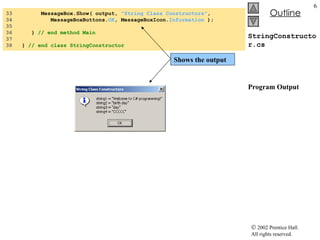
StringConstructor.cs 1  // Fig. 15.1: StringConstructor.cs 2  // Demonstrating String class constructors. 3  4  using  System; 5  using  System.Windows.Forms; 6  7  // test several String class constructors 8  class  StringConstructor 9  { 10  // The main entry point for the application. 11  [STAThread] 12  static   void  Main(  string [] args ) 13  { 14  string  output; 15  string  originalString, string1, string2,  16  string3, string4; 17  18  char [] characterArray =  19  {  'b' ,  'i' ,  'r' ,  't' ,  'h' ,  ' ' ,  'd' ,  'a' ,  'y'  }; 20  21  // string initialization 22  originalString =  "Welcome to C# programming!" ; 23  string1 = originalString; 24  string2 =  new   string ( characterArray ); 25  string3 =  new   string ( characterArray,  6 ,  3  ); 26  string4 =  new   string (  'C' ,  5  ); 27  28  output =  "string1 = "  +  "\""  + string1 +  "\"\n"  + 29  "string2 = "  +  "\""  + string2 +  "\"\n"  + 30  "string3 = "  +  "\""  + string3 +  "\"\n"  + 31  "string4 = "  +  "\""  + string4 +  "\"\n" ; 32  String declarations Allocate  char  array  characterArray  to contain nine characters Assign literal  string  to  string  reference  originalString Set  string1  to reference the same  string  literal String2  assign to a new string String  constructor takes a character array as argument String  constructor takes a  char  array and two  int  arguments Starting index and count ArgumentOutOfRangeException  thrown if element outside the bound Using  string  constructed with a character and an  int  specifying number of times to repeat character in the  string Output the strings
StringConstructor.cs Program Output 33  MessageBox.Show( output,  "String Class Constructors" , 34  MessageBoxButtons. OK , MessageBoxIcon. Information  ); 35  36  }  // end method Main 37  38  }  // end class StringConstructor Shows the output
15.4 String Indexer, Length Property and CopyTo Method String indexer Retrieval of any character in the string Length property  Returns the length of the string  CopyTo Copies specified number of characters into a char array
StringMethods.cs 1  // Fig. 15.2: StringMethods.cs 2  // Using the indexer, property Length and method CopyTo 3  // of class String. 4  5  using  System; 6  using  System.Windows.Forms; 7  8  // creates string objects and displays results of using 9  // indexer and methods Length and CopyTo 10  class  StringMethods 11  { 12  // The main entry point for the application. 13  [STAThread] 14  static   void  Main(  string [] args ) 15  { 16  string  string1, output; 17  char [] characterArray; 18  19  string1 =  "hello there" ; 20  characterArray =  new   char [  5  ]; 21  22  // output string 23  output =  24  "string1: \""  + string1 +  "\"" ; 25  26  // test Length property 27  output +=  "\nLength of string1: "  + string1.Length; 28  29  // loop through character in string1 and display 30  // reversed 31  output +=  "\nThe string reversed is: " ; 32  33  for  (  int  i = string1.Length -  1 ; i >=  0 ; i-- ) 34  output += string1[ i ]; 35  String  declarations String1  to store  string  literal “hello there” Append to output of  string1  in reverse order
StringMethods.cs Program Output 36  // copy characters from string1 into characterArray 37  string1.CopyTo(  0 , characterArray,  0 ,  5  ); 38  output +=  &quot;\nThe character array is: &quot; ; 39  40  for  (  int  i =  0  ; i < characterArray.Length; i++ ) 41  output += characterArray[ i ]; 42  43  MessageBox.Show( output,  &quot;Demonstrating the string &quot;  + 44  &quot;Indexer, Length Property and CopyTo method&quot; , 45  MessageBoxButtons. OK , MessageBoxIcon. Information  ); 46  47  }  // end method Main 48  49  }  // end class StringMethods Index to begin copying   character array to copy to Index of location to put into character array Number of characters to copy from  string Append the  char  array contents to  string output Method  Copyto  called by  string1
15.5 Comparing Strings String comparison Greater than Less than Method Equals Test objects for equality Return a Boolean Uses lexicographical comparison
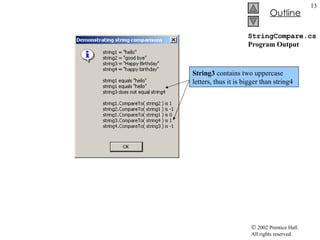
StringCompare.cs 1  // Fig. 15.3: StringCompare.cs 2  // Comparing strings. 3  4  using  System; 5  using  System.Windows.Forms; 6  7  // compare a number of strings 8  class  StringCompare 9  { 10  // The main entry point for the application. 11  [STAThread] 12  static   void  Main(  string [] args ) 13  { 14  string  string1 =  &quot;hello&quot; ; 15  string  string2 =  &quot;good bye&quot; ; 16  string  string3 =  &quot;Happy Birthday&quot; ; 17  string  string4 =  &quot;happy birthday&quot; ; 18  string  output; 19  20  // output values of four strings 21  output =  &quot;string1 = \&quot;&quot;  + string1 +  &quot;\&quot;&quot;  + 22  &quot;\nstring2 = \&quot;&quot;  + string2 +  &quot;\&quot;&quot;  + 23  &quot;\nstring3 = \&quot;&quot;  + string3 +  &quot;\&quot;&quot;  + 24  &quot;\nstring4 = \&quot;&quot;  + string4 +  &quot;\&quot;\n\n&quot; ; 25  26  // test for equality using Equals method 27  if  ( string1.Equals(  &quot;hello&quot;  ) ) 28  output +=  &quot;string1 equals \&quot;hello\&quot;\n&quot; ; 29  else 30  output +=  &quot;string1 does not equal \&quot;hello\&quot;\n&quot; ; 31  32  // test for equality with == 33  if  ( string1 ==  &quot;hello&quot;  ) 34  output +=  &quot;string1 equals \&quot;hello\&quot;\n&quot; ; Instance method  Equals Compares the Unicode values in each string Equality operator
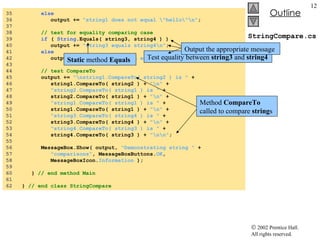
StringCompare.cs 35  else 36  output +=  &quot;string1 does not equal \&quot;hello\&quot;\n&quot; ; 37  38  // test for equality comparing case 39  if  (  String .Equals( string3, string4 ) ) 40  output +=  &quot;string3 equals string4\n&quot; ; 41  else 42  output +=  &quot;string3 does not equal string4\n&quot; ; 43  44  // test CompareTo 45  output +=  &quot;\nstring1.CompareTo( string2 ) is &quot;  + 46  string1.CompareTo( string2 ) +  &quot;\n&quot;  + 47  &quot;string2.CompareTo( string1 ) is &quot;  + 48  string2.CompareTo( string1 ) +  &quot;\n&quot;  + 49  &quot;string1.CompareTo( string1 ) is &quot;  + 50  string1.CompareTo( string1 ) +  &quot;\n&quot;  + 51  &quot;string3.CompareTo( string4 ) is &quot;  + 52  string3.CompareTo( string4 ) +  &quot;\n&quot;  + 53  &quot;string4.CompareTo( string3 ) is &quot;  + 54  string4.CompareTo( string3 ) +  &quot;\n\n&quot; ; 55  56  MessageBox.Show( output,  &quot;Demonstrating string &quot;  + 57  &quot;comparisons&quot; , MessageBoxButtons. OK ,  58  MessageBoxIcon. Information  ); 59  60  }  // end method Main 61  62  }  // end class StringCompare Test equality between  string3  and  string4 Output the appropriate message Static  method  Equals Method  CompareTo  called to compare  string s
StringCompare.cs Program Output String3  contains two uppercase letters, thus it is bigger than string4
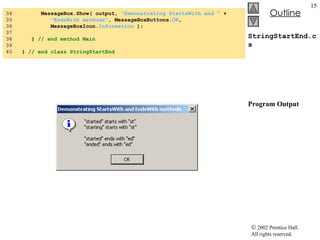
StringStartEnd.cs 1  // Fig. 15.4: StringStartEnd.cs 2  // Demonstrating StartsWith and EndsWith methods. 3  4  using  System; 5  using  System.Windows.Forms; 6  7  // testing StartsWith and EndsWith 8  class  StringStartEnd 9  { 10  // The main entry point for the application. 11  [STAThread] 12  static   void  Main(  string [] args ) 13  { 14  string [] strings =  15  {  &quot;started&quot; ,  &quot;starting&quot; ,  &quot;ended&quot; ,  &quot;ending&quot;  }; 16  string  output =  &quot;&quot; ; 17  18  //test every string to see if it starts with &quot;st&quot; 19  for  (  int  i =  0 ; i < strings.Length; i++ ) 20  21  if  ( strings[ i ].StartsWith(  &quot;st&quot;  ) ) 22  output +=  &quot;\&quot;&quot;  + strings[ i ] +  &quot;\&quot;&quot;  + 23  &quot; starts with \&quot;st\&quot;\n&quot; ; 24  25  output +=  &quot;\n&quot; ; 26  27  // test every string to see if it ends with &quot;ed&quot; 28  for  (  int  i =  0 ; i < strings.Length; i ++ ) 29  30  if  ( strings[ i ].EndsWith(  &quot;ed&quot;  ) ) 31  output +=  &quot;\&quot;&quot;  + strings[ i ] +  &quot;\&quot;&quot;  + 32  &quot; ends with \&quot;ed\&quot;\n&quot; ; 33  Method  StartsWith  determines if a  string  instance starts with the  string  text passed to it Method  EndsWith  determines if a  string  instance ends with the  string  text passed to it Array of  string s Contents define at time of declaration Method  StartsWith  takes  a  String  argument If structure determine if  string  at index i starts with “st” Appends string[i] to string output Return  true  if  test  statement matched If structure determine if  string  at index i starts with “ed”
StringStartEnd.cs Program Output 34  MessageBox.Show( output,  &quot;Demonstrating StartsWith and &quot;  + 35  &quot;EndsWith methods&quot; , MessageBoxButtons. OK ,  36  MessageBoxIcon. Information  ); 37  38  }  // end method Main 39  40  }  // end class StringStartEnd
15.6 String Method GetHashCode Hash table Of class Object Make information easily accessible Calculation to produce a hash code
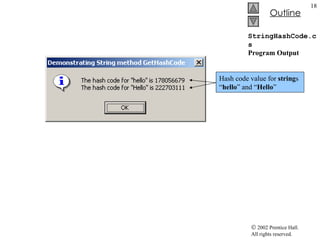
StringHashCode.cs 1  // Fig. 15.5: StringHashCode.cs 2  // Demonstrating method GetHashCode of class String. 3  4  using  System; 5  using  System.Windows.Forms; 6  7  // testing the GetHashCode method 8  class  StringHashCode 9  { 10  // The main entry point for the application. 11  [STAThread] 12  static   void  Main(  string [] args ) 13  { 14  15  string  string1 =  &quot;hello&quot; ; 16  string  string2 =  &quot;Hello&quot; ; 17  string  output; 18  19  output =  &quot;The hash code for \&quot;&quot;  + string1 + 20  &quot;\&quot; is &quot;  + string1.GetHashCode() +  &quot;\n&quot; ; 21  22  output +=  &quot;The hash code for \&quot;&quot;  + string2 + 23  &quot;\&quot; is &quot;  + string2.GetHashCode() +  &quot;\n&quot; ; 24  25  MessageBox.Show( output,  &quot;Demonstrating String &quot;  + 26  &quot;method GetHashCode&quot; , MessageBoxButtons. OK ,  27  MessageBoxIcon. Information  ); 28  29  }  // end method Main 30  31  }  // end class StringHashCode Define two  string s Method  GetHashCode  is called to calculate for  string1  and  string2
StringHashCode.cs Program Output Hash code value for  string s “ hello ” and “ Hello ”
15.7 Locating Characters and Substrings in Strings Application of  String  methods: IndexOf IndexOfAny LastIndexOf LastIndexOfAny
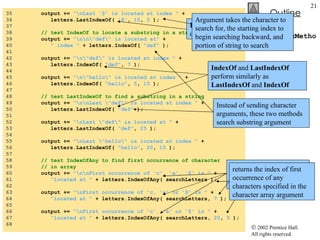
StringIndexMethods.cs 1  // Fig. 15.6: StringIndexMethods.cs 2  // Using String searching methods. 3  4  using  System; 5  using  System.Windows.Forms; 6  7  // testing indexing capabilities of strings 8  class  StringIndexMethods 9  { 10  // The main entry point for the application. 11  [STAThread] 12  static   void  Main(  string [] args ) 13  { 14  string  letters =  &quot;abcdefghijklmabcdefghijklm&quot; ; 15  string  output =  &quot;&quot; ; 16  char [] searchLetters = {  'c' ,  'a' ,  '$'  }; 17  18  // test IndexOf to locate a character in a string 19  output +=  &quot;'c' is located at index &quot;  + 20  letters.IndexOf(  'c'  ); 21  22  output +=  &quot;\n'a' is located at index &quot;  + 23  letters.IndexOf(  'a' ,  1  ); 24  25  output +=  &quot;\n'$' is located at index &quot;  + 26  letters.IndexOf(  '$' ,  3 ,  5  ); 27  28  // test LastIndexOf to find a character in a string 29  output +=  &quot;\n\nLast 'c' is located at &quot;  + 30  &quot;index &quot;  + letters.LastIndexOf(  'c'  ); 31  32  output +=  &quot;\nLast 'a' is located at index &quot;  + 33  letters.LastIndexOf(  'a' ,  25  ); 34  Method  IndexOf  to   locate first occurrence of substring in a  string If successful  IndexOf  will return index of specified character or return -1 IndexOf  takes two arguments, the character to search for and the initial index of the search IndexOf  takes three arguments, the character to search for, the initial index of the search and the number of characters to search These outputs use the  LastIndexOf  method Takes the character as an argument to search Takes two argument, the character to search for and highest index to begin backward search
StringIndexMethods.cs 35  output +=  &quot;\nLast '$' is located at index &quot;  + 36  letters.LastIndexOf(  '$' ,  15 ,  5  ); 37  38  // test IndexOf to locate a substring in a string 39  output +=  &quot;\n\n\&quot;def\&quot; is located at&quot;  + 40  &quot; index &quot;  + letters.IndexOf(  &quot;def&quot;  ); 41  42  output +=  &quot;\n\&quot;def\&quot; is located at index &quot;  + 43  letters.IndexOf(  &quot;def&quot; ,  7  ); 44  45  output +=  &quot;\n\&quot;hello\&quot; is located at index &quot;  + 46  letters.IndexOf(  &quot;hello&quot; ,  5 ,  15  ); 47  48  // test LastIndexOf to find a substring in a string 49  output +=  &quot;\n\nLast \&quot;def\&quot; is located at index &quot;  + 50  letters.LastIndexOf(  &quot;def&quot;  ); 51  52  output +=  &quot;\nLast \&quot;def\&quot; is located at &quot;  + 53  letters.LastIndexOf(  &quot;def&quot; ,  25  ); 54  55  output +=  &quot;\nLast \&quot;hello\&quot; is located at index &quot;  + 56  letters.LastIndexOf(  &quot;hello&quot; ,  20 ,  15  ); 57  58  // test IndexOfAny to find first occurrence of character 59  // in array 60  output +=  &quot;\n\nFirst occurrence of 'c', 'a', '$' is &quot;  + 61  &quot;located at &quot;  + letters.IndexOfAny( searchLetters ); 62  63  output +=  &quot;\nFirst occurrence of 'c, 'a' or '$' is &quot;  + 64  &quot;located at &quot;  + letters.IndexOfAny( searchLetters,  7  ); 65  66  output +=  &quot;\nFirst occurrence of 'c', 'a' or '$' is &quot;  + 67  &quot;located at &quot;  + letters.IndexOfAny( searchLetters,  20 ,  5  ); 68  LastIndexOf  search from the end of the string toward the beginning Argument takes the character to search for, the starting index to begin searching backward, and portion of string to search IndexOf  and  LastIndexOf  perform similarly as  LastIndexOf  and  IndexOf Instead of sending character arguments, these two methods search substring argument Method  IndexOfAny  take an array of characters as the first argument returns the index of first occurrence of any characters specified in the character array argument
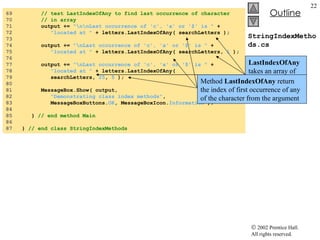
StringIndexMethods.cs 69  // test LastIndexOfAny to find last occurrence of character 70  // in array 71  output +=  &quot;\n\nLast occurrence of 'c', 'a' or '$' is &quot;  + 72  &quot;located at &quot;  + letters.LastIndexOfAny( searchLetters ); 73  74  output +=  &quot;\nLast occurrence of 'c', 'a' or '$' is &quot;  + 75  &quot;located at &quot;  + letters.LastIndexOfAny( searchLetters,  1  ); 76  77  output +=  &quot;\nLast occurrence of 'c', 'a' or '$' is &quot;  + 78  &quot;located at &quot;  + letters.LastIndexOfAny(  79  searchLetters,  25 ,  5  ); 80  81  MessageBox.Show( output,  82  &quot;Demonstrating class index methods&quot; , 83  MessageBoxButtons. OK , MessageBoxIcon. Information  ); 84  85  }  // end method Main 86  87  }  // end class StringIndexMethods LastIndexOfAny  takes an array of characters as the first argument Method  LastIndexOfAny  return the index of first occurrence of any of the character from the argument
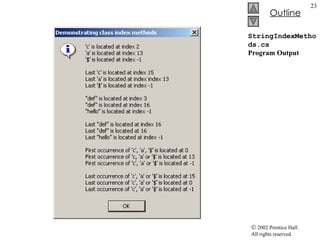
StringIndexMethods.cs Program Output
15.8 Extracting Substrings from Strings Substring methods Create new string Method return new string
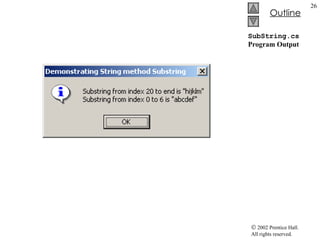
SubString.cs 1  // Fig. 15.7: SubString.cs 2  // Demonstrating the String Substring method. 3  4  using  System; 5  using  System.Windows.Forms; 6  7  // creating substrings 8  class  SubString 9  { 10  // The main entry point for the application. 11  [STAThread] 12  static   void  Main(  string [] args ) 13  { 14  string  letters =  &quot;abcdefghijklmabcdefghijklm&quot; ; 15  string  output =  &quot;&quot; ; 16  17  // invoke Substring method and pass it one parameter 18  output +=  &quot;Substring from index 20 to end is \&quot;&quot;  + 19  letters.Substring(  20  ) +  &quot;\&quot;\n&quot; ; 20  21  // invoke Substring method and pass it two parameters 22  output +=  &quot;Substring from index 0 to 6 is \&quot;&quot;  + 23  letters.Substring(  0 ,  6  ) +  &quot;\&quot;&quot; ; 24  25  MessageBox.Show( output,  26  &quot;Demonstrating String method Substring&quot; , 27  MessageBoxButtons. OK , MessageBoxIcon. Information  ); 28  29  }  // end method Main 30  31  }  // end class SubString Substring  methods takes one  int  argument Argument specifies the starting index to copy the character in the original  string The returned substring contains a copy of the character from the specified index to the end If index specified is not inside the bound, then  ArgumentOutOfRangeException  thrown This example using  Substring  takes two  int  argument First argument specify the starting index Second argument specify length of the substring to be copied Substring return contains a copy of the specified characters from the original  string
SubString.cs Program Output
15.9 Concatenating Strings Static method Concat Takes two string and return a new string
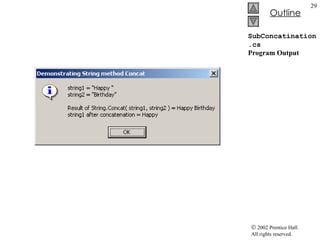
SubConcatination.cs 1  // Fig. 15.8: SubConcatination.cs 2  // Demonstrating String class Concat method. 3  4  using  System; 5  using  System.Windows.Forms; 6  7  // concatenates strings using String method Concat 8  class  StringConcatenation 9  { 10  // The main entry point for the application. 11  [STAThread] 12  static   void  Main(  string [] args ) 13  { 14  string  string1 =  &quot;Happy &quot; ; 15  string  string2 =  &quot;Birthday&quot; ; 16  string  output; 17  18  output =  &quot;string1 = \&quot;&quot;  + string1 +  &quot;\&quot;\n&quot;  + 19  &quot;string2 = \&quot;&quot;  + string2 +  &quot;\&quot;&quot; ; 20  21  output +=  22  &quot;\n\nResult of String.Concat( string1, string2 ) = &quot;  + 23  String.Concat( string1, string2 ); 24  25  output +=  &quot;\nstring1 after concatenation = &quot;  + string1; 26  27  MessageBox.Show( output,  28  &quot;Demonstrating String method Concat&quot; , 29  MessageBoxButtons. OK , MessageBoxIcon. Information  ); 30  31  }  // end method Main 32  33  }  // end class StringConcatenation Declare two new  string s Append  string2  unto the end of  string1 The original  string ,  string1  is not altered Output the result from the  ConCat  method call
SubConcatination.cs Program Output
15.10 Miscellaneous String Methods Method Replace  Original string remain unchanged  Original string return if no occurrence matched Method ToUpper Replace lower case letter Original string remain unchanged Original string return if no occurrence matched Method ToLower Replace lower case letter Original string remain unchanged Original string return if no occurrence matched
15.10 Miscellaneous String Methods Method ToString Can be called to obtain a string representation of any object Method Trim Remove whitespaces Remove characters in the array argument
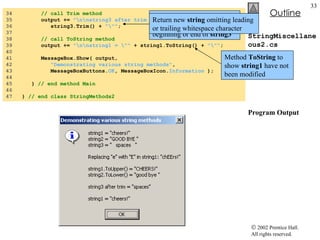
StringMiscellaneous2.cs 1  // Fig. 15.9: StringMiscellaneous2.cs 2  // Demonstrating String methods Replace, ToLower, ToUpper, Trim  3  // and ToString. 4  5  using  System; 6  using  System.Windows.Forms; 7  8  // creates strings using methods Replace, ToLower, ToUpper, Trim 9  class  StringMethods2 10  { 11  // The main entry point for the application. 12  [STAThread] 13  static   void  Main(  string [] args ) 14  { 15  string  string1 =  &quot;cheers!&quot; ; 16  string  string2 =  &quot;GOOD BYE &quot; ; 17  string  string3 =  &quot;  spaces  &quot; ; 18  string  output; 19  20  output =  &quot;string1 = \&quot;&quot;  + string1 +  &quot;\&quot;\n&quot;  + 21  &quot;string2 = \&quot;&quot;  + string2 +  &quot;\&quot;\n&quot;  + 22  &quot;string3 = \&quot;&quot;  + string3 +  &quot;\&quot;&quot; ; 23  24  // call method Replace 25  output +=  26  &quot;\n\nReplacing \&quot;e\&quot; with \&quot;E\&quot; in string1: \&quot;&quot;  + 27  string1.Replace(  'e' ,  'E'  ) +  &quot;\&quot;&quot; ; 28  29  // call ToLower and ToUpper 30  output +=  &quot;\n\nstring1.ToUpper() = \&quot;&quot;  + 31  string1.ToUpper() +  &quot;\&quot;\nstring2.ToLower() = \&quot;&quot;  + 32  string2.ToLower() +  &quot;\&quot;&quot; ; 33  Method  Replace  return new string with correct revision based on the argument Replace all instances of ‘e’ with ‘E’ in  string1 String to search for String to replace with Original  string  return if no match occur Method  ToLower  return a new  string  from  string2  by lowercase equivalence
StringMiscellaneous2.cs Program Output 34  // call Trim method 35  output +=  &quot;\n\nstring3 after trim = \&quot;&quot;  + 36  string3.Trim() +  &quot;\&quot;&quot; ; 37  38  // call ToString method 39  output +=  &quot;\n\nstring1 = \&quot;&quot;  + string1.ToString() +  &quot;\&quot;&quot; ; 40  41  MessageBox.Show( output,  42  &quot;Demonstrating various string methods&quot; , 43  MessageBoxButtons. OK , MessageBoxIcon. Information  ); 44  45  }  // end method Main 46  47  }  // end class StringMethods2 Method  Trim  to remove all whitespace character at the beginning or end of  string3 Return new  string  omitting leading or trailing whitespace character Method  ToString  to show  string1  have not been modified
15.11 Class StringBuilder Class StringBuilder Create and manipulate dynamic string information Capable of resizing
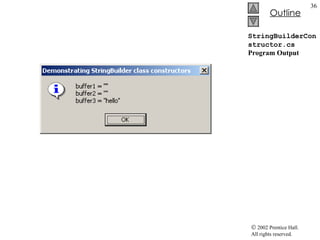
StringBuilderConstructor.cs 1  // Fig. 15.10: StringBuilderConstructor.cs 2  // Demonstrating StringBuilder class constructors. 3  4  using  System; 5  using  System.Windows.Forms; 6  using  System.Text; 7  8  // creates three StringBuilder with three constructors 9  class  StringBuilderConstructor 10  { 11  // The main entry point for the application. 12  [STAThread] 13  static   void  Main(  string [] args ) 14  { 15  StringBuilder buffer1, buffer2, buffer3; 16  string  output; 17  18  buffer1 =  new  StringBuilder(); 19  buffer2 =  new  StringBuilder(  10  ); 20  buffer3 =  new  StringBuilder(  &quot;hello&quot;  ); 21  22  output =  &quot;buffer1 = \&quot;&quot;  + buffer1.ToString() +  &quot;\&quot;\n&quot; ; 23  24  output +=  &quot;buffer2 = \&quot;&quot;  + buffer2.ToString() +  &quot;\&quot;\n&quot; ; 25  26  output +=  &quot;buffer3 = \&quot;&quot;  + buffer3.ToString() +  &quot;\&quot;\n&quot; ; 27  28  MessageBox.Show( output,  29  &quot;Demonstrating StringBuilder class constructors&quot; , 30  MessageBoxButtons. OK , MessageBoxIcon. Information  ); 31  32  }  // end method Main 33  34  }  // end class StringBuilderConstructor No-argument  StringBuilder  constructor with default initial capacity at 16 Stringbuilder  with no characters and initial size at 10 Stringbuilder with string argument Initial capacity is the smallest power of two greater than the number of characters in the  string  argument Method  ToString  to obtain  string  representation of the  StringBuilders’  content Method returns the  StringBuilders’  underlying string
StringBuilderConstructor.cs Program Output
15.12 StringBuilder Indexer, Length and Capacity Properties, and EnsureCapacity Method Method EnsureCapacity Allow programmers to guarantee StringBuilder has capacity that reduces the number of times capacity must be increased Double StringBuiler instance’s current capacity Length property return number of character in StringBuilder Capacity property return number StringBuilder can store without allocating memory
StringBuilderFeatures.cs 1  // Fig. 15.11: StringBuilderFeatures.cs 2  // Demonstrating some features of class StringBuilder. 3  4  using  System; 5  using  System.Windows.Forms; 6  using  System.Text; 7  8  // uses some of class StringBuilder’s methods 9  class  StringBuilderFeatures 10  { 11  // The main entry point for the application. 12  [STAThread] 13  static   void  Main(  string [] args ) 14  { 15  StringBuilder buffer =  16  new  StringBuilder(  &quot;Hello, how are you?&quot;  ); 17  18  // use Length and Capacity properties 19  string  output =  &quot;buffer = &quot;  + buffer.ToString() + 20  &quot;\nLength = &quot;  + buffer.Length + 21  &quot;\nCapacity = &quot;  + buffer.Capacity; 22  23  // use EnsureCapacity method 24  buffer.EnsureCapacity(  75  ); 25  26  output +=  &quot;\n\nNew capacity = &quot;  + 27  buffer.Capacity; 28  29  // truncate StringBuilder by setting Length property 30  buffer.Length =  10 ; 31  32  output +=  &quot;\n\nNew length = &quot;  + 33  buffer.Length +  &quot;\nbuffer = &quot; ; 34  Declare a  StringBuilder  name  buffer Take  string  argument to initialize its value to the actual string Append to  output  the content of  StringBuilder Append to  output  the length of  StringBuilder Append to  output  the capacity of  StringBuilder Expands the capacity to a minimum of 75 characters Uses  Length ’s  Set  accessor to set length of the  Stringbuilder  to 10 Could discard any character that doesn’t fit into specified length Would append null characters to the end of the  StringBuilder  if Length exceed space needed
StringBuilderFeatures.cs Program Output 35  // use StringBuilder indexer 36  for  (  int  i =  0 ; i < buffer.Length; i++ ) 37  output += buffer[ i ]; 38  39  MessageBox.Show( output,  &quot;StringBuilder features&quot; , 40  MessageBoxButtons. OK , MessageBoxIcon. Information  ); 41  42  }  // end method Main 43  44  }  // end class StringBuilderFeatures New length allow for the  StringBuilder  to be of only 10, truncate any preceding characters
15.13 StringBuilder Append and AppendFormat Methods Append method Allow various data-type values to append to the end of a StringBuilder Convert argument into string AppendFormat method Convert string to a specifiable format
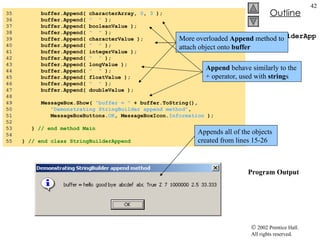
StringBuilderAppend.cs 1  // Fig. 15.12: StringBuilderAppend.cs 2  // Demonstrating StringBuilder Append methods. 3  4  using  System; 5  using  System.Windows.Forms; 6  using  System.Text; 7  8  // testing the Append method 9  class  StringBuilderAppend 10  { 11  // The main entry point for the application. 12  [STAThread] 13  static   void  Main(  string [] args ) 14  { 15  object  objectValue =  &quot;hello&quot; ; 16  string  stringValue =  &quot;good bye&quot; ; 17  char [] characterArray = {  'a' ,  'b' ,  'c' ,  'd' , 18  'e' ,  'f'  }; 19  20  bool  booleanValue =  true ; 21  char  characterValue =  'Z' ; 22  int  integerValue =  7 ; 23  long  longValue =  1000000 ; 24  float  floatValue =  2.5F ; 25  double  doubleValue =  33.333 ; 26  StringBuilder buffer =  new  StringBuilder(); 27  28  // use method Append to append values to buffer 29  buffer.Append( objectValue ); 30  buffer.Append(  &quot;  &quot;  ); 31  buffer.Append( stringValue ); 32  buffer.Append(  &quot;  &quot;  ); 33  buffer.Append( characterArray ); 34  buffer.Append(  &quot;  &quot;  ); Examples of overloaded  Append  methods Various different type of objects created to append StringBuilder   buffer  created for this example
StringBuilderAppend.cs Program Output 35  buffer.Append( characterArray,  0 ,  3  ); 36  buffer.Append(  &quot;  &quot;  ); 37  buffer.Append( booleanValue ); 38  buffer.Append(  &quot;  &quot;  ); 39  buffer.Append( characterValue ); 40  buffer.Append(  &quot;  &quot;  ); 41  buffer.Append( integerValue ); 42  buffer.Append(  &quot;  &quot;  ); 43  buffer.Append( longValue ); 44  buffer.Append(  &quot;  &quot;  ); 45  buffer.Append( floatValue ); 46  buffer.Append(  &quot;  &quot;  ); 47  buffer.Append( doubleValue ); 48  49  MessageBox.Show(  &quot;buffer = &quot;  + buffer.ToString(), 50  &quot;Demonstrating StringBuilder append method&quot; , 51  MessageBoxButtons. OK , MessageBoxIcon. Information  ); 52  53  }  // end method Main 54  55  }  // end class StringBuilderAppend More overloaded  Append  method to attach object onto  buffer Append  behave similarly to the + operator, used with  string s Appends all of the objects created from lines 15-26
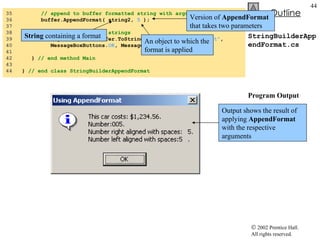
StringBuilderAppendFormat.cs 1  // Fig. 15.13: StringBuilderAppendFormat.cs 2  // Demonstrating method AppendFormat. 3  4  using  System; 5  using  System.Windows.Forms; 6  using  System.Text; 7  8  // use the AppendFormat method 9  class  StringBuilderAppendFormat 10  { 11  // The main entry point for the application. 12  [STAThread] 13  static   void  Main(  string [] args ) 14  { 15  StringBuilder buffer =  new  StringBuilder(); 16  string  string1, string2; 17  18  // formatted string 19  string1 =  &quot;This {0} costs: {1:C}.\n&quot; ; 20  21  // string1 argument array 22  object [] objectArray =  new   object [  2  ]; 23  24  objectArray[  0  ] =  &quot;car&quot; ; 25  objectArray[  1  ] =  1234.56 ; 26  27  // append to buffer formatted string with argument 28  buffer.AppendFormat( string1, objectArray ); 29  30  // formatted string 31  string2 =  &quot;Number:{0:d3}.\n&quot;  + 32  &quot;Number right aligned with spaces:{0, 4}.\n&quot;  + 33  &quot;Number left aligned with spaces:{0, -4}.&quot; ; 34  Create  string1  with formatting information Number of argument to format Format as currency value AppendFormat  takes two parameters String1  to specify the format objectArray  serve as the arguments to the format  string Argument referred by  “{0}”  is the object array at index  0 Another  string  used for formatting Specify that first argument will be formatted as a three-digit decimal Specify that argument should have four characters and be right aligned Specify that the string should be left aligned
StringBuilderAppendFormat.cs Program Output 35  // append to buffer formatted string with argument 36  buffer.AppendFormat( string2,  5  ); 37  38  // display formatted strings 39  MessageBox.Show( buffer.ToString(),  &quot;Using AppendFormat&quot; , 40  MessageBoxButtons. OK , MessageBoxIcon. Information  ); 41  42  }  // end method Main 43  44  }  // end class StringBuilderAppendFormat Version of  AppendFormat  that takes two parameters String  containing a format An object to which the format is applied Output shows the result of applying  AppendFormat  with the respective arguments
15.14 StringBuilder Insert, Remove and Replace Methods Insert method StringBuilder provides 18 overloaded methods Insert into at any position Program may throw ArgumentOutOfRangeException Remove method Takes two argument Program may throw ArgumentOutOfRangeException Replace method Substitute specified string
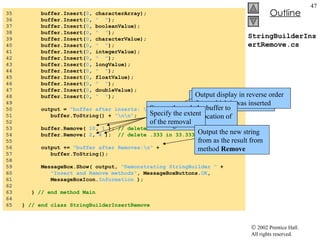
StringBuilderInsertRemove.cs 1  // Fig. 15.14: StringBuilderInsertRemove.cs 2  // Demonstrating methods Insert and Remove of the  3  // StringBuilder class. 4  5  using  System; 6  using  System.Windows.Forms; 7  using  System.Text; 8  9  // test the Insert and Remove methods 10  class  StringBuilderInsertRemove 11  { 12  // The main entry point for the application. 13  [STAThread] 14  static   void  Main(  string [] args ) 15  { 16  object  objectValue =  &quot;hello&quot; ; 17  string  stringValue =  &quot;good bye&quot; ; 18  char [] characterArray = {  'a' ,  'b' ,  'c' , 19  'd' ,  'e' ,  'f'  }; 20  21  bool  booleanValue =  true ; 22  char  characterValue =  'K' ; 23  int  integerValue =  7 ; 24  long  longValue =  10000000 ; 25  float  floatValue =  2.5F ; 26  double  doubleValue =  33.333 ; 27  StringBuilder buffer =  new  StringBuilder(); 28  string  output; 29  30  // insert values into buffer 31  buffer.Insert( 0 , objectValue); 32  buffer.Insert( 0 ,  &quot;  &quot; ); 33  buffer.Insert( 0 , stringValue); 34  buffer.Insert( 0 ,  &quot;  &quot; ); Various different type of objects created to append Uses the  Insert  method
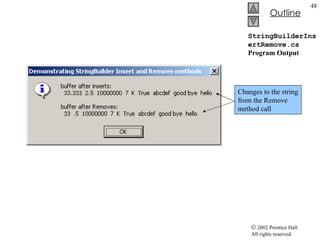
StringBuilderInsertRemove.cs 35  buffer.Insert( 0 , characterArray); 36  buffer.Insert( 0 ,  &quot;  &quot; ); 37  buffer.Insert( 0 , booleanValue); 38  buffer.Insert( 0 ,  &quot;  &quot; ); 39  buffer.Insert( 0 , characterValue); 40  buffer.Insert( 0 ,  &quot;  &quot; ); 41  buffer.Insert( 0 , integerValue); 42  buffer.Insert( 0 ,  &quot;  &quot; ); 43  buffer.Insert( 0 , longValue); 44  buffer.Insert( 0 ,  &quot;  &quot; ); 45  buffer.Insert( 0 , floatValue); 46  buffer.Insert( 0 ,  &quot;  &quot; ); 47  buffer.Insert( 0 , doubleValue); 48  buffer.Insert( 0 ,  &quot;  &quot; ); 49  50  output =  &quot;buffer after inserts: \n&quot;  + 51  buffer.ToString() +  &quot;\n\n&quot; ; 52  53  buffer.Remove(  10 ,  1  );  // delete 2 in 2.5 54  buffer.Remove(  2 ,  4  );  // delete .333 in 33.333 55  56  output +=  &quot;buffer after Removes:\n&quot;  + 57  buffer.ToString(); 58  59  MessageBox.Show( output,  &quot;Demonstrating StringBuilder &quot;  + 60  &quot;Insert and Remove methods&quot; , MessageBoxButtons. OK , 61  MessageBoxIcon. Information  ); 62  63  }  // end method Main 64  65  }  // end class StringBuilderInsertRemove Output  buffer  with all of the various object inserted Output display in reverse order from which it was inserted Stream through the buffer to reach appropriate location of the string Specify the extent of the removal Output the new string from as the result from method  Remove
StringBuilderInsertRemove.cs Program Output Changes to the string from the Remove method call
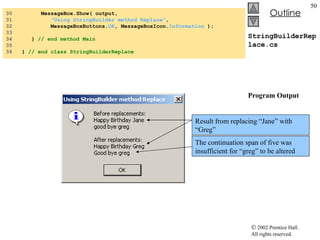
StringBuilderReplace.cs 1  // Fig. 15.15: StringBuilderReplace.cs 2  // Demonstrating method Replace. 3  4  using  System; 5  using  System.Windows.Forms; 6  using  System.Text; 7  8  // testing the Replace method 9  class  StringBuilderReplace 10  { 11  // The main entry point for the application. 12  [STAThread] 13  static   void  Main(  string [] args ) 14  { 15  StringBuilder builder1 =  16  new  StringBuilder(  &quot;Happy Birthday Jane&quot;  ); 17  18  StringBuilder builder2 =  19  new  StringBuilder(  &quot;good bye greg&quot;  ); 20  21  string  output =  &quot;Before replacements:\n&quot;  + 22  builder1.ToString() +  &quot;\n&quot;  + builder2.ToString(); 23  24  builder1.Replace(  &quot;Jane&quot; ,  &quot;Greg&quot;  ); 25  builder2.Replace(  'g' ,  'G' ,  0 ,  5  ); 26  27  output +=  &quot;\n\nAfter replacements:\n&quot;  + 28  builder1.ToString() +  &quot;\n&quot;  + builder2.ToString(); 29  StringBuilder  created with specified  string s Method  Replace  called Replace “Jane” with “Greg” Replaces all instances of the first character with the second Index specify begin point and continuation span
StringBuilderReplace.cs Program Output 30  MessageBox.Show( output,  31  &quot;Using StringBuilder method Replace&quot; , 32  MessageBoxButtons. OK , MessageBoxIcon. Information  ); 33  34  }  // end method Main 35  36  }  // end class StringBuilderReplace Result from replacing “Jane” with “Greg” The continuation span of five was insufficient for “greg” to be altered
15.15 Char Methods Structure Char For character usage Most methods are static Methods: IsLower IsUpper ToUpper ToLower IsPunctuation IsSymbol IsWhiteSpace
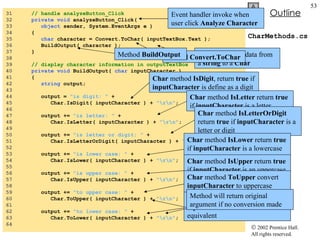
CharMethods.cs 1  // Fig. 15.16: CharMethods.cs 2  // Demonstrates static character testing methods  3  // from Char structure 4  5  using  System; 6  using  System.Drawing; 7  using  System.Collections; 8  using  System.ComponentModel; 9  using  System.Windows.Forms; 10  using  System.Data; 11  12  // Form displays information about specific characters. 13  public   class  StaticCharMethods : System.Windows.Forms.Form 14  { 15  private  System.Windows.Forms.Label enterLabel; 16  private  System.Windows.Forms.TextBox inputTextBox; 17  private  System.Windows.Forms.Button analyzeButton; 18  private  System.Windows.Forms.TextBox outputTextBox; 19  20  private  System.ComponentModel.Container components =  null ; 21  22  // The main entry point for the application. 23  [STAThread] 24  static   void  Main()  25  { 26  Application.Run(  new  StaticCharMethods() ); 27  } 28  29  // Visual Studio .NET generated code 30  TextBox  for user to input characters TextBox  to displays the output of analysis
CharMethods.cs 31  // handle analyzeButton_Click 32  private   void  analyzeButton_Click( 33  object  sender, System.EventArgs e ) 34  { 35  char  character = Convert.ToChar( inputTextBox.Text ); 36  BuildOutput( character ); 37  }  38  39  // display character information in outputTextBox 40  private   void  BuildOutput(  char  inputCharacter ) 41  { 42  string  output; 43  44  output =  &quot;is digit: &quot;  + 45  Char.IsDigit( inputCharacter ) +  &quot;\r\n&quot; ; 46  47  output +=  &quot;is letter: &quot;  + 48  Char.IsLetter( inputCharacter ) +  &quot;\r\n&quot; ; 49  50  output +=  &quot;is letter or digit: &quot;  + 51  Char.IsLetterOrDigit( inputCharacter ) +  &quot;\r\n&quot; ; 52  53  output +=  &quot;is lower case: &quot;  + 54  Char.IsLower( inputCharacter ) +  &quot;\r\n&quot; ; 55  56  output +=  &quot;is upper case: &quot;  + 57  Char.IsUpper( inputCharacter ) +  &quot;\r\n&quot; ; 58  59  output +=  &quot;to upper case: &quot;  + 60  Char.ToUpper( inputCharacter ) +  &quot;\r\n&quot; ; 61  62  output +=  &quot;to lower case: &quot;  + 63  Char.ToLower( inputCharacter ) +  &quot;\r\n&quot; ; 64  Event handler invoke when user click  Analyze Character Convert entered data from a  string  to a  Char Method  Convert.ToChar Method  BuildOutput   Char  method  IsDigit , return  true  if  inputCharacter  is define as a digit Char  method  IsLetter  return  true  if  inputCharacter  is a letter  Char  method  IsLetterOrDigit  return  true  if  inputCharacter  is a letter or digit Char  method  IsLower  return  true  if  inputCharacter  is a lowercase letter  Char  method  IsUpper  return  true  if  inputCharacter  is an uppercase letter  Char  method  ToUpper  convert  inputCharacter  to uppercase equivalent  Char  method  ToLower  convert  inputCharacter  to lowercase equivalent  Method will return original argument if no conversion made
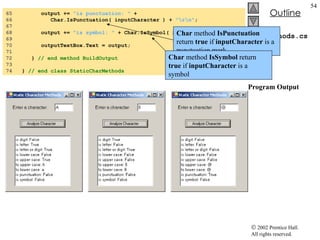
CharMethods.cs Program Output 65  output +=  &quot;is punctuation: &quot;  + 66  Char.IsPunctuation( inputCharacter ) +  &quot;\r\n&quot; ; 67  68  output +=  &quot;is symbol: &quot;  + Char.IsSymbol( inputCharacter ); 69  70  outputTextBox.Text = output; 71  72  }  // end method BuildOutput 73  74  }  // end class StaticCharMethods Char  method  IsPunctuation  return  true  if  inputCharacter  is a punctuation mark Char  method  IsSymbol  return  true  if  inputCharacter  is a symbol
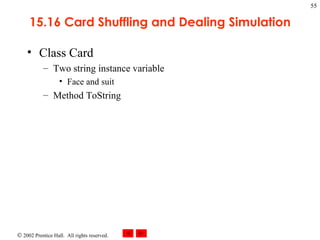
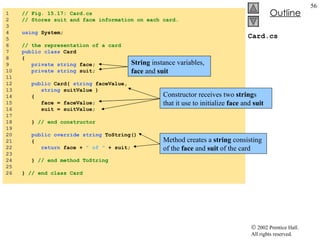
15.16 Card Shuffling and Dealing Simulation Class Card Two string instance variable Face and suit Method ToString
Card.cs 1  // Fig. 15.17: Card.cs 2  // Stores suit and face information on each card. 3  4  using  System; 5  6  // the representation of a card 7  public   class  Card 8  { 9  private   string  face; 10  private   string  suit; 11  12  public  Card(  string  faceValue,  13  string  suitValue ) 14  { 15  face = faceValue; 16  suit = suitValue; 17  18  }  // end constructor 19  20  public   override   string  ToString() 21  { 22  return  face +  &quot; of &quot;  + suit; 23  24  }  // end method ToString 25  26  }  // end class Card String  instance variables,  face  and  suit Constructor receives two  string s that it use to initialize  face  and  suit Method creates a  string  consisting of the  face  and  suit  of the card
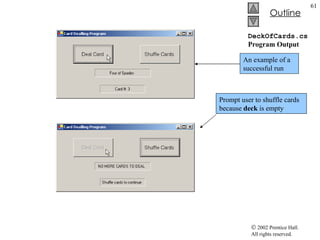
DeckOfCards.cs 1  // Fig. 15.18: DeckOfCards.cs 2  // Simulating card drawing and shuffling. 3  4  using  System; 5  using  System.Drawing; 6  using  System.Collections; 7  using  System.ComponentModel; 8  using  System.Windows.Forms; 9  using  System.Data; 10  11  // provides the functionality for the form 12  public   class  DeckForm : System.Windows.Forms.Form 13  { 14  private  System.Windows.Forms.Button dealButton; 15  private  System.Windows.Forms.Button shuffleButton; 16  17  private  System.Windows.Forms.Label displayLabel; 18  private  System.Windows.Forms.Label statusLabel; 19  20  private  System.ComponentModel.Container components =  null ; 21  22  private  Card[] deck =  new  Card[  52  ]; 23  private   int  currentCard; 24  25  // main entry point for application 26  [STAThread] 27  static   void  Main()  28  { 29  Application.Run(  new  deckForm() ); 30  } 31  32  // Visual Studio .NET generated code 33  Application  Deckform  to create a deck of 52 playing cards using  Card  objects User to have  Shuffle Cards  as an option User can  Deal Card  by pressing its button Each card dealt is displayed
DeckOfCards.cs 34  // handles form at load time 35  private   void  DeckForm_Load(  36  object  sender, System.EventArgs e ) 37  { 38  string [] faces = {  &quot;Ace&quot; ,  &quot;Deuce&quot; ,  &quot;Three&quot; ,  &quot;Four&quot; , 39  &quot;Five&quot; ,  &quot;Six&quot; ,  &quot;Seven&quot; ,  &quot;Eight&quot; ,  40  &quot;Nine&quot; ,  &quot;Ten&quot; ,  &quot;Jack&quot; ,  &quot;Queen&quot; ,  41  &quot;King&quot;  }; 42  43  string [] suits = {  &quot;Hearts&quot; ,  &quot;Diamonds&quot; ,  &quot;Clubs&quot; , 44  &quot;Spades&quot;  }; 45  46  // no cards have been drawn 47  currentCard =  -1 ; 48  49  // initialize deck 50  for  (  int  i =  0 ; i < deck.Length; i++ ) 51  deck[ i ] =  new  Card( faces[ i %  13  ], suits[ i %  4  ] ); 52  53  }  // end method deckForm_Load 54  55  // handles dealButton Click 56  private   void  dealButton_Click( 57  object  sender, System.EventArgs e ) 58  { 59  Card dealt = DealCard(); 60  61  // if dealt card is null, then no cards left 62  // player must shuffle cards 63  if  ( dealt !=  null  ) 64  { 65  displayLabel.Text = dealt.ToString(); 66  statusLabel.Text =  &quot;Card #: &quot;  + currentCard; 67  } For structure used to fill the  deck  array with  Card s Modulus calculation ensure that value fall in a specific range Event handler  dealButton_Click  invokes method  DealCard  to get next card in the array If  deck  is not empty, method returns a  Card  object reference, otherwise it returns null Display card in  displayLabel Card number display in the  statusLabel Enumeration for possible face types Enumeration for all possible suits
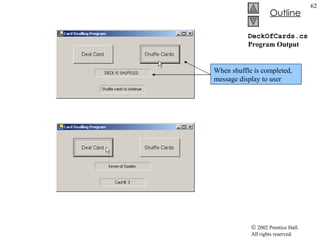
DeckOfCards.cs 68  else 69  { 70  displayLabel.Text =  &quot;NO MORE CARDS TO DEAL&quot; ; 71  statusLabel.Text =  &quot;Shuffle cards to continue&quot; ; 72  }  73  } 74  75  // shuffle cards 76  private   void  Shuffle() 77  { 78  Random randomNumber =  new  Random(); 79  Card temporaryValue; 80  81  currentCard =  -1 ; 82  83  // swap each card with random card 84  for  (  int  i =  0 ; i < deck.Length; i++ ) 85  { 86  int  j = randomNumber.Next(  52  ); 87  88  // swap cards 89  temporaryValue = deck[ i ]; 90  deck[ i ] = deck[ j ]; 91  deck[ j ] = temporaryValue; 92  } 93  94  dealButton.Enabled =  true ; 95  96  }  // end method Shuffle 97  String “NO MORE CARDS TO DEAL ” is displayed in  displayLabel  if  DealCard  is null String “Shuffle cards to continue ” is displayed in  statusLabel  if  DealCard  is null The for loops go through all 52 cards (0-51), randomly picks numbers between 0 and 51  Current  Card  object and randomly selected  Card  are swapped in the array Method  Shuffle  makes a total of 52 swaps during single pass of the entire array
DeckOfCards.cs 98  private  Card DealCard() 99  { 100  // if there is a card to deal then deal it 101  // otherwise signal that cards need to be shuffled by 102  // disabling dealButton and returning null 103  if  ( currentCard +  1  < deck.Length ) 104  { 105  currentCard++; 106  return  deck[ currentCard ]; 107  } 108  else 109  { 110  dealButton.Enabled =  false ; 111  return   null ; 112  } 113  114  }  // end method DealCard 115  116  // handles shuffleButton Click 117  private   void  shuffleButton_Click( 118  object  sender, System.EventArgs e ) 119  { 120  displayLabel.Text =  &quot;SHUFFLING...&quot; ; 121  Shuffle(); 122  displayLabel.Text =  &quot;DECK IS SHUFFLED&quot; ; 123  124  }  // end method shuffleButton_Click 125  126  }  // end class deckForm Method  shuffleButton_Click  invokes method  Shuffle  to shuffle the cards When the call to  Shuffle  returns,  displayLabel  displays “ DECK IS SHUFFLED ”
DeckOfCards.cs Program Output Prompt user to shuffle cards because  deck  is empty An example of a successful run
DeckOfCards.cs Program Output When shuffle is completed, message display to user
15.17 Regular Expression and Class Regex Regular expression Facilitate the construction of compiler Validate the syntax of a program Class Regex An immutable regular expression Method Match Return object of class Match Method Matches Return a MatchCollection object Class Match A regular expression matching operation
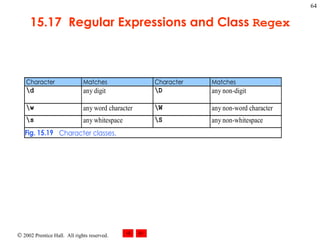
15.17  Regular Expressions and Class  Regex
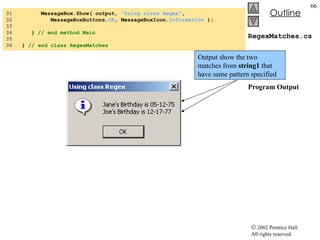
RegexMatches.cs 1  // Fig. 15.20: RegexMatches.cs 2  // Demonstrating Class Regex. 3  4  using  System; 5  using  System.Windows.Forms; 6  using  System.Text.RegularExpressions; 7  8  // test out regular expressions 9  class  RegexMatches 10  { 11  // The main entry point for the application. 12  [STAThread] 13  static   void  Main(  string [] args ) 14  { 15  string  output =  &quot;&quot; ; 16  17  // create regular expression 18  Regex expression =  19  new  Regex( @ &quot;J.*\d[0-35-9]-\d\d-\d\d&quot;  ); 20  21  string  string1 =  &quot;Jane's Birthday is 05-12-75\n&quot;  + 22  &quot;Dave's Birthday is 11-04-68\n&quot;  + 23  &quot;John's Birthday is 04-28-73\n&quot;  + 24  &quot;Joe's Birthday is 12-17-77&quot; ; 25  26  // match regular expression to string and 27  // print out all matches 28  foreach  ( Match myMatch  in  expression.Matches( string1 ) ) 29  output += myMatch.ToString() +  &quot;\n&quot; ; 30  Create instance of class  Regex Regular expression Match only digits in the range 0 – 3 and 5 - 9 Represent a two digit number foreach  loop iterates through each  Match “ .*” matches any number of unspecified characters The dot character matches any single character except a newline character Character “J” is a literal character “ \d” will match any numeric digit
RegexMatches.cs Program Output 31  MessageBox.Show( output,  &quot;Using class Regex&quot; , 32  MessageBoxButtons. OK , MessageBoxIcon. Information  ); 33  34  }  // end method Main 35  36  }  // end class RegexMatches Output show the two matches from  string1  that have same pattern specified
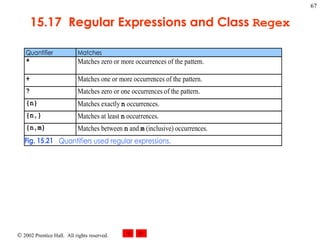
15.17  Regular Expressions and Class  Regex
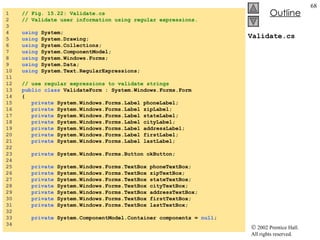
Validate.cs 1  // Fig. 15.22: Validate.cs 2  // Validate user information using regular expressions. 3  4  using  System; 5  using  System.Drawing; 6  using  System.Collections; 7  using  System.ComponentModel; 8  using  System.Windows.Forms; 9  using  System.Data; 10  using  System.Text.RegularExpressions; 11  12  // use regular expressions to validate strings 13  public   class  ValidateForm : System.Windows.Forms.Form 14  { 15  private  System.Windows.Forms.Label phoneLabel; 16  private  System.Windows.Forms.Label zipLabel; 17  private  System.Windows.Forms.Label stateLabel; 18  private  System.Windows.Forms.Label cityLabel; 19  private  System.Windows.Forms.Label addressLabel; 20  private  System.Windows.Forms.Label firstLabel; 21  private  System.Windows.Forms.Label lastLabel; 22  23  private  System.Windows.Forms.Button okButton; 24  25  private  System.Windows.Forms.TextBox phoneTextBox; 26  private  System.Windows.Forms.TextBox zipTextBox; 27  private  System.Windows.Forms.TextBox stateTextBox; 28  private  System.Windows.Forms.TextBox cityTextBox; 29  private  System.Windows.Forms.TextBox addressTextBox; 30  private  System.Windows.Forms.TextBox firstTextBox; 31  private  System.Windows.Forms.TextBox lastTextBox; 32  33  private  System.ComponentModel.Container components =  null ; 34
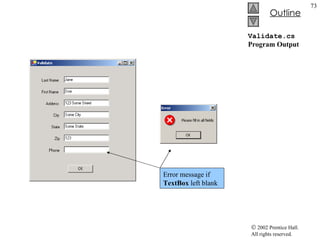
Validate.cs 35  // The main entry point for the application. 36  [STAThread] 37  static   void  Main()  38  { 39  Application.Run(  new  validateForm() ); 40  } 41  42  // Visual Studio .NET generated code 43  44  // handles okButton Click event 45  private   void  okButton_Click( 46  object  sender, System.EventArgs e ) 47  { 48  // ensures no textboxes are empty 49  if  ( lastTextBox.Text ==  &quot;&quot;  || firstTextBox.Text ==  &quot;&quot;  || 50  addressTextBox.Text ==  &quot;&quot;  || cityTextBox.Text ==  &quot;&quot;  || 51  stateTextBox.Text ==  &quot;&quot;  || zipTextBox.Text ==  &quot;&quot;  || 52  phoneTextBox.Text ==  &quot;&quot;  ) 53  { 54  // display popup box 55  MessageBox.Show(  &quot;Please fill in all fields&quot; ,  &quot;Error&quot; , 56  MessageBoxButtons. OK , MessageBoxIcon. Error  ); 57  58  // set focus to lastTextBox 59  lastTextBox.Focus(); 60  61  return ; 62  } 63  Method  okButton_Click  to ensure that all data fields were filled in Will inform if a certain field was left blank Instance method  Focus  of class  TextBox Method  Focus  places the cursor within the  TextBox  that made the call Program control then exits the event handler
Validate.cs 64  // if last name format invalid show message 65  if  ( !Regex.Match( lastTextBox.Text,  66  @ &quot;^[A-Z][a-zA-Z]*$&quot;  ).Success ) 67  { 68  // last name was incorrect 69  MessageBox.Show(  &quot;Invalid Last Name&quot; ,  &quot;Message&quot; , 70  MessageBoxButtons. OK , MessageBoxIcon. Error  ); 71  lastTextBox.Focus(); 72  73  return ; 74  } 75  76  // if first name format invalid show message 77  if  ( !Regex.Match( firstTextBox.Text,  78  @ &quot;^[A-Z][a-zA-Z]*$&quot;  ).Success ) 79  { 80  // first name was incorrect 81  MessageBox.Show(  &quot;Invalid First Name&quot; ,  &quot;Message&quot; , 82  MessageBoxButtons. OK , MessageBoxIcon. Error  ); 83  firstTextBox.Focus(); 84  85  return ; 86  } 87  88  // if address format invalid show message 89  if  ( !Regex.Match( addressTextBox.Text,  90  @ &quot;^[0-9]+\s+([a-zA-Z]+|[a-zA-Z]+\s[a-zA-Z]+)$&quot;  ).Success ) 91  { 92  // address was incorrect 93  MessageBox.Show(  &quot;Invalid Address&quot; ,  &quot;Message&quot; , 94  MessageBoxButtons. OK , MessageBoxIcon. Error  ); 95  addressTextBox.Focus(); 96  97  return ; 98  } Last Name  is validated first If the  Success  property of  Match  instance is  true Control then moves on to validate First Name Same process will occur for the remaining  TextBox es “ *” quantifier signifies that the second range of characters may occur zero or more times “ \s” matches a single whitespace character Last Name  and  First Name  fields both accept strings of any length that begin with uppercase letter Address field accepts anything in the format of: “10 Broadway” or “10 Main Street”
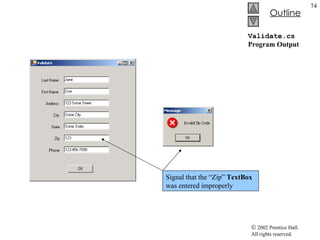
Validate.cs 99  100  // if city format invalid show message 101  if  ( !Regex.Match( cityTextBox.Text,  102  @ &quot;^([a-zA-Z]+|[a-zA-Z]+\s[a-zA-Z]+)$&quot;  ).Success ) 103  { 104  // city was incorrect 105  MessageBox.Show(  &quot;Invalid City&quot; ,  &quot;Message&quot; , 106  MessageBoxButtons. OK , MessageBoxIcon. Error  ); 107  cityTextBox.Focus(); 108  109  return ; 110  } 111  112  // if state format invalid show message 113  if  ( !Regex.Match( stateTextBox.Text,  114  @ &quot;^([a-zA-Z]+|[a-zA-Z]+\s[a-zA-Z]+)$&quot;  ).Success ) 115  { 116  // state was incorrect 117  MessageBox.Show(  &quot;Invalid State&quot; ,  &quot;Message&quot; , 118  MessageBoxButtons. OK , MessageBoxIcon. Error  ); 119  stateTextBox.Focus(); 120  121  return ; 122  } 123  124  // if zip code format invalid show message 125  if  ( !Regex.Match( zipTextBox.Text, @ &quot;^\d{5}$&quot;  ).Success ) 126  { 127  // zip was incorrect 128  MessageBox.Show(  &quot;Invalid Zip Code&quot; ,  &quot;Message&quot; , 129  MessageBoxButtons. OK , MessageBoxIcon. Error  ); 130  zipTextBox.Focus(); 131  132  return ; 133  } More check to validate the rest of the  TextBox es “ \d{5}” matches any five digits City  and  State  match any word of at least one character or any two words of at least one character if the words are separated by a single space Must be 5 digits, exactly
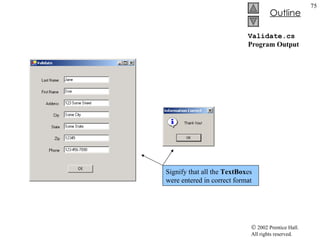
Validate.cs 134  135  // if phone number format invalid show message 136  if  ( !Regex.Match( phoneTextBox.Text,  137  @ &quot;^[1-9]\d{2}-[1-9]\d{2}-\d{4}$&quot;  ).Success ) 138  { 139  // phone number was incorrect 140  MessageBox.Show(  &quot;Invalid Phone Number&quot; ,  &quot;Message&quot; , 141  MessageBoxButtons. OK , MessageBoxIcon. Error  ); 142  phoneTextBox.Focus(); 143  144  return ; 145  } 146  147  // information is valid, signal user and exit application 148  this .Hide(); 149  MessageBox.Show(  &quot;Thank You!&quot; ,  &quot;Information Correct&quot; , 150  MessageBoxButtons. OK , MessageBoxIcon. Information  ); 151  152  Application.Exit(); 153  154  }  // end method okButton_Click 155  156  }  // end class ValidateForm If Success is signaled throughout the validation  the program signals it then quits The “^” and “$” expression forces regular expression to evaluate entire string Phone  must be the form xxx-yyy-yyy
Validate.cs Program Output Error message if  TextBox  left blank
Validate.cs Program Output Signal that the “Zip”  TextBox  was entered improperly
Validate.cs Program Output Signify that all the  TextBox es were entered in correct format
RegexSubstitution.cs 1  // Fig. 15.23: RegexSubstitution.cs 2  // Using Regex method Replace. 3  4  using  System; 5  using  System.Text.RegularExpressions; 6  using  System.Windows.Forms; 7  8  // Summary description for RegexSubstitution. 9  public   class  RegexSubstitution1 10  { 11  12  // The main entry point for the application. 13  static   void  Main( string[] args )  14  { 15  string  testString1 =  16  &quot;This sentence ends in 5 stars *****&quot; ; 17  18  string  testString2 =  &quot;1, 2, 3, 4, 5, 6, 7, 8&quot; ; 19  Regex testRegex1 =  new  Regex(  &quot;stars&quot;  ); 20  Regex testRegex2 =  new  Regex( @ &quot;\d&quot;  ); 21  string [] results; 22  string  output =  &quot;Original String 1\t\t\t&quot;  + testString1;  23  24  testString1 = Regex.Replace( testString1, @ &quot;\*&quot; ,  &quot;^&quot;  ); 25  26  output +=  &quot;\n^ substituted for *\t\t\t&quot;  + testString1; 27  28  testString1 = testRegex1.Replace( testString1,  &quot;carets&quot;  ); 29  30  output +=  &quot;\n\&quot;carets\&quot; substituted for \&quot;stars\&quot;\t&quot;  + 31  testString1; 32  33  output +=  &quot;\nEvery word replaced by \&quot;word\&quot;\t&quot;  +  34  Regex.Replace( testString1, @ &quot;\w+&quot; ,  &quot;word&quot;  ); 35  Static  version of  Replace The  string  to modify The  string  containing regular expression to match The replacement  string Replace every instance of “*” in  testString1  with “^” Instance method  Replace  uses regular expression passed to constructor Regular expression “ stars ” in  testString1  is replaced with “ carets ” Instantiates  testRegex2  with argument  @”\d”
RegexSubstitution.cs 36  output +=  &quot;\n\nOriginal String 2\t\t\t&quot;  + testString2; 37  38  output +=  &quot;\nFirst 3 digits replaced by \&quot;digit\&quot;\t&quot;  + 39  testRegex2.Replace( testString2,  &quot;digit&quot; ,  3  ); 40  41  output +=  &quot;\nString split at commas\t\t[&quot; ; 42  43  results = Regex.Split( testString2, @ &quot;,\s*&quot;  ); 44  45  foreach  (  string  resultString  in  results )  46  { 47  output +=  &quot;\&quot;&quot;  + resultString +  &quot;\&quot;, &quot; ; 48  } 49  50  output = output.Substring(  0 , output.Length -  2  ) +  &quot;]&quot; ; 51  52  MessageBox.Show( output,  53  &quot;Substitution using regular expressions&quot;  ); 54  55  }  // end method Main 56  57  }  // end class RegexSubstitution Instance method  Replace  takes three argument A  string  to modify A  string  containing the replacement text An  int  specifying the number of replacements to make Replaces first three instances of a digit in  testString2  with “ digit ” Method  split  divides a  string  into several substrings Original  string  is broken in any location that matches specified regular expression Method  Split  returns array of substrings between matches for the regular expression Using  static  version of method  Split String  to split The regular expression

Csphtp1 15

  • 1.
    Chapter 15 –Strings, Chars Outline 15.1 Introduction 15.2 Fundamentals of Characters and String s 15.3 String Constructors 15.4 String Indexer, Length Property and CopyTo Method 15.5 Comparing String s 15.6 String Method GetHashCode 15.7 Locating Characters and Substrings in String s 15.8 Extracting Substrings from String s 15.9 Concatenating String s 15.10 Miscellaneous String Methods 15.11 Class StringBuilder 15.12 StringBuilder Indexer, Length and Capacity Properties, and EnsureCapacity Method 15.13 StringBuilder Append and AppendFormat Methods 15.14 StringBuilder Insert , Remove and Replace Methods 15.15 Char Methods 15.16 Card Shuffling and Dealing Simulation 15.17 Regular Expressions and Class Regex
  • 2.
    15.1 Introduction Stringand character processing capabilities Text editors Word processors… Expand from previous chapters Class String and type char Class StringBuilder Class Regex and Match
  • 3.
    15.2 Fundamentals ofCharacters and Strings Importance of characters Character constants Character code Unicode character set String Object of class String in System namespace Consist of characters
  • 4.
    15.3 String ConstructorsClass String Provides eight constructors for initialing strings
  • 5.
    StringConstructor.cs 1 // Fig. 15.1: StringConstructor.cs 2 // Demonstrating String class constructors. 3 4 using System; 5 using System.Windows.Forms; 6 7 // test several String class constructors 8 class StringConstructor 9 { 10 // The main entry point for the application. 11 [STAThread] 12 static void Main( string [] args ) 13 { 14 string output; 15 string originalString, string1, string2, 16 string3, string4; 17 18 char [] characterArray = 19 { 'b' , 'i' , 'r' , 't' , 'h' , ' ' , 'd' , 'a' , 'y' }; 20 21 // string initialization 22 originalString = &quot;Welcome to C# programming!&quot; ; 23 string1 = originalString; 24 string2 = new string ( characterArray ); 25 string3 = new string ( characterArray, 6 , 3 ); 26 string4 = new string ( 'C' , 5 ); 27 28 output = &quot;string1 = &quot; + &quot;\&quot;&quot; + string1 + &quot;\&quot;\n&quot; + 29 &quot;string2 = &quot; + &quot;\&quot;&quot; + string2 + &quot;\&quot;\n&quot; + 30 &quot;string3 = &quot; + &quot;\&quot;&quot; + string3 + &quot;\&quot;\n&quot; + 31 &quot;string4 = &quot; + &quot;\&quot;&quot; + string4 + &quot;\&quot;\n&quot; ; 32 String declarations Allocate char array characterArray to contain nine characters Assign literal string to string reference originalString Set string1 to reference the same string literal String2 assign to a new string String constructor takes a character array as argument String constructor takes a char array and two int arguments Starting index and count ArgumentOutOfRangeException thrown if element outside the bound Using string constructed with a character and an int specifying number of times to repeat character in the string Output the strings
  • 6.
    StringConstructor.cs Program Output33 MessageBox.Show( output, &quot;String Class Constructors&quot; , 34 MessageBoxButtons. OK , MessageBoxIcon. Information ); 35 36 } // end method Main 37 38 } // end class StringConstructor Shows the output
  • 7.
    15.4 String Indexer,Length Property and CopyTo Method String indexer Retrieval of any character in the string Length property Returns the length of the string CopyTo Copies specified number of characters into a char array
  • 8.
    StringMethods.cs 1 // Fig. 15.2: StringMethods.cs 2 // Using the indexer, property Length and method CopyTo 3 // of class String. 4 5 using System; 6 using System.Windows.Forms; 7 8 // creates string objects and displays results of using 9 // indexer and methods Length and CopyTo 10 class StringMethods 11 { 12 // The main entry point for the application. 13 [STAThread] 14 static void Main( string [] args ) 15 { 16 string string1, output; 17 char [] characterArray; 18 19 string1 = &quot;hello there&quot; ; 20 characterArray = new char [ 5 ]; 21 22 // output string 23 output = 24 &quot;string1: \&quot;&quot; + string1 + &quot;\&quot;&quot; ; 25 26 // test Length property 27 output += &quot;\nLength of string1: &quot; + string1.Length; 28 29 // loop through character in string1 and display 30 // reversed 31 output += &quot;\nThe string reversed is: &quot; ; 32 33 for ( int i = string1.Length - 1 ; i >= 0 ; i-- ) 34 output += string1[ i ]; 35 String declarations String1 to store string literal “hello there” Append to output of string1 in reverse order
  • 9.
    StringMethods.cs Program Output36 // copy characters from string1 into characterArray 37 string1.CopyTo( 0 , characterArray, 0 , 5 ); 38 output += &quot;\nThe character array is: &quot; ; 39 40 for ( int i = 0 ; i < characterArray.Length; i++ ) 41 output += characterArray[ i ]; 42 43 MessageBox.Show( output, &quot;Demonstrating the string &quot; + 44 &quot;Indexer, Length Property and CopyTo method&quot; , 45 MessageBoxButtons. OK , MessageBoxIcon. Information ); 46 47 } // end method Main 48 49 } // end class StringMethods Index to begin copying character array to copy to Index of location to put into character array Number of characters to copy from string Append the char array contents to string output Method Copyto called by string1
  • 10.
    15.5 Comparing StringsString comparison Greater than Less than Method Equals Test objects for equality Return a Boolean Uses lexicographical comparison
  • 11.
    StringCompare.cs 1 // Fig. 15.3: StringCompare.cs 2 // Comparing strings. 3 4 using System; 5 using System.Windows.Forms; 6 7 // compare a number of strings 8 class StringCompare 9 { 10 // The main entry point for the application. 11 [STAThread] 12 static void Main( string [] args ) 13 { 14 string string1 = &quot;hello&quot; ; 15 string string2 = &quot;good bye&quot; ; 16 string string3 = &quot;Happy Birthday&quot; ; 17 string string4 = &quot;happy birthday&quot; ; 18 string output; 19 20 // output values of four strings 21 output = &quot;string1 = \&quot;&quot; + string1 + &quot;\&quot;&quot; + 22 &quot;\nstring2 = \&quot;&quot; + string2 + &quot;\&quot;&quot; + 23 &quot;\nstring3 = \&quot;&quot; + string3 + &quot;\&quot;&quot; + 24 &quot;\nstring4 = \&quot;&quot; + string4 + &quot;\&quot;\n\n&quot; ; 25 26 // test for equality using Equals method 27 if ( string1.Equals( &quot;hello&quot; ) ) 28 output += &quot;string1 equals \&quot;hello\&quot;\n&quot; ; 29 else 30 output += &quot;string1 does not equal \&quot;hello\&quot;\n&quot; ; 31 32 // test for equality with == 33 if ( string1 == &quot;hello&quot; ) 34 output += &quot;string1 equals \&quot;hello\&quot;\n&quot; ; Instance method Equals Compares the Unicode values in each string Equality operator
  • 12.
    StringCompare.cs 35 else 36 output += &quot;string1 does not equal \&quot;hello\&quot;\n&quot; ; 37 38 // test for equality comparing case 39 if ( String .Equals( string3, string4 ) ) 40 output += &quot;string3 equals string4\n&quot; ; 41 else 42 output += &quot;string3 does not equal string4\n&quot; ; 43 44 // test CompareTo 45 output += &quot;\nstring1.CompareTo( string2 ) is &quot; + 46 string1.CompareTo( string2 ) + &quot;\n&quot; + 47 &quot;string2.CompareTo( string1 ) is &quot; + 48 string2.CompareTo( string1 ) + &quot;\n&quot; + 49 &quot;string1.CompareTo( string1 ) is &quot; + 50 string1.CompareTo( string1 ) + &quot;\n&quot; + 51 &quot;string3.CompareTo( string4 ) is &quot; + 52 string3.CompareTo( string4 ) + &quot;\n&quot; + 53 &quot;string4.CompareTo( string3 ) is &quot; + 54 string4.CompareTo( string3 ) + &quot;\n\n&quot; ; 55 56 MessageBox.Show( output, &quot;Demonstrating string &quot; + 57 &quot;comparisons&quot; , MessageBoxButtons. OK , 58 MessageBoxIcon. Information ); 59 60 } // end method Main 61 62 } // end class StringCompare Test equality between string3 and string4 Output the appropriate message Static method Equals Method CompareTo called to compare string s
  • 13.
    StringCompare.cs Program OutputString3 contains two uppercase letters, thus it is bigger than string4
  • 14.
    StringStartEnd.cs 1 // Fig. 15.4: StringStartEnd.cs 2 // Demonstrating StartsWith and EndsWith methods. 3 4 using System; 5 using System.Windows.Forms; 6 7 // testing StartsWith and EndsWith 8 class StringStartEnd 9 { 10 // The main entry point for the application. 11 [STAThread] 12 static void Main( string [] args ) 13 { 14 string [] strings = 15 { &quot;started&quot; , &quot;starting&quot; , &quot;ended&quot; , &quot;ending&quot; }; 16 string output = &quot;&quot; ; 17 18 //test every string to see if it starts with &quot;st&quot; 19 for ( int i = 0 ; i < strings.Length; i++ ) 20 21 if ( strings[ i ].StartsWith( &quot;st&quot; ) ) 22 output += &quot;\&quot;&quot; + strings[ i ] + &quot;\&quot;&quot; + 23 &quot; starts with \&quot;st\&quot;\n&quot; ; 24 25 output += &quot;\n&quot; ; 26 27 // test every string to see if it ends with &quot;ed&quot; 28 for ( int i = 0 ; i < strings.Length; i ++ ) 29 30 if ( strings[ i ].EndsWith( &quot;ed&quot; ) ) 31 output += &quot;\&quot;&quot; + strings[ i ] + &quot;\&quot;&quot; + 32 &quot; ends with \&quot;ed\&quot;\n&quot; ; 33 Method StartsWith determines if a string instance starts with the string text passed to it Method EndsWith determines if a string instance ends with the string text passed to it Array of string s Contents define at time of declaration Method StartsWith takes a String argument If structure determine if string at index i starts with “st” Appends string[i] to string output Return true if test statement matched If structure determine if string at index i starts with “ed”
  • 15.
    StringStartEnd.cs Program Output34 MessageBox.Show( output, &quot;Demonstrating StartsWith and &quot; + 35 &quot;EndsWith methods&quot; , MessageBoxButtons. OK , 36 MessageBoxIcon. Information ); 37 38 } // end method Main 39 40 } // end class StringStartEnd
  • 16.
    15.6 String MethodGetHashCode Hash table Of class Object Make information easily accessible Calculation to produce a hash code
  • 17.
    StringHashCode.cs 1 // Fig. 15.5: StringHashCode.cs 2 // Demonstrating method GetHashCode of class String. 3 4 using System; 5 using System.Windows.Forms; 6 7 // testing the GetHashCode method 8 class StringHashCode 9 { 10 // The main entry point for the application. 11 [STAThread] 12 static void Main( string [] args ) 13 { 14 15 string string1 = &quot;hello&quot; ; 16 string string2 = &quot;Hello&quot; ; 17 string output; 18 19 output = &quot;The hash code for \&quot;&quot; + string1 + 20 &quot;\&quot; is &quot; + string1.GetHashCode() + &quot;\n&quot; ; 21 22 output += &quot;The hash code for \&quot;&quot; + string2 + 23 &quot;\&quot; is &quot; + string2.GetHashCode() + &quot;\n&quot; ; 24 25 MessageBox.Show( output, &quot;Demonstrating String &quot; + 26 &quot;method GetHashCode&quot; , MessageBoxButtons. OK , 27 MessageBoxIcon. Information ); 28 29 } // end method Main 30 31 } // end class StringHashCode Define two string s Method GetHashCode is called to calculate for string1 and string2
  • 18.
    StringHashCode.cs Program OutputHash code value for string s “ hello ” and “ Hello ”
  • 19.
    15.7 Locating Charactersand Substrings in Strings Application of String methods: IndexOf IndexOfAny LastIndexOf LastIndexOfAny
  • 20.
    StringIndexMethods.cs 1 // Fig. 15.6: StringIndexMethods.cs 2 // Using String searching methods. 3 4 using System; 5 using System.Windows.Forms; 6 7 // testing indexing capabilities of strings 8 class StringIndexMethods 9 { 10 // The main entry point for the application. 11 [STAThread] 12 static void Main( string [] args ) 13 { 14 string letters = &quot;abcdefghijklmabcdefghijklm&quot; ; 15 string output = &quot;&quot; ; 16 char [] searchLetters = { 'c' , 'a' , '$' }; 17 18 // test IndexOf to locate a character in a string 19 output += &quot;'c' is located at index &quot; + 20 letters.IndexOf( 'c' ); 21 22 output += &quot;\n'a' is located at index &quot; + 23 letters.IndexOf( 'a' , 1 ); 24 25 output += &quot;\n'$' is located at index &quot; + 26 letters.IndexOf( '$' , 3 , 5 ); 27 28 // test LastIndexOf to find a character in a string 29 output += &quot;\n\nLast 'c' is located at &quot; + 30 &quot;index &quot; + letters.LastIndexOf( 'c' ); 31 32 output += &quot;\nLast 'a' is located at index &quot; + 33 letters.LastIndexOf( 'a' , 25 ); 34 Method IndexOf to locate first occurrence of substring in a string If successful IndexOf will return index of specified character or return -1 IndexOf takes two arguments, the character to search for and the initial index of the search IndexOf takes three arguments, the character to search for, the initial index of the search and the number of characters to search These outputs use the LastIndexOf method Takes the character as an argument to search Takes two argument, the character to search for and highest index to begin backward search
  • 21.
    StringIndexMethods.cs 35 output += &quot;\nLast '$' is located at index &quot; + 36 letters.LastIndexOf( '$' , 15 , 5 ); 37 38 // test IndexOf to locate a substring in a string 39 output += &quot;\n\n\&quot;def\&quot; is located at&quot; + 40 &quot; index &quot; + letters.IndexOf( &quot;def&quot; ); 41 42 output += &quot;\n\&quot;def\&quot; is located at index &quot; + 43 letters.IndexOf( &quot;def&quot; , 7 ); 44 45 output += &quot;\n\&quot;hello\&quot; is located at index &quot; + 46 letters.IndexOf( &quot;hello&quot; , 5 , 15 ); 47 48 // test LastIndexOf to find a substring in a string 49 output += &quot;\n\nLast \&quot;def\&quot; is located at index &quot; + 50 letters.LastIndexOf( &quot;def&quot; ); 51 52 output += &quot;\nLast \&quot;def\&quot; is located at &quot; + 53 letters.LastIndexOf( &quot;def&quot; , 25 ); 54 55 output += &quot;\nLast \&quot;hello\&quot; is located at index &quot; + 56 letters.LastIndexOf( &quot;hello&quot; , 20 , 15 ); 57 58 // test IndexOfAny to find first occurrence of character 59 // in array 60 output += &quot;\n\nFirst occurrence of 'c', 'a', '$' is &quot; + 61 &quot;located at &quot; + letters.IndexOfAny( searchLetters ); 62 63 output += &quot;\nFirst occurrence of 'c, 'a' or '$' is &quot; + 64 &quot;located at &quot; + letters.IndexOfAny( searchLetters, 7 ); 65 66 output += &quot;\nFirst occurrence of 'c', 'a' or '$' is &quot; + 67 &quot;located at &quot; + letters.IndexOfAny( searchLetters, 20 , 5 ); 68 LastIndexOf search from the end of the string toward the beginning Argument takes the character to search for, the starting index to begin searching backward, and portion of string to search IndexOf and LastIndexOf perform similarly as LastIndexOf and IndexOf Instead of sending character arguments, these two methods search substring argument Method IndexOfAny take an array of characters as the first argument returns the index of first occurrence of any characters specified in the character array argument
  • 22.
    StringIndexMethods.cs 69 // test LastIndexOfAny to find last occurrence of character 70 // in array 71 output += &quot;\n\nLast occurrence of 'c', 'a' or '$' is &quot; + 72 &quot;located at &quot; + letters.LastIndexOfAny( searchLetters ); 73 74 output += &quot;\nLast occurrence of 'c', 'a' or '$' is &quot; + 75 &quot;located at &quot; + letters.LastIndexOfAny( searchLetters, 1 ); 76 77 output += &quot;\nLast occurrence of 'c', 'a' or '$' is &quot; + 78 &quot;located at &quot; + letters.LastIndexOfAny( 79 searchLetters, 25 , 5 ); 80 81 MessageBox.Show( output, 82 &quot;Demonstrating class index methods&quot; , 83 MessageBoxButtons. OK , MessageBoxIcon. Information ); 84 85 } // end method Main 86 87 } // end class StringIndexMethods LastIndexOfAny takes an array of characters as the first argument Method LastIndexOfAny return the index of first occurrence of any of the character from the argument
  • 23.
  • 24.
    15.8 Extracting Substringsfrom Strings Substring methods Create new string Method return new string
  • 25.
    SubString.cs 1 // Fig. 15.7: SubString.cs 2 // Demonstrating the String Substring method. 3 4 using System; 5 using System.Windows.Forms; 6 7 // creating substrings 8 class SubString 9 { 10 // The main entry point for the application. 11 [STAThread] 12 static void Main( string [] args ) 13 { 14 string letters = &quot;abcdefghijklmabcdefghijklm&quot; ; 15 string output = &quot;&quot; ; 16 17 // invoke Substring method and pass it one parameter 18 output += &quot;Substring from index 20 to end is \&quot;&quot; + 19 letters.Substring( 20 ) + &quot;\&quot;\n&quot; ; 20 21 // invoke Substring method and pass it two parameters 22 output += &quot;Substring from index 0 to 6 is \&quot;&quot; + 23 letters.Substring( 0 , 6 ) + &quot;\&quot;&quot; ; 24 25 MessageBox.Show( output, 26 &quot;Demonstrating String method Substring&quot; , 27 MessageBoxButtons. OK , MessageBoxIcon. Information ); 28 29 } // end method Main 30 31 } // end class SubString Substring methods takes one int argument Argument specifies the starting index to copy the character in the original string The returned substring contains a copy of the character from the specified index to the end If index specified is not inside the bound, then ArgumentOutOfRangeException thrown This example using Substring takes two int argument First argument specify the starting index Second argument specify length of the substring to be copied Substring return contains a copy of the specified characters from the original string
  • 26.
  • 27.
    15.9 Concatenating StringsStatic method Concat Takes two string and return a new string
  • 28.
    SubConcatination.cs 1 // Fig. 15.8: SubConcatination.cs 2 // Demonstrating String class Concat method. 3 4 using System; 5 using System.Windows.Forms; 6 7 // concatenates strings using String method Concat 8 class StringConcatenation 9 { 10 // The main entry point for the application. 11 [STAThread] 12 static void Main( string [] args ) 13 { 14 string string1 = &quot;Happy &quot; ; 15 string string2 = &quot;Birthday&quot; ; 16 string output; 17 18 output = &quot;string1 = \&quot;&quot; + string1 + &quot;\&quot;\n&quot; + 19 &quot;string2 = \&quot;&quot; + string2 + &quot;\&quot;&quot; ; 20 21 output += 22 &quot;\n\nResult of String.Concat( string1, string2 ) = &quot; + 23 String.Concat( string1, string2 ); 24 25 output += &quot;\nstring1 after concatenation = &quot; + string1; 26 27 MessageBox.Show( output, 28 &quot;Demonstrating String method Concat&quot; , 29 MessageBoxButtons. OK , MessageBoxIcon. Information ); 30 31 } // end method Main 32 33 } // end class StringConcatenation Declare two new string s Append string2 unto the end of string1 The original string , string1 is not altered Output the result from the ConCat method call
  • 29.
  • 30.
    15.10 Miscellaneous StringMethods Method Replace Original string remain unchanged Original string return if no occurrence matched Method ToUpper Replace lower case letter Original string remain unchanged Original string return if no occurrence matched Method ToLower Replace lower case letter Original string remain unchanged Original string return if no occurrence matched
  • 31.
    15.10 Miscellaneous StringMethods Method ToString Can be called to obtain a string representation of any object Method Trim Remove whitespaces Remove characters in the array argument
  • 32.
    StringMiscellaneous2.cs 1 // Fig. 15.9: StringMiscellaneous2.cs 2 // Demonstrating String methods Replace, ToLower, ToUpper, Trim 3 // and ToString. 4 5 using System; 6 using System.Windows.Forms; 7 8 // creates strings using methods Replace, ToLower, ToUpper, Trim 9 class StringMethods2 10 { 11 // The main entry point for the application. 12 [STAThread] 13 static void Main( string [] args ) 14 { 15 string string1 = &quot;cheers!&quot; ; 16 string string2 = &quot;GOOD BYE &quot; ; 17 string string3 = &quot; spaces &quot; ; 18 string output; 19 20 output = &quot;string1 = \&quot;&quot; + string1 + &quot;\&quot;\n&quot; + 21 &quot;string2 = \&quot;&quot; + string2 + &quot;\&quot;\n&quot; + 22 &quot;string3 = \&quot;&quot; + string3 + &quot;\&quot;&quot; ; 23 24 // call method Replace 25 output += 26 &quot;\n\nReplacing \&quot;e\&quot; with \&quot;E\&quot; in string1: \&quot;&quot; + 27 string1.Replace( 'e' , 'E' ) + &quot;\&quot;&quot; ; 28 29 // call ToLower and ToUpper 30 output += &quot;\n\nstring1.ToUpper() = \&quot;&quot; + 31 string1.ToUpper() + &quot;\&quot;\nstring2.ToLower() = \&quot;&quot; + 32 string2.ToLower() + &quot;\&quot;&quot; ; 33 Method Replace return new string with correct revision based on the argument Replace all instances of ‘e’ with ‘E’ in string1 String to search for String to replace with Original string return if no match occur Method ToLower return a new string from string2 by lowercase equivalence
  • 33.
    StringMiscellaneous2.cs Program Output34 // call Trim method 35 output += &quot;\n\nstring3 after trim = \&quot;&quot; + 36 string3.Trim() + &quot;\&quot;&quot; ; 37 38 // call ToString method 39 output += &quot;\n\nstring1 = \&quot;&quot; + string1.ToString() + &quot;\&quot;&quot; ; 40 41 MessageBox.Show( output, 42 &quot;Demonstrating various string methods&quot; , 43 MessageBoxButtons. OK , MessageBoxIcon. Information ); 44 45 } // end method Main 46 47 } // end class StringMethods2 Method Trim to remove all whitespace character at the beginning or end of string3 Return new string omitting leading or trailing whitespace character Method ToString to show string1 have not been modified
  • 34.
    15.11 Class StringBuilderClass StringBuilder Create and manipulate dynamic string information Capable of resizing
  • 35.
    StringBuilderConstructor.cs 1 // Fig. 15.10: StringBuilderConstructor.cs 2 // Demonstrating StringBuilder class constructors. 3 4 using System; 5 using System.Windows.Forms; 6 using System.Text; 7 8 // creates three StringBuilder with three constructors 9 class StringBuilderConstructor 10 { 11 // The main entry point for the application. 12 [STAThread] 13 static void Main( string [] args ) 14 { 15 StringBuilder buffer1, buffer2, buffer3; 16 string output; 17 18 buffer1 = new StringBuilder(); 19 buffer2 = new StringBuilder( 10 ); 20 buffer3 = new StringBuilder( &quot;hello&quot; ); 21 22 output = &quot;buffer1 = \&quot;&quot; + buffer1.ToString() + &quot;\&quot;\n&quot; ; 23 24 output += &quot;buffer2 = \&quot;&quot; + buffer2.ToString() + &quot;\&quot;\n&quot; ; 25 26 output += &quot;buffer3 = \&quot;&quot; + buffer3.ToString() + &quot;\&quot;\n&quot; ; 27 28 MessageBox.Show( output, 29 &quot;Demonstrating StringBuilder class constructors&quot; , 30 MessageBoxButtons. OK , MessageBoxIcon. Information ); 31 32 } // end method Main 33 34 } // end class StringBuilderConstructor No-argument StringBuilder constructor with default initial capacity at 16 Stringbuilder with no characters and initial size at 10 Stringbuilder with string argument Initial capacity is the smallest power of two greater than the number of characters in the string argument Method ToString to obtain string representation of the StringBuilders’ content Method returns the StringBuilders’ underlying string
  • 36.
  • 37.
    15.12 StringBuilder Indexer,Length and Capacity Properties, and EnsureCapacity Method Method EnsureCapacity Allow programmers to guarantee StringBuilder has capacity that reduces the number of times capacity must be increased Double StringBuiler instance’s current capacity Length property return number of character in StringBuilder Capacity property return number StringBuilder can store without allocating memory
  • 38.
    StringBuilderFeatures.cs 1 // Fig. 15.11: StringBuilderFeatures.cs 2 // Demonstrating some features of class StringBuilder. 3 4 using System; 5 using System.Windows.Forms; 6 using System.Text; 7 8 // uses some of class StringBuilder’s methods 9 class StringBuilderFeatures 10 { 11 // The main entry point for the application. 12 [STAThread] 13 static void Main( string [] args ) 14 { 15 StringBuilder buffer = 16 new StringBuilder( &quot;Hello, how are you?&quot; ); 17 18 // use Length and Capacity properties 19 string output = &quot;buffer = &quot; + buffer.ToString() + 20 &quot;\nLength = &quot; + buffer.Length + 21 &quot;\nCapacity = &quot; + buffer.Capacity; 22 23 // use EnsureCapacity method 24 buffer.EnsureCapacity( 75 ); 25 26 output += &quot;\n\nNew capacity = &quot; + 27 buffer.Capacity; 28 29 // truncate StringBuilder by setting Length property 30 buffer.Length = 10 ; 31 32 output += &quot;\n\nNew length = &quot; + 33 buffer.Length + &quot;\nbuffer = &quot; ; 34 Declare a StringBuilder name buffer Take string argument to initialize its value to the actual string Append to output the content of StringBuilder Append to output the length of StringBuilder Append to output the capacity of StringBuilder Expands the capacity to a minimum of 75 characters Uses Length ’s Set accessor to set length of the Stringbuilder to 10 Could discard any character that doesn’t fit into specified length Would append null characters to the end of the StringBuilder if Length exceed space needed
  • 39.
    StringBuilderFeatures.cs Program Output35 // use StringBuilder indexer 36 for ( int i = 0 ; i < buffer.Length; i++ ) 37 output += buffer[ i ]; 38 39 MessageBox.Show( output, &quot;StringBuilder features&quot; , 40 MessageBoxButtons. OK , MessageBoxIcon. Information ); 41 42 } // end method Main 43 44 } // end class StringBuilderFeatures New length allow for the StringBuilder to be of only 10, truncate any preceding characters
  • 40.
    15.13 StringBuilder Appendand AppendFormat Methods Append method Allow various data-type values to append to the end of a StringBuilder Convert argument into string AppendFormat method Convert string to a specifiable format
  • 41.
    StringBuilderAppend.cs 1 // Fig. 15.12: StringBuilderAppend.cs 2 // Demonstrating StringBuilder Append methods. 3 4 using System; 5 using System.Windows.Forms; 6 using System.Text; 7 8 // testing the Append method 9 class StringBuilderAppend 10 { 11 // The main entry point for the application. 12 [STAThread] 13 static void Main( string [] args ) 14 { 15 object objectValue = &quot;hello&quot; ; 16 string stringValue = &quot;good bye&quot; ; 17 char [] characterArray = { 'a' , 'b' , 'c' , 'd' , 18 'e' , 'f' }; 19 20 bool booleanValue = true ; 21 char characterValue = 'Z' ; 22 int integerValue = 7 ; 23 long longValue = 1000000 ; 24 float floatValue = 2.5F ; 25 double doubleValue = 33.333 ; 26 StringBuilder buffer = new StringBuilder(); 27 28 // use method Append to append values to buffer 29 buffer.Append( objectValue ); 30 buffer.Append( &quot; &quot; ); 31 buffer.Append( stringValue ); 32 buffer.Append( &quot; &quot; ); 33 buffer.Append( characterArray ); 34 buffer.Append( &quot; &quot; ); Examples of overloaded Append methods Various different type of objects created to append StringBuilder buffer created for this example
  • 42.
    StringBuilderAppend.cs Program Output35 buffer.Append( characterArray, 0 , 3 ); 36 buffer.Append( &quot; &quot; ); 37 buffer.Append( booleanValue ); 38 buffer.Append( &quot; &quot; ); 39 buffer.Append( characterValue ); 40 buffer.Append( &quot; &quot; ); 41 buffer.Append( integerValue ); 42 buffer.Append( &quot; &quot; ); 43 buffer.Append( longValue ); 44 buffer.Append( &quot; &quot; ); 45 buffer.Append( floatValue ); 46 buffer.Append( &quot; &quot; ); 47 buffer.Append( doubleValue ); 48 49 MessageBox.Show( &quot;buffer = &quot; + buffer.ToString(), 50 &quot;Demonstrating StringBuilder append method&quot; , 51 MessageBoxButtons. OK , MessageBoxIcon. Information ); 52 53 } // end method Main 54 55 } // end class StringBuilderAppend More overloaded Append method to attach object onto buffer Append behave similarly to the + operator, used with string s Appends all of the objects created from lines 15-26
  • 43.
    StringBuilderAppendFormat.cs 1 // Fig. 15.13: StringBuilderAppendFormat.cs 2 // Demonstrating method AppendFormat. 3 4 using System; 5 using System.Windows.Forms; 6 using System.Text; 7 8 // use the AppendFormat method 9 class StringBuilderAppendFormat 10 { 11 // The main entry point for the application. 12 [STAThread] 13 static void Main( string [] args ) 14 { 15 StringBuilder buffer = new StringBuilder(); 16 string string1, string2; 17 18 // formatted string 19 string1 = &quot;This {0} costs: {1:C}.\n&quot; ; 20 21 // string1 argument array 22 object [] objectArray = new object [ 2 ]; 23 24 objectArray[ 0 ] = &quot;car&quot; ; 25 objectArray[ 1 ] = 1234.56 ; 26 27 // append to buffer formatted string with argument 28 buffer.AppendFormat( string1, objectArray ); 29 30 // formatted string 31 string2 = &quot;Number:{0:d3}.\n&quot; + 32 &quot;Number right aligned with spaces:{0, 4}.\n&quot; + 33 &quot;Number left aligned with spaces:{0, -4}.&quot; ; 34 Create string1 with formatting information Number of argument to format Format as currency value AppendFormat takes two parameters String1 to specify the format objectArray serve as the arguments to the format string Argument referred by “{0}” is the object array at index 0 Another string used for formatting Specify that first argument will be formatted as a three-digit decimal Specify that argument should have four characters and be right aligned Specify that the string should be left aligned
  • 44.
    StringBuilderAppendFormat.cs Program Output35 // append to buffer formatted string with argument 36 buffer.AppendFormat( string2, 5 ); 37 38 // display formatted strings 39 MessageBox.Show( buffer.ToString(), &quot;Using AppendFormat&quot; , 40 MessageBoxButtons. OK , MessageBoxIcon. Information ); 41 42 } // end method Main 43 44 } // end class StringBuilderAppendFormat Version of AppendFormat that takes two parameters String containing a format An object to which the format is applied Output shows the result of applying AppendFormat with the respective arguments
  • 45.
    15.14 StringBuilder Insert,Remove and Replace Methods Insert method StringBuilder provides 18 overloaded methods Insert into at any position Program may throw ArgumentOutOfRangeException Remove method Takes two argument Program may throw ArgumentOutOfRangeException Replace method Substitute specified string
  • 46.
    StringBuilderInsertRemove.cs 1 // Fig. 15.14: StringBuilderInsertRemove.cs 2 // Demonstrating methods Insert and Remove of the 3 // StringBuilder class. 4 5 using System; 6 using System.Windows.Forms; 7 using System.Text; 8 9 // test the Insert and Remove methods 10 class StringBuilderInsertRemove 11 { 12 // The main entry point for the application. 13 [STAThread] 14 static void Main( string [] args ) 15 { 16 object objectValue = &quot;hello&quot; ; 17 string stringValue = &quot;good bye&quot; ; 18 char [] characterArray = { 'a' , 'b' , 'c' , 19 'd' , 'e' , 'f' }; 20 21 bool booleanValue = true ; 22 char characterValue = 'K' ; 23 int integerValue = 7 ; 24 long longValue = 10000000 ; 25 float floatValue = 2.5F ; 26 double doubleValue = 33.333 ; 27 StringBuilder buffer = new StringBuilder(); 28 string output; 29 30 // insert values into buffer 31 buffer.Insert( 0 , objectValue); 32 buffer.Insert( 0 , &quot; &quot; ); 33 buffer.Insert( 0 , stringValue); 34 buffer.Insert( 0 , &quot; &quot; ); Various different type of objects created to append Uses the Insert method
  • 47.
    StringBuilderInsertRemove.cs 35 buffer.Insert( 0 , characterArray); 36 buffer.Insert( 0 , &quot; &quot; ); 37 buffer.Insert( 0 , booleanValue); 38 buffer.Insert( 0 , &quot; &quot; ); 39 buffer.Insert( 0 , characterValue); 40 buffer.Insert( 0 , &quot; &quot; ); 41 buffer.Insert( 0 , integerValue); 42 buffer.Insert( 0 , &quot; &quot; ); 43 buffer.Insert( 0 , longValue); 44 buffer.Insert( 0 , &quot; &quot; ); 45 buffer.Insert( 0 , floatValue); 46 buffer.Insert( 0 , &quot; &quot; ); 47 buffer.Insert( 0 , doubleValue); 48 buffer.Insert( 0 , &quot; &quot; ); 49 50 output = &quot;buffer after inserts: \n&quot; + 51 buffer.ToString() + &quot;\n\n&quot; ; 52 53 buffer.Remove( 10 , 1 ); // delete 2 in 2.5 54 buffer.Remove( 2 , 4 ); // delete .333 in 33.333 55 56 output += &quot;buffer after Removes:\n&quot; + 57 buffer.ToString(); 58 59 MessageBox.Show( output, &quot;Demonstrating StringBuilder &quot; + 60 &quot;Insert and Remove methods&quot; , MessageBoxButtons. OK , 61 MessageBoxIcon. Information ); 62 63 } // end method Main 64 65 } // end class StringBuilderInsertRemove Output buffer with all of the various object inserted Output display in reverse order from which it was inserted Stream through the buffer to reach appropriate location of the string Specify the extent of the removal Output the new string from as the result from method Remove
  • 48.
    StringBuilderInsertRemove.cs Program OutputChanges to the string from the Remove method call
  • 49.
    StringBuilderReplace.cs 1 // Fig. 15.15: StringBuilderReplace.cs 2 // Demonstrating method Replace. 3 4 using System; 5 using System.Windows.Forms; 6 using System.Text; 7 8 // testing the Replace method 9 class StringBuilderReplace 10 { 11 // The main entry point for the application. 12 [STAThread] 13 static void Main( string [] args ) 14 { 15 StringBuilder builder1 = 16 new StringBuilder( &quot;Happy Birthday Jane&quot; ); 17 18 StringBuilder builder2 = 19 new StringBuilder( &quot;good bye greg&quot; ); 20 21 string output = &quot;Before replacements:\n&quot; + 22 builder1.ToString() + &quot;\n&quot; + builder2.ToString(); 23 24 builder1.Replace( &quot;Jane&quot; , &quot;Greg&quot; ); 25 builder2.Replace( 'g' , 'G' , 0 , 5 ); 26 27 output += &quot;\n\nAfter replacements:\n&quot; + 28 builder1.ToString() + &quot;\n&quot; + builder2.ToString(); 29 StringBuilder created with specified string s Method Replace called Replace “Jane” with “Greg” Replaces all instances of the first character with the second Index specify begin point and continuation span
  • 50.
    StringBuilderReplace.cs Program Output30 MessageBox.Show( output, 31 &quot;Using StringBuilder method Replace&quot; , 32 MessageBoxButtons. OK , MessageBoxIcon. Information ); 33 34 } // end method Main 35 36 } // end class StringBuilderReplace Result from replacing “Jane” with “Greg” The continuation span of five was insufficient for “greg” to be altered
  • 51.
    15.15 Char MethodsStructure Char For character usage Most methods are static Methods: IsLower IsUpper ToUpper ToLower IsPunctuation IsSymbol IsWhiteSpace
  • 52.
    CharMethods.cs 1 // Fig. 15.16: CharMethods.cs 2 // Demonstrates static character testing methods 3 // from Char structure 4 5 using System; 6 using System.Drawing; 7 using System.Collections; 8 using System.ComponentModel; 9 using System.Windows.Forms; 10 using System.Data; 11 12 // Form displays information about specific characters. 13 public class StaticCharMethods : System.Windows.Forms.Form 14 { 15 private System.Windows.Forms.Label enterLabel; 16 private System.Windows.Forms.TextBox inputTextBox; 17 private System.Windows.Forms.Button analyzeButton; 18 private System.Windows.Forms.TextBox outputTextBox; 19 20 private System.ComponentModel.Container components = null ; 21 22 // The main entry point for the application. 23 [STAThread] 24 static void Main() 25 { 26 Application.Run( new StaticCharMethods() ); 27 } 28 29 // Visual Studio .NET generated code 30 TextBox for user to input characters TextBox to displays the output of analysis
  • 53.
    CharMethods.cs 31 // handle analyzeButton_Click 32 private void analyzeButton_Click( 33 object sender, System.EventArgs e ) 34 { 35 char character = Convert.ToChar( inputTextBox.Text ); 36 BuildOutput( character ); 37 } 38 39 // display character information in outputTextBox 40 private void BuildOutput( char inputCharacter ) 41 { 42 string output; 43 44 output = &quot;is digit: &quot; + 45 Char.IsDigit( inputCharacter ) + &quot;\r\n&quot; ; 46 47 output += &quot;is letter: &quot; + 48 Char.IsLetter( inputCharacter ) + &quot;\r\n&quot; ; 49 50 output += &quot;is letter or digit: &quot; + 51 Char.IsLetterOrDigit( inputCharacter ) + &quot;\r\n&quot; ; 52 53 output += &quot;is lower case: &quot; + 54 Char.IsLower( inputCharacter ) + &quot;\r\n&quot; ; 55 56 output += &quot;is upper case: &quot; + 57 Char.IsUpper( inputCharacter ) + &quot;\r\n&quot; ; 58 59 output += &quot;to upper case: &quot; + 60 Char.ToUpper( inputCharacter ) + &quot;\r\n&quot; ; 61 62 output += &quot;to lower case: &quot; + 63 Char.ToLower( inputCharacter ) + &quot;\r\n&quot; ; 64 Event handler invoke when user click Analyze Character Convert entered data from a string to a Char Method Convert.ToChar Method BuildOutput Char method IsDigit , return true if inputCharacter is define as a digit Char method IsLetter return true if inputCharacter is a letter Char method IsLetterOrDigit return true if inputCharacter is a letter or digit Char method IsLower return true if inputCharacter is a lowercase letter Char method IsUpper return true if inputCharacter is an uppercase letter Char method ToUpper convert inputCharacter to uppercase equivalent Char method ToLower convert inputCharacter to lowercase equivalent Method will return original argument if no conversion made
  • 54.
    CharMethods.cs Program Output65 output += &quot;is punctuation: &quot; + 66 Char.IsPunctuation( inputCharacter ) + &quot;\r\n&quot; ; 67 68 output += &quot;is symbol: &quot; + Char.IsSymbol( inputCharacter ); 69 70 outputTextBox.Text = output; 71 72 } // end method BuildOutput 73 74 } // end class StaticCharMethods Char method IsPunctuation return true if inputCharacter is a punctuation mark Char method IsSymbol return true if inputCharacter is a symbol
  • 55.
    15.16 Card Shufflingand Dealing Simulation Class Card Two string instance variable Face and suit Method ToString
  • 56.
    Card.cs 1 // Fig. 15.17: Card.cs 2 // Stores suit and face information on each card. 3 4 using System; 5 6 // the representation of a card 7 public class Card 8 { 9 private string face; 10 private string suit; 11 12 public Card( string faceValue, 13 string suitValue ) 14 { 15 face = faceValue; 16 suit = suitValue; 17 18 } // end constructor 19 20 public override string ToString() 21 { 22 return face + &quot; of &quot; + suit; 23 24 } // end method ToString 25 26 } // end class Card String instance variables, face and suit Constructor receives two string s that it use to initialize face and suit Method creates a string consisting of the face and suit of the card
  • 57.
    DeckOfCards.cs 1 // Fig. 15.18: DeckOfCards.cs 2 // Simulating card drawing and shuffling. 3 4 using System; 5 using System.Drawing; 6 using System.Collections; 7 using System.ComponentModel; 8 using System.Windows.Forms; 9 using System.Data; 10 11 // provides the functionality for the form 12 public class DeckForm : System.Windows.Forms.Form 13 { 14 private System.Windows.Forms.Button dealButton; 15 private System.Windows.Forms.Button shuffleButton; 16 17 private System.Windows.Forms.Label displayLabel; 18 private System.Windows.Forms.Label statusLabel; 19 20 private System.ComponentModel.Container components = null ; 21 22 private Card[] deck = new Card[ 52 ]; 23 private int currentCard; 24 25 // main entry point for application 26 [STAThread] 27 static void Main() 28 { 29 Application.Run( new deckForm() ); 30 } 31 32 // Visual Studio .NET generated code 33 Application Deckform to create a deck of 52 playing cards using Card objects User to have Shuffle Cards as an option User can Deal Card by pressing its button Each card dealt is displayed
  • 58.
    DeckOfCards.cs 34 // handles form at load time 35 private void DeckForm_Load( 36 object sender, System.EventArgs e ) 37 { 38 string [] faces = { &quot;Ace&quot; , &quot;Deuce&quot; , &quot;Three&quot; , &quot;Four&quot; , 39 &quot;Five&quot; , &quot;Six&quot; , &quot;Seven&quot; , &quot;Eight&quot; , 40 &quot;Nine&quot; , &quot;Ten&quot; , &quot;Jack&quot; , &quot;Queen&quot; , 41 &quot;King&quot; }; 42 43 string [] suits = { &quot;Hearts&quot; , &quot;Diamonds&quot; , &quot;Clubs&quot; , 44 &quot;Spades&quot; }; 45 46 // no cards have been drawn 47 currentCard = -1 ; 48 49 // initialize deck 50 for ( int i = 0 ; i < deck.Length; i++ ) 51 deck[ i ] = new Card( faces[ i % 13 ], suits[ i % 4 ] ); 52 53 } // end method deckForm_Load 54 55 // handles dealButton Click 56 private void dealButton_Click( 57 object sender, System.EventArgs e ) 58 { 59 Card dealt = DealCard(); 60 61 // if dealt card is null, then no cards left 62 // player must shuffle cards 63 if ( dealt != null ) 64 { 65 displayLabel.Text = dealt.ToString(); 66 statusLabel.Text = &quot;Card #: &quot; + currentCard; 67 } For structure used to fill the deck array with Card s Modulus calculation ensure that value fall in a specific range Event handler dealButton_Click invokes method DealCard to get next card in the array If deck is not empty, method returns a Card object reference, otherwise it returns null Display card in displayLabel Card number display in the statusLabel Enumeration for possible face types Enumeration for all possible suits
  • 59.
    DeckOfCards.cs 68 else 69 { 70 displayLabel.Text = &quot;NO MORE CARDS TO DEAL&quot; ; 71 statusLabel.Text = &quot;Shuffle cards to continue&quot; ; 72 } 73 } 74 75 // shuffle cards 76 private void Shuffle() 77 { 78 Random randomNumber = new Random(); 79 Card temporaryValue; 80 81 currentCard = -1 ; 82 83 // swap each card with random card 84 for ( int i = 0 ; i < deck.Length; i++ ) 85 { 86 int j = randomNumber.Next( 52 ); 87 88 // swap cards 89 temporaryValue = deck[ i ]; 90 deck[ i ] = deck[ j ]; 91 deck[ j ] = temporaryValue; 92 } 93 94 dealButton.Enabled = true ; 95 96 } // end method Shuffle 97 String “NO MORE CARDS TO DEAL ” is displayed in displayLabel if DealCard is null String “Shuffle cards to continue ” is displayed in statusLabel if DealCard is null The for loops go through all 52 cards (0-51), randomly picks numbers between 0 and 51 Current Card object and randomly selected Card are swapped in the array Method Shuffle makes a total of 52 swaps during single pass of the entire array
  • 60.
    DeckOfCards.cs 98 private Card DealCard() 99 { 100 // if there is a card to deal then deal it 101 // otherwise signal that cards need to be shuffled by 102 // disabling dealButton and returning null 103 if ( currentCard + 1 < deck.Length ) 104 { 105 currentCard++; 106 return deck[ currentCard ]; 107 } 108 else 109 { 110 dealButton.Enabled = false ; 111 return null ; 112 } 113 114 } // end method DealCard 115 116 // handles shuffleButton Click 117 private void shuffleButton_Click( 118 object sender, System.EventArgs e ) 119 { 120 displayLabel.Text = &quot;SHUFFLING...&quot; ; 121 Shuffle(); 122 displayLabel.Text = &quot;DECK IS SHUFFLED&quot; ; 123 124 } // end method shuffleButton_Click 125 126 } // end class deckForm Method shuffleButton_Click invokes method Shuffle to shuffle the cards When the call to Shuffle returns, displayLabel displays “ DECK IS SHUFFLED ”
  • 61.
    DeckOfCards.cs Program OutputPrompt user to shuffle cards because deck is empty An example of a successful run
  • 62.
    DeckOfCards.cs Program OutputWhen shuffle is completed, message display to user
  • 63.
    15.17 Regular Expressionand Class Regex Regular expression Facilitate the construction of compiler Validate the syntax of a program Class Regex An immutable regular expression Method Match Return object of class Match Method Matches Return a MatchCollection object Class Match A regular expression matching operation
  • 64.
    15.17 RegularExpressions and Class Regex
  • 65.
    RegexMatches.cs 1 // Fig. 15.20: RegexMatches.cs 2 // Demonstrating Class Regex. 3 4 using System; 5 using System.Windows.Forms; 6 using System.Text.RegularExpressions; 7 8 // test out regular expressions 9 class RegexMatches 10 { 11 // The main entry point for the application. 12 [STAThread] 13 static void Main( string [] args ) 14 { 15 string output = &quot;&quot; ; 16 17 // create regular expression 18 Regex expression = 19 new Regex( @ &quot;J.*\d[0-35-9]-\d\d-\d\d&quot; ); 20 21 string string1 = &quot;Jane's Birthday is 05-12-75\n&quot; + 22 &quot;Dave's Birthday is 11-04-68\n&quot; + 23 &quot;John's Birthday is 04-28-73\n&quot; + 24 &quot;Joe's Birthday is 12-17-77&quot; ; 25 26 // match regular expression to string and 27 // print out all matches 28 foreach ( Match myMatch in expression.Matches( string1 ) ) 29 output += myMatch.ToString() + &quot;\n&quot; ; 30 Create instance of class Regex Regular expression Match only digits in the range 0 – 3 and 5 - 9 Represent a two digit number foreach loop iterates through each Match “ .*” matches any number of unspecified characters The dot character matches any single character except a newline character Character “J” is a literal character “ \d” will match any numeric digit
  • 66.
    RegexMatches.cs Program Output31 MessageBox.Show( output, &quot;Using class Regex&quot; , 32 MessageBoxButtons. OK , MessageBoxIcon. Information ); 33 34 } // end method Main 35 36 } // end class RegexMatches Output show the two matches from string1 that have same pattern specified
  • 67.
    15.17 RegularExpressions and Class Regex
  • 68.
    Validate.cs 1 // Fig. 15.22: Validate.cs 2 // Validate user information using regular expressions. 3 4 using System; 5 using System.Drawing; 6 using System.Collections; 7 using System.ComponentModel; 8 using System.Windows.Forms; 9 using System.Data; 10 using System.Text.RegularExpressions; 11 12 // use regular expressions to validate strings 13 public class ValidateForm : System.Windows.Forms.Form 14 { 15 private System.Windows.Forms.Label phoneLabel; 16 private System.Windows.Forms.Label zipLabel; 17 private System.Windows.Forms.Label stateLabel; 18 private System.Windows.Forms.Label cityLabel; 19 private System.Windows.Forms.Label addressLabel; 20 private System.Windows.Forms.Label firstLabel; 21 private System.Windows.Forms.Label lastLabel; 22 23 private System.Windows.Forms.Button okButton; 24 25 private System.Windows.Forms.TextBox phoneTextBox; 26 private System.Windows.Forms.TextBox zipTextBox; 27 private System.Windows.Forms.TextBox stateTextBox; 28 private System.Windows.Forms.TextBox cityTextBox; 29 private System.Windows.Forms.TextBox addressTextBox; 30 private System.Windows.Forms.TextBox firstTextBox; 31 private System.Windows.Forms.TextBox lastTextBox; 32 33 private System.ComponentModel.Container components = null ; 34
  • 69.
    Validate.cs 35 // The main entry point for the application. 36 [STAThread] 37 static void Main() 38 { 39 Application.Run( new validateForm() ); 40 } 41 42 // Visual Studio .NET generated code 43 44 // handles okButton Click event 45 private void okButton_Click( 46 object sender, System.EventArgs e ) 47 { 48 // ensures no textboxes are empty 49 if ( lastTextBox.Text == &quot;&quot; || firstTextBox.Text == &quot;&quot; || 50 addressTextBox.Text == &quot;&quot; || cityTextBox.Text == &quot;&quot; || 51 stateTextBox.Text == &quot;&quot; || zipTextBox.Text == &quot;&quot; || 52 phoneTextBox.Text == &quot;&quot; ) 53 { 54 // display popup box 55 MessageBox.Show( &quot;Please fill in all fields&quot; , &quot;Error&quot; , 56 MessageBoxButtons. OK , MessageBoxIcon. Error ); 57 58 // set focus to lastTextBox 59 lastTextBox.Focus(); 60 61 return ; 62 } 63 Method okButton_Click to ensure that all data fields were filled in Will inform if a certain field was left blank Instance method Focus of class TextBox Method Focus places the cursor within the TextBox that made the call Program control then exits the event handler
  • 70.
    Validate.cs 64 // if last name format invalid show message 65 if ( !Regex.Match( lastTextBox.Text, 66 @ &quot;^[A-Z][a-zA-Z]*$&quot; ).Success ) 67 { 68 // last name was incorrect 69 MessageBox.Show( &quot;Invalid Last Name&quot; , &quot;Message&quot; , 70 MessageBoxButtons. OK , MessageBoxIcon. Error ); 71 lastTextBox.Focus(); 72 73 return ; 74 } 75 76 // if first name format invalid show message 77 if ( !Regex.Match( firstTextBox.Text, 78 @ &quot;^[A-Z][a-zA-Z]*$&quot; ).Success ) 79 { 80 // first name was incorrect 81 MessageBox.Show( &quot;Invalid First Name&quot; , &quot;Message&quot; , 82 MessageBoxButtons. OK , MessageBoxIcon. Error ); 83 firstTextBox.Focus(); 84 85 return ; 86 } 87 88 // if address format invalid show message 89 if ( !Regex.Match( addressTextBox.Text, 90 @ &quot;^[0-9]+\s+([a-zA-Z]+|[a-zA-Z]+\s[a-zA-Z]+)$&quot; ).Success ) 91 { 92 // address was incorrect 93 MessageBox.Show( &quot;Invalid Address&quot; , &quot;Message&quot; , 94 MessageBoxButtons. OK , MessageBoxIcon. Error ); 95 addressTextBox.Focus(); 96 97 return ; 98 } Last Name is validated first If the Success property of Match instance is true Control then moves on to validate First Name Same process will occur for the remaining TextBox es “ *” quantifier signifies that the second range of characters may occur zero or more times “ \s” matches a single whitespace character Last Name and First Name fields both accept strings of any length that begin with uppercase letter Address field accepts anything in the format of: “10 Broadway” or “10 Main Street”
  • 71.
    Validate.cs 99 100 // if city format invalid show message 101 if ( !Regex.Match( cityTextBox.Text, 102 @ &quot;^([a-zA-Z]+|[a-zA-Z]+\s[a-zA-Z]+)$&quot; ).Success ) 103 { 104 // city was incorrect 105 MessageBox.Show( &quot;Invalid City&quot; , &quot;Message&quot; , 106 MessageBoxButtons. OK , MessageBoxIcon. Error ); 107 cityTextBox.Focus(); 108 109 return ; 110 } 111 112 // if state format invalid show message 113 if ( !Regex.Match( stateTextBox.Text, 114 @ &quot;^([a-zA-Z]+|[a-zA-Z]+\s[a-zA-Z]+)$&quot; ).Success ) 115 { 116 // state was incorrect 117 MessageBox.Show( &quot;Invalid State&quot; , &quot;Message&quot; , 118 MessageBoxButtons. OK , MessageBoxIcon. Error ); 119 stateTextBox.Focus(); 120 121 return ; 122 } 123 124 // if zip code format invalid show message 125 if ( !Regex.Match( zipTextBox.Text, @ &quot;^\d{5}$&quot; ).Success ) 126 { 127 // zip was incorrect 128 MessageBox.Show( &quot;Invalid Zip Code&quot; , &quot;Message&quot; , 129 MessageBoxButtons. OK , MessageBoxIcon. Error ); 130 zipTextBox.Focus(); 131 132 return ; 133 } More check to validate the rest of the TextBox es “ \d{5}” matches any five digits City and State match any word of at least one character or any two words of at least one character if the words are separated by a single space Must be 5 digits, exactly
  • 72.
    Validate.cs 134 135 // if phone number format invalid show message 136 if ( !Regex.Match( phoneTextBox.Text, 137 @ &quot;^[1-9]\d{2}-[1-9]\d{2}-\d{4}$&quot; ).Success ) 138 { 139 // phone number was incorrect 140 MessageBox.Show( &quot;Invalid Phone Number&quot; , &quot;Message&quot; , 141 MessageBoxButtons. OK , MessageBoxIcon. Error ); 142 phoneTextBox.Focus(); 143 144 return ; 145 } 146 147 // information is valid, signal user and exit application 148 this .Hide(); 149 MessageBox.Show( &quot;Thank You!&quot; , &quot;Information Correct&quot; , 150 MessageBoxButtons. OK , MessageBoxIcon. Information ); 151 152 Application.Exit(); 153 154 } // end method okButton_Click 155 156 } // end class ValidateForm If Success is signaled throughout the validation the program signals it then quits The “^” and “$” expression forces regular expression to evaluate entire string Phone must be the form xxx-yyy-yyy
  • 73.
    Validate.cs Program OutputError message if TextBox left blank
  • 74.
    Validate.cs Program OutputSignal that the “Zip” TextBox was entered improperly
  • 75.
    Validate.cs Program OutputSignify that all the TextBox es were entered in correct format
  • 76.
    RegexSubstitution.cs 1 // Fig. 15.23: RegexSubstitution.cs 2 // Using Regex method Replace. 3 4 using System; 5 using System.Text.RegularExpressions; 6 using System.Windows.Forms; 7 8 // Summary description for RegexSubstitution. 9 public class RegexSubstitution1 10 { 11 12 // The main entry point for the application. 13 static void Main( string[] args ) 14 { 15 string testString1 = 16 &quot;This sentence ends in 5 stars *****&quot; ; 17 18 string testString2 = &quot;1, 2, 3, 4, 5, 6, 7, 8&quot; ; 19 Regex testRegex1 = new Regex( &quot;stars&quot; ); 20 Regex testRegex2 = new Regex( @ &quot;\d&quot; ); 21 string [] results; 22 string output = &quot;Original String 1\t\t\t&quot; + testString1; 23 24 testString1 = Regex.Replace( testString1, @ &quot;\*&quot; , &quot;^&quot; ); 25 26 output += &quot;\n^ substituted for *\t\t\t&quot; + testString1; 27 28 testString1 = testRegex1.Replace( testString1, &quot;carets&quot; ); 29 30 output += &quot;\n\&quot;carets\&quot; substituted for \&quot;stars\&quot;\t&quot; + 31 testString1; 32 33 output += &quot;\nEvery word replaced by \&quot;word\&quot;\t&quot; + 34 Regex.Replace( testString1, @ &quot;\w+&quot; , &quot;word&quot; ); 35 Static version of Replace The string to modify The string containing regular expression to match The replacement string Replace every instance of “*” in testString1 with “^” Instance method Replace uses regular expression passed to constructor Regular expression “ stars ” in testString1 is replaced with “ carets ” Instantiates testRegex2 with argument @”\d”
  • 77.
    RegexSubstitution.cs 36 output += &quot;\n\nOriginal String 2\t\t\t&quot; + testString2; 37 38 output += &quot;\nFirst 3 digits replaced by \&quot;digit\&quot;\t&quot; + 39 testRegex2.Replace( testString2, &quot;digit&quot; , 3 ); 40 41 output += &quot;\nString split at commas\t\t[&quot; ; 42 43 results = Regex.Split( testString2, @ &quot;,\s*&quot; ); 44 45 foreach ( string resultString in results ) 46 { 47 output += &quot;\&quot;&quot; + resultString + &quot;\&quot;, &quot; ; 48 } 49 50 output = output.Substring( 0 , output.Length - 2 ) + &quot;]&quot; ; 51 52 MessageBox.Show( output, 53 &quot;Substitution using regular expressions&quot; ); 54 55 } // end method Main 56 57 } // end class RegexSubstitution Instance method Replace takes three argument A string to modify A string containing the replacement text An int specifying the number of replacements to make Replaces first three instances of a digit in testString2 with “ digit ” Method split divides a string into several substrings Original string is broken in any location that matches specified regular expression Method Split returns array of substrings between matches for the regular expression Using static version of method Split String to split The regular expression