Chapter 19 – Database, SQL, and ADO .NET Outline 19.1  Introduction 19.2  Relational Database Model 19.3  Relational Database Overview:  Books  Database 19.4  Structured Query Language (SQL) 19.4.1  Basic  SELECT  Query 19.4.2  WHERE  Clause 19.4.3  ORDER BY  Clause 19.4.4  Merging Data from Multiple Tables:  INNER JOIN 19.4.5  Joining Data from Tables Authors, AuthorISBN, Titles and Publishers 19.4.6  INSERT  Statement 19.4.7  UPDATE  Statement 19.4.8  DELETE  Statement
Chapter 19 – Database, SQL, and ADO .NET Outline 19.5  ADO .NET Object Model 19.6  Programming with ADO .NET: Extracting Information from a DBMS 19.6.1  Connecting to and Querying an Access Data Source 19.6.2  Querying the Books Database 19.7  Programming with ADO.NET: Modifying a DBMS 19.8  Reading and Writing XML Files
19.1 Introduction Database: Integrated collection of data Database management system (DBMS) Provides mechanisms for storing and organizing data in a way that is consistent with database’s format Allows storage and access to database without knowledge of internal representation Relational Databases most popular Use Structured Query Language to perform queries (search) and manipulate data Programming languages need an interface to interact with relational databases
19.2 Relational Database Model Logical representation of data: Relationships can be considered without concern for physical structure of data Composed of tables Rows called records Columns called fields Primary key: field that contains unique data Each record can be identified by at least one distinct value New sets made from queries called result sets
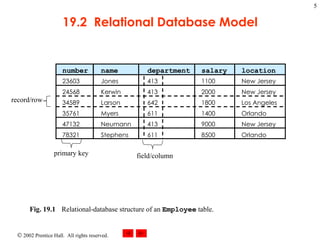
19.2  Relational Database Model Fig. 19.1 Relational-database structure of an   Employee   table.  number name department salary location 23603 Jones 413 1100 New Jersey 24568 Kerwin 413 2000 New Jersey 34589 Larson 642 1800 Los Angeles 35761 Myers 611 1400 Orlando 47132 Neumann 413 9000 New Jersey 78321 Stephens 611 8500 Orlando record/row field/column primary key
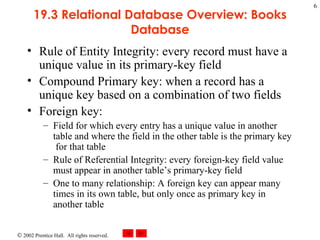
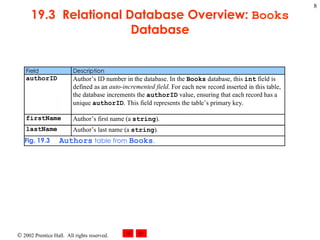
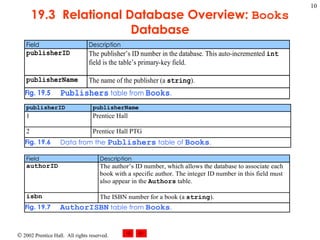
19.3 Relational Database Overview: Books Database Rule of Entity Integrity: every record must have a unique value in its primary-key field Compound Primary key: when a record has a unique key based on a combination of two fields Foreign key: Field for which every entry has a unique value in another table and where the field in the other table is the primary key  for that table Rule of Referential Integrity: every foreign-key field value must appear in another table’s primary-key field One to many relationship: A foreign key can appear many times in its own table, but only once as primary key in another table
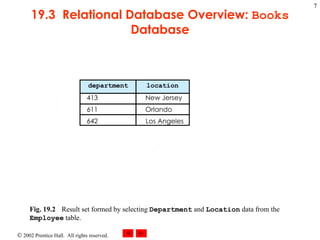
19.3  Relational Database Overview:  Books  Database Fig. 19.2 Result set formed by selecting  Department  and  Location  data from the  Employee  table.   department location 413 New Jersey 642 Los Angeles 611 Orlando
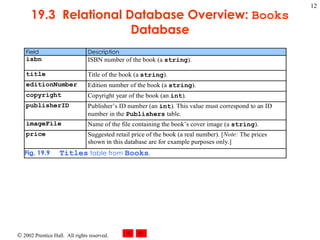
19.3  Relational Database Overview:  Books  Database
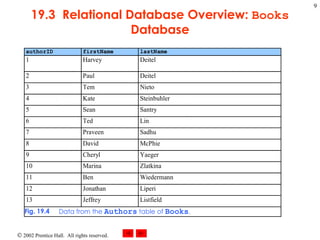
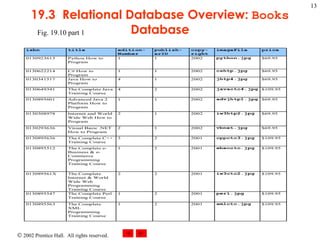
19.3  Relational Database Overview:  Books  Database Fig. 19.10 part 1
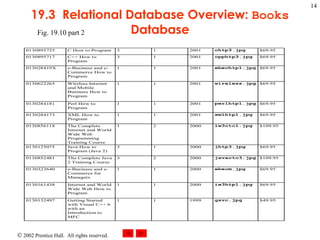
19.3  Relational Database Overview:  Books  Database Fig. 19.10 part 2
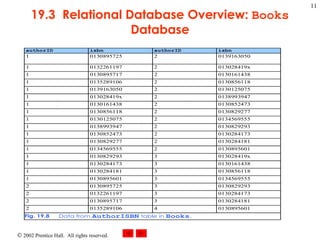
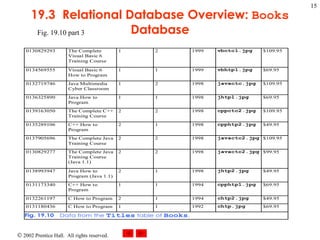
19.3  Relational Database Overview:  Books  Database Fig. 19.10 part 3
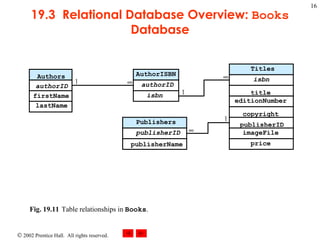
19.3  Relational Database Overview:  Books  Database Fig. 19.11 Table relationships in  Books .  AuthorISBN authorID isbn Authors authorID firstName lastName Publishers publisherID publisherName Titles isbn title editionNumber copyright publisherID imageFile price 1    1 1
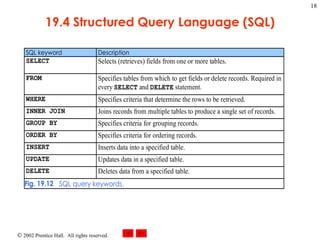
19.4 Structured Query Language (SQL) Used to request data (perform queries) and manipulate data
19.4 Structured Query Language (SQL)
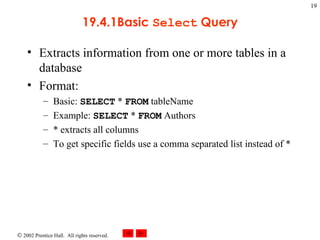
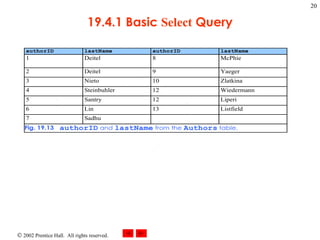
19.4.1Basic  Select  Query Extracts information from one or more tables in a database Format: Basic:  SELECT  *  FROM  tableName Example:  SELECT  *  FROM  Authors * extracts all columns To get specific fields use a comma separated list instead of *
19.4.1 Basic  Select  Query
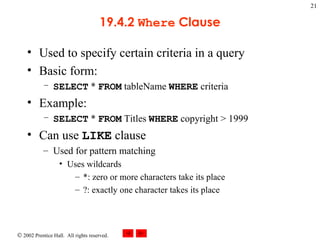
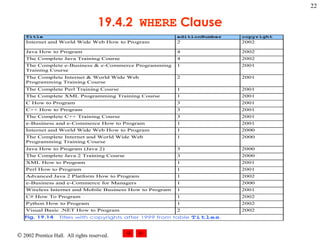
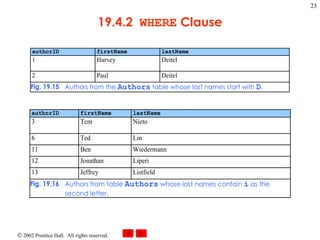
19.4.2  Where  Clause Used to specify certain criteria in a query Basic form: SELECT  *  FROM  tableName  WHERE  criteria Example: SELECT  *  FROM  Titles  WHERE  copyright > 1999 Can use  LIKE  clause Used for pattern matching Uses wildcards *: zero or more characters take its place ?: exactly one character takes its place
19.4.2  WHERE  Clause
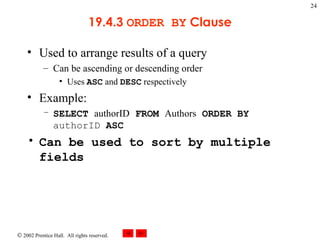
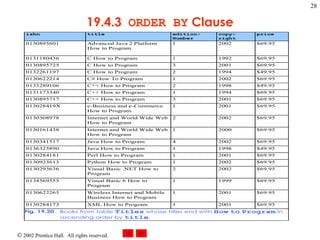
19.4.3  ORDER BY  Clause Used to arrange results of a query Can be ascending or descending order Uses  ASC  and  DESC  respectively Example: SELECT  authorID  FROM  Authors  ORDER BY  authorID  ASC Can be used to sort by multiple fields
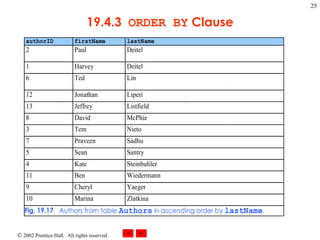
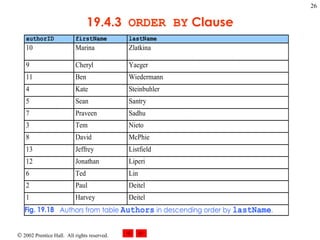
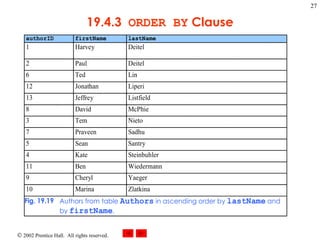
19.4.3  ORDER BY  Clause
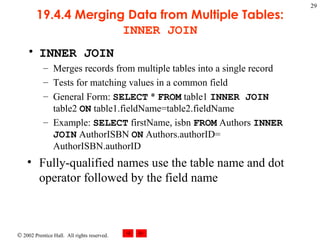
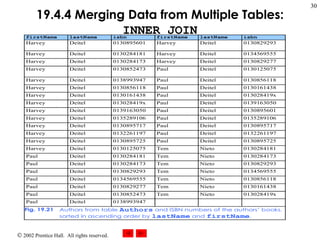
19.4.4 Merging Data from Multiple Tables:  INNER JOIN INNER JOIN  Merges records from multiple tables into a single record Tests for matching values in a common field General Form:  SELECT  *  FROM  table1  INNER JOIN  table2  ON  table1.fieldName=table2.fieldName Example:  SELECT  firstName, isbn  FROM  Authors  INNER JOIN  AuthorISBN  ON  Authors.authorID= AuthorISBN.authorID Fully-qualified names use the table name and dot operator followed by the field name
19.4.4 Merging Data from Multiple Tables:  INNER JOIN
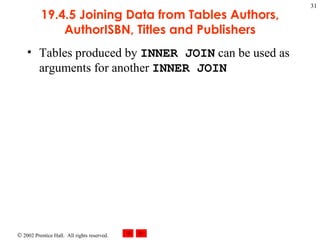
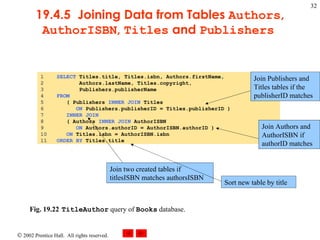
19.4.5 Joining Data from Tables Authors, AuthorISBN, Titles and Publishers Tables produced by  INNER JOIN  can be used as arguments for another  INNER JOIN
19.4.5  Joining Data from Tables  Authors ,  AuthorISBN ,  Titles  and  Publishers   Fig. 19.22 TitleAuthor  query of  Books  database.  Join Publishers and Titles tables if the publisherID matches Join Authors and AuthorISBN if authorID matches Join two created tables if titlesISBN matches authorsISBN Sort new table by title
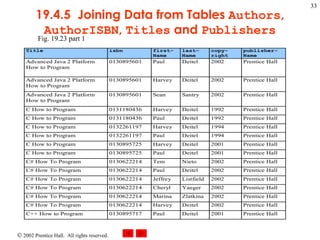
19.4.5  Joining Data from Tables  Authors ,  AuthorISBN ,  Titles  and  Publishers Fig. 19.23 part 1
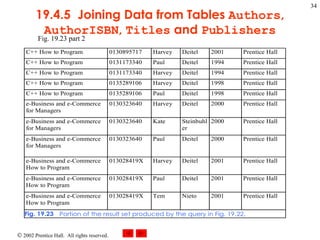
19.4.5  Joining Data from Tables  Authors ,  AuthorISBN ,  Titles  and  Publishers Fig. 19.23 part 2
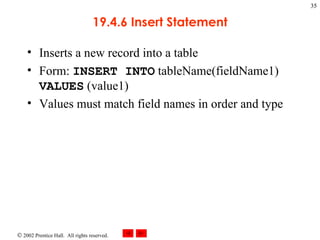
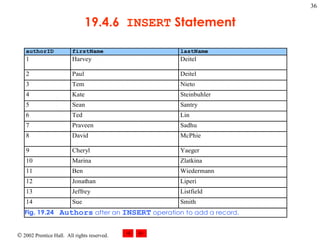
19.4.6 Insert Statement Inserts a new record into a table Form:  INSERT INTO  tableName(fieldName1)  VALUES  (value1) Values must match field names in order and type
19.4.6  INSERT  Statement
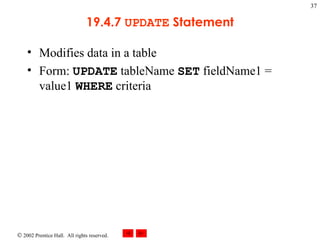
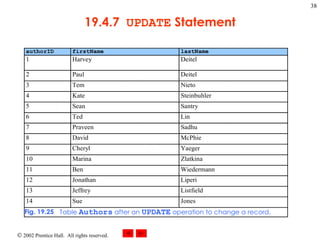
19.4.7  UPDATE  Statement Modifies data in a table Form:  UPDATE  tableName  SET  fieldName1 = value1  WHERE  criteria
19.4.7  UPDATE  Statement
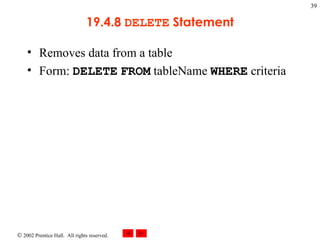
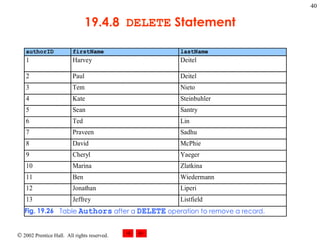
19.4.8  DELETE  Statement Removes data from a table Form:  DELETE   FROM  tableName  WHERE  criteria
19.4.8  DELETE  Statement
19.5 ADO .NET and Object Model Provides an API for accessing database systems programmatically DataSets  act as caches: Store data from source in local memory
19.6 Programming with ADO .NET: Extracting Information from a DBMS Examples that demonstrate how to connect to a database, query the database and display the results of the query
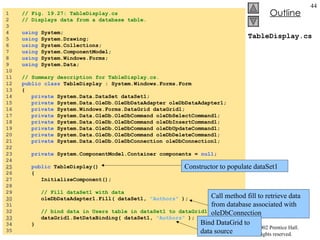
19.6.1 Connecting to and Querying an Access Data Source Retrieves data and stores it in a  DataGrid
TableDisplay.cs 1  // Fig. 19.27: TableDisplay.cs 2  // Displays data from a database table. 3  4  using  System; 5  using  System.Drawing; 6  using  System.Collections; 7  using  System.ComponentModel; 8  using  System.Windows.Forms; 9  using  System.Data; 10  11  // Summary description for TableDisplay.cs. 12  public class  TableDisplay : System.Windows.Forms.Form 13  { 14  private  System.Data.DataSet dataSet1; 15  private  System.Data.OleDb.OleDbDataAdapter oleDbDataAdapter1; 16  private  System.Windows.Forms.DataGrid dataGrid1; 17  private  System.Data.OleDb.OleDbCommand oleDbSelectCommand1; 18  private  System.Data.OleDb.OleDbCommand oleDbInsertCommand1; 19  private  System.Data.OleDb.OleDbCommand oleDbUpdateCommand1; 20  private  System.Data.OleDb.OleDbCommand oleDbDeleteCommand1; 21  private  System.Data.OleDb.OleDbConnection oleDbConnection1; 22  23  private  System.ComponentModel.Container components =  null ; 24  25   public  TableDisplay() 26  { 27  InitializeComponent(); 28  29  // Fill dataSet1 with data 30   oleDbDataAdapter1.Fill( dataSet1,  "Authors"  ); 31  32  // bind data in Users table in dataSet1 to dataGrid1 33   dataGrid1.SetDataBinding( dataSet1,  "Authors"  ); 34  } 35  Constructor to populate dataSet1 Call method fill to retrieve data from database associated with oleDbConnection Bind DataGrid to data source
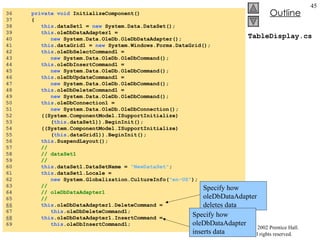
TableDisplay.cs 36  private void  InitializeComponent() 37  { 38  this .dataSet1 =  new  System.Data.DataSet(); 39  this .oleDbDataAdapter1 =  40  new  System.Data.OleDb.OleDbDataAdapter(); 41  this .dataGrid1 =  new  System.Windows.Forms.DataGrid(); 42  this .oleDbSelectCommand1 =  43  new  System.Data.OleDb.OleDbCommand(); 44  this .oleDbInsertCommand1 =  45  new  System.Data.OleDb.OleDbCommand(); 46  this .oleDbUpdateCommand1 =  47  new  System.Data.OleDb.OleDbCommand(); 48  this .oleDbDeleteCommand1 =  49  new  System.Data.OleDb.OleDbCommand(); 50  this .oleDbConnection1 =  51  new  System.Data.OleDb.OleDbConnection(); 52  ((System.ComponentModel.ISupportInitialize) 53  ( this .dataSet1)).BeginInit(); 54  ((System.ComponentModel.ISupportInitialize) 55  ( this .dataGrid1)).BeginInit(); 56  this .SuspendLayout(); 57  //  58  // dataSet1 59  //  60  this .dataSet1.DataSetName =  "NewDataSet" ; 61  this .dataSet1.Locale =  62  new  System.Globalization.CultureInfo( "en-US" ); 63  //  64  // oleDbDataAdapter1 65  //  66   this .oleDbDataAdapter1.DeleteCommand =  67  this .oleDbDeleteCommand1; 68   this .oleDbDataAdapter1.InsertCommand =  69  this .oleDbInsertCommand1; Specify how oleDbDataAdapter deletes data Specify how oleDbDataAdapter inserts data
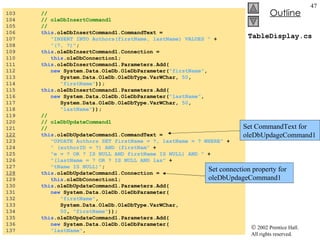
TableDisplay.cs 70   this .oleDbDataAdapter1.SelectCommand =  71  this .oleDbSelectCommand1; 72  this .oleDbDataAdapter1.TableMappings.AddRange( 73  new  System.Data.Common.DataTableMapping[] { 74  new  System.Data.Common.DataTableMapping( 75  "Table" ,  "Authors" ,  76  new  System.Data.Common.DataColumnMapping[] { 77  new  System.Data.Common.DataColumnMapping( 78  "authorID" ,  "authorID" ), 79  new  System.Data.Common.DataColumnMapping( 80  "firstName" , "firstName"), 81  new  System.Data.Common.DataColumnMapping( 82  "lastName" ,  "lastName" )})}); 83   this .oleDbDataAdapter1.UpdateCommand =  84  this .oleDbUpdateCommand1; 85  //  86  // dataGrid1 87  //  88  this .dataGrid1.DataMember =  "" ; 89  this .dataGrid1.HeaderForeColor =  90  System.Drawing.SystemColors.ControlText; 91  this .dataGrid1.Location =  92  new  System.Drawing.Point( 16 ,  16 ); 93  this .dataGrid1.Name =  "dataGrid1" ; 94  this .dataGrid1.Size =  new  System.Drawing.Size( 264 ,  248 ); 95  this .dataGrid1.TabIndex =  0 ; 96  //  97  // oleDbSelectCommand1 98  //  99  this .oleDbSelectCommand1.CommandText =  100  "SELECT authorID, firstName, lastName FROM Authors" ; 101  this .oleDbSelectCommand1.Connection =  102  this .oleDbConnection1; Specify how oleDbDataAdapter selects data Specify how oleDbDataAdapter updates data
TableDisplay.cs 103  //  104  // oleDbInsertCommand1 105  //  106  this .oleDbInsertCommand1.CommandText =  107  "INSERT INTO Authors(firstName, lastName) VALUES "  + 108  "(?, ?)" ; 109  this .oleDbInsertCommand1.Connection =  110  this .oleDbConnection1; 111  this .oleDbInsertCommand1.Parameters.Add( 112  new  System.Data.OleDb.OleDbParameter( "firstName" ,  113  System.Data.OleDb.OleDbType.VarWChar,  50 ,  114  "firstName" )); 115  this .oleDbInsertCommand1.Parameters.Add( 116  new  System.Data.OleDb.OleDbParameter( "lastName" ,  117  System.Data.OleDb.OleDbType.VarWChar,  50 ,  118  "lastName" )); 119  //  120  // oleDbUpdateCommand1 121  //  122   this .oleDbUpdateCommand1.CommandText =  123  "UPDATE Authors SET firstName = ?, lastName = ? WHERE"  + 124  " (authorID = ?) AND (firstNam"  + 125  "e = ? OR ? IS NULL AND firstName IS NULL) AND "  + 126  "(lastName = ? OR ? IS NULL AND las"  + 127  "tName IS NULL)" ; 128   this .oleDbUpdateCommand1.Connection =  129  this .oleDbConnection1; 130  this .oleDbUpdateCommand1.Parameters.Add( 131  new  System.Data.OleDb.OleDbParameter( 132  "firstName" ,  133  System.Data.OleDb.OleDbType.VarWChar,  134  50 ,  "firstName" )); 135  this .oleDbUpdateCommand1.Parameters.Add( 136  new  System.Data.OleDb.OleDbParameter( 137  "lastName" ,  Set connection property for oleDbUpdageCommand1 Set CommandText for oleDbUpdageCommand1
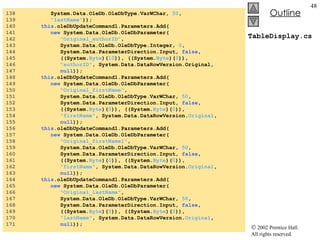
TableDisplay.cs 138  System.Data.OleDb.OleDbType.VarWChar,  50 ,  139  "lastName" )); 140  this .oleDbUpdateCommand1.Parameters.Add( 141  new  System.Data.OleDb.OleDbParameter( 142  "Original_authorID" ,  143  System.Data.OleDb.OleDbType.Integer,  0 ,  144  System.Data.ParameterDirection.Input,  false ,  145  ((System. Byte )( 10 )), ((System. Byte )( 0 )),  146  "authorID" , System.Data.DataRowVersion.Original,  147  null )); 148  this .oleDbUpdateCommand1.Parameters.Add( 149  new  System.Data.OleDb.OleDbParameter( 150  "Original_firstName" ,  151  System.Data.OleDb.OleDbType.VarWChar,  50 ,  152  System.Data.ParameterDirection.Input,  false ,  153  ((System. Byte )( 0 )), ((System. Byte )( 0 )),  154  "firstName" , System.Data.DataRowVersion. Original ,  155  null )); 156  this .oleDbUpdateCommand1.Parameters.Add( 157  new  System.Data.OleDb.OleDbParameter( 158  "Original_firstName1" ,  159  System.Data.OleDb.OleDbType.VarWChar,  50 ,  160  System.Data.ParameterDirection.Input,  false ,  161  ((System. Byte )( 0 )), ((System. Byte )( 0 )),  162  "firstName" , System.Data.DataRowVersion. Original ,  163  null )); 164  this .oleDbUpdateCommand1.Parameters.Add( 165  new  System.Data.OleDb.OleDbParameter( 166  "Original_lastName" ,  167  System.Data.OleDb.OleDbType.VarWChar,  50 ,  168  System.Data.ParameterDirection.Input,  false ,  169  ((System. Byte )( 0 )), ((System. Byte )( 0 )),  170  "lastName" , System.Data.DataRowVersion. Original ,  171  null ));
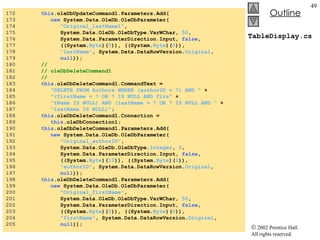
TableDisplay.cs 172  this .oleDbUpdateCommand1.Parameters.Add( 173  new  System.Data.OleDb.OleDbParameter( 174  "Original_lastName1" ,  175  System.Data.OleDb.OleDbType.VarWChar,  50 ,  176  System.Data.ParameterDirection.Input,  false ,  177  ((System. Byte )( 0 )), ((System. Byte )( 0 )),  178  "lastName" , System.Data.DataRowVersion. Original ,  179  null )); 180  //  181  // oleDbDeleteCommand1 182  //  183  this .oleDbDeleteCommand1.CommandText =  184  "DELETE FROM Authors WHERE (authorID = ?) AND "  + 185  "(firstName = ? OR ? IS NULL AND firs"  + 186  "tName IS NULL) AND (lastName = ? OR ? IS NULL AND "  + 187  "lastName IS NULL)" ; 188  this .oleDbDeleteCommand1.Connection =  189  this .oleDbConnection1; 190  this .oleDbDeleteCommand1.Parameters.Add( 191  new  System.Data.OleDb.OleDbParameter( 192  "Original_authorID" ,  193  System.Data.OleDb.OleDbType. Integer ,  0 ,  194  System.Data.ParameterDirection.Input,  false ,  195  ((System. Byte )( 10 )), ((System. Byte )( 0 )),  196  "authorID" , System.Data.DataRowVersion. Original ,  197  null )); 198  this .oleDbDeleteCommand1.Parameters.Add( 199  new  System.Data.OleDb.OleDbParameter( 200  "Original_firstName" ,  201  System.Data.OleDb.OleDbType.VarWChar,  50 , 202  System.Data.ParameterDirection.Input,  false ,  203  ((System. Byte )( 0 )), ((System. Byte )( 0 )),  204  "firstName" , System.Data.DataRowVersion. Original ,  205  null ));
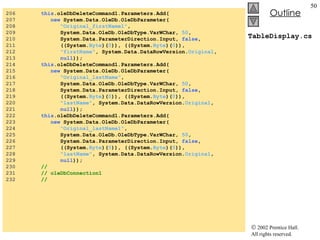
TableDisplay.cs 206  this .oleDbDeleteCommand1.Parameters.Add( 207  new  System.Data.OleDb.OleDbParameter( 208  "Original_firstName1" ,  209  System.Data.OleDb.OleDbType.VarWChar,  50 ,  210  System.Data.ParameterDirection.Input,  false ,  211  ((System. Byte )( 0 )), ((System. Byte )( 0 )),  212  "firstName" , System.Data.DataRowVersion. Original ,  213  null )); 214  this .oleDbDeleteCommand1.Parameters.Add( 215  new  System.Data.OleDb.OleDbParameter( 216  "Original_lastName" ,  217  System.Data.OleDb.OleDbType.VarWChar,  50 ,  218  System.Data.ParameterDirection.Input,  false , 219  ((System. Byte )( 0 )), ((System. Byte )( 0 )),  220  "lastName" , System.Data.DataRowVersion. Original ,  221  null )); 222  this .oleDbDeleteCommand1.Parameters.Add( 223  new  System.Data.OleDb.OleDbParameter( 224  "Original_lastName1" ,  225  System.Data.OleDb.OleDbType.VarWChar,  50 ,  226  System.Data.ParameterDirection.Input,  false ,  227  ((System. Byte )( 0 )), ((System. Byte )( 0 )),  228  "lastName" , System.Data.DataRowVersion. Original ,  229  null )); 230  //  231  // oleDbConnection1 232  //
TableDisplay.cs 233   this .oleDbConnection1.ConnectionString =  234  @"Provider=Microsoft.Jet.OLEDB.4.0;Password="""";"  + 235  @"User ID=Admin;Data Source=C:\Books\2001\csphtp1\"  + 236  @"csphtp1_examples\ch19\Books.mdb;Mode=Share "  + 237  @"Deny None;Extended Properties="""";Jet OLEDB:"  + 238  @"System database="""";Jet OLEDB:Registry "  + 239  @"Path="""";Jet OLEDB:Database Password="""";"  + 240  @"Jet OLEDB:Engine Type=5;Jet OLEDB:Database "  + 241  @"Locking Mode=1;Jet OLEDB:Global Partial Bulk "  + 242  @"Ops=2;Jet OLEDB:Global Bulk Transactions=1;Jet "  + 243  @"OLEDB:New Database Password="""";Jet OLEDB:"  + 244  @"Create System Database=False;Jet OLEDB:Encrypt "  + 245  @"Database=False;Jet OLEDB:Don't Copy Locale on "  + 246  @"Compact=False;Jet OLEDB:Compact Without Replica "  + 247  @"Repair=False;Jet OLEDB:SFP=False" ; 248  //  249  // TableDisplay 250  //  251  this .AutoScaleBaseSize =  new  System.Drawing.Size( 5 ,  13 ); 252  this .ClientSize =  new  System.Drawing.Size( 292 ,  273 ); 253  this .Controls.AddRange( 254  new  System.Windows.Forms.Control[] { 255  this .dataGrid1}); 256  this .Name =  "TableDisplay" ; 257  this .Text =  "TableDisplay" ; 258  ((System.ComponentModel.ISupportInitialize) 259  ( this .dataSet1)).EndInit(); 260  ((System.ComponentModel.ISupportInitialize) 261  ( this .dataGrid1)).EndInit(); 262  this .ResumeLayout( false ); 263  Initialize oleDbConnection, and specify path to database
TableDisplay.cs Program Output 264  }  // end of InitializeComponent 265  266  [STAThread] 267  static void  Main()  268  { 269  Application.Run(  new  TableDisplay() ); 270  } 271  }
19.6.2 Querying the Books Database Use  SELECT  statements on database and display results
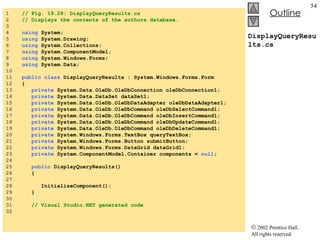
DisplayQueryResults.cs 1  // Fig. 19.28: DisplayQueryResults.cs 2  // Displays the contents of the authors database. 3  4  using  System; 5  using  System.Drawing; 6  using  System.Collections; 7  using  System.ComponentModel; 8  using  System.Windows.Forms; 9  using  System.Data; 10  11  public   class  DisplayQueryResults : System.Windows.Forms.Form 12  { 13  private  System.Data.OleDb.OleDbConnection oleDbConnection1; 14  private  System.Data.DataSet dataSet1; 15  private  System.Data.OleDb.OleDbDataAdapter oleDbDataAdapter1; 16  private  System.Data.OleDb.OleDbCommand oleDbSelectCommand1; 17  private  System.Data.OleDb.OleDbCommand oleDbInsertCommand1; 18  private  System.Data.OleDb.OleDbCommand oleDbUpdateCommand1; 19  private  System.Data.OleDb.OleDbCommand oleDbDeleteCommand1; 20  private  System.Windows.Forms.TextBox queryTextBox; 21  private  System.Windows.Forms.Button submitButton; 22  private  System.Windows.Forms.DataGrid dataGrid1; 23  private  System.ComponentModel.Container components =  null ; 24  25  public  DisplayQueryResults() 26  { 27  28  InitializeComponent(); 29  } 30  31  // Visual Studio.NET generated code 32
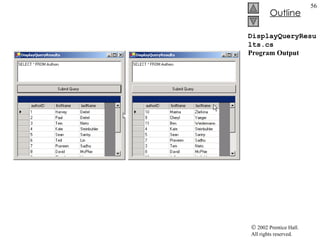
DisplayQueryResults.cs 33  [STAThread] 34  static   void  Main()  35  { 36  Application.Run(  new  DisplayQueryResults() ); 37  } 38  39  // perform SQL query on data 40  private   void  submitButton_Click(  object  sender, 41  System.EventArgs e ) 42  { 43  try 44  { 45  // set SQL query to what user  46  // input into queryTextBox 47   oleDbDataAdapter1.SelectCommand.CommandText = 48  queryTextBox.Text; 49  50  // clear DataSet from previous operation 51  dataSet1.Clear(); 52  53  // Fill data set with information that results 54  // from SQL query 55   oleDbDataAdapter1.Fill( dataSet1,  "Authors"  ); 56  57  // bind DataGrid to contents of DataSet 58   dataGrid1.SetDataBinding( dataSet1,  "Authors"  ); 59  } 60  61  catch  ( System.Data.OleDb.OleDbException oleException ) 62  { 63  MessageBox.Show(  "Invalid query"  ); 64  } 65  66  }  // end of submitButton_Click 67  } When user clicks submit button, assign SELECT query string to OleDbDataAdapter’s SelectCommand property Place data from database into dataSet1 Bind DataGrid to data and display results
DisplayQueryResults.cs Program Output
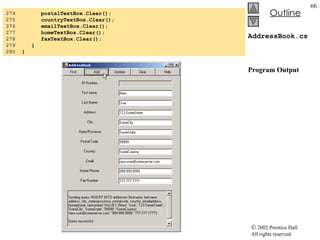
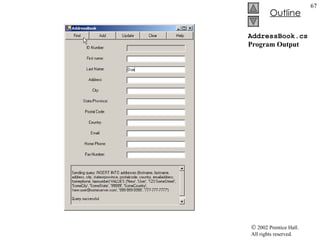
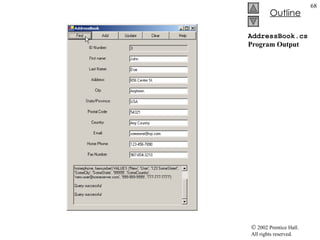
19.7 Programming with ADO.NET: Modifying a DBMS Example implements an address book User can insert, locate and update records
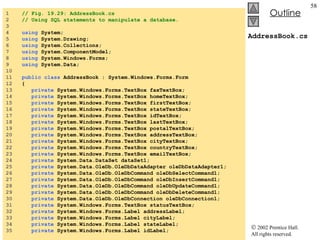
AddressBook.cs 1  // Fig. 19.29: AddressBook.cs 2  // Using SQL statements to manipulate a database. 3  4  using  System; 5  using  System.Drawing; 6  using  System.Collections; 7  using  System.ComponentModel; 8  using  System.Windows.Forms; 9  using  System.Data; 10  11  public   class  AddressBook : System.Windows.Forms.Form 12  { 13  private  System.Windows.Forms.TextBox faxTextBox; 14  private  System.Windows.Forms.TextBox homeTextBox; 15  private  System.Windows.Forms.TextBox firstTextBox; 16  private  System.Windows.Forms.TextBox stateTextBox; 17  private  System.Windows.Forms.TextBox idTextBox; 18  private  System.Windows.Forms.TextBox lastTextBox; 19  private  System.Windows.Forms.TextBox postalTextBox; 20  private  System.Windows.Forms.TextBox addressTextBox; 21  private  System.Windows.Forms.TextBox cityTextBox; 22  private  System.Windows.Forms.TextBox countryTextBox; 23  private  System.Windows.Forms.TextBox emailTextBox; 24  private  System.Data.DataSet dataSet1; 25  private  System.Data.OleDb.OleDbDataAdapter oleDbDataAdapter1; 26  private  System.Data.OleDb.OleDbCommand oleDbSelectCommand1; 27  private  System.Data.OleDb.OleDbCommand oleDbInsertCommand1; 28  private  System.Data.OleDb.OleDbCommand oleDbUpdateCommand1; 29  private  System.Data.OleDb.OleDbCommand oleDbDeleteCommand1; 30  private  System.Data.OleDb.OleDbConnection oleDbConnection1; 31  private  System.Windows.Forms.TextBox statusTextBox; 32  private  System.Windows.Forms.Label addressLabel; 33  private  System.Windows.Forms.Label cityLabel; 34  private  System.Windows.Forms.Label stateLabel; 35  private  System.Windows.Forms.Label idLabel;
AddressBook.cs 36  private  System.Windows.Forms.Label firstLabel; 37  private  System.Windows.Forms.Label lastLabel; 38  private  System.Windows.Forms.Label postalLabel; 39  private  System.Windows.Forms.Label countryLabel; 40  private  System.Windows.Forms.Label emailLabel; 41  private  System.Windows.Forms.Button clearButton; 42  private  System.Windows.Forms.Button helpButton; 43  private  System.Windows.Forms.Button findButton; 44  private  System.Windows.Forms.Button addButton; 45  private  System.Windows.Forms.Button updateButton; 46  private  System.Windows.Forms.Label faxLabel; 47  private  System.Windows.Forms.Label homeLabel; 48  private  System.ComponentModel.Container components =  null ; 49  50  public  AddressBook() 51  { 52  InitializeComponent(); 53  oleDbConnection1.Open(); 54  } 55  56  // Visual Studio.NET generated code 57  58  [STAThread] 59  static   void  Main()  60  { 61  Application.Run(  new  AddressBook() ); 62  } 63  64   private   void  findButton_Click(  object  sender, 65  System.EventArgs e ) 66  { 67  try 68  { Perform SELECT query on database
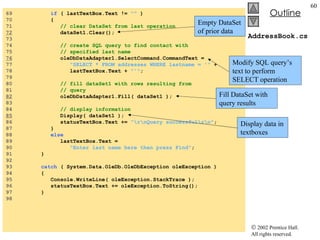
AddressBook.cs 69  if  ( lastTextBox.Text !=  ""  ) 70  {  71  // clear DataSet from last operation 72   dataSet1.Clear(); 73  74  // create SQL query to find contact with 75  // specified last name 76   oleDbDataAdapter1.SelectCommand.CommandText =  77  "SELECT * FROM addresses WHERE lastname = '"  + 78  lastTextBox.Text +  "'" ; 79  80  // fill dataSet1 with rows resulting from 81  // query 82   oleDbDataAdapter1.Fill( dataSet1 ); 83  84  // display information 85   Display( dataSet1 ); 86  statusTextBox.Text +=  "\r\nQuery successful\r\n" ; 87  } 88  else 89  lastTextBox.Text =  90  "Enter last name here then press Find" ; 91  } 92  93  catch  ( System.Data.OleDb.OleDbException oleException ) 94  { 95  Console.WriteLine( oleException.StackTrace ); 96  statusTextBox.Text += oleException.ToString(); 97  } 98  Empty DataSet of prior data Modify SQL query’s text to perform SELECT operation Fill DataSet with query results Display data in textboxes
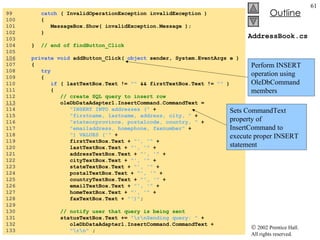
AddressBook.cs 99  catch  ( InvalidOperationException invalidException ) 100  { 101  MessageBox.Show( invalidException.Message ); 102  } 103  104  }  // end of findButton_Click 105  106   private   void  addButton_Click(  object  sender, System.EventArgs e ) 107  { 108  try 109  { 110  if  ( lastTextBox.Text !=  ""  && firstTextBox.Text !=  ""  ) 111  { 112  // create SQL query to insert row 113   oleDbDataAdapter1.InsertCommand.CommandText =  114  "INSERT INTO addresses ("  + 115  "firstname, lastname, address, city, "  + 116  "stateorprovince, postalcode, country, "  + 117  "emailaddress, homephone, faxnumber"  +  118  ") VALUES ('"  + 119  firstTextBox.Text +  "', '"  + 120  lastTextBox.Text +  "', '"  + 121  addressTextBox.Text +  "', '"  + 122  cityTextBox.Text +  "', '"  + 123  stateTextBox.Text +  "', '"  + 124  postalTextBox.Text +  "', '"  + 125  countryTextBox.Text +  "', '"  + 126  emailTextBox.Text +  "', '"  + 127  homeTextBox.Text +  "', '"  + 128  faxTextBox.Text +  "')" ; 129  130  // notify user that query is being sent 131  statusTextBox.Text +=  "\r\nSending query: "  + 132  oleDbDataAdapter1.InsertCommand.CommandText + 133  "\r\n"  ; Perform INSERT operation using OleDbCommand members Sets CommandText property of InsertCommand to execute proper INSERT statement
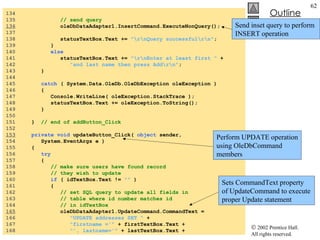
AddressBook.cs 134  135  // send query 136   oleDbDataAdapter1.InsertCommand.ExecuteNonQuery(); 137  138  statusTextBox.Text +=  "\r\nQuery successful\r\n" ; 139  } 140  else 141  statusTextBox.Text +=  "\r\nEnter at least first "  + 142  "and last name then press Add\r\n" ; 143  } 144  145  catch  ( System.Data.OleDb.OleDbException oleException ) 146  { 147  Console.WriteLine( oleException.StackTrace ); 148  statusTextBox.Text += oleException.ToString(); 149  } 150  151  }  // end of addButton_Click 152  153   private   void  updateButton_Click(  object  sender,  154  System.EventArgs e ) 155  { 156  try 157  { 158  // make sure users have found record 159  // they wish to update 160  if  ( idTextBox.Text !=  ""  ) 161  { 162  // set SQL query to update all fields in 163  // table where id number matches id 164  // in idTextBox 165   oleDbDataAdapter1.UpdateCommand.CommandText = 166  "UPDATE addresses SET "  + 167  "firstname ='"  + firstTextBox.Text + 168  "', lastname='"  + lastTextBox.Text + Perform UPDATE operation using OleDbCommand members Send inset query to perform INSERT operation Sets CommandText property of UpdateCommand to execute proper Update statement
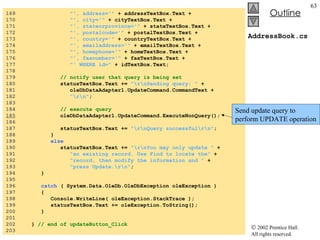
AddressBook.cs 169  "', address='"  + addressTextBox.Text + 170  "', city='"  + cityTextBox.Text + 171  "', stateorprovince='"  + stateTextBox.Text + 172  "', postalcode='"  + postalTextBox.Text + 173  "', country='"  + countryTextBox.Text + 174  "', emailaddress='"  + emailTextBox.Text + 175  "', homephone='"  + homeTextBox.Text + 176  "', faxnumber='"  + faxTextBox.Text + 177  "' WHERE id="  + idTextBox.Text; 178  179  // notify user that query is being set 180  statusTextBox.Text +=  "\r\nSending query: "  + 181  oleDbDataAdapter1.UpdateCommand.CommandText + 182  "\r\n" ; 183  184  // execute query 185   oleDbDataAdapter1.UpdateCommand.ExecuteNonQuery(); 186  187  statusTextBox.Text +=  "\r\nQuery successful\r\n" ; 188  } 189  else 190  statusTextBox.Text +=  "\r\nYou may only update "  + 191  "an existing record. Use Find to locate the"  + 192  "record, then modify the information and "  + 193  "press Update.\r\n" ; 194  } 195  196  catch  ( System.Data.OleDb.OleDbException oleException ) 197  { 198  Console.WriteLine( oleException.StackTrace ); 199  statusTextBox.Text += oleException.ToString(); 200  } 201  202  }  // end of updateButton_Click 203  Send update query to perform UPDATE operation
AddressBook.cs 204   private   void  clearButton_Click(  object  sender,  205  System.EventArgs e ) 206  { 207  idTextBox.Clear(); 208  ClearTextBoxes(); 209  } 210  211  private   void  helpButton_Click(  object  sender,  212  System.EventArgs e ) 213  { 214   statusTextBox.AppendText(  215  "\r\nClick Find to locate a record\r\n"  + 216  "Click Add to insert a new record.\r\n"  + 217  "Click Update to update the information in a record " 218  +  "\r\nClick Clear to empty the textboxes"  ); 219  } 220  221   private   void  Display( DataSet dataSet ) 222  { 223  try 224  {  225  // get first DataTable--there always will be one 226   DataTable dataTable = dataSet.Tables[  0  ]; 227  228   if  ( dataTable.Rows.Count !=  0  ) 229  { 230   int  recordNumber = (  int  ) dataTable.Rows[  0  ][  0  ]; 231  232   idTextBox.Text = recordNumber.ToString(); 233  firstTextBox.Text =  234  (  string  ) dataTable.Rows[  0  ][  1  ]; 235  lastTextBox.Text =  236  (  string  ) dataTable.Rows[  0  ][  2  ]; 237  addressTextBox.Text =  238  (  string  ) dataTable.Rows[  0  ][  3  ]; Updates display with data acquired by query DataTable from DataSet, contains results of query Determine if query returned any rows Retrieve first field of database Retrieve the rest of the fields of database Display instructions if user clicks help Clear textboxes if user clicks clear
AddressBook.cs 239  cityTextBox.Text = 240  (  string  ) dataTable.Rows[  0  ][  4  ]; 241  stateTextBox.Text = 242  (  string  ) dataTable.Rows[  0  ][  5  ]; 243  postalTextBox.Text = 244  (  string  ) dataTable.Rows[  0  ][  6  ]; 245  countryTextBox.Text = 246  (  string  ) dataTable.Rows[  0  ][  7  ]; 247  emailTextBox.Text = 248  (  string  ) dataTable.Rows[  0  ][  8  ]; 249  homeTextBox.Text = 250  (  string  ) dataTable.Rows[  0  ][  9  ]; 251  faxTextBox.Text = 252  (  string  ) dataTable.Rows[  0  ][  10  ]; 253  } 254  255  else 256  statusTextBox.Text +=  "\r\nNo record found\r\n "; 257  } 258  259  catch ( System.Data.OleDb.OleDbException oleException ) 260  { 261  Console.WriteLine( oleException.StackTrace ); 262  statusTextBox.Text += oleException.ToString(); 263  } 264  265  }  // end Display 266  267  private   void  ClearTextBoxes() 268  { 269  firstTextBox.Clear(); 270  lastTextBox.Clear(); 271  addressTextBox.Clear(); 272  cityTextBox.Clear(); 273  stateTextBox.Clear();
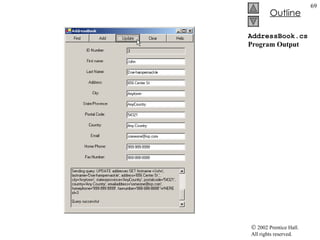
AddressBook.cs Program Output 274  postalTextBox.Clear(); 275  countryTextBox.Clear(); 276  emailTextBox.Clear(); 277  homeTextBox.Clear(); 278  faxTextBox.Clear(); 279  } 280  }
AddressBook.cs Program Output
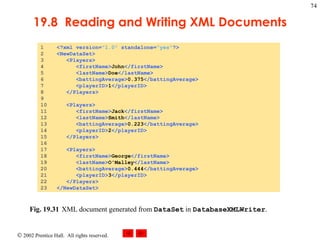
19.8 Reading and Writing XML Files ADO.NET can convert data from data source into XML files Uses methods WriteXml, ReadXml andGetXml
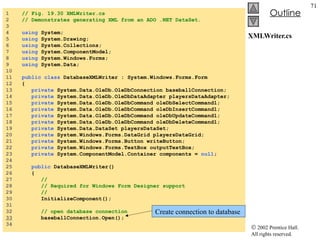
XMLWriter.cs 1  // Fig. 19.30 XMLWriter.cs 2  // Demonstrates generating XML from an ADO .NET DataSet. 3  4  using  System; 5  using  System.Drawing; 6  using  System.Collections; 7  using  System.ComponentModel; 8  using  System.Windows.Forms; 9  using  System.Data; 10  11  public   class  DatabaseXMLWriter : System.Windows.Forms.Form 12  { 13  private  System.Data.OleDb.OleDbConnection baseballConnection; 14  private  System.Data.OleDb.OleDbDataAdapter playersDataAdapter; 15  private  System.Data.OleDb.OleDbCommand oleDbSelectCommand1; 16  private  System.Data.OleDb.OleDbCommand oleDbInsertCommand1; 17  private  System.Data.OleDb.OleDbCommand oleDbUpdateCommand1; 18  private  System.Data.OleDb.OleDbCommand oleDbDeleteCommand1; 19  private  System.Data.DataSet playersDataSet; 20  private  System.Windows.Forms.DataGrid playersDataGrid; 21  private  System.Windows.Forms.Button writeButton; 22  private  System.Windows.Forms.TextBox outputTextBox; 23  private  System.ComponentModel.Container components =  null ; 24  25  public  DatabaseXMLWriter() 26  { 27  // 28  // Required for Windows Form Designer support 29  // 30  InitializeComponent(); 31  32  // open database connection 33   baseballConnection.Open(); 34  Create connection to database
XMLWriter.cs 35  // fill DataSet with data from OleDbDataAdapter 36   playersDataAdapter.Fill( playersDataSet,  "Players"  ); 37  38  // bind DataGrid to DataSet 39   playersDataGrid.SetDataBinding( playersDataSet,  "Players"  ); 40  41  } 42  43  // Visual Studio .NET generated code 44  45  // main entry point for application. 46  [STAThread] 47  static   void  Main()  48  { 49  Application.Run(  new  DatabaseXMLWriter() ); 50  } 51  52  // write XML representation of DataSet when button is clicked 53  private   void  writeButton_Click( 54  object  sender, System.EventArgs e) 55  { 56  // write XML representation of DataSet to file 57   playersDataSet.WriteXml(  "Players.xml"  ); 58  59  // display XML in TextBox 60  outputTextBox.Text +=  "Writing the following XML:\n\n"  + 61  playersDataSet.GetXml() +  "\n\n" ; 62  63  } 64  } Populate playersDataSet with data from database Bind DataGrid to DataSet to display data Create XML representation of data when user clicks button Append XML representation to textbox
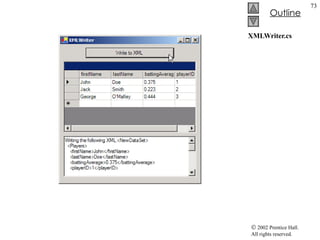
XMLWriter.cs
19.8  Reading and Writing XML Documents Fig. 19.31 XML document generated from  DataSet  in  DatabaseXMLWriter .

Csphtp1 19

  • 1.
    Chapter 19 –Database, SQL, and ADO .NET Outline 19.1 Introduction 19.2 Relational Database Model 19.3 Relational Database Overview: Books Database 19.4 Structured Query Language (SQL) 19.4.1 Basic SELECT Query 19.4.2 WHERE Clause 19.4.3 ORDER BY Clause 19.4.4 Merging Data from Multiple Tables: INNER JOIN 19.4.5 Joining Data from Tables Authors, AuthorISBN, Titles and Publishers 19.4.6 INSERT Statement 19.4.7 UPDATE Statement 19.4.8 DELETE Statement
  • 2.
    Chapter 19 –Database, SQL, and ADO .NET Outline 19.5 ADO .NET Object Model 19.6 Programming with ADO .NET: Extracting Information from a DBMS 19.6.1 Connecting to and Querying an Access Data Source 19.6.2 Querying the Books Database 19.7 Programming with ADO.NET: Modifying a DBMS 19.8 Reading and Writing XML Files
  • 3.
    19.1 Introduction Database:Integrated collection of data Database management system (DBMS) Provides mechanisms for storing and organizing data in a way that is consistent with database’s format Allows storage and access to database without knowledge of internal representation Relational Databases most popular Use Structured Query Language to perform queries (search) and manipulate data Programming languages need an interface to interact with relational databases
  • 4.
    19.2 Relational DatabaseModel Logical representation of data: Relationships can be considered without concern for physical structure of data Composed of tables Rows called records Columns called fields Primary key: field that contains unique data Each record can be identified by at least one distinct value New sets made from queries called result sets
  • 5.
    19.2 RelationalDatabase Model Fig. 19.1 Relational-database structure of an Employee table. number name department salary location 23603 Jones 413 1100 New Jersey 24568 Kerwin 413 2000 New Jersey 34589 Larson 642 1800 Los Angeles 35761 Myers 611 1400 Orlando 47132 Neumann 413 9000 New Jersey 78321 Stephens 611 8500 Orlando record/row field/column primary key
  • 6.
    19.3 Relational DatabaseOverview: Books Database Rule of Entity Integrity: every record must have a unique value in its primary-key field Compound Primary key: when a record has a unique key based on a combination of two fields Foreign key: Field for which every entry has a unique value in another table and where the field in the other table is the primary key for that table Rule of Referential Integrity: every foreign-key field value must appear in another table’s primary-key field One to many relationship: A foreign key can appear many times in its own table, but only once as primary key in another table
  • 7.
    19.3 RelationalDatabase Overview: Books Database Fig. 19.2 Result set formed by selecting Department and Location data from the Employee table. department location 413 New Jersey 642 Los Angeles 611 Orlando
  • 8.
    19.3 RelationalDatabase Overview: Books Database
  • 9.
    19.3 RelationalDatabase Overview: Books Database
  • 10.
    19.3 RelationalDatabase Overview: Books Database
  • 11.
    19.3 RelationalDatabase Overview: Books Database
  • 12.
    19.3 RelationalDatabase Overview: Books Database
  • 13.
    19.3 RelationalDatabase Overview: Books Database Fig. 19.10 part 1
  • 14.
    19.3 RelationalDatabase Overview: Books Database Fig. 19.10 part 2
  • 15.
    19.3 RelationalDatabase Overview: Books Database Fig. 19.10 part 3
  • 16.
    19.3 RelationalDatabase Overview: Books Database Fig. 19.11 Table relationships in Books . AuthorISBN authorID isbn Authors authorID firstName lastName Publishers publisherID publisherName Titles isbn title editionNumber copyright publisherID imageFile price 1    1 1
  • 17.
    19.4 Structured QueryLanguage (SQL) Used to request data (perform queries) and manipulate data
  • 18.
    19.4 Structured QueryLanguage (SQL)
  • 19.
    19.4.1Basic Select Query Extracts information from one or more tables in a database Format: Basic: SELECT * FROM tableName Example: SELECT * FROM Authors * extracts all columns To get specific fields use a comma separated list instead of *
  • 20.
    19.4.1 Basic Select Query
  • 21.
    19.4.2 Where Clause Used to specify certain criteria in a query Basic form: SELECT * FROM tableName WHERE criteria Example: SELECT * FROM Titles WHERE copyright > 1999 Can use LIKE clause Used for pattern matching Uses wildcards *: zero or more characters take its place ?: exactly one character takes its place
  • 22.
    19.4.2 WHERE Clause
  • 23.
    19.4.2 WHERE Clause
  • 24.
    19.4.3 ORDERBY Clause Used to arrange results of a query Can be ascending or descending order Uses ASC and DESC respectively Example: SELECT authorID FROM Authors ORDER BY authorID ASC Can be used to sort by multiple fields
  • 25.
    19.4.3 ORDERBY Clause
  • 26.
    19.4.3 ORDERBY Clause
  • 27.
    19.4.3 ORDERBY Clause
  • 28.
    19.4.3 ORDERBY Clause
  • 29.
    19.4.4 Merging Datafrom Multiple Tables: INNER JOIN INNER JOIN Merges records from multiple tables into a single record Tests for matching values in a common field General Form: SELECT * FROM table1 INNER JOIN table2 ON table1.fieldName=table2.fieldName Example: SELECT firstName, isbn FROM Authors INNER JOIN AuthorISBN ON Authors.authorID= AuthorISBN.authorID Fully-qualified names use the table name and dot operator followed by the field name
  • 30.
    19.4.4 Merging Datafrom Multiple Tables: INNER JOIN
  • 31.
    19.4.5 Joining Datafrom Tables Authors, AuthorISBN, Titles and Publishers Tables produced by INNER JOIN can be used as arguments for another INNER JOIN
  • 32.
    19.4.5 JoiningData from Tables Authors , AuthorISBN , Titles and Publishers Fig. 19.22 TitleAuthor query of Books database. Join Publishers and Titles tables if the publisherID matches Join Authors and AuthorISBN if authorID matches Join two created tables if titlesISBN matches authorsISBN Sort new table by title
  • 33.
    19.4.5 JoiningData from Tables Authors , AuthorISBN , Titles and Publishers Fig. 19.23 part 1
  • 34.
    19.4.5 JoiningData from Tables Authors , AuthorISBN , Titles and Publishers Fig. 19.23 part 2
  • 35.
    19.4.6 Insert StatementInserts a new record into a table Form: INSERT INTO tableName(fieldName1) VALUES (value1) Values must match field names in order and type
  • 36.
    19.4.6 INSERT Statement
  • 37.
    19.4.7 UPDATE Statement Modifies data in a table Form: UPDATE tableName SET fieldName1 = value1 WHERE criteria
  • 38.
    19.4.7 UPDATE Statement
  • 39.
    19.4.8 DELETE Statement Removes data from a table Form: DELETE FROM tableName WHERE criteria
  • 40.
    19.4.8 DELETE Statement
  • 41.
    19.5 ADO .NETand Object Model Provides an API for accessing database systems programmatically DataSets act as caches: Store data from source in local memory
  • 42.
    19.6 Programming withADO .NET: Extracting Information from a DBMS Examples that demonstrate how to connect to a database, query the database and display the results of the query
  • 43.
    19.6.1 Connecting toand Querying an Access Data Source Retrieves data and stores it in a DataGrid
  • 44.
    TableDisplay.cs 1 // Fig. 19.27: TableDisplay.cs 2 // Displays data from a database table. 3 4 using System; 5 using System.Drawing; 6 using System.Collections; 7 using System.ComponentModel; 8 using System.Windows.Forms; 9 using System.Data; 10 11 // Summary description for TableDisplay.cs. 12 public class TableDisplay : System.Windows.Forms.Form 13 { 14 private System.Data.DataSet dataSet1; 15 private System.Data.OleDb.OleDbDataAdapter oleDbDataAdapter1; 16 private System.Windows.Forms.DataGrid dataGrid1; 17 private System.Data.OleDb.OleDbCommand oleDbSelectCommand1; 18 private System.Data.OleDb.OleDbCommand oleDbInsertCommand1; 19 private System.Data.OleDb.OleDbCommand oleDbUpdateCommand1; 20 private System.Data.OleDb.OleDbCommand oleDbDeleteCommand1; 21 private System.Data.OleDb.OleDbConnection oleDbConnection1; 22 23 private System.ComponentModel.Container components = null ; 24 25 public TableDisplay() 26 { 27 InitializeComponent(); 28 29 // Fill dataSet1 with data 30 oleDbDataAdapter1.Fill( dataSet1, "Authors" ); 31 32 // bind data in Users table in dataSet1 to dataGrid1 33 dataGrid1.SetDataBinding( dataSet1, "Authors" ); 34 } 35 Constructor to populate dataSet1 Call method fill to retrieve data from database associated with oleDbConnection Bind DataGrid to data source
  • 45.
    TableDisplay.cs 36 private void InitializeComponent() 37 { 38 this .dataSet1 = new System.Data.DataSet(); 39 this .oleDbDataAdapter1 = 40 new System.Data.OleDb.OleDbDataAdapter(); 41 this .dataGrid1 = new System.Windows.Forms.DataGrid(); 42 this .oleDbSelectCommand1 = 43 new System.Data.OleDb.OleDbCommand(); 44 this .oleDbInsertCommand1 = 45 new System.Data.OleDb.OleDbCommand(); 46 this .oleDbUpdateCommand1 = 47 new System.Data.OleDb.OleDbCommand(); 48 this .oleDbDeleteCommand1 = 49 new System.Data.OleDb.OleDbCommand(); 50 this .oleDbConnection1 = 51 new System.Data.OleDb.OleDbConnection(); 52 ((System.ComponentModel.ISupportInitialize) 53 ( this .dataSet1)).BeginInit(); 54 ((System.ComponentModel.ISupportInitialize) 55 ( this .dataGrid1)).BeginInit(); 56 this .SuspendLayout(); 57 // 58 // dataSet1 59 // 60 this .dataSet1.DataSetName = "NewDataSet" ; 61 this .dataSet1.Locale = 62 new System.Globalization.CultureInfo( "en-US" ); 63 // 64 // oleDbDataAdapter1 65 // 66 this .oleDbDataAdapter1.DeleteCommand = 67 this .oleDbDeleteCommand1; 68 this .oleDbDataAdapter1.InsertCommand = 69 this .oleDbInsertCommand1; Specify how oleDbDataAdapter deletes data Specify how oleDbDataAdapter inserts data
  • 46.
    TableDisplay.cs 70 this .oleDbDataAdapter1.SelectCommand = 71 this .oleDbSelectCommand1; 72 this .oleDbDataAdapter1.TableMappings.AddRange( 73 new System.Data.Common.DataTableMapping[] { 74 new System.Data.Common.DataTableMapping( 75 "Table" , "Authors" , 76 new System.Data.Common.DataColumnMapping[] { 77 new System.Data.Common.DataColumnMapping( 78 "authorID" , "authorID" ), 79 new System.Data.Common.DataColumnMapping( 80 "firstName" , "firstName"), 81 new System.Data.Common.DataColumnMapping( 82 "lastName" , "lastName" )})}); 83 this .oleDbDataAdapter1.UpdateCommand = 84 this .oleDbUpdateCommand1; 85 // 86 // dataGrid1 87 // 88 this .dataGrid1.DataMember = "" ; 89 this .dataGrid1.HeaderForeColor = 90 System.Drawing.SystemColors.ControlText; 91 this .dataGrid1.Location = 92 new System.Drawing.Point( 16 , 16 ); 93 this .dataGrid1.Name = "dataGrid1" ; 94 this .dataGrid1.Size = new System.Drawing.Size( 264 , 248 ); 95 this .dataGrid1.TabIndex = 0 ; 96 // 97 // oleDbSelectCommand1 98 // 99 this .oleDbSelectCommand1.CommandText = 100 "SELECT authorID, firstName, lastName FROM Authors" ; 101 this .oleDbSelectCommand1.Connection = 102 this .oleDbConnection1; Specify how oleDbDataAdapter selects data Specify how oleDbDataAdapter updates data
  • 47.
    TableDisplay.cs 103 // 104 // oleDbInsertCommand1 105 // 106 this .oleDbInsertCommand1.CommandText = 107 "INSERT INTO Authors(firstName, lastName) VALUES " + 108 "(?, ?)" ; 109 this .oleDbInsertCommand1.Connection = 110 this .oleDbConnection1; 111 this .oleDbInsertCommand1.Parameters.Add( 112 new System.Data.OleDb.OleDbParameter( "firstName" , 113 System.Data.OleDb.OleDbType.VarWChar, 50 , 114 "firstName" )); 115 this .oleDbInsertCommand1.Parameters.Add( 116 new System.Data.OleDb.OleDbParameter( "lastName" , 117 System.Data.OleDb.OleDbType.VarWChar, 50 , 118 "lastName" )); 119 // 120 // oleDbUpdateCommand1 121 // 122 this .oleDbUpdateCommand1.CommandText = 123 "UPDATE Authors SET firstName = ?, lastName = ? WHERE" + 124 " (authorID = ?) AND (firstNam" + 125 "e = ? OR ? IS NULL AND firstName IS NULL) AND " + 126 "(lastName = ? OR ? IS NULL AND las" + 127 "tName IS NULL)" ; 128 this .oleDbUpdateCommand1.Connection = 129 this .oleDbConnection1; 130 this .oleDbUpdateCommand1.Parameters.Add( 131 new System.Data.OleDb.OleDbParameter( 132 "firstName" , 133 System.Data.OleDb.OleDbType.VarWChar, 134 50 , "firstName" )); 135 this .oleDbUpdateCommand1.Parameters.Add( 136 new System.Data.OleDb.OleDbParameter( 137 "lastName" , Set connection property for oleDbUpdageCommand1 Set CommandText for oleDbUpdageCommand1
  • 48.
    TableDisplay.cs 138 System.Data.OleDb.OleDbType.VarWChar, 50 , 139 "lastName" )); 140 this .oleDbUpdateCommand1.Parameters.Add( 141 new System.Data.OleDb.OleDbParameter( 142 "Original_authorID" , 143 System.Data.OleDb.OleDbType.Integer, 0 , 144 System.Data.ParameterDirection.Input, false , 145 ((System. Byte )( 10 )), ((System. Byte )( 0 )), 146 "authorID" , System.Data.DataRowVersion.Original, 147 null )); 148 this .oleDbUpdateCommand1.Parameters.Add( 149 new System.Data.OleDb.OleDbParameter( 150 "Original_firstName" , 151 System.Data.OleDb.OleDbType.VarWChar, 50 , 152 System.Data.ParameterDirection.Input, false , 153 ((System. Byte )( 0 )), ((System. Byte )( 0 )), 154 "firstName" , System.Data.DataRowVersion. Original , 155 null )); 156 this .oleDbUpdateCommand1.Parameters.Add( 157 new System.Data.OleDb.OleDbParameter( 158 "Original_firstName1" , 159 System.Data.OleDb.OleDbType.VarWChar, 50 , 160 System.Data.ParameterDirection.Input, false , 161 ((System. Byte )( 0 )), ((System. Byte )( 0 )), 162 "firstName" , System.Data.DataRowVersion. Original , 163 null )); 164 this .oleDbUpdateCommand1.Parameters.Add( 165 new System.Data.OleDb.OleDbParameter( 166 "Original_lastName" , 167 System.Data.OleDb.OleDbType.VarWChar, 50 , 168 System.Data.ParameterDirection.Input, false , 169 ((System. Byte )( 0 )), ((System. Byte )( 0 )), 170 "lastName" , System.Data.DataRowVersion. Original , 171 null ));
  • 49.
    TableDisplay.cs 172 this .oleDbUpdateCommand1.Parameters.Add( 173 new System.Data.OleDb.OleDbParameter( 174 "Original_lastName1" , 175 System.Data.OleDb.OleDbType.VarWChar, 50 , 176 System.Data.ParameterDirection.Input, false , 177 ((System. Byte )( 0 )), ((System. Byte )( 0 )), 178 "lastName" , System.Data.DataRowVersion. Original , 179 null )); 180 // 181 // oleDbDeleteCommand1 182 // 183 this .oleDbDeleteCommand1.CommandText = 184 "DELETE FROM Authors WHERE (authorID = ?) AND " + 185 "(firstName = ? OR ? IS NULL AND firs" + 186 "tName IS NULL) AND (lastName = ? OR ? IS NULL AND " + 187 "lastName IS NULL)" ; 188 this .oleDbDeleteCommand1.Connection = 189 this .oleDbConnection1; 190 this .oleDbDeleteCommand1.Parameters.Add( 191 new System.Data.OleDb.OleDbParameter( 192 "Original_authorID" , 193 System.Data.OleDb.OleDbType. Integer , 0 , 194 System.Data.ParameterDirection.Input, false , 195 ((System. Byte )( 10 )), ((System. Byte )( 0 )), 196 "authorID" , System.Data.DataRowVersion. Original , 197 null )); 198 this .oleDbDeleteCommand1.Parameters.Add( 199 new System.Data.OleDb.OleDbParameter( 200 "Original_firstName" , 201 System.Data.OleDb.OleDbType.VarWChar, 50 , 202 System.Data.ParameterDirection.Input, false , 203 ((System. Byte )( 0 )), ((System. Byte )( 0 )), 204 "firstName" , System.Data.DataRowVersion. Original , 205 null ));
  • 50.
    TableDisplay.cs 206 this .oleDbDeleteCommand1.Parameters.Add( 207 new System.Data.OleDb.OleDbParameter( 208 "Original_firstName1" , 209 System.Data.OleDb.OleDbType.VarWChar, 50 , 210 System.Data.ParameterDirection.Input, false , 211 ((System. Byte )( 0 )), ((System. Byte )( 0 )), 212 "firstName" , System.Data.DataRowVersion. Original , 213 null )); 214 this .oleDbDeleteCommand1.Parameters.Add( 215 new System.Data.OleDb.OleDbParameter( 216 "Original_lastName" , 217 System.Data.OleDb.OleDbType.VarWChar, 50 , 218 System.Data.ParameterDirection.Input, false , 219 ((System. Byte )( 0 )), ((System. Byte )( 0 )), 220 "lastName" , System.Data.DataRowVersion. Original , 221 null )); 222 this .oleDbDeleteCommand1.Parameters.Add( 223 new System.Data.OleDb.OleDbParameter( 224 "Original_lastName1" , 225 System.Data.OleDb.OleDbType.VarWChar, 50 , 226 System.Data.ParameterDirection.Input, false , 227 ((System. Byte )( 0 )), ((System. Byte )( 0 )), 228 "lastName" , System.Data.DataRowVersion. Original , 229 null )); 230 // 231 // oleDbConnection1 232 //
  • 51.
    TableDisplay.cs 233 this .oleDbConnection1.ConnectionString = 234 @"Provider=Microsoft.Jet.OLEDB.4.0;Password="""";" + 235 @"User ID=Admin;Data Source=C:\Books\2001\csphtp1\" + 236 @"csphtp1_examples\ch19\Books.mdb;Mode=Share " + 237 @"Deny None;Extended Properties="""";Jet OLEDB:" + 238 @"System database="""";Jet OLEDB:Registry " + 239 @"Path="""";Jet OLEDB:Database Password="""";" + 240 @"Jet OLEDB:Engine Type=5;Jet OLEDB:Database " + 241 @"Locking Mode=1;Jet OLEDB:Global Partial Bulk " + 242 @"Ops=2;Jet OLEDB:Global Bulk Transactions=1;Jet " + 243 @"OLEDB:New Database Password="""";Jet OLEDB:" + 244 @"Create System Database=False;Jet OLEDB:Encrypt " + 245 @"Database=False;Jet OLEDB:Don't Copy Locale on " + 246 @"Compact=False;Jet OLEDB:Compact Without Replica " + 247 @"Repair=False;Jet OLEDB:SFP=False" ; 248 // 249 // TableDisplay 250 // 251 this .AutoScaleBaseSize = new System.Drawing.Size( 5 , 13 ); 252 this .ClientSize = new System.Drawing.Size( 292 , 273 ); 253 this .Controls.AddRange( 254 new System.Windows.Forms.Control[] { 255 this .dataGrid1}); 256 this .Name = "TableDisplay" ; 257 this .Text = "TableDisplay" ; 258 ((System.ComponentModel.ISupportInitialize) 259 ( this .dataSet1)).EndInit(); 260 ((System.ComponentModel.ISupportInitialize) 261 ( this .dataGrid1)).EndInit(); 262 this .ResumeLayout( false ); 263 Initialize oleDbConnection, and specify path to database
  • 52.
    TableDisplay.cs Program Output264 } // end of InitializeComponent 265 266 [STAThread] 267 static void Main() 268 { 269 Application.Run( new TableDisplay() ); 270 } 271 }
  • 53.
    19.6.2 Querying theBooks Database Use SELECT statements on database and display results
  • 54.
    DisplayQueryResults.cs 1 // Fig. 19.28: DisplayQueryResults.cs 2 // Displays the contents of the authors database. 3 4 using System; 5 using System.Drawing; 6 using System.Collections; 7 using System.ComponentModel; 8 using System.Windows.Forms; 9 using System.Data; 10 11 public class DisplayQueryResults : System.Windows.Forms.Form 12 { 13 private System.Data.OleDb.OleDbConnection oleDbConnection1; 14 private System.Data.DataSet dataSet1; 15 private System.Data.OleDb.OleDbDataAdapter oleDbDataAdapter1; 16 private System.Data.OleDb.OleDbCommand oleDbSelectCommand1; 17 private System.Data.OleDb.OleDbCommand oleDbInsertCommand1; 18 private System.Data.OleDb.OleDbCommand oleDbUpdateCommand1; 19 private System.Data.OleDb.OleDbCommand oleDbDeleteCommand1; 20 private System.Windows.Forms.TextBox queryTextBox; 21 private System.Windows.Forms.Button submitButton; 22 private System.Windows.Forms.DataGrid dataGrid1; 23 private System.ComponentModel.Container components = null ; 24 25 public DisplayQueryResults() 26 { 27 28 InitializeComponent(); 29 } 30 31 // Visual Studio.NET generated code 32
  • 55.
    DisplayQueryResults.cs 33 [STAThread] 34 static void Main() 35 { 36 Application.Run( new DisplayQueryResults() ); 37 } 38 39 // perform SQL query on data 40 private void submitButton_Click( object sender, 41 System.EventArgs e ) 42 { 43 try 44 { 45 // set SQL query to what user 46 // input into queryTextBox 47 oleDbDataAdapter1.SelectCommand.CommandText = 48 queryTextBox.Text; 49 50 // clear DataSet from previous operation 51 dataSet1.Clear(); 52 53 // Fill data set with information that results 54 // from SQL query 55 oleDbDataAdapter1.Fill( dataSet1, "Authors" ); 56 57 // bind DataGrid to contents of DataSet 58 dataGrid1.SetDataBinding( dataSet1, "Authors" ); 59 } 60 61 catch ( System.Data.OleDb.OleDbException oleException ) 62 { 63 MessageBox.Show( "Invalid query" ); 64 } 65 66 } // end of submitButton_Click 67 } When user clicks submit button, assign SELECT query string to OleDbDataAdapter’s SelectCommand property Place data from database into dataSet1 Bind DataGrid to data and display results
  • 56.
  • 57.
    19.7 Programming withADO.NET: Modifying a DBMS Example implements an address book User can insert, locate and update records
  • 58.
    AddressBook.cs 1 // Fig. 19.29: AddressBook.cs 2 // Using SQL statements to manipulate a database. 3 4 using System; 5 using System.Drawing; 6 using System.Collections; 7 using System.ComponentModel; 8 using System.Windows.Forms; 9 using System.Data; 10 11 public class AddressBook : System.Windows.Forms.Form 12 { 13 private System.Windows.Forms.TextBox faxTextBox; 14 private System.Windows.Forms.TextBox homeTextBox; 15 private System.Windows.Forms.TextBox firstTextBox; 16 private System.Windows.Forms.TextBox stateTextBox; 17 private System.Windows.Forms.TextBox idTextBox; 18 private System.Windows.Forms.TextBox lastTextBox; 19 private System.Windows.Forms.TextBox postalTextBox; 20 private System.Windows.Forms.TextBox addressTextBox; 21 private System.Windows.Forms.TextBox cityTextBox; 22 private System.Windows.Forms.TextBox countryTextBox; 23 private System.Windows.Forms.TextBox emailTextBox; 24 private System.Data.DataSet dataSet1; 25 private System.Data.OleDb.OleDbDataAdapter oleDbDataAdapter1; 26 private System.Data.OleDb.OleDbCommand oleDbSelectCommand1; 27 private System.Data.OleDb.OleDbCommand oleDbInsertCommand1; 28 private System.Data.OleDb.OleDbCommand oleDbUpdateCommand1; 29 private System.Data.OleDb.OleDbCommand oleDbDeleteCommand1; 30 private System.Data.OleDb.OleDbConnection oleDbConnection1; 31 private System.Windows.Forms.TextBox statusTextBox; 32 private System.Windows.Forms.Label addressLabel; 33 private System.Windows.Forms.Label cityLabel; 34 private System.Windows.Forms.Label stateLabel; 35 private System.Windows.Forms.Label idLabel;
  • 59.
    AddressBook.cs 36 private System.Windows.Forms.Label firstLabel; 37 private System.Windows.Forms.Label lastLabel; 38 private System.Windows.Forms.Label postalLabel; 39 private System.Windows.Forms.Label countryLabel; 40 private System.Windows.Forms.Label emailLabel; 41 private System.Windows.Forms.Button clearButton; 42 private System.Windows.Forms.Button helpButton; 43 private System.Windows.Forms.Button findButton; 44 private System.Windows.Forms.Button addButton; 45 private System.Windows.Forms.Button updateButton; 46 private System.Windows.Forms.Label faxLabel; 47 private System.Windows.Forms.Label homeLabel; 48 private System.ComponentModel.Container components = null ; 49 50 public AddressBook() 51 { 52 InitializeComponent(); 53 oleDbConnection1.Open(); 54 } 55 56 // Visual Studio.NET generated code 57 58 [STAThread] 59 static void Main() 60 { 61 Application.Run( new AddressBook() ); 62 } 63 64 private void findButton_Click( object sender, 65 System.EventArgs e ) 66 { 67 try 68 { Perform SELECT query on database
  • 60.
    AddressBook.cs 69 if ( lastTextBox.Text != "" ) 70 { 71 // clear DataSet from last operation 72 dataSet1.Clear(); 73 74 // create SQL query to find contact with 75 // specified last name 76 oleDbDataAdapter1.SelectCommand.CommandText = 77 "SELECT * FROM addresses WHERE lastname = '" + 78 lastTextBox.Text + "'" ; 79 80 // fill dataSet1 with rows resulting from 81 // query 82 oleDbDataAdapter1.Fill( dataSet1 ); 83 84 // display information 85 Display( dataSet1 ); 86 statusTextBox.Text += "\r\nQuery successful\r\n" ; 87 } 88 else 89 lastTextBox.Text = 90 "Enter last name here then press Find" ; 91 } 92 93 catch ( System.Data.OleDb.OleDbException oleException ) 94 { 95 Console.WriteLine( oleException.StackTrace ); 96 statusTextBox.Text += oleException.ToString(); 97 } 98 Empty DataSet of prior data Modify SQL query’s text to perform SELECT operation Fill DataSet with query results Display data in textboxes
  • 61.
    AddressBook.cs 99 catch ( InvalidOperationException invalidException ) 100 { 101 MessageBox.Show( invalidException.Message ); 102 } 103 104 } // end of findButton_Click 105 106 private void addButton_Click( object sender, System.EventArgs e ) 107 { 108 try 109 { 110 if ( lastTextBox.Text != "" && firstTextBox.Text != "" ) 111 { 112 // create SQL query to insert row 113 oleDbDataAdapter1.InsertCommand.CommandText = 114 "INSERT INTO addresses (" + 115 "firstname, lastname, address, city, " + 116 "stateorprovince, postalcode, country, " + 117 "emailaddress, homephone, faxnumber" + 118 ") VALUES ('" + 119 firstTextBox.Text + "', '" + 120 lastTextBox.Text + "', '" + 121 addressTextBox.Text + "', '" + 122 cityTextBox.Text + "', '" + 123 stateTextBox.Text + "', '" + 124 postalTextBox.Text + "', '" + 125 countryTextBox.Text + "', '" + 126 emailTextBox.Text + "', '" + 127 homeTextBox.Text + "', '" + 128 faxTextBox.Text + "')" ; 129 130 // notify user that query is being sent 131 statusTextBox.Text += "\r\nSending query: " + 132 oleDbDataAdapter1.InsertCommand.CommandText + 133 "\r\n" ; Perform INSERT operation using OleDbCommand members Sets CommandText property of InsertCommand to execute proper INSERT statement
  • 62.
    AddressBook.cs 134 135 // send query 136 oleDbDataAdapter1.InsertCommand.ExecuteNonQuery(); 137 138 statusTextBox.Text += "\r\nQuery successful\r\n" ; 139 } 140 else 141 statusTextBox.Text += "\r\nEnter at least first " + 142 "and last name then press Add\r\n" ; 143 } 144 145 catch ( System.Data.OleDb.OleDbException oleException ) 146 { 147 Console.WriteLine( oleException.StackTrace ); 148 statusTextBox.Text += oleException.ToString(); 149 } 150 151 } // end of addButton_Click 152 153 private void updateButton_Click( object sender, 154 System.EventArgs e ) 155 { 156 try 157 { 158 // make sure users have found record 159 // they wish to update 160 if ( idTextBox.Text != "" ) 161 { 162 // set SQL query to update all fields in 163 // table where id number matches id 164 // in idTextBox 165 oleDbDataAdapter1.UpdateCommand.CommandText = 166 "UPDATE addresses SET " + 167 "firstname ='" + firstTextBox.Text + 168 "', lastname='" + lastTextBox.Text + Perform UPDATE operation using OleDbCommand members Send inset query to perform INSERT operation Sets CommandText property of UpdateCommand to execute proper Update statement
  • 63.
    AddressBook.cs 169 "', address='" + addressTextBox.Text + 170 "', city='" + cityTextBox.Text + 171 "', stateorprovince='" + stateTextBox.Text + 172 "', postalcode='" + postalTextBox.Text + 173 "', country='" + countryTextBox.Text + 174 "', emailaddress='" + emailTextBox.Text + 175 "', homephone='" + homeTextBox.Text + 176 "', faxnumber='" + faxTextBox.Text + 177 "' WHERE id=" + idTextBox.Text; 178 179 // notify user that query is being set 180 statusTextBox.Text += "\r\nSending query: " + 181 oleDbDataAdapter1.UpdateCommand.CommandText + 182 "\r\n" ; 183 184 // execute query 185 oleDbDataAdapter1.UpdateCommand.ExecuteNonQuery(); 186 187 statusTextBox.Text += "\r\nQuery successful\r\n" ; 188 } 189 else 190 statusTextBox.Text += "\r\nYou may only update " + 191 "an existing record. Use Find to locate the" + 192 "record, then modify the information and " + 193 "press Update.\r\n" ; 194 } 195 196 catch ( System.Data.OleDb.OleDbException oleException ) 197 { 198 Console.WriteLine( oleException.StackTrace ); 199 statusTextBox.Text += oleException.ToString(); 200 } 201 202 } // end of updateButton_Click 203 Send update query to perform UPDATE operation
  • 64.
    AddressBook.cs 204 private void clearButton_Click( object sender, 205 System.EventArgs e ) 206 { 207 idTextBox.Clear(); 208 ClearTextBoxes(); 209 } 210 211 private void helpButton_Click( object sender, 212 System.EventArgs e ) 213 { 214 statusTextBox.AppendText( 215 "\r\nClick Find to locate a record\r\n" + 216 "Click Add to insert a new record.\r\n" + 217 "Click Update to update the information in a record " 218 + "\r\nClick Clear to empty the textboxes" ); 219 } 220 221 private void Display( DataSet dataSet ) 222 { 223 try 224 { 225 // get first DataTable--there always will be one 226 DataTable dataTable = dataSet.Tables[ 0 ]; 227 228 if ( dataTable.Rows.Count != 0 ) 229 { 230 int recordNumber = ( int ) dataTable.Rows[ 0 ][ 0 ]; 231 232 idTextBox.Text = recordNumber.ToString(); 233 firstTextBox.Text = 234 ( string ) dataTable.Rows[ 0 ][ 1 ]; 235 lastTextBox.Text = 236 ( string ) dataTable.Rows[ 0 ][ 2 ]; 237 addressTextBox.Text = 238 ( string ) dataTable.Rows[ 0 ][ 3 ]; Updates display with data acquired by query DataTable from DataSet, contains results of query Determine if query returned any rows Retrieve first field of database Retrieve the rest of the fields of database Display instructions if user clicks help Clear textboxes if user clicks clear
  • 65.
    AddressBook.cs 239 cityTextBox.Text = 240 ( string ) dataTable.Rows[ 0 ][ 4 ]; 241 stateTextBox.Text = 242 ( string ) dataTable.Rows[ 0 ][ 5 ]; 243 postalTextBox.Text = 244 ( string ) dataTable.Rows[ 0 ][ 6 ]; 245 countryTextBox.Text = 246 ( string ) dataTable.Rows[ 0 ][ 7 ]; 247 emailTextBox.Text = 248 ( string ) dataTable.Rows[ 0 ][ 8 ]; 249 homeTextBox.Text = 250 ( string ) dataTable.Rows[ 0 ][ 9 ]; 251 faxTextBox.Text = 252 ( string ) dataTable.Rows[ 0 ][ 10 ]; 253 } 254 255 else 256 statusTextBox.Text += "\r\nNo record found\r\n "; 257 } 258 259 catch ( System.Data.OleDb.OleDbException oleException ) 260 { 261 Console.WriteLine( oleException.StackTrace ); 262 statusTextBox.Text += oleException.ToString(); 263 } 264 265 } // end Display 266 267 private void ClearTextBoxes() 268 { 269 firstTextBox.Clear(); 270 lastTextBox.Clear(); 271 addressTextBox.Clear(); 272 cityTextBox.Clear(); 273 stateTextBox.Clear();
  • 66.
    AddressBook.cs Program Output274 postalTextBox.Clear(); 275 countryTextBox.Clear(); 276 emailTextBox.Clear(); 277 homeTextBox.Clear(); 278 faxTextBox.Clear(); 279 } 280 }
  • 67.
  • 68.
  • 69.
  • 70.
    19.8 Reading andWriting XML Files ADO.NET can convert data from data source into XML files Uses methods WriteXml, ReadXml andGetXml
  • 71.
    XMLWriter.cs 1 // Fig. 19.30 XMLWriter.cs 2 // Demonstrates generating XML from an ADO .NET DataSet. 3 4 using System; 5 using System.Drawing; 6 using System.Collections; 7 using System.ComponentModel; 8 using System.Windows.Forms; 9 using System.Data; 10 11 public class DatabaseXMLWriter : System.Windows.Forms.Form 12 { 13 private System.Data.OleDb.OleDbConnection baseballConnection; 14 private System.Data.OleDb.OleDbDataAdapter playersDataAdapter; 15 private System.Data.OleDb.OleDbCommand oleDbSelectCommand1; 16 private System.Data.OleDb.OleDbCommand oleDbInsertCommand1; 17 private System.Data.OleDb.OleDbCommand oleDbUpdateCommand1; 18 private System.Data.OleDb.OleDbCommand oleDbDeleteCommand1; 19 private System.Data.DataSet playersDataSet; 20 private System.Windows.Forms.DataGrid playersDataGrid; 21 private System.Windows.Forms.Button writeButton; 22 private System.Windows.Forms.TextBox outputTextBox; 23 private System.ComponentModel.Container components = null ; 24 25 public DatabaseXMLWriter() 26 { 27 // 28 // Required for Windows Form Designer support 29 // 30 InitializeComponent(); 31 32 // open database connection 33 baseballConnection.Open(); 34 Create connection to database
  • 72.
    XMLWriter.cs 35 // fill DataSet with data from OleDbDataAdapter 36 playersDataAdapter.Fill( playersDataSet, "Players" ); 37 38 // bind DataGrid to DataSet 39 playersDataGrid.SetDataBinding( playersDataSet, "Players" ); 40 41 } 42 43 // Visual Studio .NET generated code 44 45 // main entry point for application. 46 [STAThread] 47 static void Main() 48 { 49 Application.Run( new DatabaseXMLWriter() ); 50 } 51 52 // write XML representation of DataSet when button is clicked 53 private void writeButton_Click( 54 object sender, System.EventArgs e) 55 { 56 // write XML representation of DataSet to file 57 playersDataSet.WriteXml( "Players.xml" ); 58 59 // display XML in TextBox 60 outputTextBox.Text += "Writing the following XML:\n\n" + 61 playersDataSet.GetXml() + "\n\n" ; 62 63 } 64 } Populate playersDataSet with data from database Bind DataGrid to DataSet to display data Create XML representation of data when user clicks button Append XML representation to textbox
  • 73.
  • 74.
    19.8 Readingand Writing XML Documents Fig. 19.31 XML document generated from DataSet in DatabaseXMLWriter .