Windows GUI
Controls and Events

     VB.NET


                      1
Windows GUI

Visual Basic is the most widely used tool
for developing Windows applications.
Windows applications utilise a GUI that
provides visual cues to the user that allow
the user to work intuitively and efficiently.
Windows applications contain WYSIWYG
“What You See Is What You Get”


                                                2
Working with Objects

An object is anything we might use in our
application for acquiring, manipulating, or
presenting data or information.
An object contains properties (data) and
methods (actions for manipulating an
object’s data).
An object is defined once as a class.

                                              3
Working with Objects (cont.)
The developer creates as many instances of the
object as necessary for the application.
The .NET class library is a large library of
classes with reusable code included in the
Microsoft .NET Framework.
.NET uses namespaces, which are collections of
related classes/
  System.Windows.Form is the namespace containing
   classes for creating Window based applications.


                                                     4
Reuse and Reliability
One of the most powerful features of object
classes is that they are reusable.
The Control class contains numerous
properties and methods common to all
controls for developing the user interface.
Objects can enhance reliability, which is
the result of good design and lots of
testing.
 Do not reinvent the wheel
                                              5
Control Objects
The Button control is considered to be the
most basic graphical control.
The Label control is used to display text
that cannot be edited by the user.
The PictureBox control is used to display
graphics.
The Timer control is used to raise an event
at user-defined intervals.

                                              6
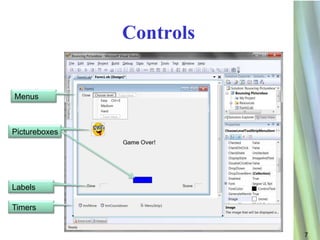
Controls


Menus


Pictureboxes


Labels

Timers


                          7
Controls
Understand and effectively use the TextBox,
ListBox, and ComboBox controls
A TextBox control provides GUI form input by
providing an area on the form where the user can
enter data while the program is executing.
A ListBox control provides GUI form input as a
list of items that the user can select by clicking.
A ComboBox control combines the functionality
of the TextBox and ListBox controls.


                                                      8
TextBox Control
The TextBox control provides an area for
the user to enter data while the program is
executing.
TextBox controls can also be used to
display output on the form.


                                              9
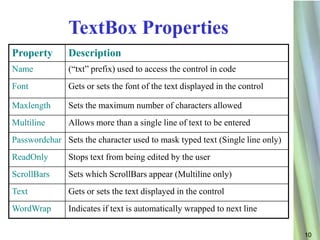
TextBox Properties
Property       Description
Name           (“txt” prefix) used to access the control in code
Font           Gets or sets the font of the text displayed in the control

Maxlength      Sets the maximum number of characters allowed
Multiline      Allows more than a single line of text to be entered
Passwordchar Sets the character used to mask typed text (Single line only)
ReadOnly       Stops text from being edited by the user
ScrollBars     Sets which ScrollBars appear (Multiline only)
Text           Gets or sets the text displayed in the control
WordWrap       Indicates if text is automatically wrapped to next line

                                                                             10
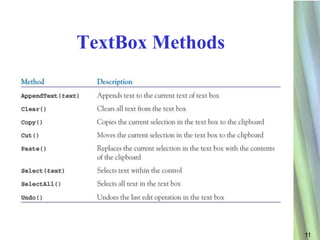
TextBox Methods


                  11
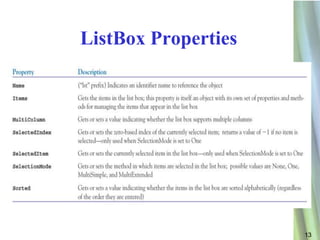
ListBox Control
The ListBox control makes a visible list of
items.
The user can select items in the list using
mouse clicks.


                                              12
ListBox Properties


                     13
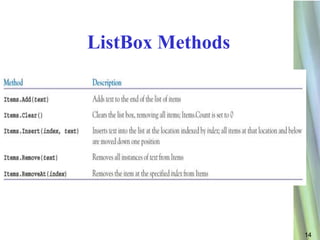
ListBox Methods


                  14
ComboBox Control
The ComboBox control combines the
functionality of the TextBox and ListBox
controls.
The user can select values from the drop-
down list or enter values directly into the
text box area.


                                              15
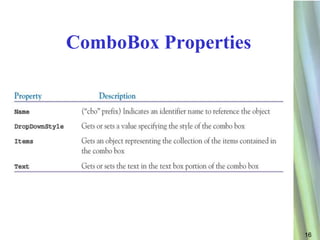
ComboBox Properties


                      16
Working with Events
Visual Basic supports event-driven
programming in which the application
recognizes and responds to events.
An event is an action or occurrence
recognized by some object and for which
you can write code to respond.
And event handler contains code that
responds to a particular event.

                                          17
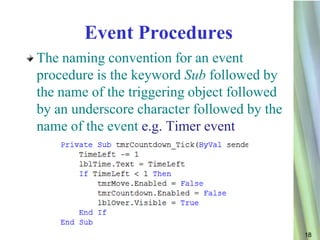
Event Procedures
The naming convention for an event
procedure is the keyword Sub followed by
the name of the triggering object followed
by an underscore character followed by the
name of the event e.g. Timer event


                                             18
Summary
Visual Basic is an object-oriented, event-driven
language.
An object is a self-contained entity that has both
properties and methods.
Most of the objects you will need are available in
VB. NET (forms & controls are objects)
An event refers to an action or change detected by
a program.
An event procedure is the method that handles or
responds to an event.
                                                     19

Controls

  • 1.
    Windows GUI Controls andEvents VB.NET 1
  • 2.
    Windows GUI Visual Basicis the most widely used tool for developing Windows applications. Windows applications utilise a GUI that provides visual cues to the user that allow the user to work intuitively and efficiently. Windows applications contain WYSIWYG “What You See Is What You Get” 2
  • 3.
    Working with Objects Anobject is anything we might use in our application for acquiring, manipulating, or presenting data or information. An object contains properties (data) and methods (actions for manipulating an object’s data). An object is defined once as a class. 3
  • 4.
    Working with Objects(cont.) The developer creates as many instances of the object as necessary for the application. The .NET class library is a large library of classes with reusable code included in the Microsoft .NET Framework. .NET uses namespaces, which are collections of related classes/  System.Windows.Form is the namespace containing classes for creating Window based applications. 4
  • 5.
    Reuse and Reliability Oneof the most powerful features of object classes is that they are reusable. The Control class contains numerous properties and methods common to all controls for developing the user interface. Objects can enhance reliability, which is the result of good design and lots of testing.  Do not reinvent the wheel 5
  • 6.
    Control Objects The Buttoncontrol is considered to be the most basic graphical control. The Label control is used to display text that cannot be edited by the user. The PictureBox control is used to display graphics. The Timer control is used to raise an event at user-defined intervals. 6
  • 7.
  • 8.
    Controls Understand and effectivelyuse the TextBox, ListBox, and ComboBox controls A TextBox control provides GUI form input by providing an area on the form where the user can enter data while the program is executing. A ListBox control provides GUI form input as a list of items that the user can select by clicking. A ComboBox control combines the functionality of the TextBox and ListBox controls. 8
  • 9.
    TextBox Control The TextBoxcontrol provides an area for the user to enter data while the program is executing. TextBox controls can also be used to display output on the form. 9
  • 10.
    TextBox Properties Property Description Name (“txt” prefix) used to access the control in code Font Gets or sets the font of the text displayed in the control Maxlength Sets the maximum number of characters allowed Multiline Allows more than a single line of text to be entered Passwordchar Sets the character used to mask typed text (Single line only) ReadOnly Stops text from being edited by the user ScrollBars Sets which ScrollBars appear (Multiline only) Text Gets or sets the text displayed in the control WordWrap Indicates if text is automatically wrapped to next line 10
  • 11.
  • 12.
    ListBox Control The ListBoxcontrol makes a visible list of items. The user can select items in the list using mouse clicks. 12
  • 13.
  • 14.
  • 15.
    ComboBox Control The ComboBoxcontrol combines the functionality of the TextBox and ListBox controls. The user can select values from the drop- down list or enter values directly into the text box area. 15
  • 16.
  • 17.
    Working with Events VisualBasic supports event-driven programming in which the application recognizes and responds to events. An event is an action or occurrence recognized by some object and for which you can write code to respond. And event handler contains code that responds to a particular event. 17
  • 18.
    Event Procedures The namingconvention for an event procedure is the keyword Sub followed by the name of the triggering object followed by an underscore character followed by the name of the event e.g. Timer event 18
  • 19.
    Summary Visual Basic isan object-oriented, event-driven language. An object is a self-contained entity that has both properties and methods. Most of the objects you will need are available in VB. NET (forms & controls are objects) An event refers to an action or change detected by a program. An event procedure is the method that handles or responds to an event. 19