Critical Path Analysis and PERT
             Charts


                               An overview of the article by
                                         Simu Mihai Stelian
                                                  An IV, CTI
       Full version http://www.mindtools.com/critpath.html
Critical Path Analysis and PERT are powerful tools that
help you to schedule and manage complex projects.
They were developed in the 1950s to control large
defense projects, and have been used routinely since
then.


These tools help monitor and improve scheduling for
complex interdependent activities such as commonly
involved in developing software. During management of
a project, they allow you to monitor achievement of
project goals. They help you to see where remedial
action needs to be taken to get a project back on course.
The benefit of using CPA within the planning process is
to help you develop and test your plan to ensure that it is
robust. Critical Path Analysis formally identifies tasks
which must be completed on time for the whole project to
be completed on time. It also identifies which tasks can be
delayed if resource needs to be reallocated to catch up on
missed or overrunning tasks.

       The disadvantage of CPA, if you use it as the
technique by which your project plans are
communicated and managed against, is that the
relation of tasks to time is not as immediately obvious
as with Gantt Charts. This can make them more difficult
to understand.
How to use the tool :
       As with Gantt Charts, the essential concept behind
Critical Path Analysis is that you cannot start some
activities until others are finished. These activities need
to be completed in a sequence, with each stage being
more-or-less completed before the next stage can begin.
These are 'sequential' activities.
       Other activities are not dependent on completion
of any other tasks. You can do these at any time before
or after a particular stage is reached. These are non-
dependent or 'parallel' tasks.
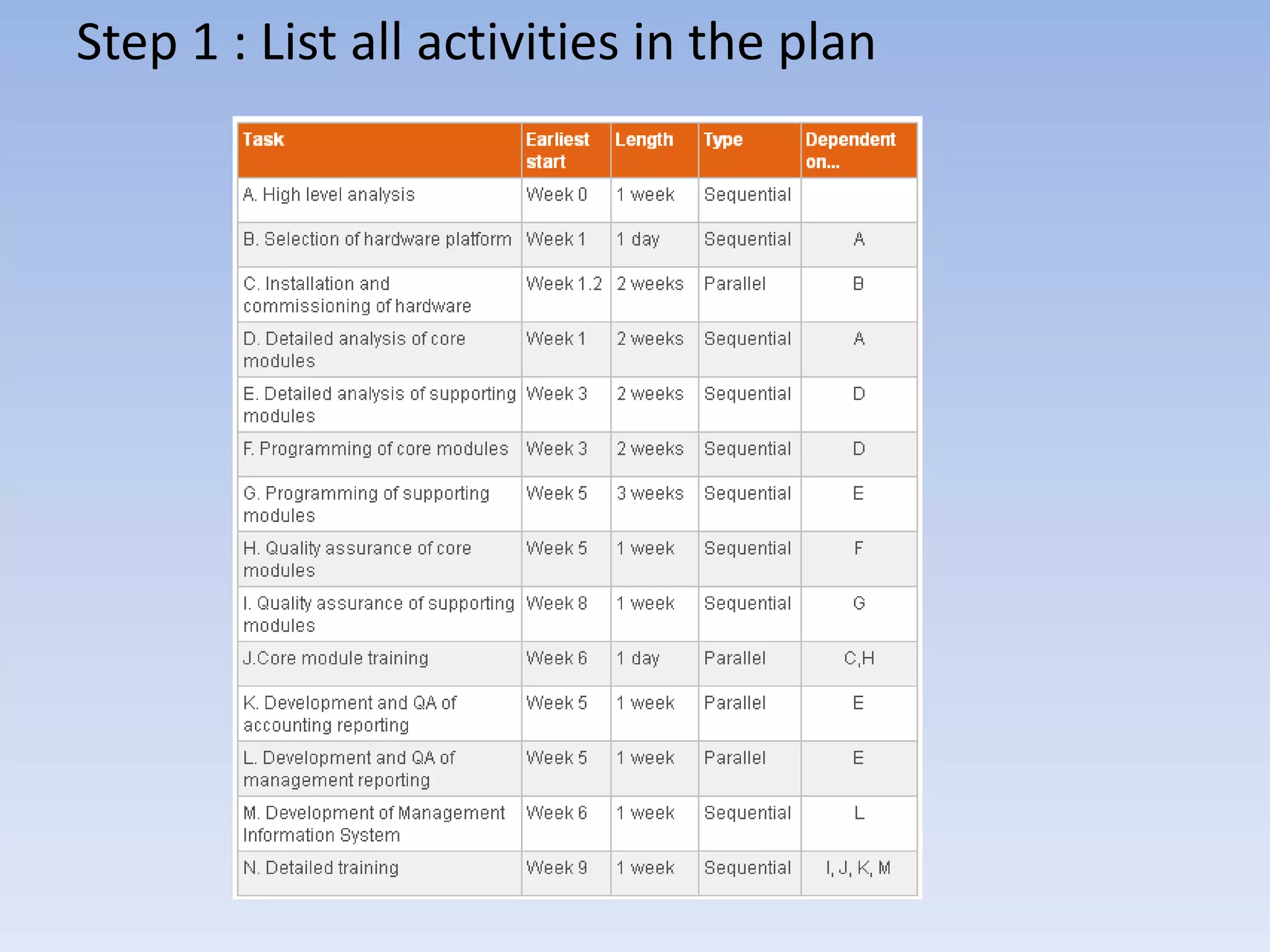
Step 1 : List all activities in the plan
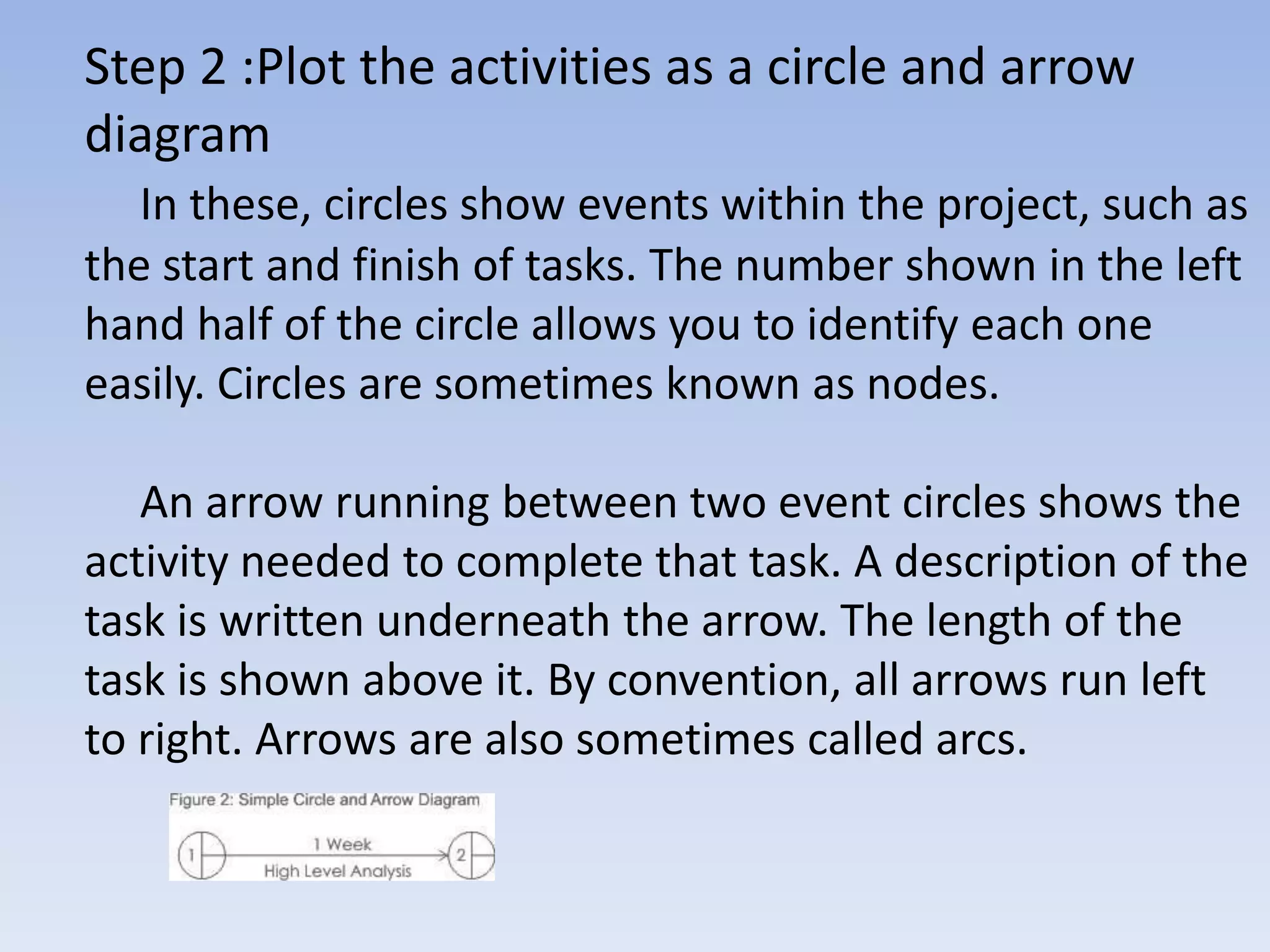
Step 2 :Plot the activities as a circle and arrow
diagram
   In these, circles show events within the project, such as
the start and finish of tasks. The number shown in the left
hand half of the circle allows you to identify each one
easily. Circles are sometimes known as nodes.

   An arrow running between two event circles shows the
activity needed to complete that task. A description of the
task is written underneath the arrow. The length of the
task is shown above it. By convention, all arrows run left
to right. Arrows are also sometimes called arcs.
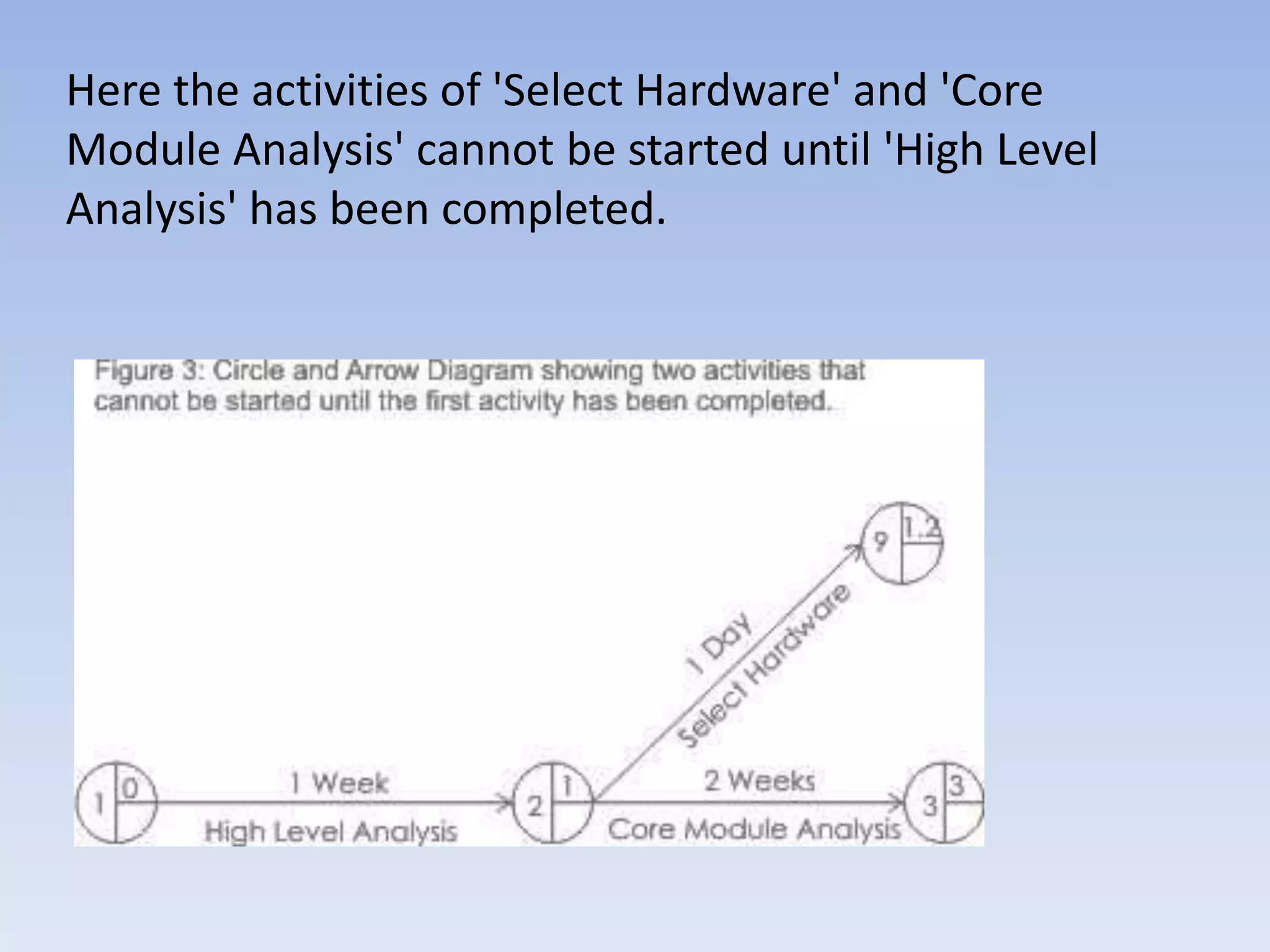
Here the activities of 'Select Hardware' and 'Core
Module Analysis' cannot be started until 'High Level
Analysis' has been completed.
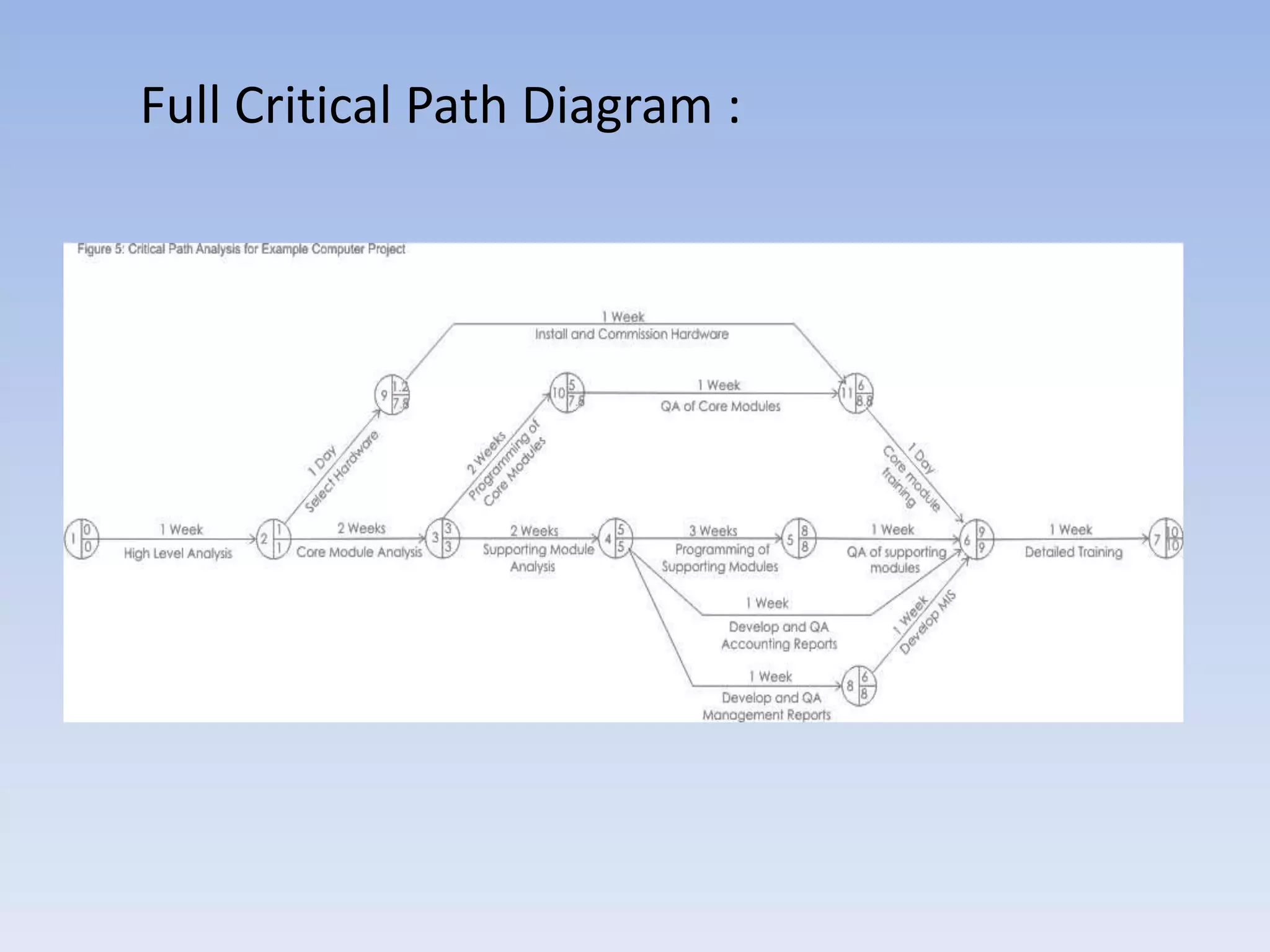
Full Critical Path Diagram :
Each event circle also has a figure in the bottom,
right hand quadrant. This shows the latest finish time
that's permissible for the preceding activity if the
project is to be completed in the minimum time
possible. You can calculate this by starting at the last
event and working backwards. The latest finish time of
the preceding event and the earliest start time of the
following even will be the same for circles on the
critical path.
        The activities on the Critical Path must be very
closely managed to ensure that activities are
completed on time. If jobs on the critical path slip,
immediate action should be taken to get the project
back on schedule. Otherwise completion of the whole
project will slip.
Crash Action :
       You may find that you need to complete a project
earlier than your Critical Path Analysis says is possible. In
this case you need to re-plan your project.

        You have a number of options and would need to
assess the impact of each on the project’s cost, quality
and time required to complete it. For example, you could
increase resource available for each project activity to
bring down time spent on each but the impact of some
of this would be insignificant and a more efficient way of
doing this would be to look only at activities on the
critical path.
PERT (Program Evaluation and Review Technique)
       PERT is a variation on Critical Path Analysis that takes a
slightly more skeptical view of time estimates made for each
project stage. To use it, estimate the shortest possible time
each activity will take, the most likely length of time, and the
longest time that might be taken if the activity takes longer
than expected.
       Use the formula below to calculate the time to use for
each project stage:

shortest time + 4 x likely time + longest time
-----------------------------------------------------------
                         6
Key Points : CPA is a powerful tool for assessing
tasks, their parallelization, upper bound of shortest
time, resources and priority of activities within a
project.

       An effective Critical Path Analysis can make the
difference between success and failure on complex
projects. It can be very useful for assessing the
importance of problems faced during the
implementation of the plan.
       PERT is a variant of Critical Path Analysis that
takes a more skeptical view of the time needed to
complete each project stage.

Critical Path Analysis

  • 1.
    Critical Path Analysisand PERT Charts An overview of the article by Simu Mihai Stelian An IV, CTI Full version http://www.mindtools.com/critpath.html
  • 2.
    Critical Path Analysisand PERT are powerful tools that help you to schedule and manage complex projects. They were developed in the 1950s to control large defense projects, and have been used routinely since then. These tools help monitor and improve scheduling for complex interdependent activities such as commonly involved in developing software. During management of a project, they allow you to monitor achievement of project goals. They help you to see where remedial action needs to be taken to get a project back on course.
  • 3.
    The benefit ofusing CPA within the planning process is to help you develop and test your plan to ensure that it is robust. Critical Path Analysis formally identifies tasks which must be completed on time for the whole project to be completed on time. It also identifies which tasks can be delayed if resource needs to be reallocated to catch up on missed or overrunning tasks. The disadvantage of CPA, if you use it as the technique by which your project plans are communicated and managed against, is that the relation of tasks to time is not as immediately obvious as with Gantt Charts. This can make them more difficult to understand.
  • 4.
    How to usethe tool : As with Gantt Charts, the essential concept behind Critical Path Analysis is that you cannot start some activities until others are finished. These activities need to be completed in a sequence, with each stage being more-or-less completed before the next stage can begin. These are 'sequential' activities. Other activities are not dependent on completion of any other tasks. You can do these at any time before or after a particular stage is reached. These are non- dependent or 'parallel' tasks.
  • 5.
    Step 1 :List all activities in the plan
  • 6.
    Step 2 :Plotthe activities as a circle and arrow diagram In these, circles show events within the project, such as the start and finish of tasks. The number shown in the left hand half of the circle allows you to identify each one easily. Circles are sometimes known as nodes. An arrow running between two event circles shows the activity needed to complete that task. A description of the task is written underneath the arrow. The length of the task is shown above it. By convention, all arrows run left to right. Arrows are also sometimes called arcs.
  • 7.
    Here the activitiesof 'Select Hardware' and 'Core Module Analysis' cannot be started until 'High Level Analysis' has been completed.
  • 8.
  • 9.
    Each event circlealso has a figure in the bottom, right hand quadrant. This shows the latest finish time that's permissible for the preceding activity if the project is to be completed in the minimum time possible. You can calculate this by starting at the last event and working backwards. The latest finish time of the preceding event and the earliest start time of the following even will be the same for circles on the critical path. The activities on the Critical Path must be very closely managed to ensure that activities are completed on time. If jobs on the critical path slip, immediate action should be taken to get the project back on schedule. Otherwise completion of the whole project will slip.
  • 10.
    Crash Action : You may find that you need to complete a project earlier than your Critical Path Analysis says is possible. In this case you need to re-plan your project. You have a number of options and would need to assess the impact of each on the project’s cost, quality and time required to complete it. For example, you could increase resource available for each project activity to bring down time spent on each but the impact of some of this would be insignificant and a more efficient way of doing this would be to look only at activities on the critical path.
  • 11.
    PERT (Program Evaluationand Review Technique) PERT is a variation on Critical Path Analysis that takes a slightly more skeptical view of time estimates made for each project stage. To use it, estimate the shortest possible time each activity will take, the most likely length of time, and the longest time that might be taken if the activity takes longer than expected. Use the formula below to calculate the time to use for each project stage: shortest time + 4 x likely time + longest time ----------------------------------------------------------- 6
  • 12.
    Key Points :CPA is a powerful tool for assessing tasks, their parallelization, upper bound of shortest time, resources and priority of activities within a project. An effective Critical Path Analysis can make the difference between success and failure on complex projects. It can be very useful for assessing the importance of problems faced during the implementation of the plan. PERT is a variant of Critical Path Analysis that takes a more skeptical view of the time needed to complete each project stage.