Computer MemoryComputer Memory
ByBy
Dr. Pravin H. GhosekarDr. Pravin H. Ghosekar
M.Sc.(C/S), MCM, DBM, M.Phil(IT), M.Phil(Comm), MBA, BJ. Ph.D.M.Sc.(C/S), MCM, DBM, M.Phil(IT), M.Phil(Comm), MBA, BJ. Ph.D.
HOD Computer DepartmentHOD Computer Department
Dhanwate National CollegeDhanwate National College
NagpurNagpur
08/10/201008/10/2010
Memory
• Primary Memory
• Secondary Memory
•Computer Memory are used to store data,
program or instructions temporarily as well
as permanently.
•There are two types of memory :
Primary Memory
The Primary or main memory is the
memory that microcomputer uses in
executing and storing programs.
1. RAM
2.ROM
RAM (Random Access Memory)
• RAM is used to store all active programs and
data; so that they are readily available and
easily accessed by the CPU and other
components of the CPU.
• Volatile
• R/W Memory
• Made with Semiconductor material like
Silicon
Types of RAM
1.Static RAM : stores binary information using
clocked sequential circuits. It is made up of
flip flops and it stores a bit as a voltage
2.Dynamic RAM : stores binary information in
the form of electric charges that are applied
to capacitors inside the chip. It is made up of
MOS transistor gates, and it stores a bit as
charge
3.iRAM (Integrated) : iRAM integrates a
dynamic RAM and its control and refresh
circuitry into a single IC
ROM (Read Only Memory)
• It is used for permanent storage. The contents
of a ROM is decided by the manufacturer. The
ROM contains some start-up instructions.
• Non-Volatile
• Read Only Memory
• Made with Semiconductor material like Silicon
Type of ROM
• PROM
• EPROM
• EEPROM
• Masked ROM
Cache Memory
• Cache memory is placed between the CPU and
the main memory.
• It is much faster than main memory.
• Its access time is much less as compared to the
main memory.
• It is not accessible to programmers.
• It stores instructions which are going to be
executed immediately.
• It is very expensive so cache memories are
used only in small quantities
Secondary Memory
• It is used primarily to store large volume of
data on permanent basis that can be partially
transferred to primary storage, whenever
required for processing.
1.Floppy Disk
2.Hard Disk
3.Magnetic Tape
4.Zip Disk
5.Optical Disk
6.Static Storage
Floppy Disk
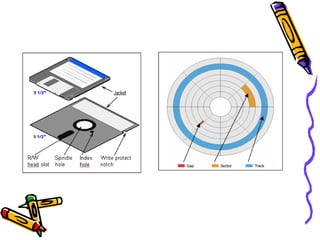
• Floppy disk is a magnetic Disk invented by IBM in 1970.
• It is made up of Mylar plastic coated with a magnetic
material known as iron oxide .
• It is enclosed inside the square shaped plastic jacket
(shell).
• The disk is rotated at constant speed of 360 rpm.
• concentric circles known as ‘tracks’. Each track is further
divided into number of sectors.
• 3.5” : Developed in 1982 which can store 1.44MB data.
• 5.25” : Developed in 1976 which can store 1.22MB data
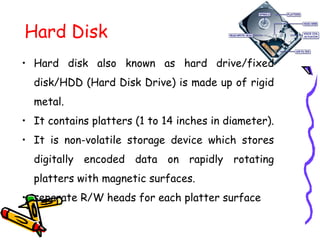
Hard Disk
• Hard disk also known as hard drive/fixed
disk/HDD (Hard Disk Drive) is made up of rigid
metal.
• It contains platters (1 to 14 inches in diameter).
• It is non-volatile storage device which stores
digitally encoded data on rapidly rotating
platters with magnetic surfaces.
• separate R/W heads for each platter surface
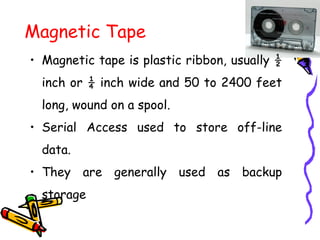
Magnetic Tape
• Magnetic tape is plastic ribbon, usually ½
inch or ¼ inch wide and 50 to 2400 feet
long, wound on a spool.
• Serial Access used to store off-line
data.
• They are generally used as backup
storage
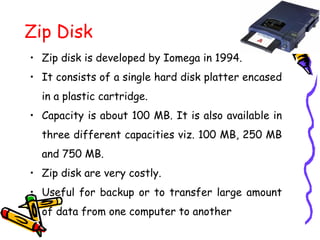
Zip Disk
• Zip disk is developed by Iomega in 1994.
• It consists of a single hard disk platter encased
in a plastic cartridge.
• Capacity is about 100 MB. It is also available in
three different capacities viz. 100 MB, 250 MB
and 750 MB.
• Zip disk are very costly.
• Useful for backup or to transfer large amount
of data from one computer to another
Optical Memories
• Optical memories are relatively new
secondary storage medium.
• These are random access, high
speed and high capacity storage
device.
• It uses laser beams i.e. highly
concentrated beams of light.
1.CD (Compact Disk)
2.DVD (Digital Versatile Disk)
CD (Compact Disk)
• CD is a direct extension of audio CD.
• CD is developed by Sony & Philips to store
music.
• It is made from a resin named polycarbonate
that is coated with aluminum to form a highly
reflective surface.
• The information on CD is stored as a series of
microscopic pits on the reflective surface.
• The process of recording information on this
disk is known as ‘mastering’.
• Size is 5.25” can store 650MB or 700MB
CD (Compact Disk)
• CD-ROM : It stands for Compact Disk Read Only
Memory. It is read only; we cannot change the
content of CD.
• WORM (or CD-R): It stands for Write Once Read
Many memory. It allows users to write data only
once and can be read many times.
• CD R/W (or Erasable Optical Disk) : It stands for
Compact Disk Read/Write. The data can be
written and changed repeatedly as we want.
Speed of CD is measured as per data transfer speed
1x = 1.1719 MB
DVD (Digital Versatile Disk)
• DVD is a standard format used to store and
distribution digital content for both computer and
consumer electronic products.
• This format is designed to store various sizes of large
multimedia data
• It stores data similar to CD having pits 4 ½ times
dense on DVD as compared to CD and can store 7
times more data on each side.
• Diameter = 5.25”. Currently available DVD can store
4.7 GB (135 minute video) data on Single Layer Disk
and 8.5GB on double layer disk.
• DVDs are 9 times than CD.
DVD-ROM, DVD-R, DVD R/W
Other Optical Memories
• Optical Card : This is laser card of the size of
a credit card and has an optical laser encoded
strip that can store approximately 2 megabytes
of data.
• Optical Tape : It is similar to magnetic tape,
but data are stored by optical laser techniques.
Optical tapes which are in cassette form can
store over 8GB
Static Storage Devices
 PEN Drive/Flash Drive : It is a compact device having
pen shaped design and comes with different features
(such as built in camera or MP3/FM3/WMA i.e. Windows
Media Audio).
 Used for transport of data from one computer to
another
 It is a plug-and-play device can be plugs into a USB
(Universal Serial Bus) port of a computer.
 It is R/W
 It does not require any battery, cable or software and is
compatible with the most of the PC, desktop & laptop
with USB 1.0 or USB 2.0 port. (Downstream and
Upstream)
 It consists of a small printed circuit board typically in a
plastic or metal casing.
 It uses EEPROM technology for R/W or erase.
 Durable
Flash Memory Card
• It uses similar technology as Pen Drive
• Flash memory cards are non-volatile computer
memory that can be electrically erased and
reprogrammed using the EEPROM.
• Flash memory cards are available wit h
different variations that are Secure Digital
(SD) and Multimedia Card (MMC), Memory
Stick, Compact Flash, Smart Media, xD.
• Flash cards are extremely durable. It can
capable of work in extremes temperature,
intense pressure and even immersion in water.
Mass Storage Devices
• RAID : Redundant Array of Inexpensive Disks
• Tape Libraries : It consist of a set of
magnetic tapes with a controller mounted in a
single unit.
ThanksThanks

Computer Memory

  • 1.
    Computer MemoryComputer Memory ByBy Dr.Pravin H. GhosekarDr. Pravin H. Ghosekar M.Sc.(C/S), MCM, DBM, M.Phil(IT), M.Phil(Comm), MBA, BJ. Ph.D.M.Sc.(C/S), MCM, DBM, M.Phil(IT), M.Phil(Comm), MBA, BJ. Ph.D. HOD Computer DepartmentHOD Computer Department Dhanwate National CollegeDhanwate National College NagpurNagpur 08/10/201008/10/2010
  • 2.
    Memory • Primary Memory •Secondary Memory •Computer Memory are used to store data, program or instructions temporarily as well as permanently. •There are two types of memory :
  • 3.
    Primary Memory The Primaryor main memory is the memory that microcomputer uses in executing and storing programs. 1. RAM 2.ROM
  • 4.
    RAM (Random AccessMemory) • RAM is used to store all active programs and data; so that they are readily available and easily accessed by the CPU and other components of the CPU. • Volatile • R/W Memory • Made with Semiconductor material like Silicon
  • 5.
    Types of RAM 1.StaticRAM : stores binary information using clocked sequential circuits. It is made up of flip flops and it stores a bit as a voltage 2.Dynamic RAM : stores binary information in the form of electric charges that are applied to capacitors inside the chip. It is made up of MOS transistor gates, and it stores a bit as charge 3.iRAM (Integrated) : iRAM integrates a dynamic RAM and its control and refresh circuitry into a single IC
  • 6.
    ROM (Read OnlyMemory) • It is used for permanent storage. The contents of a ROM is decided by the manufacturer. The ROM contains some start-up instructions. • Non-Volatile • Read Only Memory • Made with Semiconductor material like Silicon
  • 7.
    Type of ROM •PROM • EPROM • EEPROM • Masked ROM
  • 8.
    Cache Memory • Cachememory is placed between the CPU and the main memory. • It is much faster than main memory. • Its access time is much less as compared to the main memory. • It is not accessible to programmers. • It stores instructions which are going to be executed immediately. • It is very expensive so cache memories are used only in small quantities
  • 9.
    Secondary Memory • Itis used primarily to store large volume of data on permanent basis that can be partially transferred to primary storage, whenever required for processing. 1.Floppy Disk 2.Hard Disk 3.Magnetic Tape 4.Zip Disk 5.Optical Disk 6.Static Storage
  • 10.
    Floppy Disk • Floppydisk is a magnetic Disk invented by IBM in 1970. • It is made up of Mylar plastic coated with a magnetic material known as iron oxide . • It is enclosed inside the square shaped plastic jacket (shell). • The disk is rotated at constant speed of 360 rpm. • concentric circles known as ‘tracks’. Each track is further divided into number of sectors. • 3.5” : Developed in 1982 which can store 1.44MB data. • 5.25” : Developed in 1976 which can store 1.22MB data
  • 12.
    Hard Disk • Harddisk also known as hard drive/fixed disk/HDD (Hard Disk Drive) is made up of rigid metal. • It contains platters (1 to 14 inches in diameter). • It is non-volatile storage device which stores digitally encoded data on rapidly rotating platters with magnetic surfaces. • separate R/W heads for each platter surface
  • 13.
    Magnetic Tape • Magnetictape is plastic ribbon, usually ½ inch or ¼ inch wide and 50 to 2400 feet long, wound on a spool. • Serial Access used to store off-line data. • They are generally used as backup storage
  • 14.
    Zip Disk • Zipdisk is developed by Iomega in 1994. • It consists of a single hard disk platter encased in a plastic cartridge. • Capacity is about 100 MB. It is also available in three different capacities viz. 100 MB, 250 MB and 750 MB. • Zip disk are very costly. • Useful for backup or to transfer large amount of data from one computer to another
  • 15.
    Optical Memories • Opticalmemories are relatively new secondary storage medium. • These are random access, high speed and high capacity storage device. • It uses laser beams i.e. highly concentrated beams of light. 1.CD (Compact Disk) 2.DVD (Digital Versatile Disk)
  • 16.
    CD (Compact Disk) •CD is a direct extension of audio CD. • CD is developed by Sony & Philips to store music. • It is made from a resin named polycarbonate that is coated with aluminum to form a highly reflective surface. • The information on CD is stored as a series of microscopic pits on the reflective surface. • The process of recording information on this disk is known as ‘mastering’. • Size is 5.25” can store 650MB or 700MB
  • 17.
    CD (Compact Disk) •CD-ROM : It stands for Compact Disk Read Only Memory. It is read only; we cannot change the content of CD. • WORM (or CD-R): It stands for Write Once Read Many memory. It allows users to write data only once and can be read many times. • CD R/W (or Erasable Optical Disk) : It stands for Compact Disk Read/Write. The data can be written and changed repeatedly as we want. Speed of CD is measured as per data transfer speed 1x = 1.1719 MB
  • 18.
    DVD (Digital VersatileDisk) • DVD is a standard format used to store and distribution digital content for both computer and consumer electronic products. • This format is designed to store various sizes of large multimedia data • It stores data similar to CD having pits 4 ½ times dense on DVD as compared to CD and can store 7 times more data on each side. • Diameter = 5.25”. Currently available DVD can store 4.7 GB (135 minute video) data on Single Layer Disk and 8.5GB on double layer disk. • DVDs are 9 times than CD. DVD-ROM, DVD-R, DVD R/W
  • 19.
    Other Optical Memories •Optical Card : This is laser card of the size of a credit card and has an optical laser encoded strip that can store approximately 2 megabytes of data. • Optical Tape : It is similar to magnetic tape, but data are stored by optical laser techniques. Optical tapes which are in cassette form can store over 8GB
  • 20.
    Static Storage Devices PEN Drive/Flash Drive : It is a compact device having pen shaped design and comes with different features (such as built in camera or MP3/FM3/WMA i.e. Windows Media Audio).  Used for transport of data from one computer to another  It is a plug-and-play device can be plugs into a USB (Universal Serial Bus) port of a computer.  It is R/W  It does not require any battery, cable or software and is compatible with the most of the PC, desktop & laptop with USB 1.0 or USB 2.0 port. (Downstream and Upstream)  It consists of a small printed circuit board typically in a plastic or metal casing.  It uses EEPROM technology for R/W or erase.  Durable
  • 21.
    Flash Memory Card •It uses similar technology as Pen Drive • Flash memory cards are non-volatile computer memory that can be electrically erased and reprogrammed using the EEPROM. • Flash memory cards are available wit h different variations that are Secure Digital (SD) and Multimedia Card (MMC), Memory Stick, Compact Flash, Smart Media, xD. • Flash cards are extremely durable. It can capable of work in extremes temperature, intense pressure and even immersion in water.
  • 22.
    Mass Storage Devices •RAID : Redundant Array of Inexpensive Disks • Tape Libraries : It consist of a set of magnetic tapes with a controller mounted in a single unit.
  • 23.