COMPUTER MEMORY
BACK GROUND
WHAT IS A MEMORY?
WHY DOES A
COMPUTER NEED
MEMORY?
RTI, Jaipur 2
PREVIEW
INTRODUCTION
NEED
AIM
BASICS
TYPES
HOW THEY WORK
QUIZ
CONCLUSION
AIM
TO GIVE AN OVERVIEW ON
COMPUTER MEMORY
RTI, Jaipur 4
BASICS
Standardize the diverse
accounting policies
Add the reliability to the financial
statement
Eradicate baffling variation in
treatment of accounting aspects
Facilitate inter-firm and intra-firm
comparison RTI, Jaipur 5
BASICS
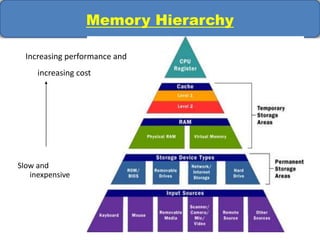
Memory Hierarchy
Slow and
inexpensive
Increasing performance and
increasing cost
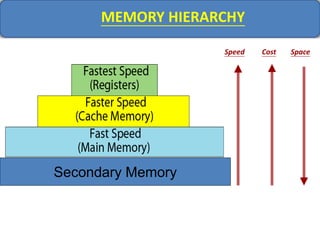
MEMORY HIERARCHY
Speed SpaceCost
Secondary Memory
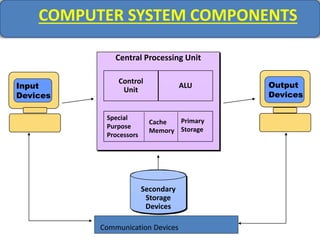
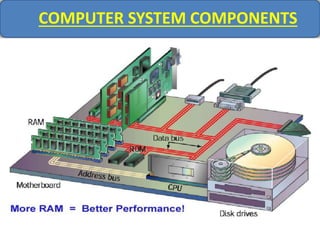
COMPUTER SYSTEM COMPONENTS
Central Processing Unit
Output
Devices
Cache
Memory
Primary
Storage
Secondary
Storage
Devices
Control
Unit
ALU
Special
Purpose
Processors
Output
Devices
Input
Devices
Communication Devices
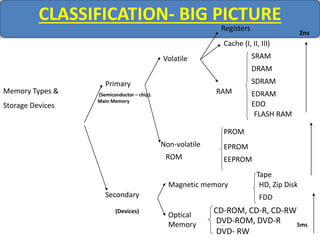
CLASSIFICATION- BIG PICTURE
Memory Types &
Storage Devices
Primary
Secondary
Volatile
Registers
Cache (I, II, III)
RAM
SRAM
DRAM
SDRAM
EDRAM
EDO
FLASH RAM
Non-volatile
ROM
PROM
EPROM
EEPROM
Magnetic memory
Tape
HD, Zip Disk
FDD
Optical
Memory
CD-ROM, CD-R, CD-RW
DVD-ROM, DVD-R
DVD- RW
(Semiconductor – chip).
Main Memory
(Devices)
2ns
5ms
REGISTERS
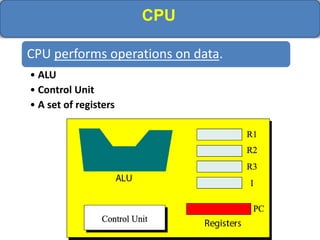
CPU
CPU performs operations on data.
• ALU
• Control Unit
• A set of registers
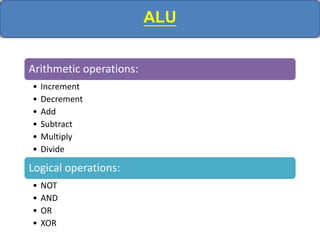
ALU
Arithmetic operations:
• Increment
• Decrement
• Add
• Subtract
• Multiply
• Divide
Logical operations:
• NOT
• AND
• OR
• XOR
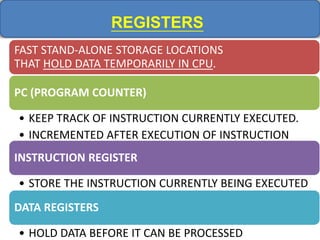
REGISTERS
FAST STAND-ALONE STORAGE LOCATIONS
THAT HOLD DATA TEMPORARILY IN CPU.
PC (PROGRAM COUNTER)
• KEEP TRACK OF INSTRUCTION CURRENTLY EXECUTED.
• INCREMENTED AFTER EXECUTION OF INSTRUCTION
INSTRUCTION REGISTER
• STORE THE INSTRUCTION CURRENTLY BEING EXECUTED
DATA REGISTERS
• HOLD DATA BEFORE IT CAN BE PROCESSED
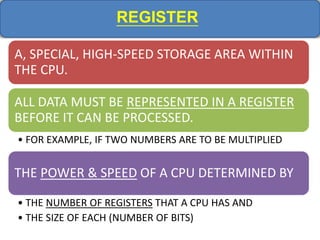
REGISTER
A, SPECIAL, HIGH-SPEED STORAGE AREA WITHIN
THE CPU.
ALL DATA MUST BE REPRESENTED IN A REGISTER
BEFORE IT CAN BE PROCESSED.
• FOR EXAMPLE, IF TWO NUMBERS ARE TO BE MULTIPLIED
THE POWER & SPEED OF A CPU DETERMINED BY
• THE NUMBER OF REGISTERS THAT A CPU HAS AND
• THE SIZE OF EACH (NUMBER OF BITS)
CACHE MEMORY
CACHE MEMORY
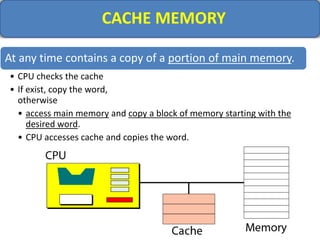
At any time contains a copy of a portion of main memory.
• CPU checks the cache
• If exist, copy the word,
otherwise
• access main memory and copy a block of memory starting with the
desired word.
• CPU accesses cache and copies the word.
CACHE MEMORY
It is very probable that the CPU, in next cycle, needs
to access the words following the first word.
The existence of the cache speeds processing.
80-20 rule
Most computers typically spend 80% of the time
accessing only 20% of the data.
Same data are accessed over and over again.
MAIN MEMORY
MAIN MEMORY
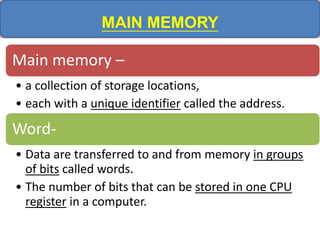
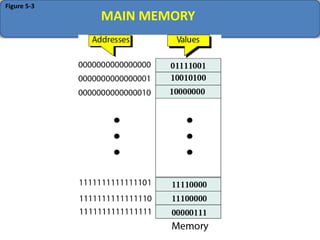
Main memory –
• a collection of storage locations,
• each with a unique identifier called the address.
Word-
• Data are transferred to and from memory in groups
of bits called words.
• The number of bits that can be stored in one CPU
register in a computer.
Address as Bit Pattern
BECAUSE COMPUTERS OPERATE BY
STORING NUMBERS AS BIT PATTERNS, THE
ADDRESS ITSELF IS ALSO REPRESENTED AS A
BIT PATTERN.
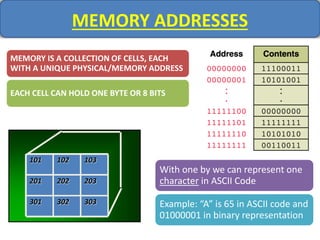
MEMORY ADDRESSES
MEMORY IS A COLLECTION OF CELLS, EACH
WITH A UNIQUE PHYSICAL/MEMORY ADDRESS
EACH CELL CAN HOLD ONE BYTE OR 8 BITS
101 102 103
201
301
202 203
302 303
With one by we can represent one
character in ASCII Code
Example: “A” is 65 in ASCII code and
01000001 in binary representation
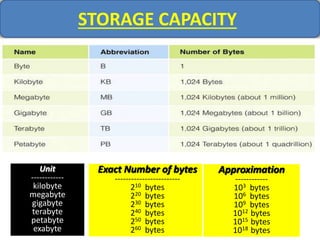
STORAGE CAPACITY
Unit
------------
kilobyte
megabyte
gigabyte
terabyte
petabyte
exabyte
Exact Number of bytes
------------------------
210 bytes
220 bytes
230 bytes
240 bytes
250 bytes
260 bytes
Approximation
------------
103 bytes
106 bytes
109 bytes
1012 bytes
1015 bytes
1018 bytes
Figure 5-3
MAIN MEMORY
ADDRESS SPACE
• Although programmers use a name to identify a word,
at the hardware level, each word is identified by an
address.
• Address space -
– The total number of uniquely identifiable locations in memory.
– For example:
a memory with 64KB and a word size of 1 byte has an
address space that range from 0 to 65535.
RAM
MEMORY TYPES - RAM
Volatile
R/W by user
Two categories:
• DRAM(Dynamic RAM)
• Refresh
• used in most PCs
• SRAM(Static RAM)
• No refresh
• Faster more reliable
• more expensive
• often used only as a memory cache
MEMORY TYPES- RAM
COMPUTER SYSTEM COMPONENTS
ROM
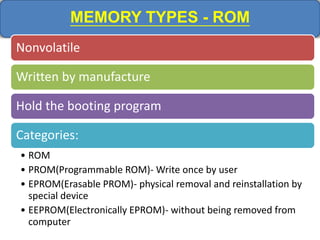
MEMORY TYPES - ROM
Nonvolatile
Written by manufacture
Hold the booting program
Categories:
• ROM
• PROM(Programmable ROM)- Write once by user
• EPROM(Erasable PROM)- physical removal and reinstallation by
special device
• EEPROM(Electronically EPROM)- without being removed from
computer
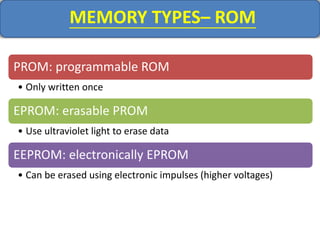
MEMORY TYPES– ROM
PROM: programmable ROM
• Only written once
EPROM: erasable PROM
• Use ultraviolet light to erase data
EEPROM: electronically EPROM
• Can be erased using electronic impulses (higher voltages)
SECONDARY MEMORY
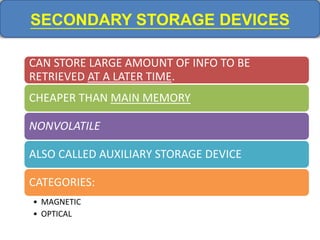
SECONDARY STORAGE DEVICES
CAN STORE LARGE AMOUNT OF INFO TO BE
RETRIEVED AT A LATER TIME.
CHEAPER THAN MAIN MEMORY
NONVOLATILE
ALSO CALLED AUXILIARY STORAGE DEVICE
CATEGORIES:
• MAGNETIC
• OPTICAL
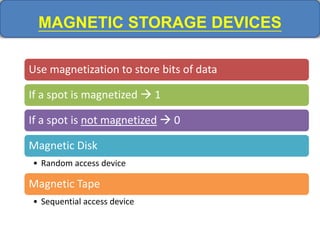
MAGNETIC STORAGE DEVICES
Use magnetization to store bits of data
If a spot is magnetized  1
If a spot is not magnetized  0
Magnetic Disk
• Random access device
Magnetic Tape
• Sequential access device
MAGNETIC STORAGE
MAGNETIC STORAGE DEVICES
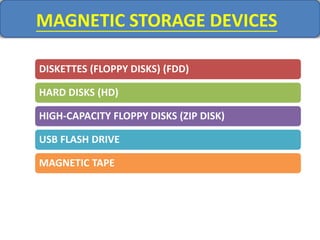
DISKETTES (FLOPPY DISKS) (FDD)
HARD DISKS (HD)
HIGH-CAPACITY FLOPPY DISKS (ZIP DISK)
USB FLASH DRIVE
MAGNETIC TAPE
MAGNETIC STORAGE DEVICES
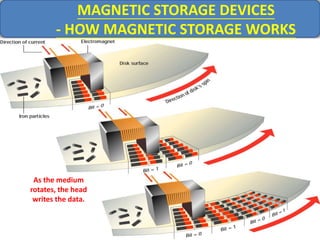
- HOW MAGNETIC STORAGE WORKS
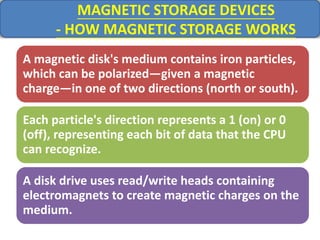
A magnetic disk's medium contains iron particles,
which can be polarized—given a magnetic
charge—in one of two directions (north or south).
Each particle's direction represents a 1 (on) or 0
(off), representing each bit of data that the CPU
can recognize.
A disk drive uses read/write heads containing
electromagnets to create magnetic charges on the
medium.
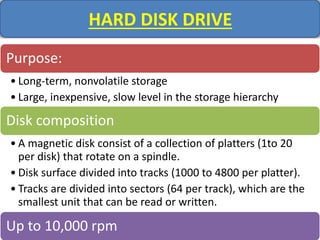
HARD DISK DRIVE
Purpose:
• Long-term, nonvolatile storage
• Large, inexpensive, slow level in the storage hierarchy
Disk composition
• A magnetic disk consist of a collection of platters (1to 20
per disk) that rotate on a spindle.
• Disk surface divided into tracks (1000 to 4800 per platter).
• Tracks are divided into sectors (64 per track), which are the
smallest unit that can be read or written.
Up to 10,000 rpm
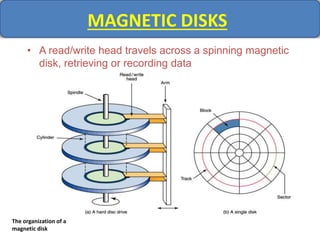
MAGNETIC DISKS
• A read/write head travels across a spinning magnetic
disk, retrieving or recording data
The organization of a
magnetic disk
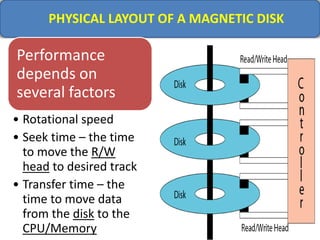
PHYSICAL LAYOUT OF A MAGNETIC DISK
Performance
depends on
several factors
• Rotational speed
• Seek time – the time
to move the R/W
head to desired track
• Transfer time – the
time to move data
from the disk to the
CPU/Memory
As the medium
rotates, the head
writes the data.
MAGNETIC STORAGE DEVICES
- HOW MAGNETIC STORAGE WORKS
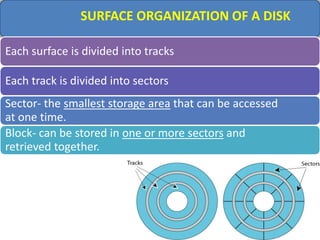
SURFACE ORGANIZATION OF A DISK
Each surface is divided into tracks
Each track is divided into sectors
Sector- the smallest storage area that can be accessed
at one time.
Block- can be stored in one or more sectors and
retrieved together.
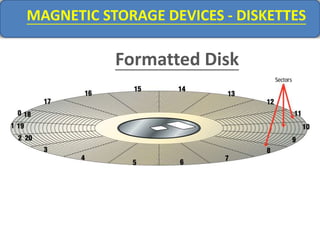
Formatted Disk
MAGNETIC STORAGE DEVICES - DISKETTES
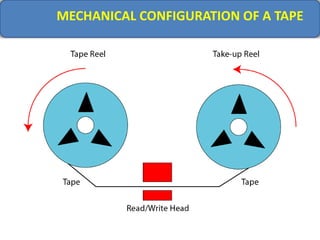
MECHANICAL CONFIGURATION OF A TAPE
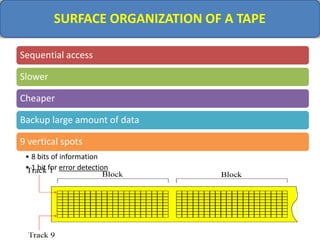
SURFACE ORGANIZATION OF A TAPE
Sequential access
Slower
Cheaper
Backup large amount of data
9 vertical spots
• 8 bits of information
• 1 bit for error detection
OPTICAL STORAGE
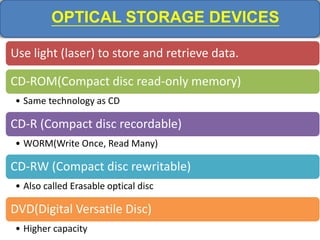
OPTICAL STORAGE DEVICES
Use light (laser) to store and retrieve data.
CD-ROM(Compact disc read-only memory)
• Same technology as CD
CD-R (Compact disc recordable)
• WORM(Write Once, Read Many)
CD-RW (Compact disc rewritable)
• Also called Erasable optical disc
DVD(Digital Versatile Disc)
• Higher capacity
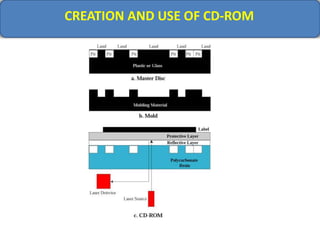
CREATION AND USE OF CD-ROM
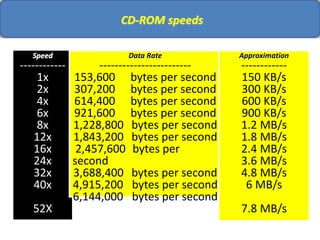
CD-ROM speeds
Speed
------------
1x
2x
4x
6x
8x
12x
16x
24x
32x
40x
52X
Data Rate
------------------------
153,600 bytes per second
307,200 bytes per second
614,400 bytes per second
921,600 bytes per second
1,228,800 bytes per second
1,843,200 bytes per second
2,457,600 bytes per
second
3,688,400 bytes per second
4,915,200 bytes per second
6,144,000 bytes per second
Approximation
------------
150 KB/s
300 KB/s
600 KB/s
900 KB/s
1.2 MB/s
1.8 MB/s
2.4 MB/s
3.6 MB/s
4.8 MB/s
6 MB/s
7.8 MB/s
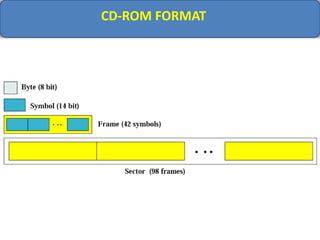
CD-ROM FORMAT
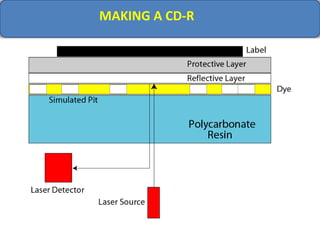
MAKING A CD-R
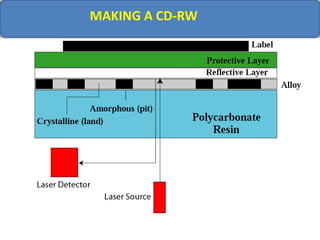
MAKING A CD-RW
OPTICAL STORAGE DEVICES
HOW OPTICAL STORAGE WORKS
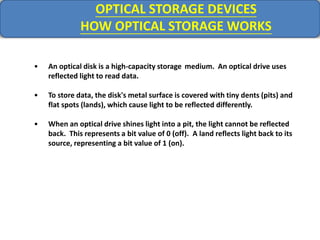
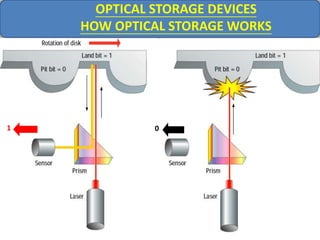
• An optical disk is a high-capacity storage medium. An optical drive uses
reflected light to read data.
• To store data, the disk's metal surface is covered with tiny dents (pits) and
flat spots (lands), which cause light to be reflected differently.
• When an optical drive shines light into a pit, the light cannot be reflected
back. This represents a bit value of 0 (off). A land reflects light back to its
source, representing a bit value of 1 (on).
1 0
OPTICAL STORAGE DEVICES
HOW OPTICAL STORAGE WORKS
OPTICAL STORAGE DEVICES
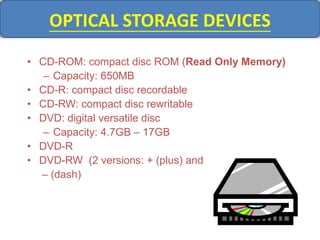
• CD-ROM: compact disc ROM (Read Only Memory)
– Capacity: 650MB
• CD-R: compact disc recordable
• CD-RW: compact disc rewritable
• DVD: digital versatile disc
– Capacity: 4.7GB – 17GB
• DVD-R
• DVD-RW (2 versions: + (plus) and
– (dash)
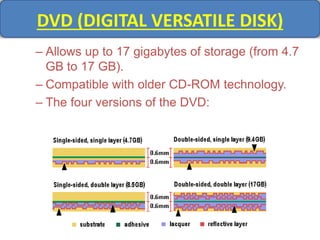
DVD (DIGITAL VERSATILE DISK)
– Allows up to 17 gigabytes of storage (from 4.7
GB to 17 GB).
– Compatible with older CD-ROM technology.
– The four versions of the DVD:
QUIZ
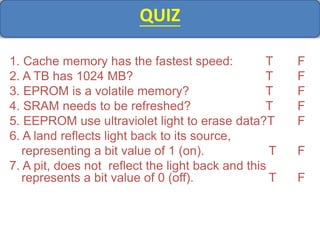
1. Cache memory has the fastest speed: T F
2. A TB has 1024 MB? T F
3. EPROM is a volatile memory? T F
4. SRAM needs to be refreshed? T F
5. EEPROM use ultraviolet light to erase data?T F
6. A land reflects light back to its source,
representing a bit value of 1 (on). T F
7. A pit, does not reflect the light back and this
represents a bit value of 0 (off). T F
QUIZ
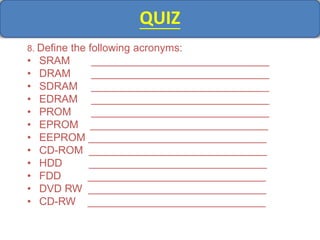
8. Define the following acronyms:
• SRAM ______________________________
• DRAM ______________________________
• SDRAM ______________________________
• EDRAM ______________________________
• PROM ______________________________
• EPROM ______________________________
• EEPROM ______________________________
• CD-ROM ______________________________
• HDD ______________________________
• FDD ______________________________
• DVD RW ______________________________
• CD-RW ______________________________
JAI HIND
Computer memory

Computer memory

  • 1.
  • 2.
    BACK GROUND WHAT ISA MEMORY? WHY DOES A COMPUTER NEED MEMORY? RTI, Jaipur 2
  • 3.
  • 4.
    AIM TO GIVE ANOVERVIEW ON COMPUTER MEMORY RTI, Jaipur 4
  • 5.
    BASICS Standardize the diverse accountingpolicies Add the reliability to the financial statement Eradicate baffling variation in treatment of accounting aspects Facilitate inter-firm and intra-firm comparison RTI, Jaipur 5
  • 6.
  • 7.
    Memory Hierarchy Slow and inexpensive Increasingperformance and increasing cost
  • 8.
  • 9.
    COMPUTER SYSTEM COMPONENTS CentralProcessing Unit Output Devices Cache Memory Primary Storage Secondary Storage Devices Control Unit ALU Special Purpose Processors Output Devices Input Devices Communication Devices
  • 10.
    CLASSIFICATION- BIG PICTURE MemoryTypes & Storage Devices Primary Secondary Volatile Registers Cache (I, II, III) RAM SRAM DRAM SDRAM EDRAM EDO FLASH RAM Non-volatile ROM PROM EPROM EEPROM Magnetic memory Tape HD, Zip Disk FDD Optical Memory CD-ROM, CD-R, CD-RW DVD-ROM, DVD-R DVD- RW (Semiconductor – chip). Main Memory (Devices) 2ns 5ms
  • 11.
  • 12.
    CPU CPU performs operationson data. • ALU • Control Unit • A set of registers
  • 13.
    ALU Arithmetic operations: • Increment •Decrement • Add • Subtract • Multiply • Divide Logical operations: • NOT • AND • OR • XOR
  • 14.
    REGISTERS FAST STAND-ALONE STORAGELOCATIONS THAT HOLD DATA TEMPORARILY IN CPU. PC (PROGRAM COUNTER) • KEEP TRACK OF INSTRUCTION CURRENTLY EXECUTED. • INCREMENTED AFTER EXECUTION OF INSTRUCTION INSTRUCTION REGISTER • STORE THE INSTRUCTION CURRENTLY BEING EXECUTED DATA REGISTERS • HOLD DATA BEFORE IT CAN BE PROCESSED
  • 15.
    REGISTER A, SPECIAL, HIGH-SPEEDSTORAGE AREA WITHIN THE CPU. ALL DATA MUST BE REPRESENTED IN A REGISTER BEFORE IT CAN BE PROCESSED. • FOR EXAMPLE, IF TWO NUMBERS ARE TO BE MULTIPLIED THE POWER & SPEED OF A CPU DETERMINED BY • THE NUMBER OF REGISTERS THAT A CPU HAS AND • THE SIZE OF EACH (NUMBER OF BITS)
  • 16.
  • 17.
    CACHE MEMORY At anytime contains a copy of a portion of main memory. • CPU checks the cache • If exist, copy the word, otherwise • access main memory and copy a block of memory starting with the desired word. • CPU accesses cache and copies the word.
  • 18.
    CACHE MEMORY It isvery probable that the CPU, in next cycle, needs to access the words following the first word. The existence of the cache speeds processing. 80-20 rule Most computers typically spend 80% of the time accessing only 20% of the data. Same data are accessed over and over again.
  • 19.
  • 20.
    MAIN MEMORY Main memory– • a collection of storage locations, • each with a unique identifier called the address. Word- • Data are transferred to and from memory in groups of bits called words. • The number of bits that can be stored in one CPU register in a computer.
  • 21.
    Address as BitPattern BECAUSE COMPUTERS OPERATE BY STORING NUMBERS AS BIT PATTERNS, THE ADDRESS ITSELF IS ALSO REPRESENTED AS A BIT PATTERN.
  • 22.
    MEMORY ADDRESSES MEMORY ISA COLLECTION OF CELLS, EACH WITH A UNIQUE PHYSICAL/MEMORY ADDRESS EACH CELL CAN HOLD ONE BYTE OR 8 BITS 101 102 103 201 301 202 203 302 303 With one by we can represent one character in ASCII Code Example: “A” is 65 in ASCII code and 01000001 in binary representation
  • 23.
    STORAGE CAPACITY Unit ------------ kilobyte megabyte gigabyte terabyte petabyte exabyte Exact Numberof bytes ------------------------ 210 bytes 220 bytes 230 bytes 240 bytes 250 bytes 260 bytes Approximation ------------ 103 bytes 106 bytes 109 bytes 1012 bytes 1015 bytes 1018 bytes
  • 24.
  • 25.
    ADDRESS SPACE • Althoughprogrammers use a name to identify a word, at the hardware level, each word is identified by an address. • Address space - – The total number of uniquely identifiable locations in memory. – For example: a memory with 64KB and a word size of 1 byte has an address space that range from 0 to 65535.
  • 26.
  • 27.
    MEMORY TYPES -RAM Volatile R/W by user Two categories: • DRAM(Dynamic RAM) • Refresh • used in most PCs • SRAM(Static RAM) • No refresh • Faster more reliable • more expensive • often used only as a memory cache
  • 28.
  • 29.
  • 30.
  • 31.
    MEMORY TYPES -ROM Nonvolatile Written by manufacture Hold the booting program Categories: • ROM • PROM(Programmable ROM)- Write once by user • EPROM(Erasable PROM)- physical removal and reinstallation by special device • EEPROM(Electronically EPROM)- without being removed from computer
  • 32.
    MEMORY TYPES– ROM PROM:programmable ROM • Only written once EPROM: erasable PROM • Use ultraviolet light to erase data EEPROM: electronically EPROM • Can be erased using electronic impulses (higher voltages)
  • 33.
  • 34.
    SECONDARY STORAGE DEVICES CANSTORE LARGE AMOUNT OF INFO TO BE RETRIEVED AT A LATER TIME. CHEAPER THAN MAIN MEMORY NONVOLATILE ALSO CALLED AUXILIARY STORAGE DEVICE CATEGORIES: • MAGNETIC • OPTICAL
  • 35.
    MAGNETIC STORAGE DEVICES Usemagnetization to store bits of data If a spot is magnetized  1 If a spot is not magnetized  0 Magnetic Disk • Random access device Magnetic Tape • Sequential access device
  • 36.
  • 37.
    MAGNETIC STORAGE DEVICES DISKETTES(FLOPPY DISKS) (FDD) HARD DISKS (HD) HIGH-CAPACITY FLOPPY DISKS (ZIP DISK) USB FLASH DRIVE MAGNETIC TAPE
  • 38.
    MAGNETIC STORAGE DEVICES -HOW MAGNETIC STORAGE WORKS A magnetic disk's medium contains iron particles, which can be polarized—given a magnetic charge—in one of two directions (north or south). Each particle's direction represents a 1 (on) or 0 (off), representing each bit of data that the CPU can recognize. A disk drive uses read/write heads containing electromagnets to create magnetic charges on the medium.
  • 39.
    HARD DISK DRIVE Purpose: •Long-term, nonvolatile storage • Large, inexpensive, slow level in the storage hierarchy Disk composition • A magnetic disk consist of a collection of platters (1to 20 per disk) that rotate on a spindle. • Disk surface divided into tracks (1000 to 4800 per platter). • Tracks are divided into sectors (64 per track), which are the smallest unit that can be read or written. Up to 10,000 rpm
  • 40.
    MAGNETIC DISKS • Aread/write head travels across a spinning magnetic disk, retrieving or recording data The organization of a magnetic disk
  • 41.
    PHYSICAL LAYOUT OFA MAGNETIC DISK Performance depends on several factors • Rotational speed • Seek time – the time to move the R/W head to desired track • Transfer time – the time to move data from the disk to the CPU/Memory
  • 42.
    As the medium rotates,the head writes the data. MAGNETIC STORAGE DEVICES - HOW MAGNETIC STORAGE WORKS
  • 43.
    SURFACE ORGANIZATION OFA DISK Each surface is divided into tracks Each track is divided into sectors Sector- the smallest storage area that can be accessed at one time. Block- can be stored in one or more sectors and retrieved together.
  • 44.
  • 45.
  • 46.
    SURFACE ORGANIZATION OFA TAPE Sequential access Slower Cheaper Backup large amount of data 9 vertical spots • 8 bits of information • 1 bit for error detection
  • 47.
  • 48.
    OPTICAL STORAGE DEVICES Uselight (laser) to store and retrieve data. CD-ROM(Compact disc read-only memory) • Same technology as CD CD-R (Compact disc recordable) • WORM(Write Once, Read Many) CD-RW (Compact disc rewritable) • Also called Erasable optical disc DVD(Digital Versatile Disc) • Higher capacity
  • 49.
  • 50.
    CD-ROM speeds Speed ------------ 1x 2x 4x 6x 8x 12x 16x 24x 32x 40x 52X Data Rate ------------------------ 153,600bytes per second 307,200 bytes per second 614,400 bytes per second 921,600 bytes per second 1,228,800 bytes per second 1,843,200 bytes per second 2,457,600 bytes per second 3,688,400 bytes per second 4,915,200 bytes per second 6,144,000 bytes per second Approximation ------------ 150 KB/s 300 KB/s 600 KB/s 900 KB/s 1.2 MB/s 1.8 MB/s 2.4 MB/s 3.6 MB/s 4.8 MB/s 6 MB/s 7.8 MB/s
  • 51.
  • 52.
  • 53.
  • 54.
    OPTICAL STORAGE DEVICES HOWOPTICAL STORAGE WORKS • An optical disk is a high-capacity storage medium. An optical drive uses reflected light to read data. • To store data, the disk's metal surface is covered with tiny dents (pits) and flat spots (lands), which cause light to be reflected differently. • When an optical drive shines light into a pit, the light cannot be reflected back. This represents a bit value of 0 (off). A land reflects light back to its source, representing a bit value of 1 (on).
  • 55.
    1 0 OPTICAL STORAGEDEVICES HOW OPTICAL STORAGE WORKS
  • 56.
    OPTICAL STORAGE DEVICES •CD-ROM: compact disc ROM (Read Only Memory) – Capacity: 650MB • CD-R: compact disc recordable • CD-RW: compact disc rewritable • DVD: digital versatile disc – Capacity: 4.7GB – 17GB • DVD-R • DVD-RW (2 versions: + (plus) and – (dash)
  • 57.
    DVD (DIGITAL VERSATILEDISK) – Allows up to 17 gigabytes of storage (from 4.7 GB to 17 GB). – Compatible with older CD-ROM technology. – The four versions of the DVD:
  • 58.
    QUIZ 1. Cache memoryhas the fastest speed: T F 2. A TB has 1024 MB? T F 3. EPROM is a volatile memory? T F 4. SRAM needs to be refreshed? T F 5. EEPROM use ultraviolet light to erase data?T F 6. A land reflects light back to its source, representing a bit value of 1 (on). T F 7. A pit, does not reflect the light back and this represents a bit value of 0 (off). T F
  • 59.
    QUIZ 8. Define thefollowing acronyms: • SRAM ______________________________ • DRAM ______________________________ • SDRAM ______________________________ • EDRAM ______________________________ • PROM ______________________________ • EPROM ______________________________ • EEPROM ______________________________ • CD-ROM ______________________________ • HDD ______________________________ • FDD ______________________________ • DVD RW ______________________________ • CD-RW ______________________________
  • 60.