MultimediaMultimedia
ByBy
Pravin H. GhosekarPravin H. Ghosekar
M.Sc.(C/S), MCM, DBM, M.Phil.,MBA, BJM.Sc.(C/S), MCM, DBM, M.Phil.,MBA, BJ
HOD Computer DepartmentHOD Computer Department
Dhanwate National CollegeDhanwate National College
NagpurNagpur
Objectives
• Multimedia Define
• Component of Multimedia
• Application of Multimedia
• Advantages & Disadvantages
• Multimedia Authoring
Multimedia?
Multimedia (Multi+Medium) is any
combination of text, art, sound,
animation, and video delivered by
computer or other electronic or
digitally manipulated means.
Multimedia?
Multimedia means that computer info
can be represented through audio,
graphics, image, video and animation
in addition to traditional media (text
and graphics).
Multimedia Categories?
1. Linear Presentation
2. Non-Linear Presentation
Multimedia is divided into :
Linear Presentation
Linear active content progresses
without any navigation control for
the viewer.
For ex. Movie, Presentation
Non-Linear Presentation
Non-linear content offers
user interactivity
to control progress.
For ex. Computer Game,
CBT (Computer Based Training)
Components of Multimedia
• Text
• Graphics
• Audio
• Animations
• Video
The use of components depends
on the target audience and its
application
Components of Multimedia
1. Text
Words and Symbols in any form,
spoken or written,
are the most common system
of communication.
Components of Multimedia
2. Graphics
The use of graphics enhances the
presentation.
a Picture ≅ 1000 Words
Components of Multimedia
2. Graphics
It comprise of a sequence of dots
that are arranged in rows & columns
to form a grid. These dots are
known as pixels.
The resolution of determines the
clarity. The resolution is
represented in terms of dpi.
Raster Graphics
Components of Multimedia
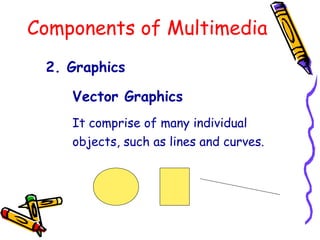
2. Graphics
It comprise of many individual
objects, such as lines and curves.
Vector Graphics
Components of Multimedia
3. Audio
Audio can be used to represent
information vocally.
Multimedia applications with
background sound effects capture
the attention of the audience.
Components of Multimedia
4. Animation
Animation is a graphic scenes
played back sequentially and
rapidly in such a way that
they appear to be in motion.
When these images move in quick
succession, an illusion of
movement is created.
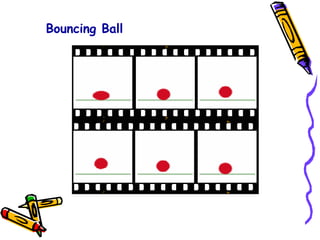
Bouncing Ball
Morphing
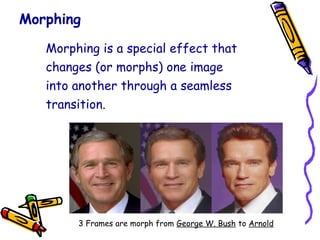
Morphing is a special effect that
changes (or morphs) one image
into another through a seamless
transition.
3 Frames are morph from George W. Bush to Arnold
Components of Multimedia
5. Video
Video is the most powerful tool
for bringing computer user closer
to the real world.
Audience can retain more what
they see using video presentation.
Applications of Multimedia
in HOME
Interior designing
Gardening
Grooming and Styling
Applications of Multimedia
in BUSINESS
Presentations
Global Meetings
Corporate Training
Marketing & Advertising
Travel Guide
Shopping Guides.
Applications of Multimedia
in EDUCATION
CBT (m-media based educational
training techniques.)
Interactive websites (student forums,
chat rooms, virtual classrooms etc)
M-media is used to depict information
that may be difficult to explain verbally.
To teach technical aspects viz. s/w
installation using simulation.
Applications of Multimedia
in ENTERTAINMENT
Virtual reality simulates the
characteristics of the real world.
Multimedia is useful for accessing
audio-visual data on the internet.
Digital kiosks and touch-screen
gadgets installed at public places;
provide information and guide.
Advantages Multimedia
It uses the natural information
processing abilities that we already
posses as humans. (eyes & ears)
Multimedia presentation helps in
retention of facts.
The user can interact.
Disadvantages Multimedia
Multimedia requires high-end
computer system.
Sound, images, animation, video
slows down the computer.
Development cost of multimedia
are very high.
It is require more time to design.
Multimedia Authoring
• Multimedia autoring tool is a
computer program that
provides various options and
methods that helps to create
the required multimedia
effect.
For ex. Macromedia Authorware, Macromedia
Director, Macromedia Flash, Shock wave, etc.
ThanksThanks

Introduction to Multimedia

  • 1.
    MultimediaMultimedia ByBy Pravin H. GhosekarPravinH. Ghosekar M.Sc.(C/S), MCM, DBM, M.Phil.,MBA, BJM.Sc.(C/S), MCM, DBM, M.Phil.,MBA, BJ HOD Computer DepartmentHOD Computer Department Dhanwate National CollegeDhanwate National College NagpurNagpur
  • 2.
    Objectives • Multimedia Define •Component of Multimedia • Application of Multimedia • Advantages & Disadvantages • Multimedia Authoring
  • 3.
    Multimedia? Multimedia (Multi+Medium) isany combination of text, art, sound, animation, and video delivered by computer or other electronic or digitally manipulated means.
  • 4.
    Multimedia? Multimedia means thatcomputer info can be represented through audio, graphics, image, video and animation in addition to traditional media (text and graphics).
  • 5.
    Multimedia Categories? 1. LinearPresentation 2. Non-Linear Presentation Multimedia is divided into :
  • 6.
    Linear Presentation Linear activecontent progresses without any navigation control for the viewer. For ex. Movie, Presentation
  • 7.
    Non-Linear Presentation Non-linear contentoffers user interactivity to control progress. For ex. Computer Game, CBT (Computer Based Training)
  • 8.
    Components of Multimedia •Text • Graphics • Audio • Animations • Video The use of components depends on the target audience and its application
  • 9.
    Components of Multimedia 1.Text Words and Symbols in any form, spoken or written, are the most common system of communication.
  • 10.
    Components of Multimedia 2.Graphics The use of graphics enhances the presentation. a Picture ≅ 1000 Words
  • 11.
    Components of Multimedia 2.Graphics It comprise of a sequence of dots that are arranged in rows & columns to form a grid. These dots are known as pixels. The resolution of determines the clarity. The resolution is represented in terms of dpi. Raster Graphics
  • 12.
    Components of Multimedia 2.Graphics It comprise of many individual objects, such as lines and curves. Vector Graphics
  • 13.
    Components of Multimedia 3.Audio Audio can be used to represent information vocally. Multimedia applications with background sound effects capture the attention of the audience.
  • 14.
    Components of Multimedia 4.Animation Animation is a graphic scenes played back sequentially and rapidly in such a way that they appear to be in motion. When these images move in quick succession, an illusion of movement is created.
  • 15.
  • 16.
    Morphing Morphing is aspecial effect that changes (or morphs) one image into another through a seamless transition. 3 Frames are morph from George W. Bush to Arnold
  • 17.
    Components of Multimedia 5.Video Video is the most powerful tool for bringing computer user closer to the real world. Audience can retain more what they see using video presentation.
  • 18.
    Applications of Multimedia inHOME Interior designing Gardening Grooming and Styling
  • 19.
    Applications of Multimedia inBUSINESS Presentations Global Meetings Corporate Training Marketing & Advertising Travel Guide Shopping Guides.
  • 20.
    Applications of Multimedia inEDUCATION CBT (m-media based educational training techniques.) Interactive websites (student forums, chat rooms, virtual classrooms etc) M-media is used to depict information that may be difficult to explain verbally. To teach technical aspects viz. s/w installation using simulation.
  • 21.
    Applications of Multimedia inENTERTAINMENT Virtual reality simulates the characteristics of the real world. Multimedia is useful for accessing audio-visual data on the internet. Digital kiosks and touch-screen gadgets installed at public places; provide information and guide.
  • 22.
    Advantages Multimedia It usesthe natural information processing abilities that we already posses as humans. (eyes & ears) Multimedia presentation helps in retention of facts. The user can interact.
  • 23.
    Disadvantages Multimedia Multimedia requireshigh-end computer system. Sound, images, animation, video slows down the computer. Development cost of multimedia are very high. It is require more time to design.
  • 24.
    Multimedia Authoring • Multimediaautoring tool is a computer program that provides various options and methods that helps to create the required multimedia effect. For ex. Macromedia Authorware, Macromedia Director, Macromedia Flash, Shock wave, etc.
  • 25.

Editor's Notes

  • #11 For ex. An Organisational structure is better understood if depicted using graphic instead of text. Graphics do not require knowledge of particular language.
  • #12 For ex. The photograph is in the format of raster graphics
  • #13 For ex. Diagrams
  • #14 Background music and sound can also make a presentation interesting. Analog audio uses waveforms induced by electrical voltage to reproduce recorded sound. Digital audio is the representation fo sound as binary numbers.
  • #15 Using animation we can simulate objects to create a real (life-like) impression. Animations are created using computer graphics or images. Animation is based on the concept of persistence of vision. Persistence of vision refers to the length of time for which the retina of human eye is able to retain an image.
  • #16 This image shows 6 different position of a ball. If all slides played rapidly; it looks like a bouncily balls
  • #17 Most often it is used to depict one person turning into another. Remember the movie JUNOON in that Rohit Roy will turns into the Tiger.
  • #19 We can use multimedia presentation to design interiors and remodel our house. Numerous web sites are available to suggest various gardening techniques. We can use multimedia to select suitable hairstyle
  • #20 We can make business presentations more appealing and interesting with m-media. Multimedia allows organisations to hold meetings simultaneously using Video conferencing Corporate training to number of participant simultaneously and effectively using m-media. Using m-media based presentation, marketing personnel can present an impressie image of their companies while demonstrating their products to a client.
  • #21 We can create m-media applications for teaching children; including comic characters that interact with the child and guide the child through the information.
  • #22 We can make business presentations more appealing and interesting with m-media. Multimedia allows organisations to hold meetings simultaneously using Video conferencing Corporate training to number of participant simultaneously and effectively using m-media. Using m-media based presentation, marketing personnel can present an impressie image of their companies while demonstrating their products to a client.