Computer Generation &
Classification
Bali Thorat
Generations of Computers
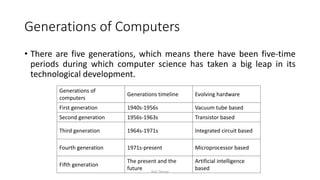
• There are five generations, which means there have been five-time
periods during which computer science has taken a big leap in its
technological development.
Generations of
computers
Generations timeline Evolving hardware
First generation 1940s-1956s Vacuum tube based
Second generation 1956s-1963s Transistor based
Third generation 1964s-1971s Integrated circuit based
Fourth generation 1971s-present Microprocessor based
Fifth generation
The present and the
future
Artificial intelligence
based
Bali Thorat
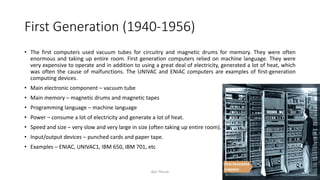
First Generation (1940-1956)
• The first computers used vacuum tubes for circuitry and magnetic drums for memory. They were often
enormous and taking up entire room. First generation computers relied on machine language. They were
very expensive to operate and in addition to using a great deal of electricity, generated a lot of heat, which
was often the cause of malfunctions. The UNIVAC and ENIAC computers are examples of first-generation
computing devices.
• Main electronic component – vacuum tube
• Main memory – magnetic drums and magnetic tapes
• Programming language – machine language
• Power – consume a lot of electricity and generate a lot of heat.
• Speed and size – very slow and very large in size (often taking up entire room).
• Input/output devices – punched cards and paper tape.
• Examples – ENIAC, UNIVAC1, IBM 650, IBM 701, etc
Bali Thorat
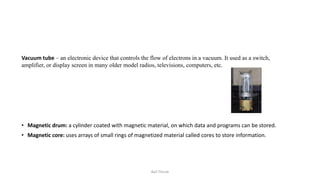
Vacuum tube – an electronic device that controls the flow of electrons in a vacuum. It used as a switch,
amplifier, or display screen in many older model radios, televisions, computers, etc.
• Magnetic drum: a cylinder coated with magnetic material, on which data and programs can be stored.
• Magnetic core: uses arrays of small rings of magnetized material called cores to store information.
Bali Thorat
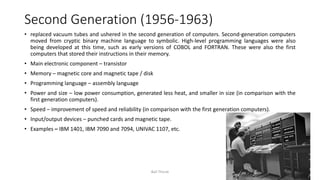
Second Generation (1956-1963)
• replaced vacuum tubes and ushered in the second generation of computers. Second-generation computers
moved from cryptic binary machine language to symbolic. High-level programming languages were also
being developed at this time, such as early versions of COBOL and FORTRAN. These were also the first
computers that stored their instructions in their memory.
• Main electronic component – transistor
• Memory – magnetic core and magnetic tape / disk
• Programming language – assembly language
• Power and size – low power consumption, generated less heat, and smaller in size (in comparison with the
first generation computers).
• Speed – improvement of speed and reliability (in comparison with the first generation computers).
• Input/output devices – punched cards and magnetic tape.
• Examples – IBM 1401, IBM 7090 and 7094, UNIVAC 1107, etc.
Bali Thorat
Transistor
– an electronic component that can be used as an amplifier or as a switch. It is used to control the
flow of electricity in radios, televisions, computers, etc.
Bali Thorat
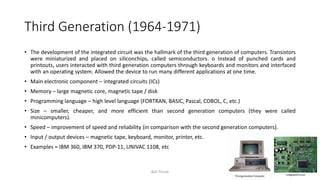
Third Generation (1964-1971)
• The development of the integrated circuit was the hallmark of the third generation of computers. Transistors
were miniaturized and placed on siliconchips, called semiconductors. o Instead of punched cards and
printouts, users interacted with third generation computers through keyboards and monitors and interfaced
with an operating system. Allowed the device to run many different applications at one time.
• Main electronic component – integrated circuits (ICs)
• Memory – large magnetic core, magnetic tape / disk
• Programming language – high level language (FORTRAN, BASIC, Pascal, COBOL, C, etc.)
• Size – smaller, cheaper, and more efficient than second generation computers (they were called
minicomputers).
• Speed – improvement of speed and reliability (in comparison with the second generation computers).
• Input / output devices – magnetic tape, keyboard, monitor, printer, etc.
• Examples – IBM 360, IBM 370, PDP-11, UNIVAC 1108, etc
Bali Thorat
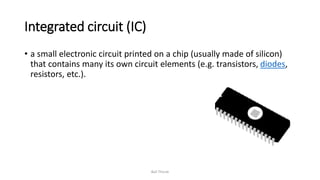
Integrated circuit (IC)
• a small electronic circuit printed on a chip (usually made of silicon)
that contains many its own circuit elements (e.g. transistors, diodes,
resistors, etc.).
Bali Thorat
• Machine language: a low-level programming language comprised of a
collection of binary digits (ones and zeros) that the computer can
read and understand.
• Assembly language is like the machine language that a computer can
understand, except that assembly language uses abbreviated words
(e.g. ADD, SUB, DIV…) in place of numbers (0s and 1s).
Bali Thorat
Fourth Generation (1971-2010)
• The microprocessor brought the fourth generation of computers, as thousands of integrated circuits were
built onto a single silicon chip. The Intel 4004 chip, developed in 1971, located all the components of the
computer. From the central processing unit and memory to input/output controls—on a single chip. . Fourth
generation computers also saw the development of GUIs, the mouse and handheld devices.
• Main electronic component – very large-scale integration (VLSI) and microprocessor.
• VLSI– thousands of transistors on a single microchip.
• Memory – semiconductor memory (such as RAM, ROM, etc.)
• Programming language – high level language (Python, C#, Java, JavaScript, Rust, Kotlin, etc.).
• Size – smaller, cheaper and more efficient than third generation computers.
• Speed – improvement of speed, accuracy, and reliability (in comparison with the third generation
computers).
• Input / output devices – keyboard, pointing devices, optical scanning, monitor, printer, etc.
• Examples – IBM PC, STAR 1000, APPLE II, Apple Macintosh, etc.
Bali Thorat
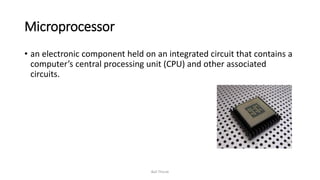
Microprocessor
• an electronic component held on an integrated circuit that contains a
computer’s central processing unit (CPU) and other associated
circuits.
Bali Thorat
Artificial intelligence (AI)
• an area of computer science that deals with the simulation and
creation of intelligent machines or intelligent behave in computers
(they think, learn, work, and react like humans).
Bali Thorat
Fifth Generation (Present Day)
• Fifth generation computing devices, based on artificial intelligence. Are still in development, though there are some
applications, such as voice recognition. The use of parallel processing and superconductors is helping to make
artificial intelligence a reality. The goal of fifth-generation computing is to develop devices that respond to natural
language input and are capable of learning and self-organization.
• Main electronic component: based on artificial intelligence, uses the Ultra Large-Scale Integration (ULSI) technology
and parallel processing method. ULSI – millions of transistors on a single microchip
• Parallel processing method – use two or more microprocessors to run tasks simultaneously.
• Language – understand natural language (human language).
• Power – consume less power and generate less heat.
• Speed – remarkable improvement of speed, accuracy and reliability (in comparison with the fourth generation
computers).
• Size – portable and small in size, and have a huge storage capacity.
• Input / output device – keyboard, monitor, mouse, trackpad (or touchpad), touchscreen, pen, speech input
(recognise voice / speech), light scanner, printer, etc.
• Example – desktops, laptops, tablets, smartphones, etc.
Bali Thorat
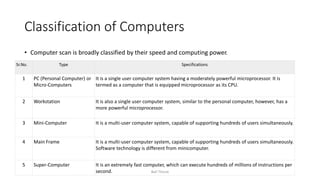
Classification of Computers
• Computer scan is broadly classified by their speed and computing power.
Sr.No. Type Specifications
1 PC (Personal Computer) or
Micro-Computers
It is a single user computer system having a moderately powerful microprocessor. It is
termed as a computer that is equipped microprocessor as its CPU.
2 Workstation It is also a single user computer system, similar to the personal computer, however, has a
more powerful microprocessor.
3 Mini-Computer It is a multi-user computer system, capable of supporting hundreds of users simultaneously.
4 Main Frame It is a multi-user computer system, capable of supporting hundreds of users simultaneously.
Software technology is different from minicomputer.
5 Super-Computer It is an extremely fast computer, which can execute hundreds of millions of instructions per
second. Bali Thorat
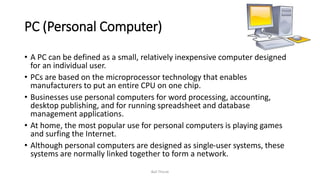
PC (Personal Computer)
• A PC can be defined as a small, relatively inexpensive computer designed
for an individual user.
• PCs are based on the microprocessor technology that enables
manufacturers to put an entire CPU on one chip.
• Businesses use personal computers for word processing, accounting,
desktop publishing, and for running spreadsheet and database
management applications.
• At home, the most popular use for personal computers is playing games
and surfing the Internet.
• Although personal computers are designed as single-user systems, these
systems are normally linked together to form a network.
Bali Thorat
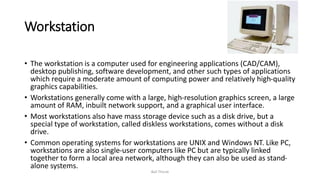
Workstation
• The workstation is a computer used for engineering applications (CAD/CAM),
desktop publishing, software development, and other such types of applications
which require a moderate amount of computing power and relatively high-quality
graphics capabilities.
• Workstations generally come with a large, high-resolution graphics screen, a large
amount of RAM, inbuilt network support, and a graphical user interface.
• Most workstations also have mass storage device such as a disk drive, but a
special type of workstation, called diskless workstations, comes without a disk
drive.
• Common operating systems for workstations are UNIX and Windows NT. Like PC,
workstations are also single-user computers like PC but are typically linked
together to form a local area network, although they can also be used as stand-
alone systems.
Bali Thorat
Minicomputer
• It is a midsize multi-processing system capable of supporting up to
250 users simultaneously.
Bali Thorat
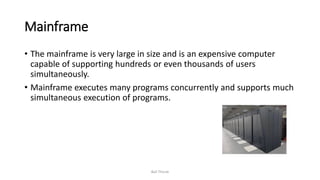
Mainframe
• The mainframe is very large in size and is an expensive computer
capable of supporting hundreds or even thousands of users
simultaneously.
• Mainframe executes many programs concurrently and supports much
simultaneous execution of programs.
Bali Thorat
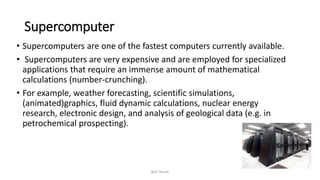
Supercomputer
• Supercomputers are one of the fastest computers currently available.
• Supercomputers are very expensive and are employed for specialized
applications that require an immense amount of mathematical
calculations (number-crunching).
• For example, weather forecasting, scientific simulations,
(animated)graphics, fluid dynamic calculations, nuclear energy
research, electronic design, and analysis of geological data (e.g. in
petrochemical prospecting).
Bali Thorat
Parallel computing
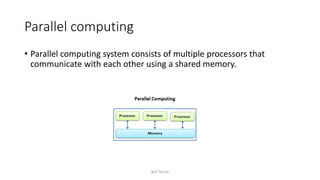
• Parallel computing system consists of multiple processors that
communicate with each other using a shared memory.
Bali Thorat
Distributed computing
Distributed computing system contains multiple processors connected
by a communication network.
Bali Thorat

Computer generation and classification

  • 1.
  • 2.
    Generations of Computers •There are five generations, which means there have been five-time periods during which computer science has taken a big leap in its technological development. Generations of computers Generations timeline Evolving hardware First generation 1940s-1956s Vacuum tube based Second generation 1956s-1963s Transistor based Third generation 1964s-1971s Integrated circuit based Fourth generation 1971s-present Microprocessor based Fifth generation The present and the future Artificial intelligence based Bali Thorat
  • 3.
    First Generation (1940-1956) •The first computers used vacuum tubes for circuitry and magnetic drums for memory. They were often enormous and taking up entire room. First generation computers relied on machine language. They were very expensive to operate and in addition to using a great deal of electricity, generated a lot of heat, which was often the cause of malfunctions. The UNIVAC and ENIAC computers are examples of first-generation computing devices. • Main electronic component – vacuum tube • Main memory – magnetic drums and magnetic tapes • Programming language – machine language • Power – consume a lot of electricity and generate a lot of heat. • Speed and size – very slow and very large in size (often taking up entire room). • Input/output devices – punched cards and paper tape. • Examples – ENIAC, UNIVAC1, IBM 650, IBM 701, etc Bali Thorat
  • 4.
    Vacuum tube –an electronic device that controls the flow of electrons in a vacuum. It used as a switch, amplifier, or display screen in many older model radios, televisions, computers, etc. • Magnetic drum: a cylinder coated with magnetic material, on which data and programs can be stored. • Magnetic core: uses arrays of small rings of magnetized material called cores to store information. Bali Thorat
  • 5.
    Second Generation (1956-1963) •replaced vacuum tubes and ushered in the second generation of computers. Second-generation computers moved from cryptic binary machine language to symbolic. High-level programming languages were also being developed at this time, such as early versions of COBOL and FORTRAN. These were also the first computers that stored their instructions in their memory. • Main electronic component – transistor • Memory – magnetic core and magnetic tape / disk • Programming language – assembly language • Power and size – low power consumption, generated less heat, and smaller in size (in comparison with the first generation computers). • Speed – improvement of speed and reliability (in comparison with the first generation computers). • Input/output devices – punched cards and magnetic tape. • Examples – IBM 1401, IBM 7090 and 7094, UNIVAC 1107, etc. Bali Thorat
  • 6.
    Transistor – an electroniccomponent that can be used as an amplifier or as a switch. It is used to control the flow of electricity in radios, televisions, computers, etc. Bali Thorat
  • 7.
    Third Generation (1964-1971) •The development of the integrated circuit was the hallmark of the third generation of computers. Transistors were miniaturized and placed on siliconchips, called semiconductors. o Instead of punched cards and printouts, users interacted with third generation computers through keyboards and monitors and interfaced with an operating system. Allowed the device to run many different applications at one time. • Main electronic component – integrated circuits (ICs) • Memory – large magnetic core, magnetic tape / disk • Programming language – high level language (FORTRAN, BASIC, Pascal, COBOL, C, etc.) • Size – smaller, cheaper, and more efficient than second generation computers (they were called minicomputers). • Speed – improvement of speed and reliability (in comparison with the second generation computers). • Input / output devices – magnetic tape, keyboard, monitor, printer, etc. • Examples – IBM 360, IBM 370, PDP-11, UNIVAC 1108, etc Bali Thorat
  • 8.
    Integrated circuit (IC) •a small electronic circuit printed on a chip (usually made of silicon) that contains many its own circuit elements (e.g. transistors, diodes, resistors, etc.). Bali Thorat
  • 9.
    • Machine language:a low-level programming language comprised of a collection of binary digits (ones and zeros) that the computer can read and understand. • Assembly language is like the machine language that a computer can understand, except that assembly language uses abbreviated words (e.g. ADD, SUB, DIV…) in place of numbers (0s and 1s). Bali Thorat
  • 10.
    Fourth Generation (1971-2010) •The microprocessor brought the fourth generation of computers, as thousands of integrated circuits were built onto a single silicon chip. The Intel 4004 chip, developed in 1971, located all the components of the computer. From the central processing unit and memory to input/output controls—on a single chip. . Fourth generation computers also saw the development of GUIs, the mouse and handheld devices. • Main electronic component – very large-scale integration (VLSI) and microprocessor. • VLSI– thousands of transistors on a single microchip. • Memory – semiconductor memory (such as RAM, ROM, etc.) • Programming language – high level language (Python, C#, Java, JavaScript, Rust, Kotlin, etc.). • Size – smaller, cheaper and more efficient than third generation computers. • Speed – improvement of speed, accuracy, and reliability (in comparison with the third generation computers). • Input / output devices – keyboard, pointing devices, optical scanning, monitor, printer, etc. • Examples – IBM PC, STAR 1000, APPLE II, Apple Macintosh, etc. Bali Thorat
  • 11.
    Microprocessor • an electroniccomponent held on an integrated circuit that contains a computer’s central processing unit (CPU) and other associated circuits. Bali Thorat
  • 12.
    Artificial intelligence (AI) •an area of computer science that deals with the simulation and creation of intelligent machines or intelligent behave in computers (they think, learn, work, and react like humans). Bali Thorat
  • 13.
    Fifth Generation (PresentDay) • Fifth generation computing devices, based on artificial intelligence. Are still in development, though there are some applications, such as voice recognition. The use of parallel processing and superconductors is helping to make artificial intelligence a reality. The goal of fifth-generation computing is to develop devices that respond to natural language input and are capable of learning and self-organization. • Main electronic component: based on artificial intelligence, uses the Ultra Large-Scale Integration (ULSI) technology and parallel processing method. ULSI – millions of transistors on a single microchip • Parallel processing method – use two or more microprocessors to run tasks simultaneously. • Language – understand natural language (human language). • Power – consume less power and generate less heat. • Speed – remarkable improvement of speed, accuracy and reliability (in comparison with the fourth generation computers). • Size – portable and small in size, and have a huge storage capacity. • Input / output device – keyboard, monitor, mouse, trackpad (or touchpad), touchscreen, pen, speech input (recognise voice / speech), light scanner, printer, etc. • Example – desktops, laptops, tablets, smartphones, etc. Bali Thorat
  • 14.
    Classification of Computers •Computer scan is broadly classified by their speed and computing power. Sr.No. Type Specifications 1 PC (Personal Computer) or Micro-Computers It is a single user computer system having a moderately powerful microprocessor. It is termed as a computer that is equipped microprocessor as its CPU. 2 Workstation It is also a single user computer system, similar to the personal computer, however, has a more powerful microprocessor. 3 Mini-Computer It is a multi-user computer system, capable of supporting hundreds of users simultaneously. 4 Main Frame It is a multi-user computer system, capable of supporting hundreds of users simultaneously. Software technology is different from minicomputer. 5 Super-Computer It is an extremely fast computer, which can execute hundreds of millions of instructions per second. Bali Thorat
  • 15.
    PC (Personal Computer) •A PC can be defined as a small, relatively inexpensive computer designed for an individual user. • PCs are based on the microprocessor technology that enables manufacturers to put an entire CPU on one chip. • Businesses use personal computers for word processing, accounting, desktop publishing, and for running spreadsheet and database management applications. • At home, the most popular use for personal computers is playing games and surfing the Internet. • Although personal computers are designed as single-user systems, these systems are normally linked together to form a network. Bali Thorat
  • 16.
    Workstation • The workstationis a computer used for engineering applications (CAD/CAM), desktop publishing, software development, and other such types of applications which require a moderate amount of computing power and relatively high-quality graphics capabilities. • Workstations generally come with a large, high-resolution graphics screen, a large amount of RAM, inbuilt network support, and a graphical user interface. • Most workstations also have mass storage device such as a disk drive, but a special type of workstation, called diskless workstations, comes without a disk drive. • Common operating systems for workstations are UNIX and Windows NT. Like PC, workstations are also single-user computers like PC but are typically linked together to form a local area network, although they can also be used as stand- alone systems. Bali Thorat
  • 17.
    Minicomputer • It isa midsize multi-processing system capable of supporting up to 250 users simultaneously. Bali Thorat
  • 18.
    Mainframe • The mainframeis very large in size and is an expensive computer capable of supporting hundreds or even thousands of users simultaneously. • Mainframe executes many programs concurrently and supports much simultaneous execution of programs. Bali Thorat
  • 19.
    Supercomputer • Supercomputers areone of the fastest computers currently available. • Supercomputers are very expensive and are employed for specialized applications that require an immense amount of mathematical calculations (number-crunching). • For example, weather forecasting, scientific simulations, (animated)graphics, fluid dynamic calculations, nuclear energy research, electronic design, and analysis of geological data (e.g. in petrochemical prospecting). Bali Thorat
  • 20.
    Parallel computing • Parallelcomputing system consists of multiple processors that communicate with each other using a shared memory. Bali Thorat
  • 21.
    Distributed computing Distributed computingsystem contains multiple processors connected by a communication network. Bali Thorat