Presentation made by: Ms. Archika Bhatia COMPUTER SYSTEM ORGANISATION
Index Evolution of computers History of computing Basics of computer and its operation: Functional Components and their interconnections Classification of Computers Software Concepts: Types of Software - System Software, Utility Software and Application Software;
EVOLUTION OF COMPUTER The development of the modern day computer was the result of advances in technologies and man's need to quantify. Let us look at some of the important milestones in the evolution of computers .
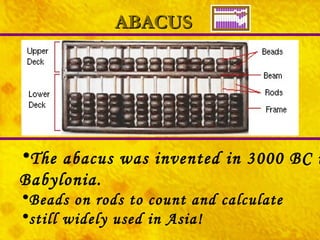
ABACUS The abacus was invented in 3000 BC in Babylonia.  Beads on rods to count and calculate still widely used in Asia!
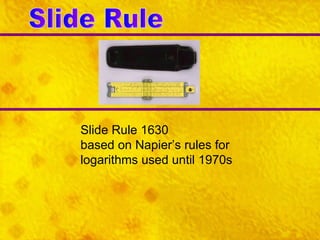
Slide Rule Slide Rule 1630 based on Napier’s rules for logarithms used until 1970s
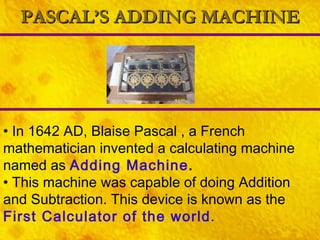
PASCAL’S ADDING MACHINE In 1642 AD, Blaise Pascal , a French mathematician invented a calculating machine named as  Adding Machine . This machine was capable of doing Addition and Subtraction. This device is known as the  First Calculator of the world .
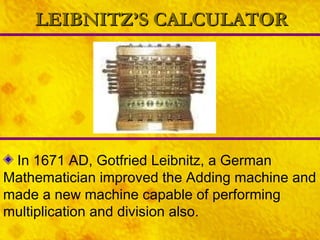
LEIBNITZ’S CALCULATOR In 1671 AD, Gotfried Leibnitz, a German Mathematician improved the Adding machine and made a new machine capable of performing multiplication and division also.
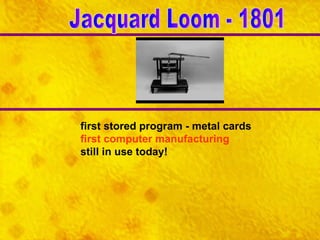
first stored program - metal cards first computer manufacturing still in use today! Jacquard Loom - 1801
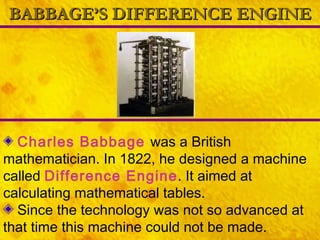
BABBAGE’S DIFFERENCE ENGINE Charles Babbage   was a British mathematician. In 1822, he designed a machine called  Difference Engine . It aimed at calculating mathematical tables. Since the technology was not so advanced at that time this machine could not be made.
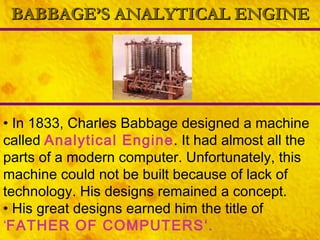
BABBAGE’S ANALYTICAL ENGINE In 1833, Charles Babbage designed a machine called  Analytical Engine . It had almost all the parts of a modern computer. Unfortunately, this machine could not be built because of lack of technology. His designs remained a concept. His great designs earned him the title of  ‘ FATHER OF COMPUTERS‘.
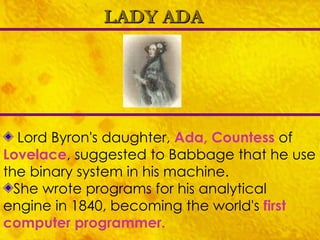
LADY ADA Lord Byron's daughter,  Ada, Countess  of  Lovelace , suggested to Babbage that he use the binary system in his machine. She wrote programs for his analytical engine in 1840, becoming the world's  first computer programmer.
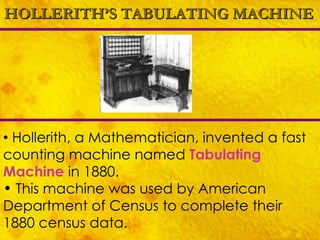
HOLLERITH’S TABULATING MACHINE Hollerith, a Mathematician, invented a fast counting machine named  Tabulating Machine   in 1880. This machine was used by American Department of Census to complete their 1880 census data.
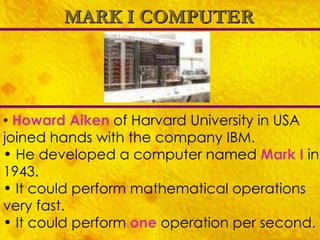
MARK I COMPUTER Howard Aiken  of Harvard University in USA joined hands with the company IBM. He developed a computer named  Mark I   in 1943. It could perform mathematical operations very fast. It could perform  one  operation per second.
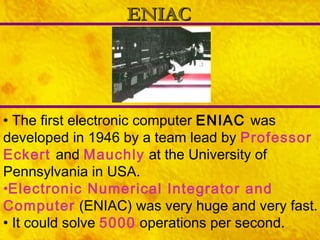
ENIAC The first electronic computer  ENIAC  was developed in 1946 by a team lead by  Professor Eckert   and  Mauchly  at the University of Pennsylvania in USA. Electronic Numerical Integrator and Computer  (ENIAC) was very huge and very fast. It could solve  5000  operations per second.
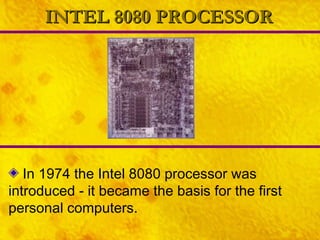
INTEL 8080 PROCESSOR In 1974 the Intel 8080 processor was introduced - it became the basis for the first personal computers.
Definition of Computer Electronic Device Accepts and stores input Manipulates result Outputs results Under direction of stores programs and instructions
Characteristics of Computer Speed Accuracy Diligence : not afflicted to tiredness, monotony, lack of concentration like human beings. Reliability Versatility : can work with different types of data like sound, graphics, audio. Memory
What is Data and Information Data  is raw facts ex:  India, 200, 4, Cricket, Wicket Information  is meaningful and arranged form of data ex:  India’s score in Cricket is 200 for 4 wickets.
Hardware refers to physical components that can be seen and touched. E.g. CPU, Memory, I/O devices. HARDWARE SOFTWARE Software is a set of programs that make the Hardware of the computer run. Program is a set of instructions.
FIRMWARE LIVEWARE Firmware is like prewritten program that is permanently stored in read-only memory. BIOS ( Basic Input Output Services ) instructions are an example of firmware. It is the term generally used for the people associated with and benefited from the computer system.
Classification of Computer Systems On the basis of Technology Generations of computers On the basis of Purpose General Purpose, special Purpose computers On The basis of size & Speed Micro, Mini & Super Computers On the basis of how it functions Analog, Digital & Hybrid Computers
Generations of Computer Each generation of computer is characterized by a major technological development that fundamentally changed the way computers operate, resulting in increasingly  Technology Based Classification of Computer Systems smaller,  cheaper,  more powerful  more efficient and  reliable devices.
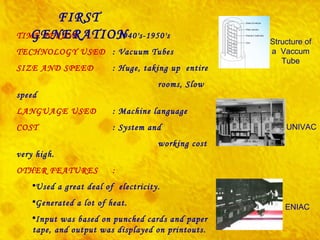
TIME PERIOD :  1940's-1950's TECHNOLOGY USED : Vacuum Tubes SIZE AND SPEED : Huge, taking up  entire  rooms, Slow speed LANGUAGE USED : Machine language COST : System and  working cost very high. OTHER FEATURES :  Used a great deal of  electricity. Generated a lot of heat. Input was based on punched cards and paper tape, and output was displayed on printouts. EXAMPLE : UNIVAC and ENIAC Structure of a  Vaccum Tube UNIVAC ENIAC FIRST GENERATION
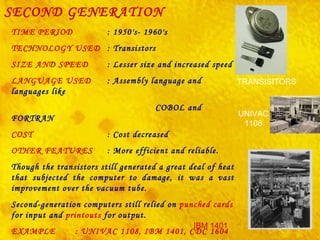
SECOND GENERATION TIME PERIOD :  1950's- 1960's   TECHNOLOGY USED : Transistors SIZE AND SPEED : Lesser size and increased speed LANGUAGE USED : Assembly language and languages like  COBOL and FORTRAN   COST : Cost decreased OTHER FEATURES : More efficient and reliable. Though the transistors still generated a great deal of heat that subjected the computer to damage, it was a vast improvement over the vacuum tube. Second-generation computers still relied on  punched   cards  for input and  printouts  for output. EXAMPLE : UNIVAC 1108, IBM 1401, CDC 1604   UNIVAC 1108 IBM 1401 TRANSISITORS
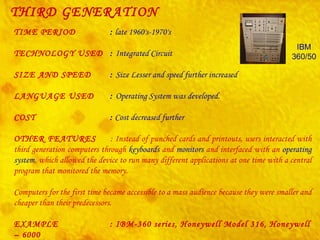
THIRD GENERATION TIME PERIOD :  late 1960's-1970's TECHNOLOGY USED :  Integrated Circuit   SIZE AND SPEED :  Size Lesser and speed further increased LANGUAGE USED :  Operating System was developed. COST :  Cost decreased further OTHER FEATURES : Instead of punched cards and printouts, users interacted with third generation computers through  keyboards  and  monitors  and interfaced with an  operating system , which allowed the device to run many different applications at one time with a central program that monitored the memory. Computers for the first time became accessible to a mass audience because they were smaller and cheaper than their predecessors.  EXAMPLE  : IBM-360 series, Honeywell Model 316, Honeywell – 6000  series, CDC – 1700. IBM 360/50
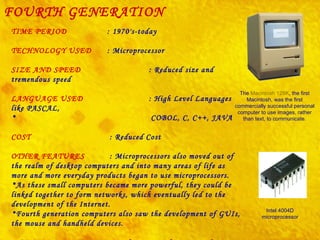
FOURTH GENERATION TIME PERIOD  : 1970's-today TECHNOLOGY USED  : Microprocessor SIZE AND SPEED    : Reduced size and tremendous speed LANGUAGE USED   : High Level Languages like PASCAL,  COBOL, C, C++, JAVA COST   : Reduced Cost OTHER FEATURES    : Microprocessors also moved out of the realm of desktop computers and into many areas of life as more and more everyday products began to use microprocessors. As these small computers became more powerful, they could be linked together to form networks, which eventually led to the development of the Internet. Fourth generation computers also saw the development of GUIs, the mouse and handheld devices. EXAMPLE  : Intel 4004, Apple Macintosh   The  Macintosh 128K , the first Macintosh, was the first commercially successful personal computer to use images, rather than text, to communicate. Intel 4004D microprocessor
FIFTH GENERATION TIME PERIOD   : 1990's -today TECHNOLOGY USED  : Microprocessor SIZE AND SPEED   : Reduced size and tremendous speed LANGUAGE USED  : Based on Artificial intelligence COST  : Reduced Cost OTHER FEATURES  :  Fifth generation computing devices, based on artificial intelligence, are still in development, though there are some applications, such as voice recognition, that are being used today. The goal of fifth-generation computing is to develop devices that respond to natural language input and are capable of learning and self-organization. EXAMPLE  :  Parallel Inference Machine Note Artificial Intelligence is the branch of computer science concerned with making computers behave like humans. Voice Recognition is the field of computer science that deals with designing computer systems that can recognize spoken words.
The current classifications of computers place them into four categories: Super Computers, Mainframes, Minicomputers, Microcomputers (Personal Computers)    Size and Speed Based Classification of Computer Systems
SUPER COMPUTER The fastest type of computer. Supercomputers are very expensive and are employed for specialized applications that require immense amounts of mathematical calculations. For example, weather forecasting requires a supercomputer.  Other uses of supercomputers include animated graphics, , nuclear energy research, and petroleum exploration.  Characteristics    Powerful     Expensive     Dedicated to one purpose - weather, satellites, military      Used by large governments or very large companies     Can be used by thousands of people at the same time     Very large - fill rooms
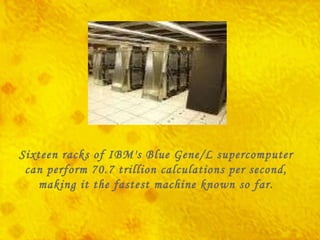
Sixteen racks of IBM's Blue Gene/L supercomputer can perform 70.7 trillion calculations per second, making it the fastest machine known so far.
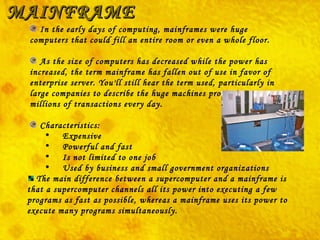
MAINFRAME In the early days of computing, mainframes were huge computers that could fill an entire room or even a whole floor. As the size of computers has decreased while the power has increased, the term mainframe has fallen out of use in favor of enterprise server. You'll still hear the term used, particularly in large companies to describe the huge machines processing millions of transactions every day.    Characteristics:        Expensive       Powerful and fast       Is not limited to one job       Used by business and small government organizations The main difference between a supercomputer and a mainframe is that a supercomputer channels all its power into executing a few programs as fast as possible, whereas a mainframe uses its power to execute many programs simultaneously.
MINICOMPUTER Another term rarely used anymore, minicomputers fall in between microcomputers (PCs) and mainframes (enterprise servers). Minicomputers are normally referred to as mid-range servers now.    Characteristics:        Smaller than mainframe        Can do several jobs at once        Can be used by many people at one time        Used by small companies
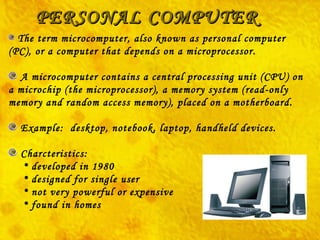
PERSONAL COMPUTER The term  microcomputer,  also known as personal computer (PC), or a computer that depends on a microprocessor. A microcomputer contains a central processing unit (CPU) on a microchip (the microprocessor), a memory system (read-only memory and random access memory), placed on a motherboard. Example:  desktop, notebook, laptop, handheld devices. Charcteristics: developed in 1980   designed for single user   not very powerful or expensive   found in homes
The current classifications of computers place them into four categories: Analog Computer Digital Computer Hybrid Computers Classification of Computers of On the basis of  How It Functions
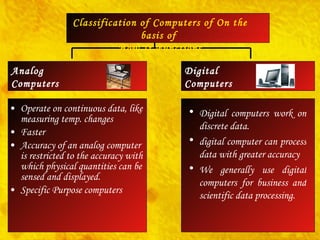
Operate on continuous data, like measuring temp. changes  Faster Accuracy of an analog computer is restricted to the accuracy with which physical quantities can be sensed and displayed.  Specific Purpose computers  Digital Computers Analog  Computers Classification of Computers of On the basis of  How It Functions Digital computers work on discrete data. digital computer can process data with greater accuracy We generally use digital computers for business and scientific data processing.  Digital  Computers
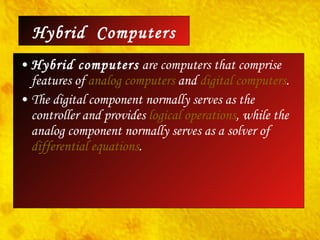
Hybrid computers  are computers that comprise features of  analog computers  and  digital   computers .  The digital component normally serves as the controller and provides  logical operations , while the analog component normally serves as a solver of  differential equations . Hybrid  Computers
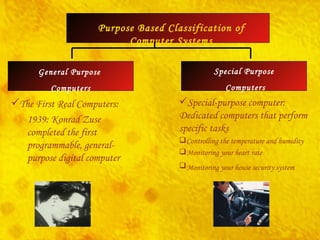
General Purpose  Computers Special Purpose  Computers Purpose Based Classification of Computer Systems The First Real Computers: 1939: Konrad Zuse completed the first programmable, general-purpose digital computer  Special-purpose computer: Dedicated computers that perform specific tasks  Controlling the temperature and humidity  Monitoring your heart rate  Monitoring your house security system
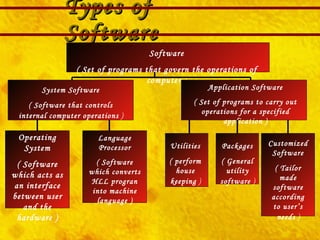
Types of Software Software ( Set of programs that govern the operations of computer ) System Software ( Software that controls internal computer operations  ) Application Software ( Set of programs to carry out operations for a specified application ) Operating System ( Software which acts as an interface between user and the hardware ) Language Processor ( Software which converts HLL progran into machine language ) Packages ( General utility software  ) Utilities ( perform house keeping  ) Customized Software ( Tailor made software according to user’s needs  )
UTILITY SOFTWARE Anti Virus e.g., Norton,  File Management tools Compression tools Disk Management tools ( Disk Cleanup, Disk Fragmentor, Backup)
APPLICATION SOFTWARE Word Processor Presentation tools Spreadsheet Package Database Management System Business Software ( ex: School Management System, Inventory Management System, Payroll System, Financial Accounting, Hotel Management, Reservation System)
Language Processors Assembler:  This language processor converts the program written in Assembly language into machine language. Compiler:  This converts HLL program into machine language in  one go . After the compiler is not needed. It is removed from the memory.Therefore,  better memory utilization . Interpreter:  This converts HLL program into machine language by converting and executing it  line by line . It must be present In  memory every time program is executed. Therefore,  unnecessary usage of memory . There are three types of Language Processors:
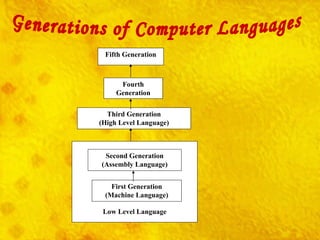
Generations of Computer Languages Low Level Language Fifth Generation Fourth Generation Third Generation (High Level Language) Second Generation (Assembly Language) First Generation (Machine Language)
Need For Operating System To make computer system convenient to use To use computer hardware in an efficient manner It decides How to do? What to do? When to do?
Functions of Operating System Processor Management Keep track of processor Decide which job should use the processor Allocate Processor Deallocate Processor File Management Keep track of files Decide which job should use the file and for what purpose Allocate the file for use Deallocate file after use
Functions of Operating System Device Management Keep track of devices Decide which job should use the processor Allocate Processor Deallocate Processor Memory Management Keep track of processor Decide which job should use the processor Allocate Processor Deallocate Processor
Types of Operating System Interactive (GUI) Time Sharing Real Time Distributed
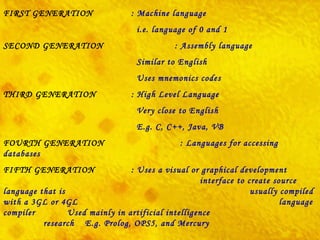
FIRST GENERATION : Machine language   i.e. language of 0 and 1 SECOND GENERATION   : Assembly language   Similar to English   Uses mnemonics codes   THIRD GENERATION : High Level Language   Very close to English   E.g. C, C++, Java, VB FOURTH GENERATION   :  Languages for accessing databases   FIFTH GENERATION : Uses a visual or graphical development    interface to create source language that is    usually compiled with a 3GL or 4GL    language compiler  Used mainly in  artificial intelligence     research   E.g.  Prolog ,  OPS5 , and  Mercury
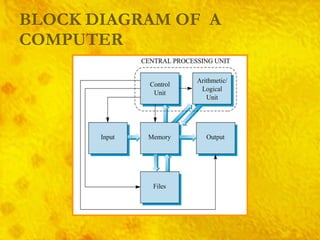
BLOCK DIAGRAM OF  A COMPUTER
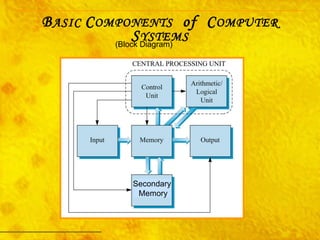
B ASIC  C OMPONENTS   of  C OMPUTER  S YSTEMS Secondary Memory (Block Diagram)
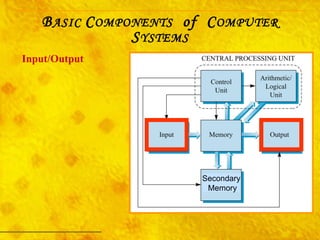
Input/Output B ASIC  C OMPONENTS   of  C OMPUTER  S YSTEMS Secondary Memory
INPUT UNIT Accepts data from outside world. Converts data into binary form acceptable to the machine. Send data in binary form to computer for further processing.
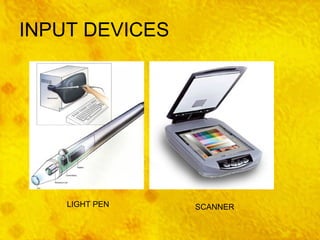
INPUT DEVICES SCANNER LIGHT PEN
Terminal Simpler than a PC Designed strictly for input and output Has keyboard and screen Does not have a processor Connected to computer with telecommunication line Allows user to key data directly into computer Input/Output Page 28 B ASIC  C OMPONENTS   of  C OMPUTER  S YSTEMS
Common input methods: Magnetic ink character recognition (MICR)  – used to process bank checks Optical character recognition (OCR)  – directly scans typed, printed, or handwritten material Imaging  – inputs digital form of documents and photos Bar code labeling  – scans bar codes on packages or products, and reads into computer Input/Output Page 29 B ASIC  C OMPONENTS   of  C OMPUTER  S YSTEMS
Common output methods: Print  – output to paper using various types of printers Computer output microfilm (COM)  – microfilm generated for archive copies in small space Voice response units  – computer recognizes input, generates verbal response messages Input/Output Page 29 B ASIC  C OMPONENTS   of  C OMPUTER  S YSTEMS
Input/Output Page 29 Multimedia  –  relatively new term for computer input and output in the form of text, graphics, sound, still images, animations, and/or video Of interest … B ASIC  C OMPONENTS   of  C OMPUTER  S YSTEMS
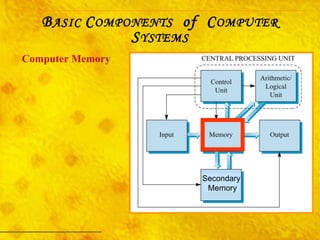
Computer Memory B ASIC  C OMPONENTS   of  C OMPUTER  S YSTEMS Secondary Memory
Memory All data flows to and from memory Divided into  cells : Each has a unique address Memory cell types: Byte  – stores one character of data Word  – stores two or more characters of data Computer Memory Page 31 B ASIC  C OMPONENTS   of  C OMPUTER  S YSTEMS
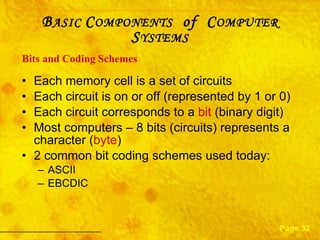
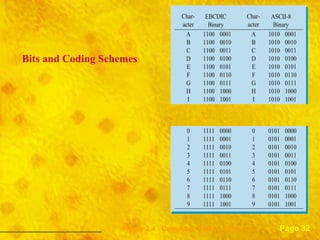
Each memory cell is a set of circuits Each circuit is on or off (represented by 1 or 0) Each circuit corresponds to a  bit  (binary digit) Most computers – 8 bits (circuits) represents a character ( byte ) 2 common bit coding schemes used today: ASCII EBCDIC  Bits and Coding Schemes Page 32 B ASIC  C OMPONENTS   of  C OMPUTER  S YSTEMS
Bits and Coding Schemes Page 32 Figure 2.4  Computer Coding Schemes . . . . . . . . . . . . . . . . . .
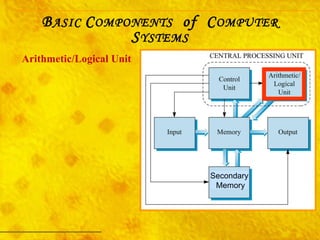
Arithmetic/Logical Unit B ASIC  C OMPONENTS   of  C OMPUTER  S YSTEMS Secondary Memory
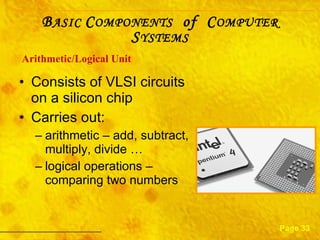
Consists of VLSI circuits on a silicon chip Carries out:  arithmetic – add, subtract, multiply, divide … logical operations – comparing two numbers Arithmetic/Logical   Unit Page 33 B ASIC  C OMPONENTS   of  C OMPUTER  S YSTEMS
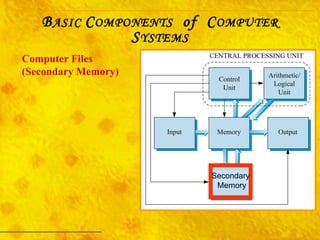
Computer Files (Secondary Memory) B ASIC  C OMPONENTS   of  C OMPUTER  S YSTEMS Secondary Memory
B ASIC  C OMPONENTS   OF  C OMPUTER  S YSTEMS When power is off, everything stored in Main memory is lost Computer files are used to store data  for long term File storage devices (Secondary Memory) : Magnetic tape drives, disk drives, floppy drives Optical CD or DVD drives Computer Files (Secondary Memory) Page 33
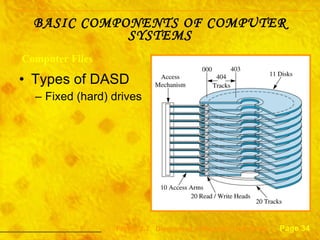
Types of DASD Fixed (hard) drives BASIC COMPONENTS OF COMPUTER SYSTEMS Computer Files Page 34 Figure 2.7  Diagram of a Magnetic Disk Drive
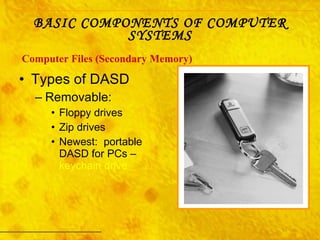
Types of DASD Removable: Floppy drives Zip drives Newest:  portable DASD for PCs –  keychain drive   BASIC COMPONENTS OF COMPUTER SYSTEMS Computer Files (Secondary Memory)

Computer System Organization

  • 1.
    Presentation made by:Ms. Archika Bhatia COMPUTER SYSTEM ORGANISATION
  • 2.
    Index Evolution ofcomputers History of computing Basics of computer and its operation: Functional Components and their interconnections Classification of Computers Software Concepts: Types of Software - System Software, Utility Software and Application Software;
  • 3.
    EVOLUTION OF COMPUTERThe development of the modern day computer was the result of advances in technologies and man's need to quantify. Let us look at some of the important milestones in the evolution of computers .
  • 4.
    ABACUS The abacuswas invented in 3000 BC in Babylonia. Beads on rods to count and calculate still widely used in Asia!
  • 5.
    Slide Rule SlideRule 1630 based on Napier’s rules for logarithms used until 1970s
  • 6.
    PASCAL’S ADDING MACHINEIn 1642 AD, Blaise Pascal , a French mathematician invented a calculating machine named as Adding Machine . This machine was capable of doing Addition and Subtraction. This device is known as the First Calculator of the world .
  • 7.
    LEIBNITZ’S CALCULATOR In1671 AD, Gotfried Leibnitz, a German Mathematician improved the Adding machine and made a new machine capable of performing multiplication and division also.
  • 8.
    first stored program- metal cards first computer manufacturing still in use today! Jacquard Loom - 1801
  • 9.
    BABBAGE’S DIFFERENCE ENGINECharles Babbage was a British mathematician. In 1822, he designed a machine called Difference Engine . It aimed at calculating mathematical tables. Since the technology was not so advanced at that time this machine could not be made.
  • 10.
    BABBAGE’S ANALYTICAL ENGINEIn 1833, Charles Babbage designed a machine called Analytical Engine . It had almost all the parts of a modern computer. Unfortunately, this machine could not be built because of lack of technology. His designs remained a concept. His great designs earned him the title of ‘ FATHER OF COMPUTERS‘.
  • 11.
    LADY ADA LordByron's daughter, Ada, Countess of Lovelace , suggested to Babbage that he use the binary system in his machine. She wrote programs for his analytical engine in 1840, becoming the world's first computer programmer.
  • 12.
    HOLLERITH’S TABULATING MACHINEHollerith, a Mathematician, invented a fast counting machine named Tabulating Machine in 1880. This machine was used by American Department of Census to complete their 1880 census data.
  • 13.
    MARK I COMPUTERHoward Aiken of Harvard University in USA joined hands with the company IBM. He developed a computer named Mark I in 1943. It could perform mathematical operations very fast. It could perform one operation per second.
  • 14.
    ENIAC The firstelectronic computer ENIAC was developed in 1946 by a team lead by Professor Eckert and Mauchly at the University of Pennsylvania in USA. Electronic Numerical Integrator and Computer (ENIAC) was very huge and very fast. It could solve 5000 operations per second.
  • 15.
    INTEL 8080 PROCESSORIn 1974 the Intel 8080 processor was introduced - it became the basis for the first personal computers.
  • 16.
    Definition of ComputerElectronic Device Accepts and stores input Manipulates result Outputs results Under direction of stores programs and instructions
  • 17.
    Characteristics of ComputerSpeed Accuracy Diligence : not afflicted to tiredness, monotony, lack of concentration like human beings. Reliability Versatility : can work with different types of data like sound, graphics, audio. Memory
  • 18.
    What is Dataand Information Data is raw facts ex: India, 200, 4, Cricket, Wicket Information is meaningful and arranged form of data ex: India’s score in Cricket is 200 for 4 wickets.
  • 19.
    Hardware refers tophysical components that can be seen and touched. E.g. CPU, Memory, I/O devices. HARDWARE SOFTWARE Software is a set of programs that make the Hardware of the computer run. Program is a set of instructions.
  • 20.
    FIRMWARE LIVEWARE Firmwareis like prewritten program that is permanently stored in read-only memory. BIOS ( Basic Input Output Services ) instructions are an example of firmware. It is the term generally used for the people associated with and benefited from the computer system.
  • 21.
    Classification of ComputerSystems On the basis of Technology Generations of computers On the basis of Purpose General Purpose, special Purpose computers On The basis of size & Speed Micro, Mini & Super Computers On the basis of how it functions Analog, Digital & Hybrid Computers
  • 22.
    Generations of ComputerEach generation of computer is characterized by a major technological development that fundamentally changed the way computers operate, resulting in increasingly Technology Based Classification of Computer Systems smaller, cheaper, more powerful more efficient and reliable devices.
  • 23.
    TIME PERIOD : 1940's-1950's TECHNOLOGY USED : Vacuum Tubes SIZE AND SPEED : Huge, taking up entire rooms, Slow speed LANGUAGE USED : Machine language COST : System and working cost very high. OTHER FEATURES : Used a great deal of electricity. Generated a lot of heat. Input was based on punched cards and paper tape, and output was displayed on printouts. EXAMPLE : UNIVAC and ENIAC Structure of a Vaccum Tube UNIVAC ENIAC FIRST GENERATION
  • 24.
    SECOND GENERATION TIMEPERIOD : 1950's- 1960's TECHNOLOGY USED : Transistors SIZE AND SPEED : Lesser size and increased speed LANGUAGE USED : Assembly language and languages like COBOL and FORTRAN COST : Cost decreased OTHER FEATURES : More efficient and reliable. Though the transistors still generated a great deal of heat that subjected the computer to damage, it was a vast improvement over the vacuum tube. Second-generation computers still relied on punched cards for input and printouts for output. EXAMPLE : UNIVAC 1108, IBM 1401, CDC 1604 UNIVAC 1108 IBM 1401 TRANSISITORS
  • 25.
    THIRD GENERATION TIMEPERIOD : late 1960's-1970's TECHNOLOGY USED : Integrated Circuit SIZE AND SPEED : Size Lesser and speed further increased LANGUAGE USED : Operating System was developed. COST : Cost decreased further OTHER FEATURES : Instead of punched cards and printouts, users interacted with third generation computers through keyboards and monitors and interfaced with an operating system , which allowed the device to run many different applications at one time with a central program that monitored the memory. Computers for the first time became accessible to a mass audience because they were smaller and cheaper than their predecessors. EXAMPLE : IBM-360 series, Honeywell Model 316, Honeywell – 6000 series, CDC – 1700. IBM 360/50
  • 26.
    FOURTH GENERATION TIMEPERIOD : 1970's-today TECHNOLOGY USED : Microprocessor SIZE AND SPEED : Reduced size and tremendous speed LANGUAGE USED : High Level Languages like PASCAL, COBOL, C, C++, JAVA COST : Reduced Cost OTHER FEATURES : Microprocessors also moved out of the realm of desktop computers and into many areas of life as more and more everyday products began to use microprocessors. As these small computers became more powerful, they could be linked together to form networks, which eventually led to the development of the Internet. Fourth generation computers also saw the development of GUIs, the mouse and handheld devices. EXAMPLE : Intel 4004, Apple Macintosh The Macintosh 128K , the first Macintosh, was the first commercially successful personal computer to use images, rather than text, to communicate. Intel 4004D microprocessor
  • 27.
    FIFTH GENERATION TIMEPERIOD : 1990's -today TECHNOLOGY USED : Microprocessor SIZE AND SPEED : Reduced size and tremendous speed LANGUAGE USED : Based on Artificial intelligence COST : Reduced Cost OTHER FEATURES : Fifth generation computing devices, based on artificial intelligence, are still in development, though there are some applications, such as voice recognition, that are being used today. The goal of fifth-generation computing is to develop devices that respond to natural language input and are capable of learning and self-organization. EXAMPLE : Parallel Inference Machine Note Artificial Intelligence is the branch of computer science concerned with making computers behave like humans. Voice Recognition is the field of computer science that deals with designing computer systems that can recognize spoken words.
  • 28.
    The current classificationsof computers place them into four categories: Super Computers, Mainframes, Minicomputers, Microcomputers (Personal Computers)  Size and Speed Based Classification of Computer Systems
  • 29.
    SUPER COMPUTER Thefastest type of computer. Supercomputers are very expensive and are employed for specialized applications that require immense amounts of mathematical calculations. For example, weather forecasting requires a supercomputer. Other uses of supercomputers include animated graphics, , nuclear energy research, and petroleum exploration. Characteristics    Powerful     Expensive     Dedicated to one purpose - weather, satellites, military     Used by large governments or very large companies     Can be used by thousands of people at the same time     Very large - fill rooms
  • 30.
    Sixteen racks ofIBM's Blue Gene/L supercomputer can perform 70.7 trillion calculations per second, making it the fastest machine known so far.
  • 31.
    MAINFRAME In theearly days of computing, mainframes were huge computers that could fill an entire room or even a whole floor. As the size of computers has decreased while the power has increased, the term mainframe has fallen out of use in favor of enterprise server. You'll still hear the term used, particularly in large companies to describe the huge machines processing millions of transactions every day.   Characteristics:       Expensive      Powerful and fast      Is not limited to one job      Used by business and small government organizations The main difference between a supercomputer and a mainframe is that a supercomputer channels all its power into executing a few programs as fast as possible, whereas a mainframe uses its power to execute many programs simultaneously.
  • 32.
    MINICOMPUTER Another termrarely used anymore, minicomputers fall in between microcomputers (PCs) and mainframes (enterprise servers). Minicomputers are normally referred to as mid-range servers now.   Characteristics:       Smaller than mainframe       Can do several jobs at once       Can be used by many people at one time       Used by small companies
  • 33.
    PERSONAL COMPUTER Theterm microcomputer, also known as personal computer (PC), or a computer that depends on a microprocessor. A microcomputer contains a central processing unit (CPU) on a microchip (the microprocessor), a memory system (read-only memory and random access memory), placed on a motherboard. Example:  desktop, notebook, laptop, handheld devices. Charcteristics: developed in 1980   designed for single user   not very powerful or expensive   found in homes
  • 34.
    The current classificationsof computers place them into four categories: Analog Computer Digital Computer Hybrid Computers Classification of Computers of On the basis of How It Functions
  • 35.
    Operate on continuousdata, like measuring temp. changes Faster Accuracy of an analog computer is restricted to the accuracy with which physical quantities can be sensed and displayed. Specific Purpose computers Digital Computers Analog Computers Classification of Computers of On the basis of How It Functions Digital computers work on discrete data. digital computer can process data with greater accuracy We generally use digital computers for business and scientific data processing. Digital Computers
  • 36.
    Hybrid computers are computers that comprise features of analog computers and digital computers . The digital component normally serves as the controller and provides logical operations , while the analog component normally serves as a solver of differential equations . Hybrid Computers
  • 37.
    General Purpose Computers Special Purpose Computers Purpose Based Classification of Computer Systems The First Real Computers: 1939: Konrad Zuse completed the first programmable, general-purpose digital computer Special-purpose computer: Dedicated computers that perform specific tasks Controlling the temperature and humidity Monitoring your heart rate Monitoring your house security system
  • 38.
    Types of SoftwareSoftware ( Set of programs that govern the operations of computer ) System Software ( Software that controls internal computer operations ) Application Software ( Set of programs to carry out operations for a specified application ) Operating System ( Software which acts as an interface between user and the hardware ) Language Processor ( Software which converts HLL progran into machine language ) Packages ( General utility software ) Utilities ( perform house keeping ) Customized Software ( Tailor made software according to user’s needs )
  • 39.
    UTILITY SOFTWARE AntiVirus e.g., Norton, File Management tools Compression tools Disk Management tools ( Disk Cleanup, Disk Fragmentor, Backup)
  • 40.
    APPLICATION SOFTWARE WordProcessor Presentation tools Spreadsheet Package Database Management System Business Software ( ex: School Management System, Inventory Management System, Payroll System, Financial Accounting, Hotel Management, Reservation System)
  • 41.
    Language Processors Assembler: This language processor converts the program written in Assembly language into machine language. Compiler: This converts HLL program into machine language in one go . After the compiler is not needed. It is removed from the memory.Therefore, better memory utilization . Interpreter: This converts HLL program into machine language by converting and executing it line by line . It must be present In memory every time program is executed. Therefore, unnecessary usage of memory . There are three types of Language Processors:
  • 42.
    Generations of ComputerLanguages Low Level Language Fifth Generation Fourth Generation Third Generation (High Level Language) Second Generation (Assembly Language) First Generation (Machine Language)
  • 43.
    Need For OperatingSystem To make computer system convenient to use To use computer hardware in an efficient manner It decides How to do? What to do? When to do?
  • 44.
    Functions of OperatingSystem Processor Management Keep track of processor Decide which job should use the processor Allocate Processor Deallocate Processor File Management Keep track of files Decide which job should use the file and for what purpose Allocate the file for use Deallocate file after use
  • 45.
    Functions of OperatingSystem Device Management Keep track of devices Decide which job should use the processor Allocate Processor Deallocate Processor Memory Management Keep track of processor Decide which job should use the processor Allocate Processor Deallocate Processor
  • 46.
    Types of OperatingSystem Interactive (GUI) Time Sharing Real Time Distributed
  • 47.
    FIRST GENERATION :Machine language i.e. language of 0 and 1 SECOND GENERATION : Assembly language Similar to English Uses mnemonics codes THIRD GENERATION : High Level Language Very close to English E.g. C, C++, Java, VB FOURTH GENERATION : Languages for accessing databases FIFTH GENERATION : Uses a visual or graphical development interface to create source language that is usually compiled with a 3GL or 4GL language compiler Used mainly in artificial intelligence research E.g. Prolog , OPS5 , and Mercury
  • 48.
    BLOCK DIAGRAM OF A COMPUTER
  • 49.
    B ASIC C OMPONENTS of C OMPUTER S YSTEMS Secondary Memory (Block Diagram)
  • 50.
    Input/Output B ASIC C OMPONENTS of C OMPUTER S YSTEMS Secondary Memory
  • 51.
    INPUT UNIT Acceptsdata from outside world. Converts data into binary form acceptable to the machine. Send data in binary form to computer for further processing.
  • 52.
  • 53.
    Terminal Simpler thana PC Designed strictly for input and output Has keyboard and screen Does not have a processor Connected to computer with telecommunication line Allows user to key data directly into computer Input/Output Page 28 B ASIC C OMPONENTS of C OMPUTER S YSTEMS
  • 54.
    Common input methods:Magnetic ink character recognition (MICR) – used to process bank checks Optical character recognition (OCR) – directly scans typed, printed, or handwritten material Imaging – inputs digital form of documents and photos Bar code labeling – scans bar codes on packages or products, and reads into computer Input/Output Page 29 B ASIC C OMPONENTS of C OMPUTER S YSTEMS
  • 55.
    Common output methods:Print – output to paper using various types of printers Computer output microfilm (COM) – microfilm generated for archive copies in small space Voice response units – computer recognizes input, generates verbal response messages Input/Output Page 29 B ASIC C OMPONENTS of C OMPUTER S YSTEMS
  • 56.
    Input/Output Page 29Multimedia – relatively new term for computer input and output in the form of text, graphics, sound, still images, animations, and/or video Of interest … B ASIC C OMPONENTS of C OMPUTER S YSTEMS
  • 57.
    Computer Memory BASIC C OMPONENTS of C OMPUTER S YSTEMS Secondary Memory
  • 58.
    Memory All dataflows to and from memory Divided into cells : Each has a unique address Memory cell types: Byte – stores one character of data Word – stores two or more characters of data Computer Memory Page 31 B ASIC C OMPONENTS of C OMPUTER S YSTEMS
  • 59.
    Each memory cellis a set of circuits Each circuit is on or off (represented by 1 or 0) Each circuit corresponds to a bit (binary digit) Most computers – 8 bits (circuits) represents a character ( byte ) 2 common bit coding schemes used today: ASCII EBCDIC Bits and Coding Schemes Page 32 B ASIC C OMPONENTS of C OMPUTER S YSTEMS
  • 60.
    Bits and CodingSchemes Page 32 Figure 2.4 Computer Coding Schemes . . . . . . . . . . . . . . . . . .
  • 61.
    Arithmetic/Logical Unit BASIC C OMPONENTS of C OMPUTER S YSTEMS Secondary Memory
  • 62.
    Consists of VLSIcircuits on a silicon chip Carries out: arithmetic – add, subtract, multiply, divide … logical operations – comparing two numbers Arithmetic/Logical Unit Page 33 B ASIC C OMPONENTS of C OMPUTER S YSTEMS
  • 63.
    Computer Files (SecondaryMemory) B ASIC C OMPONENTS of C OMPUTER S YSTEMS Secondary Memory
  • 64.
    B ASIC C OMPONENTS OF C OMPUTER S YSTEMS When power is off, everything stored in Main memory is lost Computer files are used to store data for long term File storage devices (Secondary Memory) : Magnetic tape drives, disk drives, floppy drives Optical CD or DVD drives Computer Files (Secondary Memory) Page 33
  • 65.
    Types of DASDFixed (hard) drives BASIC COMPONENTS OF COMPUTER SYSTEMS Computer Files Page 34 Figure 2.7 Diagram of a Magnetic Disk Drive
  • 66.
    Types of DASDRemovable: Floppy drives Zip drives Newest: portable DASD for PCs – keychain drive BASIC COMPONENTS OF COMPUTER SYSTEMS Computer Files (Secondary Memory)