E-commerce 2013
Kenneth C. Laudon
Carol Guercio Traver
business. technology. society.
ninth edition
Chapter 6
E-commerce Marketing Concepts: Social,
Mobile, Local
Copyright © 2013 Pearson Education, Inc.
Class Discussion
Facebook: Does Social Marketing Work?
■ Have you ever made a purchase based on
something you have read or seen on
Facebook? What was the product and what
made you interested?
■ What obstacles does Facebook face in
monetizing itself as a marketing and
advertising platform?
■ Are there other ways for Facebook to make a
profit from marketers and advertisers?
Copyright © 2013 Pearson Education, Inc. Slide 6-*
Consumers Online: The Internet
Audience and Consumer Behavior
■ Around 75% (89 million) U.S. households have
Internet access in 2012
■ Growth rate has slowed
■ Intensity and scope of use both increasing
■ Some demographic groups have much higher
percentages of online usage than others
❖ Gender, age, ethnicity, community type, income,
education
Copyright © 2013 Pearson Education, Inc. Slide 6-*
Consumers Online (cont.)
■ Broadband vs. dial-up audiences, new mobile
audience
■ Neighborhood effects
■ Lifestyle and sociological impacts
❖ Use of Internet by children, teens
❖ Use of Internet as substitute for other social activities
■ Media choices
❖ Traditional media competes with Internet for attention
❖ Television viewing has increased with Internet usage
Copyright © 2013 Pearson Education, Inc. Slide 6-*
Consumer Behavior Models
■ Study of consumer behavior
❖Attempts to explain what consumers purchase
and where, when, how much, and why they buy
■ Consumer behavior models
❖Predict wide range of consumer decisions
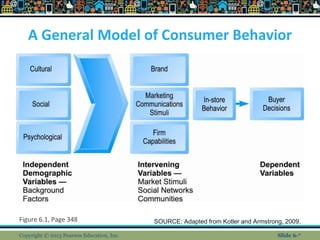
❖Based on background demographic factors and
other intervening, more immediate variables
Copyright © 2013 Pearson Education, Inc. Slide 6-*
A General Model of Consumer Behavior
Figure 6.1, Page 348
Copyright © 2013 Pearson Education, Inc.
SOURCE: Adapted from Kotler and Armstrong, 2009.
Slide 6-*
Background Demographic Factors
■ Culture: Affects entire nations
■ Subculture
❖ Subsets formed around major social differences
(ethnicity, age, lifestyle, geography)
■ Social networks and communities
❖ Direct reference groups
❖ Indirect reference groups
❖ Opinion leaders
❖ Lifestyle groups
■ Psychological profile
Copyright © 2013 Pearson Education, Inc. Slide 6-*
The Online Purchasing Decision
■ Psychographic research
❖ Combines demographic and psychological data
❖ Divides market into various groups based on social
class, lifestyle, and/or personality characteristics
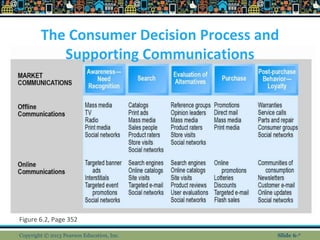
■ Stages in consumer decision process:
❖ Awareness of need
❖ Search for more information
❖ Evaluation of alternatives
❖ Actual purchase decision
❖ Post-purchase contact with firm
Copyright © 2013 Pearson Education, Inc. Slide 6-*
The Consumer Decision Process and
Supporting Communications
Figure 6.2, Page 352
Copyright © 2013 Pearson Education, Inc. Slide 6-*
A Model of Online
Consumer Behavior
■ Decision process similar for online and offline
behavior
■ General online behavior model
❖ Consumer skills
❖ Product characteristics
❖ Attitudes toward online purchasing
❖ Perceptions about control over Web environment
❖ Web site features: latency, usability, security
■ Clickstream behavior
Copyright © 2013 Pearson Education, Inc. Slide 6-*
A Model of Online Consumer Behavior
Figure 6.3, Page 353
Copyright © 2013 Pearson Education, Inc. Slide 6-*
A Model of Online Consumer Behavior (cont.)
■ Clickstream factors include:
❖ Number of days since last visit
❖ Speed of clickstream behavior
❖ Number of products viewed during last visit
❖ Number of pages viewed
❖ Supplying personal information
❖ Number of days since last purchase
❖ Number of past purchases
■ Clickstream marketing
❖ Developed dynamically as customers use Internet
Copyright © 2013 Pearson Education, Inc. Slide 6-*
Shoppers: Browsers and Buyers
■ Shoppers: 88% of Internet users
❖ 72% buyers
❖ 16% browsers (purchase offline)
■ One-third of offline retail purchases influenced by
online activities
■ Online traffic also influenced by offline brands
and shopping
■ E-commerce and traditional commerce are
coupled: Part of a continuum of consuming
behavior
Copyright © 2013 Pearson Education, Inc. Slide 6-*
What Consumers Shop for and
Buy Online
■ Big ticket items
❖Travel, computer hardware, electronics
❖Consumers now more confident in purchasing
costlier items
■ Small ticket items ($100 or less)
❖Apparel, books, office supplies, software, etc.
❖Sold by first movers on Web
■ Physically small items
■ High margin items
Copyright © 2013 Pearson Education, Inc. Slide 6-*
How Consumers Shop
■ How shoppers find online vendors
❖Search engines—59%
❖Marketplaces (Amazon, eBay)—28%
❖Direct to retail sites—10%
❖Other methods—3%
■ Online shoppers are highly intentional
■ StumbleUpon
■ Recommender systems
Copyright © 2013 Pearson Education, Inc. Slide 6-*
Trust, Utility, and Opportunism
in Online Markets
■ Two most important factors shaping
decision to purchase online:
❖Utility:
■ Better prices, convenience, speed
❖Trust:
■ Asymmetry of information can lead to opportunistic
behavior by sellers
■ Sellers can develop trust by building strong
reputations for honesty, fairness, delivery
Copyright © 2013 Pearson Education, Inc. Slide 6-*
Basic Marketing Concepts
■ Marketing
❖Strategies and actions to establish relationship
with consumer and encourage purchases
❖Addresses competitive situation of industries
and firms
❖Seeks to create unique, highly differentiated
products or services that are produced or
supplied by one trusted firm
■ Unmatchable feature set
■ Avoidance of becoming commodity
Copyright © 2013 Pearson Education, Inc. Slide 6-*
The Digital Commerce
Marketing Platform
■ Multi-channel marketing plan
❖ Web site
❖ Traditional online marketing
■ Search engine, display, e-mail, affiliate
❖ Social marketing
■ Social networks, blogs, video, game
❖ Mobile marketing
■ Mobile/tablet sites, apps
❖ Offline marketing
■ Television, radio, newspapers
Copyright © 2013 Pearson Education, Inc. Slide 6-*
Strategic Issues and Questions
■ Which part of the marketing plan should
you focus on first?
■ How do you integrate the different
platforms for a coherent message?
■ How do you allocate resources?
❖How do you measure and compare metrics from
different platforms?
❖How do you link each to sales revenues?
Copyright © 2013 Pearson Education, Inc. Slide 6-*
Can Brands Survive the Internet?
Brands and Price Dispersion
■ Vision: “Law of One Price, ”end of brands
■ Instead:
❖ Consumers still pay premium prices for differentiated
products
❖ E-commerce firms rely heavily on brands to attract
customers and charge premium prices
❖ Price dispersion
❖ Large differences in price sensitivity for same product
❖ “Library effect”
Copyright © 2013 Pearson Education, Inc. Slide 6-*
Online Segmenting, Targeting, and
Positioning
■ Segmenting: Allows firms to differentiate products
to fit consumer needs and charge different prices
■ Types of segmentation
❖ Behavioral
❖ Demographic
❖ Psychographic
❖ Technical
❖ Contextual
❖ Search
Copyright © 2013 Pearson Education, Inc. Slide 6-*
The Digital Commerce Marketing
Platform: Strategies and Tools
■ Internet marketing (vs. traditional)
❖More personalized
❖More participatory
❖More peer-to-peer
❖More communal
■ The most effective Internet marketing
has all four features
Copyright © 2013 Pearson Education, Inc. Slide 6-*
Customer Engagement
■ Customer conversations about:
❖Products and services
❖Customer experience with products
❖Customer likes and dislikes
■ Conversations conducted through:
❖Web site feedback
❖Blogs
❖Facebook
❖Twitter
Copyright © 2013 Pearson Education, Inc. Slide 6-*
Generic Market Entry Strategies
Figure 6-11, Page 391
Copyright © 2013 Pearson Education, Inc. Slide 6-*
Establishing the Customer
Relationship
■ Web site functions to:
❖Establish brand identity and customer
expectations
■ Differentiating product
❖Inform and educate customer
❖Shape customer experience
❖Anchor the brand online
■ Central point for all marketing messages
Copyright © 2013 Pearson Education, Inc. Slide 6-*
Traditional Online Marketing Tools
■ Search engine marketing (SEM)
❖Sponsored links
❖Search result display ads
❖Keywords
❖Search engine optimization (SEO)
■ Display ad marketing
❖Advertising networks
❖Ad exchanges, real-time bidding
Copyright © 2013 Pearson Education, Inc. Slide 6-*
How an Advertising Network
Such as DoubleClick Works
Figure 6.6, Page 372
Copyright © 2013 Pearson Education, Inc. Slide 6-*
Traditional Online Marketing Tools (cont.)
■ E-mail marketing
❖Very inexpensive
❖3% click-throughs in targeted campaigns
❖Permission marketing
■ Affiliate marketing
■ Lead-generation marketing
■ Sponsorship marketing
Copyright © 2013 Pearson Education, Inc. Slide 6-*
Social Marketing
■ Fastest growing type of online
marketing
■ Long-term prospects unknown
■ Four features driving growth
■ Social sign-on
■ Collaborative shopping
■ Network notification
■ Social search (recommendation)
Copyright © 2013 Pearson Education, Inc. Slide 6-*
Twitter Marketing
■ Real-time interaction with consumers
■ 50% companies with 100+ employees
using Twitter
■ Twitter marketing products
❖Promoted Tweets
❖Promoted Trends
❖Promoted Accounts
Copyright © 2013 Pearson Education, Inc. Slide 6-*
Blog Marketing
■ 43% of all U.S. companies use blogs for
marketing
■ Ideal for starting viral campaigns
■ Can use blogs for both branding
messages and advertisements
■ Blog advertising networks
■ Brand advocacy blogs
Copyright © 2013 Pearson Education, Inc. Slide 6-*
Viral Marketing
■ Form of social marketing
■ Customers pass along marketing
message to friends, family, coworkers
■ Referred customers cost less to acquire
and keep
■ Venues are e-mail, social networks,
video and game sites
Copyright © 2013 Pearson Education, Inc. Slide 6-*
Mobile Marketing
■ 7% of online marketing, growing rapidly
■ Major formats:
❖ Messaging (SMS)
❖ Display
❖ Search
❖ Video
■ Other formats:
❖ Quick Response (QR) codes
❖ Couponing
Copyright © 2013 Pearson Education, Inc. Slide 6-*
Insight on Business: Class Discussion
Mobile Marketing: Land Rover Seeks
Engagement on the Small Screen
■ Why do mobile devices represent such a
promising opportunity for marketers?
■ Have you ever responded to mobile marketing
messages?
■ What are some of the new types of marketing
that mobile devices have spawned?
■ What the disadvantages of social network
marketing?
Copyright © 2013 Pearson Education, Inc. Slide 6-*
App Marketing
■ Revenue sources
❖ Pay-per-app
❖ In-app purchase
❖ Subscriptions
❖ Advertising
■ Most popular types of apps
❖ Social network, banking, search, news
■ Retailer’s apps
❖ Browsing and purchasing
Copyright © 2013 Pearson Education, Inc. Slide 6-*
Local Marketing
■ Marketing geared to user’s geographic
location
■ Local searches:
❖20% of all searches
❖40% of mobile searches
■ Most common local marketing tools
❖Geotargeting with Google Maps
❖Display ads in hyperlocal publications
Copyright © 2013 Pearson Education, Inc. Slide 6-*
Multi-Channel Marketing
■ Average American spends 24% of media
time on Internet, rest on other channels
■ Television, radio, newspapers, and
magazines
■ Consumers also multitask, using several
media
■ Internet campaigns strengthened by
using other channels
Copyright © 2013 Pearson Education, Inc. Slide 6-*
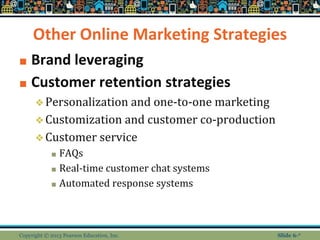
Other Online Marketing Strategies
■ Brand leveraging
■ Customer retention strategies
❖Personalization and one-to-one marketing
❖Customization and customer co-production
❖Customer service
■ FAQs
■ Real-time customer chat systems
■ Automated response systems
Copyright © 2013 Pearson Education, Inc. Slide 6-*
The Mass Market-Personalization
Continuum
Figure 6.13, Page 407
Copyright © 2013 Pearson Education, Inc. Slide 6-*
Net Pricing Strategies
■ Pricing
❖Integral part of marketing strategy
❖Traditionally based on:
■ Fixed cost
■ Variable costs
■ Demand curve
■ Price discrimination
❖Selling products to different people and groups
based on willingness to pay
Copyright © 2013 Pearson Education, Inc. Slide 6-*
Net Pricing Strategies (cont.)
■ Free and freemium
❖ Can be used to build market awareness
■ Versioning
❖ Creating multiple versions of product and selling essentially same
product to different market segments at different prices
■ Bundling
❖ Offers consumers two or more goods for one price
■ Dynamic pricing:
❖ Auctions
❖ Yield management
❖ Flash marketing
Copyright © 2013 Pearson Education, Inc. Slide 6-*
Long-Tail Marketing
■ Internet allows for sales of obscure
products with little demand
■ Substantial revenue because
■ Near zero inventory costs
■ Little marketing costs
■ Search and recommendation engines
Copyright © 2013 Pearson Education, Inc. Slide 6-*
Insight on Technology: Class Discussion
The Long Tail: Big Hits and Big Misses
■ What are “recommender systems”?
Give an example you have used.
■ What is the “Long Tail” and how do
recommender systems support sales of
items in the Long Tail?
■ How can human editors, including
consumers, make recommender
systems more helpful?
Copyright © 2013 Pearson Education, Inc. Slide 6-*
Channel Management Strategies
■ Channels:
❖ Different methods by which goods can be distributed
and sold
■ Channel conflict:
❖ When new venue for selling products or services
threatens or destroys existing sales venues
❖ e.g., online airline/travel services and traditional offline
travel agencies
■ Some manufacturers are using partnership
model to avoid channel conflict
Copyright © 2013 Pearson Education, Inc. Slide 6-*
The Revolution in
Internet Marketing Technologies
■ Internet’s main impacts on marketing:
❖ Scope of marketing communications broadened
❖ Richness of marketing communications increased
❖ Information intensity of marketplace expanded
❖ Always-on mobile environment expands marketing opportunities
■ Internet marketing technologies:
❖ Web transaction logs
❖ Tracking files
❖ Databases, data warehouses, data mining
❖ Hadoop and Big Data
❖ Customer relationship management systems
Copyright © 2013 Pearson Education, Inc. Slide 6-*
Web Transaction Logs
■ Built into Web server software
■ Record user activity at Web site
■ Provides much marketing data, especially
combined with:
❖ Registration forms
❖ Shopping cart database
■ Answers questions such as:
❖ What are major patterns of interest and purchase?
❖ After home page, where do users go first? Second?
Copyright © 2013 Pearson Education, Inc. Slide 6-*
Tracking Files
■ Users browsing tracked as they move
from site to site
■ Four types of tracking files
❖Cookies
■ Small text file placed by Web site
■ Allows Web marketers to gather data
❖Flash cookies
❖Beacons (“bugs”)
❖Apps
Copyright © 2013 Pearson Education, Inc. Slide 6-*
Insight on Society: Class Discussion
Every Move You Make, Every Click You
Make, We’ll Be Tracking You
■ Are beacons innocuous? Or are they an
invasion of personal privacy?
■ Do you think your Web browsing should be
known to marketers?
■ What are the Privacy Foundation guidelines
for Web beacons?
■ Should online shopping be allowed to be a
private activity?
Copyright © 2013 Pearson Education, Inc. Slide 6-*
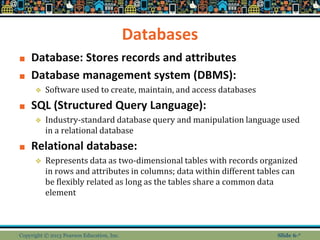
Databases
■ Database: Stores records and attributes
■ Database management system (DBMS):
❖ Software used to create, maintain, and access databases
■ SQL (Structured Query Language):
❖ Industry-standard database query and manipulation language used
in a relational database
■ Relational database:
❖ Represents data as two-dimensional tables with records organized
in rows and attributes in columns; data within different tables can
be flexibly related as long as the tables share a common data
element
Copyright © 2013 Pearson Education, Inc. Slide 6-*
Data Warehouses and Data Mining
■ Data warehouse:
❖ Collects firm’s transactional and customer data in single
location for offline analysis by marketers and site
managers
■ Data mining:
❖ Analytical techniques to find patterns in data, model
behavior of customers, develop customer profiles
■ Query-driven data mining
■ Model-driven data mining
■ Rule-based data mining
Copyright © 2013 Pearson Education, Inc. Slide 6-*
Hadoop and the Challenge of Big Data
■ “Big data”
❖Web traffic, e-mail, social media content
■ Traditional DBMS unable to process the
volumes—petabytes and exabytes
■ Hadoop
❖Open-source software solution
❖Distributed processing among inexpensive
servers
Copyright © 2013 Pearson Education, Inc. Slide 6-*
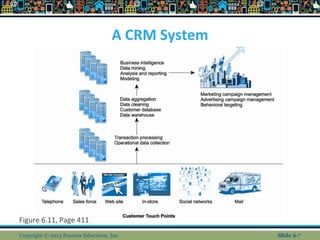
Customer Relationship
Management (CRM) Systems
■ Create customer profiles:
❖ Product and usage summary data
❖ Demographic and psychographic data
❖ Profitability measures
❖ Contact history
❖ Marketing and sales information
■ Customer data used to:
❖ Develop and sell additional products
❖ Identify profitable customers
❖ Optimize service delivery, etc.
Copyright © 2013 Pearson Education, Inc. Slide 6-*
A CRM System
Figure 6.11, Page 411
Copyright © 2013 Pearson Education, Inc. Slide 6-*

Chapter 6

  • 1.
    E-commerce 2013 Kenneth C.Laudon Carol Guercio Traver business. technology. society. ninth edition
  • 2.
    Chapter 6 E-commerce MarketingConcepts: Social, Mobile, Local Copyright © 2013 Pearson Education, Inc.
  • 3.
    Class Discussion Facebook: DoesSocial Marketing Work? ■ Have you ever made a purchase based on something you have read or seen on Facebook? What was the product and what made you interested? ■ What obstacles does Facebook face in monetizing itself as a marketing and advertising platform? ■ Are there other ways for Facebook to make a profit from marketers and advertisers? Copyright © 2013 Pearson Education, Inc. Slide 6-*
  • 4.
    Consumers Online: TheInternet Audience and Consumer Behavior ■ Around 75% (89 million) U.S. households have Internet access in 2012 ■ Growth rate has slowed ■ Intensity and scope of use both increasing ■ Some demographic groups have much higher percentages of online usage than others ❖ Gender, age, ethnicity, community type, income, education Copyright © 2013 Pearson Education, Inc. Slide 6-*
  • 5.
    Consumers Online (cont.) ■Broadband vs. dial-up audiences, new mobile audience ■ Neighborhood effects ■ Lifestyle and sociological impacts ❖ Use of Internet by children, teens ❖ Use of Internet as substitute for other social activities ■ Media choices ❖ Traditional media competes with Internet for attention ❖ Television viewing has increased with Internet usage Copyright © 2013 Pearson Education, Inc. Slide 6-*
  • 6.
    Consumer Behavior Models ■Study of consumer behavior ❖Attempts to explain what consumers purchase and where, when, how much, and why they buy ■ Consumer behavior models ❖Predict wide range of consumer decisions ❖Based on background demographic factors and other intervening, more immediate variables Copyright © 2013 Pearson Education, Inc. Slide 6-*
  • 7.
    A General Modelof Consumer Behavior Figure 6.1, Page 348 Copyright © 2013 Pearson Education, Inc. SOURCE: Adapted from Kotler and Armstrong, 2009. Slide 6-*
  • 8.
    Background Demographic Factors ■Culture: Affects entire nations ■ Subculture ❖ Subsets formed around major social differences (ethnicity, age, lifestyle, geography) ■ Social networks and communities ❖ Direct reference groups ❖ Indirect reference groups ❖ Opinion leaders ❖ Lifestyle groups ■ Psychological profile Copyright © 2013 Pearson Education, Inc. Slide 6-*
  • 9.
    The Online PurchasingDecision ■ Psychographic research ❖ Combines demographic and psychological data ❖ Divides market into various groups based on social class, lifestyle, and/or personality characteristics ■ Stages in consumer decision process: ❖ Awareness of need ❖ Search for more information ❖ Evaluation of alternatives ❖ Actual purchase decision ❖ Post-purchase contact with firm Copyright © 2013 Pearson Education, Inc. Slide 6-*
  • 10.
    The Consumer DecisionProcess and Supporting Communications Figure 6.2, Page 352 Copyright © 2013 Pearson Education, Inc. Slide 6-*
  • 11.
    A Model ofOnline Consumer Behavior ■ Decision process similar for online and offline behavior ■ General online behavior model ❖ Consumer skills ❖ Product characteristics ❖ Attitudes toward online purchasing ❖ Perceptions about control over Web environment ❖ Web site features: latency, usability, security ■ Clickstream behavior Copyright © 2013 Pearson Education, Inc. Slide 6-*
  • 12.
    A Model ofOnline Consumer Behavior Figure 6.3, Page 353 Copyright © 2013 Pearson Education, Inc. Slide 6-*
  • 13.
    A Model ofOnline Consumer Behavior (cont.) ■ Clickstream factors include: ❖ Number of days since last visit ❖ Speed of clickstream behavior ❖ Number of products viewed during last visit ❖ Number of pages viewed ❖ Supplying personal information ❖ Number of days since last purchase ❖ Number of past purchases ■ Clickstream marketing ❖ Developed dynamically as customers use Internet Copyright © 2013 Pearson Education, Inc. Slide 6-*
  • 14.
    Shoppers: Browsers andBuyers ■ Shoppers: 88% of Internet users ❖ 72% buyers ❖ 16% browsers (purchase offline) ■ One-third of offline retail purchases influenced by online activities ■ Online traffic also influenced by offline brands and shopping ■ E-commerce and traditional commerce are coupled: Part of a continuum of consuming behavior Copyright © 2013 Pearson Education, Inc. Slide 6-*
  • 15.
    What Consumers Shopfor and Buy Online ■ Big ticket items ❖Travel, computer hardware, electronics ❖Consumers now more confident in purchasing costlier items ■ Small ticket items ($100 or less) ❖Apparel, books, office supplies, software, etc. ❖Sold by first movers on Web ■ Physically small items ■ High margin items Copyright © 2013 Pearson Education, Inc. Slide 6-*
  • 16.
    How Consumers Shop ■How shoppers find online vendors ❖Search engines—59% ❖Marketplaces (Amazon, eBay)—28% ❖Direct to retail sites—10% ❖Other methods—3% ■ Online shoppers are highly intentional ■ StumbleUpon ■ Recommender systems Copyright © 2013 Pearson Education, Inc. Slide 6-*
  • 17.
    Trust, Utility, andOpportunism in Online Markets ■ Two most important factors shaping decision to purchase online: ❖Utility: ■ Better prices, convenience, speed ❖Trust: ■ Asymmetry of information can lead to opportunistic behavior by sellers ■ Sellers can develop trust by building strong reputations for honesty, fairness, delivery Copyright © 2013 Pearson Education, Inc. Slide 6-*
  • 18.
    Basic Marketing Concepts ■Marketing ❖Strategies and actions to establish relationship with consumer and encourage purchases ❖Addresses competitive situation of industries and firms ❖Seeks to create unique, highly differentiated products or services that are produced or supplied by one trusted firm ■ Unmatchable feature set ■ Avoidance of becoming commodity Copyright © 2013 Pearson Education, Inc. Slide 6-*
  • 19.
    The Digital Commerce MarketingPlatform ■ Multi-channel marketing plan ❖ Web site ❖ Traditional online marketing ■ Search engine, display, e-mail, affiliate ❖ Social marketing ■ Social networks, blogs, video, game ❖ Mobile marketing ■ Mobile/tablet sites, apps ❖ Offline marketing ■ Television, radio, newspapers Copyright © 2013 Pearson Education, Inc. Slide 6-*
  • 20.
    Strategic Issues andQuestions ■ Which part of the marketing plan should you focus on first? ■ How do you integrate the different platforms for a coherent message? ■ How do you allocate resources? ❖How do you measure and compare metrics from different platforms? ❖How do you link each to sales revenues? Copyright © 2013 Pearson Education, Inc. Slide 6-*
  • 21.
    Can Brands Survivethe Internet? Brands and Price Dispersion ■ Vision: “Law of One Price, ”end of brands ■ Instead: ❖ Consumers still pay premium prices for differentiated products ❖ E-commerce firms rely heavily on brands to attract customers and charge premium prices ❖ Price dispersion ❖ Large differences in price sensitivity for same product ❖ “Library effect” Copyright © 2013 Pearson Education, Inc. Slide 6-*
  • 22.
    Online Segmenting, Targeting,and Positioning ■ Segmenting: Allows firms to differentiate products to fit consumer needs and charge different prices ■ Types of segmentation ❖ Behavioral ❖ Demographic ❖ Psychographic ❖ Technical ❖ Contextual ❖ Search Copyright © 2013 Pearson Education, Inc. Slide 6-*
  • 23.
    The Digital CommerceMarketing Platform: Strategies and Tools ■ Internet marketing (vs. traditional) ❖More personalized ❖More participatory ❖More peer-to-peer ❖More communal ■ The most effective Internet marketing has all four features Copyright © 2013 Pearson Education, Inc. Slide 6-*
  • 24.
    Customer Engagement ■ Customerconversations about: ❖Products and services ❖Customer experience with products ❖Customer likes and dislikes ■ Conversations conducted through: ❖Web site feedback ❖Blogs ❖Facebook ❖Twitter Copyright © 2013 Pearson Education, Inc. Slide 6-*
  • 25.
    Generic Market EntryStrategies Figure 6-11, Page 391 Copyright © 2013 Pearson Education, Inc. Slide 6-*
  • 26.
    Establishing the Customer Relationship ■Web site functions to: ❖Establish brand identity and customer expectations ■ Differentiating product ❖Inform and educate customer ❖Shape customer experience ❖Anchor the brand online ■ Central point for all marketing messages Copyright © 2013 Pearson Education, Inc. Slide 6-*
  • 27.
    Traditional Online MarketingTools ■ Search engine marketing (SEM) ❖Sponsored links ❖Search result display ads ❖Keywords ❖Search engine optimization (SEO) ■ Display ad marketing ❖Advertising networks ❖Ad exchanges, real-time bidding Copyright © 2013 Pearson Education, Inc. Slide 6-*
  • 28.
    How an AdvertisingNetwork Such as DoubleClick Works Figure 6.6, Page 372 Copyright © 2013 Pearson Education, Inc. Slide 6-*
  • 29.
    Traditional Online MarketingTools (cont.) ■ E-mail marketing ❖Very inexpensive ❖3% click-throughs in targeted campaigns ❖Permission marketing ■ Affiliate marketing ■ Lead-generation marketing ■ Sponsorship marketing Copyright © 2013 Pearson Education, Inc. Slide 6-*
  • 30.
    Social Marketing ■ Fastestgrowing type of online marketing ■ Long-term prospects unknown ■ Four features driving growth ■ Social sign-on ■ Collaborative shopping ■ Network notification ■ Social search (recommendation) Copyright © 2013 Pearson Education, Inc. Slide 6-*
  • 31.
    Twitter Marketing ■ Real-timeinteraction with consumers ■ 50% companies with 100+ employees using Twitter ■ Twitter marketing products ❖Promoted Tweets ❖Promoted Trends ❖Promoted Accounts Copyright © 2013 Pearson Education, Inc. Slide 6-*
  • 32.
    Blog Marketing ■ 43%of all U.S. companies use blogs for marketing ■ Ideal for starting viral campaigns ■ Can use blogs for both branding messages and advertisements ■ Blog advertising networks ■ Brand advocacy blogs Copyright © 2013 Pearson Education, Inc. Slide 6-*
  • 33.
    Viral Marketing ■ Formof social marketing ■ Customers pass along marketing message to friends, family, coworkers ■ Referred customers cost less to acquire and keep ■ Venues are e-mail, social networks, video and game sites Copyright © 2013 Pearson Education, Inc. Slide 6-*
  • 34.
    Mobile Marketing ■ 7%of online marketing, growing rapidly ■ Major formats: ❖ Messaging (SMS) ❖ Display ❖ Search ❖ Video ■ Other formats: ❖ Quick Response (QR) codes ❖ Couponing Copyright © 2013 Pearson Education, Inc. Slide 6-*
  • 35.
    Insight on Business:Class Discussion Mobile Marketing: Land Rover Seeks Engagement on the Small Screen ■ Why do mobile devices represent such a promising opportunity for marketers? ■ Have you ever responded to mobile marketing messages? ■ What are some of the new types of marketing that mobile devices have spawned? ■ What the disadvantages of social network marketing? Copyright © 2013 Pearson Education, Inc. Slide 6-*
  • 36.
    App Marketing ■ Revenuesources ❖ Pay-per-app ❖ In-app purchase ❖ Subscriptions ❖ Advertising ■ Most popular types of apps ❖ Social network, banking, search, news ■ Retailer’s apps ❖ Browsing and purchasing Copyright © 2013 Pearson Education, Inc. Slide 6-*
  • 37.
    Local Marketing ■ Marketinggeared to user’s geographic location ■ Local searches: ❖20% of all searches ❖40% of mobile searches ■ Most common local marketing tools ❖Geotargeting with Google Maps ❖Display ads in hyperlocal publications Copyright © 2013 Pearson Education, Inc. Slide 6-*
  • 38.
    Multi-Channel Marketing ■ AverageAmerican spends 24% of media time on Internet, rest on other channels ■ Television, radio, newspapers, and magazines ■ Consumers also multitask, using several media ■ Internet campaigns strengthened by using other channels Copyright © 2013 Pearson Education, Inc. Slide 6-*
  • 39.
    Other Online MarketingStrategies ■ Brand leveraging ■ Customer retention strategies ❖Personalization and one-to-one marketing ❖Customization and customer co-production ❖Customer service ■ FAQs ■ Real-time customer chat systems ■ Automated response systems Copyright © 2013 Pearson Education, Inc. Slide 6-*
  • 40.
    The Mass Market-Personalization Continuum Figure6.13, Page 407 Copyright © 2013 Pearson Education, Inc. Slide 6-*
  • 41.
    Net Pricing Strategies ■Pricing ❖Integral part of marketing strategy ❖Traditionally based on: ■ Fixed cost ■ Variable costs ■ Demand curve ■ Price discrimination ❖Selling products to different people and groups based on willingness to pay Copyright © 2013 Pearson Education, Inc. Slide 6-*
  • 42.
    Net Pricing Strategies(cont.) ■ Free and freemium ❖ Can be used to build market awareness ■ Versioning ❖ Creating multiple versions of product and selling essentially same product to different market segments at different prices ■ Bundling ❖ Offers consumers two or more goods for one price ■ Dynamic pricing: ❖ Auctions ❖ Yield management ❖ Flash marketing Copyright © 2013 Pearson Education, Inc. Slide 6-*
  • 43.
    Long-Tail Marketing ■ Internetallows for sales of obscure products with little demand ■ Substantial revenue because ■ Near zero inventory costs ■ Little marketing costs ■ Search and recommendation engines Copyright © 2013 Pearson Education, Inc. Slide 6-*
  • 44.
    Insight on Technology:Class Discussion The Long Tail: Big Hits and Big Misses ■ What are “recommender systems”? Give an example you have used. ■ What is the “Long Tail” and how do recommender systems support sales of items in the Long Tail? ■ How can human editors, including consumers, make recommender systems more helpful? Copyright © 2013 Pearson Education, Inc. Slide 6-*
  • 45.
    Channel Management Strategies ■Channels: ❖ Different methods by which goods can be distributed and sold ■ Channel conflict: ❖ When new venue for selling products or services threatens or destroys existing sales venues ❖ e.g., online airline/travel services and traditional offline travel agencies ■ Some manufacturers are using partnership model to avoid channel conflict Copyright © 2013 Pearson Education, Inc. Slide 6-*
  • 46.
    The Revolution in InternetMarketing Technologies ■ Internet’s main impacts on marketing: ❖ Scope of marketing communications broadened ❖ Richness of marketing communications increased ❖ Information intensity of marketplace expanded ❖ Always-on mobile environment expands marketing opportunities ■ Internet marketing technologies: ❖ Web transaction logs ❖ Tracking files ❖ Databases, data warehouses, data mining ❖ Hadoop and Big Data ❖ Customer relationship management systems Copyright © 2013 Pearson Education, Inc. Slide 6-*
  • 47.
    Web Transaction Logs ■Built into Web server software ■ Record user activity at Web site ■ Provides much marketing data, especially combined with: ❖ Registration forms ❖ Shopping cart database ■ Answers questions such as: ❖ What are major patterns of interest and purchase? ❖ After home page, where do users go first? Second? Copyright © 2013 Pearson Education, Inc. Slide 6-*
  • 48.
    Tracking Files ■ Usersbrowsing tracked as they move from site to site ■ Four types of tracking files ❖Cookies ■ Small text file placed by Web site ■ Allows Web marketers to gather data ❖Flash cookies ❖Beacons (“bugs”) ❖Apps Copyright © 2013 Pearson Education, Inc. Slide 6-*
  • 49.
    Insight on Society:Class Discussion Every Move You Make, Every Click You Make, We’ll Be Tracking You ■ Are beacons innocuous? Or are they an invasion of personal privacy? ■ Do you think your Web browsing should be known to marketers? ■ What are the Privacy Foundation guidelines for Web beacons? ■ Should online shopping be allowed to be a private activity? Copyright © 2013 Pearson Education, Inc. Slide 6-*
  • 50.
    Databases ■ Database: Storesrecords and attributes ■ Database management system (DBMS): ❖ Software used to create, maintain, and access databases ■ SQL (Structured Query Language): ❖ Industry-standard database query and manipulation language used in a relational database ■ Relational database: ❖ Represents data as two-dimensional tables with records organized in rows and attributes in columns; data within different tables can be flexibly related as long as the tables share a common data element Copyright © 2013 Pearson Education, Inc. Slide 6-*
  • 51.
    Data Warehouses andData Mining ■ Data warehouse: ❖ Collects firm’s transactional and customer data in single location for offline analysis by marketers and site managers ■ Data mining: ❖ Analytical techniques to find patterns in data, model behavior of customers, develop customer profiles ■ Query-driven data mining ■ Model-driven data mining ■ Rule-based data mining Copyright © 2013 Pearson Education, Inc. Slide 6-*
  • 52.
    Hadoop and theChallenge of Big Data ■ “Big data” ❖Web traffic, e-mail, social media content ■ Traditional DBMS unable to process the volumes—petabytes and exabytes ■ Hadoop ❖Open-source software solution ❖Distributed processing among inexpensive servers Copyright © 2013 Pearson Education, Inc. Slide 6-*
  • 53.
    Customer Relationship Management (CRM)Systems ■ Create customer profiles: ❖ Product and usage summary data ❖ Demographic and psychographic data ❖ Profitability measures ❖ Contact history ❖ Marketing and sales information ■ Customer data used to: ❖ Develop and sell additional products ❖ Identify profitable customers ❖ Optimize service delivery, etc. Copyright © 2013 Pearson Education, Inc. Slide 6-*
  • 54.
    A CRM System Figure6.11, Page 411 Copyright © 2013 Pearson Education, Inc. Slide 6-*
  • 55.
    Copyright © 2013Pearson Education, Inc. Slide 6-*