Security Program and
Policies
Principles and Practices
by Sari Stern Greene
Chapter 10: Information Systems Acquisition, Development,
and Maintenance
Copyright 2014 Pearson Education, Inc. 2
Objectives
■ Understand the rationale for the systems
development lifecycle (SDLC)
■ Recognize the stages of software releases
■ Appreciate the importance of developing secure
code
■ Be aware of the most common application
development security faults
■ Explain cryptographic components
■ Develop policies related to systems acquisition,
development, and maintenance
Copyright 2014 Pearson Education, Inc. 3
System Security Requirements
❑ Security must be taken into account from the
genesis of the project
❑ Retroactively attempting to inject security back
into existing code usually either does not work or
ends up creating new vulnerabilities and/or
instability in the code
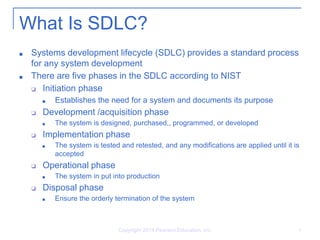
What Is SDLC?
■ Systems development lifecycle (SDLC) provides a standard process
for any system development
■ There are five phases in the SDLC according to NIST
❑ Initiation phase
■ Establishes the need for a system and documents its purpose
❑ Development /acquisition phase
■ The system is designed, purchased,, programmed, or developed
❑ Implementation phase
■ The system is tested and retested, and any modifications are applied until it is
accepted
❑ Operational phase
■ The system in put into production
❑ Disposal phase
■ Ensure the orderly termination of the system
Copyright 2014 Pearson Education, Inc. 4
What Is SDLC? Cont.
■ SDLC principles apply to commercial off-the-
shelf software (COTS) and open source
software
❑ Development is not done in-house but should be
evaluated to ensure it meets or exceeds the
organization’s security requirement
❑ Only stable and tested software should be
deployed
Copyright 2014 Pearson Education, Inc. 5
What Is SDLC? Cont.
■ Software Releases
❑ Alpha phase
■ Initial release of software for testing
■ Can be unstable
❑ Beta phase
■ Software is complete and ready for usability testing
❑ Release candidate (RC)
■ Hybrid of beta and final release version
■ Has the potential of being final release unless significant
issues are identified
❑ General availability or go live
■ Software has been made commercially available
Copyright 2014 Pearson Education, Inc. 6
What Is SDLC? Cont.
■ Software Updates
❑ Updates are different from security patches
❑ Security patches are designed to address a specific
vulnerability
❑ Updates include functional enhancements and new
features
❑ Updates should be thoroughly tested
❑ A documented rollback strategy should exists before
applying any updates
❑ If update required a system reboot, it should be
delayed until the reboot has the least impact on
business operations
Copyright 2014 Pearson Education, Inc. 7
Copyright 2014 Pearson Education, Inc. 8
What Is SDLC? Cont.
■ Testing Environment Concerns
■ Companies SHOULD have a test environment
■ The closer to the live environment the test environment is, the more
expensive it is, but the more accurate the testing will be
■ The cost of setting up the test environment should be compared to
the cost of a loss of data confidentiality, integrity, and/or availability
because of a patch-related reason
■ Testing environment should be 100% segregated from the live
network
■ Live data should NEVER be used in a test environment
■ The test servers may not be as well secured as the live, production
servers
■ De-identified or dummy data should be used in place of live data
Copyright 2014 Pearson Education, Inc. 9
Secure Code
■ Two types of code
❑ Insecure code (referred as “sloppy code”)
❑ Secure code
■ Deploying secure code is responsibility of the systems’ owner
■ The Open Web Application Security Project
(OWASP)
❑ Open community dedicated to enabling organizations
to develop, purchase, and maintain applications that
can be trusted
❑ Every 3 years releases the top 10 most critical web
application security flaws
Copyright 2014 Pearson Education, Inc. 10
Secure Code Cont.
❑ Injection
❑ Input validation
❑ Dynamic data verification
❑ Output validation
❑ Broken authentication and session management
Copyright 2014 Pearson Education, Inc. 11
Cryptography
❑ Cryptography: The process that takes plain text
and turns it into ciphertext
❑ Ciphertext: Text that cannot be read unless you
apply the correct algorithm and predetermined
value
❑ The predetermined value is also referred to as a
key
❑ The key must be securely stored and strong
enough to resist brute force cracking attempts
Copyright 2014 Pearson Education, Inc. 12
Cryptography Cont.
■ Hashing
❑ The process of creating a numeric value that
represents the original text
❑ It is a one-way process
❑ Provides integrity but not confidentiality and
authentication
■ Digital signature:
❑ A hash value that has been encrypted with the
sender’s private key
❑ Insures nonrepudiation and data integrity
❑ Does not insure data confidentiality
Cryptography Cont.
■ Symmetric key
❑ Uses a single secret key that must be shared in
advance and kept private
■ Asymmetric key
❑ Also known as public key
❑ Uses two different but mathematically related keys
❑ One is called public and the other one private
Copyright 2014 Pearson Education, Inc. 13
Cryptography Cont.
■ Public Key Infrastructure (PKI)
❑ Framework and services used to create,
distribute, manage, and revoke public keys
❑ Components
■ Certification Authority (CA)
■ Registration Authority (RA)
■ Client nodes
■ Digital certificate
Copyright 2014 Pearson Education, Inc. 14
Copyright 2014 Pearson Education, Inc. 15
Cryptography Cont.
■ Protecting the encryption keys
■ Compromised keys mean that the confidential data is
not safe anymore
■ Worse if the company does not know that the key has
been compromised as it will continue to rely on it and
use it to send confidential data, thinking that it is secure
■ Someone must be officially responsible for the security
of the keys
❑ Usually, it is a senior IT employee, in correlation with the
information security officer
Copyright 2014 Pearson Education, Inc. 16
Cryptography Cont.
■ Digital certificates can be revoked
❑ Usually a bad sign! It means there is a chance that the key
has been compromised
❑ If there’s the slightest chance that a key may have been
compromised, the digital certificate MUST be revoked
❑ Revocation lists are kept to verify that a given certificate
has not been revoked
❑ Certificates can be suspended when it is known that it won’t
be used for a period of time
❑ Key destruction must occur before a hard drive is reused
Copyright 2014 Pearson Education, Inc. 17
Summary
■ Data availability needs are at an all-time high.
Custom applications must be created with
security in mind from the start of the project,
which includes a risk assessment and proper
input and output validation, along with regular
security tests.
■ Patching a server is not a trivial task and
should be accomplished according to the path
management policy.

Chapter 10: Information Systems Acquisition, Development, and Maintenance

  • 1.
    Security Program and Policies Principlesand Practices by Sari Stern Greene Chapter 10: Information Systems Acquisition, Development, and Maintenance
  • 2.
    Copyright 2014 PearsonEducation, Inc. 2 Objectives ■ Understand the rationale for the systems development lifecycle (SDLC) ■ Recognize the stages of software releases ■ Appreciate the importance of developing secure code ■ Be aware of the most common application development security faults ■ Explain cryptographic components ■ Develop policies related to systems acquisition, development, and maintenance
  • 3.
    Copyright 2014 PearsonEducation, Inc. 3 System Security Requirements ❑ Security must be taken into account from the genesis of the project ❑ Retroactively attempting to inject security back into existing code usually either does not work or ends up creating new vulnerabilities and/or instability in the code
  • 4.
    What Is SDLC? ■Systems development lifecycle (SDLC) provides a standard process for any system development ■ There are five phases in the SDLC according to NIST ❑ Initiation phase ■ Establishes the need for a system and documents its purpose ❑ Development /acquisition phase ■ The system is designed, purchased,, programmed, or developed ❑ Implementation phase ■ The system is tested and retested, and any modifications are applied until it is accepted ❑ Operational phase ■ The system in put into production ❑ Disposal phase ■ Ensure the orderly termination of the system Copyright 2014 Pearson Education, Inc. 4
  • 5.
    What Is SDLC?Cont. ■ SDLC principles apply to commercial off-the- shelf software (COTS) and open source software ❑ Development is not done in-house but should be evaluated to ensure it meets or exceeds the organization’s security requirement ❑ Only stable and tested software should be deployed Copyright 2014 Pearson Education, Inc. 5
  • 6.
    What Is SDLC?Cont. ■ Software Releases ❑ Alpha phase ■ Initial release of software for testing ■ Can be unstable ❑ Beta phase ■ Software is complete and ready for usability testing ❑ Release candidate (RC) ■ Hybrid of beta and final release version ■ Has the potential of being final release unless significant issues are identified ❑ General availability or go live ■ Software has been made commercially available Copyright 2014 Pearson Education, Inc. 6
  • 7.
    What Is SDLC?Cont. ■ Software Updates ❑ Updates are different from security patches ❑ Security patches are designed to address a specific vulnerability ❑ Updates include functional enhancements and new features ❑ Updates should be thoroughly tested ❑ A documented rollback strategy should exists before applying any updates ❑ If update required a system reboot, it should be delayed until the reboot has the least impact on business operations Copyright 2014 Pearson Education, Inc. 7
  • 8.
    Copyright 2014 PearsonEducation, Inc. 8 What Is SDLC? Cont. ■ Testing Environment Concerns ■ Companies SHOULD have a test environment ■ The closer to the live environment the test environment is, the more expensive it is, but the more accurate the testing will be ■ The cost of setting up the test environment should be compared to the cost of a loss of data confidentiality, integrity, and/or availability because of a patch-related reason ■ Testing environment should be 100% segregated from the live network ■ Live data should NEVER be used in a test environment ■ The test servers may not be as well secured as the live, production servers ■ De-identified or dummy data should be used in place of live data
  • 9.
    Copyright 2014 PearsonEducation, Inc. 9 Secure Code ■ Two types of code ❑ Insecure code (referred as “sloppy code”) ❑ Secure code ■ Deploying secure code is responsibility of the systems’ owner ■ The Open Web Application Security Project (OWASP) ❑ Open community dedicated to enabling organizations to develop, purchase, and maintain applications that can be trusted ❑ Every 3 years releases the top 10 most critical web application security flaws
  • 10.
    Copyright 2014 PearsonEducation, Inc. 10 Secure Code Cont. ❑ Injection ❑ Input validation ❑ Dynamic data verification ❑ Output validation ❑ Broken authentication and session management
  • 11.
    Copyright 2014 PearsonEducation, Inc. 11 Cryptography ❑ Cryptography: The process that takes plain text and turns it into ciphertext ❑ Ciphertext: Text that cannot be read unless you apply the correct algorithm and predetermined value ❑ The predetermined value is also referred to as a key ❑ The key must be securely stored and strong enough to resist brute force cracking attempts
  • 12.
    Copyright 2014 PearsonEducation, Inc. 12 Cryptography Cont. ■ Hashing ❑ The process of creating a numeric value that represents the original text ❑ It is a one-way process ❑ Provides integrity but not confidentiality and authentication ■ Digital signature: ❑ A hash value that has been encrypted with the sender’s private key ❑ Insures nonrepudiation and data integrity ❑ Does not insure data confidentiality
  • 13.
    Cryptography Cont. ■ Symmetrickey ❑ Uses a single secret key that must be shared in advance and kept private ■ Asymmetric key ❑ Also known as public key ❑ Uses two different but mathematically related keys ❑ One is called public and the other one private Copyright 2014 Pearson Education, Inc. 13
  • 14.
    Cryptography Cont. ■ PublicKey Infrastructure (PKI) ❑ Framework and services used to create, distribute, manage, and revoke public keys ❑ Components ■ Certification Authority (CA) ■ Registration Authority (RA) ■ Client nodes ■ Digital certificate Copyright 2014 Pearson Education, Inc. 14
  • 15.
    Copyright 2014 PearsonEducation, Inc. 15 Cryptography Cont. ■ Protecting the encryption keys ■ Compromised keys mean that the confidential data is not safe anymore ■ Worse if the company does not know that the key has been compromised as it will continue to rely on it and use it to send confidential data, thinking that it is secure ■ Someone must be officially responsible for the security of the keys ❑ Usually, it is a senior IT employee, in correlation with the information security officer
  • 16.
    Copyright 2014 PearsonEducation, Inc. 16 Cryptography Cont. ■ Digital certificates can be revoked ❑ Usually a bad sign! It means there is a chance that the key has been compromised ❑ If there’s the slightest chance that a key may have been compromised, the digital certificate MUST be revoked ❑ Revocation lists are kept to verify that a given certificate has not been revoked ❑ Certificates can be suspended when it is known that it won’t be used for a period of time ❑ Key destruction must occur before a hard drive is reused
  • 17.
    Copyright 2014 PearsonEducation, Inc. 17 Summary ■ Data availability needs are at an all-time high. Custom applications must be created with security in mind from the start of the project, which includes a risk assessment and proper input and output validation, along with regular security tests. ■ Patching a server is not a trivial task and should be accomplished according to the path management policy.