Statistics for Managers Using Microsoft Excel, 4e © 2004 Prentice-Hall, Inc. Chap 16-1
Chapter 16
Decision Making
Statistics for Managers
Using Microsoft®
Excel
4th
Edition
Statistics for Managers Using
Microsoft Excel, 4e © 2004
Prentice-Hall, Inc. Chap 16-2
Chapter Goals
After completing this chapter, you should be
able to:
 Describe basic features of decision making
 Construct a payoff table and an opportunity-loss table
 Define and apply the expected value criterion for decision
making
 Compute the value of perfect information
 Describe utility and attitudes toward risk
Statistics for Managers Using
Microsoft Excel, 4e © 2004
Prentice-Hall, Inc. Chap 16-3
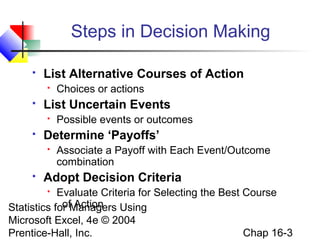
Steps in Decision Making
 List Alternative Courses of Action
 Choices or actions
 List Uncertain Events
 Possible events or outcomes
 Determine ‘Payoffs’
 Associate a Payoff with Each Event/Outcome
combination
 Adopt Decision Criteria
 Evaluate Criteria for Selecting the Best Course
of Action
Statistics for Managers Using
Microsoft Excel, 4e © 2004
Prentice-Hall, Inc. Chap 16-4
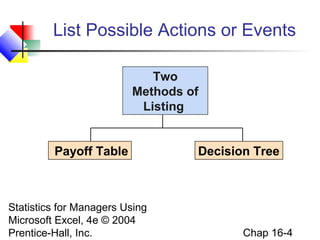
List Possible Actions or Events
Payoff Table Decision Tree
Two
Methods of
Listing
Statistics for Managers Using
Microsoft Excel, 4e © 2004
Prentice-Hall, Inc. Chap 16-5
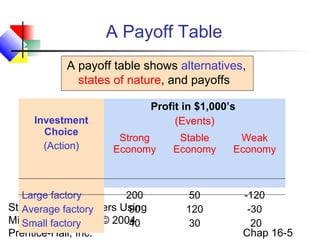
A Payoff Table
A payoff table shows alternatives,
states of nature, and payoffs
Investment
Choice
(Action)
Profit in $1,000’s
(Events)
Strong
Economy
Stable
Economy
Weak
Economy
Large factory
Average factory
Small factory
200
90
40
50
120
30
-120
-30
20
Statistics for Managers Using
Microsoft Excel, 4e © 2004
Prentice-Hall, Inc. Chap 16-6
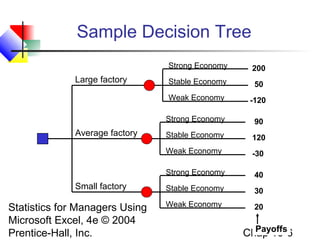
Sample Decision Tree
Large factory
Small factory
Average factory
Strong Economy
Stable Economy
Weak Economy
Strong Economy
Stable Economy
Weak Economy
Strong Economy
Stable Economy
Weak Economy
Payoffs
200
50
-120
40
30
20
90
120
-30
Statistics for Managers Using
Microsoft Excel, 4e © 2004
Prentice-Hall, Inc. Chap 16-7
Opportunity Loss
Investment
Choice
(Action)
Profit in $1,000’s
(Events)
Strong
Economy
Stable
Economy
Weak
Economy
Large factory
Average factory
Small factory
200
90
40
50
120
30
-120
-30
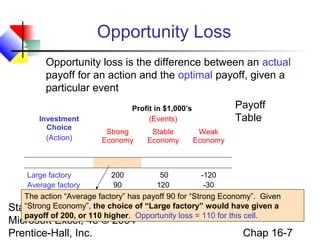
20The action “Average factory” has payoff 90 for “Strong Economy”. Given
“Strong Economy”, the choice of “Large factory” would have given a
payoff of 200, or 110 higher. Opportunity loss = 110 for this cell.
Opportunity loss is the difference between an actual
payoff for an action and the optimal payoff, given a
particular event
Payoff
Table
Statistics for Managers Using
Microsoft Excel, 4e © 2004
Prentice-Hall, Inc. Chap 16-8
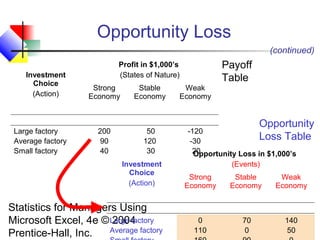
Opportunity Loss
Investment
Choice
(Action)
Profit in $1,000’s
(States of Nature)
Strong
Economy
Stable
Economy
Weak
Economy
Large factory
Average factory
Small factory
200
90
40
50
120
30
-120
-30
20
(continued)
Investment
Choice
(Action)
Opportunity Loss in $1,000’s
(Events)
Strong
Economy
Stable
Economy
Weak
Economy
Large factory
Average factory
0
110
70
0
140
50
Payoff
Table
Opportunity
Loss Table
Statistics for Managers Using
Microsoft Excel, 4e © 2004
Prentice-Hall, Inc. Chap 16-9
Decision Criteria
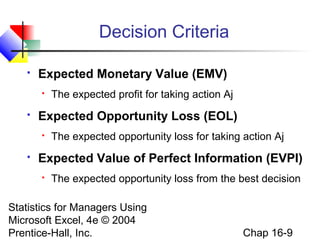
 Expected Monetary Value (EMV)
 The expected profit for taking action Aj
 Expected Opportunity Loss (EOL)
 The expected opportunity loss for taking action Aj
 Expected Value of Perfect Information (EVPI)
 The expected opportunity loss from the best decision
Statistics for Managers Using
Microsoft Excel, 4e © 2004
Prentice-Hall, Inc. Chap 16-10
Expected Monetary Value
Solution
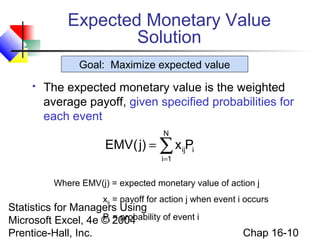
 The expected monetary value is the weighted
average payoff, given specified probabilities for
each event
∑=
=
N
1i
iijPx)j(EMV
Where EMV(j) = expected monetary value of action j
xij = payoff for action j when event i occurs
Pi = probability of event i
Goal: Maximize expected value
Statistics for Managers Using
Microsoft Excel, 4e © 2004
Prentice-Hall, Inc. Chap 16-11
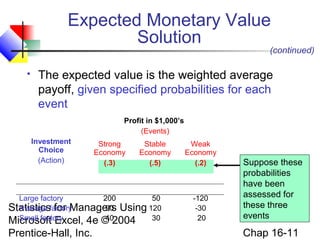
 The expected value is the weighted average
payoff, given specified probabilities for each
event
Investment
Choice
(Action)
Profit in $1,000’s
(Events)
Strong
Economy
(.3)
Stable
Economy
(.5)
Weak
Economy
(.2)
Large factory
Average factory
Small factory
200
90
40
50
120
30
-120
-30
20
Suppose these
probabilities
have been
assessed for
these three
events
(continued)
Expected Monetary Value
Solution
Statistics for Managers Using
Microsoft Excel, 4e © 2004
Prentice-Hall, Inc. Chap 16-12
Investment
Choice
(Action)
Profit in $1,000’s
(Events)
Strong
Economy
(.3)
Stable
Economy
(.5)
Weak
Economy
(.2)
Large factory
Average factory
Small factory
200
90
40
50
120
30
-120
-30
20
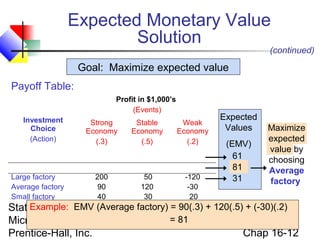
Example: EMV (Average factory) = 90(.3) + 120(.5) + (-30)(.2)
= 81
Expected
Values
(EMV)
61
81
31
Maximize
expected
value by
choosing
Average
factory
(continued)
Payoff Table:
Goal: Maximize expected value
Expected Monetary Value
Solution
Statistics for Managers Using
Microsoft Excel, 4e © 2004
Prentice-Hall, Inc. Chap 16-13
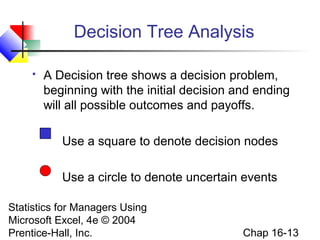
Decision Tree Analysis
 A Decision tree shows a decision problem,
beginning with the initial decision and ending
will all possible outcomes and payoffs.
Use a square to denote decision nodes
Use a circle to denote uncertain events
Statistics for Managers Using
Microsoft Excel, 4e © 2004
Prentice-Hall, Inc. Chap 16-14
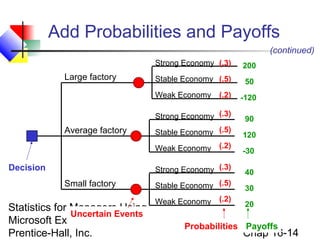
Add Probabilities and Payoffs
Large factory
Small factory
Decision
Average factory
Uncertain Events
Strong Economy
Stable Economy
Weak Economy
Strong Economy
Stable Economy
Weak Economy
Strong Economy
Stable Economy
Weak Economy
(continued)
PayoffsProbabilities
200
50
-120
40
30
20
90
120
-30
(.3)
(.5)
(.2)
(.3)
(.5)
(.2)
(.3)
(.5)
(.2)
Statistics for Managers Using
Microsoft Excel, 4e © 2004
Prentice-Hall, Inc. Chap 16-15
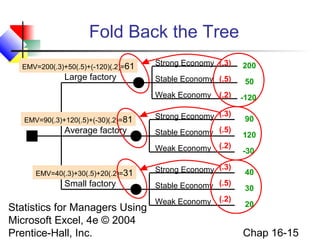
Fold Back the Tree
Large factory
Small factory
Average factory
Strong Economy
Stable Economy
Weak Economy
Strong Economy
Stable Economy
Weak Economy
Strong Economy
Stable Economy
Weak Economy
200
50
-120
40
30
20
90
120
-30
(.3)
(.5)
(.2)
(.3)
(.5)
(.2)
(.3)
(.5)
(.2)
EMV=200(.3)+50(.5)+(-120)(.2)=61
EMV=90(.3)+120(.5)+(-30)(.2)=81
EMV=40(.3)+30(.5)+20(.2)=31
Statistics for Managers Using
Microsoft Excel, 4e © 2004
Prentice-Hall, Inc. Chap 16-16
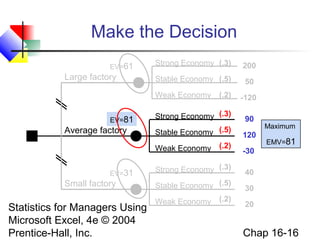
Make the Decision
Large factory
Small factory
Average factory
Strong Economy
Stable Economy
Weak Economy
Strong Economy
Stable Economy
Weak Economy
Strong Economy
Stable Economy
Weak Economy
200
50
-120
40
30
20
90
120
-30
(.3)
(.5)
(.2)
(.3)
(.5)
(.2)
(.3)
(.5)
(.2)
EV=61
EV=81
EV=31
Maximum
EMV=81
Statistics for Managers Using
Microsoft Excel, 4e © 2004
Prentice-Hall, Inc. Chap 16-17
Expected Opportunity Loss
Solution
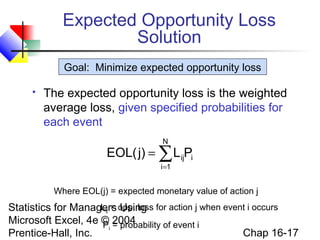
 The expected opportunity loss is the weighted
average loss, given specified probabilities for
each event
∑=
=
N
1i
iijPL)j(EOL
Where EOL(j) = expected monetary value of action j
Lij = opp. loss for action j when event i occurs
Pi = probability of event i
Goal: Minimize expected opportunity loss
Statistics for Managers Using
Microsoft Excel, 4e © 2004
Prentice-Hall, Inc. Chap 16-18
Expected Opportunity Loss
Solution
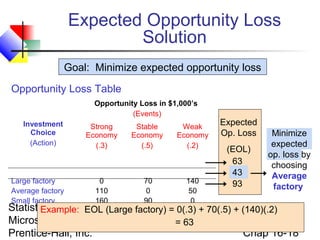
Investment
Choice
(Action)
Opportunity Loss in $1,000’s
(Events)
Strong
Economy
(.3)
Stable
Economy
(.5)
Weak
Economy
(.2)
Large factory
Average factory
Small factory
0
110
160
70
0
90
140
50
0
Example: EOL (Large factory) = 0(.3) + 70(.5) + (140)(.2)
= 63
Expected
Op. Loss
(EOL)
63
43
93
Minimize
expected
op. loss by
choosing
Average
factory
Opportunity Loss Table
Goal: Minimize expected opportunity loss
Statistics for Managers Using
Microsoft Excel, 4e © 2004
Prentice-Hall, Inc. Chap 16-19
Value of Information
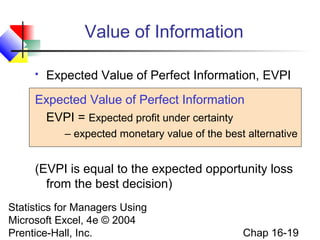
 Expected Value of Perfect Information, EVPI
Expected Value of Perfect Information
EVPI = Expected profit under certainty
– expected monetary value of the best alternative
(EVPI is equal to the expected opportunity loss
from the best decision)
Statistics for Managers Using
Microsoft Excel, 4e © 2004
Prentice-Hall, Inc. Chap 16-20
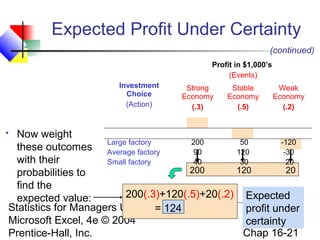
Expected Profit Under Certainty
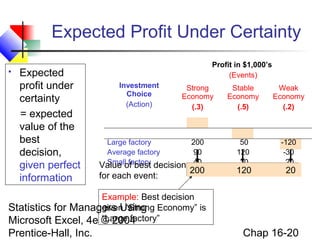
 Expected
profit under
certainty
= expected
value of the
best
decision,
given perfect
information
Investment
Choice
(Action)
Profit in $1,000’s
(Events)
Strong
Economy
(.3)
Stable
Economy
(.5)
Weak
Economy
(.2)
Large factory
Average factory
Small factory
200
90
40
50
120
30
-120
-30
20
Example: Best decision
given “Strong Economy” is
“Large factory”
200 120 20
Value of best decision
for each event:
Statistics for Managers Using
Microsoft Excel, 4e © 2004
Prentice-Hall, Inc. Chap 16-21
Expected Profit Under Certainty
Investment
Choice
(Action)
Profit in $1,000’s
(Events)
Strong
Economy
(.3)
Stable
Economy
(.5)
Weak
Economy
(.2)
Large factory
Average factory
Small factory
200
90
40
50
120
30
-120
-30
20
200 120 20
(continued)
 Now weight
these outcomes
with their
probabilities to
find the
expected value: 200(.3)+120(.5)+20(.2)
= 124
Expected
profit under
certainty
Statistics for Managers Using
Microsoft Excel, 4e © 2004
Prentice-Hall, Inc. Chap 16-22
Value of Information Solution
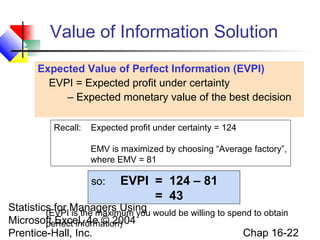
Expected Value of Perfect Information (EVPI)
EVPI = Expected profit under certainty
– Expected monetary value of the best decision
so: EVPI = 124 – 81
= 43
Recall: Expected profit under certainty = 124
EMV is maximized by choosing “Average factory”,
where EMV = 81
(EVPI is the maximum you would be willing to spend to obtain
perfect information)
Statistics for Managers Using
Microsoft Excel, 4e © 2004
Prentice-Hall, Inc. Chap 16-23
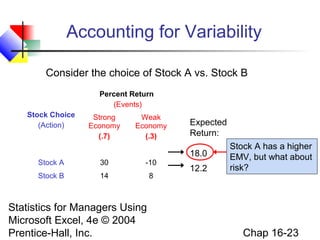
Accounting for Variability
Stock Choice
(Action)
Percent Return
(Events)
Strong
Economy
(.7)
Weak
Economy
(.3)
Stock A 30 -10
Stock B 14 8
Consider the choice of Stock A vs. Stock B
Expected
Return:
18.0
12.2
Stock A has a higher
EMV, but what about
risk?
Statistics for Managers Using
Microsoft Excel, 4e © 2004
Prentice-Hall, Inc. Chap 16-24
Stock Choice
(Action)
Percent Return
(Events)
Strong
Economy
(.7)
Weak
Economy
(.3)
Stock A 30 -10
Stock B 14 8
Variance:
336.0
7.56
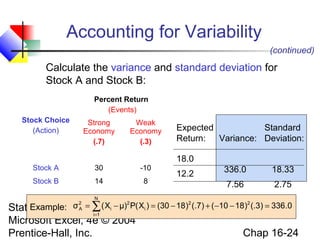
Calculate the variance and standard deviation for
Stock A and Stock B:
Expected
Return:
18.0
12.2
0.336)3(.)1810()7(.)1830()X(Pμ)X(σ 22
N
1i
i
2
i
2
A =−−+−=−= ∑=
Example:
Standard
Deviation:
18.33
2.75
Accounting for Variability
(continued)
Statistics for Managers Using
Microsoft Excel, 4e © 2004
Prentice-Hall, Inc. Chap 16-25
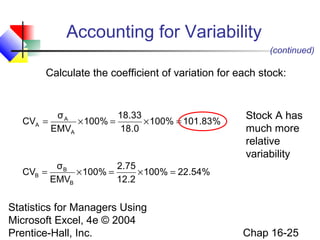
Calculate the coefficient of variation for each stock:
%83.101100%
0.18
33.18
100%
EMV
σ
CV
A
A
A =×=×=
(continued)
%54.22100%
2.12
75.2
100%
EMV
σ
CV
B
B
B =×=×=
Stock A has
much more
relative
variability
Accounting for Variability
Statistics for Managers Using
Microsoft Excel, 4e © 2004
Prentice-Hall, Inc. Chap 16-26
Return-to-Risk Ratio
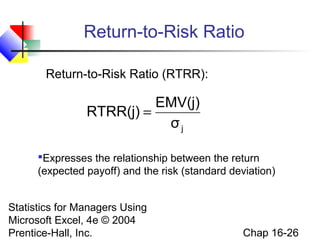
Return-to-Risk Ratio (RTRR):
jσ
EMV(j)
RTRR(j) =
Expresses the relationship between the return
(expected payoff) and the risk (standard deviation)
Statistics for Managers Using
Microsoft Excel, 4e © 2004
Prentice-Hall, Inc. Chap 16-27
Return-to-Risk Ratio
jσ
EMV(j)
RTRR(j) =
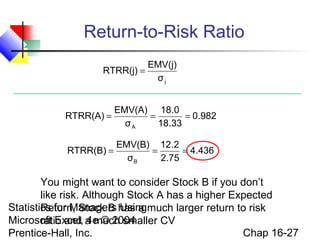
You might want to consider Stock B if you don’t
like risk. Although Stock A has a higher Expected
Return, Stock B has a much larger return to risk
ratio and a much smaller CV
982.0
33.18
0.18
σ
EMV(A)
RTRR(A)
A
===
436.4
75.2
2.12
σ
EMV(B)
RTRR(B)
B
===
Statistics for Managers Using
Microsoft Excel, 4e © 2004
Prentice-Hall, Inc. Chap 16-28
Decision Making in PHStat
 PHStat | decision-making | expected
monetary value
 Check the “expected opportunity loss” and
“measures of valuation” boxes
Statistics for Managers Using
Microsoft Excel, 4e © 2004
Prentice-Hall, Inc. Chap 16-29
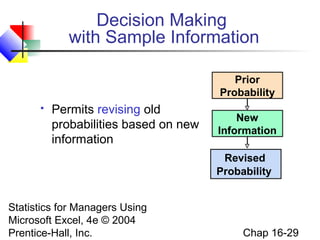
Decision Making
with Sample Information
 Permits revising old
probabilities based on new
information
New
Information
Revised
Probability
Prior
Probability
Statistics for Managers Using
Microsoft Excel, 4e © 2004
Prentice-Hall, Inc. Chap 16-30
Revised Probabilities
Example
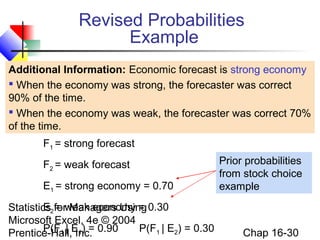
Additional Information: Economic forecast is strong economy
 When the economy was strong, the forecaster was correct
90% of the time.
 When the economy was weak, the forecaster was correct 70%
of the time.
Prior probabilities
from stock choice
example
F1 = strong forecast
F2 = weak forecast
E1 = strong economy = 0.70
E2 = weak economy = 0.30
P(F1 | E1) = 0.90 P(F1 | E2) = 0.30
Statistics for Managers Using
Microsoft Excel, 4e © 2004
Prentice-Hall, Inc. Chap 16-31
Revised Probabilities
Example
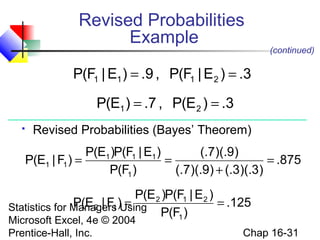
 Revised Probabilities (Bayes’ Theorem)
3.)E|F(P,9.)E|F(P 2111 ==
3.)E(P,7.)E(P 21 ==
875.
)3)(.3(.)9)(.7(.
)9)(.7(.
)F(P
)E|F(P)E(P
)F|E(P
1
111
11 =
+
==
125.
)F(P
)E|F(P)E(P
)F|E(P
1
212
12 ==
(continued)
Statistics for Managers Using
Microsoft Excel, 4e © 2004
Prentice-Hall, Inc. Chap 16-32
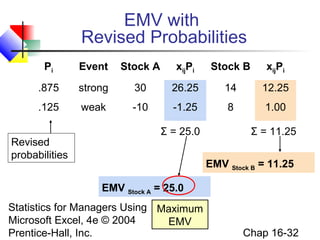
EMV with
Revised Probabilities
EMV Stock A = 25.0
EMV Stock B = 11.25
Revised
probabilities
Pi Event Stock A xijPi Stock B xijPi
.875 strong 30 26.25 14 12.25
.125 weak -10 -1.25 8 1.00
Σ = 25.0 Σ = 11.25
Maximum
EMV
Statistics for Managers Using
Microsoft Excel, 4e © 2004
Prentice-Hall, Inc. Chap 16-33
EOL Table with
Revised Probabilities
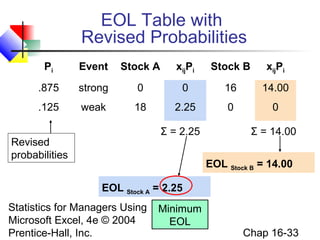
EOL Stock A = 2.25
EOL Stock B = 14.00
Revised
probabilities
Pi Event Stock A xijPi Stock B xijPi
.875 strong 0 0 16 14.00
.125 weak 18 2.25 0 0
Σ = 2.25 Σ = 14.00
Minimum
EOL
Statistics for Managers Using
Microsoft Excel, 4e © 2004
Prentice-Hall, Inc. Chap 16-34
Stock Choice
(Action)
Percent Return
(Events)
Strong
Economy
(.875)
Weak
Economy
(.125)
Stock A 30 -10
Stock B 14 8
Variance:
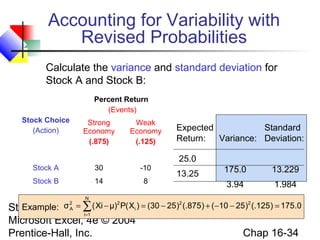
175.0
3.94
Calculate the variance and standard deviation for
Stock A and Stock B:
Expected
Return:
25.0
13.25
0.175)125(.)2510()875(.)2530()X(Pμ)Xi(σ 22
N
1i
i
22
A =−−+−=−= ∑=
Example:
Standard
Deviation:
13.229
1.984
Accounting for Variability with
Revised Probabilities
Statistics for Managers Using
Microsoft Excel, 4e © 2004
Prentice-Hall, Inc. Chap 16-35
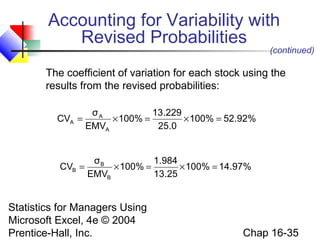
The coefficient of variation for each stock using the
results from the revised probabilities:
%92.52100%
0.25
229.13
100%
EMV
σ
CV
A
A
A =×=×=
(continued)
%97.14100%
25.13
984.1
100%
EMV
σ
CV
B
B
B =×=×=
Accounting for Variability with
Revised Probabilities
Statistics for Managers Using
Microsoft Excel, 4e © 2004
Prentice-Hall, Inc. Chap 16-36
Return-to-Risk Ratio with
Revised Probabilities
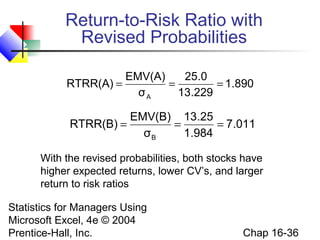
With the revised probabilities, both stocks have
higher expected returns, lower CV’s, and larger
return to risk ratios
890.1
229.13
0.25
σ
EMV(A)
RTRR(A)
A
===
011.7
984.1
25.13
σ
EMV(B)
RTRR(B)
B
===
Statistics for Managers Using
Microsoft Excel, 4e © 2004
Prentice-Hall, Inc. Chap 16-37
Utility
 Utility is the pleasure or satisfaction
obtained from an action.
 The utility of an outcome may not be the same
for each individual.
Statistics for Managers Using
Microsoft Excel, 4e © 2004
Prentice-Hall, Inc. Chap 16-38
Utility
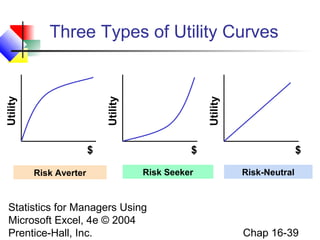
 Example: each incremental $1 of profit does not
have the same value to every individual:
 A risk averse person, once reaching a goal,
assigns less utility to each incremental $1.
 A risk seeker assigns more utility to each
incremental $1.
 A risk neutral person assigns the same utility to
each extra $1.
Statistics for Managers Using
Microsoft Excel, 4e © 2004
Prentice-Hall, Inc. Chap 16-39
Three Types of Utility Curves
Utility
$ $ $
Utility
Utility
Risk Averter Risk Seeker Risk-Neutral
Statistics for Managers Using
Microsoft Excel, 4e © 2004
Prentice-Hall, Inc. Chap 16-40
Maximizing Expected
Utility
 Making decisions in terms of utility, not $
 Translate $ outcomes into utility outcomes
 Calculate expected utilities for each action
 Choose the action to maximize expected utility
Statistics for Managers Using
Microsoft Excel, 4e © 2004
Prentice-Hall, Inc. Chap 16-41
Chapter Summary
 Described the payoff table and decision trees
 Opportunity loss
 Provided criteria for decision making
 Expected monetary value
 Expected opportunity loss
 Return to risk ratio
 Introduced expected profit under certainty and the
value of perfect information
 Discussed decision making with sample
information
 Addressed the concept of utility

Decision Making in English

  • 1.
    Statistics for ManagersUsing Microsoft Excel, 4e © 2004 Prentice-Hall, Inc. Chap 16-1 Chapter 16 Decision Making Statistics for Managers Using Microsoft® Excel 4th Edition
  • 2.
    Statistics for ManagersUsing Microsoft Excel, 4e © 2004 Prentice-Hall, Inc. Chap 16-2 Chapter Goals After completing this chapter, you should be able to:  Describe basic features of decision making  Construct a payoff table and an opportunity-loss table  Define and apply the expected value criterion for decision making  Compute the value of perfect information  Describe utility and attitudes toward risk
  • 3.
    Statistics for ManagersUsing Microsoft Excel, 4e © 2004 Prentice-Hall, Inc. Chap 16-3 Steps in Decision Making  List Alternative Courses of Action  Choices or actions  List Uncertain Events  Possible events or outcomes  Determine ‘Payoffs’  Associate a Payoff with Each Event/Outcome combination  Adopt Decision Criteria  Evaluate Criteria for Selecting the Best Course of Action
  • 4.
    Statistics for ManagersUsing Microsoft Excel, 4e © 2004 Prentice-Hall, Inc. Chap 16-4 List Possible Actions or Events Payoff Table Decision Tree Two Methods of Listing
  • 5.
    Statistics for ManagersUsing Microsoft Excel, 4e © 2004 Prentice-Hall, Inc. Chap 16-5 A Payoff Table A payoff table shows alternatives, states of nature, and payoffs Investment Choice (Action) Profit in $1,000’s (Events) Strong Economy Stable Economy Weak Economy Large factory Average factory Small factory 200 90 40 50 120 30 -120 -30 20
  • 6.
    Statistics for ManagersUsing Microsoft Excel, 4e © 2004 Prentice-Hall, Inc. Chap 16-6 Sample Decision Tree Large factory Small factory Average factory Strong Economy Stable Economy Weak Economy Strong Economy Stable Economy Weak Economy Strong Economy Stable Economy Weak Economy Payoffs 200 50 -120 40 30 20 90 120 -30
  • 7.
    Statistics for ManagersUsing Microsoft Excel, 4e © 2004 Prentice-Hall, Inc. Chap 16-7 Opportunity Loss Investment Choice (Action) Profit in $1,000’s (Events) Strong Economy Stable Economy Weak Economy Large factory Average factory Small factory 200 90 40 50 120 30 -120 -30 20The action “Average factory” has payoff 90 for “Strong Economy”. Given “Strong Economy”, the choice of “Large factory” would have given a payoff of 200, or 110 higher. Opportunity loss = 110 for this cell. Opportunity loss is the difference between an actual payoff for an action and the optimal payoff, given a particular event Payoff Table
  • 8.
    Statistics for ManagersUsing Microsoft Excel, 4e © 2004 Prentice-Hall, Inc. Chap 16-8 Opportunity Loss Investment Choice (Action) Profit in $1,000’s (States of Nature) Strong Economy Stable Economy Weak Economy Large factory Average factory Small factory 200 90 40 50 120 30 -120 -30 20 (continued) Investment Choice (Action) Opportunity Loss in $1,000’s (Events) Strong Economy Stable Economy Weak Economy Large factory Average factory 0 110 70 0 140 50 Payoff Table Opportunity Loss Table
  • 9.
    Statistics for ManagersUsing Microsoft Excel, 4e © 2004 Prentice-Hall, Inc. Chap 16-9 Decision Criteria  Expected Monetary Value (EMV)  The expected profit for taking action Aj  Expected Opportunity Loss (EOL)  The expected opportunity loss for taking action Aj  Expected Value of Perfect Information (EVPI)  The expected opportunity loss from the best decision
  • 10.
    Statistics for ManagersUsing Microsoft Excel, 4e © 2004 Prentice-Hall, Inc. Chap 16-10 Expected Monetary Value Solution  The expected monetary value is the weighted average payoff, given specified probabilities for each event ∑= = N 1i iijPx)j(EMV Where EMV(j) = expected monetary value of action j xij = payoff for action j when event i occurs Pi = probability of event i Goal: Maximize expected value
  • 11.
    Statistics for ManagersUsing Microsoft Excel, 4e © 2004 Prentice-Hall, Inc. Chap 16-11  The expected value is the weighted average payoff, given specified probabilities for each event Investment Choice (Action) Profit in $1,000’s (Events) Strong Economy (.3) Stable Economy (.5) Weak Economy (.2) Large factory Average factory Small factory 200 90 40 50 120 30 -120 -30 20 Suppose these probabilities have been assessed for these three events (continued) Expected Monetary Value Solution
  • 12.
    Statistics for ManagersUsing Microsoft Excel, 4e © 2004 Prentice-Hall, Inc. Chap 16-12 Investment Choice (Action) Profit in $1,000’s (Events) Strong Economy (.3) Stable Economy (.5) Weak Economy (.2) Large factory Average factory Small factory 200 90 40 50 120 30 -120 -30 20 Example: EMV (Average factory) = 90(.3) + 120(.5) + (-30)(.2) = 81 Expected Values (EMV) 61 81 31 Maximize expected value by choosing Average factory (continued) Payoff Table: Goal: Maximize expected value Expected Monetary Value Solution
  • 13.
    Statistics for ManagersUsing Microsoft Excel, 4e © 2004 Prentice-Hall, Inc. Chap 16-13 Decision Tree Analysis  A Decision tree shows a decision problem, beginning with the initial decision and ending will all possible outcomes and payoffs. Use a square to denote decision nodes Use a circle to denote uncertain events
  • 14.
    Statistics for ManagersUsing Microsoft Excel, 4e © 2004 Prentice-Hall, Inc. Chap 16-14 Add Probabilities and Payoffs Large factory Small factory Decision Average factory Uncertain Events Strong Economy Stable Economy Weak Economy Strong Economy Stable Economy Weak Economy Strong Economy Stable Economy Weak Economy (continued) PayoffsProbabilities 200 50 -120 40 30 20 90 120 -30 (.3) (.5) (.2) (.3) (.5) (.2) (.3) (.5) (.2)
  • 15.
    Statistics for ManagersUsing Microsoft Excel, 4e © 2004 Prentice-Hall, Inc. Chap 16-15 Fold Back the Tree Large factory Small factory Average factory Strong Economy Stable Economy Weak Economy Strong Economy Stable Economy Weak Economy Strong Economy Stable Economy Weak Economy 200 50 -120 40 30 20 90 120 -30 (.3) (.5) (.2) (.3) (.5) (.2) (.3) (.5) (.2) EMV=200(.3)+50(.5)+(-120)(.2)=61 EMV=90(.3)+120(.5)+(-30)(.2)=81 EMV=40(.3)+30(.5)+20(.2)=31
  • 16.
    Statistics for ManagersUsing Microsoft Excel, 4e © 2004 Prentice-Hall, Inc. Chap 16-16 Make the Decision Large factory Small factory Average factory Strong Economy Stable Economy Weak Economy Strong Economy Stable Economy Weak Economy Strong Economy Stable Economy Weak Economy 200 50 -120 40 30 20 90 120 -30 (.3) (.5) (.2) (.3) (.5) (.2) (.3) (.5) (.2) EV=61 EV=81 EV=31 Maximum EMV=81
  • 17.
    Statistics for ManagersUsing Microsoft Excel, 4e © 2004 Prentice-Hall, Inc. Chap 16-17 Expected Opportunity Loss Solution  The expected opportunity loss is the weighted average loss, given specified probabilities for each event ∑= = N 1i iijPL)j(EOL Where EOL(j) = expected monetary value of action j Lij = opp. loss for action j when event i occurs Pi = probability of event i Goal: Minimize expected opportunity loss
  • 18.
    Statistics for ManagersUsing Microsoft Excel, 4e © 2004 Prentice-Hall, Inc. Chap 16-18 Expected Opportunity Loss Solution Investment Choice (Action) Opportunity Loss in $1,000’s (Events) Strong Economy (.3) Stable Economy (.5) Weak Economy (.2) Large factory Average factory Small factory 0 110 160 70 0 90 140 50 0 Example: EOL (Large factory) = 0(.3) + 70(.5) + (140)(.2) = 63 Expected Op. Loss (EOL) 63 43 93 Minimize expected op. loss by choosing Average factory Opportunity Loss Table Goal: Minimize expected opportunity loss
  • 19.
    Statistics for ManagersUsing Microsoft Excel, 4e © 2004 Prentice-Hall, Inc. Chap 16-19 Value of Information  Expected Value of Perfect Information, EVPI Expected Value of Perfect Information EVPI = Expected profit under certainty – expected monetary value of the best alternative (EVPI is equal to the expected opportunity loss from the best decision)
  • 20.
    Statistics for ManagersUsing Microsoft Excel, 4e © 2004 Prentice-Hall, Inc. Chap 16-20 Expected Profit Under Certainty  Expected profit under certainty = expected value of the best decision, given perfect information Investment Choice (Action) Profit in $1,000’s (Events) Strong Economy (.3) Stable Economy (.5) Weak Economy (.2) Large factory Average factory Small factory 200 90 40 50 120 30 -120 -30 20 Example: Best decision given “Strong Economy” is “Large factory” 200 120 20 Value of best decision for each event:
  • 21.
    Statistics for ManagersUsing Microsoft Excel, 4e © 2004 Prentice-Hall, Inc. Chap 16-21 Expected Profit Under Certainty Investment Choice (Action) Profit in $1,000’s (Events) Strong Economy (.3) Stable Economy (.5) Weak Economy (.2) Large factory Average factory Small factory 200 90 40 50 120 30 -120 -30 20 200 120 20 (continued)  Now weight these outcomes with their probabilities to find the expected value: 200(.3)+120(.5)+20(.2) = 124 Expected profit under certainty
  • 22.
    Statistics for ManagersUsing Microsoft Excel, 4e © 2004 Prentice-Hall, Inc. Chap 16-22 Value of Information Solution Expected Value of Perfect Information (EVPI) EVPI = Expected profit under certainty – Expected monetary value of the best decision so: EVPI = 124 – 81 = 43 Recall: Expected profit under certainty = 124 EMV is maximized by choosing “Average factory”, where EMV = 81 (EVPI is the maximum you would be willing to spend to obtain perfect information)
  • 23.
    Statistics for ManagersUsing Microsoft Excel, 4e © 2004 Prentice-Hall, Inc. Chap 16-23 Accounting for Variability Stock Choice (Action) Percent Return (Events) Strong Economy (.7) Weak Economy (.3) Stock A 30 -10 Stock B 14 8 Consider the choice of Stock A vs. Stock B Expected Return: 18.0 12.2 Stock A has a higher EMV, but what about risk?
  • 24.
    Statistics for ManagersUsing Microsoft Excel, 4e © 2004 Prentice-Hall, Inc. Chap 16-24 Stock Choice (Action) Percent Return (Events) Strong Economy (.7) Weak Economy (.3) Stock A 30 -10 Stock B 14 8 Variance: 336.0 7.56 Calculate the variance and standard deviation for Stock A and Stock B: Expected Return: 18.0 12.2 0.336)3(.)1810()7(.)1830()X(Pμ)X(σ 22 N 1i i 2 i 2 A =−−+−=−= ∑= Example: Standard Deviation: 18.33 2.75 Accounting for Variability (continued)
  • 25.
    Statistics for ManagersUsing Microsoft Excel, 4e © 2004 Prentice-Hall, Inc. Chap 16-25 Calculate the coefficient of variation for each stock: %83.101100% 0.18 33.18 100% EMV σ CV A A A =×=×= (continued) %54.22100% 2.12 75.2 100% EMV σ CV B B B =×=×= Stock A has much more relative variability Accounting for Variability
  • 26.
    Statistics for ManagersUsing Microsoft Excel, 4e © 2004 Prentice-Hall, Inc. Chap 16-26 Return-to-Risk Ratio Return-to-Risk Ratio (RTRR): jσ EMV(j) RTRR(j) = Expresses the relationship between the return (expected payoff) and the risk (standard deviation)
  • 27.
    Statistics for ManagersUsing Microsoft Excel, 4e © 2004 Prentice-Hall, Inc. Chap 16-27 Return-to-Risk Ratio jσ EMV(j) RTRR(j) = You might want to consider Stock B if you don’t like risk. Although Stock A has a higher Expected Return, Stock B has a much larger return to risk ratio and a much smaller CV 982.0 33.18 0.18 σ EMV(A) RTRR(A) A === 436.4 75.2 2.12 σ EMV(B) RTRR(B) B ===
  • 28.
    Statistics for ManagersUsing Microsoft Excel, 4e © 2004 Prentice-Hall, Inc. Chap 16-28 Decision Making in PHStat  PHStat | decision-making | expected monetary value  Check the “expected opportunity loss” and “measures of valuation” boxes
  • 29.
    Statistics for ManagersUsing Microsoft Excel, 4e © 2004 Prentice-Hall, Inc. Chap 16-29 Decision Making with Sample Information  Permits revising old probabilities based on new information New Information Revised Probability Prior Probability
  • 30.
    Statistics for ManagersUsing Microsoft Excel, 4e © 2004 Prentice-Hall, Inc. Chap 16-30 Revised Probabilities Example Additional Information: Economic forecast is strong economy  When the economy was strong, the forecaster was correct 90% of the time.  When the economy was weak, the forecaster was correct 70% of the time. Prior probabilities from stock choice example F1 = strong forecast F2 = weak forecast E1 = strong economy = 0.70 E2 = weak economy = 0.30 P(F1 | E1) = 0.90 P(F1 | E2) = 0.30
  • 31.
    Statistics for ManagersUsing Microsoft Excel, 4e © 2004 Prentice-Hall, Inc. Chap 16-31 Revised Probabilities Example  Revised Probabilities (Bayes’ Theorem) 3.)E|F(P,9.)E|F(P 2111 == 3.)E(P,7.)E(P 21 == 875. )3)(.3(.)9)(.7(. )9)(.7(. )F(P )E|F(P)E(P )F|E(P 1 111 11 = + == 125. )F(P )E|F(P)E(P )F|E(P 1 212 12 == (continued)
  • 32.
    Statistics for ManagersUsing Microsoft Excel, 4e © 2004 Prentice-Hall, Inc. Chap 16-32 EMV with Revised Probabilities EMV Stock A = 25.0 EMV Stock B = 11.25 Revised probabilities Pi Event Stock A xijPi Stock B xijPi .875 strong 30 26.25 14 12.25 .125 weak -10 -1.25 8 1.00 Σ = 25.0 Σ = 11.25 Maximum EMV
  • 33.
    Statistics for ManagersUsing Microsoft Excel, 4e © 2004 Prentice-Hall, Inc. Chap 16-33 EOL Table with Revised Probabilities EOL Stock A = 2.25 EOL Stock B = 14.00 Revised probabilities Pi Event Stock A xijPi Stock B xijPi .875 strong 0 0 16 14.00 .125 weak 18 2.25 0 0 Σ = 2.25 Σ = 14.00 Minimum EOL
  • 34.
    Statistics for ManagersUsing Microsoft Excel, 4e © 2004 Prentice-Hall, Inc. Chap 16-34 Stock Choice (Action) Percent Return (Events) Strong Economy (.875) Weak Economy (.125) Stock A 30 -10 Stock B 14 8 Variance: 175.0 3.94 Calculate the variance and standard deviation for Stock A and Stock B: Expected Return: 25.0 13.25 0.175)125(.)2510()875(.)2530()X(Pμ)Xi(σ 22 N 1i i 22 A =−−+−=−= ∑= Example: Standard Deviation: 13.229 1.984 Accounting for Variability with Revised Probabilities
  • 35.
    Statistics for ManagersUsing Microsoft Excel, 4e © 2004 Prentice-Hall, Inc. Chap 16-35 The coefficient of variation for each stock using the results from the revised probabilities: %92.52100% 0.25 229.13 100% EMV σ CV A A A =×=×= (continued) %97.14100% 25.13 984.1 100% EMV σ CV B B B =×=×= Accounting for Variability with Revised Probabilities
  • 36.
    Statistics for ManagersUsing Microsoft Excel, 4e © 2004 Prentice-Hall, Inc. Chap 16-36 Return-to-Risk Ratio with Revised Probabilities With the revised probabilities, both stocks have higher expected returns, lower CV’s, and larger return to risk ratios 890.1 229.13 0.25 σ EMV(A) RTRR(A) A === 011.7 984.1 25.13 σ EMV(B) RTRR(B) B ===
  • 37.
    Statistics for ManagersUsing Microsoft Excel, 4e © 2004 Prentice-Hall, Inc. Chap 16-37 Utility  Utility is the pleasure or satisfaction obtained from an action.  The utility of an outcome may not be the same for each individual.
  • 38.
    Statistics for ManagersUsing Microsoft Excel, 4e © 2004 Prentice-Hall, Inc. Chap 16-38 Utility  Example: each incremental $1 of profit does not have the same value to every individual:  A risk averse person, once reaching a goal, assigns less utility to each incremental $1.  A risk seeker assigns more utility to each incremental $1.  A risk neutral person assigns the same utility to each extra $1.
  • 39.
    Statistics for ManagersUsing Microsoft Excel, 4e © 2004 Prentice-Hall, Inc. Chap 16-39 Three Types of Utility Curves Utility $ $ $ Utility Utility Risk Averter Risk Seeker Risk-Neutral
  • 40.
    Statistics for ManagersUsing Microsoft Excel, 4e © 2004 Prentice-Hall, Inc. Chap 16-40 Maximizing Expected Utility  Making decisions in terms of utility, not $  Translate $ outcomes into utility outcomes  Calculate expected utilities for each action  Choose the action to maximize expected utility
  • 41.
    Statistics for ManagersUsing Microsoft Excel, 4e © 2004 Prentice-Hall, Inc. Chap 16-41 Chapter Summary  Described the payoff table and decision trees  Opportunity loss  Provided criteria for decision making  Expected monetary value  Expected opportunity loss  Return to risk ratio  Introduced expected profit under certainty and the value of perfect information  Discussed decision making with sample information  Addressed the concept of utility