Cause-and-Effect Diagram
What is it?
• An analysis tool that
provides a systematic way
of looking at effects and
their respective causes
• Developed by Dr. Kaoru
Ishikawa of Japan in 1943
and is sometimes referred
to as an Ishikawa Diagram
or a Fishbone Diagram
because of its shape
Why implement this?
• It helps determine the root
causes of a problem using a
structured approach.
• It encourages group
participation and utilizes
group knowledge of the
process.
• It uses an orderly, easy-to-
read format to diagram
cause-and-effect.
relationships
• It indicates possible causes of
variation in a process.
• It increases knowledge of the
process by helping everyone
to learn more about the
factors at work and how they
relate.
• It identifies areas where data
should be collected for further
study.
Why implement this?
> EXAMPLE OF A BUSINESS PROCESS >
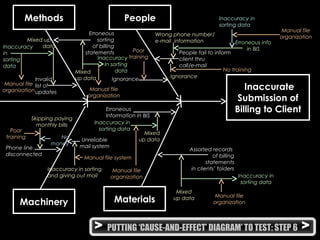
> PUTTING ‘CAUSE-AND-EFFECT’ DIAGRAM’ TO TEST: STEP 1 >
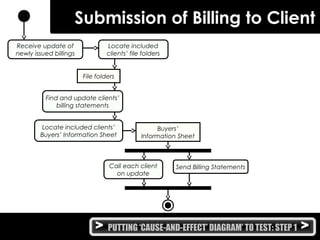
Submission of Billing to Client
Receive update of
newly issued billings
Find and update clients’
billing statements
Locate included
clients’ file folders
File folders
Call each client
on update
Buyers’
Information Sheet
Send Billing Statements
Locate included clients’
Buyers’ Information Sheet
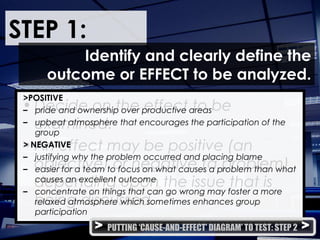
STEP 1:
• Decide on the effect to be
examined.
• An effect may be positive (an
objective) or negative (a problem),
depending upon the issue that is
being discussed.
Identify and clearly define the
outcome or EFFECT to be analyzed.
>POSITIVE
– pride and ownership over productive areas
– upbeat atmosphere that encourages the participation of the
group
> NEGATIVE
– justifying why the problem occurred and placing blame
– easier for a team to focus on what causes a problem than what
causes an excellent outcome
– concentrate on things that can go wrong may foster a more
relaxed atmosphere which sometimes enhances group
participation
> PUTTING ‘CAUSE-AND-EFFECT’ DIAGRAM’ TO TEST: STEP 2 >
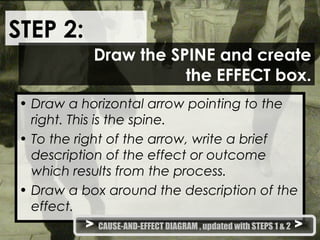
STEP 2:
• Draw a horizontal arrow pointing to the
right. This is the spine.
• To the right of the arrow, write a brief
description of the effect or outcome
which results from the process.
• Draw a box around the description of the
effect.
Draw the SPINE and create
the EFFECT box.
> CAUSE-AND-EFFECT DIAGRAM , updated with STEPS 1 & 2 >
> PUTTING ‘CAUSE-AND-EFFECT’ DIAGRAM’ TO TEST: STEP 3 >
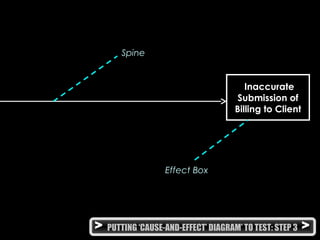
Inaccurate
Submission of
Billing to Client
Effect Box
Spine
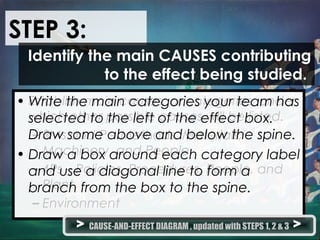
STEP 3:
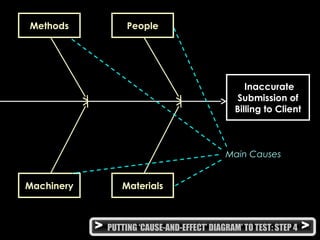
• Establish main causes, or categories, under
which other possible causes will be listed.
– 3Ms and P – Methods, Materials,
Machinery, and People
– 4Ps – Policies, Procedures, People, and
Plant
– Environment
Identify the main CAUSES contributing
to the effect being studied.
• Write the main categories your team has
selected to the left of the effect box.
Draw some above and below the spine.
• Draw a box around each category label
and use a diagonal line to form a
branch from the box to the spine.
> CAUSE-AND-EFFECT DIAGRAM , updated with STEPS 1, 2 & 3 >
Materials
> PUTTING ‘CAUSE-AND-EFFECT’ DIAGRAM’ TO TEST: STEP 4 >
Inaccurate
Submission of
Billing to Client
Methods People
Machinery
Main Causes
STEP 4:
• Identify as many factors or causes
possible and attach them as sub-
branches of the major branches.
• Fill in detail for each cause.
For each major branch, identify other
specific factors which may be the
CAUSES of the EFFECT.
> CAUSE-AND-EFFECT DIAGRAM , updated with STEPS 1, 2, 3 & 4 >
> PUTTING ‘CAUSE-AND-EFFECT’ DIAGRAM’ TO TEST: STEP 5 >
Materials
Inaccurate
Submission of
Billing to Client
Methods People
Machinery
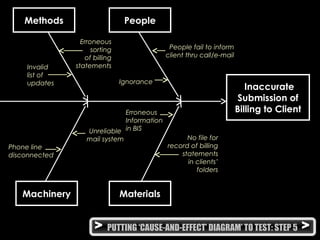
Ignorance
People fail to inform
client thru call/e-mail
Unreliable
mail system
Erroneous
sorting
of billing
statementsInvalid
list of
updates
Phone line
disconnected
Erroneous
Information
in BIS
No file for
record of billing
statements
in clients’
folders
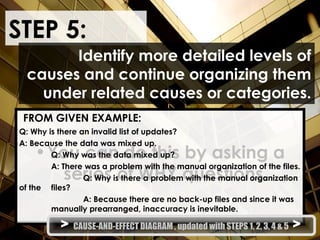
STEP 5:
•You can do this by asking a
series of WHY questions.
Identify more detailed levels of
causes and continue organizing them
under related causes or categories.
FROM GIVEN EXAMPLE:
Q: Why is there an invalid list of updates?
A: Because the data was mixed up.
Q: Why was the data mixed up?
A: There was a problem with the manual organization of the files.
Q: Why is there a problem with the manual organization
of the files?
A: Because there are no back-up files and since it was
manually prearranged, inaccuracy is inevitable.
> CAUSE-AND-EFFECT DIAGRAM , updated with STEPS 1, 2, 3, 4 & 5 >
> PUTTING ‘CAUSE-AND-EFFECT’ DIAGRAM’ TO TEST: STEP 6 >
Materials
Inaccurate
Submission of
Billing to Client
Methods People
Machinery
Ignorance
People fail to inform
client thru
call/e-mail
Unreliable
mail system
Erroneous
sorting
of billing
statements
Invalid
list of
updates
Phone line
disconnected
Erroneous
Information in BIS
Assorted records
of billing
statements
in clients’ folders
Mixed up
dataInaccuracy
in
sorting
data
Manual file
organization
Poor
training
Mixed
up data
Inaccuracy
In sorting
data
Ignorance
Wrong phone number/
e-mail information Erroneous info
in BIS
Inaccuracy in
sorting data
Manual file
organization
No training
Manual file
organization
Skipping paying
monthly bills
Poor
training No
money
Inaccuracy in sorting
and giving out mail
Manual file system
Mixed
up data
Inaccuracy in
sorting data
Manual file
organization
Mixed
up data
Inaccuracy in
sorting data
Manual file
organization
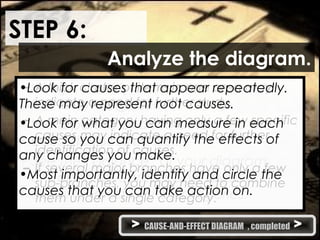
STEP 6:
• It helps identify causes that warrant
further investigation.
• Use a pareto chart to determine the
cause to focus on first.
• See the “balance” of your diagram,
checking for comparable levels of
detail for most of the categories.
Analyze the diagram.
– A thick cluster of items in one area may
indicate a need for further study.
– A main category having only a few specific
causes may indicate a need for further
identification of causes.
– If several major branches have only a few
sub-branches, you may need to combine
them under a single category.
•Look for causes that appear repeatedly.
These may represent root causes.
•Look for what you can measure in each
cause so you can quantify the effects of
any changes you make.
•Most importantly, identify and circle the
causes that you can take action on.
> CAUSE-AND-EFFECT DIAGRAM , completed >
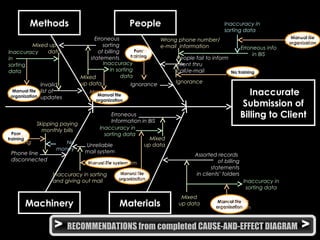
> RECOMMENDATIONS from completed CAUSE-AND-EFFECT DIAGRAM >
Poor
training
Manual file
organization
Poor
training
Manual file system
Manual file
organization
Manual file
organizationMaterials
Inaccurate
Submission of
Billing to Client
Methods People
Machinery
Ignorance
People fail to inform
client thru
call/e-mail
Unreliable
mail system
Erroneous
sorting
of billing
statements
Invalid
list of
updates
Phone line
disconnected
Erroneous
Information in BIS
Assorted records
of billing
statements
in clients’ folders
Mixed up
dataInaccuracy
in
sorting
data
Manual file
organization
Poor
training
Mixed
up data
Inaccuracy
In sorting
data
Ignorance
Wrong phone number/
e-mail information Erroneous info
in BIS
Inaccuracy in
sorting data
Manual file
organization
No training
Manual file
organization
Skipping paying
monthly bills
Poor
training No
money
Inaccuracy in sorting
and giving out mail
Manual file system
Mixed
up data
Inaccuracy in
sorting data
Manual file
organization
Mixed
up data
Inaccuracy in
sorting data
Manual file
organization
No training
Manual file
organization Manual file
organization
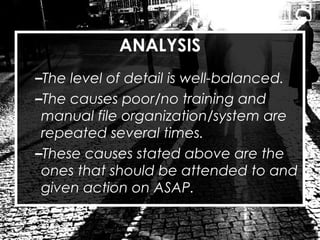
ANALYSIS
–The level of detail is well-balanced.
–The causes poor/no training and
manual file organization/system are
repeated several times.
–These causes stated above are the
ones that should be attended to and
given action on ASAP.
RECOMMENDED SOLUTIONS:
–Poor/No Training -> Give tutorials and
seminars to new and old employees alike.
Have people check employees’
performances every once in a while.
–Manual File System -> Have a computer-
based information system to maintain the
organization. It will not only give you back-
up files but make the system work faster.
Make sure it is maintained and updated at
all times.
THANK YOU

Cause and-effect diagram

  • 1.
  • 2.
    What is it? •An analysis tool that provides a systematic way of looking at effects and their respective causes • Developed by Dr. Kaoru Ishikawa of Japan in 1943 and is sometimes referred to as an Ishikawa Diagram or a Fishbone Diagram because of its shape
  • 3.
    Why implement this? •It helps determine the root causes of a problem using a structured approach. • It encourages group participation and utilizes group knowledge of the process. • It uses an orderly, easy-to- read format to diagram cause-and-effect. relationships • It indicates possible causes of variation in a process.
  • 4.
    • It increasesknowledge of the process by helping everyone to learn more about the factors at work and how they relate. • It identifies areas where data should be collected for further study. Why implement this? > EXAMPLE OF A BUSINESS PROCESS >
  • 5.
    > PUTTING ‘CAUSE-AND-EFFECT’DIAGRAM’ TO TEST: STEP 1 > Submission of Billing to Client Receive update of newly issued billings Find and update clients’ billing statements Locate included clients’ file folders File folders Call each client on update Buyers’ Information Sheet Send Billing Statements Locate included clients’ Buyers’ Information Sheet
  • 6.
    STEP 1: • Decideon the effect to be examined. • An effect may be positive (an objective) or negative (a problem), depending upon the issue that is being discussed. Identify and clearly define the outcome or EFFECT to be analyzed. >POSITIVE – pride and ownership over productive areas – upbeat atmosphere that encourages the participation of the group > NEGATIVE – justifying why the problem occurred and placing blame – easier for a team to focus on what causes a problem than what causes an excellent outcome – concentrate on things that can go wrong may foster a more relaxed atmosphere which sometimes enhances group participation > PUTTING ‘CAUSE-AND-EFFECT’ DIAGRAM’ TO TEST: STEP 2 >
  • 7.
    STEP 2: • Drawa horizontal arrow pointing to the right. This is the spine. • To the right of the arrow, write a brief description of the effect or outcome which results from the process. • Draw a box around the description of the effect. Draw the SPINE and create the EFFECT box. > CAUSE-AND-EFFECT DIAGRAM , updated with STEPS 1 & 2 >
  • 8.
    > PUTTING ‘CAUSE-AND-EFFECT’DIAGRAM’ TO TEST: STEP 3 > Inaccurate Submission of Billing to Client Effect Box Spine
  • 9.
    STEP 3: • Establishmain causes, or categories, under which other possible causes will be listed. – 3Ms and P – Methods, Materials, Machinery, and People – 4Ps – Policies, Procedures, People, and Plant – Environment Identify the main CAUSES contributing to the effect being studied. • Write the main categories your team has selected to the left of the effect box. Draw some above and below the spine. • Draw a box around each category label and use a diagonal line to form a branch from the box to the spine. > CAUSE-AND-EFFECT DIAGRAM , updated with STEPS 1, 2 & 3 >
  • 10.
    Materials > PUTTING ‘CAUSE-AND-EFFECT’DIAGRAM’ TO TEST: STEP 4 > Inaccurate Submission of Billing to Client Methods People Machinery Main Causes
  • 11.
    STEP 4: • Identifyas many factors or causes possible and attach them as sub- branches of the major branches. • Fill in detail for each cause. For each major branch, identify other specific factors which may be the CAUSES of the EFFECT. > CAUSE-AND-EFFECT DIAGRAM , updated with STEPS 1, 2, 3 & 4 >
  • 12.
    > PUTTING ‘CAUSE-AND-EFFECT’DIAGRAM’ TO TEST: STEP 5 > Materials Inaccurate Submission of Billing to Client Methods People Machinery Ignorance People fail to inform client thru call/e-mail Unreliable mail system Erroneous sorting of billing statementsInvalid list of updates Phone line disconnected Erroneous Information in BIS No file for record of billing statements in clients’ folders
  • 13.
    STEP 5: •You cando this by asking a series of WHY questions. Identify more detailed levels of causes and continue organizing them under related causes or categories. FROM GIVEN EXAMPLE: Q: Why is there an invalid list of updates? A: Because the data was mixed up. Q: Why was the data mixed up? A: There was a problem with the manual organization of the files. Q: Why is there a problem with the manual organization of the files? A: Because there are no back-up files and since it was manually prearranged, inaccuracy is inevitable. > CAUSE-AND-EFFECT DIAGRAM , updated with STEPS 1, 2, 3, 4 & 5 >
  • 14.
    > PUTTING ‘CAUSE-AND-EFFECT’DIAGRAM’ TO TEST: STEP 6 > Materials Inaccurate Submission of Billing to Client Methods People Machinery Ignorance People fail to inform client thru call/e-mail Unreliable mail system Erroneous sorting of billing statements Invalid list of updates Phone line disconnected Erroneous Information in BIS Assorted records of billing statements in clients’ folders Mixed up dataInaccuracy in sorting data Manual file organization Poor training Mixed up data Inaccuracy In sorting data Ignorance Wrong phone number/ e-mail information Erroneous info in BIS Inaccuracy in sorting data Manual file organization No training Manual file organization Skipping paying monthly bills Poor training No money Inaccuracy in sorting and giving out mail Manual file system Mixed up data Inaccuracy in sorting data Manual file organization Mixed up data Inaccuracy in sorting data Manual file organization
  • 15.
    STEP 6: • Ithelps identify causes that warrant further investigation. • Use a pareto chart to determine the cause to focus on first. • See the “balance” of your diagram, checking for comparable levels of detail for most of the categories. Analyze the diagram. – A thick cluster of items in one area may indicate a need for further study. – A main category having only a few specific causes may indicate a need for further identification of causes. – If several major branches have only a few sub-branches, you may need to combine them under a single category. •Look for causes that appear repeatedly. These may represent root causes. •Look for what you can measure in each cause so you can quantify the effects of any changes you make. •Most importantly, identify and circle the causes that you can take action on. > CAUSE-AND-EFFECT DIAGRAM , completed >
  • 16.
    > RECOMMENDATIONS fromcompleted CAUSE-AND-EFFECT DIAGRAM > Poor training Manual file organization Poor training Manual file system Manual file organization Manual file organizationMaterials Inaccurate Submission of Billing to Client Methods People Machinery Ignorance People fail to inform client thru call/e-mail Unreliable mail system Erroneous sorting of billing statements Invalid list of updates Phone line disconnected Erroneous Information in BIS Assorted records of billing statements in clients’ folders Mixed up dataInaccuracy in sorting data Manual file organization Poor training Mixed up data Inaccuracy In sorting data Ignorance Wrong phone number/ e-mail information Erroneous info in BIS Inaccuracy in sorting data Manual file organization No training Manual file organization Skipping paying monthly bills Poor training No money Inaccuracy in sorting and giving out mail Manual file system Mixed up data Inaccuracy in sorting data Manual file organization Mixed up data Inaccuracy in sorting data Manual file organization No training Manual file organization Manual file organization
  • 17.
    ANALYSIS –The level ofdetail is well-balanced. –The causes poor/no training and manual file organization/system are repeated several times. –These causes stated above are the ones that should be attended to and given action on ASAP.
  • 18.
    RECOMMENDED SOLUTIONS: –Poor/No Training-> Give tutorials and seminars to new and old employees alike. Have people check employees’ performances every once in a while. –Manual File System -> Have a computer- based information system to maintain the organization. It will not only give you back- up files but make the system work faster. Make sure it is maintained and updated at all times.
  • 19.