PROCESSPROCESS
MAPPINGMAPPING
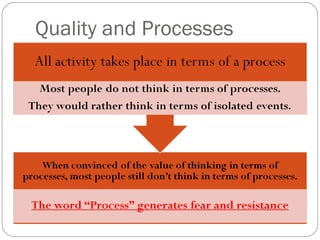
Quality and
Processes
Quality is judged by customers
based on the output of a process
Focusing on the work of the
individual worker will not lead to
greatly improved quality
Quality and Processes
To improve quality, the process must be
improved.
Simply focusing on or defining a process is
NOT improvement – Management has to
make changes and use data to show the
change really is an improvement.
Quality and Processes
PROCESS MAPPINGPROCESS MAPPING
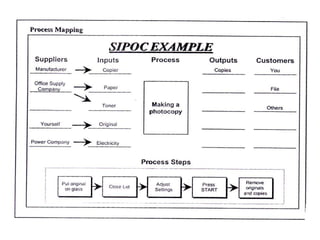
WHY CREATE A SIPOC MAP?
1. To develop a high-level view of the
process.
2. To avoid dilution of Scope.
3. To highlight areas for improvement.
4. To ensure focus on the customer.
PROCESS MAPPINGPROCESS MAPPING
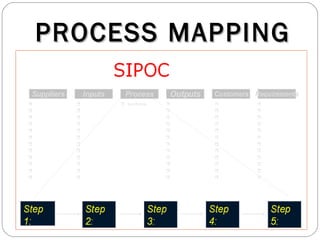
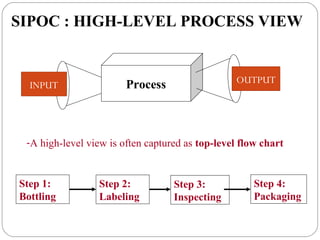
SIPOC : HIGH-LEVEL PROCESS VIEW
Process
-A high-level view is often captured as top-level flow chart
Step 1:
Bottling
Step 2:
Labeling
Step 3:
Inspecting
Step 4:
Packaging
INPUT
OUTPUT
Questions to help with SIPOC
Purpose
Why does this process exist?
What is the purpose of this process?
What is the outcome?
Outputs
What product does this process make?
What are the outputs of this process?
At what point does this process end?
Questions to help withQuestions to help with
SIPOCSIPOC
Customers
Who uses the products from this process?
Who are the customers of this process?
Process steps
What happens to each input?
What conversion activities take place?
PROCESS MAPPINGPROCESS MAPPING
Inputs/Suppliers
Where does the information or material you
work on come from? Who are your suppliers?
What do they supply?
Where do they affect the process flow?
What effect do they have on the process and on
the outcome?
How to create a SIPOC
Map
Name the process.
Clarify the start and the stop (boundaries)
of the process.
List key outputs and customers.
List key inputs and suppliers.
Identify, name, and order the major process
steps.
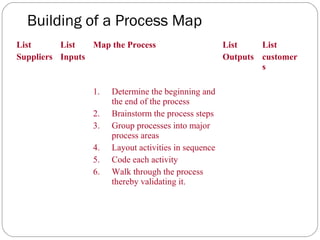
Building of a Process Map
List
Suppliers
List
Inputs
Map the Process List
Outputs
List
customer
s
1. Determine the beginning and
the end of the process
2. Brainstorm the process steps
3. Group processes into major
process areas
4. Layout activities in sequence
5. Code each activity
6. Walk through the process
thereby validating it.
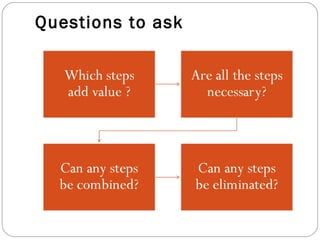
Questions to ask
PROCESS MAPPINGPROCESS MAPPING
Many defects arise because something in
a process is done incorrectly or
inefficiently.
To improve process sigma managers
need to be able to pinpoint process
problems and find better, more effective
ways to accomplish the same work.
What you need to know about a
Process
PROCESS MAPPINGPROCESS MAPPING
Understanding a Process
To better understand the process, PEIM
will:
Create a flowchart of the process.
Identify which of your process steps are value-
added and which are non value-added.
Determine cycle time and identify
bottlenecks.
Look for errors or inefficiencies that
contribute to defects.
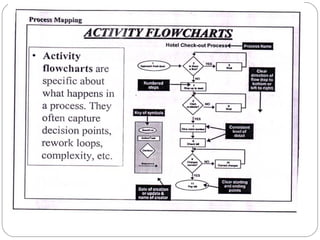
FLOW CHARTS
Flow charts are tools that make a process visible.
Start Step 1 Step 2 Step 3
Decision
Step 4 Step 5
Step 6 End
No
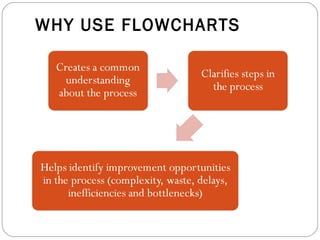
WHY USE FLOWCHARTS
PROCESS MAPPINGPROCESS MAPPING
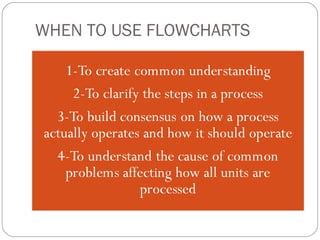
WHEN TO USE FLOWCHARTS
Custome
r Service
Demand
Fulfillment
Demand
Generatio
n
New Product
Development
ShippingPackingProducing
Ordering
materials
PackagingSealingFillingMixing
Level
1
Level
2
Level 3
STARTING AT THE TOP
Key business activities can be defined at different levels of
the organisation
PROCESS MAPPINGPROCESS MAPPING
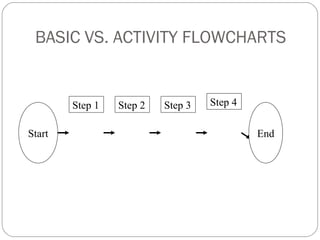
BASIC VS. ACTIVITY FLOWCHARTS
Start
Step 1 Step 2 Step 3 Step 4
End
WHICH FLOWCHARTING TECHNIQUE
SHOULD I USE?
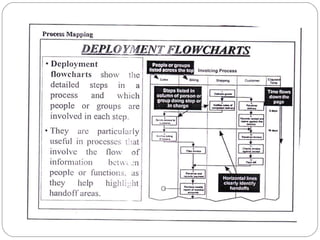
Basic Flowchart Activity Flowchart Deployment
Flowchart
•To identify the
major steps of the
process
•To illustrate where
in the process you
will collect data
•To display the
complexity and
decision points of a
process
•To identify rework
loops and
bottlenecks
•To help highlight
handoff areas in
processes between
people or functions
•To clarify roles and
indicate
dependencies
HOW TO CREATE FLOWCHARTS
When creating a flowchart, work
with a group so you can get multiple
viewpoints.
Brainstorm action steps
Write these on self-stick notes or on
a flipchart
Make sure to include the steps that
occur when things go wrong
HOW TO CREATE FLOWCHARTS
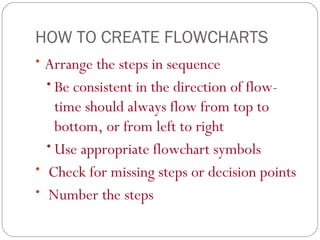
• Arrange the steps in sequence
• Be consistent in the direction of flow-
time should always flow from top to
bottom, or from left to right
• Use appropriate flowchart symbols
• Check for missing steps or decision points
• Number the steps
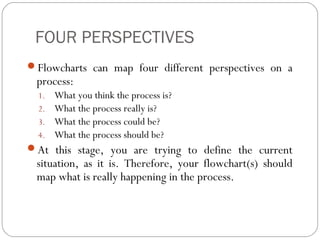
FOUR PERSPECTIVES
Flowcharts can map four different perspectives on a
process:
1. What you think the process is?
2. What the process really is?
3. What the process could be?
4. What the process should be?
At this stage, you are trying to define the current
situation, as it is. Therefore, your flowchart(s) should
map what is really happening in the process.
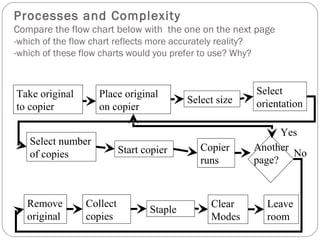
Processes and Complexity
Compare the flow chart below with the one on the next page
-which of the flow chart reflects more accurately reality?
-which of these flow charts would you prefer to use? Why?
Take original
to copier
Place original
on copier
Select size
Select
orientation
Select number
of copies Start copier Copier
runs
Another
page?
Remove
original
Collect
copies
Staple
Clear
Modes
Leave
room
Yes
No
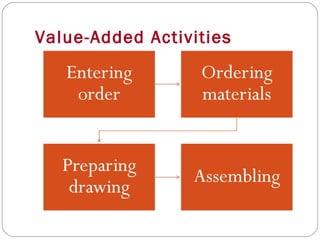
VALUE-ADDED AND NONVALUE-ADDED STEPS
Value-Added Step:
Customers are willing to pay for it.
It physically changes the product
It’s done right the first time.
Non-Value Added Step:
Is not essential to produce output.
Does not add value to the output.
Non-Value Added Step:
Includes:
Defects, errors, omissions.
Preparation/setup,
Over-production, processing,
inventory
Transporting, motion, waiting,
delays
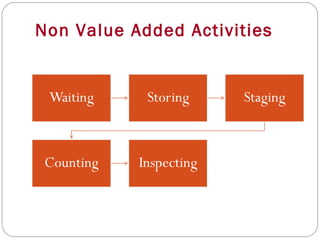
Value-Added Activities
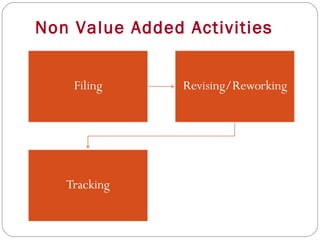
Non Value Added Activities
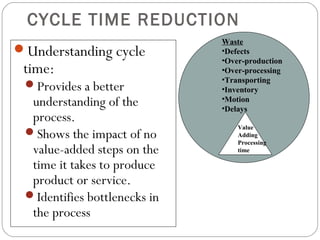
CYCLE TIME REDUCTION
Understanding cycle
time:
Provides a better
understanding of the
process.
Shows the impact of no
value-added steps on the
time it takes to produce
product or service.
Identifies bottlenecks in
the process
Waste
•Defects
•Over-production
•Over-processing
•Transporting
•Inventory
•Motion
•Delays
Value
Adding
Processing
time
CYCLE TIME REDUCTION
Reducing cycle time:
• Helps increase predictability in the
process
• Helps reduce waste and rework,
which reduces costs.
• Provides a competitive advantage by
reducing cycle time.
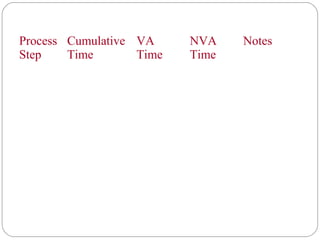
MEASURING CYCLE TIME
1. Decide whether you
will measure cycle
time on the entire
process or on a
subset of steps.
2. Develop
operational
definitions for the
starting and ending
points of each step.
3. Develop
consensus about
what is value-
added and what
is non-value
added time (if
you haven’t done
so already)
4. Develop a data
collection form.
Process
Step
Cumulative
Time
VA
Time
NVA
Time
Notes
VALUE ANALYSIS MATRIX
You can track specific types of non-
value added time with a Value Analysis
Matrix. This helps clarify:
the types of waste present in the
process,
the percentage of overall process
time each non-Value adding step
contributes.
100%100Total
30%30Transporting/
Motion
52%52Delay
6%6Control/
Inspection
Prep/Setup
10%10Fixing Errors
Non Value
added
2%2Value Added
100%10020101106201011012Time (Hours)
%TotalTotal
10987654321Process Step
BOTTLENECKS
Bottlenecks increase cycle time
A bottleneck is:
Any resource whose capacity limits the amount
of information or material that flows through
the process.
Any resource whose capacity is equal to or less
than the demand placed upon it.
How do you recognise bottlenecks?
WHEN TO GO FOR DESIGN
EXCELLENCE
WHEN TO GO FOR DESIGN
EXCELLENCE
Next generation; the existing
product’s remaining Life Cycle is very
short, a successor is required soon.
System limits: the performance gap is
due to system / business model
configurations that cannot be changed.
Process mapping
Become aware of the Problem.
Describe the Problem
Define & Verify the root causes
Identify potential root causes
Select likely causes
Is the potential cause a root cause
Yes
Identify alternative solutions
Verify corrective actions
Implement permanent actions
Prevent Recurrence
Congratulate your team
QUALITY AND PROCESSES
Quality is judged by customers based
on the output of a process.
Focusing on the work of the individual
worker will not lead to greatly
improved quality.
To improve quality, the process must
be improved.
QUALITY AND PROCESSES
Simply focusing on or defining a
process is NOT improvement – we
have to make changes and use data to
show the change really is an
improvement.

090 Process Mapping

  • 1.
  • 2.
    Quality and Processes Quality isjudged by customers based on the output of a process Focusing on the work of the individual worker will not lead to greatly improved quality
  • 3.
    Quality and Processes Toimprove quality, the process must be improved. Simply focusing on or defining a process is NOT improvement – Management has to make changes and use data to show the change really is an improvement.
  • 4.
  • 5.
  • 6.
  • 7.
    WHY CREATE ASIPOC MAP? 1. To develop a high-level view of the process. 2. To avoid dilution of Scope. 3. To highlight areas for improvement. 4. To ensure focus on the customer.
  • 8.
  • 9.
  • 10.
    SIPOC : HIGH-LEVELPROCESS VIEW Process -A high-level view is often captured as top-level flow chart Step 1: Bottling Step 2: Labeling Step 3: Inspecting Step 4: Packaging INPUT OUTPUT
  • 11.
    Questions to helpwith SIPOC Purpose Why does this process exist? What is the purpose of this process? What is the outcome? Outputs What product does this process make? What are the outputs of this process? At what point does this process end?
  • 12.
    Questions to helpwithQuestions to help with SIPOCSIPOC Customers Who uses the products from this process? Who are the customers of this process? Process steps What happens to each input? What conversion activities take place?
  • 13.
    PROCESS MAPPINGPROCESS MAPPING Inputs/Suppliers Wheredoes the information or material you work on come from? Who are your suppliers? What do they supply? Where do they affect the process flow? What effect do they have on the process and on the outcome?
  • 15.
    How to createa SIPOC Map Name the process. Clarify the start and the stop (boundaries) of the process. List key outputs and customers. List key inputs and suppliers. Identify, name, and order the major process steps.
  • 16.
    Building of aProcess Map List Suppliers List Inputs Map the Process List Outputs List customer s 1. Determine the beginning and the end of the process 2. Brainstorm the process steps 3. Group processes into major process areas 4. Layout activities in sequence 5. Code each activity 6. Walk through the process thereby validating it.
  • 17.
  • 18.
    PROCESS MAPPINGPROCESS MAPPING Manydefects arise because something in a process is done incorrectly or inefficiently. To improve process sigma managers need to be able to pinpoint process problems and find better, more effective ways to accomplish the same work.
  • 19.
    What you needto know about a Process
  • 20.
  • 21.
    Understanding a Process Tobetter understand the process, PEIM will: Create a flowchart of the process. Identify which of your process steps are value- added and which are non value-added. Determine cycle time and identify bottlenecks. Look for errors or inefficiencies that contribute to defects.
  • 22.
    FLOW CHARTS Flow chartsare tools that make a process visible. Start Step 1 Step 2 Step 3 Decision Step 4 Step 5 Step 6 End No
  • 23.
  • 24.
  • 25.
    WHEN TO USEFLOWCHARTS
  • 26.
  • 27.
  • 29.
  • 30.
  • 31.
  • 32.
    BASIC VS. ACTIVITYFLOWCHARTS Start Step 1 Step 2 Step 3 Step 4 End
  • 35.
    WHICH FLOWCHARTING TECHNIQUE SHOULDI USE? Basic Flowchart Activity Flowchart Deployment Flowchart •To identify the major steps of the process •To illustrate where in the process you will collect data •To display the complexity and decision points of a process •To identify rework loops and bottlenecks •To help highlight handoff areas in processes between people or functions •To clarify roles and indicate dependencies
  • 36.
    HOW TO CREATEFLOWCHARTS When creating a flowchart, work with a group so you can get multiple viewpoints. Brainstorm action steps Write these on self-stick notes or on a flipchart Make sure to include the steps that occur when things go wrong
  • 37.
    HOW TO CREATEFLOWCHARTS • Arrange the steps in sequence • Be consistent in the direction of flow- time should always flow from top to bottom, or from left to right • Use appropriate flowchart symbols • Check for missing steps or decision points • Number the steps
  • 38.
    FOUR PERSPECTIVES Flowcharts canmap four different perspectives on a process: 1. What you think the process is? 2. What the process really is? 3. What the process could be? 4. What the process should be? At this stage, you are trying to define the current situation, as it is. Therefore, your flowchart(s) should map what is really happening in the process.
  • 39.
    Processes and Complexity Comparethe flow chart below with the one on the next page -which of the flow chart reflects more accurately reality? -which of these flow charts would you prefer to use? Why? Take original to copier Place original on copier Select size Select orientation Select number of copies Start copier Copier runs Another page? Remove original Collect copies Staple Clear Modes Leave room Yes No
  • 41.
    VALUE-ADDED AND NONVALUE-ADDEDSTEPS Value-Added Step: Customers are willing to pay for it. It physically changes the product It’s done right the first time. Non-Value Added Step: Is not essential to produce output. Does not add value to the output.
  • 42.
    Non-Value Added Step: Includes: Defects,errors, omissions. Preparation/setup, Over-production, processing, inventory Transporting, motion, waiting, delays
  • 43.
  • 44.
  • 45.
    Non Value AddedActivities
  • 46.
    Non Value AddedActivities
  • 47.
    Non Value AddedActivities
  • 52.
    CYCLE TIME REDUCTION Understandingcycle time: Provides a better understanding of the process. Shows the impact of no value-added steps on the time it takes to produce product or service. Identifies bottlenecks in the process Waste •Defects •Over-production •Over-processing •Transporting •Inventory •Motion •Delays Value Adding Processing time
  • 53.
    CYCLE TIME REDUCTION Reducingcycle time: • Helps increase predictability in the process • Helps reduce waste and rework, which reduces costs. • Provides a competitive advantage by reducing cycle time.
  • 54.
    MEASURING CYCLE TIME 1.Decide whether you will measure cycle time on the entire process or on a subset of steps. 2. Develop operational definitions for the starting and ending points of each step. 3. Develop consensus about what is value- added and what is non-value added time (if you haven’t done so already) 4. Develop a data collection form.
  • 55.
  • 56.
    VALUE ANALYSIS MATRIX Youcan track specific types of non- value added time with a Value Analysis Matrix. This helps clarify: the types of waste present in the process, the percentage of overall process time each non-Value adding step contributes.
  • 57.
  • 59.
    BOTTLENECKS Bottlenecks increase cycletime A bottleneck is: Any resource whose capacity limits the amount of information or material that flows through the process. Any resource whose capacity is equal to or less than the demand placed upon it. How do you recognise bottlenecks?
  • 60.
    WHEN TO GOFOR DESIGN EXCELLENCE
  • 61.
    WHEN TO GOFOR DESIGN EXCELLENCE Next generation; the existing product’s remaining Life Cycle is very short, a successor is required soon. System limits: the performance gap is due to system / business model configurations that cannot be changed.
  • 62.
    Process mapping Become awareof the Problem. Describe the Problem Define & Verify the root causes Identify potential root causes Select likely causes Is the potential cause a root cause Yes Identify alternative solutions Verify corrective actions Implement permanent actions Prevent Recurrence Congratulate your team
  • 63.
    QUALITY AND PROCESSES Qualityis judged by customers based on the output of a process. Focusing on the work of the individual worker will not lead to greatly improved quality. To improve quality, the process must be improved.
  • 64.
    QUALITY AND PROCESSES Simplyfocusing on or defining a process is NOT improvement – we have to make changes and use data to show the change really is an improvement.