PC Hardware Servicing
Chapter 4: The Motherboard
Chapter 4 Objectives
• Understand the processing subsystem
• Identify expansion buses and slots
• Differentiate between motherboard form
factors and feature sets
• Identify parts of a motherboard
• Change the battery in a motherboard
• Troubleshoot motherboard problems
Processing Subsystem
• Motherboard
• CPU
• Memory
• Operating system
How a Motherboard Works
• Buses
– Address bus
– System bus
– Expansion buses
• Chips
– Chipset
– CPU
– RAM
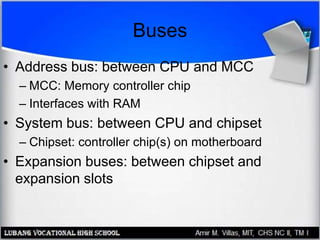
Buses
• Address bus: between CPU and MCC
– MCC: Memory controller chip
– Interfaces with RAM
• System bus: between CPU and chipset
– Chipset: controller chip(s) on motherboard
• Expansion buses: between chipset and
expansion slots
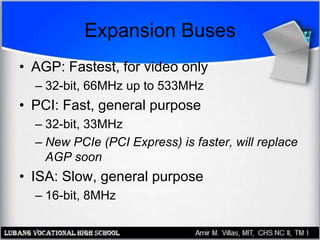
Expansion Buses
• AGP: Fastest, for video only
– 32-bit, 66MHz up to 533MHz
• PCI: Fast, general purpose
– 32-bit, 33MHz
– New PCIe (PCI Express) is faster, will replace
AGP soon
• ISA: Slow, general purpose
– 16-bit, 8MHz
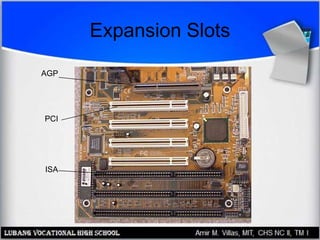
Expansion Slots
AGP
ISA
PCI
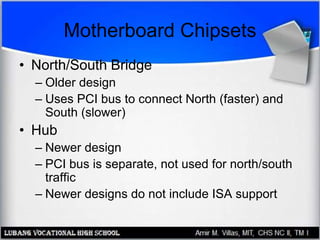
Motherboard Chipsets
• North/South Bridge
– Older design
– Uses PCI bus to connect North (faster) and
South (slower)
• Hub
– Newer design
– PCI bus is separate, not used for north/south
traffic
– Newer designs do not include ISA support
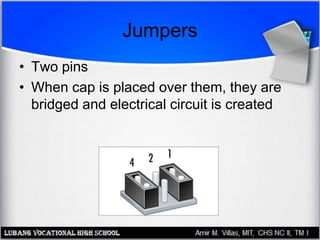
Jumpers
• Two pins
• When cap is placed over them, they are
bridged and electrical circuit is created
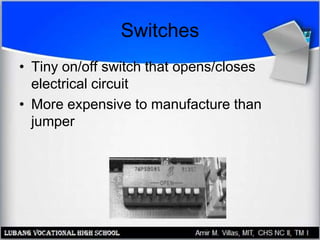
Switches
• Tiny on/off switch that opens/closes
electrical circuit
• More expensive to manufacture than
jumper
Selecting a Motherboard
• Form Factor
• Expansion Slots
• RAM slots
• CPU Slot or Socket
• Built-in components (sound, video,
network)
• I/O ports (USB, FireWire, serial, parallel,
PS/2 mouse)
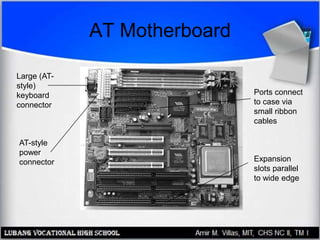
AT Motherboard
Ports connect
to case via
small ribbon
cables
Large (AT-
style)
keyboard
connector
AT-style
power
connector Expansion
slots parallel
to wide edge
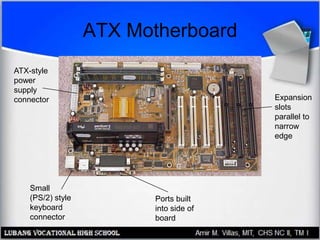
ATX Motherboard
ATX-style
power
supply
connector
Ports built
into side of
board
Expansion
slots
parallel to
narrow
edge
Small
(PS/2) style
keyboard
connector
Motherboard Expansion Slots
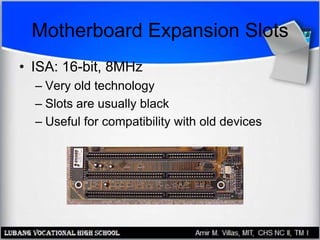
• ISA: 16-bit, 8MHz
– Very old technology
– Slots are usually black
– Useful for compatibility with old devices
Motherboard Expansion Slots
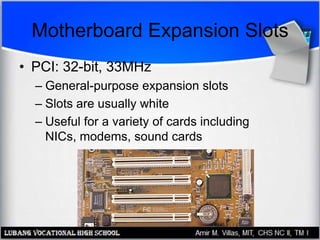
• PCI: 32-bit, 33MHz
– General-purpose expansion slots
– Slots are usually white
– Useful for a variety of cards including
NICs, modems, sound cards
Motherboard Expansion Slots
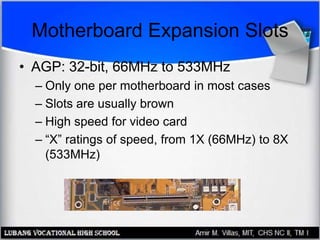
• AGP: 32-bit, 66MHz to 533MHz
– Only one per motherboard in most cases
– Slots are usually brown
– High speed for video card
– “X” ratings of speed, from 1X (66MHz) to 8X
(533MHz)
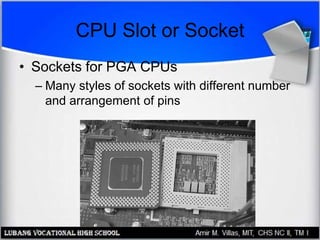
CPU Slot or Socket
• Sockets for PGA CPUs
– Many styles of sockets with different number
and arrangement of pins
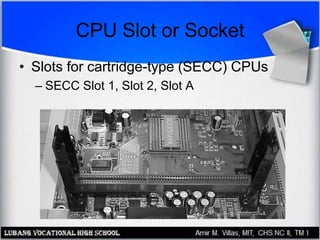
CPU Slot or Socket
• Slots for cartridge-type (SECC) CPUs
– SECC Slot 1, Slot 2, Slot A
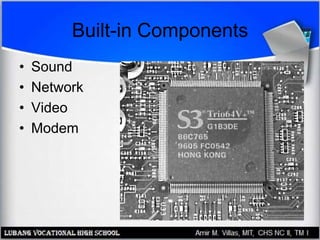
Built-in Components
• Sound
• Network
• Video
• Modem
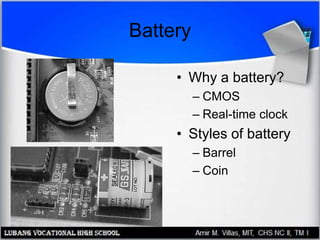
Battery
• Why a battery?
– CMOS
– Real-time clock
• Styles of battery
– Barrel
– Coin
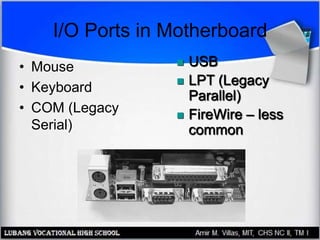
I/O Ports in Motherboard
• Mouse
• Keyboard
• COM (Legacy
Serial)
 USB
 LPT (Legacy
Parallel)
 FireWire – less
common
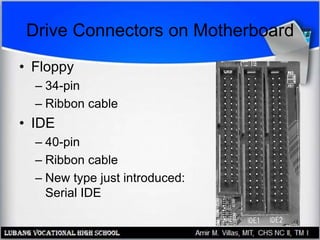
Drive Connectors on Motherboard
• Floppy
– 34-pin
– Ribbon cable
• IDE
– 40-pin
– Ribbon cable
– New type just introduced:
Serial IDE
Troubleshooting Motherboards
• Dead Motherboard:
– Correct CPU installed?
– Correct type of RAM?
– Power supply working?
– Video card installed?
– Power turned on?
Troubleshooting Motherboards
• Beeping
– RAM, CPU, video card:
• Installed correctly?
• Appropriate for this motherboard?
• Malfunctioning?
– Look up beep code in BIOS reference
Troubleshooting Motherboards
• Dead Battery
– Real-time clock is losing time
– PC forgets its configuration settings when
powered off
Troubleshooting Motherboards
• Dead built-in components
• Malfunctioning expansion slots
• Bad jumper settings
• Bent pins
• Leaky battery
• Broken connection (poor soldering)
• Short circuiting

The Motherboard

  • 1.
  • 2.
    Chapter 4 Objectives •Understand the processing subsystem • Identify expansion buses and slots • Differentiate between motherboard form factors and feature sets • Identify parts of a motherboard • Change the battery in a motherboard • Troubleshoot motherboard problems
  • 3.
    Processing Subsystem • Motherboard •CPU • Memory • Operating system
  • 4.
    How a MotherboardWorks • Buses – Address bus – System bus – Expansion buses • Chips – Chipset – CPU – RAM
  • 5.
    Buses • Address bus:between CPU and MCC – MCC: Memory controller chip – Interfaces with RAM • System bus: between CPU and chipset – Chipset: controller chip(s) on motherboard • Expansion buses: between chipset and expansion slots
  • 6.
    Expansion Buses • AGP:Fastest, for video only – 32-bit, 66MHz up to 533MHz • PCI: Fast, general purpose – 32-bit, 33MHz – New PCIe (PCI Express) is faster, will replace AGP soon • ISA: Slow, general purpose – 16-bit, 8MHz
  • 7.
  • 8.
    Motherboard Chipsets • North/SouthBridge – Older design – Uses PCI bus to connect North (faster) and South (slower) • Hub – Newer design – PCI bus is separate, not used for north/south traffic – Newer designs do not include ISA support
  • 9.
    Jumpers • Two pins •When cap is placed over them, they are bridged and electrical circuit is created
  • 10.
    Switches • Tiny on/offswitch that opens/closes electrical circuit • More expensive to manufacture than jumper
  • 11.
    Selecting a Motherboard •Form Factor • Expansion Slots • RAM slots • CPU Slot or Socket • Built-in components (sound, video, network) • I/O ports (USB, FireWire, serial, parallel, PS/2 mouse)
  • 12.
    AT Motherboard Ports connect tocase via small ribbon cables Large (AT- style) keyboard connector AT-style power connector Expansion slots parallel to wide edge
  • 13.
    ATX Motherboard ATX-style power supply connector Ports built intoside of board Expansion slots parallel to narrow edge Small (PS/2) style keyboard connector
  • 14.
    Motherboard Expansion Slots •ISA: 16-bit, 8MHz – Very old technology – Slots are usually black – Useful for compatibility with old devices
  • 15.
    Motherboard Expansion Slots •PCI: 32-bit, 33MHz – General-purpose expansion slots – Slots are usually white – Useful for a variety of cards including NICs, modems, sound cards
  • 16.
    Motherboard Expansion Slots •AGP: 32-bit, 66MHz to 533MHz – Only one per motherboard in most cases – Slots are usually brown – High speed for video card – “X” ratings of speed, from 1X (66MHz) to 8X (533MHz)
  • 17.
    CPU Slot orSocket • Sockets for PGA CPUs – Many styles of sockets with different number and arrangement of pins
  • 18.
    CPU Slot orSocket • Slots for cartridge-type (SECC) CPUs – SECC Slot 1, Slot 2, Slot A
  • 19.
    Built-in Components • Sound •Network • Video • Modem
  • 20.
    Battery • Why abattery? – CMOS – Real-time clock • Styles of battery – Barrel – Coin
  • 21.
    I/O Ports inMotherboard • Mouse • Keyboard • COM (Legacy Serial)  USB  LPT (Legacy Parallel)  FireWire – less common
  • 22.
    Drive Connectors onMotherboard • Floppy – 34-pin – Ribbon cable • IDE – 40-pin – Ribbon cable – New type just introduced: Serial IDE
  • 23.
    Troubleshooting Motherboards • DeadMotherboard: – Correct CPU installed? – Correct type of RAM? – Power supply working? – Video card installed? – Power turned on?
  • 24.
    Troubleshooting Motherboards • Beeping –RAM, CPU, video card: • Installed correctly? • Appropriate for this motherboard? • Malfunctioning? – Look up beep code in BIOS reference
  • 25.
    Troubleshooting Motherboards • DeadBattery – Real-time clock is losing time – PC forgets its configuration settings when powered off
  • 26.
    Troubleshooting Motherboards • Deadbuilt-in components • Malfunctioning expansion slots • Bad jumper settings • Bent pins • Leaky battery • Broken connection (poor soldering) • Short circuiting