FOUNDATIONS OF
COMPUTING: FROM
HARDWARE
ESSENTIALS TO WEB
DESIGN
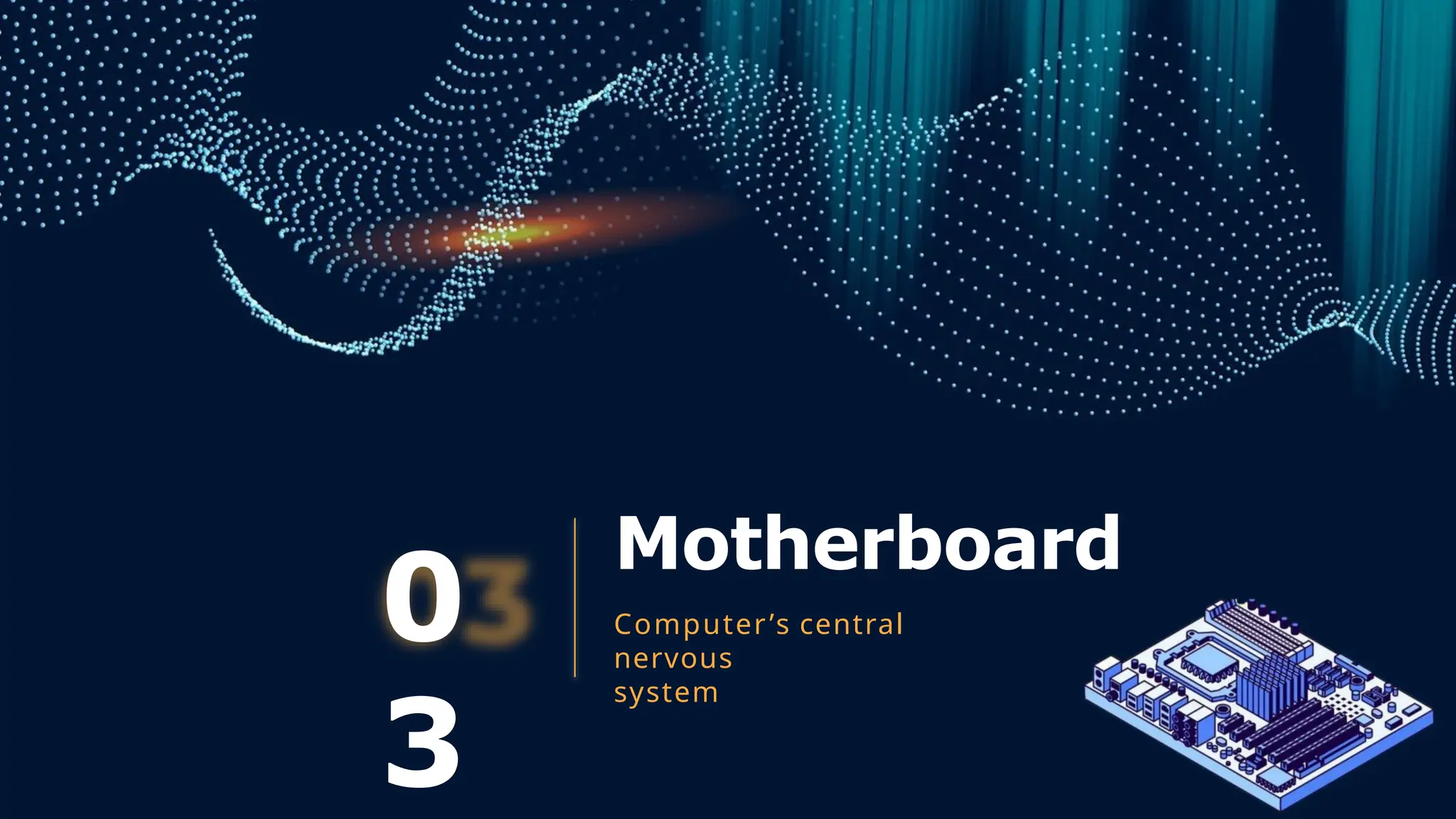
Motherboard
0
3
Computer’s central
nervous
system
What is a Motherboard?
● The motherboard is the main printed circuit board (PCB) in a
computer, connecting and enabling communication
between all the essential components of the system.
● Acts as the backbone of the computer, distributing power
and allowing hardware components to communicate.
9
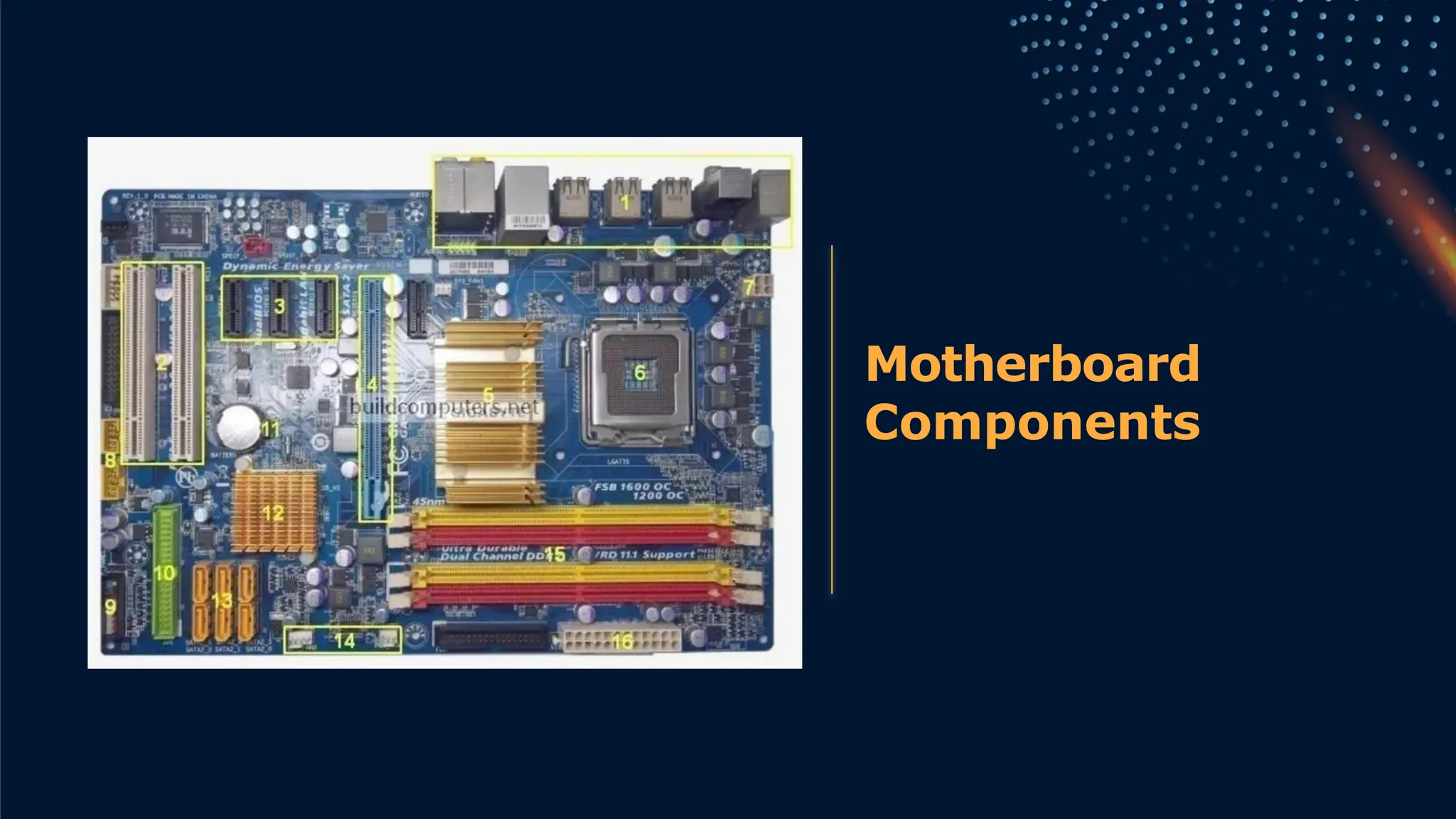
Motherboard
Components
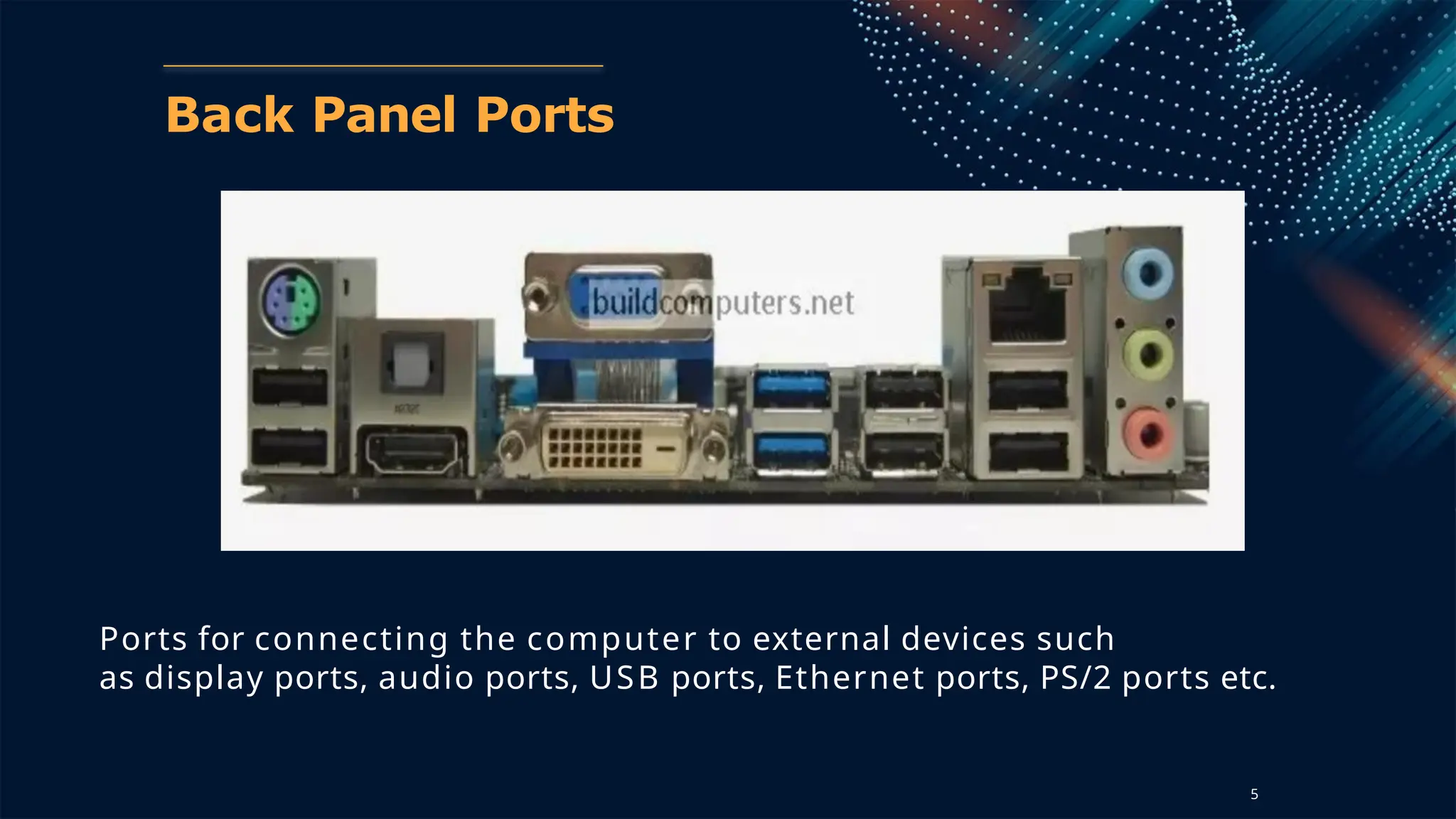
Back Panel Ports
Ports for connecting the computer to external devices such
as display ports, audio ports, USB ports, Ethernet ports, PS/2 ports etc.
5
Back Panel Connectors &
Ports
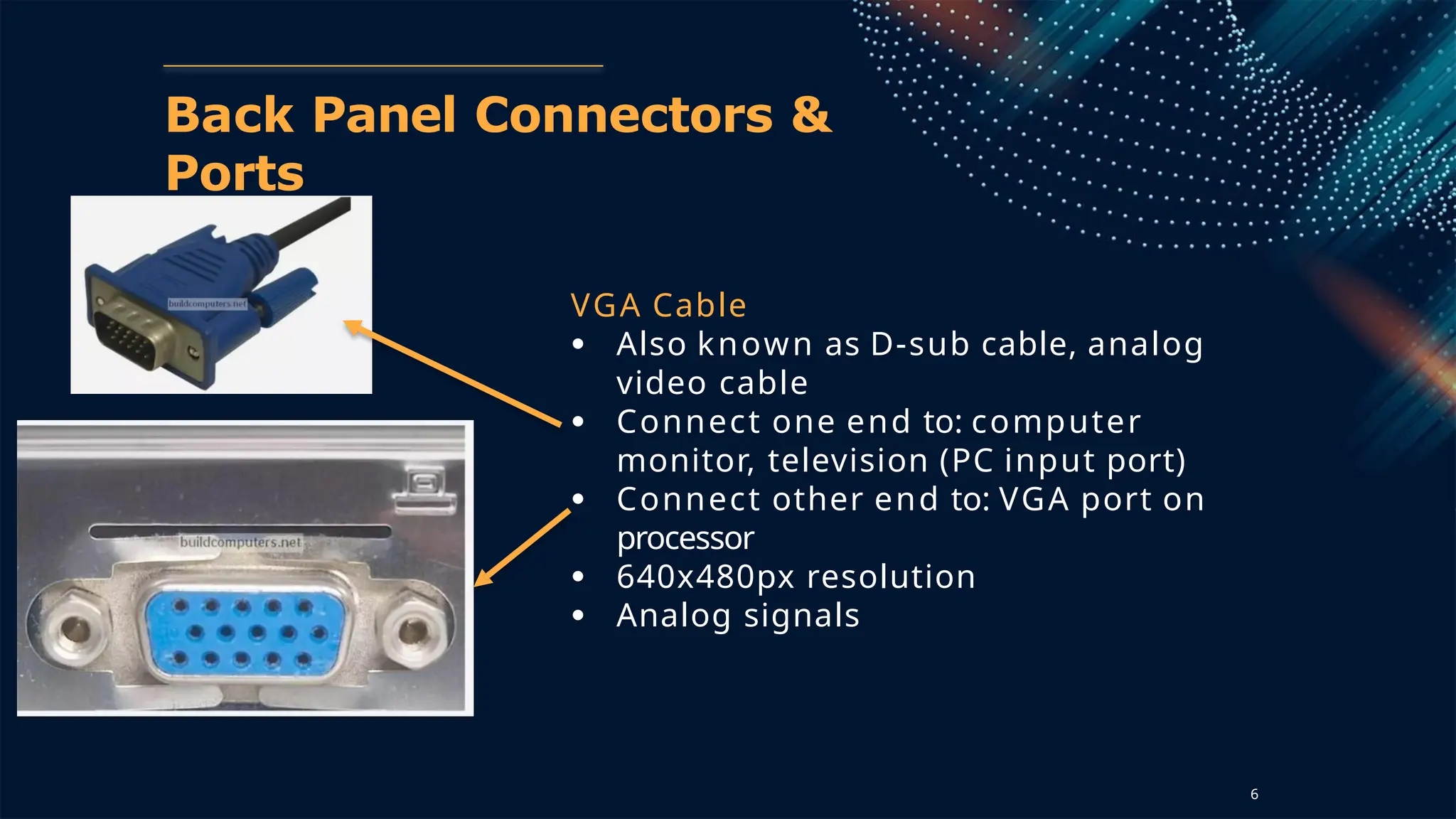
VGA Cable
● Also known as D-sub cable, analog
video cable
● Connect one end to: computer
monitor, television (PC input port)
● Connect other end to: VGA port on
processor
● 640x480px resolution
● Analog signals
6
Back Panel Connectors &
Ports
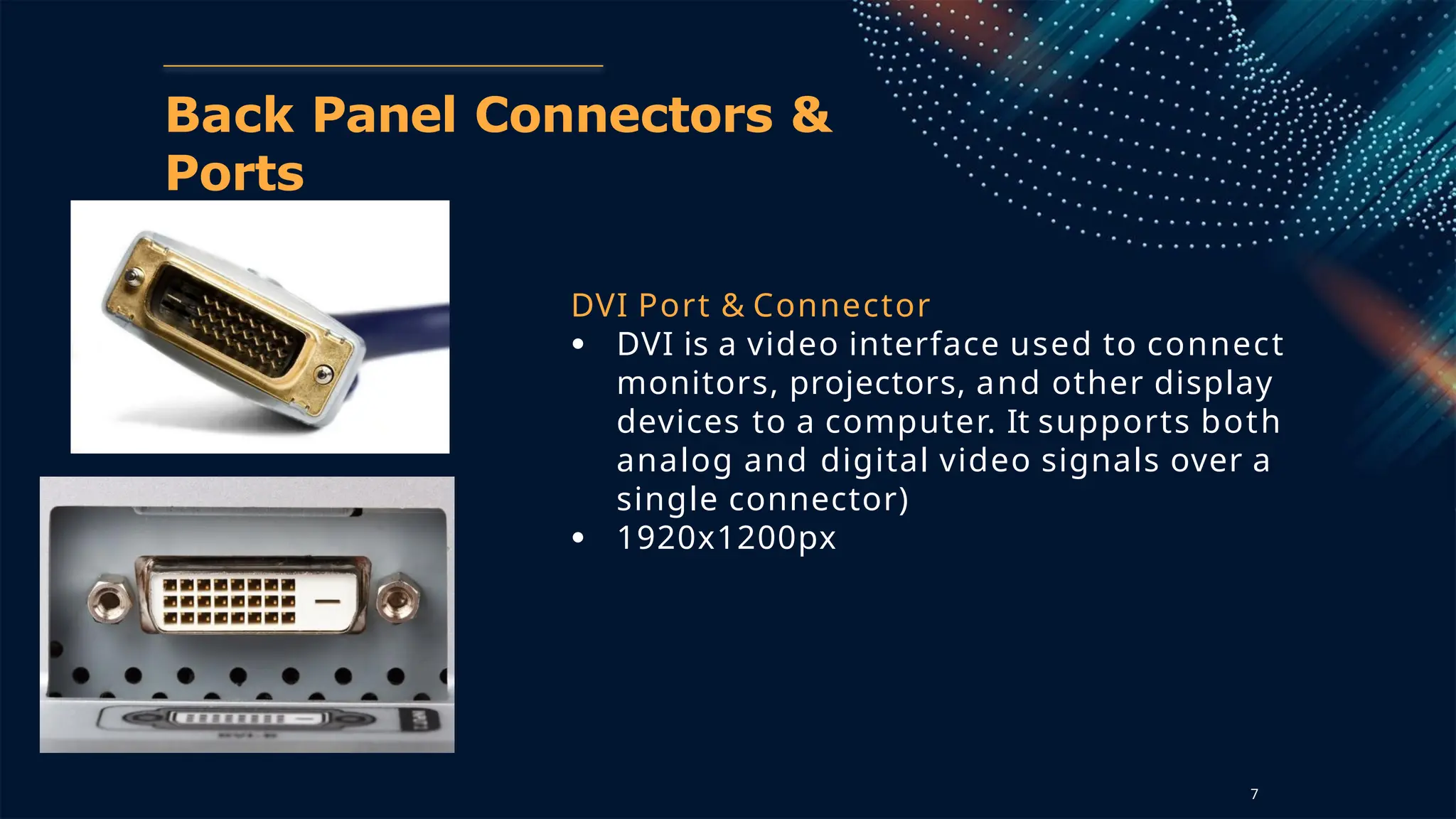
DVI Port & Connector
● DVI is a video interface used to connect
monitors, projectors, and other display
devices to a computer. It supports both
analog and digital video signals over a
single connector)
● 1920x1200px
7
Back Panel Connectors &
Ports
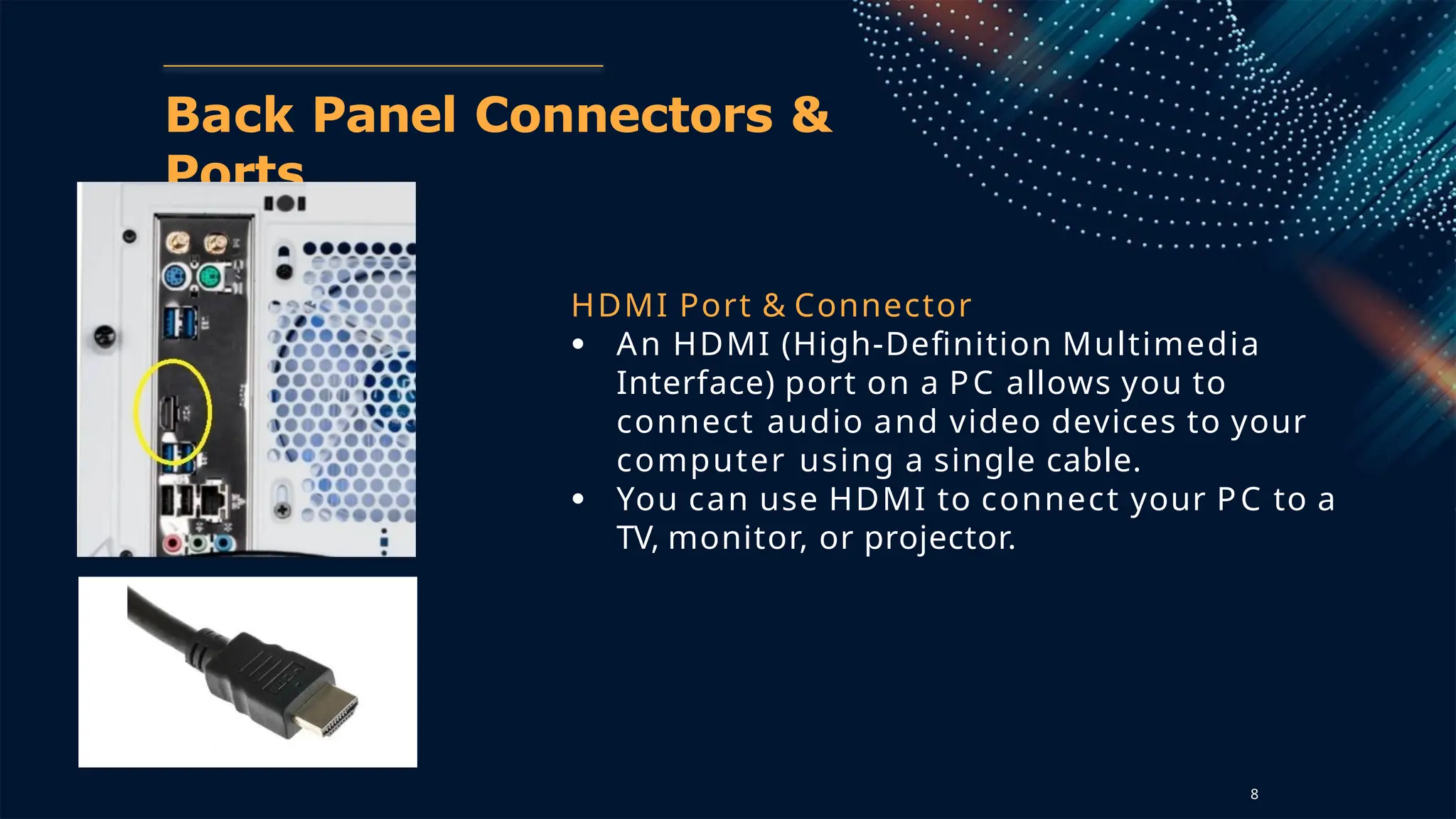
HDMI Port & Connector
● An HDMI (High-Definition Multimedia
Interface) port on a PC allows you to
connect audio and video devices to your
computer using a single cable.
● You can use HDMI to connect your PC to a
TV, monitor, or projector.
8
Back Panel Connectors &
Ports
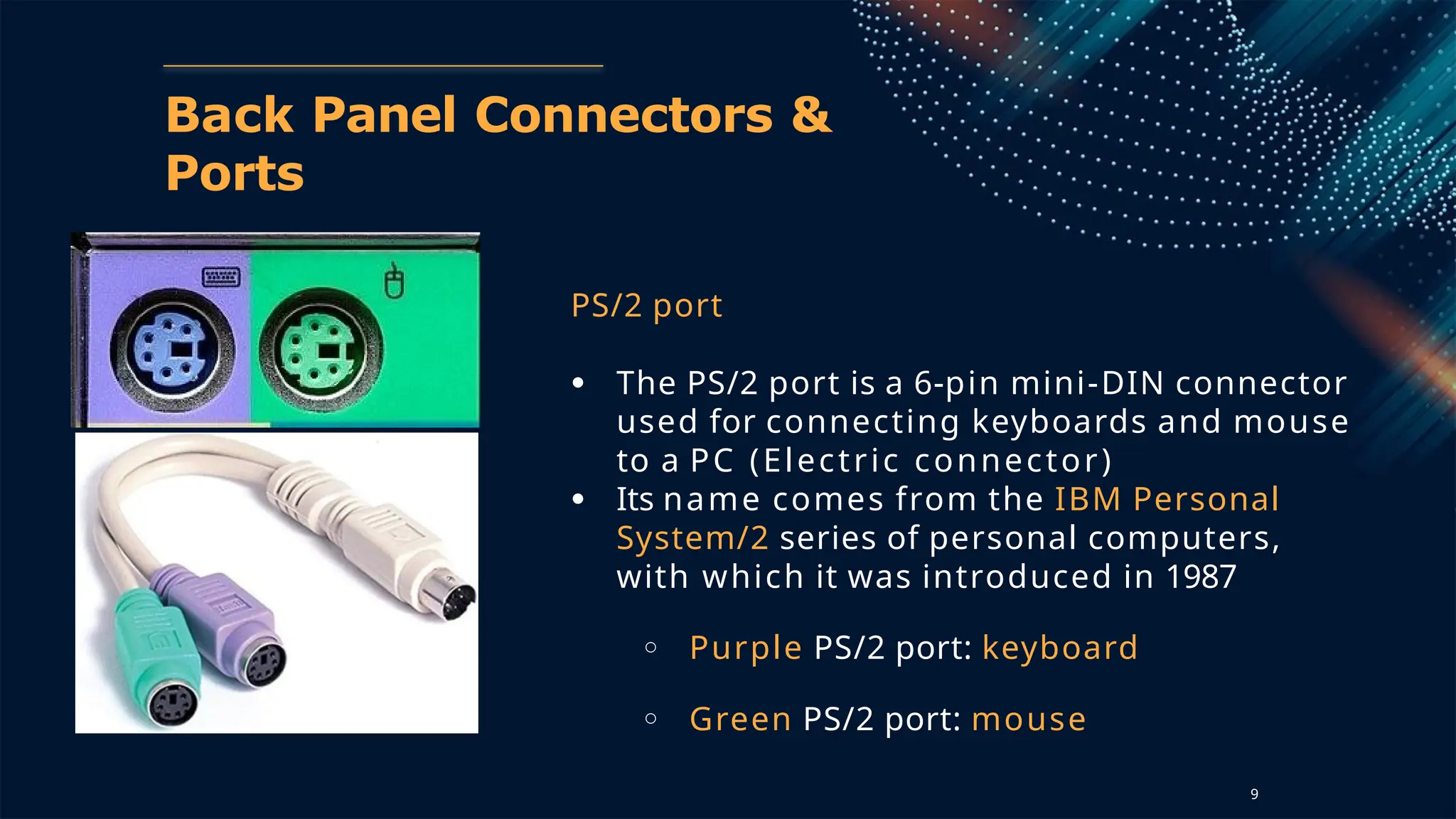
PS/2 port
● The PS/2 port is a 6-pin mini-DIN connector
used for connecting keyboards and mouse
to a PC (Electric connector)
● Its name comes from the IBM Personal
System/2 series of personal computers,
with which it was introduced in 1987
○ Purple PS/2 port: keyboard
○ Green PS/2 port: mouse
9
Back Panel Connectors &
Ports
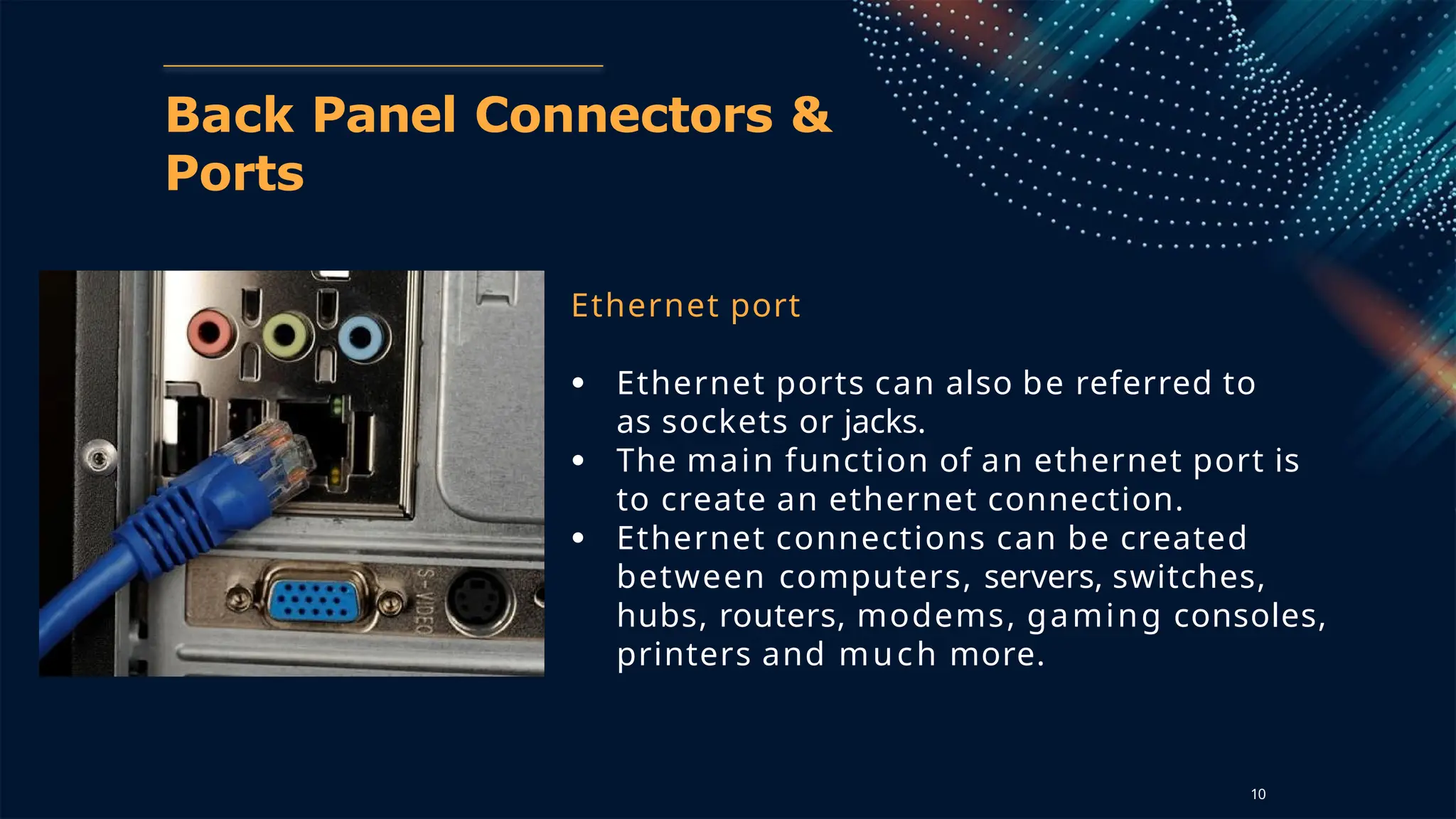
Ethernet port
● Ethernet ports can also be referred to
as sockets or jacks.
● The main function of an ethernet port is
to create an ethernet connection.
● Ethernet connections can be created
between computers, servers, switches,
hubs, routers, modems, gaming consoles,
printers and much more.
10
17
Back Panel Connectors &
Ports
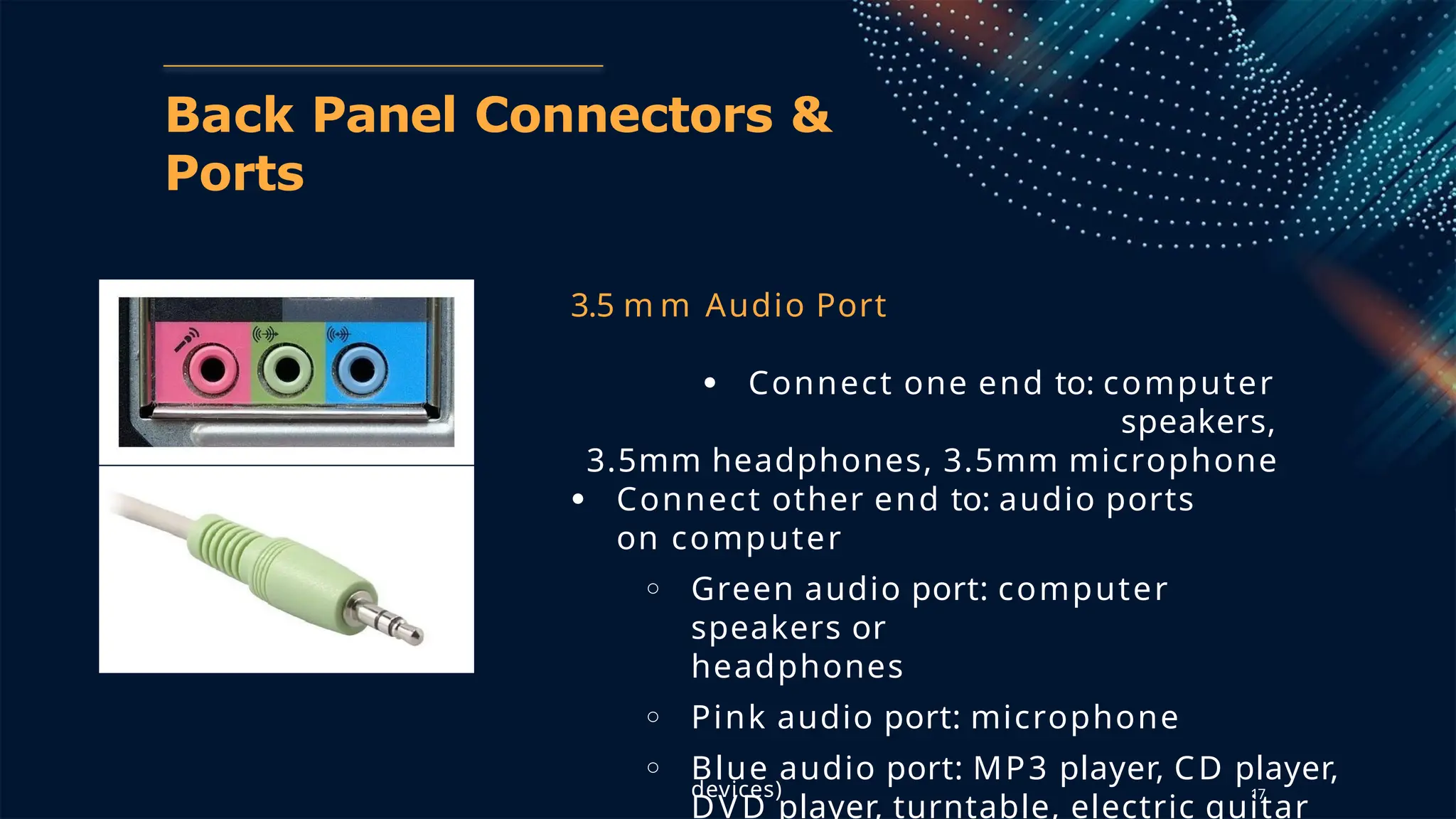
3.5 m m Audio Port
● Connect one end to: computer
speakers,
3.5mm headphones, 3.5mm microphone
● Connect other end to: audio ports
on computer
○ Green audio port: computer
speakers or
headphones
○ Pink audio port: microphone
○ Blue audio port: MP3 player, CD player,
DVD player, turntable, electric guitar
devices)
Back Panel Connectors &
Ports
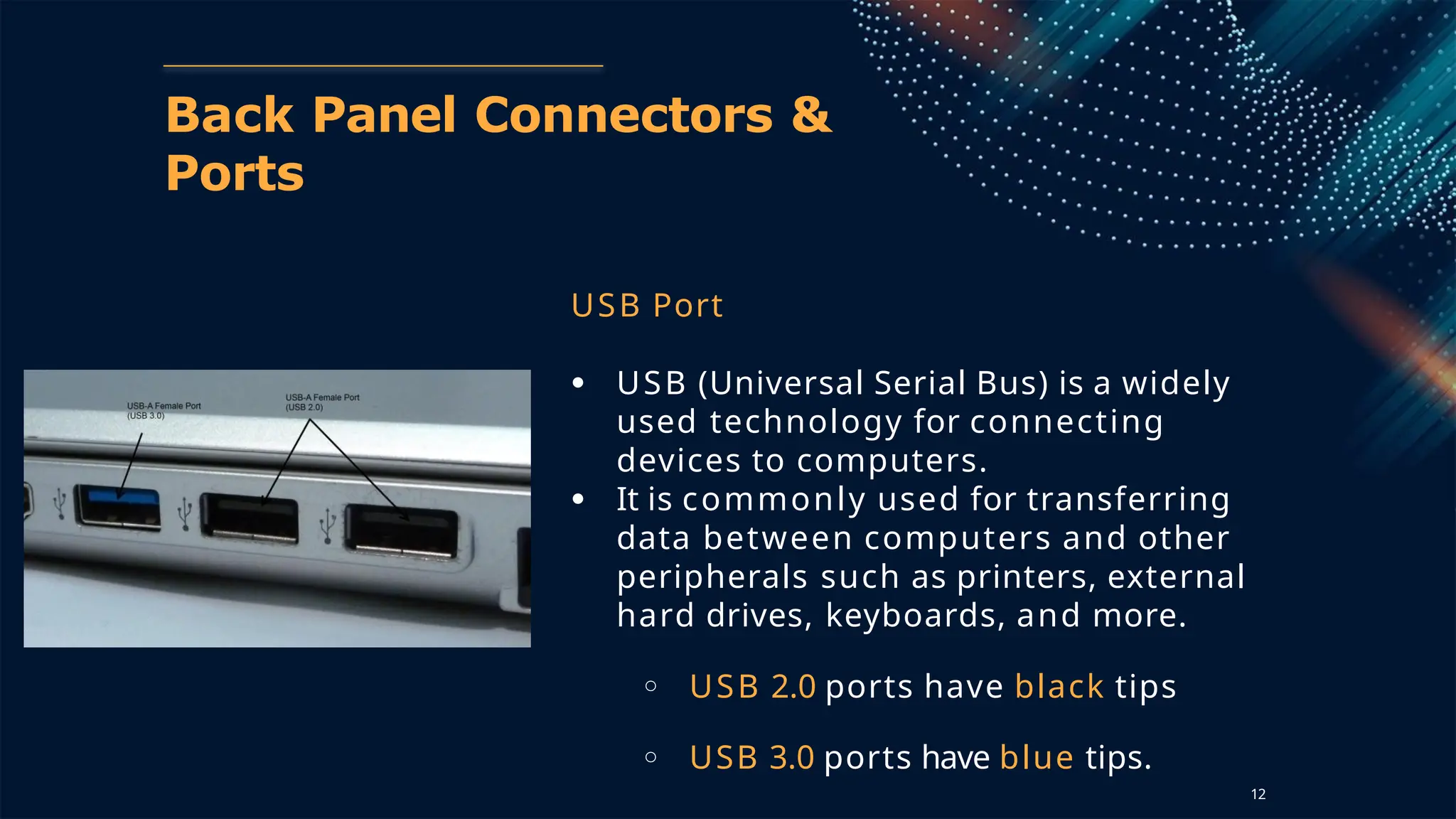
USB Port
● USB (Universal Serial Bus) is a widely
used technology for connecting
devices to computers.
● It is commonly used for transferring
data between computers and other
peripherals such as printers, external
hard drives, keyboards, and more.
○ USB 2.0 ports have black tips
○ USB 3.0 ports have blue tips.
12
PCI
Slots
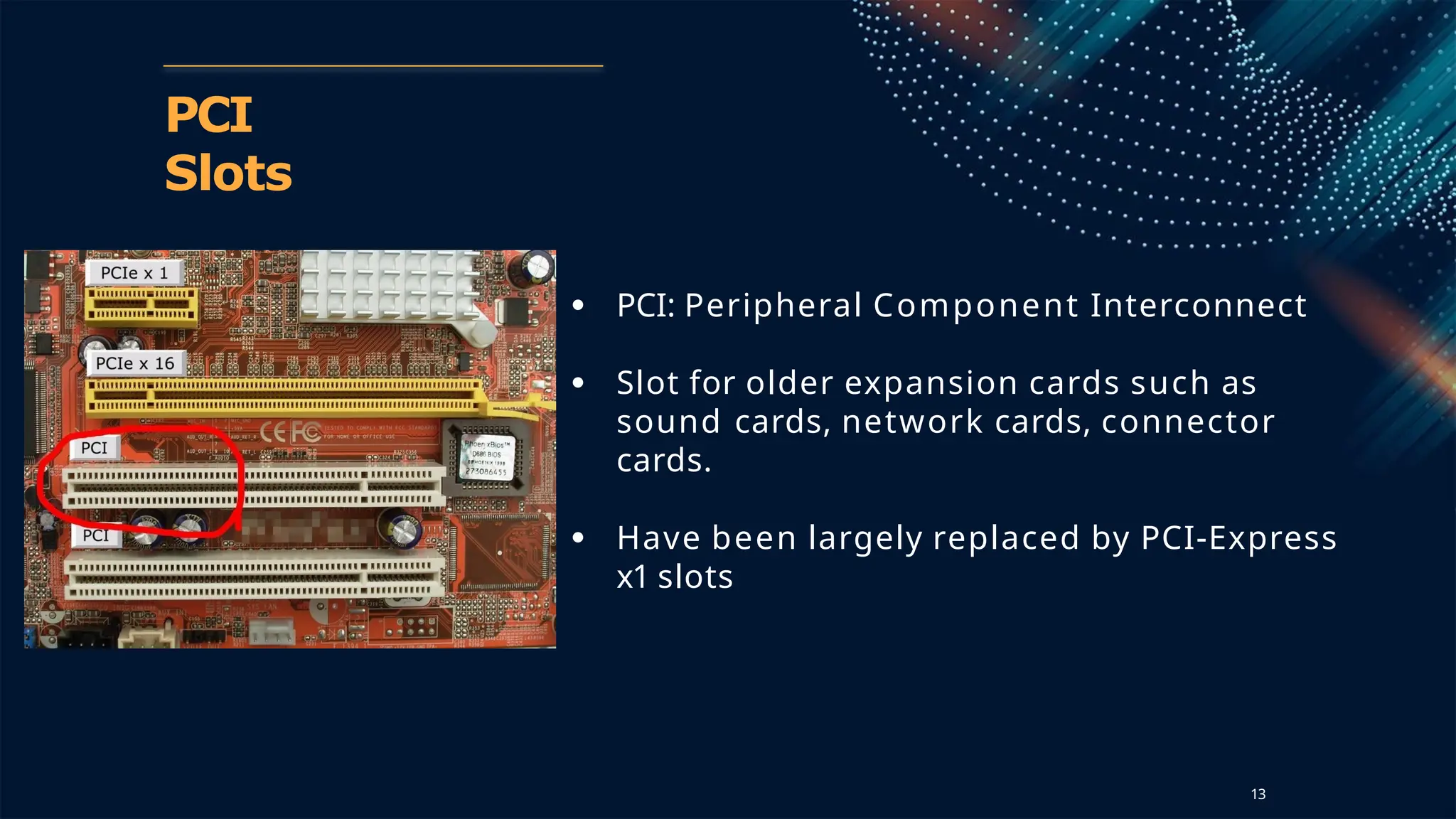
● PCI: Peripheral Component Interconnect
● Slot for older expansion cards such as
sound cards, network cards, connector
cards.
● Have been largely replaced by PCI-Express
x1 slots
13
PCI Express x1
Slots
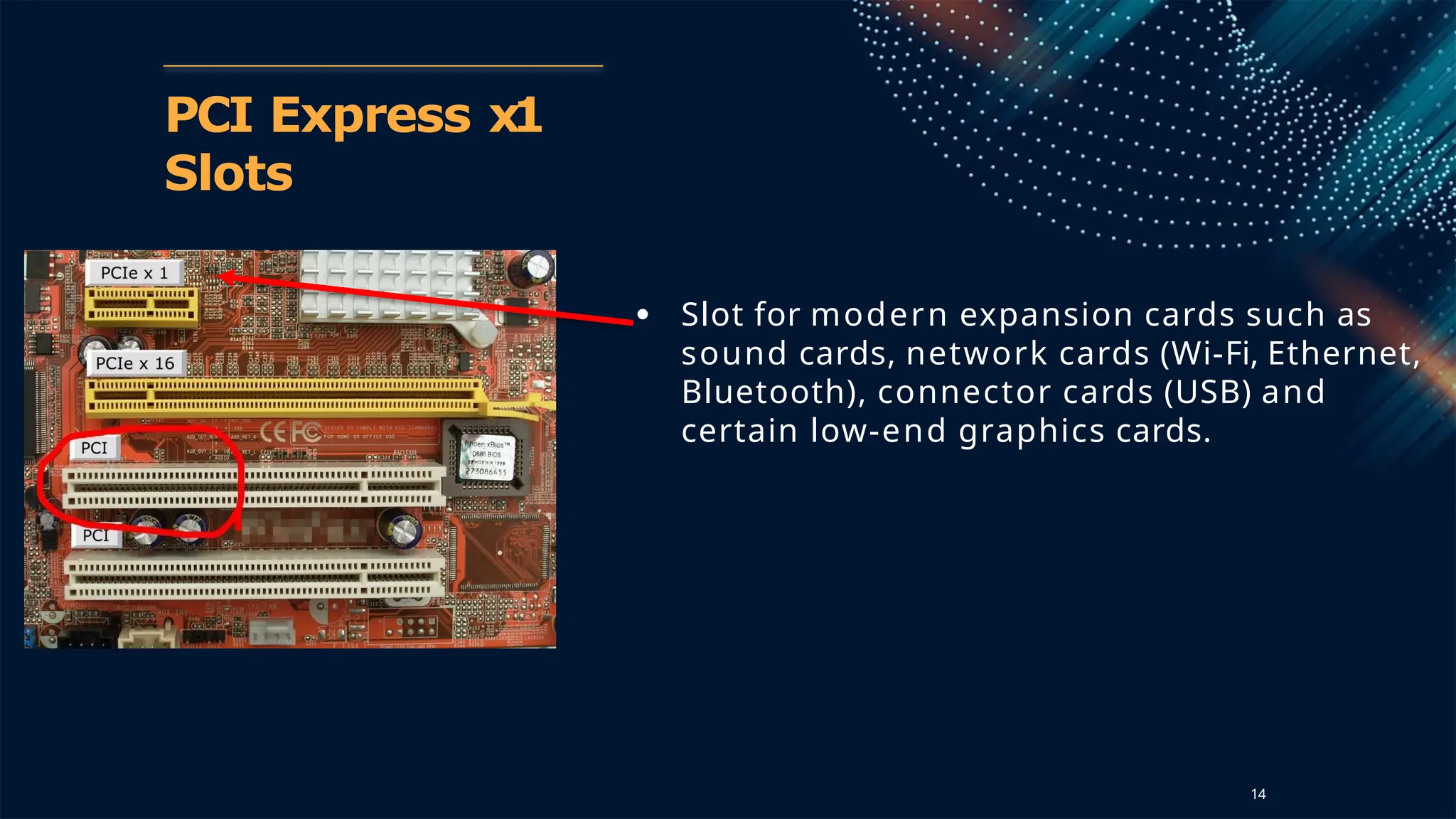
● Slot for modern expansion cards such as
sound cards, network cards (Wi-Fi, Ethernet,
Bluetooth), connector cards (USB) and
certain low-end graphics cards.
14
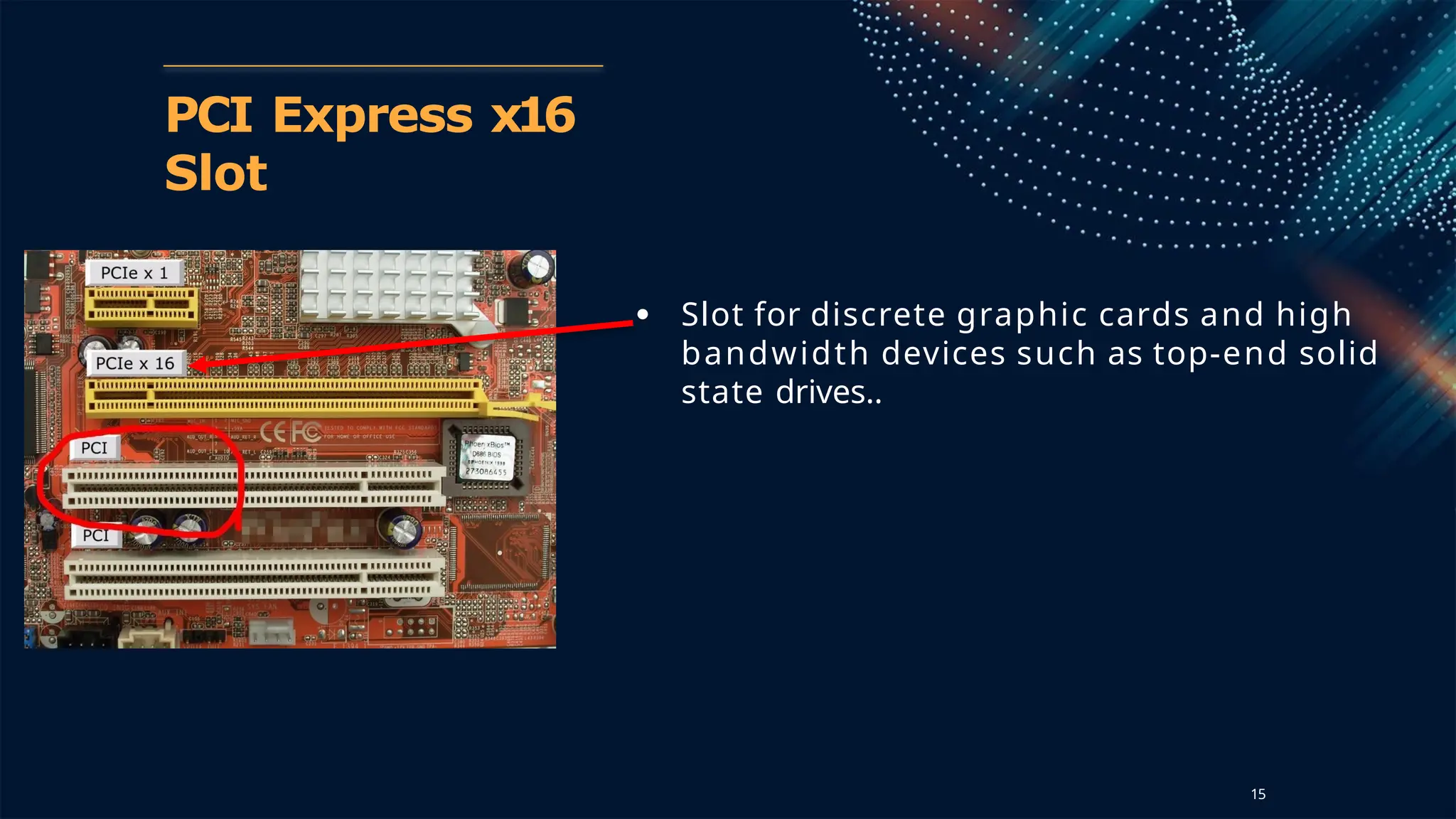
PCI Express x16
Slot
● Slot for discrete graphic cards and high
bandwidth devices such as top-end solid
state drives..
15
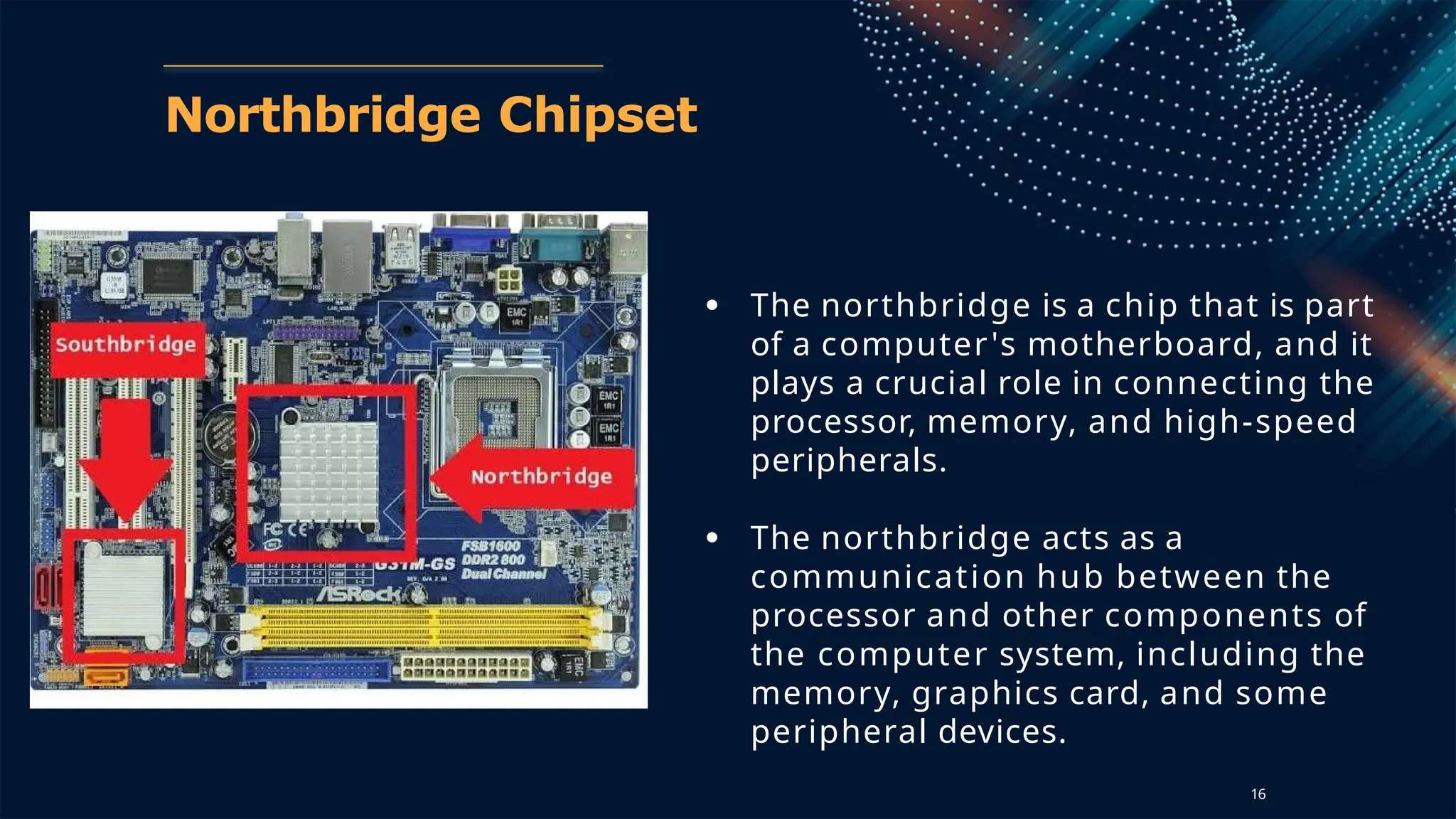
Northbridge Chipset
● The northbridge is a chip that is part
of a computer's motherboard, and it
plays a crucial role in connecting the
processor, memory, and high-speed
peripherals.
● The northbridge acts as a
communication hub between the
processor and other components of
the computer system, including the
memory, graphics card, and some
peripheral devices.
16
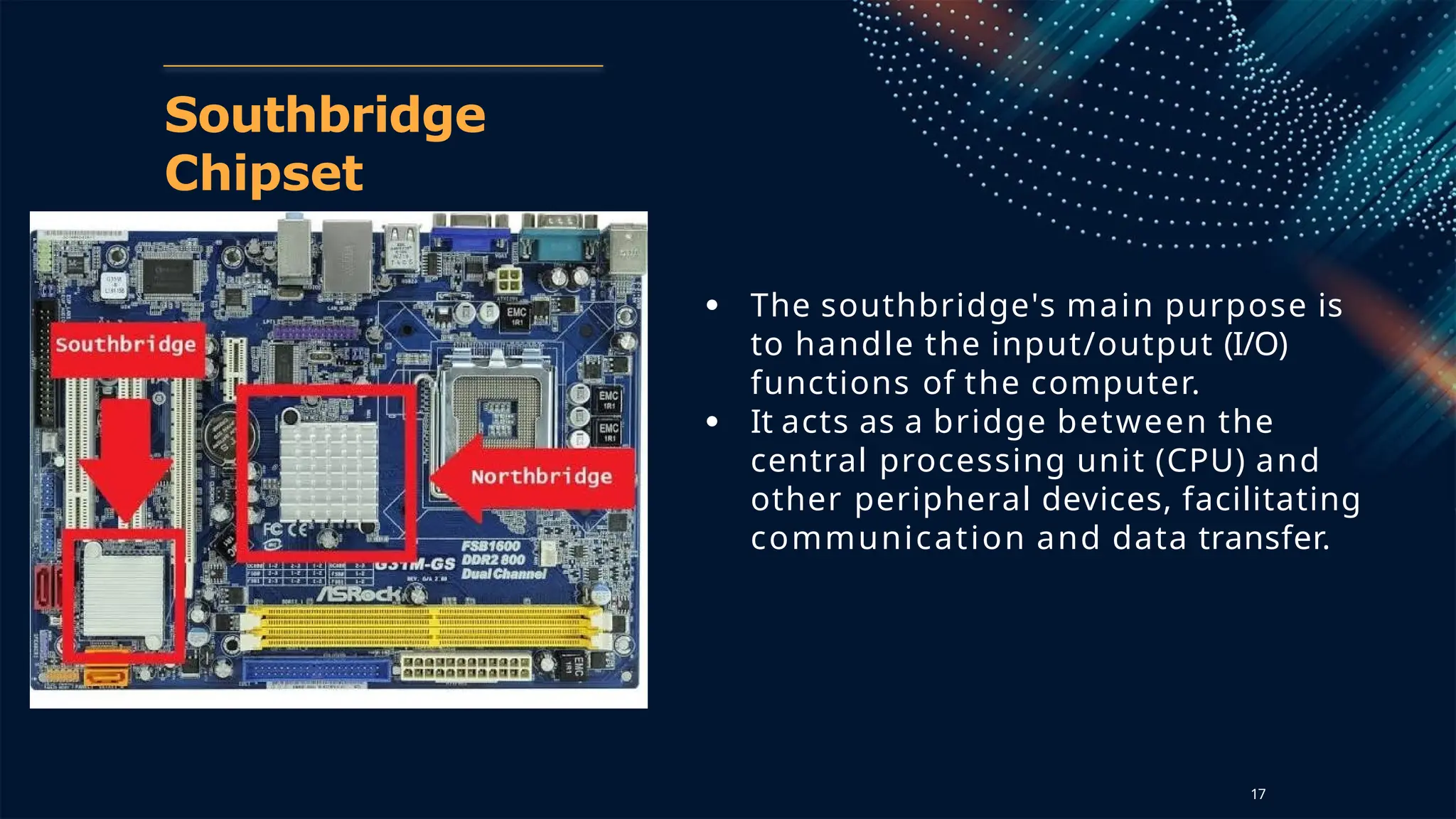
Southbridge
Chipset
● The southbridge's main purpose is
to handle the input/output (I/O)
functions of the computer.
● It acts as a bridge between the
central processing unit (CPU) and
other peripheral devices, facilitating
communication and data transfer.
17
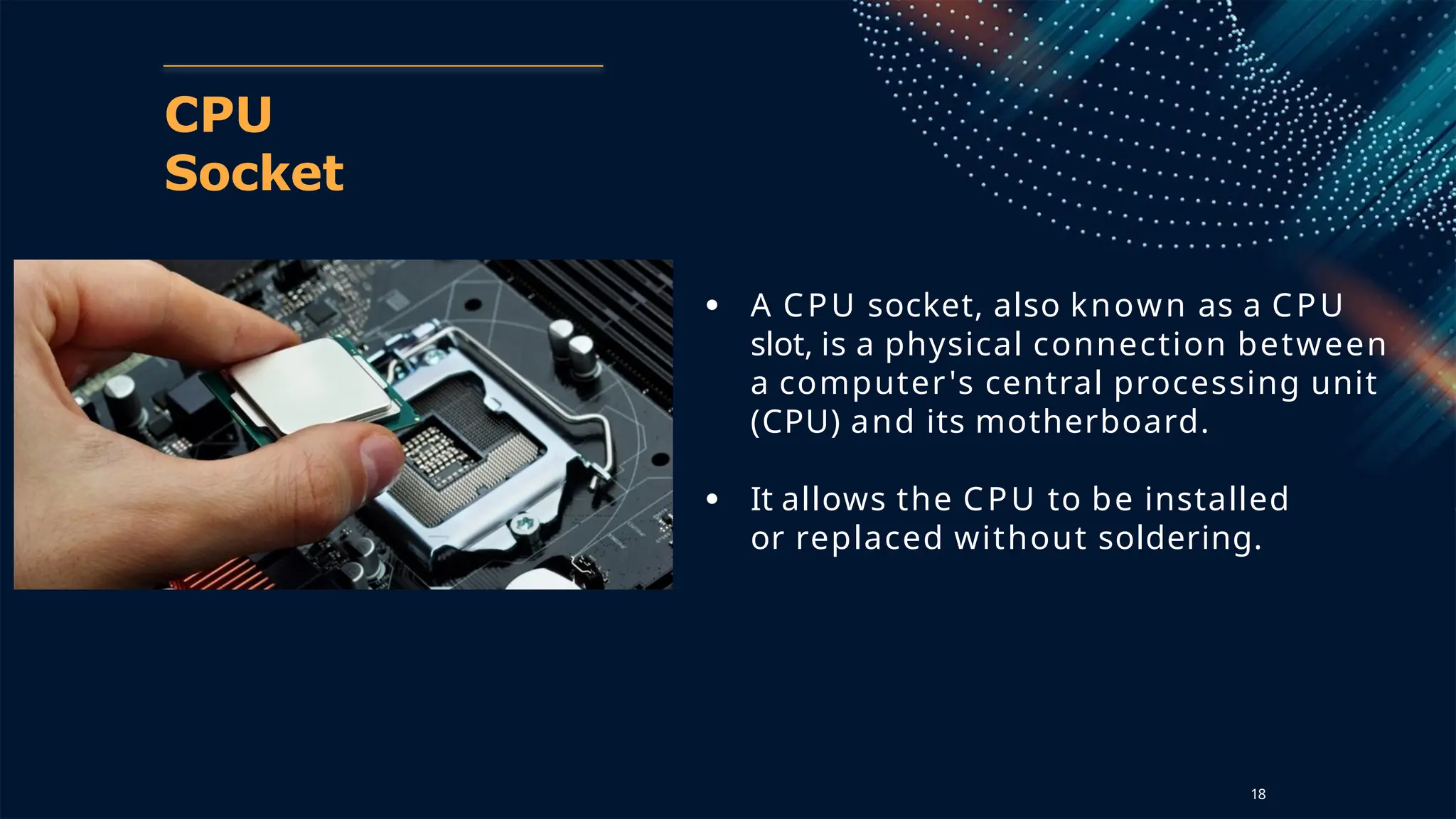
CPU
Socket
● A CPU socket, also known as a CPU
slot, is a physical connection between
a computer's central processing unit
(CPU) and its motherboard.
● It allows the CPU to be installed
or replaced without soldering.
18
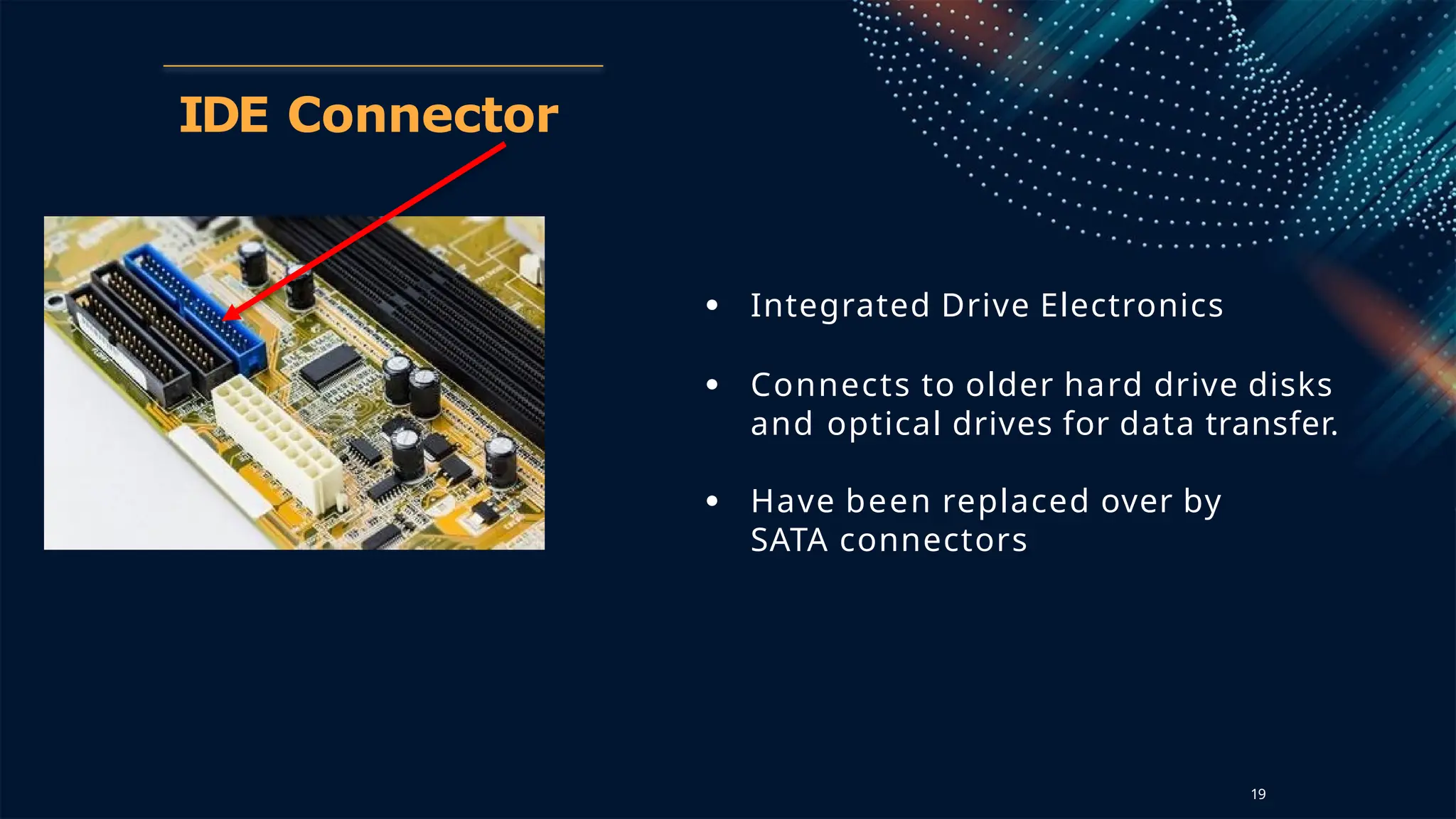
IDE Connector
● Integrated Drive Electronics
● Connects to older hard drive disks
and optical drives for data transfer.
● Have been replaced over by
SATA connectors
19
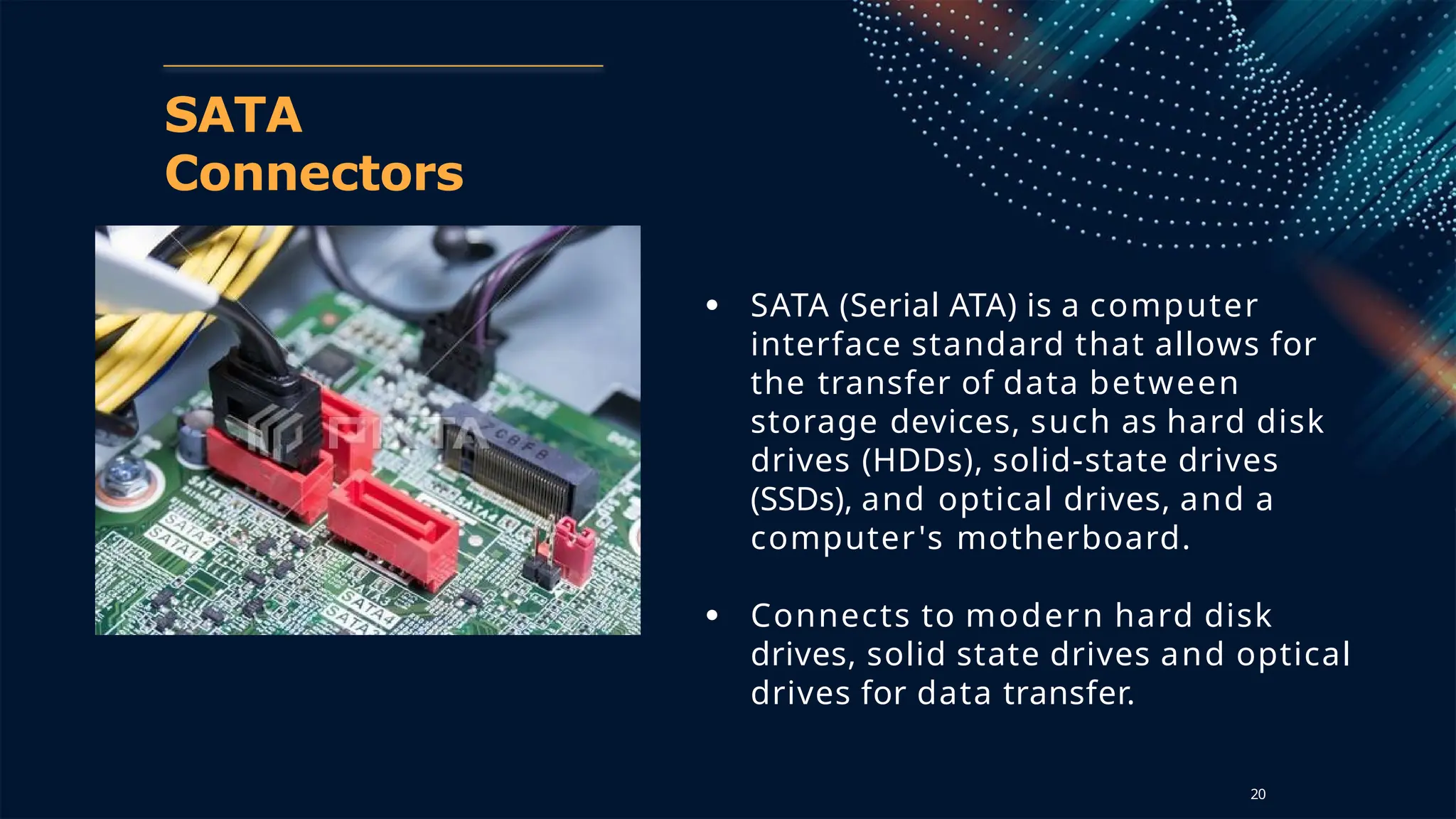
SATA
Connectors
● SATA (Serial ATA) is a computer
interface standard that allows for
the transfer of data between
storage devices, such as hard disk
drives (HDDs), solid-state drives
(SSDs), and optical drives, and a
computer's motherboard.
● Connects to modern hard disk
drives, solid state drives and optical
drives for data transfer.
20
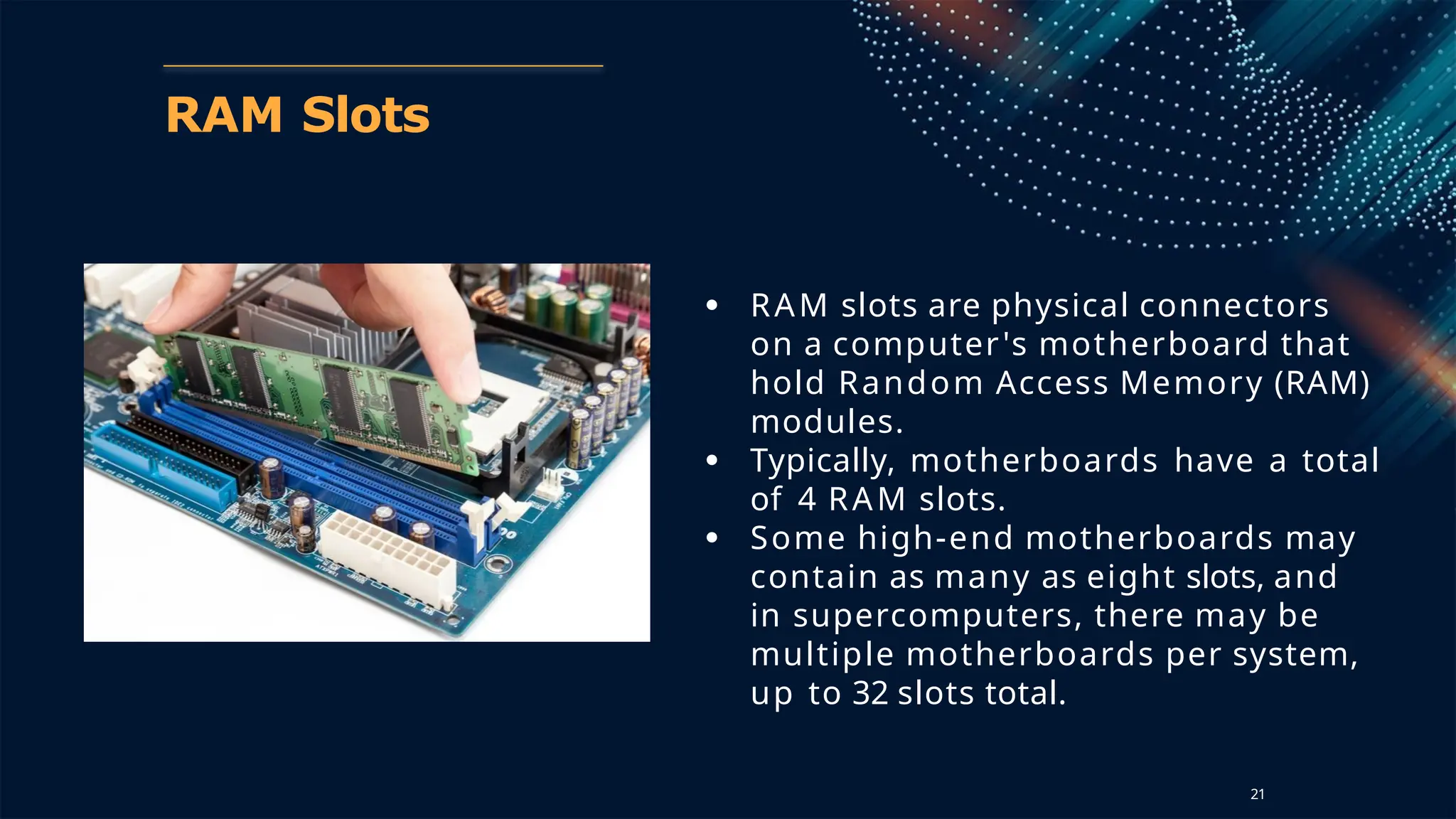
RAM Slots
● RAM slots are physical connectors
on a computer's motherboard that
hold Random Access Memory (RAM)
modules.
● Typically, motherboards have a total
of 4 RAM slots.
● Some high-end motherboards may
contain as many as eight slots, and
in supercomputers, there may be
multiple motherboards per system,
up to 32 slots total.
21
RAM
Slots
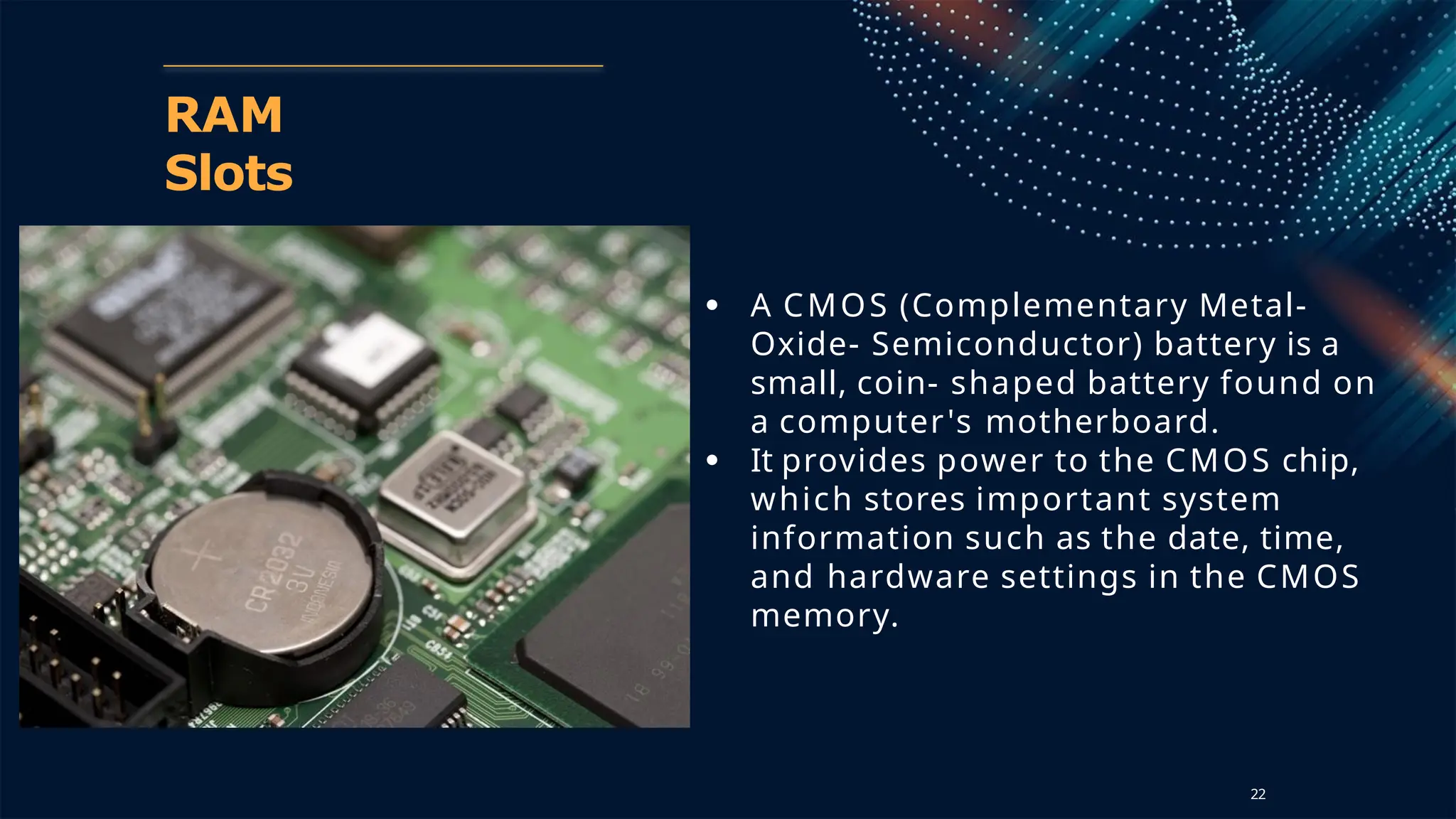
● A CMOS (Complementary Metal-
Oxide- Semiconductor) battery is a
small, coin- shaped battery found on
a computer's motherboard.
● It provides power to the CMOS chip,
which stores important system
information such as the date, time,
and hardware settings in the CMOS
memory.
22
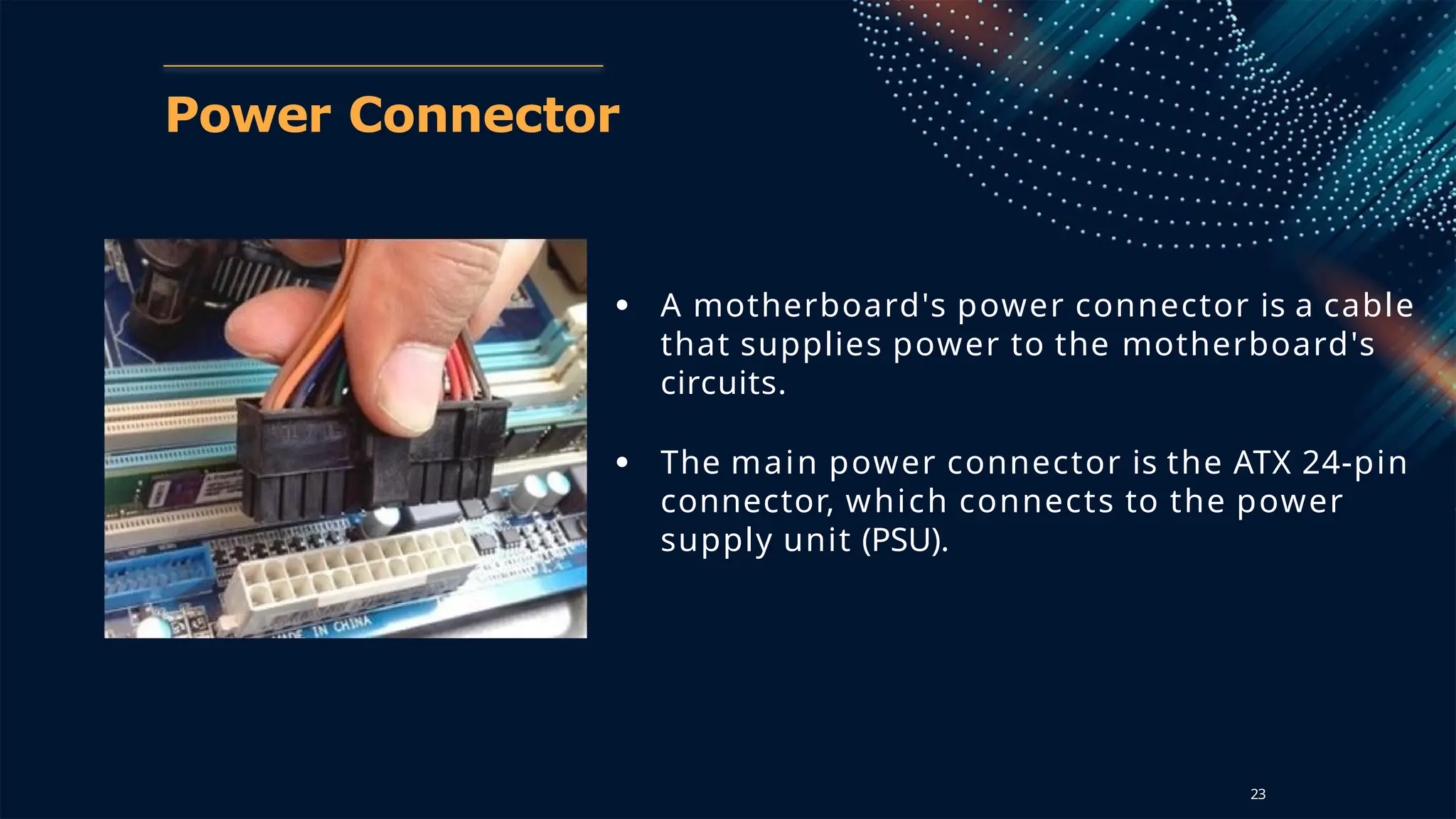
Power Connector
● A motherboard's power connector is a cable
that supplies power to the motherboard's
circuits.
● The main power connector is the ATX 24-pin
connector, which connects to the power
supply unit (PSU).
23
Types of Motherboards
● AT Motherboard (Advanced Technology Motherboard)
○ The AT motherboard was one of the earliest types
used in computers during the 1980s and 1990s.
○ Form Factor: Large in size, typically 12 inches x 13.8
inches,
requiring large cases.
○ Power Connector: Used a 12-pin connector, which is
now outdated.
○ Limitations:
■ Bulky size made it difficult to install and upgrade.
■ Lack of proper power management.
■ Not compatible with modern computer systems. 24
Types of Motherboards
● ATX Motherboard (Advanced Technology Extended)
○ Introduced by Intel in the mid-1990s, the ATX motherboard
became the standard for personal computers.
○ Form Factor: Available in a range of sizes, the full ATX board
typically
measures 12 inches x 9.6 inches.
○ Features:
■ Efficient layout with components easily accessible.
■ Battery enabled power connectors (20/24-pin).
■ Supports high-performance CPUs and RAM.
○ Use Cases: Widely used in desktops, workstations,
and gaming PCs.
25
Types of Motherboards
● Micro-ATX Motherboard
○ A smaller version of the ATX motherboard, designed
for compact cases.
○ Form Factor: Measures 9.6 inches x 9.6 inches.
○ Features:
■ Fewer expansion slots compared to ATX.
■ Compatible with most ATX cases.
■ Suitable for mid-range computers with
moderate
expansion needs.
○ Use Cases: Home PCs, budget gaming systems, and
office computers.
26
Types of Motherboards
● Mini-ITX Motherboard
● The Mini-ITX motherboard is a compact form factor
designed for space-saving devices.
● Form Factor: Measures 6.7 inches x 6.7 inches.
● Features:
○ Limited to one PCI slot.
○ Low power consumption.
○ Supports smaller cases and quieter systems.
● Use Cases: HTPCs (Home Theater PCs), small form factor
(SFF) builds, and low-power applications.
27
Types of Motherboards
● E-ATX Motherboard (Extended ATX)Description:
● A larger version of the ATX motherboard, designed for
high- performance systems.
● Form Factor: Measures 12 inches x 13 inches.
● Features:
○ More expansion slots and ports than standard ATX.
○ Supports extensive cooling solutions.
○ Ideal for high-end CPUs.
● Use Cases: High-performance gaming rigs, workstations,
and servers.
28
Types of Motherboards
● BTX Motherboard (Balanced Technology Extended)
● Designed as an alternative to ATX, the BTX motherboard
aimed to improve thermal performance and layout
efficiency.
● Form Factor: Slightly different from ATX, with a focus on
airflow
and cooling.
● Features:
○ Better airflow for CPU cooling.
○ Rearranged components for efficiency.
● Limitations: It was not widely adopted and is now
largely discontinued. 29
foundation of computing module1 power point

  • 1.
  • 2.
  • 3.
    What is aMotherboard? ● The motherboard is the main printed circuit board (PCB) in a computer, connecting and enabling communication between all the essential components of the system. ● Acts as the backbone of the computer, distributing power and allowing hardware components to communicate. 9
  • 4.
  • 5.
    Back Panel Ports Portsfor connecting the computer to external devices such as display ports, audio ports, USB ports, Ethernet ports, PS/2 ports etc. 5
  • 6.
    Back Panel Connectors& Ports VGA Cable ● Also known as D-sub cable, analog video cable ● Connect one end to: computer monitor, television (PC input port) ● Connect other end to: VGA port on processor ● 640x480px resolution ● Analog signals 6
  • 7.
    Back Panel Connectors& Ports DVI Port & Connector ● DVI is a video interface used to connect monitors, projectors, and other display devices to a computer. It supports both analog and digital video signals over a single connector) ● 1920x1200px 7
  • 8.
    Back Panel Connectors& Ports HDMI Port & Connector ● An HDMI (High-Definition Multimedia Interface) port on a PC allows you to connect audio and video devices to your computer using a single cable. ● You can use HDMI to connect your PC to a TV, monitor, or projector. 8
  • 9.
    Back Panel Connectors& Ports PS/2 port ● The PS/2 port is a 6-pin mini-DIN connector used for connecting keyboards and mouse to a PC (Electric connector) ● Its name comes from the IBM Personal System/2 series of personal computers, with which it was introduced in 1987 ○ Purple PS/2 port: keyboard ○ Green PS/2 port: mouse 9
  • 10.
    Back Panel Connectors& Ports Ethernet port ● Ethernet ports can also be referred to as sockets or jacks. ● The main function of an ethernet port is to create an ethernet connection. ● Ethernet connections can be created between computers, servers, switches, hubs, routers, modems, gaming consoles, printers and much more. 10
  • 11.
    17 Back Panel Connectors& Ports 3.5 m m Audio Port ● Connect one end to: computer speakers, 3.5mm headphones, 3.5mm microphone ● Connect other end to: audio ports on computer ○ Green audio port: computer speakers or headphones ○ Pink audio port: microphone ○ Blue audio port: MP3 player, CD player, DVD player, turntable, electric guitar devices)
  • 12.
    Back Panel Connectors& Ports USB Port ● USB (Universal Serial Bus) is a widely used technology for connecting devices to computers. ● It is commonly used for transferring data between computers and other peripherals such as printers, external hard drives, keyboards, and more. ○ USB 2.0 ports have black tips ○ USB 3.0 ports have blue tips. 12
  • 13.
    PCI Slots ● PCI: PeripheralComponent Interconnect ● Slot for older expansion cards such as sound cards, network cards, connector cards. ● Have been largely replaced by PCI-Express x1 slots 13
  • 14.
    PCI Express x1 Slots ●Slot for modern expansion cards such as sound cards, network cards (Wi-Fi, Ethernet, Bluetooth), connector cards (USB) and certain low-end graphics cards. 14
  • 15.
    PCI Express x16 Slot ●Slot for discrete graphic cards and high bandwidth devices such as top-end solid state drives.. 15
  • 16.
    Northbridge Chipset ● Thenorthbridge is a chip that is part of a computer's motherboard, and it plays a crucial role in connecting the processor, memory, and high-speed peripherals. ● The northbridge acts as a communication hub between the processor and other components of the computer system, including the memory, graphics card, and some peripheral devices. 16
  • 17.
    Southbridge Chipset ● The southbridge'smain purpose is to handle the input/output (I/O) functions of the computer. ● It acts as a bridge between the central processing unit (CPU) and other peripheral devices, facilitating communication and data transfer. 17
  • 18.
    CPU Socket ● A CPUsocket, also known as a CPU slot, is a physical connection between a computer's central processing unit (CPU) and its motherboard. ● It allows the CPU to be installed or replaced without soldering. 18
  • 19.
    IDE Connector ● IntegratedDrive Electronics ● Connects to older hard drive disks and optical drives for data transfer. ● Have been replaced over by SATA connectors 19
  • 20.
    SATA Connectors ● SATA (SerialATA) is a computer interface standard that allows for the transfer of data between storage devices, such as hard disk drives (HDDs), solid-state drives (SSDs), and optical drives, and a computer's motherboard. ● Connects to modern hard disk drives, solid state drives and optical drives for data transfer. 20
  • 21.
    RAM Slots ● RAMslots are physical connectors on a computer's motherboard that hold Random Access Memory (RAM) modules. ● Typically, motherboards have a total of 4 RAM slots. ● Some high-end motherboards may contain as many as eight slots, and in supercomputers, there may be multiple motherboards per system, up to 32 slots total. 21
  • 22.
    RAM Slots ● A CMOS(Complementary Metal- Oxide- Semiconductor) battery is a small, coin- shaped battery found on a computer's motherboard. ● It provides power to the CMOS chip, which stores important system information such as the date, time, and hardware settings in the CMOS memory. 22
  • 23.
    Power Connector ● Amotherboard's power connector is a cable that supplies power to the motherboard's circuits. ● The main power connector is the ATX 24-pin connector, which connects to the power supply unit (PSU). 23
  • 24.
    Types of Motherboards ●AT Motherboard (Advanced Technology Motherboard) ○ The AT motherboard was one of the earliest types used in computers during the 1980s and 1990s. ○ Form Factor: Large in size, typically 12 inches x 13.8 inches, requiring large cases. ○ Power Connector: Used a 12-pin connector, which is now outdated. ○ Limitations: ■ Bulky size made it difficult to install and upgrade. ■ Lack of proper power management. ■ Not compatible with modern computer systems. 24
  • 25.
    Types of Motherboards ●ATX Motherboard (Advanced Technology Extended) ○ Introduced by Intel in the mid-1990s, the ATX motherboard became the standard for personal computers. ○ Form Factor: Available in a range of sizes, the full ATX board typically measures 12 inches x 9.6 inches. ○ Features: ■ Efficient layout with components easily accessible. ■ Battery enabled power connectors (20/24-pin). ■ Supports high-performance CPUs and RAM. ○ Use Cases: Widely used in desktops, workstations, and gaming PCs. 25
  • 26.
    Types of Motherboards ●Micro-ATX Motherboard ○ A smaller version of the ATX motherboard, designed for compact cases. ○ Form Factor: Measures 9.6 inches x 9.6 inches. ○ Features: ■ Fewer expansion slots compared to ATX. ■ Compatible with most ATX cases. ■ Suitable for mid-range computers with moderate expansion needs. ○ Use Cases: Home PCs, budget gaming systems, and office computers. 26
  • 27.
    Types of Motherboards ●Mini-ITX Motherboard ● The Mini-ITX motherboard is a compact form factor designed for space-saving devices. ● Form Factor: Measures 6.7 inches x 6.7 inches. ● Features: ○ Limited to one PCI slot. ○ Low power consumption. ○ Supports smaller cases and quieter systems. ● Use Cases: HTPCs (Home Theater PCs), small form factor (SFF) builds, and low-power applications. 27
  • 28.
    Types of Motherboards ●E-ATX Motherboard (Extended ATX)Description: ● A larger version of the ATX motherboard, designed for high- performance systems. ● Form Factor: Measures 12 inches x 13 inches. ● Features: ○ More expansion slots and ports than standard ATX. ○ Supports extensive cooling solutions. ○ Ideal for high-end CPUs. ● Use Cases: High-performance gaming rigs, workstations, and servers. 28
  • 29.
    Types of Motherboards ●BTX Motherboard (Balanced Technology Extended) ● Designed as an alternative to ATX, the BTX motherboard aimed to improve thermal performance and layout efficiency. ● Form Factor: Slightly different from ATX, with a focus on airflow and cooling. ● Features: ○ Better airflow for CPU cooling. ○ Rearranged components for efficiency. ● Limitations: It was not widely adopted and is now largely discontinued. 29