
MOTHER
BOARD
�The motherboard is the main circuit board.
�Motherboard has a collection of chips and controllers known as
the chipset.
�It connects and transmits signals to and from peripherals and
components.
MOTHER BOARD
A motherboard is mainly composed of two materials:
� Layers of fiberglass for the purpose of insulation.
� Copper to form conductive pathways.
MOTHER BOARD
The motherboard manufacturing process is essentially broken down
into 4 steps:
� Surface Mount Technology (SMT)
� DIP (Dual Inline Package)
� Testing
� Packaging
MANUFACTURING PROCESS
� BIOS and CMOS
� Input/Output Ports
� IDE and SATA Ports
� Power Connectors
� VRMs (Voltage Regulator Module)
� Cabinet Connections
PARTS OF A MOTHERBOARD
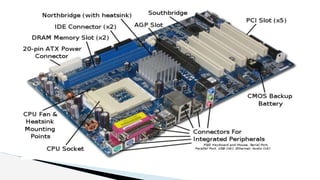
� CPU Socket
� Expansion Card Slots
� RAM (Memory) Slots
� Northbridge and Southbridge Chip
� ROM Chip
PARTS OF A MOTHERBOARD
� BIOS (basic input/output system)
� It is the program that microprocessor uses to get the computer system
started after you turn it on.
� It also manages data flow between the computer's operating system and
attached devices.
BIOS
The Four main functions of a BIOS
� POST
� Bootstrap Loader
� BIOS drivers
� BIOS setup or CMOS setup
BIOS
� CMOS is short for complementary metal-oxide
semiconductor.
� Alternatively referred to as a RTC (real-time clock), NVRAM
(non-volatile RAM) or CMOS RAM.
� CMOS is an on board, battery powered semiconductor chip
inside computers that stores information.
� This information ranges from the system time and date to system
hardware settings for your computer.
CMOS
� Internal port − It connects the motherboard to internal devices like
hard disk drive, CD drive, internal modem, etc.
� External port − It connects the motherboard to external devices like
modem, mouse, printer, flash drives, etc.
INPUT/OUTPUT PORTS
� Short for Integrated Drive Electronics, IDE is more commonly
known as ATA or PATA (parallel ATA).
� It interface used between a computer motherboard's data paths
or bus and the computer's disk storage devices.
IDE
� Stands for "Serial Advanced Technology Attachment," or "Serial
ATA."
� It is an interface used to connect ATA hard drives to a computer's
motherboard.
SATA
� The device is engineered to connect power from the computer's
main power supply to all of the computer's components.
� Every motherboard has at least one power connector.
POWER CONNECTORS
� VRM, also called a processor power module (PPM), is a component
that acts very similar to a computer power supply unit (PSU). It cuts
down the voltage.
� A process that actually happens several times before the electricity
even reaches your home to provide the CPU with the exact amount
of voltage it needs.
VRMs (Voltage Regulator Module)
� It connects the Power Switch, the LED power indicator, the Reset
Switch, the HDD LED.
� The front audio port and front USB are also connected here.
� These connections are also usually located at the bottom part of
the motherboard.
CABINET CONNECTIONS
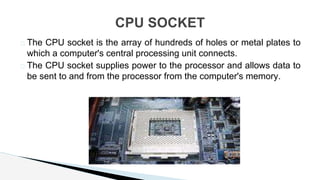
� The CPU socket is the array of hundreds of holes or metal plates to
which a computer's central processing unit connects.
� The CPU socket supplies power to the processor and allows data to
be sent to and from the processor from the computer's memory.
CPU SOCKET
� Expansion cards can extend the capability of a system by adding more
resources.
� Expansion cards can increase functionality by adding abilities that were
not in the original system.
� Expansion cards are often a fairly inexpensive solution to a multitude of
issues that may occur.
EXPANSION CARD SLOTS
Types:
1. Video cards
2. Network cards
3. Sound cards
4. Modem cards
EXPANSION CARD SLOTS
Network cards
� Most motherboards have built in network cards, however, they can fail
or they might not connect to the right type of network in your situation.
� Additionally, It connect with another or different type of network or make
multiple network connections.
Sound cards
� Sound cards expand the sound capabilities of a PC.
� With a sound card, a system can go from mono sound, to stereo
sound, to surround sound.
Modem cards
� Most systems no longer come with built-in modems.
� However, some virtual private networks require the client to dial in in
order to connect and a modem is needed to do so.
� An expansion card that has a modem built into it will resolve this
problem.
Video cards (Accelerated Graphics Port).
� Video cards can increase the overall performance of a system,
depending upon the card that is installed.
� They can also allow the addition of multiple monitors.
� One of the ways that they increase performance is by taking the
workload off of the CPU and transferring it to the video card.
� The north bridge chip is connected directly to the CPU and
handles fast communication between the CPU and performance-
sensitive components such as the graphics card and system
memory.
� The south bridge communicates with less performance-
sensitive components such as USB ports, storage devices,
onboard networks, and audio chips.
NORTH BRIDGE AND SOUTH BRIDGE
CHIP
� Random access memory (RAM) is connected to the computer
motherboard through RAM slots.
� Program is loaded from the hard drive into RAM storage for quick
retrieval when it gets open.
RAM CHIP
� ROM or Read Only Memory .
� It’s very hard to modify the contents of a ROM.
� It's used to store the start-up instructions for a computer, also known
as the firmware.
ROM CHIP
� AT Motherboard
� ATX Motherboard
� LPX Motherboard
� BTX Motherboard
� Pico BTX Motherboard
� Mini ITX Motherboard.
TYPES OF MOTHER BOARD
THANK YOU

Mother board

  • 1.
  • 2.
    �The motherboard isthe main circuit board. �Motherboard has a collection of chips and controllers known as the chipset. �It connects and transmits signals to and from peripherals and components. MOTHER BOARD
  • 3.
    A motherboard ismainly composed of two materials: � Layers of fiberglass for the purpose of insulation. � Copper to form conductive pathways. MOTHER BOARD
  • 4.
    The motherboard manufacturingprocess is essentially broken down into 4 steps: � Surface Mount Technology (SMT) � DIP (Dual Inline Package) � Testing � Packaging MANUFACTURING PROCESS
  • 5.
    � BIOS andCMOS � Input/Output Ports � IDE and SATA Ports � Power Connectors � VRMs (Voltage Regulator Module) � Cabinet Connections PARTS OF A MOTHERBOARD
  • 6.
    � CPU Socket �Expansion Card Slots � RAM (Memory) Slots � Northbridge and Southbridge Chip � ROM Chip PARTS OF A MOTHERBOARD
  • 8.
    � BIOS (basicinput/output system) � It is the program that microprocessor uses to get the computer system started after you turn it on. � It also manages data flow between the computer's operating system and attached devices. BIOS
  • 9.
    The Four mainfunctions of a BIOS � POST � Bootstrap Loader � BIOS drivers � BIOS setup or CMOS setup BIOS
  • 10.
    � CMOS isshort for complementary metal-oxide semiconductor. � Alternatively referred to as a RTC (real-time clock), NVRAM (non-volatile RAM) or CMOS RAM. � CMOS is an on board, battery powered semiconductor chip inside computers that stores information. � This information ranges from the system time and date to system hardware settings for your computer. CMOS
  • 11.
    � Internal port− It connects the motherboard to internal devices like hard disk drive, CD drive, internal modem, etc. � External port − It connects the motherboard to external devices like modem, mouse, printer, flash drives, etc. INPUT/OUTPUT PORTS
  • 12.
    � Short forIntegrated Drive Electronics, IDE is more commonly known as ATA or PATA (parallel ATA). � It interface used between a computer motherboard's data paths or bus and the computer's disk storage devices. IDE
  • 13.
    � Stands for"Serial Advanced Technology Attachment," or "Serial ATA." � It is an interface used to connect ATA hard drives to a computer's motherboard. SATA
  • 14.
    � The deviceis engineered to connect power from the computer's main power supply to all of the computer's components. � Every motherboard has at least one power connector. POWER CONNECTORS
  • 15.
    � VRM, alsocalled a processor power module (PPM), is a component that acts very similar to a computer power supply unit (PSU). It cuts down the voltage. � A process that actually happens several times before the electricity even reaches your home to provide the CPU with the exact amount of voltage it needs. VRMs (Voltage Regulator Module)
  • 16.
    � It connectsthe Power Switch, the LED power indicator, the Reset Switch, the HDD LED. � The front audio port and front USB are also connected here. � These connections are also usually located at the bottom part of the motherboard. CABINET CONNECTIONS
  • 17.
    � The CPUsocket is the array of hundreds of holes or metal plates to which a computer's central processing unit connects. � The CPU socket supplies power to the processor and allows data to be sent to and from the processor from the computer's memory. CPU SOCKET
  • 18.
    � Expansion cardscan extend the capability of a system by adding more resources. � Expansion cards can increase functionality by adding abilities that were not in the original system. � Expansion cards are often a fairly inexpensive solution to a multitude of issues that may occur. EXPANSION CARD SLOTS
  • 19.
    Types: 1. Video cards 2.Network cards 3. Sound cards 4. Modem cards EXPANSION CARD SLOTS
  • 20.
    Network cards � Mostmotherboards have built in network cards, however, they can fail or they might not connect to the right type of network in your situation. � Additionally, It connect with another or different type of network or make multiple network connections.
  • 21.
    Sound cards � Soundcards expand the sound capabilities of a PC. � With a sound card, a system can go from mono sound, to stereo sound, to surround sound.
  • 22.
    Modem cards � Mostsystems no longer come with built-in modems. � However, some virtual private networks require the client to dial in in order to connect and a modem is needed to do so. � An expansion card that has a modem built into it will resolve this problem.
  • 23.
    Video cards (AcceleratedGraphics Port). � Video cards can increase the overall performance of a system, depending upon the card that is installed. � They can also allow the addition of multiple monitors. � One of the ways that they increase performance is by taking the workload off of the CPU and transferring it to the video card.
  • 24.
    � The northbridge chip is connected directly to the CPU and handles fast communication between the CPU and performance- sensitive components such as the graphics card and system memory. � The south bridge communicates with less performance- sensitive components such as USB ports, storage devices, onboard networks, and audio chips. NORTH BRIDGE AND SOUTH BRIDGE CHIP
  • 25.
    � Random accessmemory (RAM) is connected to the computer motherboard through RAM slots. � Program is loaded from the hard drive into RAM storage for quick retrieval when it gets open. RAM CHIP
  • 26.
    � ROM orRead Only Memory . � It’s very hard to modify the contents of a ROM. � It's used to store the start-up instructions for a computer, also known as the firmware. ROM CHIP
  • 27.
    � AT Motherboard �ATX Motherboard � LPX Motherboard � BTX Motherboard � Pico BTX Motherboard � Mini ITX Motherboard. TYPES OF MOTHER BOARD
  • 28.